Kaizen #193: Creating different fields in Zoho CRM through API

Kaizen #193: Creating different fields in Zoho CRM through API

🎊 Nearing 200th Kaizen Post – We want to hear from you!
Do you have any questions, suggestions, or topics you would like us to cover in future posts? Your insights and suggestions help us shape future content and make this series better for everyone. 

Hello all, welcome back to another exciting Kaizen post!

In Zoho CRM, you have the option to tailor modules according to your organization's unique needs using custom fields. These can be created manually in the module builder or via API.
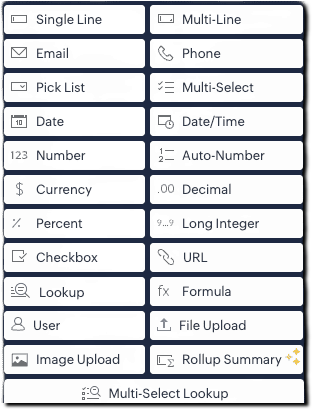
From Zoho CRM API version 6, you can add custom fields via API using the below endpoint:
POST 
{api-domain}/crm/{version}/settings/fields?module={module_API_name}

From Zoho CRM API version 8, additional field types like multi-select lookups, multi-user lookup additions are also supported.
This article is intended to be a guide on how to create fields through the API.

Field Type (UI)
Field Data Type 
Single Line
text
Multi-Line
textarea
Email
email
Phone
phone
Pick List
picklist
Multi Select
multiselectpicklist
Date
date
Date/Time
datetime
Number
integer
Auto-Number
autonumber
Currency
currency
Decimal
double
Percent
percent (only in POST)
Long Integer
bigint
Checkbox
Boolean
URL
website
Lookup
lookup
Formula
formula
User (Type- Single User)
userlookup
User (Type- Multiple Users)
multiuserlookup
File Upload
fileupload
Image Upload
imageupload
Rollup Summary
rollup_summary
Multi-Select Lookup
multiselectlookup

The fields in below JSON are common for all fields. Field types such as single line text, phone, email, date, datetime, integer, and url fields consists of the below common fields alone and there are no dependent fields for them. 
{
  "fields": [
    {
      "field_label": "Your Field Label",
      "data_type": "<field_type>",
      "length": "<length>",
      "tooltip": {
        "name": "static_text",
        "value": "Tooltip message"
      },
      "profiles": [
        {
          "id": "<profile_id_1>",
          "permission_type": "read_write"
        },
        {
          "id": "<profile_id_2>",
          "permission_type": "read_only"
        }
      ],
      "external": {
        "type": "user",
        "show": false
      },
      "crypt": {
        "mode": "decryption"
      }
    }
  ]
}


Key
Mandatory
Description
field_label


Yes
Display name of the field
date_type
Yes
Field type
length
No
Max number of characters allowed for a field
filterable
No
Whether field can be used in filters. When set to true, the field will be available for use in Criteria Pattern Editors. Note that it is not applicable for imageupload, fileupload, textarea, and formula fields 
tooltip
No
Field help text; name can be static_text or info_icon 
profiles
No
Access control per profile (read_write, read_only, hidden)
crypt
No
Whether to encrypt the field (encryption or decryption)
unique
No
Enforce uniqueness across records
hipaa_compliance_enabled
No
Enable HIPAA protection
private
No
Enable GDPR-level handling (Low or High)

Single line Field

The single line field is a string field that can store 255 characters, and alphanumeric and special characters. It can be used to store fields like name, company, account name, etc. To create a single line field, give data_type as text
A single line field can be marked as an external field. An external field is used to hold a record's unique ID available in an external system.
{
    "fields": [
        {
            "data_type": "text",
            "field_label": "External ID",
            "external": {
                "type": "org",
                "show": true
            }
        }
    ]
}

Multiline Fields

The multi line field is a string field that can be used when you need a larger string field. It accepts alphanumeric and special characters. Multiline fields are of three types: plain text small, plain text large, and rich text field.
Multi-line field type
Character limit
Can be marked Mandatory?
Can be Encrypted?
Plain text small
Up to 2000
Yes
Yes
Plain text large
Up to 32000
Yes
No
Rich text (RTF)
Up to 50000
No
No

1) Plain Text Small Field

This type of multi-line field is ideal for concise entries up to 2000 character size. To create a plain text small multi line field, give data_type as textarea and type key in text area JSON object as "small".
{
    "fields": [
        {
            "field_label": "Apartment_details",
            "data_type": "textarea",
            "length" : 2000,
            "textarea": {
                "type": "small"
            }
        }
    ]
}

2) Plain Text Large Field

This type of multi line field is ideal for more extensive entries of up to 32000 character size. To create a plain text large multi line field, give data_type as textarea and type key in text area JSON object as "large".

{
    "fields": [
        {
            "field_label": "Apartment_details",
            "data_type": "textarea",
            "length" : 32000,
            "textarea": {
                "type": "large"
            }
        }
    ]
}

3) Rich text Field

Rich text field is ideal when formatted text needs to be entered. The length of the entry can be up to 50000 characters. To create a plain text large multi line field, give data_type as textarea and type key in text area JSON object as "rich_text"
{
    "fields": [
        {
            "field_label": "Apartment_details",
            "data_type": "textarea",
            "length" : 50000,
            "textarea": {
                "type": "rich_text"
            }
        }
    ]
}

Picklist Field

Picklist is a field that lets you choose a value from a set of predefined values. The pick list value accepts all alphanumeric and special characters.
To create a picklist field, give data_type as picklist .Picklist fields have dependent JSON array - pick_list_values.  
  • pick_list_values: This JSON array comprises the options for the picklist field. Inside the array, display_value and actual_values stores the label shown for the picklist value in the CRM UI and the actual internal value of the picklist option respectively.  The colour_code field consists of the color code of the picklist option in hex format, if color code is enabled.
  • enable_colour_code - Boolean value that represents whether color code is enabled for the script
  • history_tracking_enabled -   This key when set as true audit/history tracking for the picklist field is enabled. Users with Module Customization permission can enable picklist history tracking. You can enable tracking for one picklist field per module, and this will be applicable across all layouts.
{
  "fields": [
    {
      "field_label": "Your picklist's field label",
      "data_type": "picklist",
      "enable_colour_code": true,
      "history_tracking_enabled": true,
      "pick_list_values": [
        {
          "display_value": "Option 1",
          "colour_code": "#af38fa",
          "actual_value": "Option 1"
        },
        {
          "display_value": "Option 2",
          "colour_code": "#ffd6bc",
          "actual_value": "Option 2"
        },
        {
          "display_value": "Option 3",
          "colour_code": "#cfddbc",
          "actual_value": "Option 3"
        }
      ]
    }
  ]
}

Global picklist Field

Global sets in Zoho CRM is a type of picklist that helps you easily manage picklist values that recur across modules. To create a global picklist, use the Create Global Picklist API. The global picklist can then be associated to a module in the below format using the Create Custom Field API.
{
  "fields": [
    {
      "field_label": "Source",
      "data_type": "picklist",
      "global_picklist": {
        "id": "72223455366"//Id of the global picklist
      }
    }
  ]
}

Multi-Select Picklist Field

Multi-select picklist allows you to select multiple values while creating or editing record. The pick list value accepts all alphanumeric and special characters. To create a multi select picklist, give data type as multiselectpicklist.
Note that Picklist tracking is not supported for multi-select picklists
{
    "fields": [
        {
            "field_label": "Preferred working days",
            "data_type": "multiselectpicklist", // Specify the data type as multiselectpicklist* 
            "pick_list_values": [
                {
                    "display_value": "Monday",
                    "actual_value": "1"
                },
                {
                    "display_value": "Tuesday",
                    "actual_value": "2"
                },
                {
                    "display_value": "Wednesday",
                    "actual_value": "3"
                },
                {
                    "display_value": "Thursday",
                    "actual_value": "4"
                },
                {
                    "display_value": "Friday",
                    "actual_value": "5"
                }
            ],
            "pick_list_values_sorted_lexically": true,
            "enable_colour_code": true
        }
    ]
}

Auto Number Field

Auto Number fields are used for assigning a unique incremental number automatically to each record, making identification easy. To create an auto number field, set "data_type" as "autonumber" and include an auto_number object with the following keys:

  • start_number (mandatory) – Starting value for the auto-number sequence.
  • prefix (optional) – (String) to prepend to the number.
  • suffix (optional) – (String) to append to the number.
  • _update_existing_records (optional) – (Boolean). If set to true, updates existing records with new auto-numbers based on the current format. Default value is false.
{
  "fields": [
    {
      "field_label": "Order ID",
      "data_type": "autonumber",
      "auto_number": {
        "start_number": 1000,
        "prefix": "ORD-",
        "suffix": "-2025",
        "_update_existing_records": true
      }
    }
  ]
}

Currency Field

Currency field is used to store amount values. To create a currency field, set "data_type" as "currency" and define the currency JSON object with the following keys:
  • rounding_option(mandatory) – Specifies how values should be rounded:
    • "normal" – No rounding.
    • "round_off" – Rounds to nearest based on precision.
    • "round_up" – Always rounds up based on precision.
    • "round_down" – Always rounds down based on precision.
  • precision(optional) – Number of decimal places displayed in the UI (e.g., 123.466 with precision 2 becomes 123.47).
  • decimal_place(optional) – Maximum number of decimal places stored. Values beyond this are truncated. Max allowed decimal places: 9.
{
  "fields": [
    {
      "field_label": "Deal Amount",
      "data_type": "currency",
      "currency": {
        "rounding_option": "round_up",
        "precision": 2,
        "decimal_place": 3
      }
    }
  ]
}

Decimal Field

Decimal field is used to store decimal numbers. To add a decimal (floating point) number field, use "data_type": "double".
  • length(optional) – Total number of digits allowed, including both sides of the decimal point.
  • decimal_place(optional) – Number of digits to allow after the decimal point (e.g., 2 means values like 123.45).
{
  "fields": [
    {
      "field_label": "Discount Rate",
      "data_type": "double",
      "length": 16,
      "decimal_place": 2
    }
  ]
}

Percent Field

This field type is used to capture percentage values, such as scores or growth rates. To create a percentage field, use "data_type": "percent". 
{
  "fields": [
    {
      "field_label": "Enrollment number",
      "data_type": "bigint",
      "length": 18,
      "separator": true
    }
  ]
}

Long Integer Field

Long Integer Fields are number fields that accept up to 18 digits. To create a long integer field, use "data_type": "bigint".  
{
  "fields": [
    {
      "field_label": "Enrollment number",
      "data_type": "bigint",
      "length": 18,
      "separator": true
    }
  ]
}

Separator: a Boolean key that indicates whether the number is formatted for better readability. It is applicable for data types integer, double, bigint. Refer to this article on changing locale information for information on how to change it.

Checkbox Field

Checkbox value allows you to select or unselect a value indicating true or false. To create a checkbox field, use "data_type": "boolean".
{
  "fields": [
    {
      "field_label": "Previously Employed?",
      "data_type": "boolean"
    }
  ]
}

Lookup Field

Use "data_type": "lookup" to associate records from another module. The lookup JSON object defines the target module, display label, and optional filter criteria.
  • module.api_name(mandatory) – API name of the target module (get via Modules API).
  • display_label(mandatory) – Label shown in the related list.
  • query_details(optional) – Used to define lookup filters. Inside query_details JSON Object following keys are present:
    • criteria(mandatory if query_details is used) – Filter logic.
    • group_operator – "AND"/"OR" (required for multiple conditions).
    • group – Array of filter conditions. Each condition includes:
      • field.api_name: Field in the target module
      • comparator: Operator like contains, equal
      • value: Value to match
  • revalidate_filter_during_edit(optional) – If true, validates filter conditions on record edit.
{
  "fields": [
    {
      "field_label": "Your lookup",
      "data_type": "lookup",
      "lookup": {
        "module": {
          "api_name": "Contacts"
        },
        "display_label": "Contact Lookup",
        "revalidate_filter_during_edit": true,
        "query_details": {
          "criteria": {
            "group_operator": "AND",
            "group": [
              {
                "field": {
                  "api_name": "Phone"
                },
                "comparator": "contains",
                "value": "91"
              },
              {
                "field": {
                  "api_name": "Lead_Source"
                },
                "comparator": "equal",
                "value": [
                  "Cold Call"
                ]
              }
            ]
          }
        }
      }
    }
  ]
}

Formula Field

Formula fields are used to calculate different types of values, including numeric values, text values, date values, etc. Use "data_type": "formula" to calculate dynamic values based on other fields.
For more details on all the available usages in the formula field, refer to this help doc on formula field. The formula object defines the logic and output type.
  • formula.return_type (mandatory for formula field) – Output type of the formula. Possible values: double, currency, text, date, datetime, boolean
  • formula.expression(mandatory) – The actual formula logic (e.g., "Sqrt(Len(${Email}))").
  • decimal_place(optional) – Number of decimal places (only for double or currency).
  • number_separator(optional) – If true, formats the number using separators (default is true).
{
  "fields": [
    {
      "field_label": "Total amount",
      "data_type": "formula",
      "formula": {
        "return_type": "double",
        "expression": "${Amount} + 150"
      },
      "decimal_place": 0,
      "number_separator": false
    }
  ]
}

Auto refresh formula field

These type of formula fields are used when you need an accurate time measurement whenever you view the record. The key "dynamic" set as true indicates that the field is an auto refresh formula field.
 For example, the age of a deal can be calculated by comparing the created time of the deal with the current time. A condition can be given to stop computing the value of the auto refresh field. 
  • dynamic: When set as true, indicates that the formula field is an auto refresh field.
  • stop_compute_conditionally:  When set as true, indicates that the computation of field stops when the condition given in stop_compute_expression key
  • stop_compute_expression:  Mandatory when stop_compute_conditionally is true. Consists of the condition for stopping computation of the auto refresh formula field.
{
    "fields": [
        {
            "field_label": "Deal Age",
            "data_type": "formula",
            "formula": {
                "expression": "Datecomp(${Created_Time},Now())",
                "return_type": "double",
                "dynamic": true,
                "stop_compute_conditionally": true,
                "stop_compute_expression": "${Probability}==100"//When the deal probability is 100, the calculation gets stopped.
            }
        }
    ]
}

User lookup Field

User lookup field is used to associate a specific user to a record of the module. Use "data_type": "userlookup" to add a user lookup field.
The lookup JSON object defines the key properties of the user lookup
  • query_details (JSON object): Defines filters to restrict which users are selectable.
  • criteria: Uses a group of field conditions (field, comparator, value) with a group_operator (AND, OR) to filter users.
  • revalidate_filter_during_edit (Boolean): If true, the criteria is reevaluated on record edit for the value selected on the record creation. This option is useful when associated values or fields have changed due to updates. It allows users to re-check and confirm that the correct records are still linked when editing the record.
  • sharing_properties (JSON object):  Contains details of access given to users
    •  share_preference_enabled (Boolean): If true, enables access to the records for the users.
    • share_permission (String): Defines what level of access the associated user has (e.g., "read-only", "full-access", "read-write").

{
  "fields": [
    {
      "field_label": "Assigned Sales Rep",
      "data_type": "userlookup",
      "tooltip": {
        "name": "info_icon",
        "value": "Sales user responsible for this lead"
      },
      "lookup": {
        "revalidate_filter_during_edit": true,
         //associate only users from countries India, and email containing "zylker.com".
        "query_details": {
          "criteria": {
            "group_operator": "AND",
            "group": [
              {
                "field": {
                  "api_name": "country"
                },
                "comparator": "equal",
                "value": "India"
              },
              {
                "field": {
                  "api_name": "email"
                },
                "comparator": "contains",
                "value": "@zylker.com"
              }
            ]
          }
        }
      },
      "sharing_properties": {
        "share_preference_enabled": true,
        "share_permission": "read-only"
      }
    }
  ]
}

Multiuser lookup Field

Multi-user look up is a lookup field that lets you add multiple users to a module record. It allows you to establish many-to-many relationships between modules and users in CRM.
Multi user lookup can be added by using the data_type "multiuserlookup". 
  • record_access: This Boolean key when marked as true indicates that the added user has access to the record. The users selected in the multi-user lookup field will be able to 'Edit', 'Delete', 'Change the owner' of that respective record
{
  "fields": [
    {
      "field_label": "Associated_Agents",
      "data_type": "multiuserlookup",
      "multiuserlookup": {
        "record_access": true
      }
    }
  ]
}


File Upload Field

User data type "fileupload" to add a file upload field 
{
  "fields": [
    {
      "field_label": "Resume Upload",
      "data_type": "fileupload",
      "length": 1,// Allow only 1 file, Maximum length : 5
      "tooltip": {
        "name": "info_icon",
        "value": "Upload the applicant's resume in PDF or DOC format"
      }
    }
  ]
}


Image Upload Field

User data type "imageupload" to add an image upload field
{
  "fields": [
    {
      "field_label": "Profile Photo",
      "data_type": "imageupload",
      "length": 1, // Only 1 profile photo allowed, Maximum length 10
      "tooltip": {
        "name": "info_icon",
        "value": "Upload a professional head shot for the employee record"
      }
    }
  ]
}

Rollup Summary Field

Rollup Summary is a field that aggregates or summarizes a desired related list field. Rollup Summary Fields are of two types - Custom Rollups and Predefined Rollups. You can create only custom rollups using APIs. Supported related modules for APIs are Calls, Meetings, and Tasks
  • function - Indicates the mathematical function applied to calculate the rollup summary.
  • field_label - Represents the label of the field as it appears in the UI. 
  • data_type - This must be set to "rollup_summary" for rollup summary field.
  • rollup_summary -  This object contains all the configuration details for the rollup field.
  • return_type - Specifies the type of value returned.
  • expression - Defines the calculation logic for the rollup. 
    • function_parameters  An array containing parameters needed by the function, typically including:
      • api_name: The field being summarized.
    • criteria Defines the filters to apply to the related records. Each condition includes:
      • group_operator:  If there are multiple conditions, you should also include AND or OR as the group operator for the conditions. It consists of an array of conditions.
      • group: Array element of a condition
        • field
          • api_name: The API name of the field.
        • comparator: The comparison operator (e.g., equal, greater_than, contains).
        • value: The value used in the comparison.
  • function - The function to be applied to the filtered records.  Allowed functions : COUNT, MAXIMUM, MINIMUM, AVERAGE, RECENT, UPCOMING, EARLIEST.
  • based_on_module - Specifies the module from which to summarize related records.
  • related_list - Indicates the related list within the module (e.g., "Deals", "Contacts") to summarize from.
{
    "fields": [
        {
            "field_label": "Total Invoice Amount",
            "data_type": "rollup_summary",
            "rollup_summary": {
                "return_type": "currency",
                "expression": {
                    "function_parameters": [
                        {
                            "api_name": "Grand_Total"
                        }
                    ],
                    "criteria": {
                        "group_operator": "AND",
                        "group": [
                            {
                                "comparator": "equal",
                                "field": {
                                    "api_name": "Billing_Country"
                                },
                                "value": "United States"
                            },
                            {
                                "comparator": "greater_than",
                                "field": {
                                    "api_name": "Invoice_Date"
                                },
                                "value": "2024-01-01"
                            }
                        ]
                    },
                    "function": "SUM"
                },
                "based_on_module": {
                    "api_name": "Invoices"
                },
                "related_list": {
                    "api_name": "Invoices"
                }
            }
        }
    ]
}


Multi-Select Lookup Field

 Multi-Select Lookup Field enables you to establish a many-to-many relationship between two modules in CRM.
  • multiselectlookup : The mulitselectlookup JSON object specify the linking details between the module in which the field is present and another module 
    • connected_details: This JSON object contains details about the module you want to connect the current module with.
      • module.api_name:  Specify the module API name you want to link the current module with.
      • field.field_label: When connecting a module, the system creates a new lookup field in the connected module for the current module. Use this key to specify a field label in the connected module.
  • linking_details: When creating a multi-select lookup field, the system creates a separate module connecting these two modules, which contains their common details. This module is called the linking module
    • module: Consists of the details of the linking module.
      • plural_label: Specify a plural label for the linking module.

{
    "fields": [
        {
            "field_label": "Skills",
            "data_type": "multiselectlookup",
            "multiselectlookup": {
                "connected_details": {
                    "module": {
                        "api_name": "Skills"
                    },
                    "field": {
                        "field_label": "SkillName"
                    }
                },
                "linking_details": {
                    "module": {
                        "plural_label": "EmpXSkill"
                    }
                }
            }
        }
    ]
}


    Access your files securely from anywhere


                            Zoho Developer Community


                                                  • Desk Community Learning Series


                                                  • Digest


                                                  • Functions


                                                  • Meetups


                                                  • Kbase


                                                  • Resources


                                                  • Glossary


                                                  • Desk Marketplace


                                                  • MVP Corner


                                                  • Word of the Day


                                                  • Ask the Experts


                                                            • Sticky Posts

                                                            • Kaizen #226: Using ZRC in Client Script

                                                              Hello everyone! Welcome to another week of Kaizen. In today's post, lets see what is ZRC (Zoho Request Client) and how we can use ZRC methods in Client Script to get inputs from a Salesperson and update the Lead status with a single button click. In this
                                                            • Kaizen #222 - Client Script Support for Notes Related List

                                                              Hello everyone! Welcome to another week of Kaizen. The final Kaizen post of the year 2025 is here! With the new Client Script support for the Notes Related List, you can validate, enrich, and manage notes across modules. In this post, we’ll explore how
                                                            • Kaizen #217 - Actions APIs : Tasks

                                                              Welcome to another week of Kaizen! In last week's post we discussed Email Notifications APIs which act as the link between your Workflow automations and you. We have discussed how Zylker Cloud Services uses Email Notifications API in their custom dashboard.
                                                            • Kaizen #216 - Actions APIs : Email Notifications

                                                              Welcome to another week of Kaizen! For the last three weeks, we have been discussing Zylker's workflows. We successfully updated a dormant workflow, built a new one from the ground up and more. But our work is not finished—these automated processes are
                                                            • Kaizen #152 - Client Script Support for the new Canvas Record Forms

                                                              Hello everyone! Have you ever wanted to trigger actions on click of a canvas button, icon, or text mandatory forms in Create/Edit and Clone Pages? Have you ever wanted to control how elements behave on the new Canvas Record Forms? This can be achieved


                                                            Manage your brands on social media


                                                                  Zoho TeamInbox Resources


                                                                      Zoho CRM Plus Resources

                                                                        Zoho Books Resources


                                                                          Zoho Subscriptions Resources

                                                                            Zoho Projects Resources


                                                                              Zoho Sprints Resources


                                                                                Qntrl Resources


                                                                                  Zoho Creator Resources


                                                                                      Zoho CRM Resources

                                                                                      • CRM Community Learning Series

                                                                                        CRM Community Learning Series


                                                                                      • Kaizen

                                                                                        Kaizen

                                                                                      • Functions

                                                                                        Functions

                                                                                      • Meetups

                                                                                        Meetups

                                                                                      • Kbase

                                                                                        Kbase

                                                                                      • Resources

                                                                                        Resources

                                                                                      • Digest

                                                                                        Digest

                                                                                      • CRM Marketplace

                                                                                        CRM Marketplace

                                                                                      • MVP Corner

                                                                                        MVP Corner


                                                                                          Design. Discuss. Deliver.

                                                                                          Create visually engaging stories with Zoho Show.

                                                                                          Get Started Now


                                                                                            Zoho Show Resources

                                                                                              Zoho Writer

                                                                                              Get Started. Write Away!

                                                                                              Writer is a powerful online word processor, designed for collaborative work.

                                                                                                Zoho CRM コンテンツ


                                                                                                  Nederlandse Hulpbronnen


                                                                                                      ご検討中の方


                                                                                                              • Recent Topics

                                                                                                              • How to apply customized Zoho Crm Home Page to all users?

                                                                                                                I have tried to study manuals and play with Zoho CRM but haven't found a way how to apply customized Zoho CRM Home Page as a (default) home page for other CRM users.. How that can be done, if possible? - kipi Moderation Update: Currently, each user has
                                                                                                              • Please can the open tasks be shown in each customer account at the top.

                                                                                                                Hi there This has happened before, where the open tasks are no longer visible at the top of the page for each customer in the CRM. They have gone missing previously and were reinstated when I asked so I think it's just after an update that this feature
                                                                                                              • How to Customize Task Creation to Send a Custom Alert Using JavaScript in Zoho CRM?

                                                                                                                Hello Zoho CRM Community, I’m looking to customize Zoho CRM to send a custom alert whenever a task is created. I understand that Zoho CRM supports client scripts using JavaScript, and I would like to leverage this feature to implement the alert functionality.
                                                                                                              • Send Whatsapp with API including custom placeholders

                                                                                                                Is is possible to initiate a session on whatsapp IM channel with a template that includes params (placeholders) that are passed on the API call? This is very usefull to send a Utility message for a transactional notification including an order number
                                                                                                              • Configurable Zoho Cliq Notifications for Zoho People Alerts

                                                                                                                Hello Zoho People Product Team, Greetings and hope you are doing well. We would like to request an enhancement to Zoho People notifications, enabling a native delivery via Zoho Cliq with admin-level control, similar to the notification settings available
                                                                                                              • Add Israel & Jewish Holidays to Zoho People Holidays Gallery

                                                                                                                Greetings, We hope you are doing well. We are writing to request an enhancement to the Holidays Gallery in Zoho People. Currently, there are several holidays available, but none for Israel and none for Jewish holidays (which are not necessarily the same
                                                                                                              • Keep Zoho People Feature Requests in the Zoho People Forum

                                                                                                                Hello Zoho People Product Team, Greetings. We would like to submit a feature request regarding the handling of feature requests themselves, specifically for Zoho People. Issue: Feature Requests Being Moved to Zoho One Zoho People feature requests are
                                                                                                              • ZO25: The refreshed, more unified, and intelligent OS for business

                                                                                                                Hello all, Greetings from Zoho One! 2025 has been a remarkable year, packed with new features that will take your Zoho One experience to the next level! From sleek, customizable dashboards to an all-new action panel for instant task management, we’ve
                                                                                                              • Introducing Multi-Asset Support in Work Orders, Estimates, and Service Appointments

                                                                                                                We’re excited to announce a highly requested enhancement in Zoho FSM — you can now associate multiple assets with Work Orders, Estimates, and Service Appointments. This update brings more clarity, flexibility, and control to your field service operations,
                                                                                                              • [Product Update] Locations module migration in Zoho Books integration with Zoho Analytics

                                                                                                                Dear Customers, As Zoho Books are starting to support an advance version of the Branches/Warehouses module called the Locations module, users who choose to migrate to the Locations module in Zoho Books will also be migrated in Zoho Analytics-Zoho Books
                                                                                                              • Introducing Schedules for smarter availability management

                                                                                                                Greetings from the Zoho Bookings team! We’re excited to introduce Schedules, a powerful enhancement to manage availability across your workspace. Schedules are reusable working-hour templates that help you define and maintain consistent availability across
                                                                                                              • Why Zoho Contracts Prefers Structured Approvals Over Ad-hoc Approvals

                                                                                                                Approvals are one of the most important stages in a contract’s lifecycle. They determine whether a contract moves forward, gets revised, or needs further discussion. The approval process also defines accountability within the organization. Zoho Contracts
                                                                                                              • Whatsapp Connection Status still "Pending" after migration

                                                                                                                Hello, I migrated my WhatsApp API to Zoho from another provider a day ago. So far the connection status is still “Pending”. There is a problem? How long does it usually take?
                                                                                                              • Kaizen #226: Using ZRC in Client Script

                                                                                                                Hello everyone! Welcome to another week of Kaizen. In today's post, lets see what is ZRC (Zoho Request Client) and how we can use ZRC methods in Client Script to get inputs from a Salesperson and update the Lead status with a single button click. In this
                                                                                                              • Search Bar positioning

                                                                                                                Why is the Search bar on the far right when everything is oriented towards the left?
                                                                                                              • How to use Rollup Summary in a Formula Field?

                                                                                                                I created a Rollup Summary (Decimal) field in my module, and it shows values correctly. When I try to reference it in a Formula Field (e.g. ${Deals.Partners_Requested} - ${Deals.Partners_Paid}), I get the error that the field can’t be found. Is it possible
                                                                                                              • How to Filter timewise question to check uploaded one month or two months before in these community question ?

                                                                                                                i want to find the question that is asked some month or before any particular year, so how can i filter it ?
                                                                                                              • Proposal for Creating a Unique "Address" Entity in Zoho FSM

                                                                                                                The "Address" entity is one of the most critical components for a service-oriented company. While homeowners may change and servicing companies may vary, the address itself remains constant. This constancy is essential for subsequent services, as it provides
                                                                                                              • Workflow Down/Bug

                                                                                                                We have a workflow that sends an email to one of our internal departments 10 minutes after a record is created in a custom module. The workflow actually works correctly. However, we have now noticed that on January 8, between 3:55 p.m. and 4:33 p.m.,
                                                                                                              • Service Locations: Designed for Shared Sites and Changing Customers

                                                                                                                Managing service addresses sounds simple—until it isn’t. Large facilities, shared sites, and frequently changing customers can quickly turn address management into an operational bottleneck. This is where Service Locations deliver clarity and control.
                                                                                                              • Can I re-send the Customer Satisfaction Survey after a ticket closure?

                                                                                                                Hello, Some customers does not answer the survey right after closure, is it possible to re-send after a few days or weeks? Best Regards!
                                                                                                              • Filter contacts based on selected category in Zoho Desk ticket

                                                                                                                Hello community, I’m setting up the Tickets module in Zoho Desk and I need help implementing the following: When a category is selected in a ticket, I want the Contact field to be filtered so that it only displays contacts that are related to that category.
                                                                                                              • Mapping a new Ticket in Zoho Desk to an Account or Deal in Zoho CRM manually

                                                                                                                Is there any way for me to map an existing ticket in Zoho desk to an account or Deal within Zoho CRM? Sometimes people use different email to put in a ticket than the one that we have in the CRM, but it's still the same person. We would like to be able
                                                                                                              • Assign Income to Project Without Invoice

                                                                                                                Hello, Fairly new user here so apologies if there is a really obvious solution here that I am just missing... I have hundreds of small deposits into a bank account that I want to assign to a project but do not want to have to create an invoice every time
                                                                                                              • Tracking Non-Inventory Items

                                                                                                                We have several business locations and currently use zoho inventory to track retail items (sales and purchase orders). We were hoping to use zoho inventory to track our non-inventory items as well (toilet paper, paper towels, etc). I understand that we
                                                                                                              • Profile Page View Customization

                                                                                                                I need to change the fields, sections from the profile view of an emplyoyee.
                                                                                                              • Zoho Desk Android app update: Filter, Sort and Saved filters Enhancements

                                                                                                                Hello everyone! We are excited to introduce the below features on the Android version Zoho Desk mobile app: 1. Filter & Sort support has been introduced for the Contacts and Accounts modules. 2. Sort options is now available in Custom Modules as well.
                                                                                                              • Accessing shared mailboxes through Trident (Windows)

                                                                                                                Hi, I have a created a couple of shared mailboxes. The mailboxes are showing up on the browser based Zoho workplace, but I cannot seem to figure out how to access my shared inboxes through Trident (Windows). Am I missing something or is this feature not
                                                                                                              • Feature Request: Ability to set Default Custom Filters and apply them via URL/Deluge

                                                                                                                I've discovered a significant gap in how Zoho Creator handles Custom Filters for reports, and I'm hoping the Zoho team can address this in a future update. This limitation has been raised before and continues to be requested, but remains unresolved. The
                                                                                                              • Closing the Loop: Why Lookup Asymmetry is Harming Data Integrity in Creator

                                                                                                                TL;DR: Lookup fields allow users to add new related records inline via the "+" icon, but there's no equivalent ability to edit an existing related record without navigating away and losing form context. Adding a native "Edit" icon—with automatic User
                                                                                                              • filtering lookup field options based on information in another module.

                                                                                                                In our CRM system. We have the standard Accounts and Deals modules. We would like to introduce the ability to classify Accounts by Sector. Our desired functionality is to have a global list of all sectors that an Account can select, with the ability to
                                                                                                              • Really want the field "Company" in the activities module!

                                                                                                                Hi team! Something we are really missing is able to see the field Company when working in the activities module. We have a lot of tasks and need to see what company it's related to. It's really annoying to not be able to see it.🙈 Thx!
                                                                                                              • Service op locatie organiseren met Zoho FSM: waar lopen organisaties tegenaan?

                                                                                                                Bij organisaties met service teams op locatie merken we vaak dat de complexiteit niet zozeer in de planning zelf zit, maar in wat er rond die planning gebeurt. Denk aan opvolging na interventies, consistente servicerapporten, en het bijhouden van installaties
                                                                                                              • Introducing Assemblies and Kits in Zoho Inventory

                                                                                                                Hello customers, We’re excited to share a major revamp to Zoho Inventory that brings both clarity and flexibility to your inventory management experience! Presenting Assemblies and Kits We’re thrilled to introduce Assemblies and Kits, which replaces the
                                                                                                              • Does the ability exist to make tax on the customer profile mandatory?

                                                                                                                I am reaching out to inquire about the possibility of making the "Customer Tax" field mandatory when creating a new customer in Zoho. We want to ensure that all customers have their tax information recorded to maintain compliance with our internal processes.
                                                                                                              • How to integrate XML with Zoho CRM

                                                                                                                Hi, I have an eCom service provider that gives me a dynamic XML that contains order information, clients, shipments... The XML link is the only thing I have. No Oath or key, No API get... I want to integrate it into Zoho CRM. I am not a developer nor
                                                                                                              • email association with CRM

                                                                                                                Why is it 2024 (almost 2025) and Zoho has not figured out how to integrate email with CRM? It is so inconsistent at associating emails within CRM. I am an attorney. I have clients and work with other attorneys. Attorney John Doe is associated with multiple
                                                                                                              • Fix the speed

                                                                                                                It takes ages to load on every step even though my dataset is quite small.
                                                                                                              • Credit Note for Shipped and Fatoora pushed invoices

                                                                                                                We have shipped a Sales Order and created an Invoice. The Invoice is also pushed to Fatoora Now we need to create a credit note for the invoice When we try it, it says we need to create a Sales Return in the Zoho Books, we have already created a Sales
                                                                                                              • FSM - Timesheet entires for Internal Work

                                                                                                                Hi FSM Team, Several of my clients have asked how they can manage internal timesheets within Zoho FSM. Since their technicians already spend most of their day working in FSM, it would be ideal if they could log all working hours directly in the FSM app.
                                                                                                              • Next Page