Kaizen #205 - Answering Your Questions | Managing Picklists and Enabling History Tracking via Zoho CRM APIs
Hello everyone!
Welcome back to another post in our Kaizen series.
In this post, we will look at how you can manage picklist fields in Zoho CRM using APIs. This topic was raised as feedback to Kaizen #200, so we are taking it up here with more details.

In this post, we will cover the following:
- What is a picklist field in Zoho CRM?
- Picklist vs Multi-select Picklist
- Working with picklist fields via APIs
- Creating a picklist field using the Create Custom Field Metadata API
- Updating a picklist field using the Update Custom Field Metadata API
- Assigning picklist values when creating records using the Insert Records API
- Updating picklist values in existing records using the Update Records API
- History tracking for picklists
- What is history tracking for picklists in Zoho CRM?
- Use case
- Enabling history tracking for a picklist using the Create Custom Fields API
What is a picklist field in Zoho CRM?
A Picklist field is a drop-down field in Zoho CRM that contains a predefined list of values. While creating or updating a record, you can select one value from this list instead of entering it manually. This helps you avoid typing errors.
Example :
A Region field with values East, West, North, and South.
If a lead is from the East, the user simply selects East from the picklist instead of typing it manually.
Picklist vs Multi-select Picklist
Picklist | Multi-select Picklist |
Users can select only one value from the list. | Users can select multiple values at once. |
A standard Region picklist works when a record belongs to only one region. Example : East | A Multi-select Region picklist works when a record spans multiple regions. Example : East, North |
Global picklist / Global set : User can create a picklist in common and associate the created picklist across the modules to maintain accuracy. Refer to Kaizen #161: Global Sets using Zoho CRM APIs for more details.
Working with picklist fields via APIs
Creating a picklist field using the Create Custom Field API
You can create a new Picklist field in a module by calling the Create Custom Field Metadata API. For example, you can create a picklist field named Region with the values: East, West, North, South.
Request URL : {{api-domain}}/crm/v8/settings/fields?module=Leads
Request Method : POST
Sample Input
When creating a picklist field, set its data type as picklist and provide the list of options, each with a mandatory display_value. You can also configure additional properties such as actual_value, lexical sorting, and color coding.
{ "fields": [ { "field_label": "Select Region", "data_type": "picklist", // Specify the data type as picklist "tooltip": { "name": "info_icon", "value": "Select your region here" }, "profiles": [ { "id": "5725767000000026011", "permission_type": "read_write" } ], "pick_list_values": [ { "display_value": "East", //The unique display value for the picklist, which will be displayed in the CRM UI. Use the display_value in API requests during create, update, and upsert operations. "actual_value": "IN_East" //The unique reference value associated with the particular option. }, { "display_value": "West", "actual_value": "IN_West" }, { "display_value": "North", "actual_value": "IN_North" }, { "display_value": "South", "actual_value": "IN_South" } ], "pick_list_values_sorted_lexically": true, //Sorts options alphabetically. Default value is false. "enable_colour_code": true //Allows color coding for picklist options. Default value is false. } ] } |
Note : To create a multi-select picklist field, set the data_type key to multiselectpicklist in the request body ("data_type": "multiselectpicklist").
Sample Response
{ "fields": [ { "code": "SUCCESS", "details": { "id": "5725767000007613005" }, "message": "field created", "status": "success" } ] } |
Updating a picklist field using the Update Custom Field API
The PATCH - Field Metadata API lets you modify an existing Picklist field. Use the Get Fields Metadata API to get your picklist field ID.
You can:
- Add new options
- Update the picklist
- Remove existing options using Update Custom Layout API
Here is a sample request that updates the Select Region dropdown field in the Leads module.
Request URL : {{api-domain}}/crm/v8/settings/fields/5725767000007613005?module=Leads
Request Method : PATCH
Adding a new option to the existing picklist field
Sample Input
{ "fields": [ { "pick_list_values": [ { "display_value": "Central", //adding a new option to the existing picklist field "actual_value": "IN_Central" } ], } ] } |
Updating picklist
{ "fields": [ { "profiles": [ { "id": "5725767000000026011", "permission_type": "read_only" //updating the permission_type } ], "pick_list_values": [ { "display_value": "South Region", //updating the display field's value "id": "5725767000007613010" //unique ID of the option } ], "enable_colour_code": false //disabling color code for the options } ] } |
Note : Use the actual_value or unique ID of a picklist option to update its display value. Use the Get Fields Metadata API or Get Layouts Metadata API to get the details.
Removing existing options using Update Custom Layout API
To remove picklist values, keep only the required options in your input. Any options not included in the request will automatically move to the unused section.
First, fetch the required layout, section, field, and option IDs using the Get Layouts Metadata API. Then, in your request body, specify only the picklist values you want to retain.
Request URL : {{api-domain}}/crm/v8/settings/layouts/5725767000000091055?module=Leads
Request Method : PATCH
Sample Input
{ "layouts": [ { "id": "5725767000000091055", //layout id "sections": [ { "id": "5725767000000209001", //section id "fields": [ { "id": "5725767000007613005", //field id "pick_list_values": [ { "display_value": "Central", "id": "5725767000007626001" }, { "display_value": "East", "id": "5725767000007613004" } ] } ] } ] } ] } |
Here, Central and East regions remain as active picklist options, and West, North, and South regions are moved to the unused section.
Updated response
Use the Get Fields Metadata API to check the updated response. The Central and East are still active options (type: used), and North, South, and West are inactive options (type: unused)
{ "fields": [ . . . { "field_label": "Select Region", "id": "5725767000007613005", "api_name": "Select_Region", "pick_list_values": [ { "display_value": "-None-", "sequence_number": 1, "reference_value": "-None-", "colour_code": null, "actual_value": "-None-", "id": "5725767000007613013", "type": "used" //default option }, { "display_value": "Central", "sequence_number": 6, "reference_value": "Central", "colour_code": null, "actual_value": "IN_Central", "id": "5725767000007626001", "type": "used" }, { "display_value": "East", "sequence_number": 2, "reference_value": "East", "colour_code": null, "actual_value": "IN_East", "id": "5725767000007613004", "type": "used" }, { "display_value": "North", "sequence_number": 4, "reference_value": "North", "colour_code": null, "actual_value": "IN_North", "id": "5725767000007613008", "type": "unused" }, { "display_value": "South", "sequence_number": 5, "reference_value": "South", "colour_code": null, "actual_value": "IN_South", "id": "5725767000007613010", "type": "unused" }, { "display_value": "West", "sequence_number": 3, "reference_value": "West", "colour_code": null, "actual_value": "IN_West", "id": "5725767000007613006", "type": "unused" } ], "data_type": "picklist" } ] } |
Assigning picklist values using the Insert Records API
When you insert a record, you can directly pass the picklist option’s display value (not the ID) in the request body.
Request URL : {api-domain}/crm/v8/{module_api_name}
Request Method : POST
Sample Input
{ "data": [ { "Company": "Zylker", "Last_Name": "David", "Select_Region": "Central" // Picklist value to assign } ] } |
Note:
- When creating, updating, or upserting records,
- You can either pass an existing picklist value or add a new one, through the API. Please note that the new value will only be stored in that record, and will not be added to the picklist field’s metadata.
- In the UI, you can only select from the available dropdown options.
- Always use the display_value of the picklist option, not the picklist option’s ID.
- You can also assign the default option (-None-). In this case, the picklist field’s value will be stored as null ("Select_Region": null)
Sample Response
{ "data": [ { "code": "SUCCESS", "details": { "Modified_Time": "2025-08-23T04:51:39-07:00", "Modified_By": { "name": "Patricia Boyle", "id": "5725767000000411001" }, "Created_Time": "2025-08-23T04:51:39-07:00", "id": "5725767000007623017", "Created_By": { "name": "Patricia Boyle", "id": "5725767000000411001" } }, "message": "record added", "status": "success" } ] } |
Updating picklist values in existing records using the Update Records API
When updating, you also use the picklist display value in the field.
Request URL : {api-domain}/crm/v8/Leads/5725767000007628002
Request Method : PUT
Sample Input
{ "data": [ { "Select_Region": "West" // New picklist value } ] } |
This will replace the existing picklist value with West.
History tracking for picklists
What is history tracking for picklists in Zoho CRM?
You can enable history tracking for a picklist field using the Create Custom Field API. Once enabled, Zoho CRM automatically creates a related list for the tracked picklist and a separate module.
Every time the picklist value changes, Zoho CRM creates a new entry in this related list. Each entry shows the old value, the new value, who made the change, and when it was made, and how long the record stayed in the previous value before moving to the next one.
Use case
Zylker's sales team tracks lead progress through the statuses such as New, Contacted, Qualified, and Converted. The team wants to know how long a lead remains in each status and identify if follow-ups are delayed or leads are not progressing.
You can achieve this by enabling history tracking on the Status picklist. You can also monitor every status change, who made it, and how long the lead stayed in the previous status. This helps the team monitor, identify delays, and improve the follow-up process.
The log stores:
- New Value - updated region in the Moved_To__s key.
- Changed By - user who made the update in the Modified_By key.
- Changed On - date and time when the region was changed in the Last_Activity_Time key.
- Duration - how long the record stayed in the previous value before the change in the Duration_Time and Duration_Days keys.
Enabling history tracking for a picklist using the Create Custom Fields API
Request URL : {{api-domain}}/crm/v8/settings/fields?module=Leads
Request Method : POST
Sample Input
{ "fields": [ { "field_label": "Status", "data_type": "picklist", "pick_list_values": [ { "display_value": "New", "actual_value": "New" }, { "display_value": "Contacted", "actual_value": "Contacted" }, { "display_value": "Qualified", "actual_value": "Qualified" }, { "display_value": "Converted", "actual_value": "Converted" } ], "history_tracking_enabled": true, //(mandatory) Enables history tracking for the picklist "history_tracking": { "related_list_name": "Status History", //Lets you give a custom name to the history related list that CRM creates. "duration_configuration": "time", //Decides how to track the timing of changes: days - History is tracked by days and time - History is tracked by time. Note : Before specifying the time value, enable the duration customization feature in your organization by contacting support@zohocrm.com. "followed_fields": [ // The followed_fields lets you retrieve additional field values whenever the picklist value changes. { "api_name": "Owner" } ] } } ] } |
Sample Response in UI
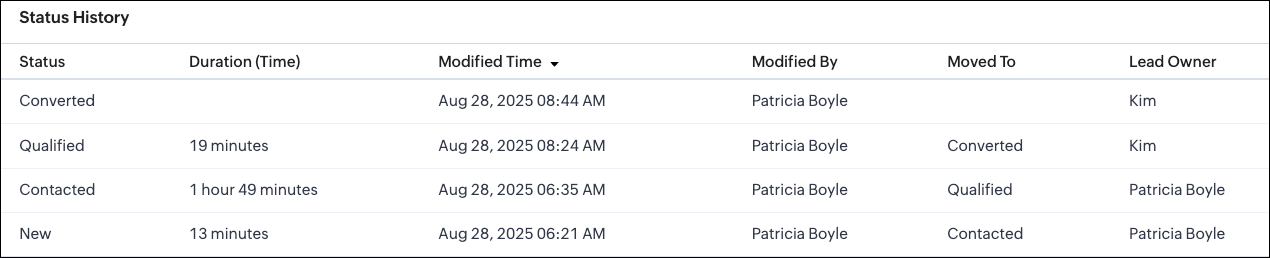
Sample Response via API
Whenever a picklist option changes, the system creates a new record in the related list module. In this example, Status History is the related list module. The sample response below shows how a particular change looks when retrieved using the Get Records API.
Request URL : {{api-domain}}/crm/v8/Status_History/5725767000007739323
Request Method : GET
Sample Response
{ "data": [ { "Status": "Contacted", "$approval": { "delegate": false, "takeover": false, "approve": false, "reject": false, "resubmit": false }, "Modified_Time": "2025-08-28T06:35:15-07:00", "$currency_symbol": "$", "$field_states": null, "$review_process": null, "$editable": true, "Duration_Time": "6568847", //The system stores the duration in milliseconds. "$sharing_permission": "full_access", "Lead_Owner": { "name": "Patricia Boyle", "id": "5725767000000411001" }, "Moved_To__s": "Qualified", "$orchestration": false, "Last_Activity_Time": "2025-08-28T08:24:44-07:00", "Full_Name": { "name": "Zylker", "id": "5725767000007735001" }, "Modified_By": { "name": "Patricia Boyle", "id": "5725767000000411001", }, "$review": null, "$process_flow": false, "$in_merge": false, "id": "5725767000007739350", "$approval_state": "approved", "$pathfinder": false, "$zia_visions": null } ] } |
Note :
- You can select up to 10 fields in total, with a maximum of 5 user fields for all modules except Deals.
- Encrypted fields cannot be specified.
- In the Deals module,
- History tracking is enabled by default for the Stage picklist field.
- You cannot enable history tracking for any other picklist field in the Deals module.
- You can only update the existing Stage picklist field using the Update Custom Field API.
- You can add up to 6 followed fields, with a maximum of 5 user fields.
We hope this post helps you confidently manage picklists and track their history in Zoho CRM. Try it out, and let us know your experience in the comment section or reach out to us at support@zohocrm.com
Stay tuned for more insights in our upcoming Kaizen posts!
Cheers!

Previous Kaizen : Kaizen# 204 - Answering Your Questions - Perform Field Updates before Blueprint transition via Client Script | Kaizen Directory : Home
Related Links :
Access your files securely from anywhere
Centralize Knowledge. Transform Learning.
All-in-one knowledge management and training platform for your employees and customers.
New to Zoho Recruit?

Zoho Developer Community
New to Zoho LandingPage?
Zoho LandingPage Resources
New to Zoho Survey?
New to Zoho CRM Plus?
Deliver unforgettable customer experiences
New to Zoho CRM Plus?
Deliver unforgettable customer experiences
New to Zoho Marketing Plus?
Everything you need to run your marketing
New to Zoho Marketing Plus?
Everything you need to run your marketing
New to Bigin?





Topic Participants
Subramanian K
Sticky Posts
Kaizen #198: Using Client Script for Custom Validation in Blueprint
Nearing 200th Kaizen Post – 1 More to the Big Two-Oh-Oh! Do you have any questions, suggestions, or topics you would like us to cover in future posts? Your insights and suggestions help us shape future content and make this series better for everyone.Kaizen #226: Using ZRC in Client Script
Hello everyone! Welcome to another week of Kaizen. In today's post, lets see what is ZRC (Zoho Request Client) and how we can use ZRC methods in Client Script to get inputs from a Salesperson and update the Lead status with a single button click. In thisKaizen #222 - Client Script Support for Notes Related List
Hello everyone! Welcome to another week of Kaizen. The final Kaizen post of the year 2025 is here! With the new Client Script support for the Notes Related List, you can validate, enrich, and manage notes across modules. In this post, we’ll explore howKaizen #217 - Actions APIs : Tasks
Welcome to another week of Kaizen! In last week's post we discussed Email Notifications APIs which act as the link between your Workflow automations and you. We have discussed how Zylker Cloud Services uses Email Notifications API in their custom dashboard.Kaizen #216 - Actions APIs : Email Notifications
Welcome to another week of Kaizen! For the last three weeks, we have been discussing Zylker's workflows. We successfully updated a dormant workflow, built a new one from the ground up and more. But our work is not finished—these automated processes are
New to Zoho TeamInbox?
Zoho TeamInbox Resources
Zoho CRM Plus Resources
Zoho Books Resources
Zoho Subscriptions Resources
Zoho Projects Resources
Zoho Sprints Resources
Qntrl Resources
Zoho Creator Resources
Zoho CRM Resources
Design. Discuss. Deliver.
Zoho Show Resources

Get Started. Write Away!
Writer is a powerful online word processor, designed for collaborative work.
Zoho CRM コンテンツ
-
オンラインヘルプ
-
Webセミナー
-
機能活用動画
-
よくある質問
-
Ebook
-
-
Zoho Campaigns
- Zoho サービスのWebセミナー
その他のサービス コンテンツ
Nederlandse Hulpbronnen

ご検討中の方
Recent Topics
Fetch ALL items from Inventory and send to Google Sheet using Flow
The title says it all -- I want to fetch the Item name, SKU, Purchase rate, and Sales rate for ALL items in Zoho Inventory and have them populate a tab in an existing Google Sheet. I have already successfully made this work for one item, so the flow isWhy Document Integrity Matters at Every Stage of the Contract Lifecycle
Contracts are legal records that must stay authentic and traceable from creation to expiry or termination. In Zoho Contracts, several design decisions focus on protecting the integrity of every document. These measures ensure that no important detailsaffichage pièces jointes impossible
Bonjour, aujourd'hui je n'arrive pas à afficher ni à télécharger les pièces jointes dans ZOHO CRM. J'utilise Chrome, j'ai vidé les caches et les cookies. Mais cela ne change rien. Merci de votre aideReminder to renew subscription.
Whenever I try to add to one of my notes a " renew your subscription" window pops out and won't Close disallowing me to edit. Why should I renew my subscription on an application with at best such bugs and at worse such underhanded ways to force renFields not coming through, not pulling data
Forgive the noviceness of my vocabulary. I am in Zoho flow connecting CRM and Projects. When an opportunity hits a certain stage, it will create the project in Projects, and bring in data from the opportunity. Everything is working, except for two fieldsSmartsheet Integration
Has any in the community been able to integrate Zoho Desk with Smartsheets using Zoho Flow? I am trying to get the Smartsheet Row ID based on ticket data and cannot find documentation on the Get Row function for Smartsheet. It is asking for a Query StringCRM Campaign - how to mass remove contacts?
Does anyone have a solution for removing all contacts from a CRM campaign. Seems that one by one is the only option.Send out follow-up email in the same thread (threaded conversations in individual emails) from Zoho CRM
Hi, I'm new to Zoho. I'm trying to send individual emails to my leads one by one. And I'll send out follow up email if I don't hear back from them later. However, instead of sending a new email, I want to reply in the same email thread so that the recipientsCadence Support in Zoho Vertical Studio
We would like to know whether it is possible to create and configure Cadences in Zoho Vertical Studio, similar to the Cadence feature available in Zoho CRM. Please confirm if Vertical Studio supports creating cadences for modules and users, and whetherRemoving "Products" as mandatory field from Sales Order creation page
Hello, friends According to our workflow, we should: 1) create Sales Order (Stage "New") 2) call and discuss the Products with a customer (Stage "Communication") 3) add the Products to the Sales Order during the call However, "Products" is mandatory toZoho Books says "The customer "Hakimuddin P A Ali" already exists. Please specify a different name.""
One of my transaction is not getting posted from Stripe to Zoho books. I already checked in Zoho books that there is no customer already present in Zoho books with the same name (as the error mentions) I already raised this complaint on Zoho flow portal,Is it possible to automate a file to be directly uploaded to a specific subfolder in Zoho Workdrive?
I am establishing a workflow so that when a new task is marked "complete", the document submitted in the task (under the "Documents" tab) is automatically uploaded to a specific subfolder in the associated WorkDrive for the project. However, the dilemmaSteuerberater der Zoho benutzt in Deutschland
I write in English because the issue is related to German regulations. Wir sind ein Unternehmen, welches aktuell keine Pflicht zur doppelten Buchführung hat. Aktuell bucht unser Steuerberater jeden Beleg, auch unsere Auslagen. Wir würden dies gerne selbstWhy are some folders not showing up as an action trigger in Zoho Flow?
I am currently working on a flow that automates the process of creating a folder in WorkDrive once a Task List is created. When I am selecting a destination for the folder, some projects are not showing up. I intend to create a folder within a specificGetting Date from PostgreSQL error
I am pulling data from PostgreSQL table into a CRM record via FLOW but the field is coming out empty. Need some suggestions: Field Type in CRM: Date/Time Field value in PostgreSQL: 2024-12-05 21:06:32.479 Field value in FLOW "Fetch Row": created : "2024-12-05T21:06:32.479382000",Zoho Flow to SendOwl API error
SendOwl is listed in the apps list of Zoho Flow. When trying to connect through the API with valid key and secret, the error given is: SendOwl says "HTTP Basic: Access denied" It seems Zoho doesn't connect via HTTPS. I've already tried using webhooks,decisions based on content of a ticket
Hi, I need to create a flow that sends automated email based on the content of a ticket in zoho desk. I have certain tickets that are formatted in a particular way, and contain certain keywords. How can I filter (based on decisions) the tickets basedNewline Character "\n" parsing problem in webhooks
Hi there, I am facing an issue in Zoho Flow (maybe a general issue or maybe only in Zoho Flow): I have this function: void sendListWebhook(string url, list array) { for each arrayElement in array { result = invokeurl [ url :url type :POST parameters:arrayElement.toString()One Company, multi branches, multi warehouses and I need to manage this in one organization
Dears, I'm a new user to zoho solutions, however I found a lot of persons giving a nice feedback about it also a lot of good reviews. I though why we try to move to it in our company. I'm not sure if Zoho could give me all what I need or not that's why I'm going to post in this topic most of the things I know about managing our business to let you ,as zoho experts, tell me if Zoho will meet my business requirements or not. First of all we are a flowers and landscaping company we have like 6 toMigration Evernote
Bonjour Apres plus d'une dizaine d'année passer avec evernote j'ai décidé de franchir le pas . J'ai débuté par migrer mes notes vers zoho et depuis la migration est bloquée. Impossible d'avoir un retour du support malgré plusieurs mails et tentative d'appelPushing GCLID info from Gravity Forms to ZohoCRM
We are switching to Gravity Forms from Zoho Forms and I cannot find any good info on how to make sure my GCLID tracking info is pushed through to the CRM through my new forms. There was an article in the documentation about placing something within theOn Zoho Flow, Record deleted trigger from Zoho Creator
On creating flow in Zoho Flow, when we select app Zoho created, it provides 3 trigger options - Record created, Record updated and Record created or updated We need trigger on "Record Delete" as well, We have a use case to fire our system api if recordZoho Flow Switch On Not Working
I have created a flow which is when the mailbox address received the email that meet the condition will auto fetch the contact, account and finally create the ticket by using Zoho Desk. When I do a test and debug on my flow it work well as what I expectMS Teams Flow Integration Question
Where can I find the chat ID for the "Post message to chat" target?Zoho Flow - Access denied to recover recording from call module - OpenAI
Hi, I am trying to build a Flow to recover recoding when a new call is saved in my CRM. I have integrated my CRM with ringcentral and the recordings are saved in the event. Trigger: When new module entry Step 2: Fetch module entry (Zoho CRM says "permissionUnable to send price in big commerce from zoho flow.
I am creating a flow from zoho flow to create a product in zoho inventory and sending this to big commerce. But the problem is like when ever i send the price its getting error. it require decimal format value if i am sending ${trigger.sales_rate} theNot sending mail to new lead in zoho flow
I have created a flow in zoho flow and triggered an action to send email notification when the new lead is created but even after user entering the mail id the email is not going to themAccess query string from incoming webhook URL in Zoho Flow
I have a fairly straightforward use case, but cannot find anything conclusive on this subject. How can I simply access the query string of the incoming webhook request in Zoho Flow? I am attaching the Deal ID to the end of the request like: https://flow.zoho.com/762439902/flow/webhook/incoming?zapikey=1001.0dec2d7dd15080c464a13925275f0129.448c23ee219c545c89f5a178456cfc8b&isdebug=false&dealID=${Deals.DealUnable to access my Zoho forms account
For some days now, I haven't had access to my Zoho Forms account. I keep getting an error that says, "You are an inactive user in your organization" via the mobile app and "You don't have permission to access this organization" via the web. I was removedIdentify Unused Deluge Functions in Zoho CRM
Hello Zoho Support Team, I would like to request a feature that helps administrators identify unused or rarely used Deluge functions in Zoho CRM. Currently, Deluge functions are distributed across different areas, and there is no centralized overviewUpdate on V2 API End-of-Life Timeline
Dear Users, Earlier this year, we shared the launch of the V3 APIs and requested users to migrate from the older V2 APIs by December 2025. We have received valuable feedback from our users and partners regarding their migration timelines. We are happyRun a workflow after record merge
Hello, We are wondering if there is a way to trigger a workflow after two records are merged? We have a sms service that use to text back and forth with Prospects and Contacts. To make it easy for our users, we automatically create them in this otherLive webinar | The Evolution of Zoho Show: 2025 Feature Recap
2025 has been a year of exciting updates and features for Zoho Show. From advanced design and formatting tools to smarter presentation delivery, enhanced collaboration, and AI-powered features—along with the launch of our desktop apps, Show has continuedBatch Tracking custom function
Hi fellow zoho users, We have our ecommerce site setup to shopify. I have some products I want to add batch tracking too, my only issue is that it breaks our shopify workflow (create sales order, invoice, payment, package) because it requires us to manuallyInclude Suggested Articles in New Ticket Email
When someone creates a new ticket, is there any way to include recommended knowledge base articles (like the ones Zia Suggests) in the email notification to the user? When they're waiting for a reply, it would be nice to have sent them some recommendedZoho Flow + QuickBooks Estimates – Line items not created from CRM subform
Hi everyone, I’m trying to create QuickBooks Estimates from Zoho CRM Quotes using Zoho Flow. I’m aware that Zoho Flow’s native “Create Estimate” action does not support multiple line items, so I followed the community guidance for Invoices using a customSAP S/4 HANA Integration via ZOHO Flow
Hi How do I change the SAP Client ID while creating a new connection ? MY client ID is 421. I believe the client id should be an input field for length 3 numbers rather then a drop down to select from a fixed set of values. ThanksVLOOKUP FUNCTION PROBLEM
Hello, i have a problem with the VLOOKUP function in my sheet http://public.sheet.zoho.com/public/tonimoreno/indicemasacorporal2 in cell D2. This function doesn't work correctly and always returns the last content of the range. Can you help me?Zoho Flow Completely Broken?
Since December 13th, 100% of our flows have stopped working completely. Nothing is working or triggering??? I called support & sat on the line with them for 2 HOURS until they finally concluded it was a back-end problem on their end?? Now i'm callingPrint / Export full Dashboard page
Hello Zoho team, It is currently only possible to print/export one component of a dashboard at a time. Requesting the option to print/export a full dashboard page with all components to a pdf or picture. Doing through the browser doesn't give good results.Next Page