Maintain steady traffic to your domain: How Domain Aliasing helps

Maintain steady traffic to your domain: How Domain Aliasing helps

Consider this scenario: An organization has its primary domain as administrator.com. Now it wants to shorten its domain to admin.com because it's simpler and easier to remember.

However, changing the domain completely can cause the following problems:
  1. Emails sent to registered but not aliased domains will be rejected with "User not found" error.

  2. Administrators must create and maintain separate, independent accounts across different domains, instead of having a single unified user account.

  3. Having different domains leads admins to manage different consoles, increasing the chances of misconfiguration.

  4. Customers may be confused about your brand's authenticity.

  5. Domains that are not managed or aliased are prime targets for cyber attackers to use similar domains for phishing and cause reputational damage to your organization.

This is where Domain Aliasing comes in handy. Instead of replacing the original domain, you can add the new domain (admin.com) as an alias to your existing primary domain (administrator.com). This allows emails sent to the alias domain to reach the corresponding accounts in your primary domain without creating new mailboxes.


Why is it important to have Domain Aliasing?

Domain Aliasing is the process of mapping a new domain as an alias to the already configured domain in your email service provider.

Uses of Domain Aliasing extend to:

Company rebranding - Domain Aliasing allows you to switch to a new domain without losing emails from the old one. Emails sent to the old domain will still arrive in your inbox, so customers don’t face any disruption during the change.
Maintain a single inbox for multiple domains - With Domain Aliasing, emails sent to different domain names are delivered to the same inbox under primary domain. For example, messages sent to user@admin.com are sent to user@administrator.com.
Reduces administrative overhead and challenges - Domain Aliasing allows admins to manage multiple domains under a single console, thereby reducing the overall administrative work and making settings configuration easier.
Support separate domains for marketing and campaign - You can set up campaign-specific or promotional domains as aliases, such that they still point to your main domain. This allows anyone visiting or emailing to your campaigning domain to end up in your primary system, thereby providing flexibility for marketing without maintaining a separate inbox.

How to configure Domiain Aliasing from Zoho Mail Admin Console?
  1.  Log in to Zoho Mail Admin Console.

  2. Under Domains section, select a domain for which you have to add Domain Aliasing.
    Note:
    Ensure that you have already added the domain and setup in Zoho Mail.

  3. Navigate to Domain Aliasing under Advanced Settings.

  4. Select +Add and select a domain that you wish to add as an Alias domain under Add Domain Alias dialog box.
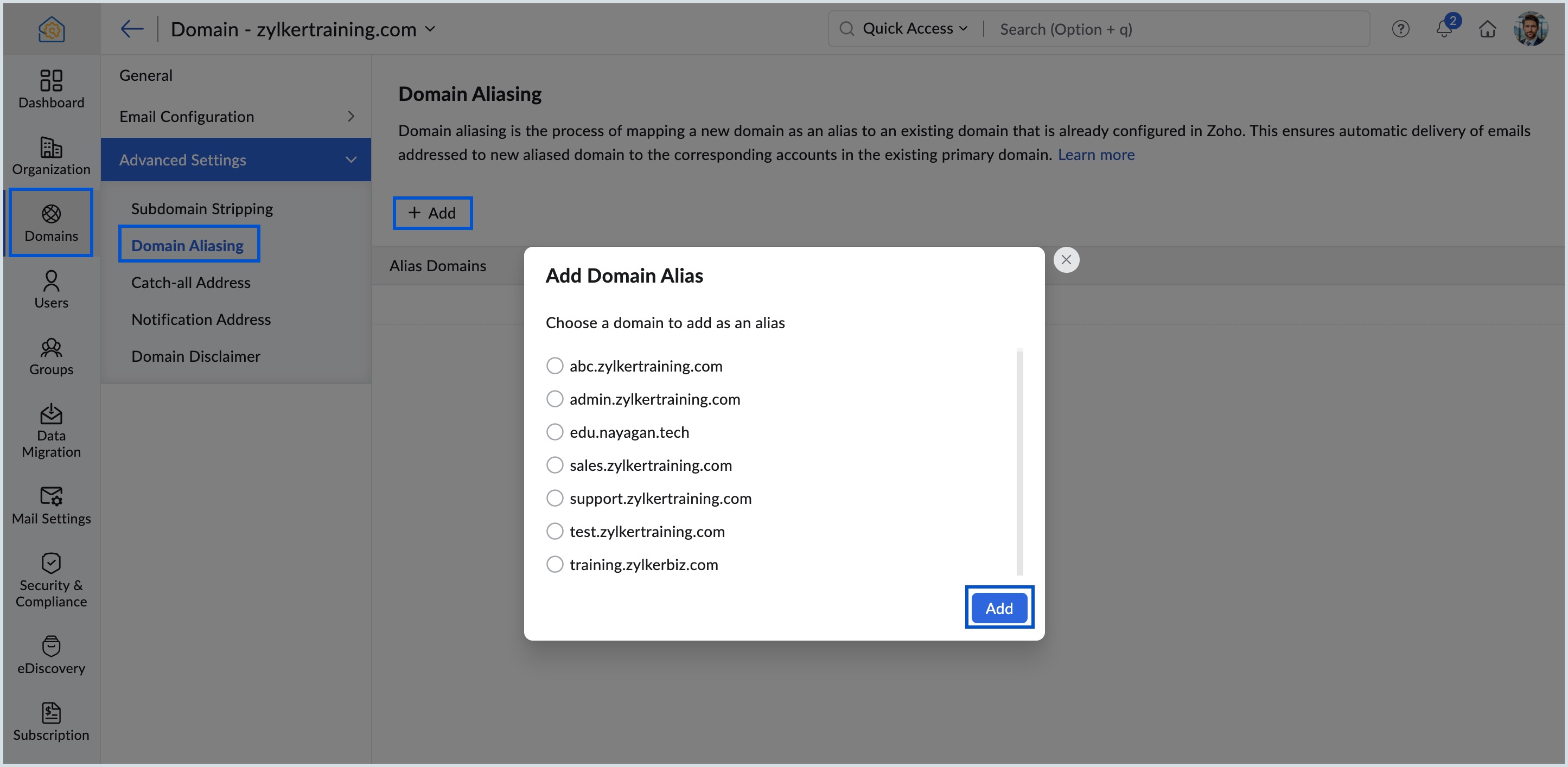
    Add Domain Alias

  5. Review the warning message that pops up carefully and click Proceed.
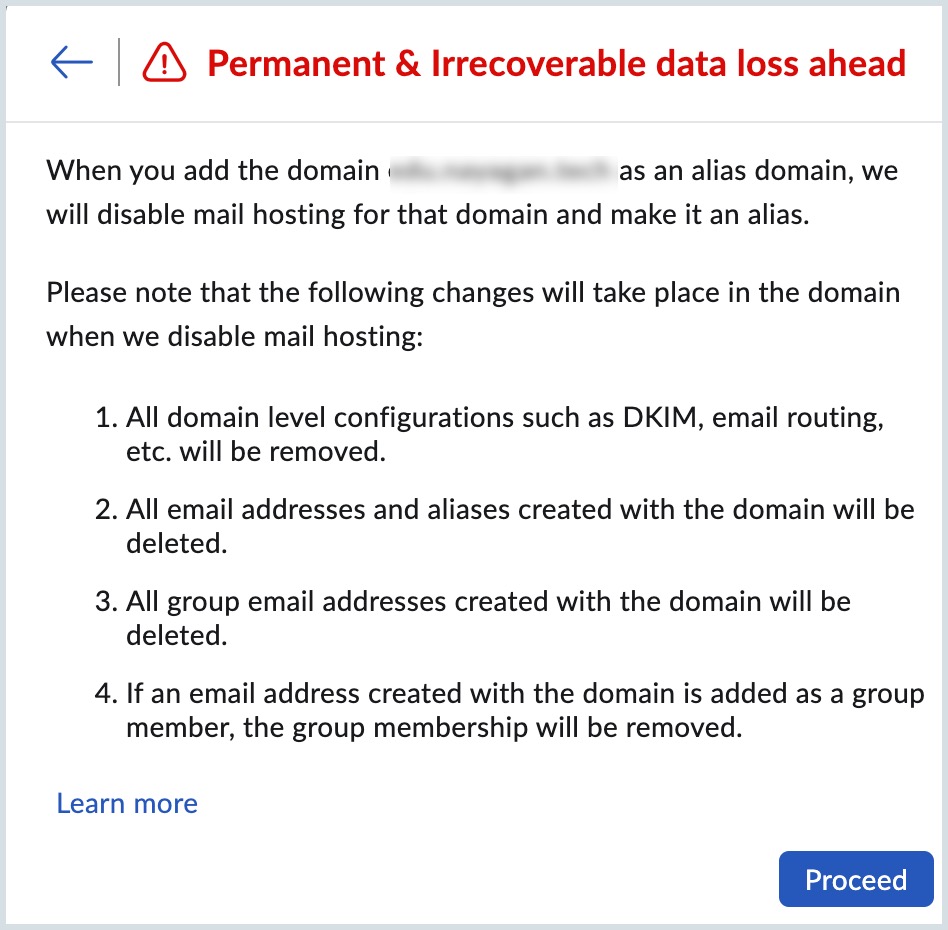
    Warning Message

Once done, the alias domain will be linked to the primary domain and emails sent to alias domain will be delivered to corresponding primary domain accounts.

View detailed steps in the Domain Aliasing help page.

By configuring Domain Aliasing, you can maintain a single inbox for multiple domains, make stronger branding, and increased visibility for your organization.


    Access your files securely from anywhere

        All-in-one knowledge management and training platform for your employees and customers.


                              Zoho Developer Community


                                                    • Desk Community Learning Series


                                                    • Digest


                                                    • Functions


                                                    • Meetups


                                                    • Kbase


                                                    • Resources


                                                    • Glossary


                                                    • Desk Marketplace


                                                    • MVP Corner


                                                    • Word of the Day


                                                    • Ask the Experts


                                                              • Sticky Posts

                                                              • Mailbox delegation - A secure way to enable collaboration

                                                                Admins often encounter scenarios where a user needs another team member to access and manage their mailbox during extended leave, role transitions, or while handling high email volumes. In such situations, ensuring business continuity without sharing
                                                              • Email Forwarding: Maintain business continuity

                                                                As an administrator, ensuring uninterrupted email communication is critical when a role-based employee is unavailable due to extended leave or a temporary role change. Emails from customers, partners, and internal teams must continue to be received and
                                                              • Maintain steady traffic to your domain: How Domain Aliasing helps

                                                                Consider this scenario: An organization has its primary domain as administrator.com. Now it wants to shorten its domain to admin.com because it's simpler and easier to remember. However, changing the domain completely can cause the following problems:
                                                              • Facing email delivery issues? Verify your domain's DNS records

                                                                Have you ever wondered why your legitimate emails are landing in the recipient’s spam folder? Or been surprised to see emails sent from your registered domain getting rejected by recipient email servers? Why does this happen? In most cases, this happens
                                                              • Email Administrators! Join our tips & troubleshooting series

                                                                Greetings to all the admins out there! This announcement is exclusively for you. As we step into the New Year, we’re excited to start a dedicated series of admin-specific tips curated to support you. These posts will help you overcome everyday challenges


                                                              Manage your brands on social media


                                                                    Zoho TeamInbox Resources


                                                                        Zoho CRM Plus Resources

                                                                          Zoho Books Resources


                                                                            Zoho Subscriptions Resources

                                                                              Zoho Projects Resources


                                                                                Zoho Sprints Resources


                                                                                  Qntrl Resources


                                                                                    Zoho Creator Resources


                                                                                        Zoho CRM Resources

                                                                                        • CRM Community Learning Series

                                                                                          CRM Community Learning Series


                                                                                        • Kaizen

                                                                                          Kaizen

                                                                                        • Functions

                                                                                          Functions

                                                                                        • Meetups

                                                                                          Meetups

                                                                                        • Kbase

                                                                                          Kbase

                                                                                        • Resources

                                                                                          Resources

                                                                                        • Digest

                                                                                          Digest

                                                                                        • CRM Marketplace

                                                                                          CRM Marketplace

                                                                                        • MVP Corner

                                                                                          MVP Corner


                                                                                            Design. Discuss. Deliver.

                                                                                            Create visually engaging stories with Zoho Show.

                                                                                            Get Started Now


                                                                                              Zoho Show Resources

                                                                                                Zoho Writer

                                                                                                Get Started. Write Away!

                                                                                                Writer is a powerful online word processor, designed for collaborative work.

                                                                                                  Zoho CRM コンテンツ


                                                                                                    Nederlandse Hulpbronnen


                                                                                                        ご検討中の方


                                                                                                                • Recent Topics

                                                                                                                • Scale up your writing style with content analysis tool in Knowledge Base

                                                                                                                  Hello everyone, Sometimes writers may have strong knowledge about the subject but may find it challenging to articulate clearly or produce comprehensible, jargon free content. To make the process easier and to ensure consistent, high-quality articles,
                                                                                                                • Zoho Books "Update" Trigger for Zapier?

                                                                                                                  Hi Zoho Team, I've been in talks with Zapier about using their services to connect my Zoho Books account to various apps, but I require an additional trigger beyond the "New" trigger. I require an "Update" trigger, which will allow me to filter and create Zaps only when certain conditions are fulfilled on the Zoho Books end before I automate a separate app. Specifically this will help me create invoices in QuickBooks Online only when payments are recorded in Zoho Books, rather than when a new invoice
                                                                                                                • How to prevent editing of closed tickets in Zoho Desk?

                                                                                                                  I would like to confirm whether it is possible to completely prevent agents from editing tickets once their status is set to Closed. Is there any configuration, permission, or best practice in Zoho Desk to ensure that closed tickets remain read-only and
                                                                                                                • Zoho Desk Limitations

                                                                                                                  Good day, all, I would like to know whether others share my frustration with some of Zoho's limitations. Don't get me wrong, I like Desk (and I also have a subscription for Analytics), I have been with them for close to 10 years, and unfortunately, I
                                                                                                                • New Mandatory One-Click Unsubscribe Link Overshadowing Custom Unsubscribe Link

                                                                                                                  I was recently informed by Zoho CRM Support that they are now mandated by the large email service providers like Google and Yahoo to provide a one-click unsubscribe option in the header (not the body) of all mass emails. I have a custom unsubscribe link
                                                                                                                • how to undoreconciled transaction

                                                                                                                  how to undo reconciled transaction
                                                                                                                • Zoho Sign for Zoho Projects

                                                                                                                  Documents authorization and validation with signature is now easier in project management with Zoho Projects' Zoho Sign extension. Sign documents or send them for signatures directly from tasks and issues using Zoho Sign extension in Zoho Projects. Extension
                                                                                                                • Deluge Learning Series – Best Practices in Deluge | December 2025

                                                                                                                  We’re excited to bring you the next session of the Deluge Learning Series, focused entirely on writing cleaner, faster, and more reliable Deluge code. In this edition, we’ll dive deep into the essential best practices every Deluge developer should follow
                                                                                                                • Associate a Contact to a Campaign using deluge?

                                                                                                                  If I want to add one record to another related list, which zoho function do I use? zoho.updateRelatedRecord is not it I don't think.  I simply want to take a "Contact" and associate it to a "Campaign" using deluge.  Can anyone help? contactId = 5122008000000796037;
                                                                                                                • Add "Groups" above "Users" in the Zoho Forms Left Menu

                                                                                                                  Hi, We have Groups but you have to go to a Form and Share or use the Directory App to manage them, please add "Groups" above "Users" in the Zoho Forms Left Menu so you can manage them in 1 place within Zoho Forms too. Thanks Dan
                                                                                                                • Zoho Books | Product updates | October 2025

                                                                                                                  Hello users, We’ve rolled out new features and enhancements in Zoho Books. From iOS 26 updates to viewing reports as charts, explore the updates designed to enhance your bookkeeping experience. Zoho Books Updates for Apple Devices At WWDC 2025, Apple
                                                                                                                • Adding Taxes to paid consultations in Zoho Bookings

                                                                                                                  I created a 'paid' consultation under Zoho Booking and integrated it with payment gateways for online/instant payment before a booking is done. How can I add 'taxes' to the price of consultation? I can add taxes to other Zoho apps (liks Books, Checkout,
                                                                                                                • Zoho CRM Reports Module on Mobil App

                                                                                                                  I have the mobile app and the reports module doesn't appear in the sidebar for some reason. I saw a Youtube video where the user had the Reports module on mobile. Is there a setting to show it on mobile? Thanks.
                                                                                                                • Inquiry on Help Centre Tab Customisation

                                                                                                                  Hi Zoho team, I’m wondering if it’s possible to further customise the Help Center tabs, specifically the descriptions under Knowledge Base, Community, and Tickets. While the current setup allows customising tab names, being able to tailor the descriptions
                                                                                                                • Passing a form object to a function

                                                                                                                  Suppose I have a sort_order field in multiple tables and I want to increment it by +1 onCreate of a new record. Is there a way to pass the form object as an argument into the function to keep things DRY? The following function from Zia works, but I'd
                                                                                                                • Can you copy and paste a page within a form?

                                                                                                                  I have been looking at trying to copy/duplicate a whole page within a form. I can't see how I can do this without having to add all the data in again. This is very time consuming. Any help would be great.
                                                                                                                • Unable to sort as Descending order

                                                                                                                  Trying to change the sort order for a lookup field (checkboxes) from Ascending to Descending and keep getting an error in Deluge that the order must be Ascending Did anyone ran into this? Thanks Eyal
                                                                                                                • How do I copy an email message to one or more other folders?

                                                                                                                  I can move a message to another folder using the "move to" option but I can't figure out how to copy a message. 
                                                                                                                • New feature request: Allow copy of email message to another folder

                                                                                                                  Hello Zoho team, This is a suggested new feature to allow copy an email message to either another folder or the same folder. Within the same Zoho account. This is not a support request about "label". This is a suggested new feature to allow copies of
                                                                                                                • Creator Simplified #11: Create a custom button to download files

                                                                                                                  Hey there! This time, let's see how to create custom buttons to download the files uploaded in the file upload field. Sample use-case A training app has a module that provides the materials for all the available courses. Students can click on the corresponding
                                                                                                                • Hide horizontal lines at bottom of form

                                                                                                                  Hi I have a page with 3 forms embedded in html snippets. On each of the forms I can hide the submit button easily but I am left with the horizontal lines that bound that section and I cannot figure out to remove them (see below for the two sets of horizontal
                                                                                                                • Autosaving of Form Field

                                                                                                                  HI can anyone suggest a way of autosaving or simulating an autosave function for a specific field in a form. The story is as follows. I have a bunch of technicians who write notes on how they do a repair. Sometimes they write for a couple of hours the troubleshooting process. If they click incorrectly, press ESC, Cancel or the browser crashes the information is lost which can be heartbreaking so my guys use notepad and then copy the information in. The only way around this is to click submit on the
                                                                                                                • Ask the Experts 26: Brighten every customer interaction with Zoho Desk all year long

                                                                                                                  Hello everyone, Greetings and welcome to Ask the Experts 26. As we wrap up 2025, we are excited to invite you to the 26th episode of our Ask the Expert series. 🎄The Merry Metrics Edition = Best of Zoho Desk [Best Practices + Holiday Automation + Year-End
                                                                                                                • Pricing calculator

                                                                                                                  Alright, so I'm trying to create a pricing calculator/pricing report generator to use in a cabinet shop. I did all the logic and such, and the calculator works. I have a few other things that I would need it to be able to do though, I'll do my best to
                                                                                                                • Bug Details

                                                                                                                  In the Bug detail the milestoneid is missing
                                                                                                                • Is there a way to make a button scroll down?

                                                                                                                  Looking to have a button on a landing page scroll down to another section on the page. Any recomendations outside of coding?
                                                                                                                • Stop completed task lists from disappearing?

                                                                                                                  Is there any way to stop projects from making tasks lists disappear when all the tasks in the list are completed? That's one of those little things where we're constantly fighting the product. For instance we have some projects which are ongoing - no start and end date. We use Kanban view to show the various task lists. We don't want the kanban list to disappear every time the items on it happen to be closed out. Thanks
                                                                                                                • Allow customers to choose meeting venue and meeting duration on booking page

                                                                                                                  My business primarily involves one-to-one meetings with my clients. Given the hybrid-work world we now find ourselves in, these meetings can take several forms (which I think of as the meeting "venue"): In-person Zoom Phone call I currently handle these
                                                                                                                • Booking outside of scheduled availability

                                                                                                                  Is there a way for staff (such as the secretary) to book appointments outside of the scheduled availability? Right now to do this special hours must be set each time. There should be a quicker way. Am I missing something?
                                                                                                                • Operation Questions.

                                                                                                                  Hello, I hope you are well. To explain a little, we are a company that sells services and products with a technical team responsible for installation and maintenance. Zoho FSM can be useful for the technical team, namely for the technical coordinator
                                                                                                                • Update date & time when a cell is edited

                                                                                                                  Hi All, I am desiring to have a cell update with the current date and time when another cell is edited. Any ideas?  Thank you
                                                                                                                • Add "Groups" to "Share With" on Reports & All Entries

                                                                                                                  Hi, On Forms we can share Publicly, with Specific Users And/Or Specific Groups or All Users. With Reports and All Entries we lack the "Groups" option, please add this as with many users this saves a lot of work. Thanks Dan
                                                                                                                • Add Pause / Resume Option to Zoho Quartz Recordings

                                                                                                                  Hi Zoho Team, We would like to request an enhancement to Zoho Quartz recordings: the ability to pause and resume an ongoing recording. Current Limitation: At the moment, when recording an issue with Zoho Quartz, the recording continues even when we are
                                                                                                                • Custom Fields Not Showing Up in Invoice PDF Template Document Information

                                                                                                                  I have added 2 custom fields under Sales > Invoices > Manage Custom Fields. They are set to show in all PDFs. However when I am editing my Invoice PDF template, i do not see the custom fields under Document Information.
                                                                                                                • ZOHO Books

                                                                                                                  Hi there, Why after I upgrade my Zoho invoice > Books then i wanted to add plugin which i cannot do. Please advise.
                                                                                                                • How is Your eCommerce Experience w/Zoho Inventory?

                                                                                                                  First off, I'm SUPER grateful for the advent of Zoho Inventory and now the Zoho Commerce Suite. Overall, Inventory is a great product, especially for customers without an eCommerce presence. For eCommerce companies (especially those shipping more than ~10 packages/day), however, there are certain drawbacks that keep my clients from moving over to Zoho Inventory: Cons: 1. Invoice + Package Creation from Shopify/Other eCommerce Integrations: Zoho Inventory makes the somewhat perplexing decision to
                                                                                                                • Simplify Mass Replies with Predefined Templates and Snippets

                                                                                                                  Hello everyone, We are happy to introduce a new enhancement to Mass Reply that helps agents respond to customers quickly and consistently. With the addition of Email Templates and Snippets in the reply window, agents can use predefined messages while
                                                                                                                • Mapping custom fields from one module to another

                                                                                                                  I have a custom field, "Subscription Period" that appears as a required field in every Opportunity (Potential). I want that field to appear on any Quotes derived from that Opportunity (and have created a custom field of the same name in Quotes for that
                                                                                                                • The Social Wall: November 2025

                                                                                                                  We’re nearing the end of the year, and the holiday season is officially kicking in! It’s that time when sales peak and your social media game needs to be stronger than ever. We’re back with exciting new updates across AI, analytics, and the mobile app
                                                                                                                • How to update Multi File upload field

                                                                                                                  Assume that i have a multi file upload field,how can i update the same field again?
                                                                                                                • Next Page


