Nouvelle fonctionnalité Zoho Bigin : découvrez Team Pipelines
Bonjour à tous !
Il y a quelques jours, nous vous avions annoncé l'arrivée de la nouvelle version de Bigin.
Dans cet article nous avions fait le tour des nouvelles fonctionnalités développées pour booster la croissance de votre petite entreprise.
Aujourd'hui, nous abordons plus en détail la fonctionnalité la plus attendue de cette update : Team Pipelines.
Quel est l'intérêt de cette nouvelle mise à jour ?
Toute entreprise, petite ou grande, est caractérisée par de multiples opérations en contact avec la clientèle, telles que les ventes, le marketing ou le succès client.
En tant que propriétaire d'une petite entreprise, vous avez soit une équipe où chacun s'occupe de plusieurs opérations, soit des membres individuels qui s'occupent d'opérations spécifiques.
Idéalement, chaque élément d'information recueilli auprès de vos clients doit être ajouté à votre CRM afin que vous et votre équipe puissiez y accéder chaque fois que nécessaire.
En fin de compte, l'unification des informations sur les clients et la rationalisation de chaque élément de vos opérations quotidiennes deviennent la clé pour obtenir une vue panoramique sur vos clients et atteindre l'objectif difficile qui consiste à obtenir une source unique de vérité pour les données clients.
Actuellement, la plupart d'entre vous utilisent Bigin pour gérer leurs opérations de vente. Vous pouvez également renommer les modules, personnaliser les champs et les étapes de vos pipelines pour gérer des opérations autres que les ventes, comme l'accueil des clients, les études de cas marketing, la livraison des produits, etc.
Mais que se passe-t-il lorsque vous voulez gérer simultanément vos affaires, l'accueil des clients et la mise en œuvre, le tout dans le même compte Bigin ?
Ce que nous avons remarqué avec le système de pipeline actuel, c'est que la plupart des clients créent plusieurs comptes Bigin ou ont recours à d'autres outils tels que des feuilles de calcul, des logiciels d'assistance, etc. pour gérer les opérations de contact avec les clients autres que les ventes.
Mais dans de telles situations, les données de vos clients sont dispersées entre plusieurs outils, ce qui entraîne un manque de coordination entre les membres de votre équipe, avec pour conséquence un retard global dans les opérations et une expérience client amoindrie.
C'est pour remédier à ce manque d'unification que nous avons conçu Team Pipelines.
Présentation de Team Pipelines
Au cours du processus d'achat, vos clients s'adressent au service commercial, ce qui est généralement suivi dans le pipeline Deals. Si un contrat légal est impliqué dans la vente, il peut être géré par l'équipe juridique dans le pipeline juridique. Une fois l'affaire conclue, la livraison du produit peut être saisie dans le pipeline Delivery, et à chaque étape de ce pipeline, les clients peuvent être informés automatiquement de l'état de la livraison.
De même, une fois le produit livré, il peut y avoir d'autres étapes comme l'installation et l'activation qui peuvent être suivies dans les pipelines respectifs par les équipes.
Dans le parcours que nous venons de voir, au moins cinq personnes différentes travaillent ensemble pour offrir une excellente expérience aux clients.
Comment la nouvelle mise à jour va-t-elle vous aider ?
Avant Team Pipelines, aucun des membres de votre équipe n'aurait eu la visibilité des tâches et des opérations effectuées par les autres équipes. Ils auraient été obligés de s'appeler, de discuter ou de s'envoyer des e-mails, ce qui aurait rendu le parcours chaotique et inefficace pour vos clients.
À présent, avec Team Pipelines, les opérations de chaque équipe sont désormais visibles et accessibles à partir d'un seul compte Bigin. Il vous suffit de cliquer sur un contact pour connaître l'état de chaque activité associée à ce contact.
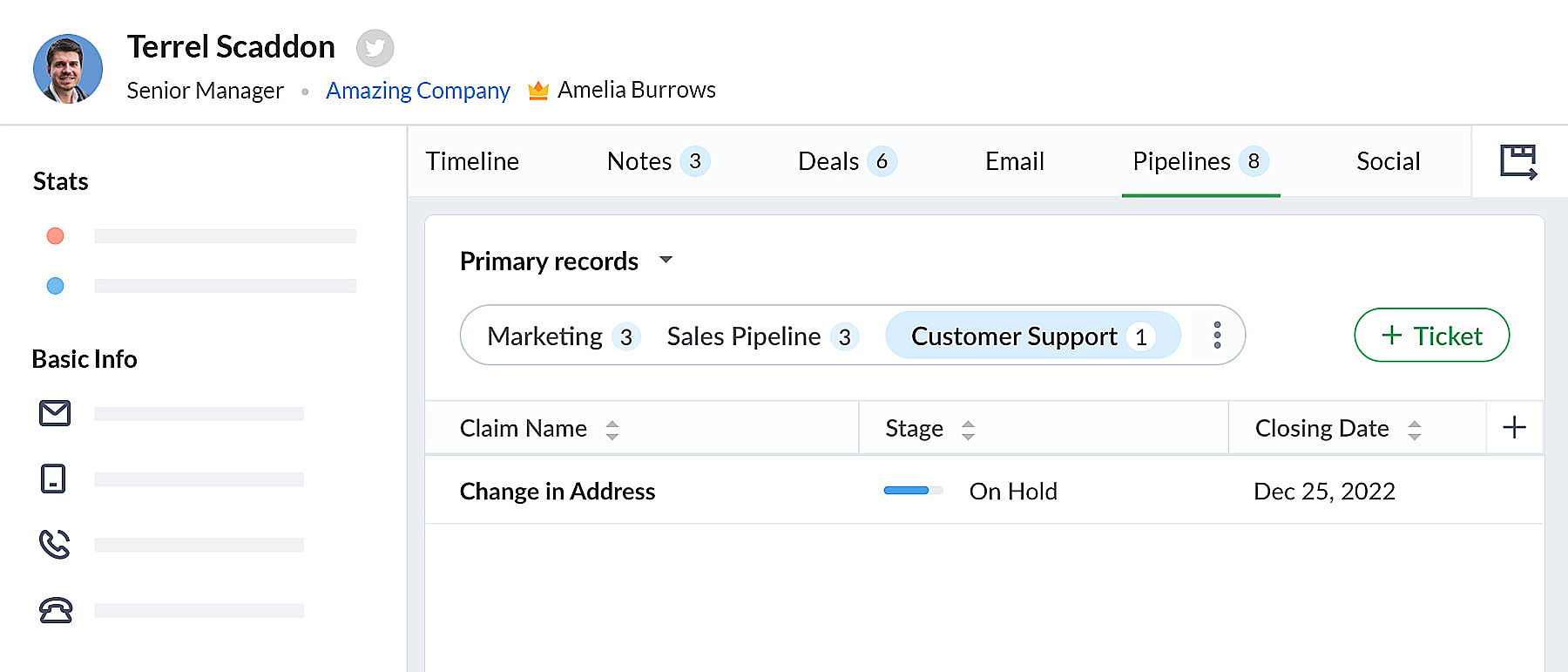 bigin pipeline
Team Pipelines et sous-pipelines : L'équipe idéale pour gérer les opérations uniques de vos clients
Au sein de chaque Team Pipelines, vous pouvez également créer différents sous-pipelines. Les sous-pipelines au sein d'un Team Pipelines ne diffèrent que par les étapes. Ainsi, au sein d'un Team Pipelines, si vous avez besoin de différents ensembles d'étapes pour différentes opérations, vous pouvez créer des sous-pipelines.
En d'autres termes, les sous-pipelines dans Bigin ne sont rien d'autre que la fonctionnalité multi-pipeline actuelle dont vous disposiez déjà.
Votre compte Bigin devient maintenant la source unique d'informations fiables sur vos clients. Il donne à tous les membres de votre équipe une vue à 360 degrés des informations sur les clients, leur permettant de gérer les relations et les interactions avec succès.
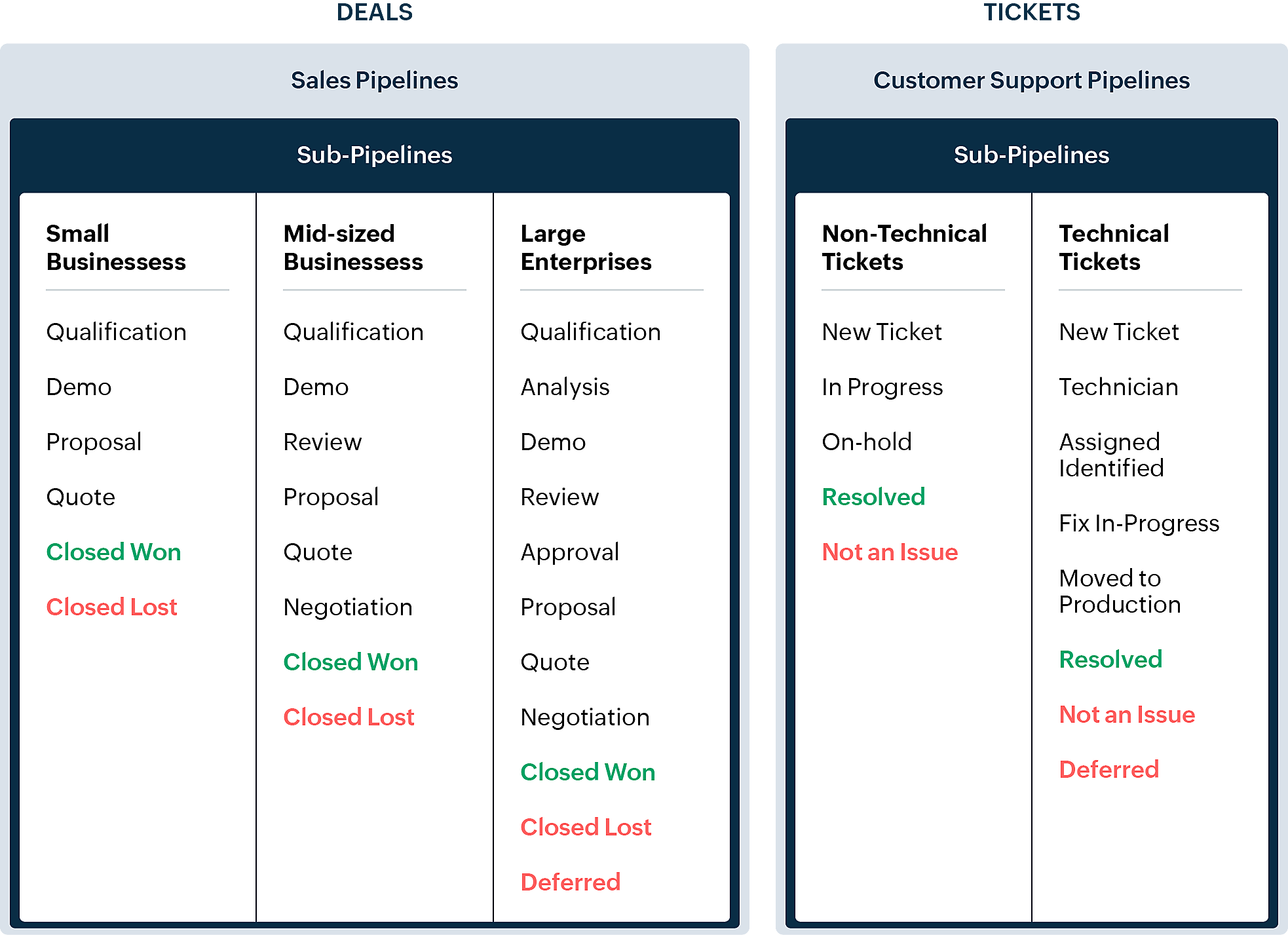
En quoi la nouvelle version est-elle différente de l'interface utilisateur Bigin existante ?
Pipelines est maintenant un module séparé dans Bigin. Là où il y avait auparavant les affaires/opportunités, vous avez maintenant les pipelines. Dans ce module, vous pouvez gérer plusieurs types d'enregistrements tels que les transactions, les tickets, les demandes, etc.
- Les anciennes versions des pipelines que vous avez créés précédemment seront disponibles en tant que sous-pipelines en bas à l'intérieur de chaque pipeline d'équipe.
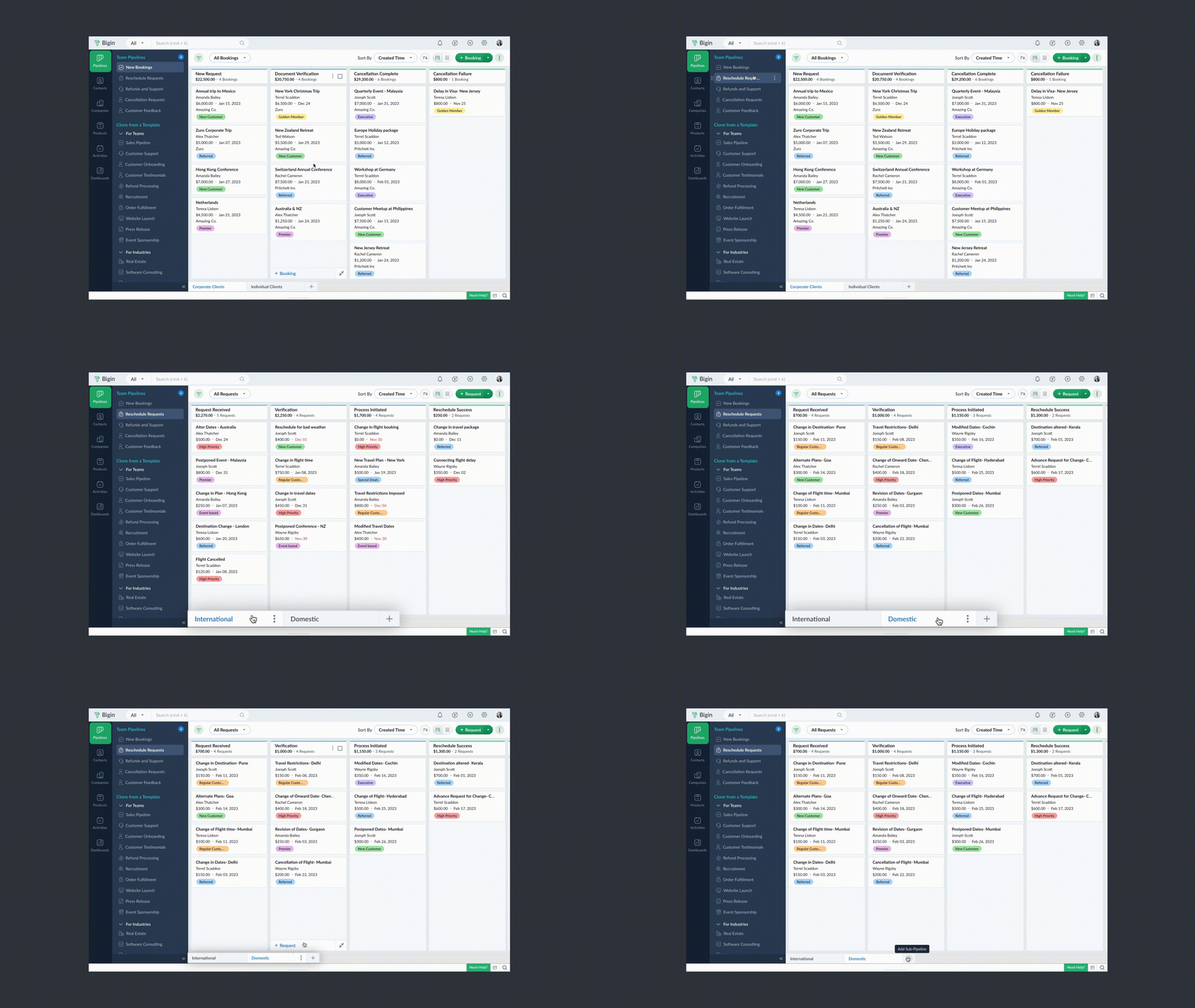
- Chaque pipeline d'équipe peut gérer un type d'enregistrement différent. Par exemple, vous pouvez gérer des transactions dans un pipeline de vente, des tickets dans un pipeline de support client, et ainsi de suite.
- Vous pouvez créer des pipelines à partir de zéro ou utiliser l'un des modèles proposés par Bigin.
- Vous pouvez rendre vos pipelines d'équipe extrêmement spécifiques aux opérations en leur donnant des noms pertinents, en choisissant les champs nécessaires, en ajoutant des étapes appropriées et en attribuant les bons profils d'utilisateurs pour accéder aux pipelines.
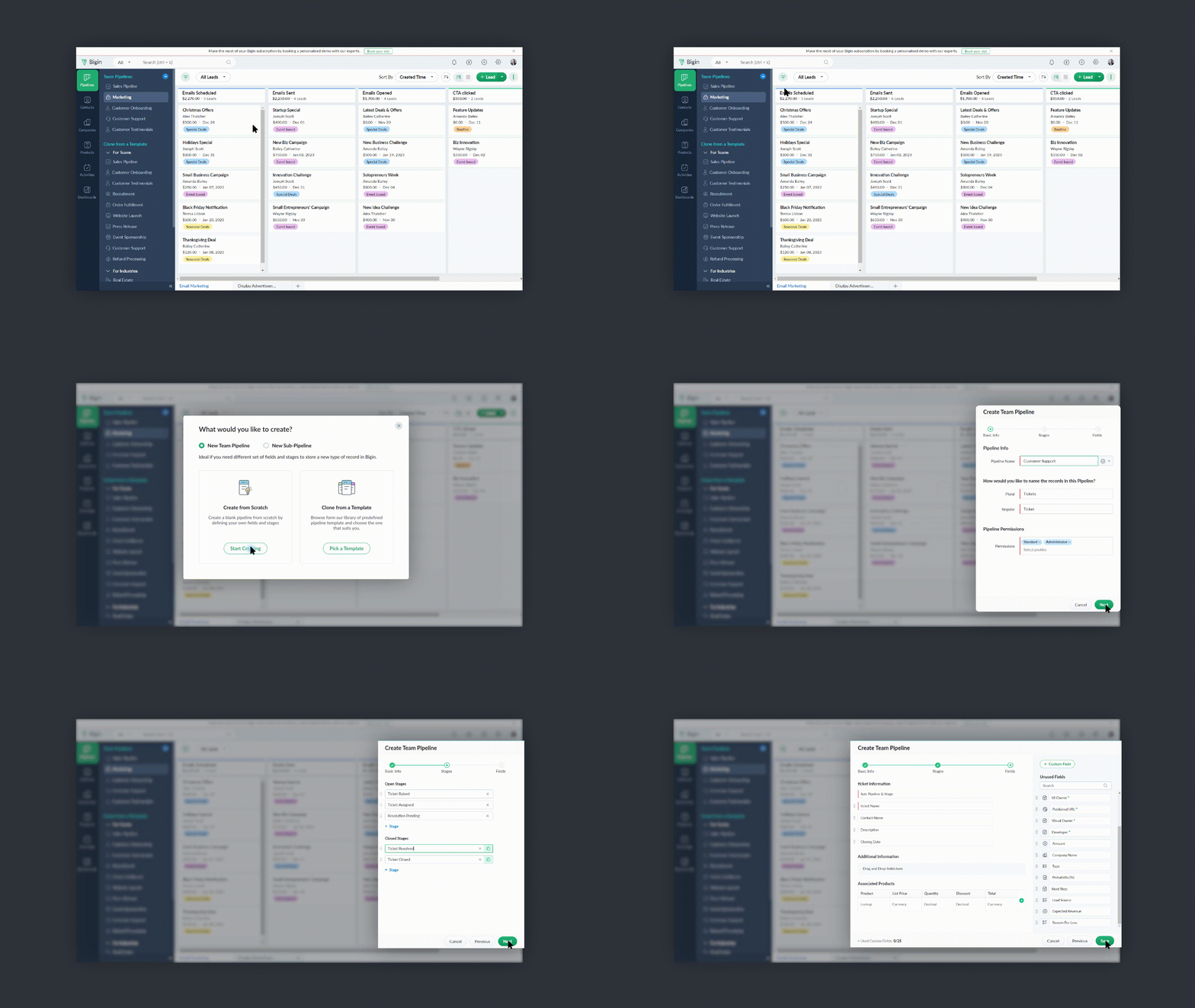
- Vous pouvez réduire le panneau Pipelines d'équipe lorsque vous n'en avez pas besoin en cliquant sur l'icône de la flèche de réduction en bas à gauche.
Comment accéder à cette nouvelle fonctionnalité ?
La fonctionnalité Team Pipelines est désormais accessible à tous nos clients directement depuis l'application Bigin. Il suffit de cliquer sur l'interface comme visible sur la photo ci-dessous :

Vous pouvez nous écrire à l'adresse support@eu.bigin.com à tout moment pour nous faire part de vos commentaires et de vos réactions.
PS : Je serai là si vous avez besoin d'aide pour la nouvelle mise à jour. Il vous suffit de laisser un commentaire dans cet article pour obtenir une réponse à vos questions.
Passez une bonne journée et à très bientôt pour découvrir les nouvelles fonctionnalités Bigin !
Access your files securely from anywhere

Zoho Developer Community





Topic Participants
Antoine Perrault
Sticky Posts
Bigin - Astuce #5 : Comment transférer le statut Super Admin ?
Bonjour Community France, Découvrons comment transférer le statut de Super Administrateur. Sachez que le statut de super administrateur ne peut être transféré à un autre utilisateur administrateur que par le super administrateur lui même. Pour transférerNouveau forfait Bigin Premier : Multi-devises, flux de travail avancés et plus encore !
Bonjour à tous, Nous sommes ravis d'annoncer une toute nouvelle édition de Bigin qui contient plusieurs nouvelles fonctionnalités comme la multidevise, des flux de travail avancés, des champs de recherche personnalisés et plus encore : l'édition Premier.Nouveauté Bigin : associez plusieurs contacts à une même affaire!
Bonjour à tous, Une transaction implique souvent plusieurs décideurs. Prenons l'exemple de l'entreprise Zylker qui utilise Bigin pour gérer ses pipelines de vente. Ils souhaitent acheter des meubles. Pour valider la vente, différents employés, de différentsPack débutant : vos premiers pas sur Zoho Bigin
Dans cet article nous verrons comment paramétrer votre CRM Bigin en 4 étapes : renseigner vos informations, gérer vos utilisateurs ainsi que leurs rôles et profils. Renseigner les informations de votre organisation Vous venez de vous inscrire à Zoho Bigin,Anniversaire Bigin : le CRM pour les petites entreprises évolue
Bonjour à tous ! Nous sommes de retour avec quelques annonces passionnantes. Mais d'abord, joyeux anniversaire à nous ! Bigin a eu un an récemment et nous avons un nouvel ensemble de fonctionnalités que nous sommes impatients de partager avec vous. Nous
Zoho TeamInbox Resources
Zoho CRM Plus Resources
Zoho Books Resources
Zoho Subscriptions Resources
Zoho Projects Resources
Zoho Sprints Resources
Qntrl Resources
Zoho Creator Resources
Zoho CRM Resources
Design. Discuss. Deliver.
Zoho Show Resources

Get Started. Write Away!
Writer is a powerful online word processor, designed for collaborative work.
-
オンラインヘルプ
-
Webセミナー
-
機能活用動画
-
よくある質問
-
Ebook
-
-
Zoho Campaigns
- Zoho サービスのWebセミナー
その他のサービス コンテンツ
Nederlandse Hulpbronnen

ご検討中の方
Recent Topics
Syncing Bills in Zoho Books to Zoho CRM
Is there any way to sync the Bills in Zoho Books in Zoho CRMAuto CheckOut Based On Shift.
This Deluge script runs on a scheduled basis to automatically set the 'Actual_Check_Out' time for employees who haven't manually checked out. If the current time is past their scheduled 'Shift_End_Time', the script updates the check-out time to matchERROR: Product type cannot be changed for Items having transactions.
I have mistakenly added a product type as goods for an item that was a digital service. Now when HSN/SAC became mandatory, this brought my attention to this error I did. So I tried changing the product type but it displayed this error message ProductBoost your CRM accuracy with smart Data Enrichment
Hello all! In this post let's look at data enrichment from a holistic perspective to gain more clarity on how you can use it. So, here's a quick recap of what data enrichment is and how you set it up it to enhance your existing module data! What is dataIs it possible to set a region lookup table so that my deal country can lookup this lookup table
Hi there, I would like to be able to add a data lookup table with the following fields: Country, Region. And then in my deal report, i can then lookup this table to fish out the region in my report. This will be important for my sales process to categoriseTest Emails Show Sent "via zcsend.net" in My Gmail Account
I noticed the following info... However, a few email service providers such as Outlook and Gmail will display that the email was sent by zcsend.net (Zoho campaigns’ server) on your behalf instead of just your from email address. In order to prevent this, you can go for either of these options: Do not select the check box meant for DomainKey Signature which is listed under Unverified sender domains. Include our mail servers by advanced authentication method such as SPF/ Sender ID and DomainKey/ DKIM.'UnAuthenticated Connection: zbooks_connection'
I have a zoho connection in Zoho Books, the link name es zbooks_connection, but I like to validate if exist, by example if I use this line in my code: response=zoho.books.getTemplates("", "","zbooks_connection"); But I don't have the connection I likeCalling the new 'Custom API' feature from within a Custom Widget
From what I've learned it is not possible to call an endpoint from the new "Custom API" feature within a Creator Widget. The SDK's doesn't support it yet, when calling it natively you end up with CORS issues or at least I couldn't get it working evenCannot post to Instagram. I get the error: Insufficient permission to publish on this page. Check with your page Admin to update permissions.
We had another admin that left the company. Since he left, we get this error when posting to Instagram.Zoho desk desktop application
does zoho desk has a destop applicaion?Ability to re-order Workflow Rules
We really need the ability to re-order workflow rules within departments. Either the ability to drag/drop them into a different order or something.Create an article template
I have a question concern the Knolwedge Database from Zoho Desk. There is any possibility to create an article template ? Exemple of what I research : TODAY : I want to create a lot af articles with the same baseline > I create one article > I copy/pastePersisting email signals to contact timeline?
Hello there. Regarding the email signals that are logged when a contact opens an email, am I correct that these signals are not logged to a contact's timeline? Ideally, I would like to have this context available for future follow-ups, if the contactChange of Blog Author
Hi, I am creating the blog post on behalf of my colleague. When I publish the post, it is showing my name as author of the post which is not intended and needs to be changed to my colleague's name. How can I change the name of the author in the blogs?? Thanks, RamananZoho FSM API Delete Record
Hi FSM Team, It would be great if you could delete a record via API. Thank you,Instant Messaging Update | Now migrate your WhatsApp Business phonenumber from another BSP to Zoho Desk | Dec'23
Hi All, Everything seems to move at lightning speed these days, and time is certainly flying by for the IM team. But we are delighted at how much ground we covered this year. 🚀 For one, we enabled WhatsApp business phone number migration so that youUpload ticket attachments via Drag-&-Drop
Hello, if you want to upload a file to the ticket attachment you need to click the button and use the file browser to select and upload the desired file. In many cases, it would be much more efficient if you could simply drag the file to the browser window...Can we disable add to cart in Zoho Commerce?
Hello, Our sales happen on the phone. During the call the customer is directed to our website to inspect the products together with the sales rep. So we need a way to present our inventory. I figured Zoho Commerce is a good fit for this use case. HoweverIntroducing WhatsApp integration in Bigin
Greetings! In today's business landscape, messaging apps play a significant role in customer operations. Customers can engage with businesses, seek support, ask questions, receive personalized recommendations, read reviews, and even make purchases—allZoho One account closure vs deactivation
I wonder what are the best practices and guidelines around deactivating vs deleting Zoho accounts in organisations? Any practical considerations?Global Search placement in the new UI
Having a hard time with the global search placement in the UI redesign. Surely I can't be the only one. Previously global search placement was perfect. A bar at the top/center of the page. Exactly where you would expect it to be. Since the new UI hasSchedule Zoho CRM reports only on Business Days
Hello, Is it possible to schedule reports only on business days ? We currently get daily sales reports on weekend which has no value since the sales team doesn't work on weekends. ThanksHow to install Widget in inventory module
Hi, I am trying to install a app into Sales Order Module related list, however there is no button allow me to do that. May I ask how to install widget to inventory module related list?How to track a contact or customer's past product purchases in Bigin Premiere?
Hello there. I am the sole user of Bigin for a small company (chess club), and would like to track current and past purchases made by a contact (player) or company (family which includes the player). Players may register for multiple tournaments, takeLENTITUD EN RECIBIR MAIL
Buenas tardes, Estamos experimentando lentitud en la recepción de correos electrónicos.Items should display under specific warehouse
I have configured the multi warehouse but it show all the items under all warehouse which is not correct according to our business logic, so i want that items should only display under that specific warehouse not under all the warehouses not even with zero quantity. Some items should be common but not all so is there any option for that purpose so i can specific the items to its warehouse. RegardsPartial refunds
I am trying to process refund for a one item invoice, however the refund is partial: i am getting this error while creating credit note, can anyone share some wisdom about thisBest practice importing items and matching assemblies
Hi, I was wondering what would be the best practice to import items and composite items (assemblies) From my backup, what should I import first? The items or the composite items? I am on Zoho one, using inventory and books. Kind regards, SabineBulk Fill In & Edit PO/Bill/SO/Invoice
Hello, I am adding stock in bulk on a PO, the system is automatically populating the Rate (price) and Tax from the item data. Problem is that the bill rate is different from the rate on the item data, so I have to manually erase each and enter the price.Separate Items & Services
Hi, please separate items and services into different categories. Thank youItems Below Reorder Point Report?
Is there a way to run a report of Items that are below the Reorder Point? I don't see this as a specific report, nor can I figure out how to customize any of the other stock reports to give me this information. Please tell me I'm missing something sAllocating inventory to specific SO's
Is there a way that allocate inventory to a specific sales order? For example, let's say we have 90 items in stock. Customer 1 orders 100 items. This allocates all 90 items to their order, and they have a back order for the remaining 10 items which couldCancelled Transfer order problem
Hello, We've canceled a transfer order, and we can't add the related items to a new Transfer Order. The system tells us that the bin doesn't have the required quantity, but when we check the item, it indicates that there are 2 units in the bin. It alsoCreating a Chart from a Report
In Zoho Analytics, is it possible to create a chart from a Pivot View report? We are looking to use Zoho Analytics to replace Excel for Sales reports and would like to be able to show both the table and the chart together.Client Portal ZOHO ONE
Dear Zoho one is fantastic option for companies but it seems to me that it is still an aggregation of aps let me explain I have zoho books with client portal so client access their invoice then I have zoho project with client portal so they can access their project but not their invoice without another URL another LOGIN Are you planning in creating a beautiful UI portal for client so we can control access to client in one location to multiple aps at least unify project and invoice aps that wouldEmail Insights included in Bigin emals are marked as SPAM everywhere
Today I noticed that email recipients who use Office 365 never receive emails sent from Bigin. Further examination showed that all Email Insights links in email headers are marked as spam/phishing by Office 365. Example screen included. The problem isData Import | Zoho Analytics Custom Query Window Size
Please increase the window size for the Custom Query Data Import. It's impossible to work with such a small query window.Name changed in settings for mailbox but still not changed when typed in To field
In the email account secretary@ i have updaetd the new staff members details but the old members name still appears when I type secretary@ in the To field. I cant work out where Zoho is finding the old name from. I have deleted the browser cache. If ICannot add my name to my domain name
I want to have My name@mydomain.com and it says my name is linked to another account already. Please fix it since I do not have another account.Invoice status on write-off is "Paid" - how do I change this to "Written off"
HI guys, I want to write off a couple of outstanding invoices, but when I do this, the status of the invoices shows as "Paid". Clearly this is not the case and I need to be able to see that they are written off in the customer's history. Is there a wayNext Page