Optimiser le dossier d'équipe au sein de WorkDrive - 2e partie

La tâche de l'administrateur est de fournir l'accès juste aux bonnes personnes sans entraver l'accès aux documents quotidiens. Découvrons comment WorkDrive vous offre la possibilité d'optimiser les différentes tâches exécutées dans le dossier de l'équipe.
Éliminer les copies multiples d'un même document
L'une des façons d'éliminer les copies multiples d'un même document est la fonction de versions de la suite Zoho Office. Cela vous permet de
- Accéder à l'ancienne version du document, sans créer plusieurs documents.
- Connaître les modifications apportées au document.
- Créer un document individuel à partir de n'importe quelle version.
Contrôler l'accès aux fichiers
Pour empêcher d'autres utilisateurs de modifier un fichier, il suffit de le verrouiller. Une fois prêt à collaborer à nouveau, reprenez le fichier.
Bon à savoir
- Un utilisateur doit au moins avoir un accès d'édition au fichier pour pouvoir l'extraire (le verrouiller).
- Lorsqu'un fichier est verrouillé dans un dossier d'équipe, les membres ayant un rôle d'organisateur ou d'administrateur peuvent le déverrouiller.
Extraire un fichier
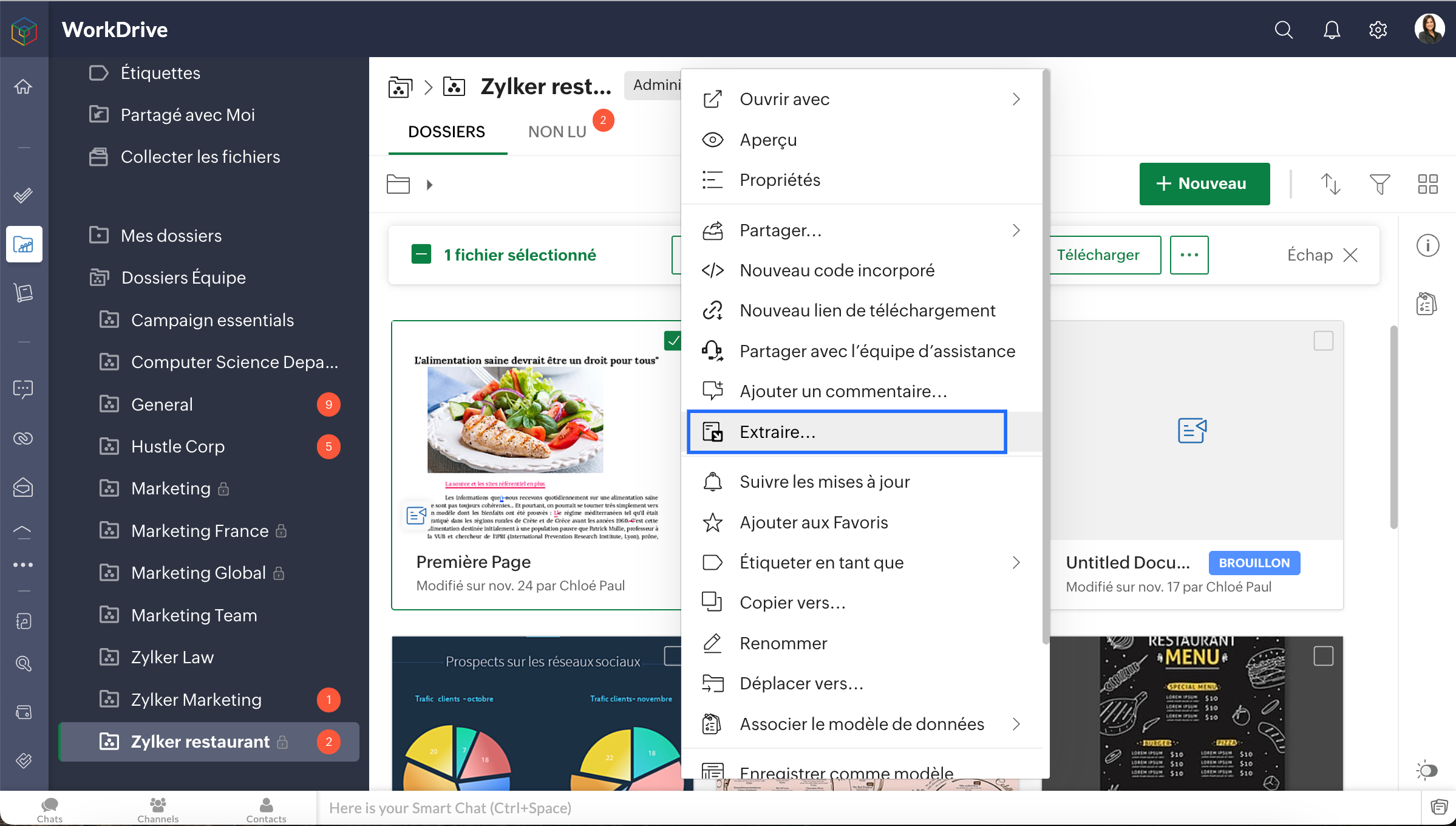
- Sélectionnez un fichier dans "Mes dossiers" ou "Dossier d'équipe".
- Cliquez sur l'icône "Autres" dans la barre d'actions en haut, sélectionnez "Extraire" dans la liste déroulante ou encore, faites un clic droit sur le fichier et sélectionnez "Extraire".
- L'onglet Versions du fichier s'ouvre dans un nouvel écran, cliquez sur "Extraire". Lorsque vous avez extrait un fichier, vos collaborateurs ne peuvent pas le modifier ni voir les modifications que vous avez apportées.
Pour récupérer un fichier
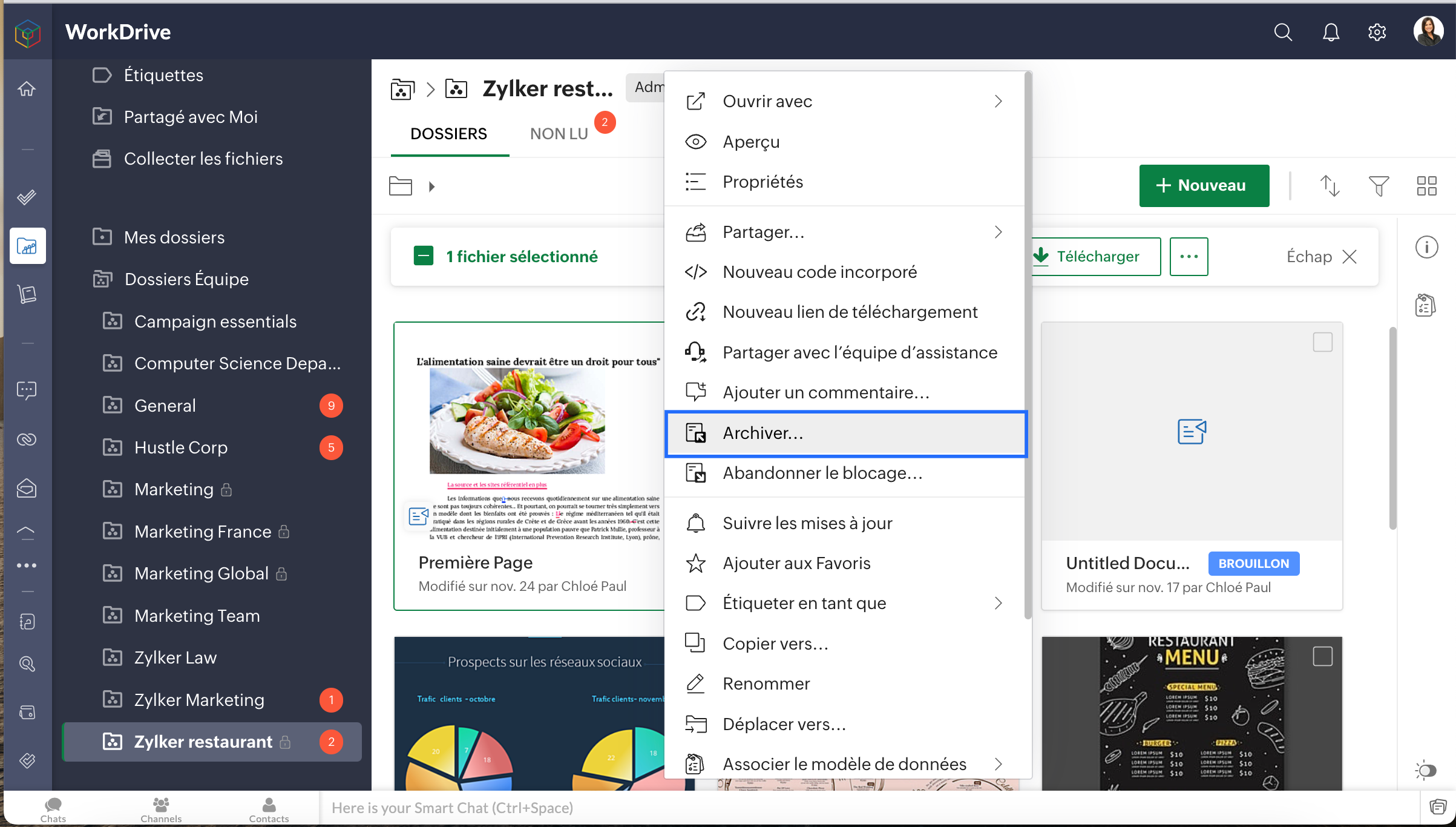
- Sélectionnez un document extrait, faites un clic droit sur le fichier et sélectionnez "Archiver"
- L'onglet Versions du fichier s'ouvre, ajoutez des notes de version pour référence ultérieure.
- Vérifier pour permettre à vos collaborateurs de voir les modifications que vous avez apportées.
Organiser le dossier d'équipe
Vous avez créé un fichier dans le mauvais dossier d'équipe ? Vous souhaitez partager un document de votre dossier personnel à un dossier d'équipe ? Ou vous voulez simplement organiser vos fichiers ? Ne vous inquiétez pas, la fonction "Déplacer et copier" de WorkDrive vous aide à le faire sans perdre les données et sans les inconvénients du téléchargement.
Bon à savoir
- Seuls les Organisateurs et Administrateurs d'un dossier d'équipe peuvent déplacer des fichiers et des dossiers dans le dossier d'équipe.
- Seuls les administrateurs de dossier d'équipe peuvent déplacer des documents de leur dossier d'équipe vers leurs "Mes Dossiers".
- Seuls les administrateurs de dossier d'équipe peuvent déplacer des fichiers et des dossiers de l'un vers un autre. Il doit avoir au moins le rôle d'éditeur dans le dossier d'équipe de destination.
- Seuls les administrateurs de dossier d'équipe peuvent déplacer des fichiers et des dossiers de ce dossier d'équipe vers un dossier partagé. Ils doivent avoir au moins le rôle d'éditeur dans le dossier de destination.
- Pour copier des fichiers et des dossiers au sein d'un dossier d'équipe, vous devez être membre du dossier d'équipe et avoir au moins le rôle d'éditeur.
- Pour copier des fichiers et des dossiers d'un dossier d'équipe vers Mes Dossiers, vous devez être un membre du dossier d'équipe et disposer de n'importe quel rôle.
- Un membre avec n'importe quel rôle dans un dossier d'équipe peut copier des fichiers vers un autre. Le membre doit avoir au moins le rôle d'éditeur dans le dossier de l'équipe de destination.
- Vous pouvez copier des fichiers et des dossiers d'un dossier d'équipe auquel vous avez un rôle quelconque vers un dossier partagé auquel vous avez au moins le rôle d'éditeur.
Afficher les propriétés du fichier
Sachez tout sur un fichier dans Zoho WorkDrive en visualisant ses propriétés. Découvrez comment visualiser les informations générales, les versions, l'activité et les statistiques d'accès d'un fichier.
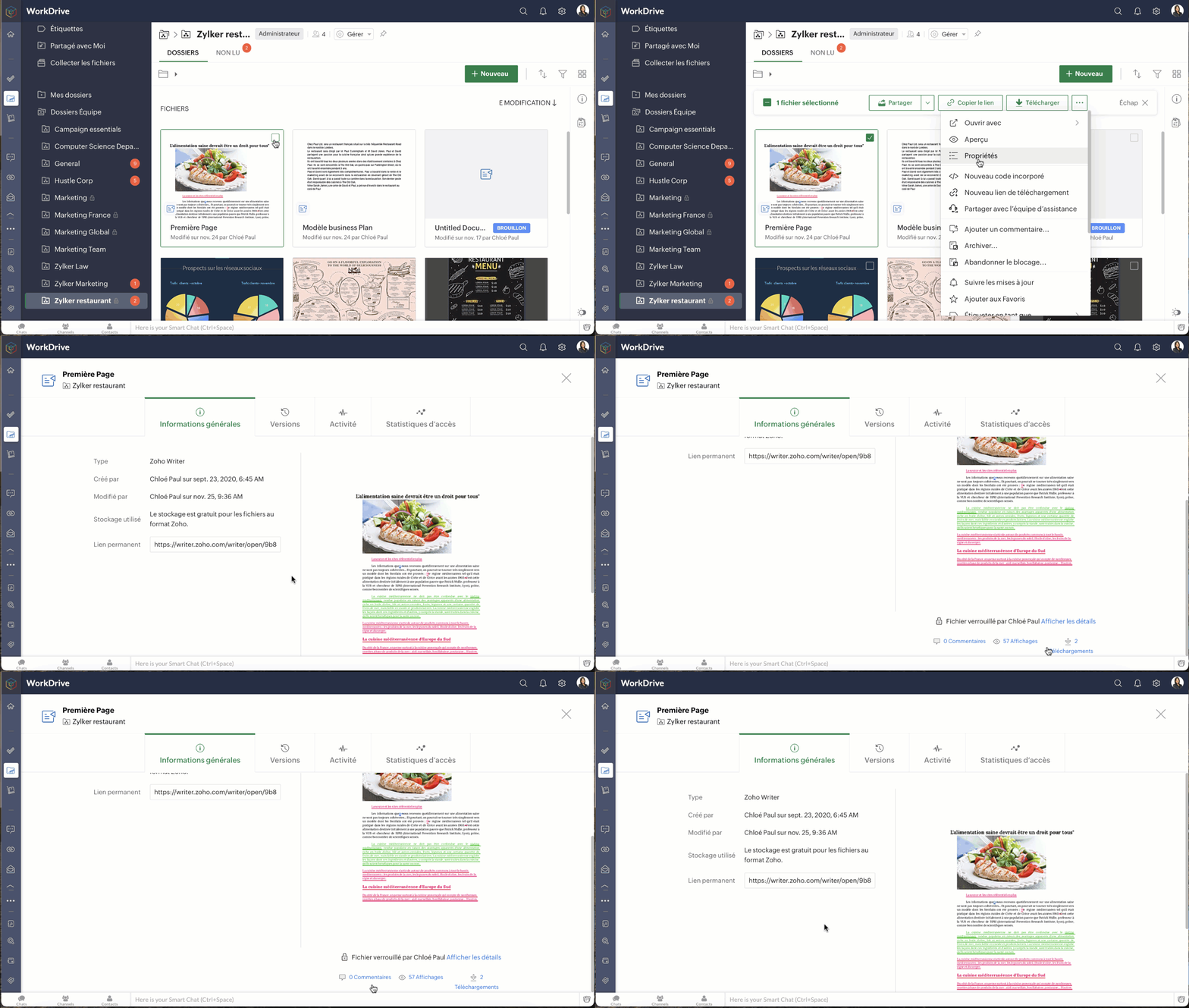
- Sélectionnez un fichier dans le dossier de l'équipe.
- Cliquez sur l'icône "Autres" dans la barre d'action en haut.
L'onglet Informations générales affiche les informations suivantes du fichier ;
- Format du fichier
- Utilisateur qui a créé le fichier et la date de création
- Utilisateur qui a modifié le fichier et la date de modification
- Taille (taille de la dernière version du fichier)
- Stockage utilisé (stockage total utilisé par les différentes versions du fichier)
- Lien permanent (lien d'accès au fichier)
- Nombre de commentaires
- Nombre de vues
- Nombre de téléchargements
Sous l'onglet Versions, vous pouvez consulter la liste des versions du fichier. La taille et les notes de la version du fichier sont également indiquées.
Cliquez sur l'icône des trois points verticaux sur une version de fichier. Vous pouvez faire les actions suivantes à partir de là :
- Restaurer la version comme version principale
- Télécharger la version
- Afficher un aperçu de la version
- Enregistrer la version comme un nouveau fichier
- Supprimer la version
Bon à savoir
- Pour les dossiers d'équipe privés, un membre doit avoir le rôle d'éditeur ou un rôle supérieur pour voir les versions d'un fichier.
- Pour les dossiers d'équipe publics, tout membre du dossier d'équipe peut visualiser les versions d'un fichier.
- Pour les fichiers partagés, tout membre de l'équipe peut visualiser les versions de ces fichiers.
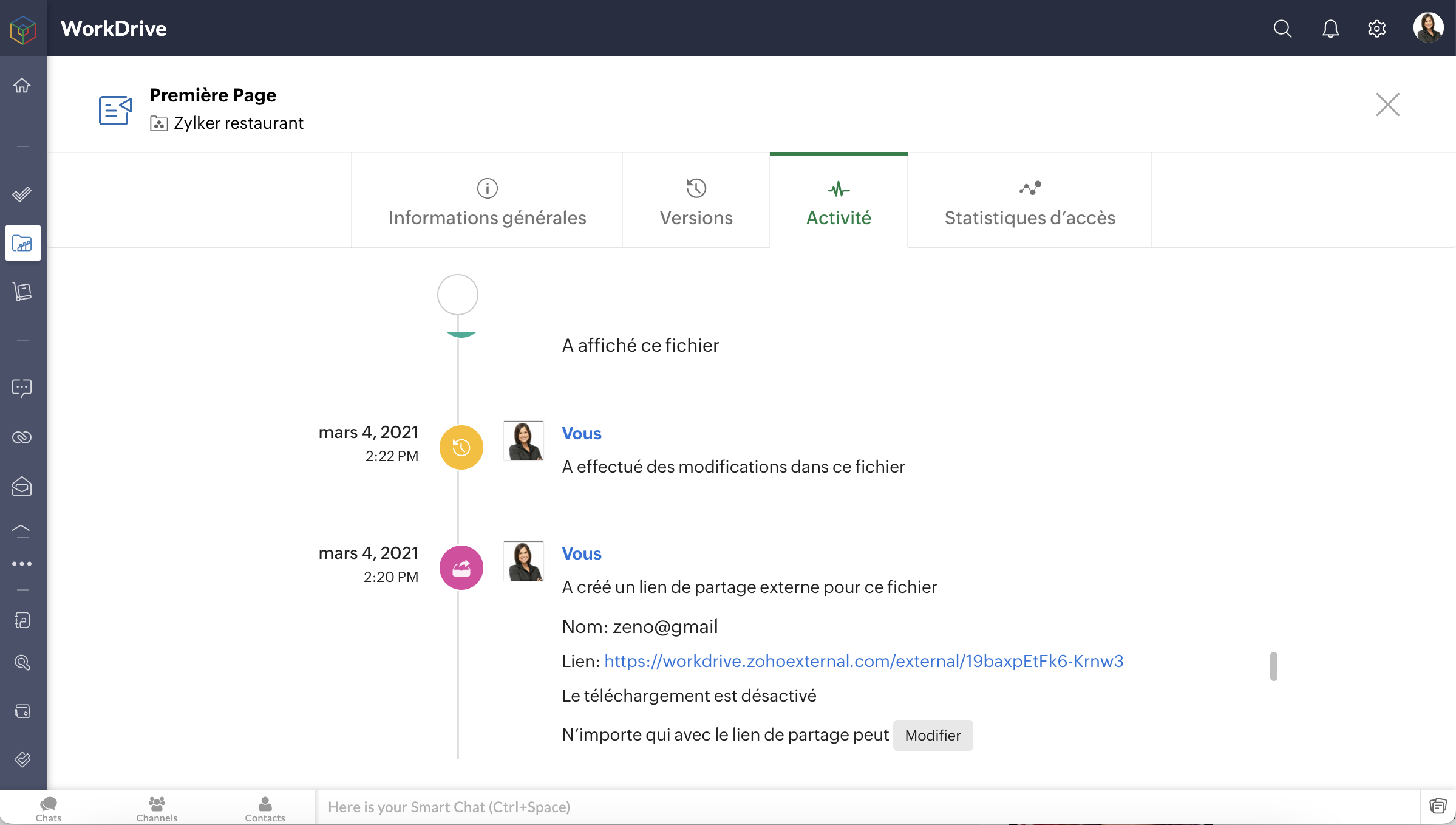
L'onglet Activité vous permet de voir toutes les activités sur le dossier par vous et vos collaborateurs, en fonction de la date et de l'heure.
Bon à savoir
- Pour les dossiers d'équipe privés et publics, un membre doit avoir le rôle d'éditeur ou un rôle supérieur pour afficher l'activité d'un dossier.
- Pour les fichiers partagés, un membre doit avoir l'autorisation de partage pour visualiser les activités sur ces fichiers.
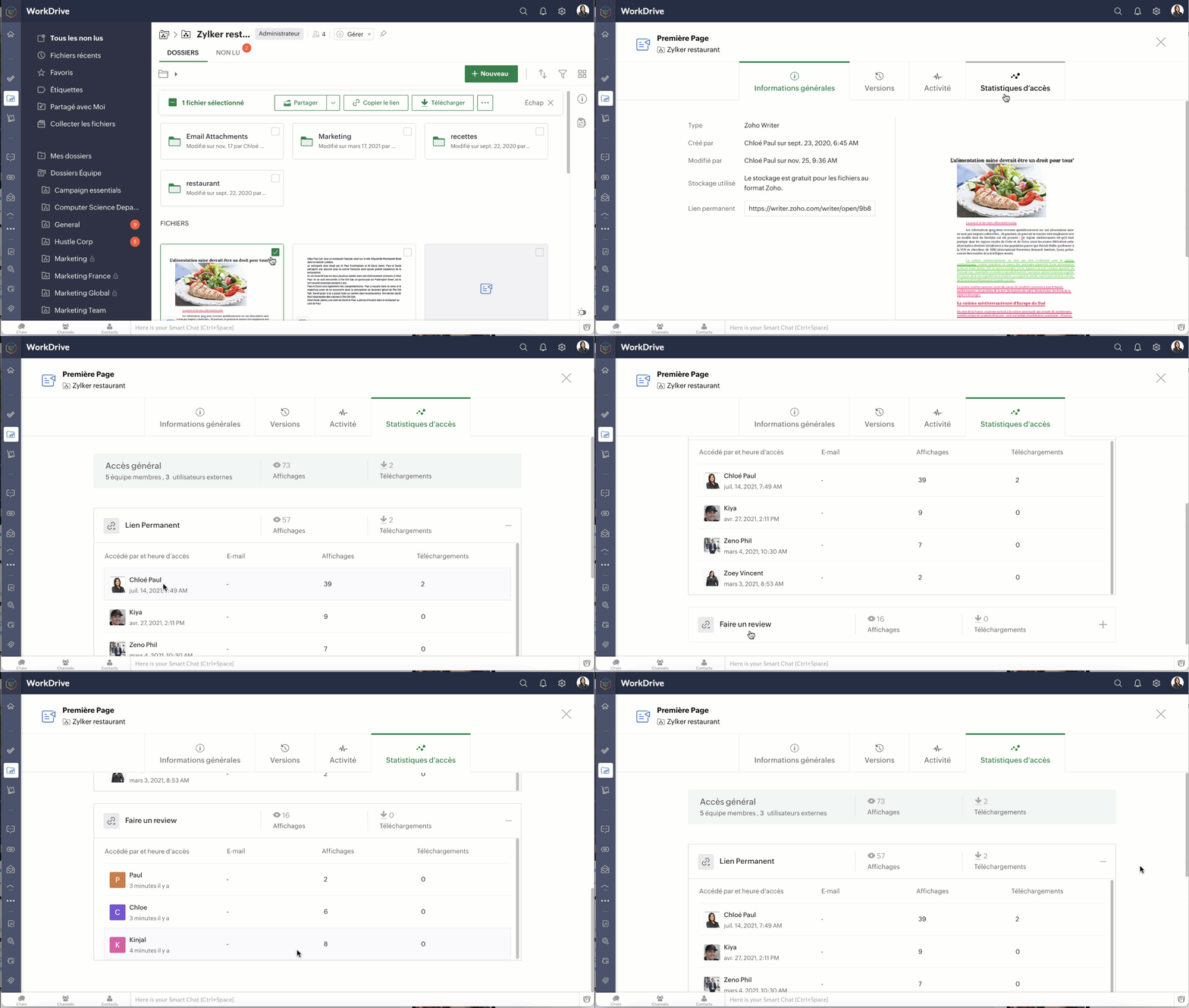
Les statistiques d'accès avancées d'un fichier vous permettent de voir qui a accédé à votre fichier (membres de l'équipe et utilisateurs externes) et quelles actions ils ont effectuées (nombre de consultations et de téléchargements).
- Sous accès global, vous pouvez voir le nombre de membres de l'équipe et d'utilisateurs externes qui ont accédé au fichier, ainsi que leur nombre total de consultations et de téléchargements.
- Le lien permanent ou lien de partage externe vous affiche le nombre total correspondant de consultations et de téléchargements pour le fichier.
- Cliquez sur Permalink pour afficher la liste des membres de l'équipe qui ont accédé au fichier, ainsi que la date et l'heure auxquelles ils y ont accédé.
- Cliquez sur un lien de partage externe pour afficher la liste des utilisateurs externes qui ont accédé au fichier ainsi que la date et l'heure auxquelles ils y ont accédé.
Bon à savoir
- Dans le cas d'un lien de partage externe, si les données de l'utilisateur telles que le nom, le numéro de téléphone et l'e-mail sont demandées, ces données seront également indiquées.
- Si le nom n'est pas demandé, les utilisateurs seront appelés en tant que Guest# (dans l'ordre Guest#1, Guest#2, etc.).
- Pour les dossiers d'équipe privés et publics, un membre doit avoir le rôle d'éditeur ou un rôle plus élevé pour voir les statistiques d'accès d'un fichier.
- Pour les fichiers partagés, un membre doit avoir l'autorisation de partage pour voir leurs statistiques d'accès.
N'hésitez pas à nous faire part de vos questions dans la partie commentaires ci-dessous.
L'équipe Zoho France
Access your files securely from anywhere
New to Zoho Recruit?

Zoho Developer Community
New to Zoho LandingPage?
Zoho LandingPage Resources
New to Zoho Survey?
New to Zoho CRM Plus?
Deliver unforgettable customer experiences
New to Zoho CRM Plus?
Deliver unforgettable customer experiences
New to Zoho Marketing Plus?
Everything you need to run your marketing
New to Zoho Marketing Plus?
Everything you need to run your marketing
New to Bigin?





Topic Participants
Kinjal Lodaya
Sticky Posts
Collaboration sans faille avec Zoho One
Bonjour à tous, Dans cet article nous allons voir comment Zoho One permet une collaboration à différents niveaux . La façon dont nous travaillons évolue. À mesure que les entreprises se mondialisent, la plupart des activités sont menées en équipe.
New to Zoho TeamInbox?
Zoho TeamInbox Resources
Zoho CRM Plus Resources
Zoho Books Resources
Zoho Subscriptions Resources
Zoho Projects Resources
Zoho Sprints Resources
Qntrl Resources
Zoho Creator Resources
Zoho CRM Resources
Design. Discuss. Deliver.
Zoho Show Resources

Get Started. Write Away!
Writer is a powerful online word processor, designed for collaborative work.
Zoho CRM コンテンツ
-
オンラインヘルプ
-
Webセミナー
-
機能活用動画
-
よくある質問
-
Ebook
-
-
Zoho Campaigns
- Zoho サービスのWebセミナー
その他のサービス コンテンツ
Nederlandse Hulpbronnen

ご検討中の方
Recent Topics
MCP > Creator connection failing with Claude
I'm trying to get claude to access any of my Zoho Creator apps and it keeps failing. I have enabled all tools for creator and ensured in claude settings that everything is authorised. Here is what claude says : Unfortunately, the error messages I'm receivingIs it possible to sync data every 5–10 minutes in Zoho Analytics (CRM or Excel imports)?
Hello Team, I want to know if Zoho Analytics supports near real-time syncing of data from different sources. My requirements: I am importing data from Zoho CRM → Zoho Analytics I also have some datasets maintained in Excel/CSV I want both data sourcesFeature Request: Dynamic Dimension Control for zc_LoadIn Popups
As detailed in this community discussion, Zoho Creator's zc_LoadIn parameter is a vital tool for opening components (forms, reports, or pages) in modal dialogs via HTML snippets, Notes, or Rich Text Fields. While powerful, this feature suffers from aSubforms in stateless forms
I think the title says it all. We need to be able to add subforms to stateless forms. Currently the only workaround is to create a Form and delete each record upon submission of the form. I need to build an interface to update our inventory. BasicallyText wrap column headers in reports?
Is it possible to auto wrap column headers so that a longer multi-word header displays as two lines when the column is narrower than the width of the header title?What’s New in Zoho Inventory — Latest Features, Integrations & Updates | December 2025
Zoho Inventory has evolved significantly over the past months, bringing you smarter, faster, and more connected tools to streamline your operations. Whether you’re managing multichannel sales, complex fulfillment workflows, or fast-moving stock, our newestMarketer’s Space - Multi-Channel Campaigns for the Biggest Shopping Week with Zoho Marketing Automation
Hello marketers, Welcome back to another post in Marketers Space! The biggest shopping week of the year is almost here, and it’s your moment to shine without the stress. With Black Friday and Cyber Monday just around the corner, being present across email,Auto-Invite Users to Portals in Zoho CRM based on Conditions
Hello Everyone, You can now automate portal invitations in Zoho CRM with the new Auto-Invite users feature in Portal management. No more manually enabling portal access one by one. With this enhancement, you can automatically send invites for users toPricing Strategies: #5 Stay local, Price & Sell Global
Arun had always dreamed of taking his handmade craft business beyond his hometown. For years, he sold locally. Most of his customers are familiar faces, in our usual currency and with the exact expectations. But one day, a traveller visited his workshopBest practice to structure reporting to include events covering multiple months / quarters.
Hi, I'm new to Zoho, have some experience of more "enterprise" tools, looking for some input from the community. I'm looking to create a report that includes events that cover a long period, each event has a start / end date and I'm struggling undertandingIncorrect Email Notifications for Product Reviews
Dear Zoho Commerce Support Team, I am writing to report a technical issue that occurs frequently on our platform. Problem Description: We regularly receive email notifications informing us of new product reviews awaiting approval. However, when we accessZoho CRM for Everyone's NextGen UI Gets an Upgrade
Hello Everyone We've made improvements to Zoho CRM for Everyone's Nextgen UI. These changes are the result of valuable feedback from you where we’ve focused on improving usability, providing wider screen space, and making navigation smoother so everythingWhat is the easiest way to move Hotmail emails to an IMAP server?
The easiest way to move Hotmail (Outlook.com) emails to an IMAP server is to add your Hotmail account directly to any email client that supports IMAP, then copy the messages across. This avoids paid tools and keeps the process simple. Fastest free method:No feedback from Zoho Books regarding Yodlee feeds for Investec
I reported on 6 Feb 2025 that the Bank Feeds for Investec bank via Yodlee are not working. To date there has been no resolution. You are charging us for a suite of products where the functionality does not work. Please advise how you will refund me forTurn off Knowlege Base Follow options and Follower lists
Is there a way to hide or turn off the option in the Knowledge Base for users to follow specific departments/categories/sections/articles? If not, is there a way to turn off the public list of followers for each of those things? Otherwise, customer namesCustom validation in CRM schema
Validation rules in CRM layouts work nicely, good docs by @Kiran Karthik P https://help.zoho.com/portal/en/kb/crm/customize-crm-account/validation-rules/articles/create-validation-rules I'd prefer validating data input 'closer to the schema'Meet Canvas' Grid component: Your easiest way to build responsive record templates
Visual design can be exciting—until you're knee-deep in the details. Whether it's aligning text boxes to prevent overlaps, fixing negative space, or simply making sure the right data stands out, just ironing out inconsistencies takes a lot of moving parts.Text snippet
There is a nice feature in Zoho Desk called Text Snippet. It allows you to insert a bit of text anywhere in a reply that you are typing. That would be nice to have that option in Zoho CRM as well when we compose an email. Moderation Update: We agree thatZoho Books "Update" Trigger for Zapier?
Hi Zoho Team, I've been in talks with Zapier about using their services to connect my Zoho Books account to various apps, but I require an additional trigger beyond the "New" trigger. I require an "Update" trigger, which will allow me to filter and create Zaps only when certain conditions are fulfilled on the Zoho Books end before I automate a separate app. Specifically this will help me create invoices in QuickBooks Online only when payments are recorded in Zoho Books, rather than when a new invoiceService One. Bill Another. Zero Hassle.
In field service operations, one challenge often comes up: the person who needs the service isn’t always the one who pays for it. Think about tenants vs. property managers, corporate offices vs. their finance departments, or school buildings vs. centralTime Tracking on Iphone doesn't stop
When I start a time tracking session the timer starts as expected. However when I hit stop, the timer remains on that project. The only buttons available are discard and start. Start runs the timer more and discard says it will throw away the data fromPresenting ABM for Zoho CRM: Expand and retain your customers with precision
Picture this scenario: You're a growing SaaS company ready to launch a powerful business suite, and are looking to gain traction and momentum. But as a business with a tight budget, you know acquiring new customers is slow, expensive, and often deliversCan we do Image swatches for color variants?
We want to do something like the attached screenshot on our new zoho store. We need image swatches instead of normal text selection. We want to user to select an image as color option. Is this doable? I don't see any option on zoho backend. Please hCan Zoho Flows repeat Actions more than once?
I'm attempting to make an intentional Zoho Flow loop using the below layout. However, when "WithinLimit" condition is met, the program fails to execute the action "Get & Add Request Co..." again. Is this by design? Is Zoho Flows unable to repeat actionsVideo interviews not compatible on mobile
Hi Zoho, The 2-way video interview feature you have added to Recruit would be great if the candidate was able to use the link to the video on a mobile phone, it doesn't work on Samsung browser, it doesn't work on chrome/firefox mobile version of browser,What is the difference between Zoho Campaigns and marketing hub?
Zoho Campaigns is a permission-based email marketing tool for sending marketing emails and mass emails. Marketing Automation is a multichannel marketing automation tool that caters to organizations looking for tools to engage their users across multipleZoho Desk View Open Tickets and Open Shared Tickets
Hi, I would like to create a custom view so that an agent can view all the open tickets he has access to, including the shared tickets created by a different department. Currently my team has to swich between two views (Open Tickets and Shared Open Tickets).Enviro Recycling EHF Fee's
I'm in Canada and each province has it's own recycling program with it's own fee's. There are numerous categories that electronics fall into and each category has a taxable rate applied to it. I need a way to be able to apply the correct rate dependingChange of Blog Author
Hi, I am creating the blog post on behalf of my colleague. When I publish the post, it is showing my name as author of the post which is not intended and needs to be changed to my colleague's name. How can I change the name of the author in the blogs?? Thanks, RamananConsultant-Only Booking Page
Zoho Bookings does not allow for Meeting Type OR Workspace-Wide booking pages to be turned off. This is detrimental to organizations that have territory-based or assigned accounts, because if prospects can go to these booking pages and either select theZoho Desk API - Influence which layout is used
Hello, how can the ticket layout be changed using the API? I would like to choose the layout directly when creating the ticket. If this is not possible, my question would be how can I change it afterwards? Best regards, SvenHas CSS Changed for Common Elements?
I noticed today that the standard title headings on my Forms and Reports display smaller in size than before. Google Dev Tools (attached), seems to confirm my suspicion. Something appears to be overriding the 1.375rem to 1.125rem. The font size on theText field alignment
Is it possible to align text in the text field? Or even better, is there a possibility to have a field which accepts only numbers?email moderation issue when email is sent in the name of a mail group
Symptom: an email that is sent by a mail group moderator in the name of a moderated mail group is held back for approval. Reproduction: Create a moderated mail group with members and moderators. Allow that mails can be sent in the name of the group (extendedPipeline in Custom Modules
I love the way the Sales Pipeline looks and functions with reports. I would like to add the save pipeline features and visualization to a custom module, however, I only see that these pipelines are only available for the Deals module. Is there a way to add pipelines to custom modules?Duplicate customers being created in Desk
Hi I've trying to work out why I've getting duplicated customers being created in my desk. I have an external booking system that generates an email when I get a customer booking a job. A booking email gets sent to Desk where I manage the booking andTip #53- Remote Billing: Your End-to-End Billing Solution in Zoho Assist- 'Insider Insights'
Manual invoicing, after every remote support session, can be time-consuming and often error-prone. As an MSP, IT admin, or even a freelance support technician, it may become overwhelming to keep track of session time, service rates, and client invoices.Record history and ticket interaction tab in contacts and accounts
Hello everyone! We have improved the History tab to help users trace updates in the interaction activity logs of the Contacts and Accounts detail pages in the Customer Module. This enhancement make it easier to get clear details about who made each update,sync views to sheet
Im looking to sync my views aka reports in analytics to zoho sheets, when data is updated in analytics it also should be updated in sheets, till now zoho sheets only offer raw data connection and it is not enough as these reports are difficult to re-doIs there an API to "File a Ticket" in Desk
Hi, Is there an API to "File a Ticket" in Desk to zoho projects?Next Page