We’re transitioning from Zoho ShowTime to TrainerCentral
Hello everyone,
Zoho ShowTime was originally built as a training platform to serve training agencies, HR teams, and individual trainers. As the platform grew, we realized that more creators and businesses could benefit from its capabilities. That’s why we launched a new brand, TrainerCentral, a full-featured training platform that handles everything from course creation to live sessions. With a host of new features and added capabilities in TrainerCentral, we’re saying goodbye to Zoho ShowTime and transitioning to a more advanced, comprehensive platform.
With TrainerCentral, you can design multimedia-rich courses that combine videos, documents, quizzes, and assignments to offer self-paced training. Built-in live session tools allow you to host interactive sessions including polls, chats, and surveys, to keep learners engaged. The platform simplifies learner management with detailed progress tracking, analytics, and automated certificates, helping trainers measure performance and learning outcomes with ease.
It also offers a no-code website builder that enables users to create a professional, fully branded academy website to strategize and market their online courses effectively to learners. With its robust, integrated payment gateway system, it facilitates secure, frictionless transactions across global markets.
This migration from Zoho Showtime to TrainerCentral will provide you with access to enhanced features, improved performance, and a unified training experience.
How to migrate from Zoho ShowTime to TrainerCentral.
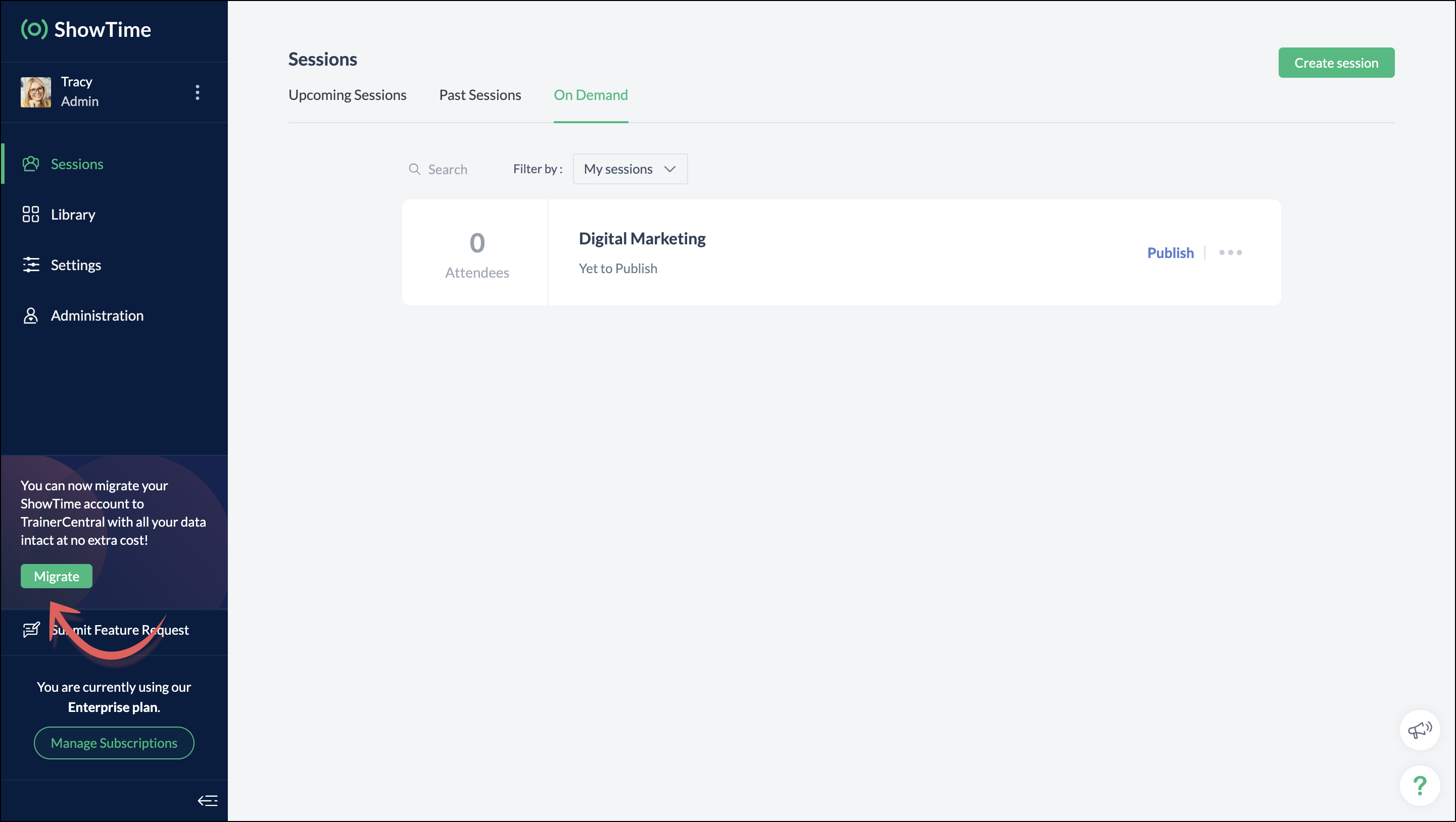
You can migrate your account from Zoho ShowTime to TrainerCentral anytime by clicking the Migrate button in the left pane and following the on-screen instructions. Once migrated, you’ll receive a notification, through which you can access your TrainerCentral account.
- Only the super admin of a Zoho ShowTime portal can migrate their portal's data to TrainerCentral.
- We’ll be disabling remote session scheduling and learner registration for on-demand sessions starting December 1, 2025. With this transition, Zoho ShowTime will reach its End of Life (EOL) on December 31, 2025.
To avoid any disruptions to your live classes, please move to TrainerCentral before December 31, 2025.
We hope this will elevate your experience to the next level.
If you have any questions, take a look at the FAQ section below, reach out to us at support@zohoshowtime.com, or just leave a comment here.
FAQ
FAQ
1. How long will the migration take?
The migration of your Zoho ShowTime data and account portal is expected to take approximately one to two hours. In the event of any technical issues or glitches during the migration, the product team will address them immediately. In such rare cases, the migration will be completed within 24–48 hours.
2. What will happen to my Zoho ShowTime account if it is not migrated before the sunset?
If you fail to migrate before the sunset, i.e., December 31, 2025, active Zoho ShowTime accounts will be automatically migrated to TrainerCentral.
3. What will happen after migration?
You will be able to access TrainerCentral with your Zoho ShowTime credentials and continue your teaching journey seamlessly, with the added benefit of new features.
4. Will there be any changes to my payment after migration?
No, there will be no changes to your payment. The amount you currently pay for your Zoho ShowTime subscription will remain the same after migration.
5. I am a Zoho ShowTime customer or Zoho One user. How will I be mapped to the TrainerCentral plan?
If you are a Zoho ShowTime customer or a Zoho One user, you will be mapped to the equivalent TrainerCentral plan automatically to ensure a seamless transition.
6. What happens if I choose not to migrate?
You can back up your data, including materials, recordings, and analytics associated with your account, and then contact our support team to delete your account.
7. I am a Zoho One user and purchased paid attendee add-ons. How do I enable them in TrainerCentral?
8. Will my configured payment gateway and ticket settings in Zoho ShowTime be migrated to my TrainerCentral account automatically?
All of the sessions and tickets created in Zoho ShowTime will be migrated without any changes to your TrainerCentral account. However, for any new sessions you create in TrainerCentral, you will need to set up your payment gateway and ticketing options again.
9. Where can I find my past sessions and library content from Zoho ShowTime in TrainerCentral after migration?

➤ Remote session: You can find previously created/conducted Zoho ShowTime remote sessions in Live Workshops → Past Sessions.
➤ On-demand session: You can find previously created/conducted Zoho ShowTime on-demand sessions in Live Workshops → On demand.
➤ All materials hosted in your ShowTime library will be moved to TrainerCentral's library.
10. Will my current integrations like Zoho CRM, Zapier, and Zoho Flow function seamlessly?
All of your Zoho CRM, Zapier, and Zoho Flow integrations and their functionalities will be migrated seamlessly to TrainerCentral. In Zapier and Zoho Flow, several additional triggers and actions are available for all courses and live workshops.
11. If I cancel my TrainerCentral subscription after migration, will I get the same plan when I resubscribe to a new TrainerCentral account?
No. The equivalent plan is provided only if you migrate from Zoho ShowTime. If you resubscribe for a new TrainerCentral account, you’ll be mapped to a new plan.
12. What if I can't see the Migrate button on my Zoho ShowTime portal?
If the Migrate button isn’t visible, please contact our support team to help you migrate from Zoho ShowTime to TrainerCentral.
Access your files securely from anywhere
New to Zoho Recruit?

Zoho Developer Community
New to Zoho LandingPage?
Zoho LandingPage Resources
New to Zoho Survey?
New to Zoho CRM Plus?
Deliver unforgettable customer experiences
New to Zoho CRM Plus?
Deliver unforgettable customer experiences
New to Zoho Marketing Plus?
Everything you need to run your marketing
New to Zoho Marketing Plus?
Everything you need to run your marketing
New to Bigin?





Topic Participants
Neeraja Raghavendran
Sticky Posts
Video tip 02: Customize your feedback and evaluation forms in Zoho ShowTime
Hello everyone, Here's a new video tip for all our ShowTime users. Today we will learn few quick, effective ways to evaluate your participants and assess your trainings conducted on Showtime, like MCQs (multiple choice questions), text-boxes, and ratings scale. Watch the below video to learn how these assessment systems help you effectively evaluate course-related knowledge and skills of your trainees on a regular basis. Follow this page to learn more such tips and stay updated on all theVideo tip 05: Host training courses under your own personalized domain and white-label your email communications.
Hello everyone, As a trainer, having your own domain name increases your brand's positioning and reach through search results on top search engines like Google, Yahoo, and Bing. Prospective customers will more readily pay for courses from an organization with a professional, established online presence. A custom domain establishes you as a leader in your area of subject expertise, helping you promote your courses and build brand recognition with your global audience. In today's video tip, we atVideo tip 04: Do you want to set up repeated training sessions at regular intervals? Learn how.
Hello everyone, Sometimes it is difficult to organize and manage your everyday work and training sessions. Scheduling recurring or repeated sessions can be even more time-consuming as you need to create and maintain the training content, schedule multiple time slots for the training, manage registrants across each session, and more. Zoho ShowTime offers a smarter option for these cases that only takes a few clicks. Play the video below to learn how to use the same presentation content and setSpotlight 03: Connect and deliver more effective trainings with ShowTimes' Viewer app
With the growing need for virtual classroom learning, the use of mobile and tablet software is quickly becoming the most convenient way to share knowledge between educators and students. According to a 2018 study, nearly 67% of digital learners now use mobile devices to complete their online coursework. Additionally, smartphone learners complete course material 45% faster than those using a computer. Considering these facts, we now introduce our next community spotlight series that will focus on ZohoVideo tip 1: Record and share trainings on Zoho ShowTime.
Hello everyone, We are excited to launch our video tip of the month series within our ShowTime's community, aimed to help our trainers and educators with brief and practical tips on delivering more effective and comprehensive training. In this month's video tip, we will show you how to record your training sessions quickly and share them with your attendees and other prospective learners externally. We hope this tip was useful. ShowTime also allows you to automatically record your live trainings
New to Zoho TeamInbox?
Zoho TeamInbox Resources
Zoho CRM Plus Resources
Zoho Books Resources
Zoho Subscriptions Resources
Zoho Projects Resources
Zoho Sprints Resources
Qntrl Resources
Zoho Creator Resources
Zoho CRM Resources
Design. Discuss. Deliver.
Zoho Show Resources

Get Started. Write Away!
Writer is a powerful online word processor, designed for collaborative work.
Zoho CRM コンテンツ
-
オンラインヘルプ
-
Webセミナー
-
機能活用動画
-
よくある質問
-
Ebook
-
-
Zoho Campaigns
- Zoho サービスのWebセミナー
その他のサービス コンテンツ
Nederlandse Hulpbronnen

ご検討中の方
Recent Topics
Free webinar: Security that works: Building resilience for the AI-powered workforce
Hello there, Did you know that more than 51% of organizations worldwide have experienced one or more security breaches, each costing over $1 million in losses or incident response? In today’s threat landscape, simply playing defense is no longer enough.Free webinar—Redefining workforce security with Zoho Vault: Passwords, passkeys, and multi-factor authentication
Hi everyone! Did you know that in Q2 alone, 94 million data records were leaked globally? Behind every breach is a combination of poor password habits, phishing attacks, privilege misuse, and simple human error. The fallout—including reputational damage,Fill Colors
Hello, Just curious, is it possible to manage the Used and standard colors in the fill drop down menu ? I would like to change/edit them is possible to colors I frequently use. Thanks for you reply, BruceClient scripts for Zoho Books ?
Good day everyone, I am looking for a way to be able to interact with the Quotes and Invoices as they are being created. Think of it like Zoho client script in Zoho CRM. But for the life of me I dont see a way to do this. The issue with having functionFillable template with dynamic tables?
Is there a way to build a fillable template so that users can add rows to a table? To describe what I'm trying to accomplish the table has 3 sections; a header row, some number of rows with custom information, and a summary row with totals. I can't figureInvoicing multiple expense items as a single line item
My client would like me to invoice them for multiple expense items on a single line item on an invoice. Can this be done? I know I can import billable expenses to an invoice, but I don't know how to show them as a single line item or have themTables improvement ideas / features
Heya, I've been using Zoho Tables for a few months now and wanted to post some features that I think will be greatly beneficial for the tool: 1. Ability to delete a record in automation or move a record in automation. - Usecase: I move a record from oneAnnouncing offline payment modes for event tickets
Hello everyone, Collecting ticket payments from prospective attendees can be a tricky part of event planning. While Zoho Backstage has always allowed you to collect payments online as people buy tickets from your event microsite, we have now enabledGmail is ramping up its email sender policy from November 2025
Hello marketers, As you may be aware, Gmail introduced a guideline for bulk senders starting February 2024. If not, here's a quick refresher straight from Google: After this policy was announced first in 2023 and soft-implemented in February 2024, weDeluge Error Code 1002 - "Resource does not exist."
I am using the following script in a Custom Button on a Sales Return. Basically, the function takes the information in the sales return (plus the arguments that are entered by the user when the button is pushed) and creates a return shipping label viaIs there a list of Zoho Icons?
Is there a list of Zoho Icons you can reference: i.e. business-gold is <image marginRight='7px' color='#2A70E7' bgColor='#FFFFFF' width='52px' height='52px' type='icon' value='business-gold' size='24px' cornerRadius='26px' iconType='solid' /> Thanks!Item images
Can we get an "On hover" expanded image for items please ?Ability to Create and Manage YouTube Video Chapters in Zoho Social
Hi Zoho Social Team, How are you? We would like to request an enhancement to Zoho Social that would allow users to create and manage YouTube video chapters directly within the platform. Currently, Zoho Social does not support manually adding chaptersWhat happens to my current site SEO if i opt for zoho creator?
I have an existing website and I need to use Zoho creators for the rapid creation of my webpage creation. Currently, my IT team is creating the web pages, but I am concerned about the SEO of my current website if I shift to zoho will i loose it all?Automatic Portal invite
We have numerous customers we move through a blueprint in deals, when they get to a certain point we need to give them portal access, how can this be done through deluge or a workflow?Preview Emails with Merge Fields before sending
Hello, Are there plans to preview an email with merge fields before sending out? Currently, all you see in the preview are the merge field values, but before I send out the email I want to make sure the merge is working. Also, the saved emails only showUser Filter not selecting All Items
We are encountering 2 issues when using the user filter. When users are trying to search using the filter option, the OK button is grayed out. Users have to unselect or make a change before it filters properly. 2. When filtering and the OK button works,Support Nested JavaScript Variables in PageSense Pop-up Targeting
Hello Zoho PageSense Team, I hope you're doing well. I’d like to request a feature enhancement for the PageSense pop-up targeting functionality. Current Limitation: Currently, PageSense pop-ups can be triggered using simple JavaScript variables. However,Cannot Invert Axis for Rankings
Hi there I want to be able to create a ranking graph in Analytics/BI, with 1 at the top of the Y axis, but I am unable to invert the axis. Super simple example in Excel below. Higher rankings need to be higher up on the graph to give the correct visualHow to copy value from a single line field into a picklist field within a module's subform?
Hello there, I have a single line field in a module's subform. I would like the value in the field to automatically update a picklist field within the same subform (both have items with the same names). Is this possible via function? Unfortunately, workflowsCommitted Stock and To Be Received Stock via API?
Is it possible to retrieve Committed Stock and/or To Be Received Stock for an Item via the API? I want to use this information for calculating the amount of inventory needed to be purchased.Creating Email template that attaches file uploaded in specific field.
If there's a way to do this using Zoho CRM's built-in features, then this has eluded me! I'm looking to create a workflow that automatically sends an email upon execution, and that email includes an attachment uploaded in a specific field. Email templatesMarketer’s Space - Automate a Personalized Holiday Workflow with Zoho Campaigns
Hello marketers, Welcome back to another post in Marketer’s Space! From Thanksgiving through Christmas, you have a flurry of opportunities to connect with your audience. In this post, we’ll see how you can plan an entire month-long automated workflowService Account Admin for API Calls and System Actions
Hello, I would like to request the addition of a Service Account Admin option in Zoho product. This feature would allow API calls and system actions to be performed on behalf of the system, rather than an active user. Current Issue: At present, API callsSorting columns in Zoho Projects
Hi, In project management best practice, sorting columns (ascending, descending) is an important tool. Sorting dates to see the order of tasks starting, sorting on priority or even on planned hours is a must for an efficient project control. Currently,Zoho CRM - Calendar Cards View - Let Users Decide What Is Displayed On Calendar Entries
Imagine planning your week of face-to-face meetings across three counties. You’re trying to group appointments by location to make the best use of your time, but Zoho CRM’s calendar doesn’t show where each meeting is happening. You’re left trying to rememberZoho Inventory - How to pay a supplier up front then receive multiple deliveries
How do we manage situations where we pay a supplier up front, then the receive the products in increments? Example Workflow: Create Purchase Order > Receive Bill for full amount > Receive Items 2 or more deliveries. Currently, once a Bill is created againstHow can I add or change the active customer in Zoho Projects?
I'm trying to change the customer in an active Zoho project. Is it possible to add or change the customer?What happens when someone clicks 'unsubscribe' in a zoho CRM email
Hello, As per, i am going round in circles trying to find an answer to these 2 question. I have an email template that has an unsubscribe link in the footer in zoho CRM. First, what happens when someone clicks it - where does the contact get unsubscribedZoho CRM - Scheduled Reports Which Contain Chart
Hi Zoho CRM Team, I'm requesting that the Report Export and Scheduling feature be enhanced to include a chart, if one has been created on a report. At the moment I have a report which shows Sales This Week by Deal Owner and a pie chart at the top of theCan I add Conditional merge tags on my Templates?
Hi I was wondering if I can use Conditional Mail Merge tags inside my Email templates/Quotes etc within the CRM? In spanish and in our business we use gender and academic degree salutations , ie: Dr., Dra., Sr., Srta., so the beginning of an email / letterCadences
I have just started using Cadences for follow-up up email pipeline. Is it just me or do you find the functionality very basic? For example, it will tell me (if I go looking for it) if someone has replied to a follow-up and been unenrolled; but it won'tCanvas View in Zoho Recruit
Is it possible or would it be possible to have the new 'Canvas View' in Zoho Recruit?Zoho Inventory - Move Orders
Quick question about Move Orders... Why is there no status to say something like "Draft", "In Progress" and "Completed", similar to Transfer Orders? I'm assuming that when something needs to be moved it should be planned in Inventory, executed and thenKaizen #215 - Workflow APIs - Part 3 - Create and Update Workflow Rules
Welcome back to another week of Kaizen! Over the last couple of weeks, we’ve joined Zylker Cloud Services as they review and improve their workflows. In Part 1, we discovered and audited their sprawling workflow landscape. In Part 2, we learned how toDataPrep Bigquery Connection failed
Hello everybody, I want to create a connnection beetwen Bigquery and Dataprep but when I try to connect my project I got this error Loading tables has failed. Table list fetched from the data source expired.Utilisation de Zoho en conformité avec l’article 286 du Code général des impôts (CGI)
Cher(e) client(e), Conformément à l’article 286 du Code général des impôts (CGI) impose aux entreprises assujetties à la TVA d’utiliser des systèmes de caisse ou de gestion commerciale certifiés lorsqu’elles enregistrent des ventes à des particuliers.Issue in Zoho People Regularization – Incorrect Hour Calculation
I have noticed that when applying attendance regularization in Zoho People for previous dates, the total working hours are not calculated correctly. For example, even if the check-in is 10:00 AM and check-out is 6:00 PM, the system shows an incorrectFree Webinar : Unlock AI driven business insights with Zoho Inventory + Zoho Analytics
Are you tired of switching between apps and exporting data to build customized reports? Say hello to smarter & streamlined insights! Join us for this exclusive webinar where we explore the power of the Zoho Inventory–Zoho Analytics integration. LearnAllow Multiple usage units to items while adding them to sales/purchase transactions
The usage unit of items added in zoho books are static right now and can not be changed. But certain items are received or sold in multiple usage units. One example is fabric. It can be bought in Meters, inches, kgs or other units. Another example wouldNext Page