Zoho CRM : de nouveaux modules Tâches, Appels et Réunions !
Ces modifications seront bientôt disponibles pour toutes les entreprises.
Bonjour à tous !
Les activités de vente ont besoin de contexte pour accompagner les commerciaux dans la conclusion d'une l'affaire. C'est pourquoi il est essentiel de capturer toutes les activités et d'en surveiller les résultats, car cela vous permet d'améliorer votre process de vente.
Le module Activités de Zoho CRM vous aide à capturer les tâches, les appels et les réunions en un seul et même endroit. Au fur et à mesure que vos besoins en matière de vente augmentent, vous aurez besoin d'une personnalisation approfondie, de l'automatisation du flux de travail, de l'administration des données, d'intégrations et de rapports détaillés pour les tâches, les appels et les réunions.
Mais plus ces nouvelles fonctionnalités sont ajoutées, plus le module Activités deviendra complexe et inutilisable. S'il est plus simple de continuer à ajouter ces nouvelles options, cela nuira à l'expérience utilisateur. C'est pourquoi nous introduisons de nouveaux onglets pour la gestion des tâches, des appels et des réunions, en supprimant le module Activités à terme.
Bien que ce changement implique quelques changements pour les utilisateurs existants, ils peuvent bénéficier des avantages suivants :
Masquer les modules dont vous n'avez pas besoin en fonction du profil de l'utilisateur.
Un utilisateur peut avoir accès à des modules individuels (Tâches, Appels ou Réunions) en fonction des activités qu'il effectue. Par exemple, vous pouvez masquer le module des tâches pour les représentants commerciaux de votre organisation. Ils peuvent avoir accès uniquement aux modules Appels et Réunions.
Mise à jour ou suppression en masse des enregistrements
Comme les modules Tâches, Appels et Réunions seront répertoriés séparément, vous pourrez activer/désactiver la fonction de mise à jour ou de suppression en masse pour des modules spécifiques.

Contrairement à la configuration précédente, lorsque l'accès à un module était désactivé pour un profil spécifique, les utilisateurs ne pouvaient pas mettre à jour/supprimer en masse des enregistrements dans les autres modules, car les modules Tâches, Appels, Réunions étaient combinés sous Activités.
Créer des rapports associés à une activité de vente spécifique
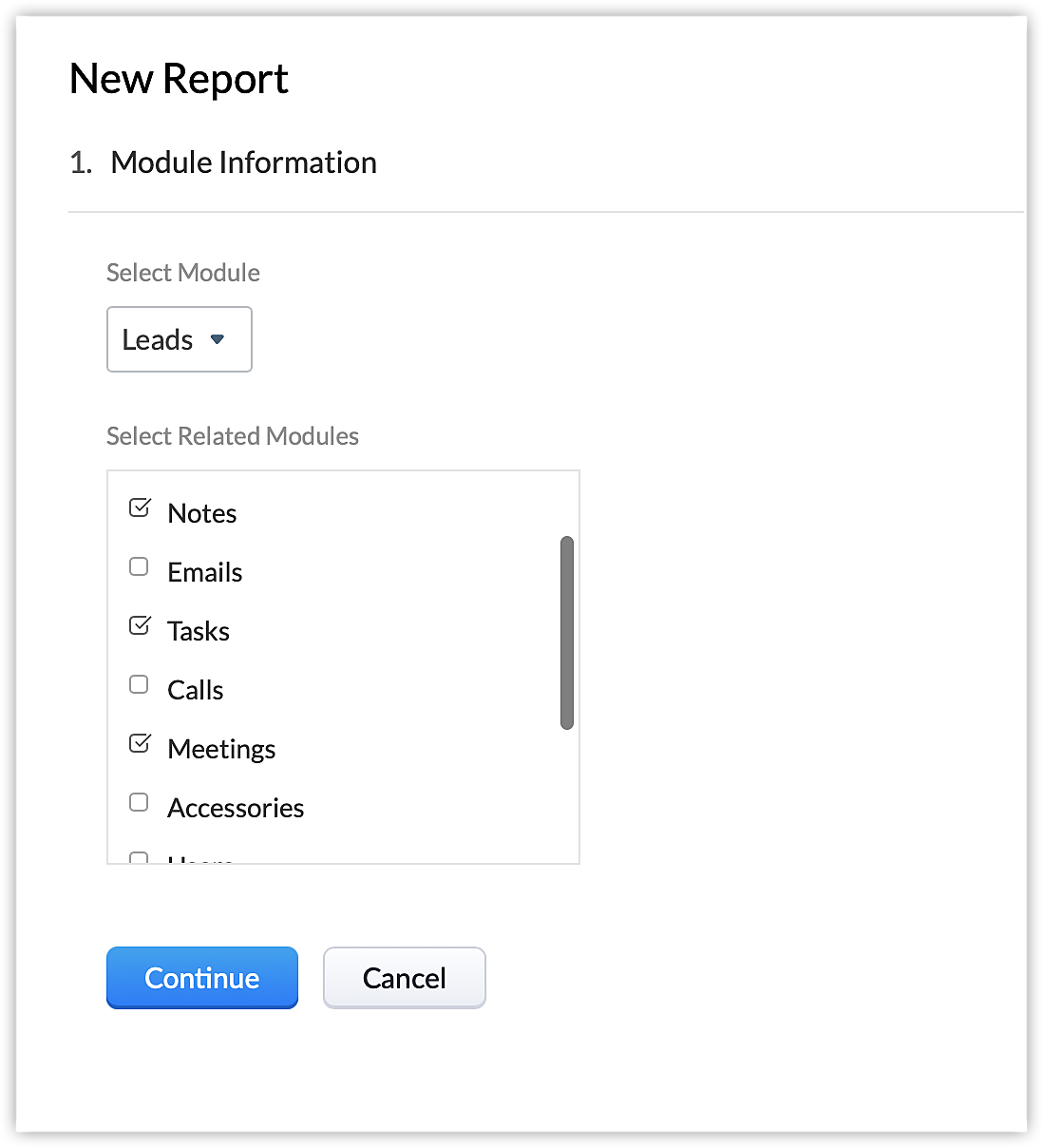
Les tâches, les appels et les réunions seront répertoriés séparément dans la liste des modules associés du module principal que vous avez sélectionné lors de la création des rapports.
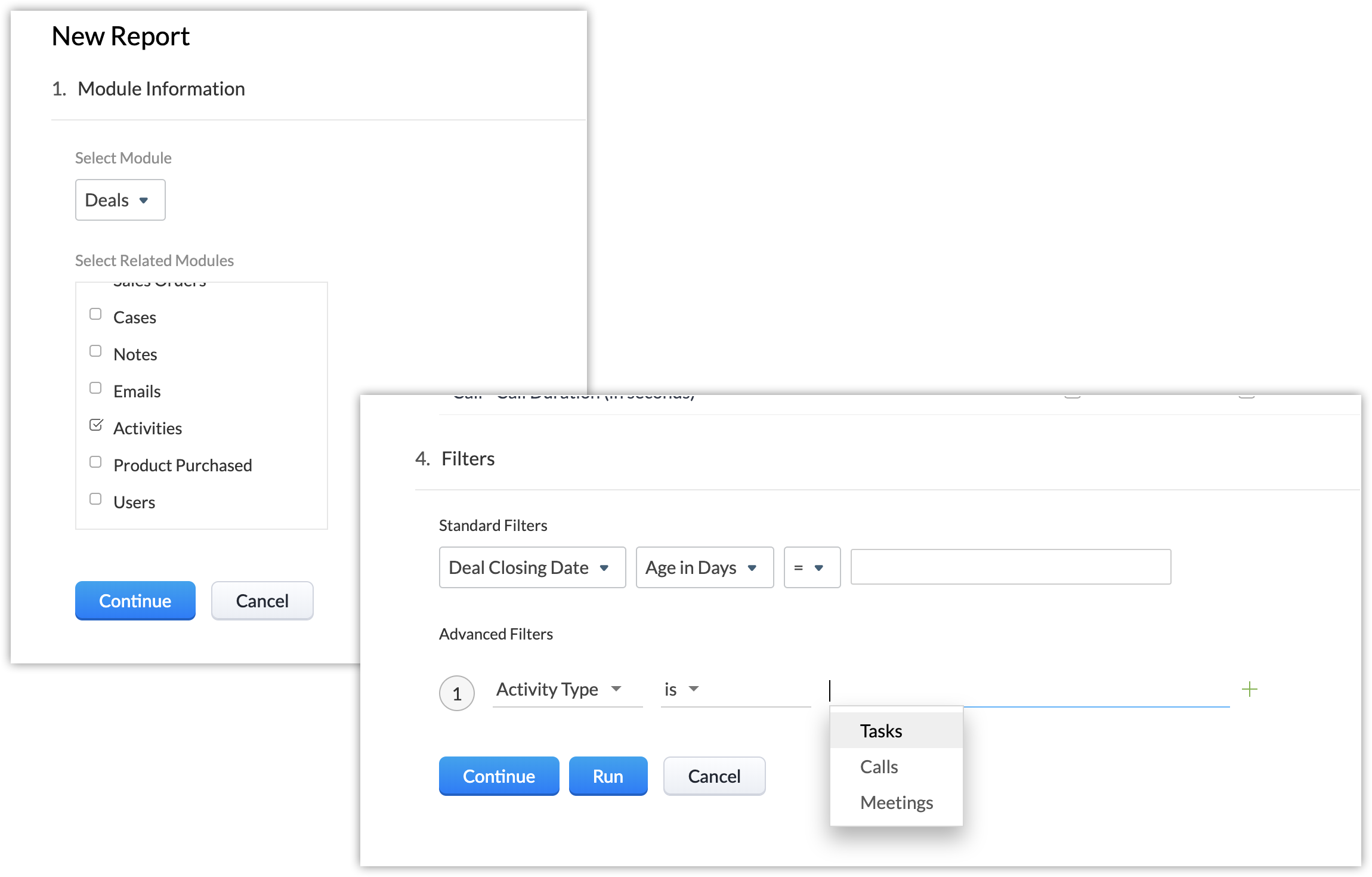
Auparavant, seul le module Activités était répertorié ici et les utilisateurs devaient créer un filtre pour personnaliser le rapport en fonction du type d'activité. Vous pouvez maintenant créer un rapport pour le module Affaires montrant directement les tâches associées à chaque affaire.
Créer des tableaux de bord
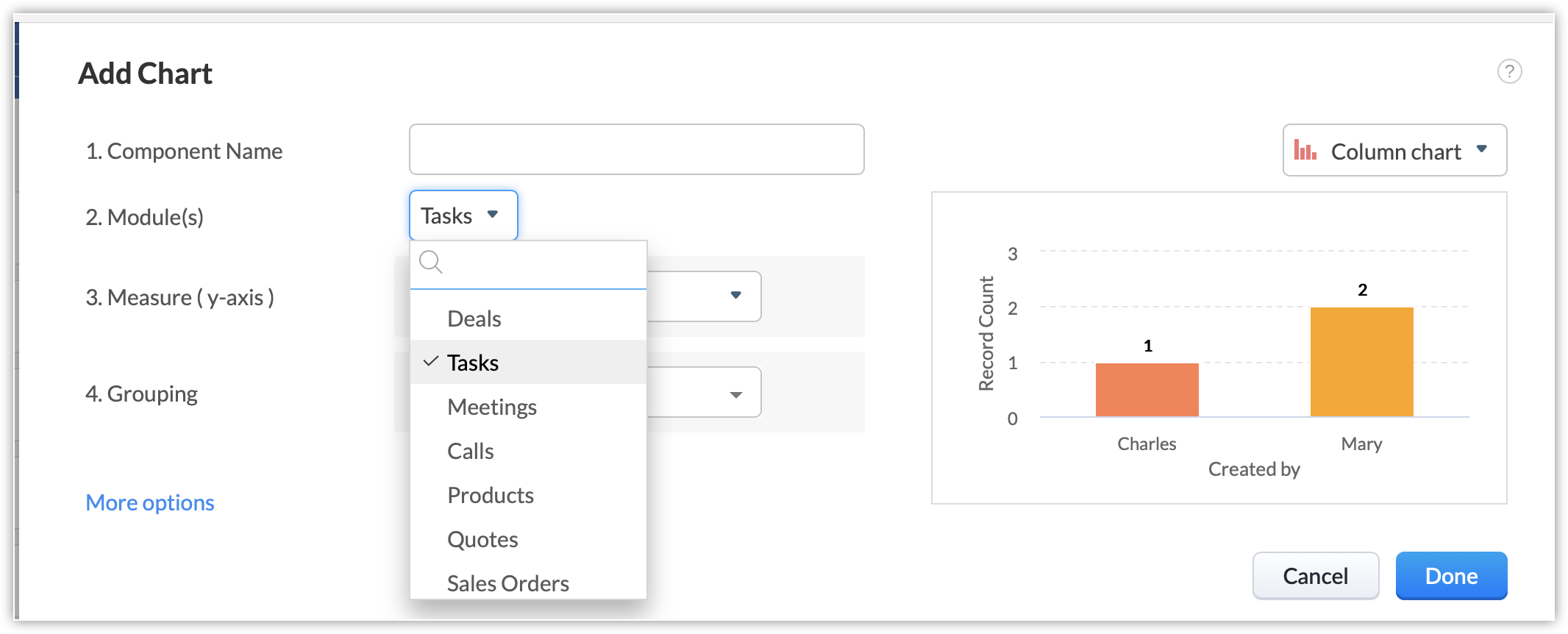
Créez des tableaux de bord pour les modules Tâches, Appels et Réunions séparément.
Ajouter des composants à votre page d'accueil
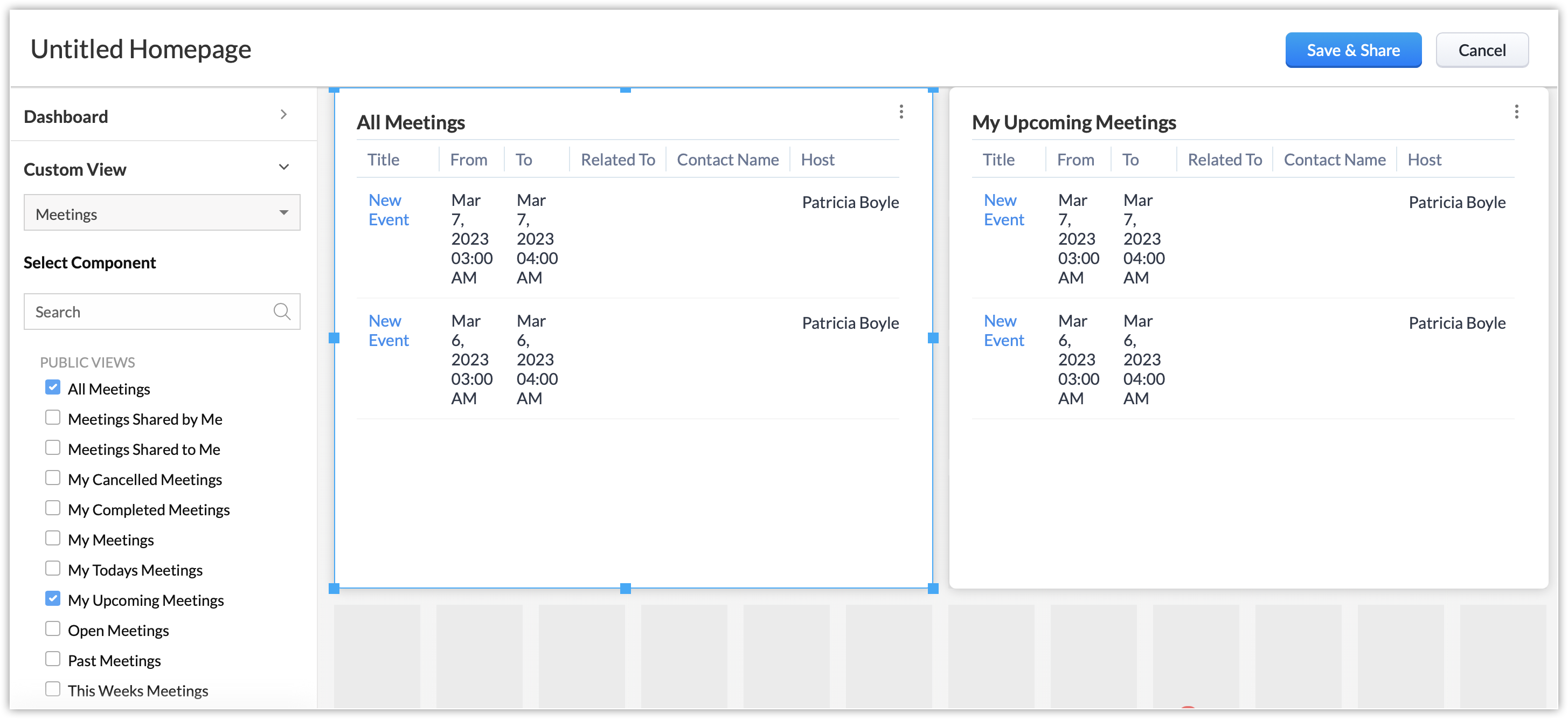
Dans la page d'accueil, les utilisateurs peuvent ajouter des composants personnalisés pour les modules Appels, Réunions et Tâches individuellement.
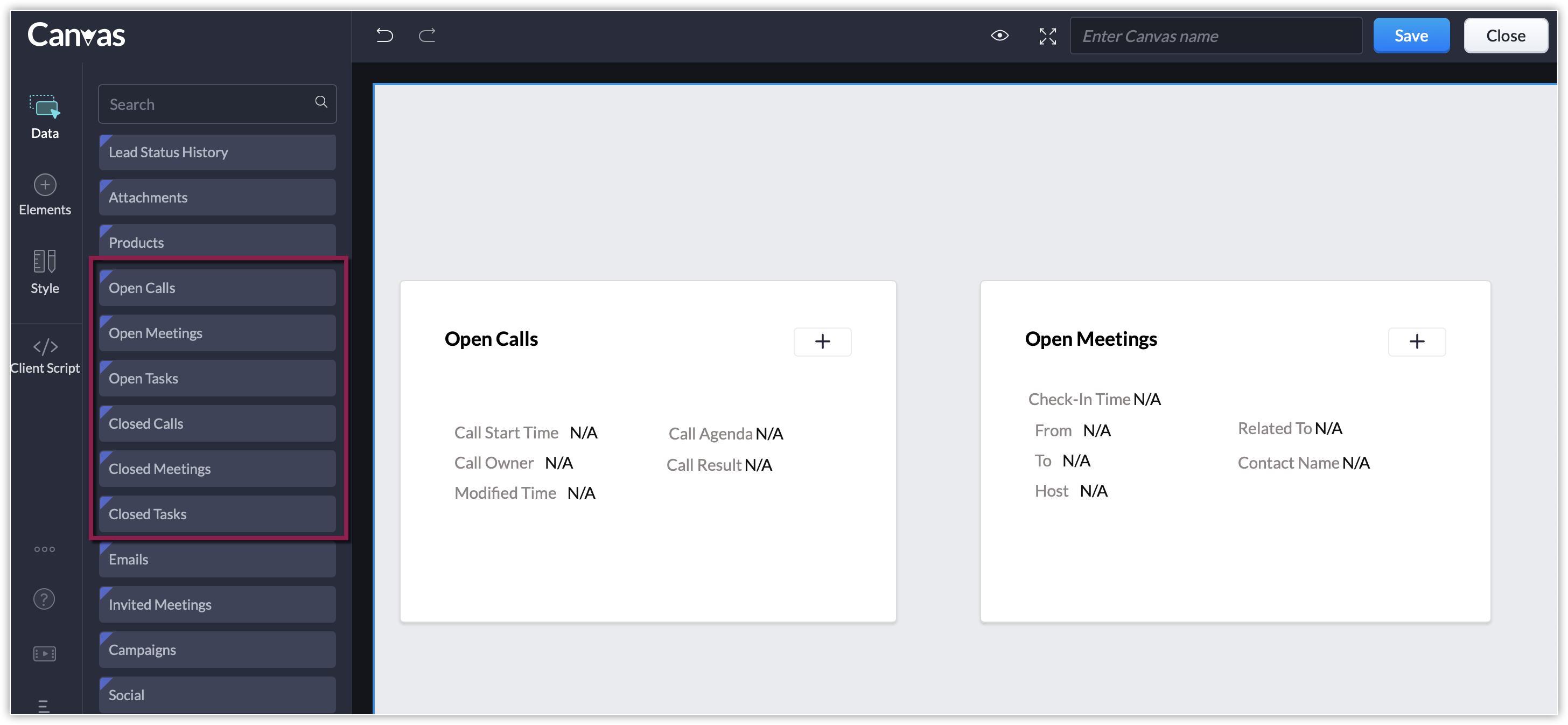
Ajouter des composants à la vue Canvas
Les composants individuels de liste liée tels que les appels ouverts ou fermés, les réunions ouvertes ou fermées, les tâches ouvertes ou fermées sont disponibles dans la vue Canvas en plus de la liste liée des activités ouvertes ou fermées. Cela vous permet de personnaliser la page de détails de votre enregistrement et d'afficher uniquement les listes liées aux activités que vous suivez.
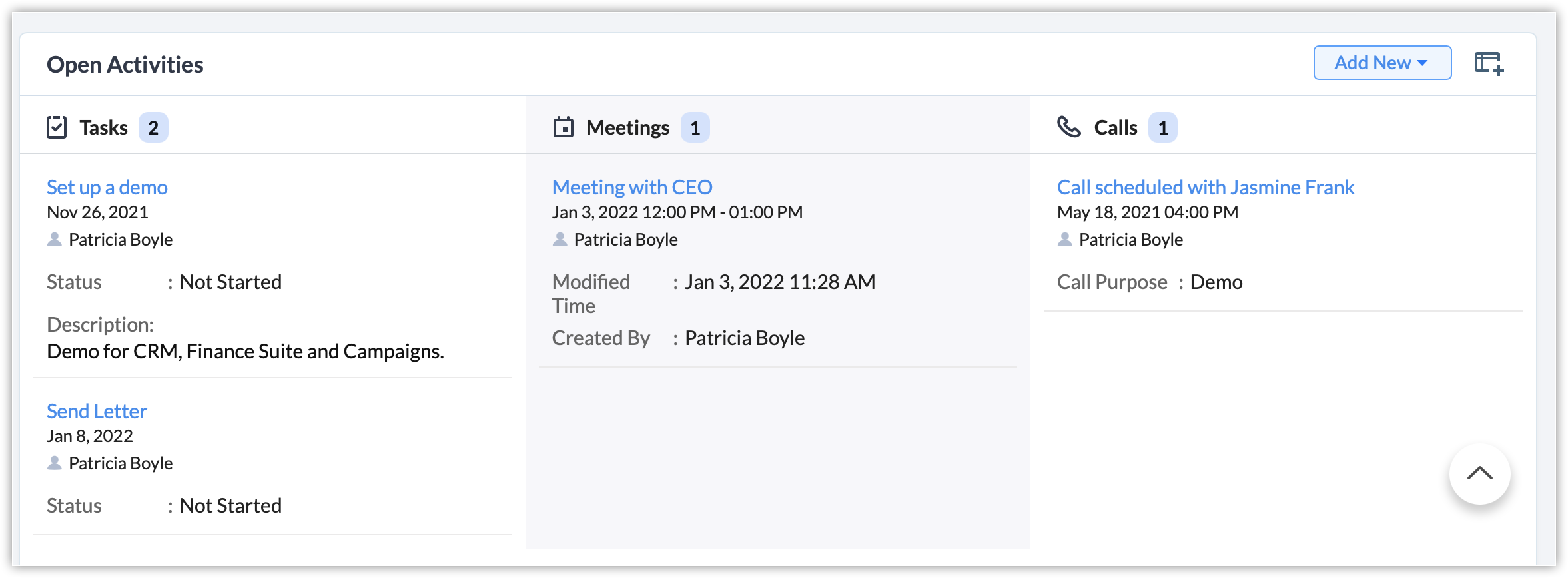
La liste des activités ouvertes/fermées fait peau neuve.
i. Les activités sont maintenant classées selon le type d'activité.

ii. La liste associée peut être personnalisée pour afficher les champs spécifiques aux modules Tâches, Appels et Réunions.
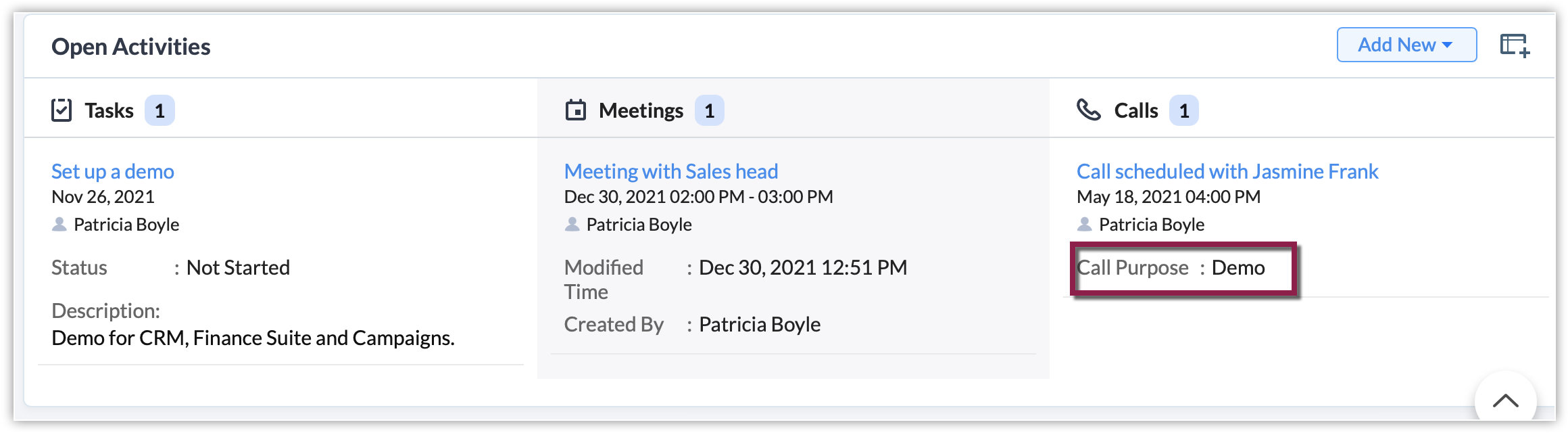
iii. Les utilisateurs n'ont plus besoin de faire défiler la liste horizontalement pour voir tous les champs de la liste liée. Désormais, les données sont répertoriées sous chaque type d'activité.
Alors, qu'adviendra-t-il du module Activités existant ?
Pour les organisations qui se sont inscrites avant le 10 septembre 2021
Nous conserverons le module Activités et présenterons également les modules Tâches, Appels et Réunions afin que les clients aient suffisamment de temps pour s'adapter aux changements et s'habituer à utiliser ces modules individuellement. À terme, le module Activités sera supprimé (nous annoncerons la date ultérieurement). Vos données ne seront pas perdues et elles seront disponibles dans les modules Tâches, Appels et Réunions. Vous serez informé bien à l'avance de la suppression du module Activités.
Pour les organisations qui se sont inscrites après le 10 septembre 2021
Seuls les modules Tâches, Appels et Réunions seront disponibles. Le module Activités ne sera pas affiché.
Merci de votre attention et bonne journée,
L'équipe Zoho France
L'équipe Zoho France
Access your files securely from anywhere
Centralize Knowledge. Transform Learning.
All-in-one knowledge management and training platform for your employees and customers.
New to Zoho Recruit?

Zoho Developer Community
New to Zoho LandingPage?
Zoho LandingPage Resources
New to Zoho Survey?
New to Zoho CRM Plus?
Deliver unforgettable customer experiences
New to Zoho CRM Plus?
Deliver unforgettable customer experiences
New to Zoho Marketing Plus?
Everything you need to run your marketing
New to Zoho Marketing Plus?
Everything you need to run your marketing
New to Bigin?





Topic Participants
Florence Barbier
Sticky Posts
CRM - Astuce #5 : Effectuer des actions en masses
Bonjour à tous, Au programme du jour : éviter les répétitions grâce à la fonction "en masse". Gagnez du temps sur ces actions simples pour vous concentrez sur votre entreprise. Allez dans le module concerné et cliquer sur les : (...) Suppression enZoho CRM - Il y a du nouveau chez les modèles d'e-mails
Bonjour à tous, Nous sommes ravis d'annoncer que les modèles d'email dans Zoho CRM sont désormais adaptés au design pour tous les ordinateurs et mobiles. Le responsive design désigne une méthode selon laquelle les pages sont conçues pour s'afficherNouveautés Zoho CRM : la page d'accueil et le tableau de bord actualisés !
Bonjour à tous, Nous avons apporté quelques améliorations à la page d'accueil des utilisateurs et à l'onglet Tableau de bord, en voici un aperçu. Des composants supplémentaires dans la page d'accueil pour les nouveaux inscrits : Dans l'onglet Accueil,CRM Blueprint #5: Glossaire
Bonjour à tous, Voici le dernier volet de notre série sur les Blueprints : un glossaire pour comprendre tous les termes nécessaire à l'automatisation de votre process. État : fait référence à chaque étape de votre processus. Par exemple : qualification,CRM : Ajoutez de la couleur à vos balises CRM
Bonjour à tous, Les tags sont des identifiants uniques qui peuvent être associés à différents enregistrements ce qui permet de rechercher, trier, catégoriser, filtrer et segmenter efficacement les enregistrements. Cette nouvelle amélioration a pour but
New to Zoho TeamInbox?
Zoho TeamInbox Resources
Zoho CRM Plus Resources
Zoho Books Resources
Zoho Subscriptions Resources
Zoho Projects Resources
Zoho Sprints Resources
Qntrl Resources
Zoho Creator Resources
Zoho CRM Resources
Design. Discuss. Deliver.
Zoho Show Resources

Get Started. Write Away!
Writer is a powerful online word processor, designed for collaborative work.
Zoho CRM コンテンツ
-
オンラインヘルプ
-
Webセミナー
-
機能活用動画
-
よくある質問
-
Ebook
-
-
Zoho Campaigns
- Zoho サービスのWebセミナー
その他のサービス コンテンツ
Nederlandse Hulpbronnen

ご検討中の方
Recent Topics
Why Do My Portal Users Can't See Any Data in Reports
In My zoho crm i have created a button automation which basically is it converts a quote into invoice and sales order , so initially when a person who is my app user submits a quotation form it goes into quote module and record is created and in eachIntroducing Zoho Commerce 2.0 — It's more than just selling!
Hello! We are proud to launch Zoho Commerce 2.0, a reimagination of how online businesses look, feel, and function. This launch is both timely and symbolic, as we reaffirm our commitment to empowering small and medium enterprises with powerful, yet simple-to-useIntroducing prompt builder in Zoho CRM
We’ve introduced a new way to put Zia’s generative AI to work—right where your teams need it most. With the all new prompt builder for custom buttons, you can create your own AI instructions to generate tailored content, suggestions, or summaries acrossItem Batch Creation/Updation
I have a requirement to integrate a local system with Zoho Books. I need to create items in Zoho Books with batch tracking enabled, but I couldn't find a specific API for that in the Zoho Books API documentation. Is there a dedicated API endpoint to createEducation Zoho User Group (ZUG) virtual meetup featuring Zoho Sign
Hi there! The educational sector often faces the hassle of handling extensive paperwork, which leads to increased operational costs. A digital signature solution like Zoho Sign can help you modernize your processes, go fully digital, and seamlessly collectTroubleshooting Delays in Zoho CRM Automation Workflows for Lead Status Updates
Dear Zoho Community, I am refining a sales pipeline in Zoho CRM, implemented in May 2025, to enhance efficiency for a small business managing client leads. While the CRM effectively tracks leads, I am encountering delays in automation workflows that update📣 [Webinar] Spikra shows how businesses leverage Zoho Bookings to increase revenue
[Webinar] Spikra shows how businesses leverage Zoho Bookings to increase revenue Hi all, Service-based businesses need to be on top of their client experience game to stay ahead. Spikra, one of our Advanced Zoho Partners, has been helping businesses deliverKaizen #172 - Leveraging the 'crmAPIResponse' Object in Queries
Hello everyone! Welcome back to another week of Kaizen! We released the Queries feature sometime back and hope you have tried it out. A little gist about this feature before we move on to our post. Zoho CRM's Queries feature enables dynamic data retrievaltransforming 1D tables to 2D and the other way round
Does Dataprep have tools to convert 1D tables to 2D tables and the other way round? The actions that are commonly called "pivot" and "melt". What I mean is transitioning between these two kinds of table: 2D id ____ name ____ surname ____ age 00 ____ MattRebrand your CRM with the all-new custom domain mapping setup
UPDATES TO THIS FEATURE! 19th Jan, 2024 — Custom domain mapping has been made available for portal users in Zoho One and CRM Plus. 23rd June, 2023 — Custom domain mapping has been made available for all users, in all DCs. Hello everyone! We are elatedauthentication
We cannot connect via IMAP. We are receiving the following error: Error: You are yet to enable IMAP for your account. Please contact your administrator (Failure)Bad User: Authenticated but not connected
Zoho CRM cannot send/receive emails and it appears as if it may be an api configuration change either via Zoho or MS. Does anyone have information on how to fix this error message? I am admin on all my accounts. Zoho and MS are blaming each other.Edit email address that appears on invoice
Hi How do I change the email address that appears on invoices, it is showing the email address that i used to sign up to zoho with but I want to change it to another email address that we use for accounts. also is there a way to edit the position of aZoho Tasks - Add Sorting by Priority
We are able to Group by and Filter by Priority but for some reason we can't Sort by Priority on the Task lists. Please allow for sorting by priority if the current view is not grouped by priority.Zoho People > Candidate Form > error Editable Primary Lookup is needed to set add permission
Hello All I have try to turn on the add feature in the candidate form It show the error Editable Primary Lookup is needed to set add permission What is missing from my side?6 time-saving tips for working with tables in Zoho Writer
Tables have always been the best way to represent data. They help you structure and categorize information systematically and present them in a simpler way. While tables in Zoho Writer are easy to implement, some tasks might not be that obvious. Here are some time-saving tips to help you work better with tables in Zoho Writer: 1. Insert Multiple Rows / Columns in a Table Adding more rows and columns is the most common action performed while working with tables. Instead of using the Table tab,Add Built-in "Partner Finder" / "Contractor Directory" Tab to Zoho Desk Help
Hi Zoho Team, We hope you're doing well. We would like to request a new feature for the Zoho Desk Help Center: A built-in, configurable "Partner Finder" / "Contractor Directory" tab or section, similar in concept to your own Zoho Partner Finder at: 🔗Can't get sender adress to work
Hi, I am having some trouble getting the sender adress to work for responses on tickets. I would like to configure a sender adress that is different from the zohodesk emailadress that is normally used. These are the steps I have followed: 1. Add a newQuestion Regarding Deleted Reports in Zoho Desk Analytics
Dear Zoho Desk Support Team, I hope this message finds you well. We have a question regarding the Analytics module in Zoho Desk, specifically related to deleted reports/dashboards. We would like to understand the following: Is there a recycle bin, recoveryAdd an option to start zobot when user clicks the Chat with Us button
I would like to have an option to start the zobot when user clicks on "Chat with us" button when chat widget is maximized that way visitors could see first the homepage and decide which channel they would like to use to connect, or to see the quicke helpZoho Books - Feature Request - Provide "Show PDF View" toggle on Invoice records
I have noticed it is possible to activate or deactivate the PDF preview on some records but not all. This would be very helpful on Invoices when a custom template is being used and the PDF preview does not represent the output file. Not available on:Incorrect Handling of XLSX data
Trying to import an XLSX schedule of bills into Zoho Books I ran across the problem of date formatting. To replicate: Build a CSV file with bill dates in whatever format you like and import it - this should work if you match the "dd/MM/yyy" etc. formatAdding Columns to Reports
Hi, Is it possible to choose fields to be added as columns in the reports? Thank you.How do I automatically assign the project owner for all tasks in Zoho Projects?
I have been researching for days on how to automatically assign all the tasks to the project owner on creation of the project in Zoho Projects. I have been having to go in and manually change all the task owner from 'unassigned' to the owner of the projectCRM Kiosk - Action for GetRecords
I have a Kiosk screen with GetRecords and want to use the selected records in a custom function. My particular case is to set a lookup value on the selected records. Generally speaking though, I want to work with the selected records in a function. IEmail for customer to provide payment information
Is there a way for customers when you set up a subscription to get an email that prompts them to put in their billing information to start their subscription? Also, can you show the subscription in their portal?Unable to display field label from a hidden Single Line Textbox in Description
Hi folks, I'm unable to display my hidden field, e.g. ${zf:SingleLine4} , in my description. I'm pre-filling this hidden Single Line Text box via "Field Alias - Pre-fill URL" settings. I noticed that my decimal form fields work, e.g. ${zf:Decimal}, andLookup fields
Is there any way to add Lookup fields to Zoho FSM -- I do not see the option but I see default lookup fields in different modulesZoho Analytics - Bill Table
Hi I am new to Zoho and mainly work in Books. Recently learned of Zoho Analytics and am exploring it to create reports that would be useful for me. For example, I want to create a bills cash forecast by week for cash flow planning. When I start to createCreating a tax - amount table in Analytics
Hi everyone, I would like to create a report in Zoho Anayltics that creates the tax and amounts in a table. I have been able to create a report that shows me all the tax accounts, but I can't get it combined with the amounts of the accounts. Is thereIs it possible to do custom domains on test accounts that use saml setups?
In Zoho Billing, Is it possible to do custom domains on test accounts that use saml setups for the customer portal?I’m facing an issue while trying to upload a PDF file to a custom file upload field within the Leads module via the Zoho CRM API.
Hi Zoho Team, I’m facing an issue while trying to upload a PDF file to a custom file upload field within the Leads module via the Zoho CRM API. I am able to manually upload a PDF into this field through the UI. I am also able to upload files as attachmentsNo chat option
Chat option is not available in Android app.How to add custom templates in zoho sheets mobile
How can I add custom templates in Zoho spreadsheet mobile?Order Items
Hi .. We have to implement orders with line but each line should have a separate record and not as a subform, does anyone have experience with that kind of solution what is the best practice for that kind of thing ThanksTrello: Invalid Client - Client ID passed does not exist
Hello, I am trying to authorize the Zoho CRM power-up in Trello but always land on the following page: I tried adding a trello client to the Zoho API console but this generated a different client ID to the one in the link of the page in the above picture.Zoho Sprints - Q2 updates for 2025
Hello everyone! We’re excited to share the latest updates from Zoho Sprints for Q2 2025! This quarter, we rolled out a few highly-requested features designed to enhance collaboration and time management across your projects. Here's a look back at theCRM Email Insights Not Working - Status not Changing
I used to be able to see if a customer opened/read an email in CRM, but I no longer get those status changes inside their record. I have everything enabled and I am sending the email from CRM. The experience center has the status' enabled as well. AnyThe use of Ticket statuses
When your support team mark a ticket "Closed" before I had a time to check what your team has done on the ticket - I have to consider this as you consider the ticket closed even if I dont consider it closed. Which automatically produce a negative sentiment."Replace" an existing version of CRM
Hi all, I have a question, I saw an article about this once, but I now cannot find it. I am working with a client who has had their CRM in Zoho One built and extensively modified. But it is non-functional now, and rather than try and unpick the system,Next Page