All Zoho Survey tables explained

Introduction
Hey everyone! Sometimes, deciphering the structure and meaning of data in Zoho
Analytics, especially when Zoho’s native syncs and integrations are
activated, can be quite challenging. That’s why I’ve put together an
overview, not only to aid myself but also to assist others in navigating
through these complexities.
Collectors
The table plays an important role in the administration of surveys, especially when using the multi-collector feature. This feature makes it possible to distribute a survey to different groups and then filter the results by group.
What is a collector?
A collector is basically a way to distribute a single survey in different ways. Normally a survey is shared via a single link, but with this feature separate links can be created for different groups. This makes it easier to filter and analyze responses by group. In addition, numerous settings such as restrictions, quotas, visibility and hash URLs can be set separately for each collector.
A practical example illustrates this: Suppose you are organizing a workshop for many different customers from different companies and want to get feedback from the participants. Instead of creating separate surveys per company, you can create a single survey and send it to each participant using multi-collectors. This way, all incoming responses are already automatically segmented by company without participants having to provide information manually.
The Collectors table therefore makes it easier for you to organize survey activities.
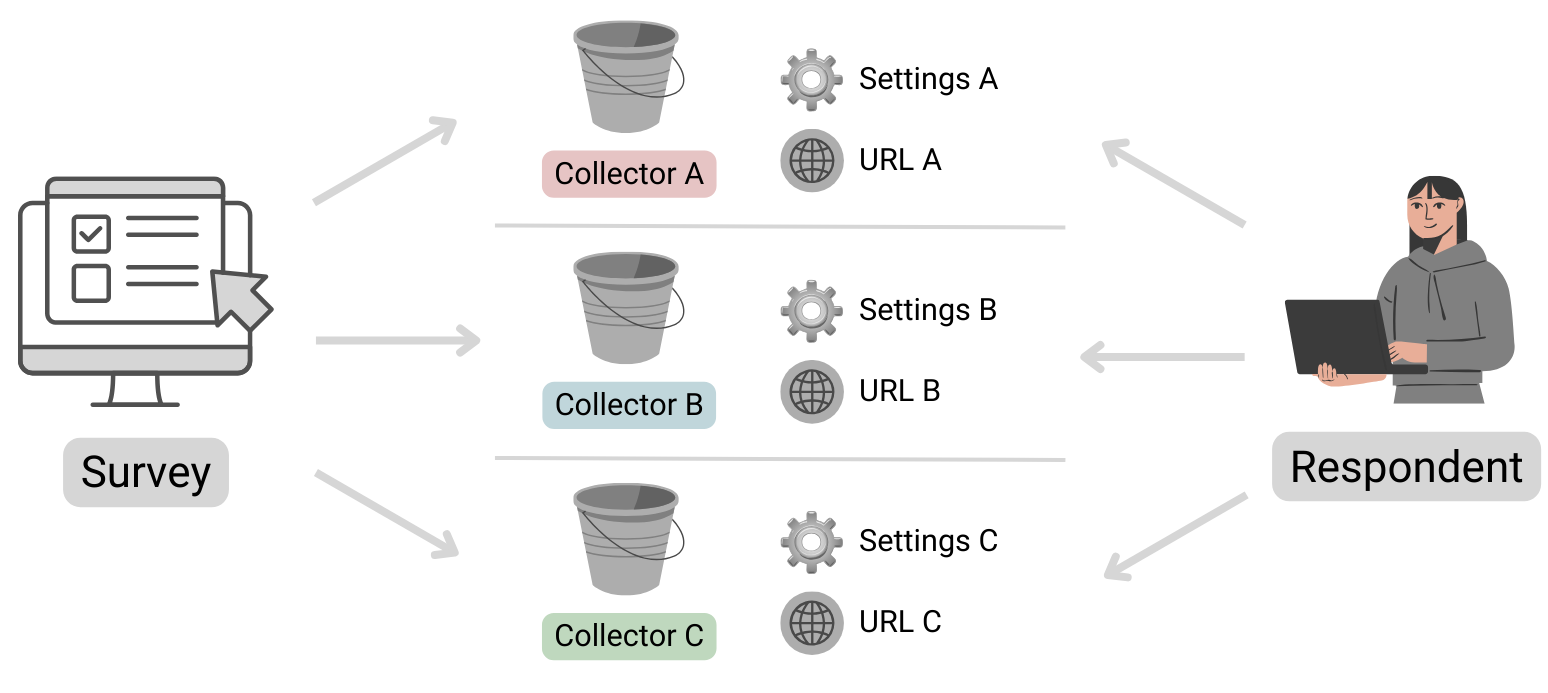
Table structure
| Column name | Data type | Explanation | Table relationships | Values |
|---|---|---|---|---|
| ID | Number | Primary key | Respondents.Collector ID | |
| Name | Text | Name of the collector | ||
| Unique URL | Text | The public URL where the survey can be accessed | ||
| Survey ID | Text | Reference to the survey to which this collector belongs | Surveys.ID | |
| Status | Text | Indicates whether the collector is still accepting submissions or is already closed. | open, closed | |
| Type | Text | Specifies whether the collector is public or private. If a survey is set as private, it can only be opened by logged-in Zoho users. | public, private | |
| Offline URL | Text | Zoho Survey offers the option of completing surveys offline. This
means that responses can be received even without an Internet connection
and can be viewed and uploaded after authentication. Further
information can be found here: https://help.zoho.com/portal/en/kb/survey/launch/offline-survey/articles/offline-surveys
Attention: Even if this function is deactivated, a URL is displayed here. If this is opened, a corresponding message appears stating that it cannot be accessed. |
||
| Offline Enabled | Boolean (DecisionBox) | Indicates whether the offline feature is activated or not. |
|
|
| Published Date | Date + Time | Time at which the Collector was published. | ||
| Cut Off Date | Date | Time at which the collector should be closed (this is the deadline specified in the settings).If a collector was closed manually, the date is not entered here (unfortunately this cannot be found anywhere else). | ||
| Multiple Response | Text | This column is always empty, even the support team couldn’t help me here. It looks as if information on restrictions is stored here (Editor 🡆 Publish 🡆 Restrictions 🡆 Response Restriction). |
Surveys
This table stores basic information about a survey.
Table structure
| Column name | Data type | Explanation | Table relationships | Values |
|---|---|---|---|---|
| ID | Number | Primary key | Responses.Survey IDQuestions.Survey IDVariables.Survey IDResponse Variables.Survey IDCollectors.Survey IDPages.Survey ID | |
| Language | Text | Identification of the standard language selected for the survey | Set 1 of the ISO 639 language codes | |
| Created Date | Date + Time | Date on which the survey was created (the publication date can be found in the Collectors table!) | ||
| Modified Date | Date + Time | Time of the last editing of the survey | ||
| Page Count | Positive number | Indicates the total number of pages in the survey. | ||
| Title | Text | A different title can be configured in the settings if the name of the survey (table column ‘Name’) is not to be used. | ||
| Submit Button | Text | The text stored in the settings for the button to send the survey | ||
| Back Button | Text | The text stored in the settings for the button to go back to the previous page has been changed. | ||
| Enable Back | Text | Indicates whether the respondent can return to the previous page or whether the button is not displayed. | true, false (Attention! Zoho uses the text true and false here and not the data type Desicion Box, this inconsistency is confusing and must be taken into account). | |
| Next Button | Text | The text that was defined in the settings for the button to go to the next page | ||
| Group ID | Number | Reference to the department in which the survey was created | Departments.ID | |
| Name | Text | Survey name | ||
| Type | Text | As a rule, the value “survey” is available here. However, if scores
have been configured under Editor 🡆 Advanced settings, the value scoring is available instead. |
survey, scoring |
Automatically import new surveys is selected, there should normally be no missing data!Pages
The table contains all the information about the pages in the survey. Normally, this table should not play a major role in evaluations, unless you want to use the page title for segmentation.
Table structure
| Column name | Data type | Explanation | Table relationships |
|---|---|---|---|
| ID | Number | Primary key | Responses.Page ID
Questions.Page ID |
| Title | Text | Title of the page | |
| Description | Text | Description text | |
| Question Count | Positive number | Indicates the total number of questions on the corresponding page | |
| Survey ID | Number | Reference to the survey in which this page exists | Surveys.ID |
Questions
All data relating to the individual questions is stored here.
Table structure
| Column name | Data type | Explanation | Table relationships | Values |
|---|---|---|---|---|
| ID | Number | Primary key | Responses.Question ID | |
| Type | Text | Indicates the type of question | ||
| Text | Text | Question text | ||
| Page ID | Number | Reference to the page on which the question is located | Pages.ID | |
| Trashed | Boolean (DecisionBox) | Indicates whether the question is visible or whether it has been deleted |
|
|
| Mandatory Enabled | Boolean (DecisionBox) | Indicates whether the question is defined as a mandatory fieldThis column can contain the value NULL! Further information on the supported question types can be found below. |
|
|
| Random Enabled | Boolean (DecisionBox) | Indicates whether a random order of answer options is activated for the questionThis column can contain the value NULL! Further information on the supported question types can be found below. |
|
|
| Hint Enabled | Boolean (DecisionBox) | Indicates whether a hint text is stored for the questionThis column can contain the value NULL! Further information on the supported question types can be found below. |
|
|
| Other Option | Boolean (DecisionBox) | An optional “Other” field can be activated for certain questions. This column indicates whether this setting is active. Please note that the “Other” field cannot be used for all question types. Therefore, this column may contain the value NULL. Further information on the supported question types can be found below. |
|
|
| Hint | Text | If configured, the information text is stored here | ||
| No. Of Stars | Positive number | Maximum number of stars to be awardedThis column can contain the value NULL! Further information on the supported question types can be found below. |
Question types
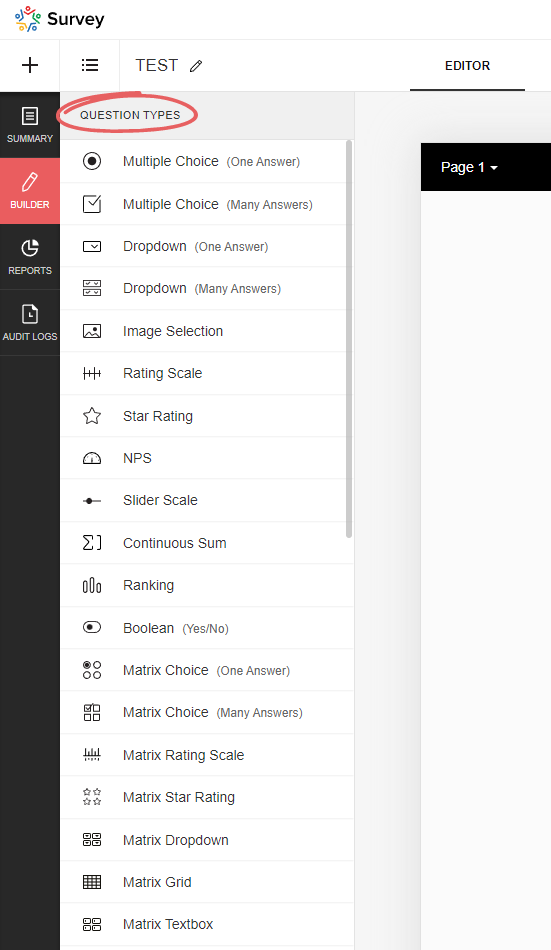
Zoho Survey offers a variety of question types, and depending on which type you select, certain options may not be available, resulting in the corresponding Boolean (DecisionBox) fields having the value NULL. In the table below you will find an overview of all available question types.
| Type | Field name (on the UI) | Note | Mandatory Enabled | Random Enabled | Hint Enabled | Other Option | No. Of Stars |
|---|---|---|---|---|---|---|---|
| full_name | Full name | NULL | NULL | Yes/No | NULL | NULL | |
| demographic | Contact details | NULL | NULL | Yes/No | NULL | NULL | |
| heading_descriptive | Heading and description | This is not a question! This element is only used to display text | NULL | NULL | NULL | NULL | NULL |
| single_drop_down | Dropdown field (one answer) | Yes/No | Yes/No | Yes/No | Yes/No | NULL | |
| multi_select_dropdown | Dropdown field (many answers) | Yes/No | Yes/No | Yes/No | Yes/No | NULL | |
| likert_rating | Rating Scale | The following setting is selected: Likert scale (can be selected when initially added) | Yes/No | NULL | Yes/No | NULL | NULL |
| image_star_rating | Image Selection | The following setting is selected: Star rating | Yes/No | NULL | Yes/No | NULL | Positive number |
| image_single_choice | Image Selection | The following setting is selected: Multiple selection (one answer) | Yes/No | Yes/No | Yes/No | NULL | NULL |
| image_multiple_choice | Image Selection | The following setting is selected: Multiple selection (multiple answers) | Yes/No | Yes/No | Yes/No | NULL | NULL |
| boolean_choice | Boolean | Yes/No | NULL | Yes/No | NULL | NULL | |
| combined_file_upload | File Upload | Yes/No | NULL | Yes/No | NULL | NULL | |
| calendar_box | Date/Time | Yes/No | NULL | Yes/No | NULL | NULL | |
| email_textbox | Yes/No | NULL | Yes/No | NULL | NULL | ||
| single_textbox | Short Answer | Yes/No | NULL | Yes/No | NULL | NULL | |
| textarea | Long Answer | Yes/No | NULL | Yes/No | NULL | NULL | |
| continuous_sum | Continuous Sum | Yes/No | NULL | Yes/No | NULL | NULL | |
| matrix_text_box | Matrix Textbox | Yes/No | NULL | Yes/No | NULL | NULL | |
| matrix_radio_box | Matrix Choice (One Answer) | Yes/No | NULL | Yes/No | Yes/No | NULL | |
| matrix_check_box | Matrix Choice (Many Answers) | Yes/No | NULL | Yes/No | Yes/No | NULL | |
| matrix_likert_rating | Matrix Rating Scale | The following setting is selected: Likert scale (can be selected when initially added) | Yes/No | NULL | Yes/No | NULL | NULL |
| matrix_grid | Matrix Grid | Yes/No | NULL | Yes/No | NULL | NULL | |
| matrix_drop_down | Matrix Dropdown | Yes/No | NULL | Yes/No | Yes/No | NULL | |
| matrix_star_rating | Matrix Star Rating | Yes/No | NULL | Yes/No | NULL | Positive number | |
| multiple_textbox | Multiple Textboxes | Yes/No | NULL | Yes/No | NULL | NULL | |
| single_choice | Multiple Choice (One Answer) | Yes/No | Yes/No | Yes/No | Yes/No | NULL | |
| multiple_choice | Multiple Choice (Many Answers) | Yes/No | Yes/No | Yes/No | Yes/No | NULL | |
| nps | NPS | Yes/No | NULL | Yes/No | NULL | NULL | |
| ranking | Ranking | Yes/No | NULL | Yes/No | NULL | NULL | |
| slider | Slider Scale | Yes/No | NULL | Yes/No | NULL | NULL | |
| signature | Signature | Yes/No | NULL | Yes/No | NULL | NULL | |
| star_rating | Star Rating | Yes/No | NULL | Yes/No | NULL | Positive number | |
| numeric_textbox | Number | Yes/No | NULL | Yes/No | NULL | NULL | |
| matrix_weightage | Matrix Rating Scale | The following setting is selected: Weighted selection (can be selected during initial addition) | Yes/No | NULL | Yes/No | NULL | NULL |
| choice_weightage | Rating Scale | The following setting is selected: Weighted selection (can be selected during initial addition) | Yes/No | NULL | Yes/No | NULL | NULL |
Respondents
This table stores data on the specific completion of the survey, including information on who completed it and when, and to which collector it belongs.
Table structure
| Column name | Data type | Explanation | Table relationships | Values |
|---|---|---|---|---|
| ID | Number | Primary key | Responses.Respondent IDResponse Variables.Respondent ID | |
| Start Date | Date + Time | Time at which the respondent opened the survey | ||
| End Date | Date + Time | Time at which the respondent submitted/completed the survey. If the survey has not yet been completed, this value is of course empty | ||
| IP Address | Text | IP address of the respondent; whether this data is saved or not depends on the setting in the collector (under general restrictions) | ||
| Status | Text | Indicates whether or not the survey has already been completed or submitted by the user | completed, partial | |
| Collector ID | Number | Reference to the collector through which the survey data was collected | Collectors.ID | |
| Survey ID | Number | Reference to the survey | Surveys.ID | |
| Time Taken in Minutes | Decimal number | Time difference between start and end time in minutes | ||
| Time Taken | Number | Time difference between start and end time in seconds | ||
| Survey Modified Time | Date + Time | Time at which the survey was last edited |
partial). Please take this into account when evaluating the data, as these should generally be excluded…Response Variables
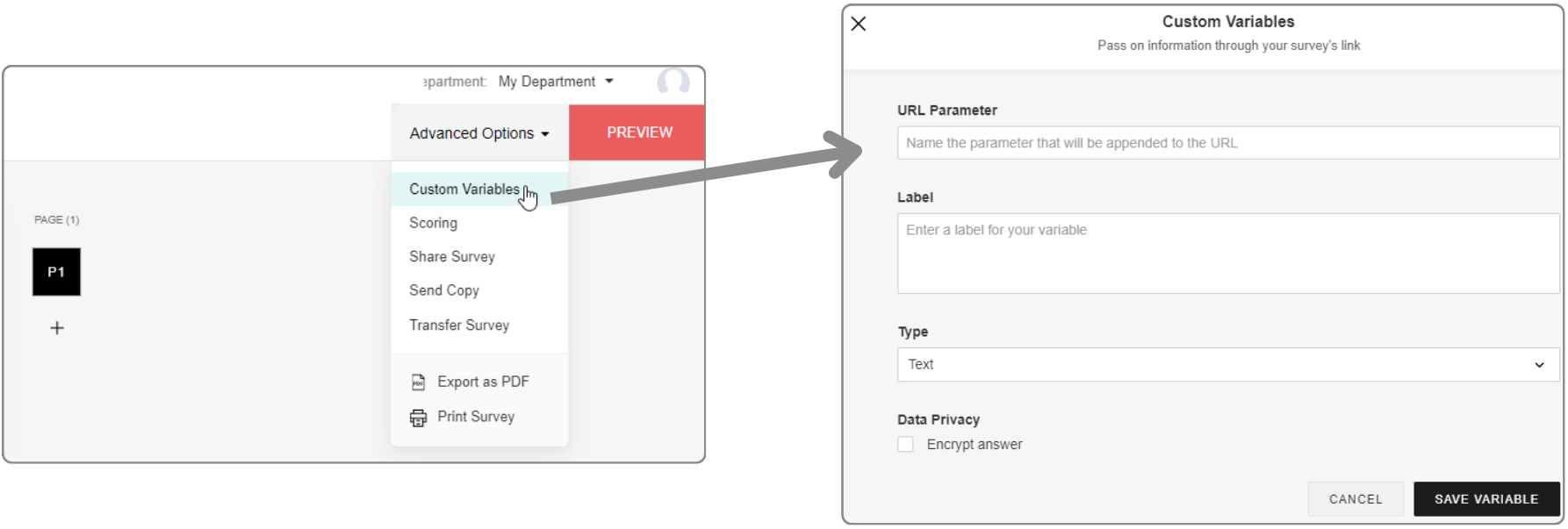
URL parameters can be configured in the editor under Advanced settings. If data has been transferred in a survey link and a response has been submitted, this data is saved here.
In addition, URL parameters can also be used as response restrictions, whereby these can be set per collector. This means that only one submission is permitted per unique URL parameter value.
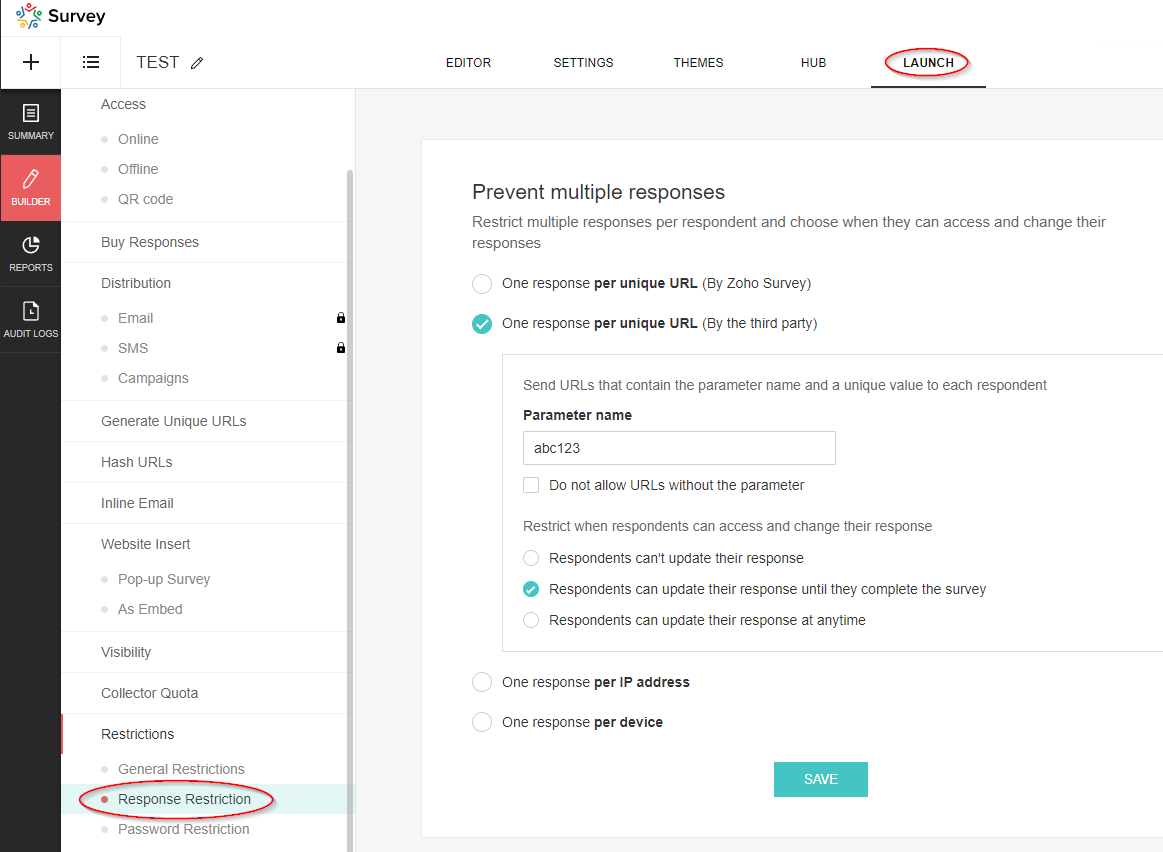
These parameters are not visible in the editor under Advanced settings, but are also saved in this table.
Table structure
| Column name | Data type | Explanation | Table relationships | Values |
|---|---|---|---|---|
| Respondent ID | Number | Reference to the data set of the respondent | Respondents.ID | |
| Variable ID | Number | Reference to the variable | Variables.ID | |
| Variable Label | Text | Description | ||
| Variable Value | Text | Value of the variable | ||
| Skipped By Logic | Boolean (DecisionBox) | ? |
|
|
| Survey ID | Number | Reference to the survey | Surveys.ID |
Variables
This table contains the basic data of the variables (URL parameters).
Table structure
| Column name | Data type | Explanation | Table relationships | Values |
|---|---|---|---|---|
| ID | Number | Primary key | Response Variables.Variable ID | |
| Name | Text | Name of the parameter, i.e. the exact string used in the URL | ||
| Label | Text | Description of the parameter | ||
| Type | Text | Data type |
|
|
| Unique Order | Text | Order in which the parameters were added (in the advanced settings) | Capital letters (A, B, C, etc.) | |
| Trashed | Boolean (DecisionBox) | Indicator whether the parameter has been deleted |
|
|
| Respondent / Custom | Text | If the parameter is used for the response restriction, the value is Respondent, otherwise it is Custom. |
|
|
| Survey ID | Number | Reference to the survey | Surveys.ID |
Responses
This table is of particular interest as it contains the answers to the questions that were submitted.
Table structure
| Column name | Data type | Explanation | Table relationships | Values |
|---|---|---|---|---|
| Respondent ID | Number | Reference to the respondent’s data record | Respondents.ID | |
| Question ID | Number | Reference to the question | Questions.ID | |
| Option ID | Number | Reference to the option: “Option” refers to the selected value in a drop-down field or the selected answer in a multiple choice question. Image selection questions also refer to an option. However, it should be noted that this does not currently contain any information about the image, so it is unfortunately useless. For further details, please see the section on the corresponding table! | Options.ID | |
| Text | Text | Answer to the question. This field is empty if it is a dropdown field or a multiple choice question (then the answer is the selected option) | ||
| Row ID | Number | Reference to the row | Rows.ID | |
| Column ID | Number | Reference to the column | Columns.ID | |
| Row | Text | The name of the row (this is simply a lookup, unfortunately the value at the time of the evaluation is not saved) | Rows.Text | |
| Column | Text | The name of the column (this is simply a lookup, unfortunately the value at the time of the evaluation is not saved) | Columns.Text | |
| Option | Text | The name of the option (this is simply a lookup, unfortunately the value at the time of evaluation is not saved) | ||
| Survey ID | Number | Reference to the survey | Surveys.ID | |
| Field ID | Number | Reference to the field if it is a text field or a number field. Further information can be found in the section on the corresponding table! | Fields.ID | |
| Not Applicable Enabled | Boolean (DecisionBox) | For certain questions, you can add the option “Not applicable”. If this option was selected by the respondent, this flag is set. The option can be activated for the following question types: ranking, image_star_rating, matrix_star_rating, matrix_likert_rating | Yes, No | |
| Others | Text | For certain questions, it is possible to activate the “Other” option. You can find more information on this in the section on question types! If this option is activated and the respondent has used it, the answer is not recorded in the “Text” field, but in this field. | ||
| Page ID | Number | Reference to the page on which the answered question is located. | Pages.ID | |
| Field | Text | The name of the field (this is simply a lookup, unfortunately the value at the time of the evaluation is not saved) | Fields.Text |
Rows
The row information for multi-line questions, such as those that occur in a matrix, is recorded in this table. The data in this table relates to the following question types (Questions.Type):
- matrix_likert_rating
- matrix_grid
- matrix_check_box
- matrix_star_rating
- matrix_radio_box
- matrix_text_box
- matrix_weightage
- ranking
- matrix_drop_down
- image_star_rating
Table structure
| Column name | Data type | Explanation | Table relationships | Values |
|---|---|---|---|---|
| ID | Number | Primary key | Responses.Row ID | |
| Question ID | Number | Reference to the question | Questions.ID | |
| Text | Text | Name of the row | ||
| Survey ID | Number | Reference to the survey | Surveys.ID | |
| Unique Order | Text | Specifies the sequence |
Columns
The column information for questions with multiple columns that only occur in a matrix is recorded in this table. The entries in this table refer to the following question types (Questions.Type):
- matrix_grid
- matrix_text_box
- matrix_radio_box
- matrix_drop_down
- matrix_check_box
- matrix_weightage
Table structure
| Column name | Data type | Explanation | Table relationships | Values |
|---|---|---|---|---|
| ID | Number | Primary key | Responses.Column ID | |
| Text | Text | Name of the column | ||
| Question ID | Number | Reference to the question | Questions.ID | |
| Survey ID | Number | Reference to the survey | Surveys.ID |
Fields
This table contains information on group input fields that are used to enable multiple entries per question. This also includes the file upload field and the Boolean (DecisionBox) field, as multiple fields can also be configured here as an option.
In the table, the fields of the following question types (Questions.Type) are listed:
- continuous_sum
- demographic
- Boolean (DecisionBox)_choice
- multiple_textbox
- full_name
- combined_file_upload
Table structure
| Column name | Data type | Explanation | Table relationships | Values |
|---|---|---|---|---|
| ID | Number | Primary key | Responses.Field ID | |
| Text | Text | Name - Attention! If there is only a single switch, “Boolean (DecisionBox)” is displayed here. Otherwise, the corresponding values for the labels will of course appear. | ||
| Type | Text | Indicates the type of input field. | single_textbox, numeric_textbox, email_textbox, file_upload, single_choice | |
| Unique Order | Text | Specifies the order. | ||
| Sequence No | Number | Specifies the order. | ||
| Question ID | Number | Reference to the question | Questions.ID | |
| Survey ID | Number | Reference to the survey | Surveys.ID | |
| Mandatory Enabled | Boolean (DecisionBox) | Indicates whether the field is defined as a mandatory field or not. | Yes, No |
Options
The selectable values that are available in drop-down fields or for multiple-choice questions are saved here. There is also an option for image selection questions. However, it should be noted that this option currently contains no information on the image and is therefore unfortunately useless. In addition, this table is also important for weighted rating scales, as the weightings are saved here. A look at this table is therefore essential for evaluations with this type of scale.
Options are saved for the following question types (Questions.Type):
- matrix_drop_down
- single_choice
- single_drop_down
- image_single_choice
- multi_select_dropdown
- multi_select_dropdown
- multiple_choice
- matrix_weightage
- choice_weightage
Table structure
| Column name | Data type | Explanation | Table relationships | Values |
|---|---|---|---|---|
| ID | Number | Primary key | Responses.Option ID | |
| Text | Text | Name of the option/answer | ||
| Question ID | Number | Reference to the question | Questions.ID | |
| Survey ID | Number | Reference to the survey | Surveys.ID | |
| Column ID | Number | Reference to the column | Columns.ID | |
| Weightage | Number | For questions of the rating scale type and the Weighted selection option set, the respective weighting is displayed here. |
Access your files securely from anywhere
All-in-one knowledge management and training platform for your employees and customers.

Zoho Developer Community





Topic Participants
Sven
Sticky Posts
What's New in Zoho Analytics - January 2026
Hello Users! We are starting the year with a strong lineup of updates, marking the beginning of many improvements planned to enhance your analytics experience. Explore the latest improvements built to boost performance, simplify analysis, and help youWhat's New in Zoho Analytics - November 2025
We're thrilled to announce a significant update focused on expanding your data connectivity, enhancing visualization capabilities, and delivering a more powerful, intuitive, and performant analytics experience. Here’s a look at what’s new. Explore What'sWhat's New in Zoho Analytics - October 2025
Hello Users! We're are back with a fresh set of updates and enhancements to make data analysis faster and more insightful. Take a quick look at what’s new and see how these updates can power up your reports and dashboards. Explore What's New! ExtremeWhat’s New in Zoho Analytics – September 2025
Hello Users!! In this month’s update, we’re raising the bar across multiple touchpoints, from how you bring in data, plan and track projects to how you design and brand your dashboards. We’ve added the all-new Gantt chart for project visualization, expandedAnnouncing Agentic AI - Ask Zia!
We are delighted to roll out the new agentic AI capabilities in Ask Zia, where every stage of the BI workflow is assisted by AI. With a human-in-the-loop approach, Ask Zia ensures that you’re in command of the decision, while AI handles the complexity.
Zoho TeamInbox Resources
Zoho CRM Plus Resources
Zoho Books Resources
Zoho Subscriptions Resources
Zoho Projects Resources
Zoho Sprints Resources
Qntrl Resources
Zoho Creator Resources
Zoho CRM Resources
Design. Discuss. Deliver.
Zoho Show Resources

Get Started. Write Away!
Writer is a powerful online word processor, designed for collaborative work.
-
オンラインヘルプ
-
Webセミナー
-
機能活用動画
-
よくある質問
-
Ebook
-
-
Zoho Campaigns
- Zoho サービスのWebセミナー
その他のサービス コンテンツ
Nederlandse Hulpbronnen

ご検討中の方
Recent Topics
Zoho Social API for generating draft posts from a third-party app ?
Hello everyone, I hope you are all well. I have a question regarding Zoho Social. I am developing an application that generates social media posts, and I would like to be able to incorporate a feature that allows saving these posts as drafts in Zoho Social.CRM Percent custom fields: When will it show the % symbol and behave like %?
1. Actually Percent custom fields fail to show the % symbol. 2. When in formulas Percent fields work like number: 100 x 5% = 5 ideal world 100 x 5% = 500 what happens actually 3. When importing Percent fields the % symbol has to be removed and the data【Zoho CRM】商談タブへのデータインポート
Zoho使用前にエクセルで管理していた商談情報を、Zoho一括管理のため、商談タブにインポートしたいのですが、お客さまの氏名だけが紐づけられませんでした。 「Zoho CRMにインポートする項目を関連付ける」のところが画像のようになっています。 (弊社では、「姓」を「★個人データ名」という項目名に変更し、フルネームを入れて使用しています。) どのようにしたら氏名をインポートできるかご存じの方がいらっしゃいましたら、ご教示いただきたく、よろしくお願いいたします。 (投稿先が間違っていましたらご指Deprecation of the Zoho OAuth connector
Hello everyone, At Zoho, we continuously evaluate our integrations to ensure they meet the highest standards of security, reliability, and compliance. As part of these ongoing efforts, we've made the decision to deprecate the Zoho OAuth default connectorRouteIQ for Zoho FSM
Beste, Zou wel top zijn dat we een RouteIQ hebben voor FSM aangezien we constant moeten zien wat de beste route is voor onze monteurs. Nu moeten we een speciale aparte programma hebben om de beste route te berrekenen voor onze monteurs aangezien de planningLet us view and export the full price books data from CRM
I quote out of CRM, some of my clients have specialised pricing for specific products - therefore we use Price Books to manage these special prices. I can only see the breakdown of the products listed in the price book and the specialised pricing forChanges to the send mail Deluge task in Zoho CRM
Hello everyone, At Zoho, we continuously enhance our security measures to ensure a safer experience for all users. As part of our ongoing security enhancements, we're making an important update on using the send mail Deluge task in Zoho CRM. What's changing?How to Invoice Based on Timesheet Hours Logged on a Zoho FSM Work Order
Hi everyone, We’re working on optimizing our invoicing process in Zoho FSM, and we’ve run into a bit of a roadblock. Here’s our goal: We want to invoice based on the actual number of hours logged by our technicians on a job, specifically using the timesheetsZoho Books | Product updates | January 2026
Hello users, We’ve rolled out new features and enhancements in Zoho Books. From e-filing Form 1099 directly with the IRS to corporation tax support, explore the updates designed to enhance your bookkeeping experience. E-File Form 1099 Directly With theInclusion is the new engagement
When in a very challenging situation, you may have peers or friends around you saying, “Everything will be okay.” They speak to you in a way that they are connected or in a language or tone that feels close. But your inner voice comes to you in a trulyDKIM verification for Squarespace website - Corrections to instructions
Zoho Campaigns DKIM TXT record instructions for Squarespace show that Host field should show: 22111._domainkey.[domain name, e.g. mywebsite.com] However, after 72hrs, I had to reach out to Squarespace tech support, and they confirmed that the domain namePassing the image/file uploaded in form to openai api
I'm trying to use the OpenAI's new vision feature where we can send image through Api. What I want is the user to upload an image in the form and send this image to OpenAI. But I can't access this image properly in deluge script. There are also some constraintsMy client requires me to have custom pdf file names to except payment for invoices, how can I customize this before emailing.
Hello! I love the program so far but there are a few things that are standing in the way. I hope you guys can code them in so I can keep the program for years to come. My client requires I customize the pdf file names I send in for billing. Can you pleaseDisable All
I want to disable all the fields on the form when it loads. I know there is a way to do this by listing all the fields as follows: disable Name; disable Address; disable City; ... I have over 50 fields on my form and i am wondering if there is a single command or way to just disable all fields on load. On load = disable All Thank you for any help.Migrating my email from GMAIL to ZOHO MAIL..........
I am a long time GMAIL user and I really only understand how they operate, but after reviewing your tutorials and forums online, it is quite unbelievable how much more and how much more streamlined ZOHO mail is, not to mention ZOHO's wonderful, more advanced capabilities. I do have several questions about transitioning over to ZOHO. Primarily, where is the best place to start, what do I do first? And how hard is it actually to move all my business and personal accounts over here? When I sign upiOS Zoho Mail App Crashesruni
Whenever I trying to search emails via the Zoho Mail app on my iPhone the app crashes, I am running the latest version of the app and the latest iOS version. I have all set reset the app and deleted the app and still have the same issue. Thank you inAssessment Answered - Automation (Related List)
Hello everyone, We have linked a candidate assessment to our job posting. When someone applies, they are required to answer all the assessment questions. However, some candidates submit their applications without completing the questions. In such cases,Rebrand your CRM with the all-new custom domain mapping setup
UPDATES TO THIS FEATURE! 19th Jan, 2024 — Custom domain mapping has been made available for portal users in Zoho One and CRM Plus. 23rd June, 2023 — Custom domain mapping has been made available for all users, in all DCs. Hello everyone! We are elatedPaid Support Plans with Automated Billing
We (like many others, I'm sure) are designing or have paid support plans. Our design involves a given number of support hours in each plan. Here are my questions: 1) Are there any plans to add time-based plans in the Zoho Desk Support Plans feature? TheHow Does Knowledge Base Search and Article Recommendation Work?
Hello, I would like to understand how the Knowledge Base search engine works. Specifically, does it search based on: The article title only? The full article content? Both, the article and the content? Keywords? Tags? Also, how does the system determineCan't change form's original name in URL
Hi all, I have been duplicating + editing forms for jobs regarding the same department to maintain formatting + styling. The issue I've not run into is because I've duplicated it from an existing form, the URL doesn't seem to want to update with the newCalendar report with order options and more quick view templates
I think many of us regularly work with calendar-style reports. It would be great to be able to customize the quick view with new templates and have options to sort the entries for each day of the calendar by different criteria. I think this is an interestingShared Views
Hello, is there a way to prevent an agent from changing a shared table view? I have no issues with agents being able to create and customize their own view, but when I create a view and share it to my team -- the expectation is that they are viewing itUsing Zoho answer bot across departments (help center articles from another department)
Hi Zoho Community, I’ve run into a major issue and hope someone here has experience with this setup. We currently have a Help Center in the department A where all of our knowledge base articles are maintained. However, we would like to use a Zoho AnswerZoho Desk Partners with Microsoft's M365 Copilot for seamless customer service experiences
Hello Zoho Desk users, We are happy to announce that Zoho Desk has partnered with Microsoft's M365 to empower customer service teams with enhanced capabilities and seamless experiences for agents. Microsoft announced their partnership during their keynotehow to avoid duplicate customer
How can i avoid to create a duplicate customer. I charged a same customer with two different plans and it showed up twice in my customer list and subsequently in Zoho books contacts. It creates confusion to have a same customer appears multiple times in customer or contact list. How can i avoid it.The Social Wall: January 2026
Hello everyone, We’re back with the first edition of The Social Wall of 2026. There’s a lot planned for the year ahead, and we’re starting with a few useful features and improvements released in January to help you get started. Create a GBP in SocialAPI keys not showing in ZeptoMail dashboard
Hi there, I'm hoping someone can provide some assistance as support isn't replying. I am trying to configure my transactional emails, but the dashboard doesn't show any of my API details - the `div` is there but it's emtpy. Every time I click "GeneratePipeline: Copying rulesets from one data source to another
When creating and editing data pipelines, it would be really helpful to be able to copy the ruleset from one data source and 'paste' it to another. This would save time and reduce manual mistakes.Doubt about maximum email reach
Good morning, greetings. This is Bramdon García from EDULABS S.A.S ESP, located in Colombia. I'm writing to inquire about the possibility of sending an email to 35,000 people simultaneously. Our company has a Zoho account, but we'd like to know if there'sZoho calendar not working in browser
Hello, I am new to Zoho. I have two accounts for two separate businesses. In one of them, calendar loads in a browser no problem. However, if I use this account (sairfeetmusic.co.uk) calendar does not load. I also cannot add it to my Thunderbird LighteningAuthentication Failure when adding POP3 accounts
Hi everyone, I am a new user currently migrating from Gmail to Zoho Mail. I decided to make the switch following Google's decision to discontinue POP3 fetching. I previously used Gmail as my primary mail hub, and Zoho seems like the perfect alternativeTrident Application Folder
Hi, How to choose installation folder for Trident, by default it gets installed in C drive. How to change drive?Email disappeared to specific contact
Good afternoon, this morning I emailed somebody. This email isn’t showing up in my sent folder. They sent me a response which I clicked on and it disappeared immediately. Why could this be?How Do Mutliple Sales People Prospect in the "LEADS" module without calling the same leads?
We have 4 sales reps and the Leads module does not have real time intuitive knowlodge to make the sales rteps dont call the same people at the same time. How can we crate a fluent prospecting sytem where the salres reps can go out bound without callingCreate an Eye-Catching Announcement Widget for Your Help Center
Hello Everyone! In this week’s edition, let’s explore how to keep your customers updated with exciting news in the Help Center. See how ZylkerMobile wowed their customers by bringing updates right to their portal. ZylkerMobile, the renowned brand forEnable Free External Collaboration on Notecards in Zoho Notebook
Hi Zoho Notebook Team, I would like to suggest a feature enhancement regarding external collaboration in Zoho Notebook. Currently, we can share notes with external users, and they are able to view the content without any issue. However, when these externalUpdating records through Zoho Sheets View doesn't update timeline or trigger workflow rules
I have noticed that when i update a series of record with the zoho sheets view (see here http://d.pr/i/ahnR) it doesn't update timeline history or trigger workflow rules. I am using it in the Deals module. Looking forward for some more info. DenisHow do I change the account bank charges are charged to?
I want bank charges charged to my Credit Card Fees account. Is there a way to do this?Mail Search should allow grouping by conversation like Gmail.
Having switched from gmail I have found the search function hard to use. Mostly because mail is not grouped by conversation in search. If I search for a word when looking for a conversation had with someone then sometimes 10 emails will come up from theNext Page