Bidirectional sync between Zoho Bookings and Zoho CRM - Part 1
Hey, community members!
The default integration between Zoho CRM and Zoho Bookings is unidirectional, which means that any appointments booked, rescheduled, or deleted in Zoho Bookings will be reflected in Zoho CRM. However, any modifications made to events in Zoho CRM that originated from Zoho Bookings will not be reflected back in Zoho Bookings. Hence, as we're announcing in this community post, we've made the sync bidirectional.
This community post will cover the process of configuring appointment bookings from Zoho CRM in Zoho Bookings, as well as managing appointment statuses such as Canceled, No Show and Completed. We have addressed the rescheduling action in a separate post. To view it, please click on the following link: Reschedule Action
This community post will be beneficial for active Zoho CRM users who handle all their meetings within Zoho CRM. Additionally, you can use this community post as a reference to explore various automation possibilities tailored to your business requirements. For instance, with this post's guidance, when you update a booking's status field to "Completed" in Zoho CRM, it will automatically sync with Zoho Bookings and trigger an automated "Mark as completed" email to customers. This enhancement will improve your Zoho Bookings and Zoho CRM synchronization experience, making appointment management easier.
Prerequisites of bidirectional sync:
- Zoho Bookings Premium subscription
- Zoho CRM paid subscription
- Enable Zoho CRM integration within Zoho Bookings
The purpose of enabling the Zoho CRM integration within Zoho Bookings is to transfer booking details from Zoho Bookings to Zoho CRM. In this configuration, the mandatory field is the Booking ID, which is passed from Zoho Bookings to Zoho CRM through the integration. Whenever an appointment is booked, customer details will be sent to the designated CRM module, and a corresponding record will be created in the Meetings module within Zoho CRM, which will help in automating the workflow.
Here's the complete demo video that covers all the configurations discussed in the community post below:
Timestamps for your reference:
0:35 - Purpose of this community post
Here's the complete demo video that covers all the configurations discussed in the community post below:
Timestamps for your reference:
0:35 - Purpose of this community post
1:26 - Zoho CRM plugin installation
4:43 - Custom field creation
7:20 - Function creation
9:22 - Connection creation
10:24 - Configuring arguments
11:06 - Workflow creation
13:33 - Argument mapping
14:41 - Output verification
17:41 - Conclusion
How we're approaching this bidirectional sync
1. Booking an appointment from Zoho CRM
Install the Zoho Bookings for Zoho CRM plugin within your Zoho CRM application. This plugin enables the creation of a "New Appointment" button within the Zoho CRM Leads and Contacts module, which enables you to select the desired booking page you wish to open. You can choose from various workspace, service, or staff booking pages. After configuration, you can initiate the process of scheduling bookings directly from within your Zoho CRM account.
- Guide on Zoho Bookings and Zoho CRM plugin installation: Booking page selection for Zoho CRM plugin
2. Booking status: Completed or No Show
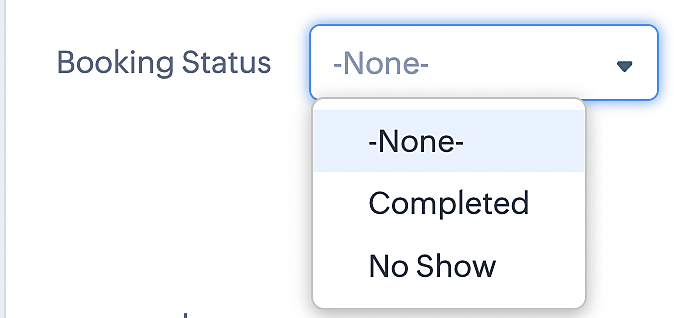
To update a booking's status (Completed or No Show), we've added a new picklist properties field named "Booking Status" in the Meetings module and configured it with two options: "completed" and "no show". Depending on the booking status chosen, the corresponding booking in Zoho Bookings will be updated.
- Details on how to add a custom field to the Meetings module : Customizing modules
- Here's a video that demonstrates how to add a field to a module in Zoho CRM: Adding fields
Reference:
3. Booking status: Canceled
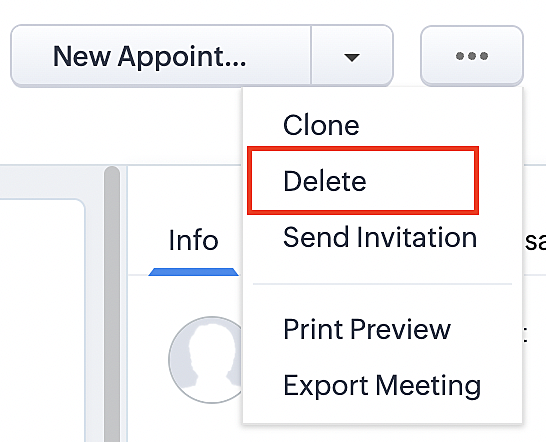
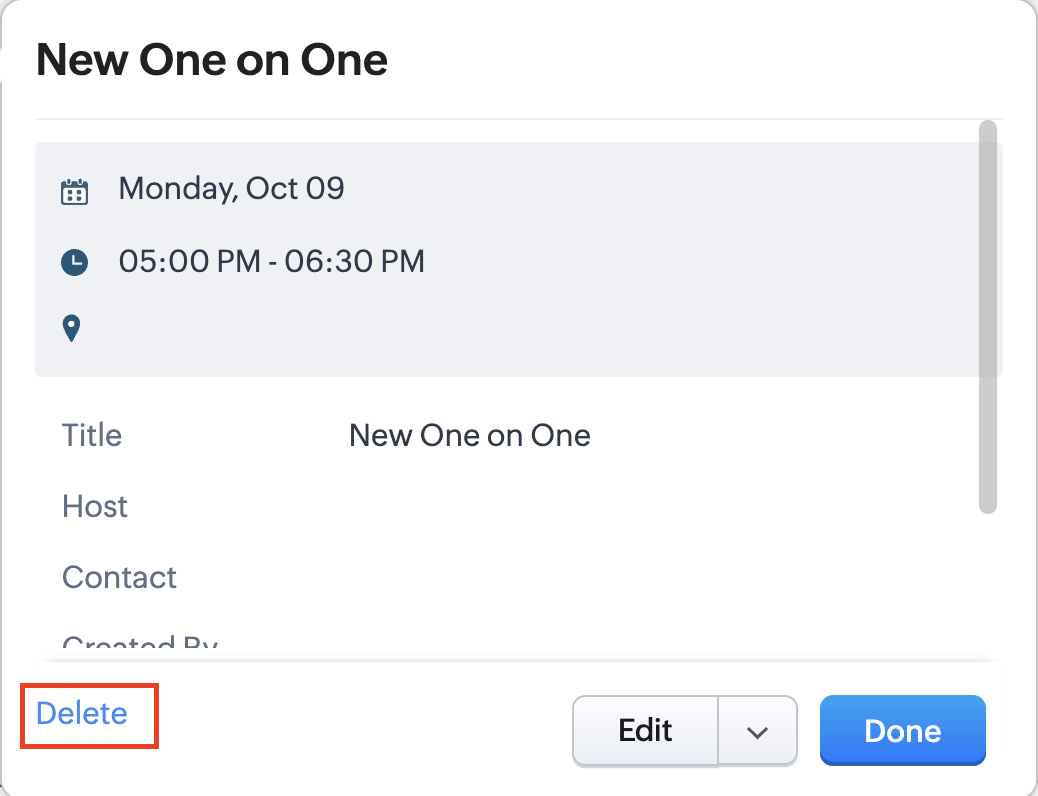
Whenever a meeting is deleted from the Meetings module, the corresponding booking in the Zoho Bookings app will also be canceled automatically. The meeting can be deleted either from the Meetings module or directly from the calendar.
To enable bidirectional sync between Zoho CRM and Zoho Bookings
Complete these steps in Zoho CRM.
Step 1: Creating connections
You first need to establish a connection between Zoho CRM and Zoho Bookings. Zoho Bookings is listed as one of the default connections in Zoho CRM, making it simple to set up. Select the Zoho Bookings connection, define the connection name and scope, and you'll be all set. This connection will enable you to link both applications and facilitate the seamless transfer of data.
Read here for more details on how to create connection in Zoho CRM: Connections
Step 2: Creating functions
In this context, we'll be creating three functions: one for marking appointments as completed, another for canceling appointments, a third for marking appointments as no shows, and a fourth for rescheduling appointments. For each function, we must also configure arguments, which pass values or data into a function when making a call. Here, we'll pass the booking ID to the function as an argument to update the necessary booking status.
i. To create a function for marking appointments as completed:
1. Go to Setup > Developer Space > Functions.
2. In the Functions page, click + Create New Function.

3. Configure the function name, display name, and description.
4. Set the category as automation.
This opens the Deluge script page.
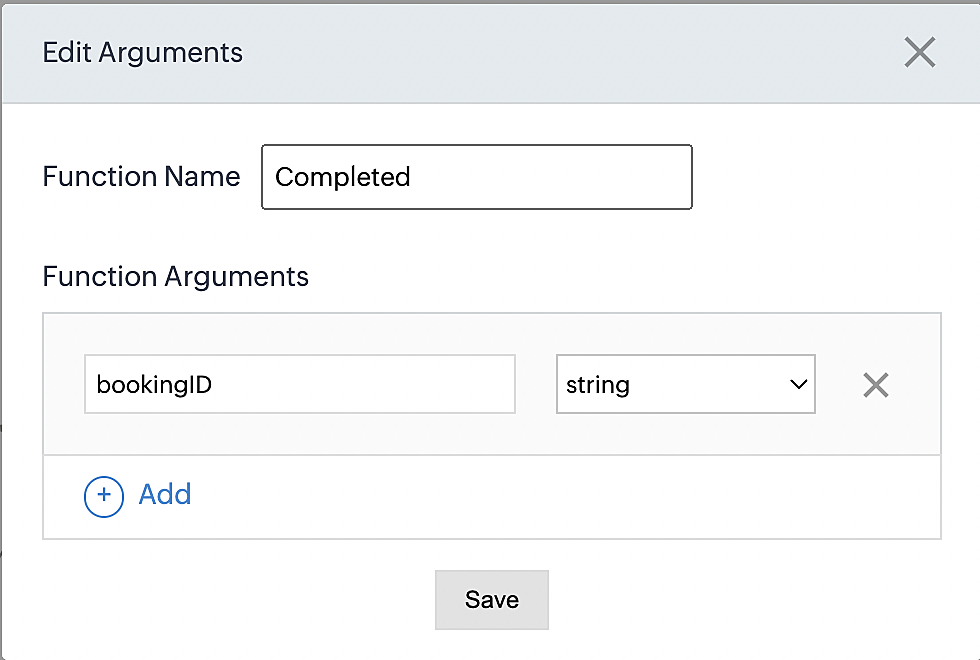
5. Next, configure the function's arguments:
A. Click on Edit Arguments on the Deluge script page.

B. Set the Parameter Name as bookingID. (Please note that the "bookingID" value is case sensitive and must match
the term used in the code).
C. Set the type as string.
Reference:
Please configure the below code in the Deluge script page.
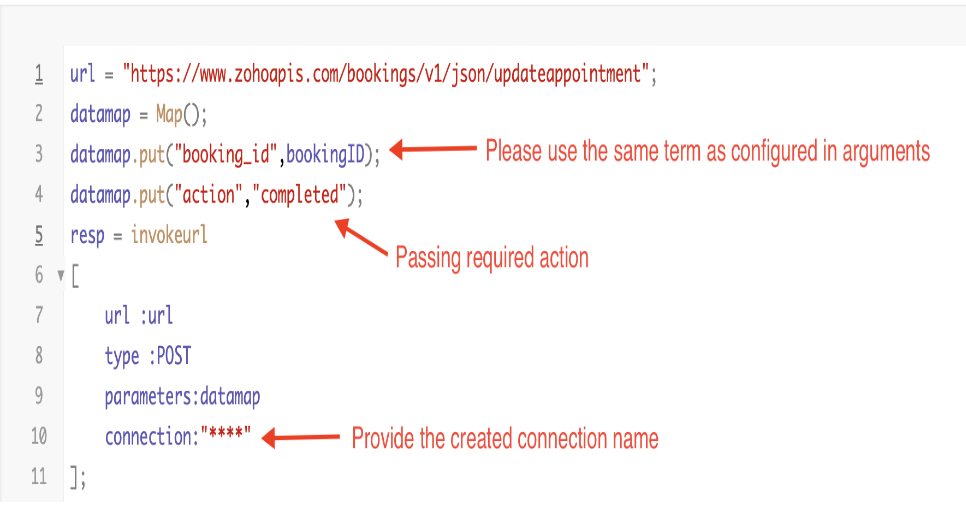
By completing these steps, we've configured a function that will mark appointments as completed.
ii. To create a function for marking appointments as no shows
1. Go to Setup > Developer Space > Functions.
2. In the Functions page, click + Create New Function.

3. Configure the function name, display name, and description.
4. Set the category as automation.
This opens the Deluge script page.
5. Next, configure the function's arguments:
A. Click on Edit Arguments on the Deluge script page.

B. Set the Parameter Name as bookingID. (Please note that the "bookingID" value is case sensitive and must match
the term used in the code).
C. Set the type as string.
Reference:
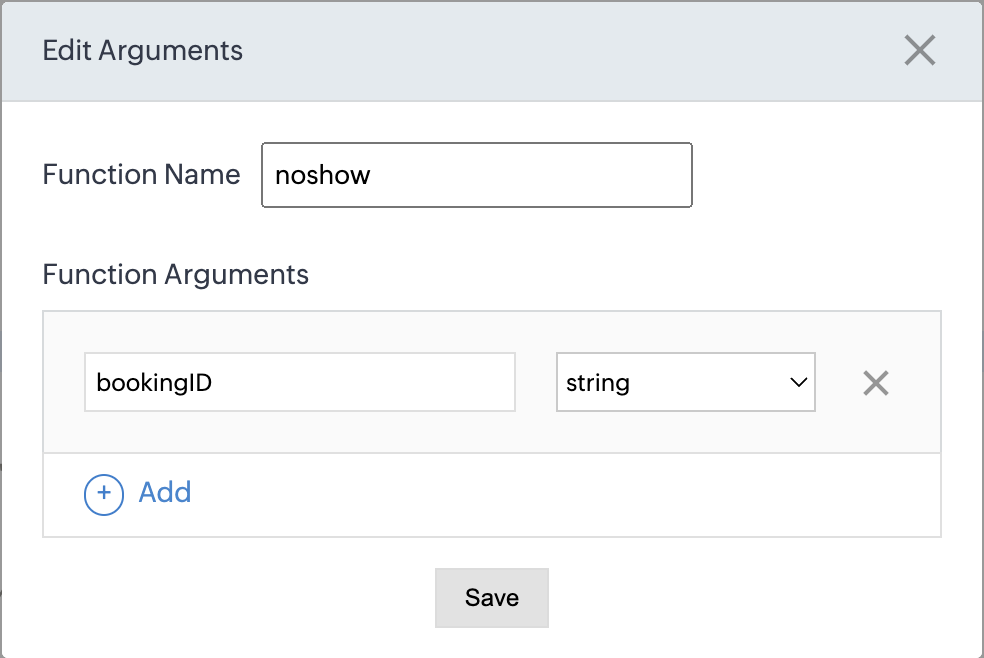
Please configure the below code on the Deluge script page.
Code link: No show
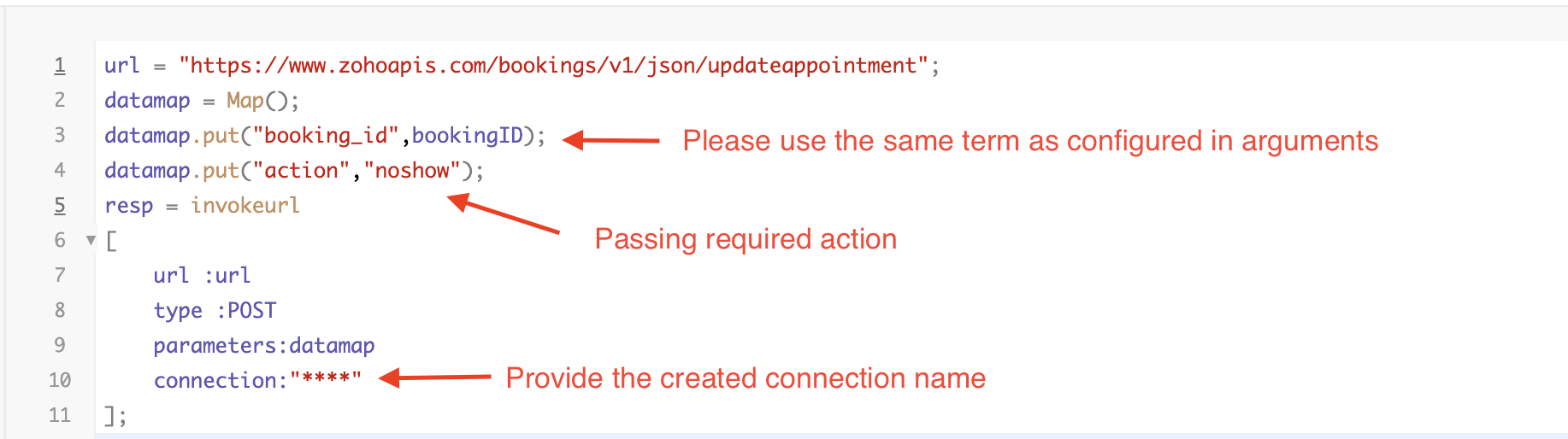
By completing these steps, we've configured a function that marks appointments as no shows.
iii. To create a function for marking appointments as canceled
1. Go to Setup > Developer Space > Functions.
2. In the Functions page, click + Create New Function.

3. Configure the function name, display name, and description.
4. Set the category as automation.
This opens the Deluge script page.
5. Next, configure the function's arguments:
A. Click on Edit Arguments on the Deluge script page.

B. Set the Parameter Name as bookingID. (Please note that the "bookingID" value is case sensitive and must match
the term used in the code).
C. Set the type as string.
Reference
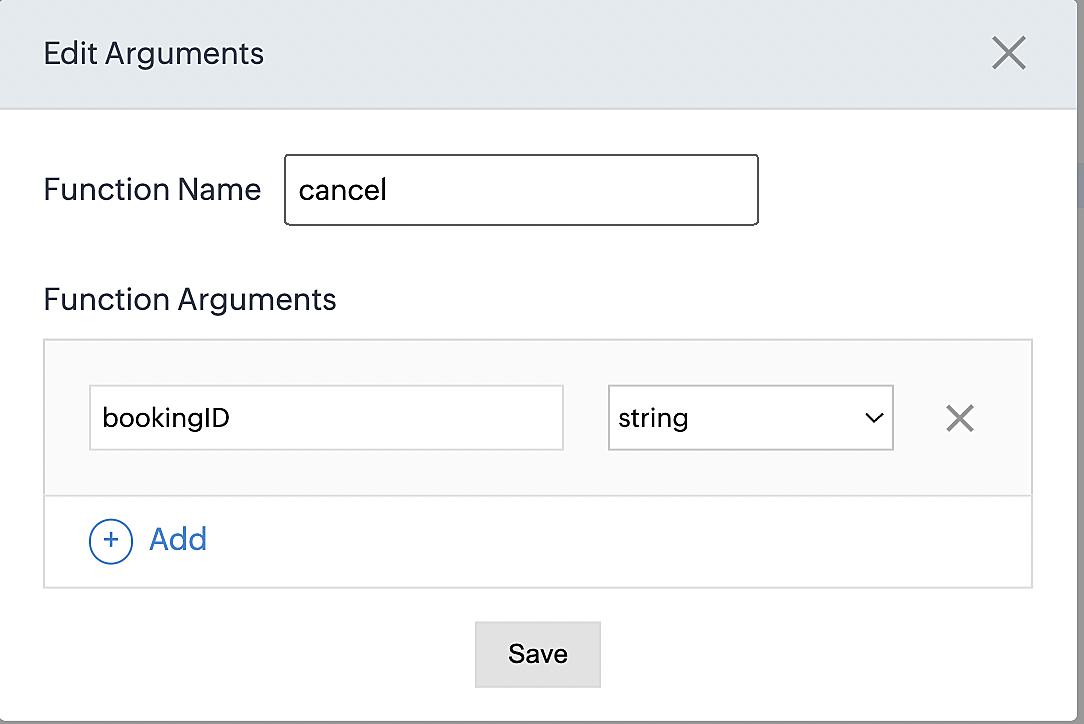
Please configure the below code on the Deluge script page.
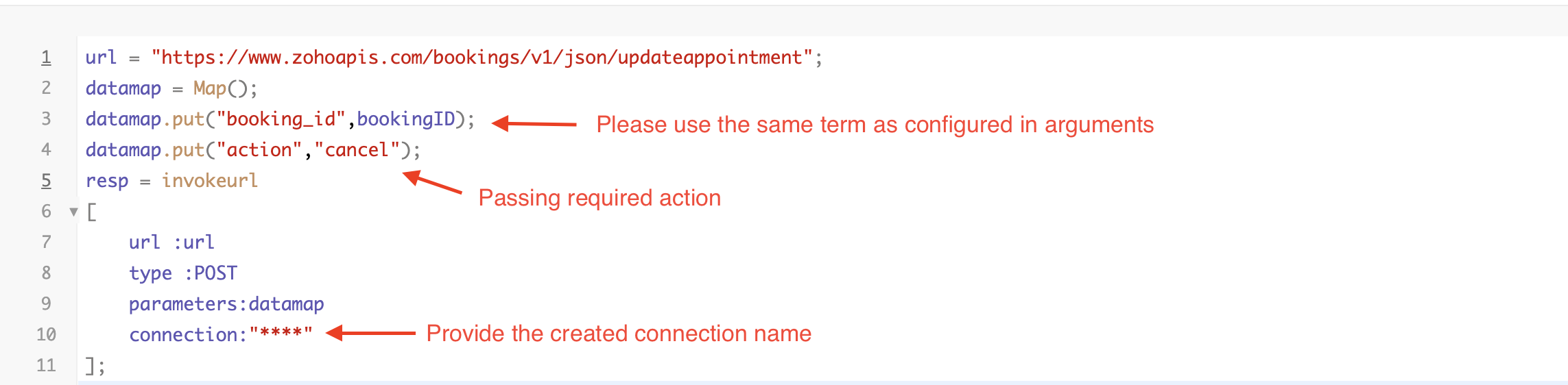
By completing these steps, we've configured a function that marks appointments as canceled.
Code explanation
Below is an explanation of the code that covers all the configurations present in the three functions mentioned above (cancel, mark as completed, and mark as no show).
Line 1: Based on the Zoho Bookings account's data center, we're setting up the API endpoint URL configuration.
Lines 2 - 4: To update appointments, we utilize the Zoho Bookings API. Within the update appointment API, there are two mandatory fields that need to be included: BookingID and action (completed/cancel/noshow).
Lines 5 - 10: We use the invokeURL task for API calls. To learn more about the invokeURL task, please refer to the following document: InvokeURL task for API calls
Now, let's proceed and learn about the process of creating a workflow and linking the established functions to it. This will enable us to automate the entire appointment status updating process.
Step 3: Creating a workflow
Workflow rules are sets of actions (email notifications, tasks and field updates) that are executed when specified conditions are met. Here, we'll generate workflow rules for each action to activate the respective function, thereby automating the appointment status updating process.
i. Creating a workflow for "canceling" appointments in Zoho Bookings when a meeting is deleted in Zoho CRM
Part 1: Creating the rule
1. Go to Setup > Automation > Workflow Rules.
2. In the Workflow Rules page, click Create Rule.

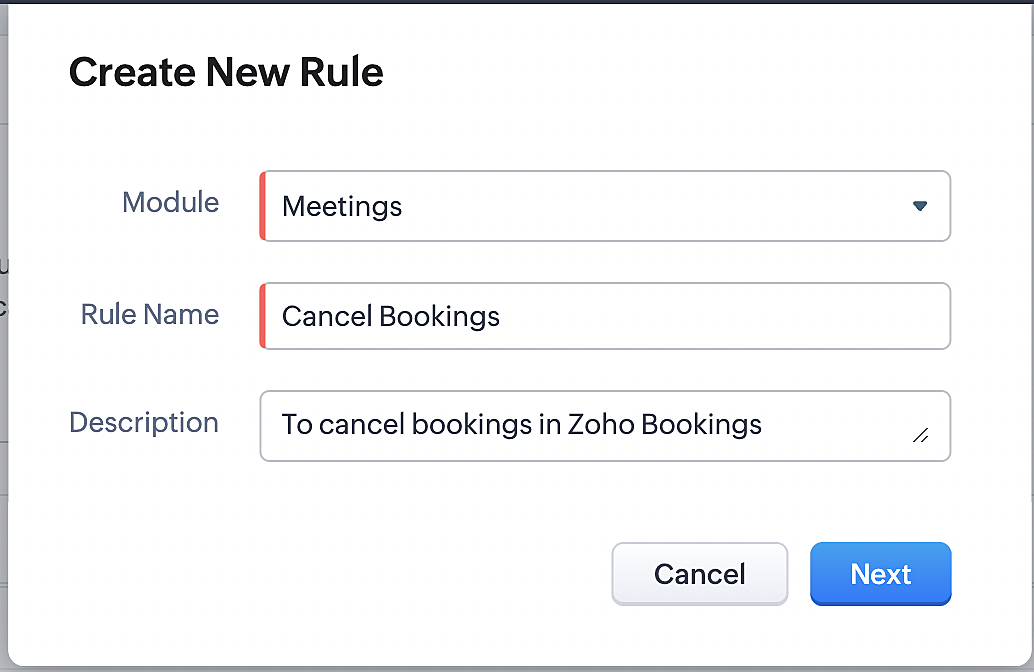
3. Select "Meetings" under Module and configure rule name and description as required.
More details: Create Rule
Reference:
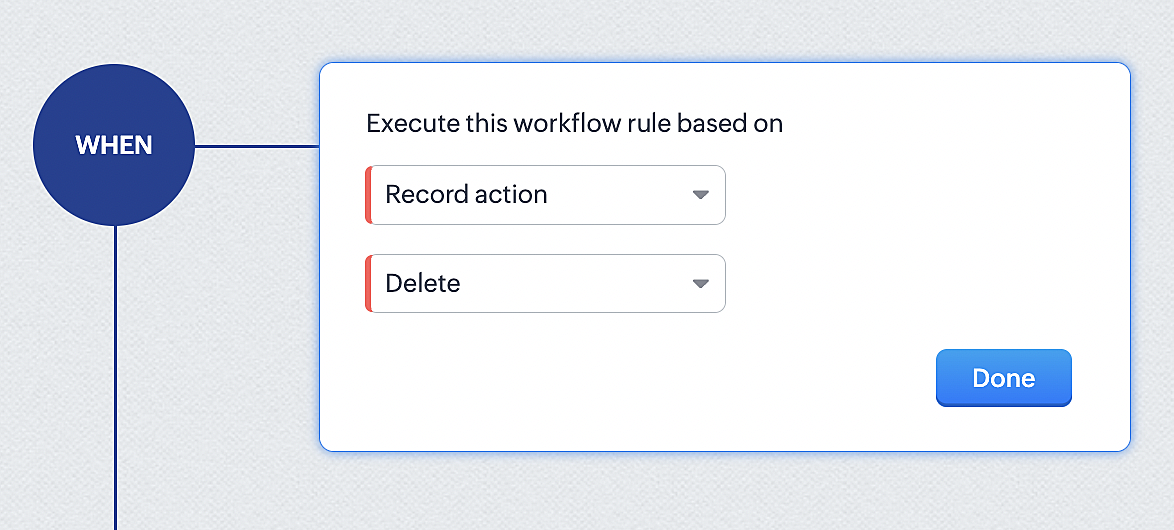
1. Select Record Action > Delete > Done to execute the rule when meetings are deleted.
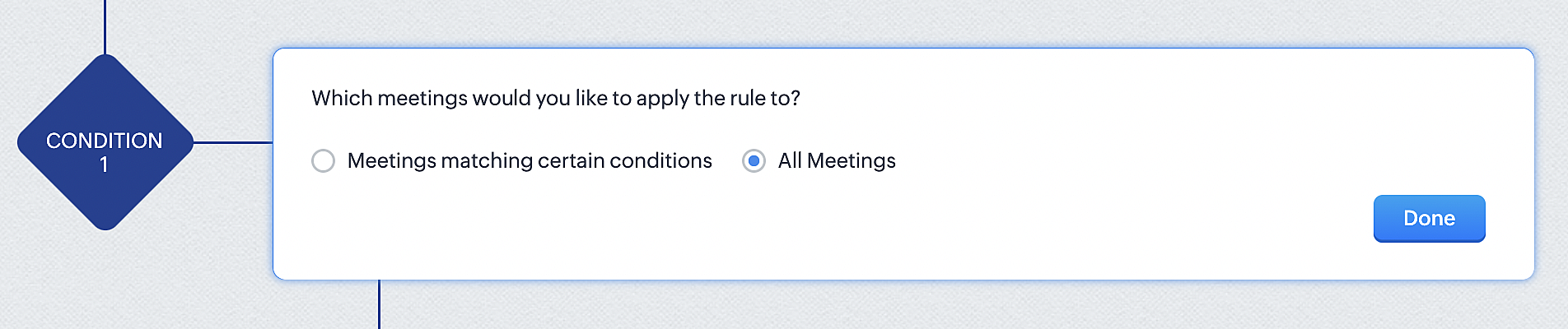
2. Configure condition > All Meetings.
3. Instant Actions > Function.
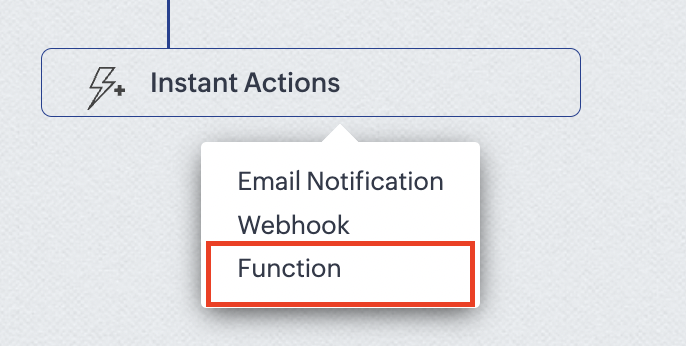
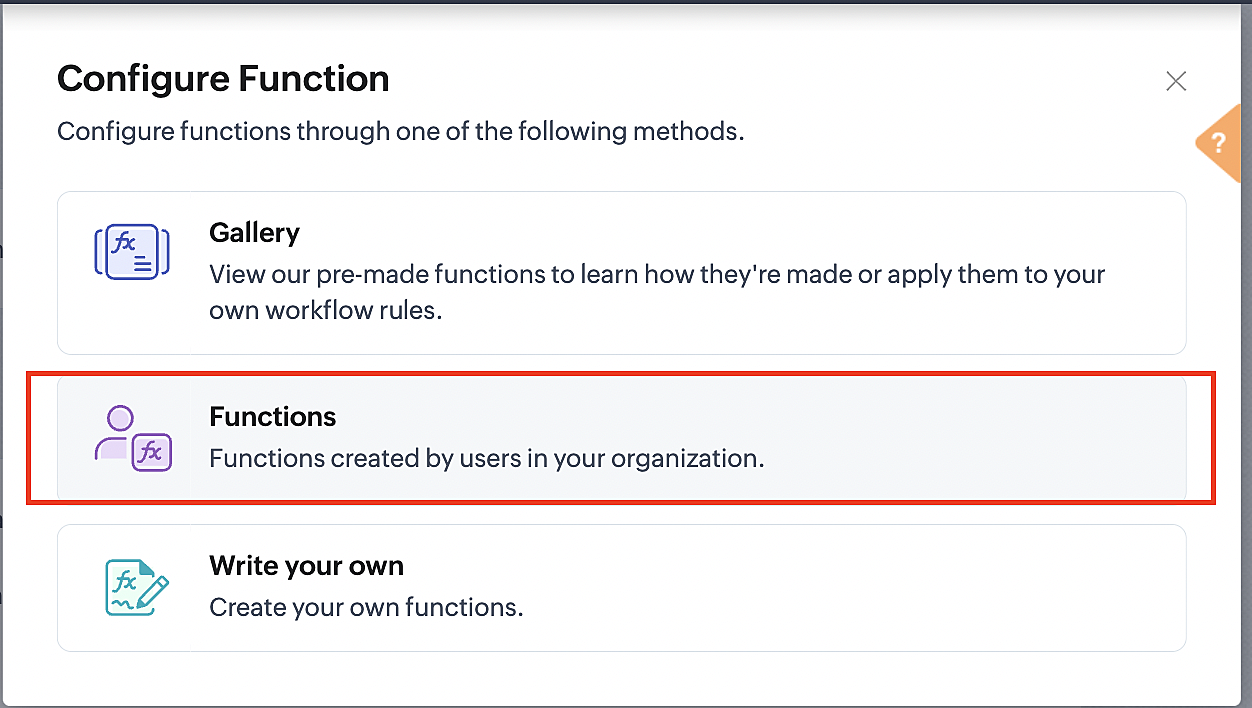
4. Click the New Function button.

5. In the Configure custom function page, select the "cancel" function you created from among the functions users in your organization have created.
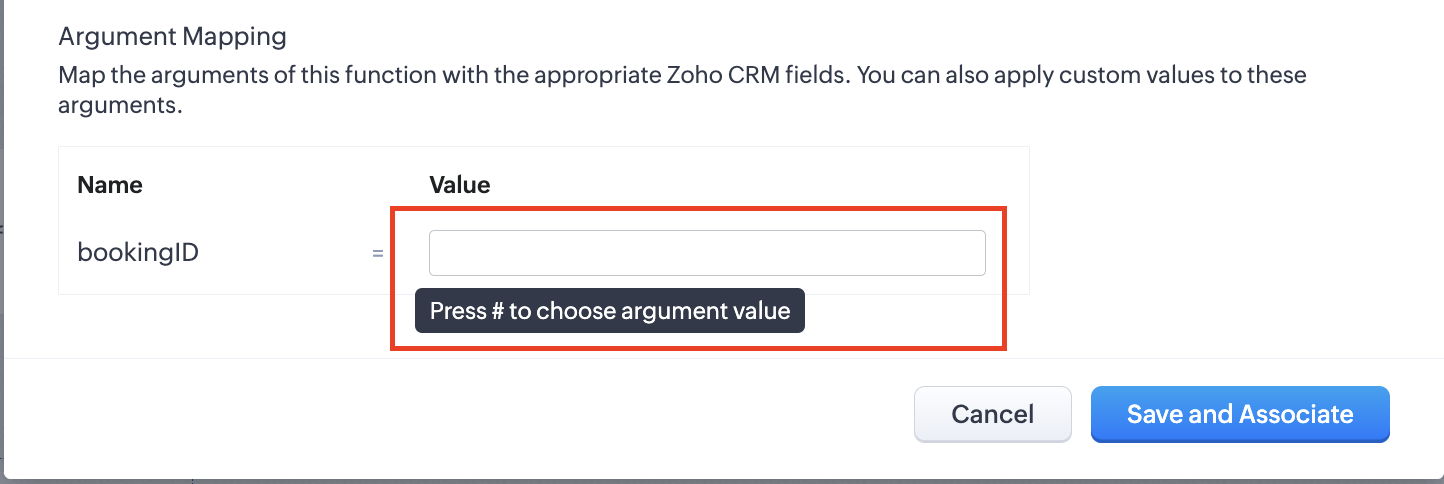
Part 3: Argument mapping
1. Press # to choose an argument value.
2. Select Meetings under Module and BookingId in the field.
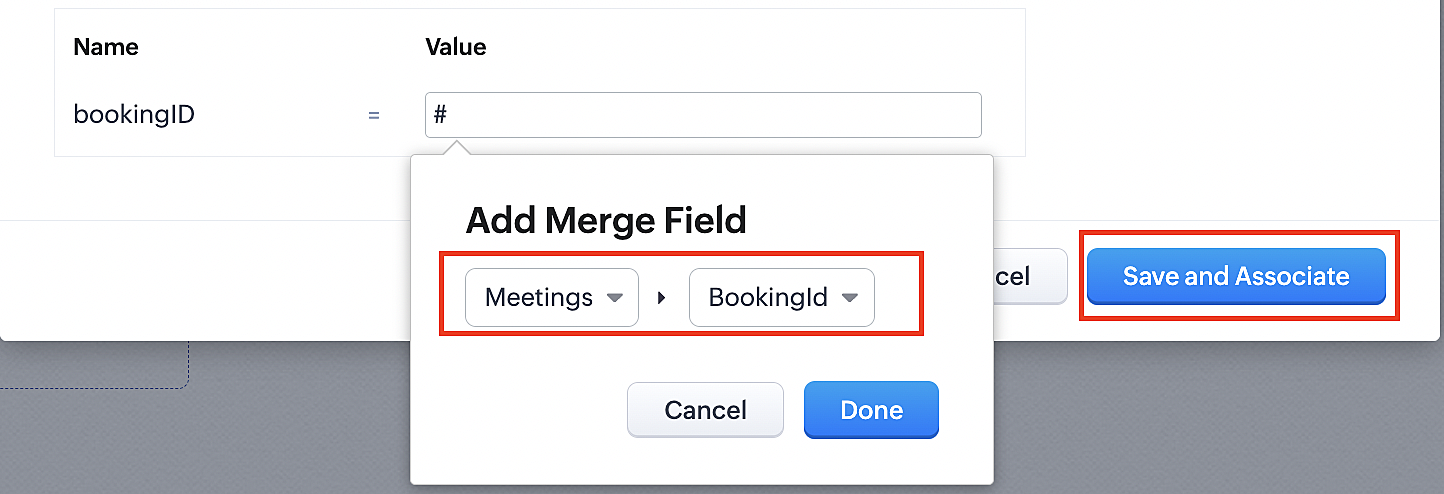
3. Click the Save and Associate button.
Reference:
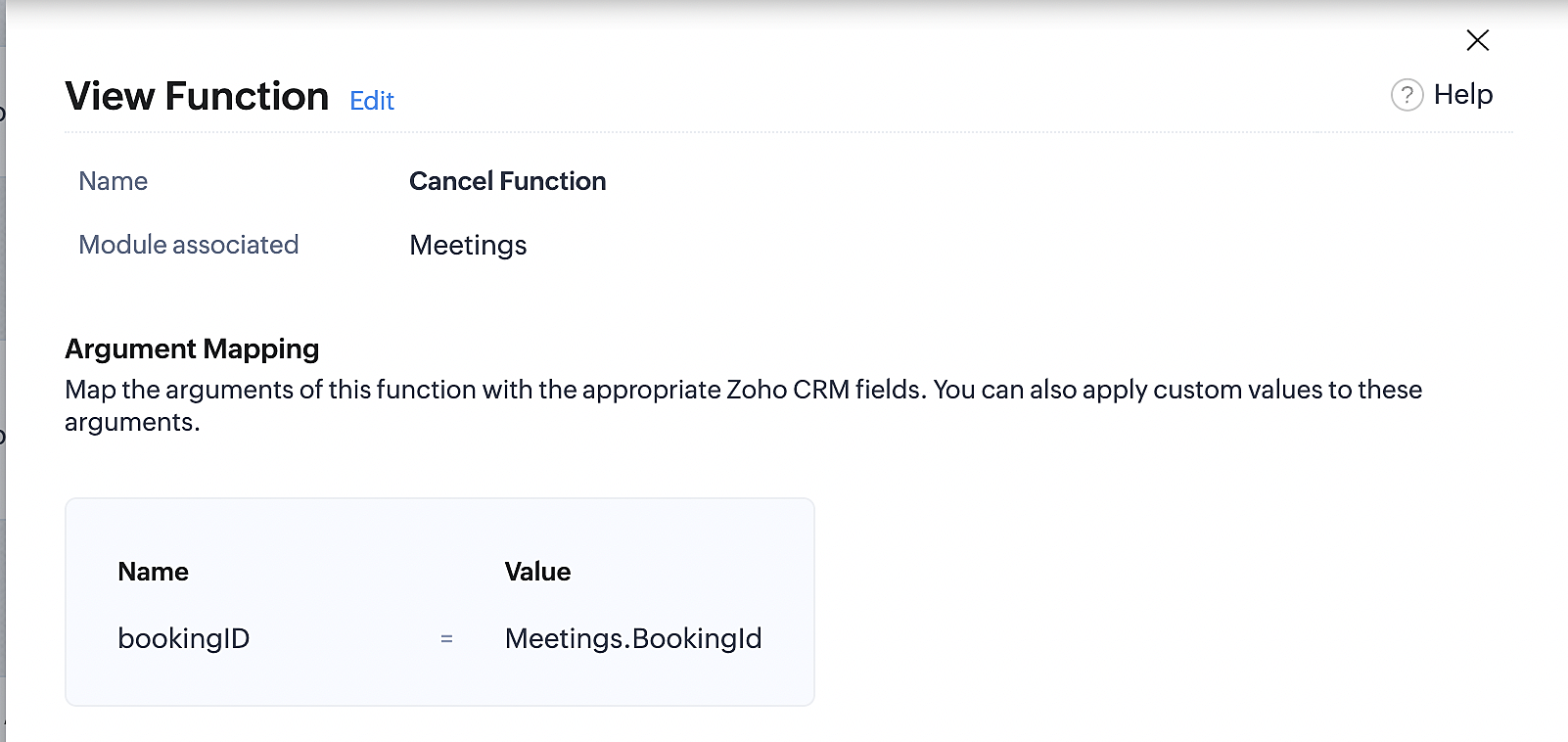
Below is the final flow of the cancel booking workflow:
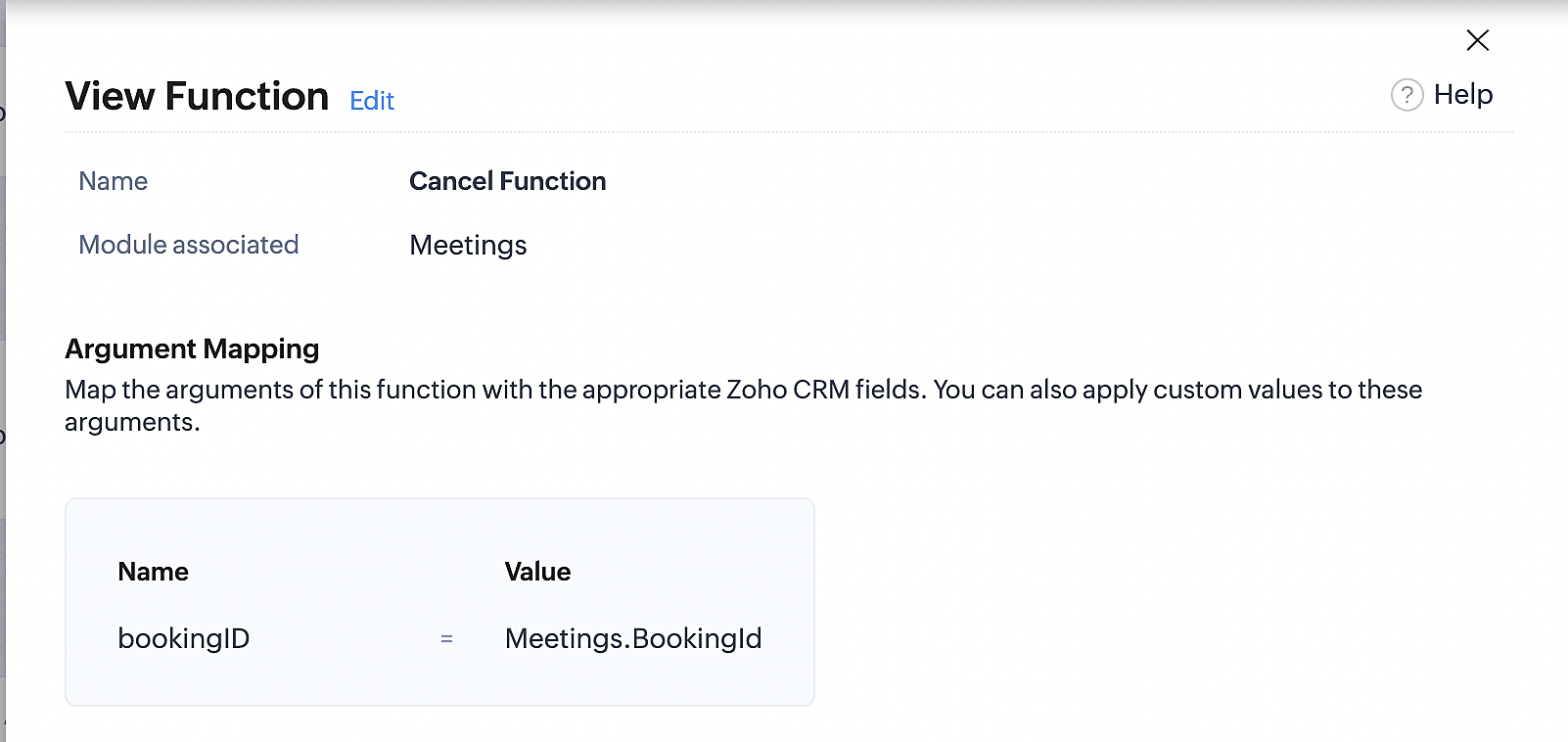
At the end of Part 3, we will have created a workflow that will be executed automatically when meetings are deleted in Zoho CRM. Simultaneously, the bookings associated with the meeting will also be canceled in Zoho Booking.
ii. Creating workflow for updating an appointment's status as "no show" in Zoho Bookings when the meeting's booking status is marked as no show in Zoho CRM
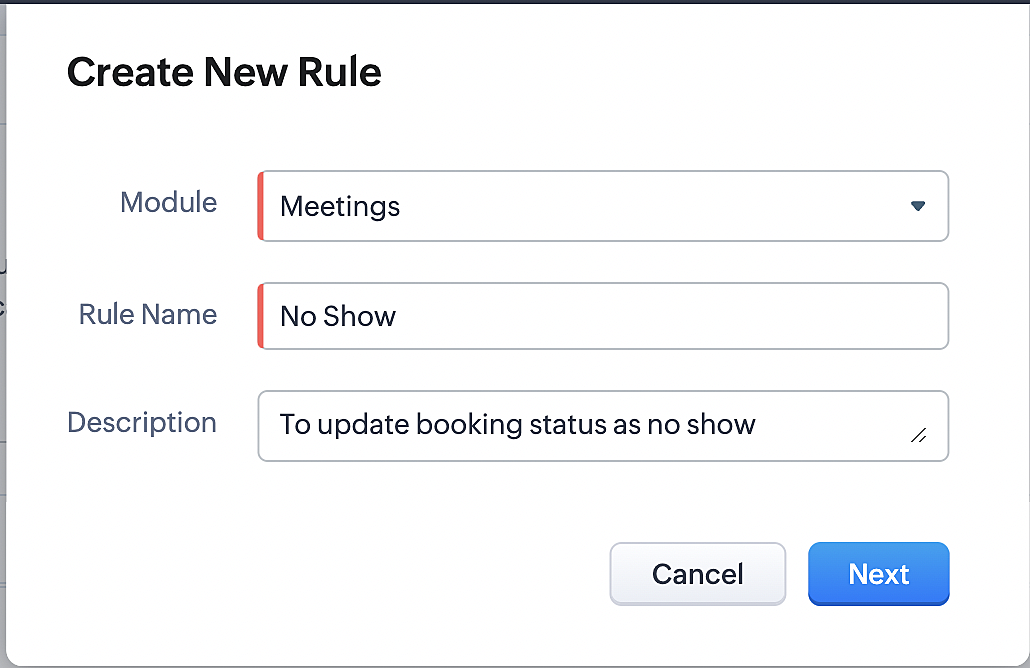
Part 4: Creating the rule
1. Go to Setup > Automation > Workflow Rules.
2. In the Workflow Rules page, click Create Rule.

3. Select Meetings under Module and configure the rule name and description as required.
Reference:
Part 5: Specifying the rule trigger
If you encounter difficulties while navigating through the steps mentioned below, please refer to Part 2 above, where we have provided step-by-step screenshots for clarification.
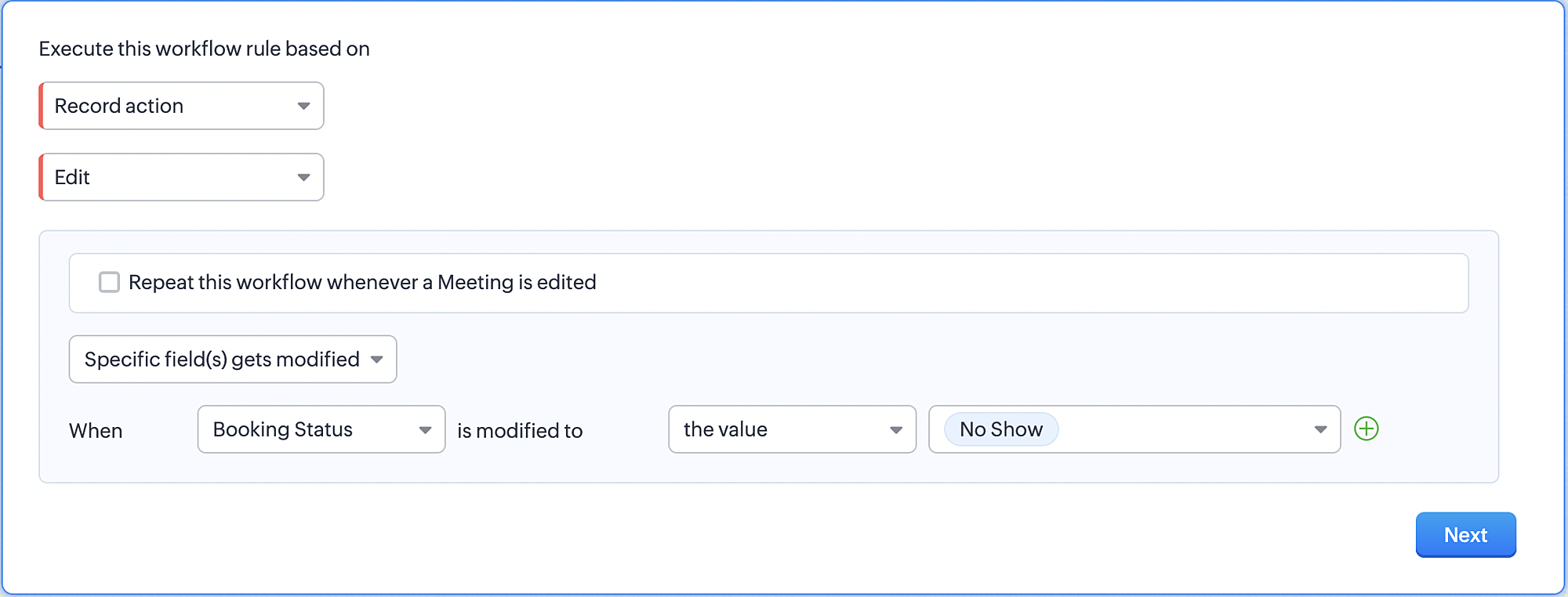
1. Record Action > Edit.

2. Enable the Specific field(s) gets modified and configure it per the screenshot below.
a. This is to ensure that the workflow is executed only when the booking status under the meeting module is
updated to "No Show".
updated to "No Show".
3. Configure condition > All Meetings.
4. Instant Actions > Function > New Function.
5. In the Configure custom function page, select the "no show" function you created from among the functions
users in your organization have created.
users in your organization have created.
Part 6: Argument mapping:
If you encounter difficulties while navigating through the steps mentioned below, please refer to Part 3 above, where we have provided step-by-step screenshots for clarification.
1. Press # to choose an argument value.
2. Select Meetings under Module and configure the field as "BookingId".
3. Click Save and Associate button.
Reference:
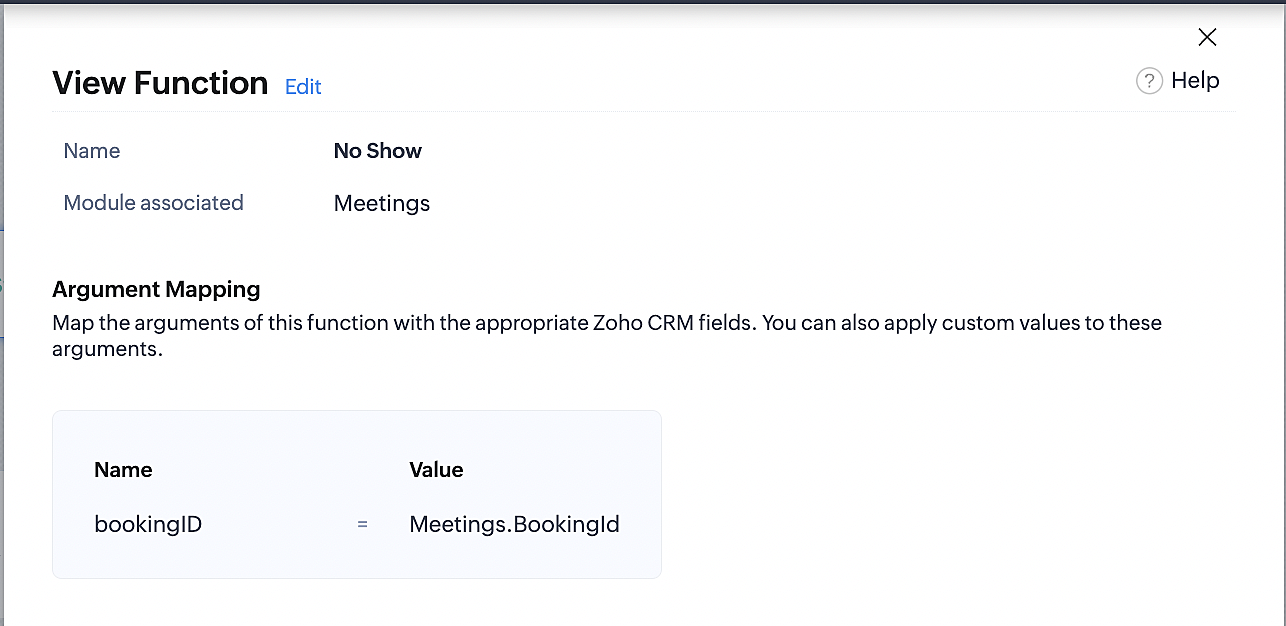
Below is the final flow of the "No Show" booking status workflow:
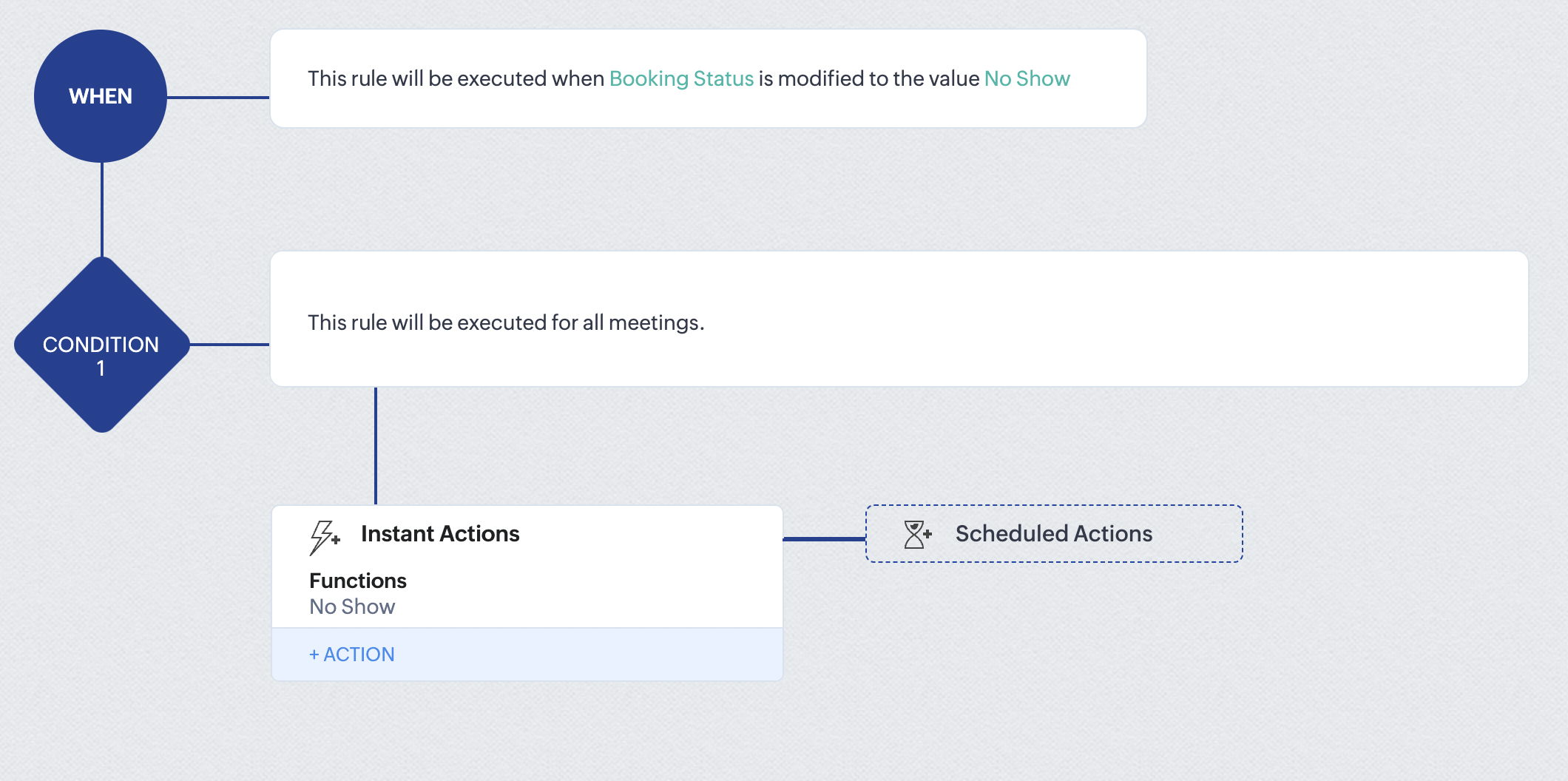
At the end of part 6, we will have created a workflow that automatically executes when the booking status field within the Zoho CRM Meetings module is updated to "No Show." This action will result in the associated bookings for that meeting also being marked as "No Show" in Zoho Bookings.
iii. Creating workflow for updating appointment status as "Completed" in Zoho Bookings when the booking status field of the meeting is marked as completed in Zoho CRM.
Part 7: Creating the rule
1. Go to Setup > Automation > Workflow Rules.
2. In the Workflow Rules page, click Create Rule.

3. Select Meetings under Module and configure rule name and description as required.
Reference:
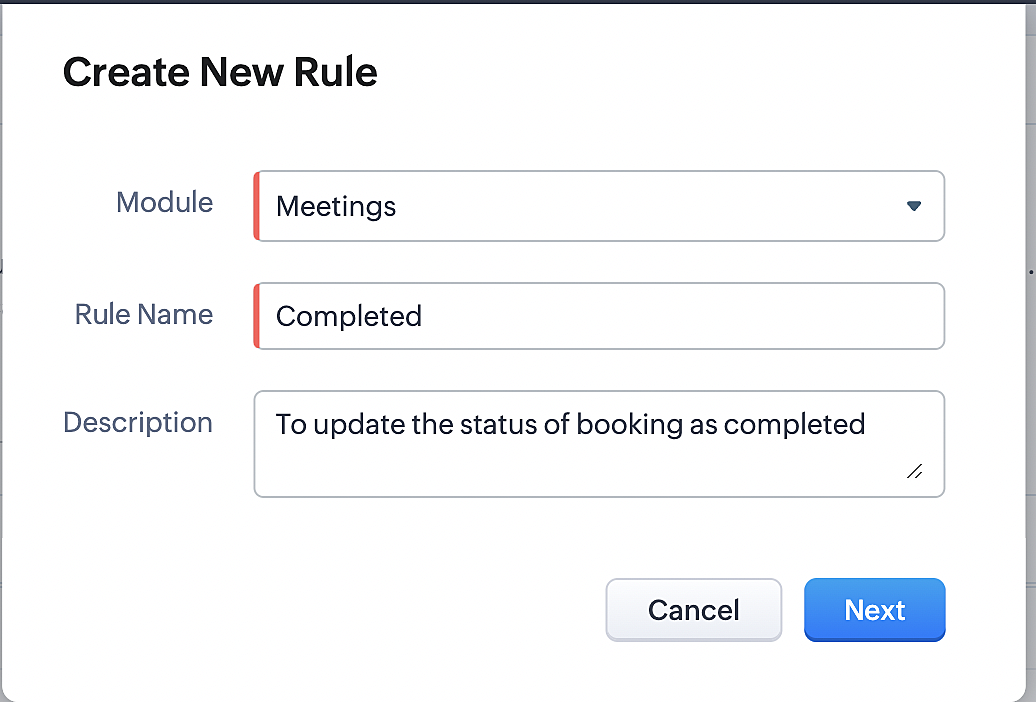
Part 8: Specifying the rule trigger
If you encounter difficulties while navigating through the steps mentioned below, please refer to Part 2 above, where we have provided step-by-step screenshots for clarification.
1. Record Action > Edit.

2. Enable the Specific field(s) gets modified setting and configure it per the screenshot below.
a. This serves to ensure that the workflow is executed only when the booking status under the Meetings module is
updated to "Completed".
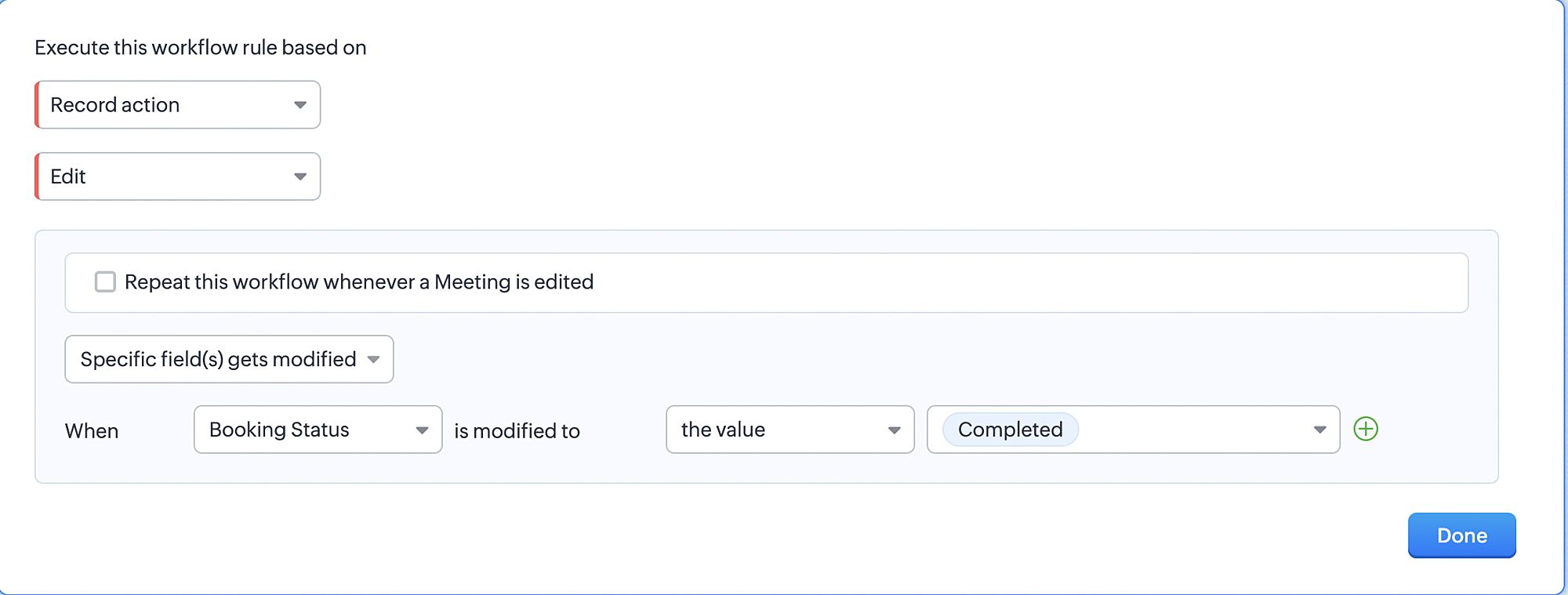
3. Configure condition > All Meetings.
4. Instant Actions > Function > New Function.
5. In the Configure custom function page, select the "completed" function you created from among the functions users
in your organization have created.
Part 9: Argument mapping:
If you encounter difficulties while navigating through the steps mentioned below, please refer to Part 3 above, where we have provided step-by-step screenshots for clarification.
1. Press # to choose an argument value.
2. Select Meetings under Module and configure the field as "BookingId".
3. Click Save and Associate button.
Reference:
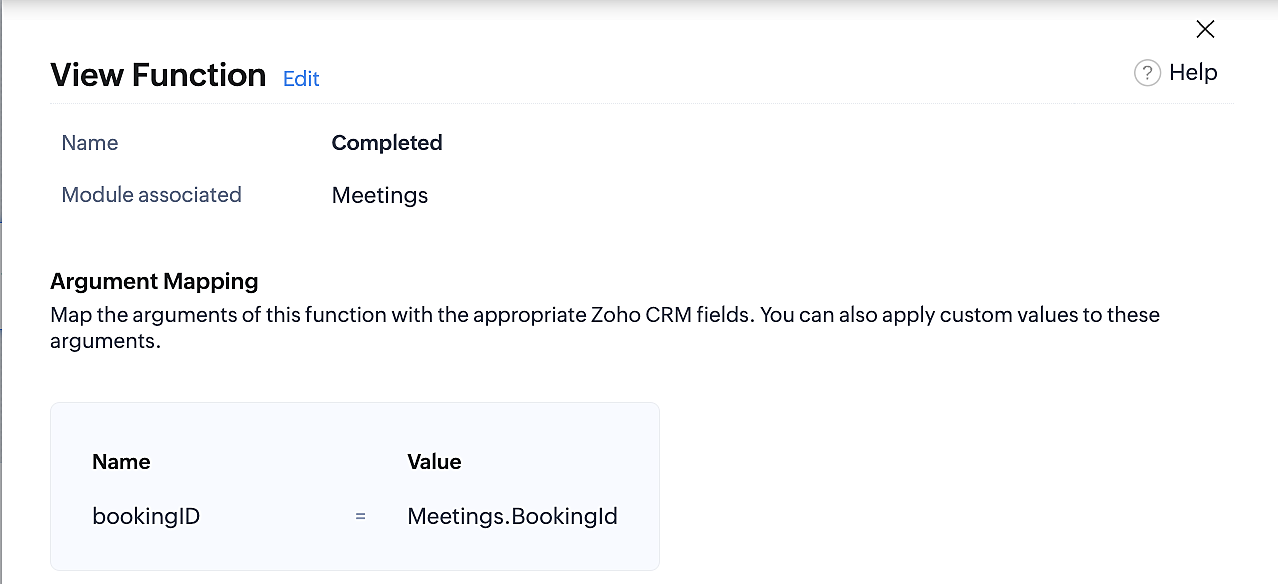
Below is the final flow of the "Completed" booking status workflow:
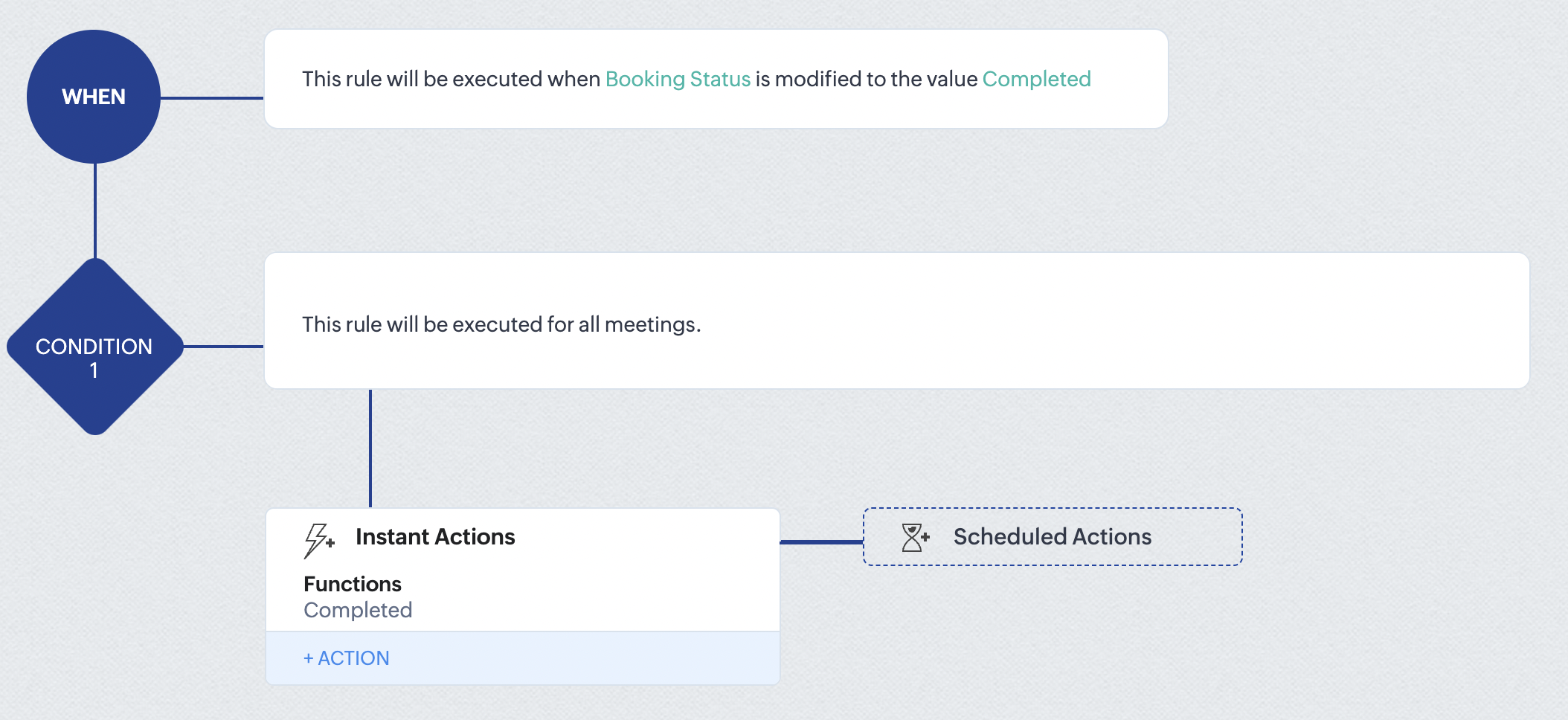
At the end of part 9, we will have created a workflow that is automatically executed when the booking status field within the Zoho CRM Meetings module is updated to "Completed." As a result, the associated bookings for that meeting will also be marked as "Completed" in Zoho Bookings.
Conclusion
We've reached the end of this community post. With the integration mentioned above in place, you'll be able to book, cancel, and update the status of appointments in Zoho Bookings directly from your Zoho CRM application. This will help you effectively manage your appointments in one place. As mentioned above, we've covered the rescheduling action in a separate post, which you can access by clicking on the following link: Reschedule Action
Furthermore, we've outlined a method for automating appointment statuses in detail. You can use this document as a reference to explore the various possibilities that suit your needs.
If you have any questions or need assistance with your configuration, please email us at hello@zohobookings.com or support@zohobookings.com.
Access your files securely from anywhere
New to Zoho Recruit?

Zoho Developer Community
New to Zoho LandingPage?
Zoho LandingPage Resources
New to Zoho Survey?
New to Zoho CRM Plus?
Deliver unforgettable customer experiences
New to Zoho CRM Plus?
Deliver unforgettable customer experiences
New to Zoho Marketing Plus?
Everything you need to run your marketing
New to Zoho Marketing Plus?
Everything you need to run your marketing
New to Bigin?





Topic Participants
Kaushik S
bruce
Ishwarya SG
PrismaNote Support
Sticky Posts
Presenting ABM for Zoho CRM: Expand and retain your customers with precision
Picture this scenario: You're a growing SaaS company ready to launch a powerful business suite, and are looking to gain traction and momentum. But as a business with a tight budget, you know acquiring new customers is slow, expensive, and often deliversGood news! Calendar in Zoho CRM gets a face lift
Dear Customers, We are delighted to unveil the revamped calendar UI in Zoho CRM. With a complete visual overhaul aligned with CRM for Everyone, the calendar now offers a more intuitive and flexible scheduling experience. What’s new? Distinguish activitiesCreate and populate a record in an instant: Introducing zero-shot field prompting to Zia's ICR
A couple of months ago, we upgraded our in-house AI image detection and validation tool, Zia Vision, with intelligent character recognition (ICR). By training Zia with sample images, you could create and enrich CRM records with data extracted from standardIn-person ZUG Meetups for Real Estate Professionals - US Q1 2026
The Real Estate Zoho User Group is going on a multi-city, in-person meetup tour across the US, and we’d love to see you there! These meetups are a great opportunity to: Connect with fellow real estate professionals using Zoho Share challenges and discoverNimble enhancements to WhatsApp for Business integration in Zoho CRM: Enjoy context and clarity in business messaging
Dear Customers, We hope you're well! WhatsApp for business is a renowned business messaging platform that takes your business closer to your customers; it gives your business the power of personalized outreach. Using the WhatsApp for Business integration
New to Zoho TeamInbox?
Zoho TeamInbox Resources
Zoho CRM Plus Resources
Zoho Books Resources
Zoho Subscriptions Resources
Zoho Projects Resources
Zoho Sprints Resources
Qntrl Resources
Zoho Creator Resources
Zoho CRM Resources
Design. Discuss. Deliver.
Zoho Show Resources

Get Started. Write Away!
Writer is a powerful online word processor, designed for collaborative work.
Zoho CRM コンテンツ
-
オンラインヘルプ
-
Webセミナー
-
機能活用動画
-
よくある質問
-
Ebook
-
-
Zoho Campaigns
- Zoho サービスのWebセミナー
その他のサービス コンテンツ
Nederlandse Hulpbronnen

ご検討中の方
Recent Topics
Name Change and Delete Email ID and Alias
Hello please i require urgent assistance, 1.) I would also like to change the name that appears when people receive my emails. I have an info@spacetraiders.com but when people receive my email its say Ronma Adedeji instead of either Info or Space Traiders..Feature Requests and enhancements: Subform
By The Grace of G-D. Hi, It would make it much easier to use if we could have some more features in subforms: More Columns/Fields Set the size of a column Show the subform in Full Page Width Sorting By Column Please consider The above suggestions. TUnapplied AP Credits not showing up on AP Detail Aging
I am new to using Zoho Books. I was reconciling some accounts and found differences from the GL balance and AP Aging and it came down to unapplied vendor credits. Is there an option to include that on the report, so I can pull a matching AP Aging to theAdd Entry and Subform Record from Deluge Scripts
Hi all, I would like to know how do I add a new entry and also subform records from a deluge scripts. I can use the insert into to add a new entry to a form, but how do i insert a collection into the subform of the entry? I am using a deluge scriptFinding draft ticket replies
Is there a way to see all tickets which have draft replies?How to apply a tag to a ticket based on the to email address?
I need to assign a tag to a ticket if the ticket was sent to a specific email address. For example, we have the email accounting[at]company.com forwarding into Zoho Desk. We would like all emails that were sent to this address to be tagged with an AccountingEngineering Change Order Process using Tickets?
Hi Zoho Community, I'm working with my company to create an Engineering Change Order/Request (ECO/ECR) process where engineers can internally create tickets for changes in a product that must be reviewed, approved and implemented by people or teams inHow can I move a ticket from Department A to Department B?
Hi there, how do I move ticket from Department A to Department B? I went in the ticket and tried to scroll down the menu under the "department" but it won't let me, I am a support admin. Did I do anything wrong? or am I doing it in the wrong place?Validation Rules Trigger on Untouched Fields
In Zoho Desk, validation rules trigger for ALL fields during an update—even fields that weren't modified in the current edit. This behavior is fundamentally different from Zoho CRM and other Zoho products, where validation rules only apply to fields actuallyHow to work with getFieldNames formdata functions ,Any Examples
I don't find any example showing usage of getFieldNames. Where do i find .is there any Help documents availableZoho Notifications - Received two notifications for one message and none for the other
We had a client reply to a ticket twice in one minute. The ticket owner received two emails for the second message but none for the first (which was crucial content and unfortunately was therefore missed). I'm assuming this created a race condition -What is the difference between "Reply" and "Public Comment" in a ticket?
Hey, my company is thinking about switching to Zoho Desk but we do not understand the difference between the "Reply" and the "Public Comment" feature. When should we use which? And why? What is the difference between them? Thank you for your help! KindestTasks View for Opportunity/Jobs does not indicate "Related To" account
How can ZoHo be setup so that when a task is created for an Opportunity, the subject automatically lists the underlying account? Right now, it's impossible to link the Account to the task when the task is created from the Job. Therefore, the open task view is inadequate. And it's a lot of maintenance to have to manually add the account to the subject...defeating the purpose of "Automated" workflow.can i show alert when i finish running the function?
how i can show alert inside the custom function or popup notification. when i use alert inside the custom function it show this error Error at line number: 2 'ALERT' task can be used only in on load, on validate and on change actions CRM calendar not syncing with Zoho Calendar
The sync is not happening: This is my Zoho Calendar CalDAV synced with Outlook This is my Zoho CRM Calendar (sadly empty ...) I have enabled CalDAV Access. In Zoho Calendar, I have set up APP Calendar sync like this: What else can I check? ThankPipeline in Custom Modules
I love the way the Sales Pipeline looks and functions with reports. I would like to add the save pipeline features and visualization to a custom module, however, I only see that these pipelines are only available for the Deals module. Is there a way to add pipelines to custom modules?Cannot associate event with other objects when creating?
I am attempting to associate an Event with one or more other objects when creating it via the API. According to the API docs, the "Related_To" property is a jsonobject even though the description says "Provide the details about the entities the eventHow to disable subform records dynamically
Hi Everyone I have a requirement to dynamically disable or hide subform fields based on certain criteria. However, the code I tried didn't work as expected. It either disabled or hid all the fields in all subform records or none at all. What I actuallyClient Script Operate Timeout
Hi Zoho, I have set a client script that use for ( i =1; length < i , i++) to fetch all of the product in order I have an order have 30+ products, seems this script will be stopped when it is checking rough 10 + products because of timeout (may be). MayWhy and When to Manually Regenerate Reports?
What is the protocol for needing to regenerate reports? It is very confusing when data in reports pulls correctly sometimes, but are inaccurate other times. Why is report regenerating necessary at all - can the report function not read the live data as inputted into the forms? We have built lots of reports and it is very tedious and time consuming to have to regenerate the report before each use of that data to make sure it is accurate. Is there a way to know when a report should or shouldn'tImport template from Zoho Writer
I am trying to import a mail merge template - tried to import direct from my .docx file on my hard drive and the formatting went all over the place. I then imported the .docx file in my Zoho Docs and then fixed up the formatting within Zoho Writer. CanButton Duplication when emails forwarded or replied
When I create a new email template in campaigns and send it out it looks fine to all the users, however if that email is then on forwarded or replied to then all buttons within the email duplicate. See below The one on the left is the original one.Enhancements to Custom Connectors in Zoho Creator
Hello everyone, At Zoho Creator, we believe in providing you with the necessary tools to achieve a well connected ecosystem of apps. Our Custom Connectors feature is a testament to this, enabling you to integrate with a wide range of external servicesAutoScan Not Working Since April -Support says it with engineering
Hi there, Autoscan has not been working on my account since April. Without this feature, completing expenses reports is laborious and error-prone. I keep asking for updates seeing as this is a critical feature, but told that it's being looked into andZoho books bulk update for invoices
Hi Zoho team, Why only 25 invoices can be bulk update at a time. I am booking 800 to 900 invoices in a month. Please increase this limit? Please dont tell that you dont have enough request for this task. 25 limit for bulk update is too much lowQuerying CloudSQL using NodeJS?
How can I query CloudSQL over nodejs? Are there any rest apis from which I perform Select Queries in the data of a Workspace? In the v1 we had C#, Python, Java for CloudSQL Now I only see Java? I am confused about the overall API of Analytics, there anyRename Record Templates in Zoho Creator
Hi Team, I need to rename the Record Templates based on the name of the employee which i have configured in Zoho Creator Deluge Script. How to do this one? // Attachments :template:PDF_ECF:Exit_Clearance_Form input.ID as PDFLes Zoholics 2025 sont de retour
Bonjour à tous, Préparez-vous pour deux jours exceptionnels au cœur de l’écosystème Zoho ! Nous avons le plaisir de vous convier à Zoholics France 2025, un événement dédié à l’innovation, à l’expertise et à la communauté Zoho. Au programme : • PrésentationsSalutation
Hey there, I want to make an indvidual salutation. It is possible to use if statements in the email templates? For exampe: When is male then wirte "Dear Mr." else write "Dear Mrs." Thanks DavidPersonal Expenses
I have reviewed the board and found a few scenarios like mine however not exactly so sorry if this is a re-post. I just recently joined Zoho Books and had to go through 2000 transactions manually which took FOREVER. So the dilemma that I am facing is that I have attached my personal and business checking cards to my account because it was not until half way through 2015 that I decided to open up a business account as an independent contractor. When I first started my account I placed the openingNot receiving instagram verfication emails
Hi- I'm not receiving Not receiving instagram verfication emails. I have seen other users having the same issue and your answer was to contact instagram. But instagram no longer has a support email.Change work hours per day for employees
Hello, Is there a way to modify the work hours per day for employees in Zoho projects? This would be helpful for resource allocation to more accurately see when an employee who works 35 hours a week vs 40 hours has a full schedule. Thanks.PROBLEMA AL CONECTAR EL DOMINIO
hola buenas tardes hoy estoy tratando de crear mi registro y no me deja conectar el dominio me dice que el dominio ya está vinculado a una cuenta y la verdad no tiene conectado el dominio a ninguna cuenta tengo acceso al hosting y cpanel que se compro pero al revisar los dns estan apuntando al mismo hosting del panel del proveedor del domini ... como hago para poder crear la cuenta con ese dominio, incluso cree un registro pero no me deja vincularlo el dominio es integrasoft.co agradezco me ayudenDelay in delivery of emails
I'm experiencing random delays for emails sent from Zoho account. Headers show that the message reached mx.zohomail.com almost instantly, followed by a delay of anywhere from 3-15 minutes (and counting). Please confirm whether this is a system-wideZoho Mail not working. Constant OTP
Firstly, my emails have been playing up for over a year. They are struggling to send and I have to press Send a few time to make them going. They mostly hover with a loading note saying Sending. I emailed Zoho and they got it working, but now it is doingZoho Mail Storage Usage Discrepancy – Incorrect Storage Reporting
Dear Zoho Support Team and Community, I previously raised a concern about inaccurate storage usage reporting in Zoho Mail but did not receive a clear or satisfactory response. To investigate further, I meticulously calculated the storage used by all foldersWhat Is ZOHO-Workplace? Why was I charged?
Hi, Today my PayPal account was charged $12.72 for ZOHO-Workplace. The transaction ID is 15S32484H3826544W. What is this charge for? It is the first time I am seeing it.Building a custom site
do we have an option in Zoho to build custom sites like adding custom functionalities? want to make a site like https://trackscourier.com/jnt-tracking-ph/. Is it doable? Please assist.Missing Payload Details
Hi All, Does anyone know how to fix missing webhook payload data in the next step of the flow? Payload comes into the webhook -- All details here When i go to use the webhook data in the next step -- the majority of the payload data is missingNumeric options in Decision
Zoho really needs to add options for numeric comparisons in the Decision action. These are the ones that should be implemented: Greater than Less than Greater than or equal to Less than or equal to Equal to (although this is actually handled already)Next Page