Building extensions #7: Create custom widgets for a simplified end-user experience
Discover the benefits of using widgets!
We explored the significance of widgets, prerequisites, and the availability of JS SDK methods as part of our previous post. In this post, let's go over a detailed example of using widgets along with certain Zoho Projects JS SDK methods.
Use case: A developer is working on a Zoho Projects task and wants to know if there are any existing references that could be used to get a head start on their work.
Goal: Our goal here is to simplify the developer's job by presenting them with articles that are relevant to the task at hand.
Solution: Widgets! To achieve this goal, it would be ideal for the developer to have access to relevant Zoho Desk articles from a tab on the Task Details page. This can be accomplished by developing a custom widget.
Required components:
- A connection between Zoho Projects and Zoho Desk.
- An extension configuration process that includes:
A. Creating an extensionB. Configuring the plugin manifestC. Setting up the widget code to display the Zoho Desk articles on the Zoho Projects Task Details tab
We have already explored the steps to establish a connection, create an extension, and configure the plugin-manifest.json file as part of our earlier posts. You can refer to those resources for detailed guidance. In this case, we have already completed most of these steps (screenshots below).
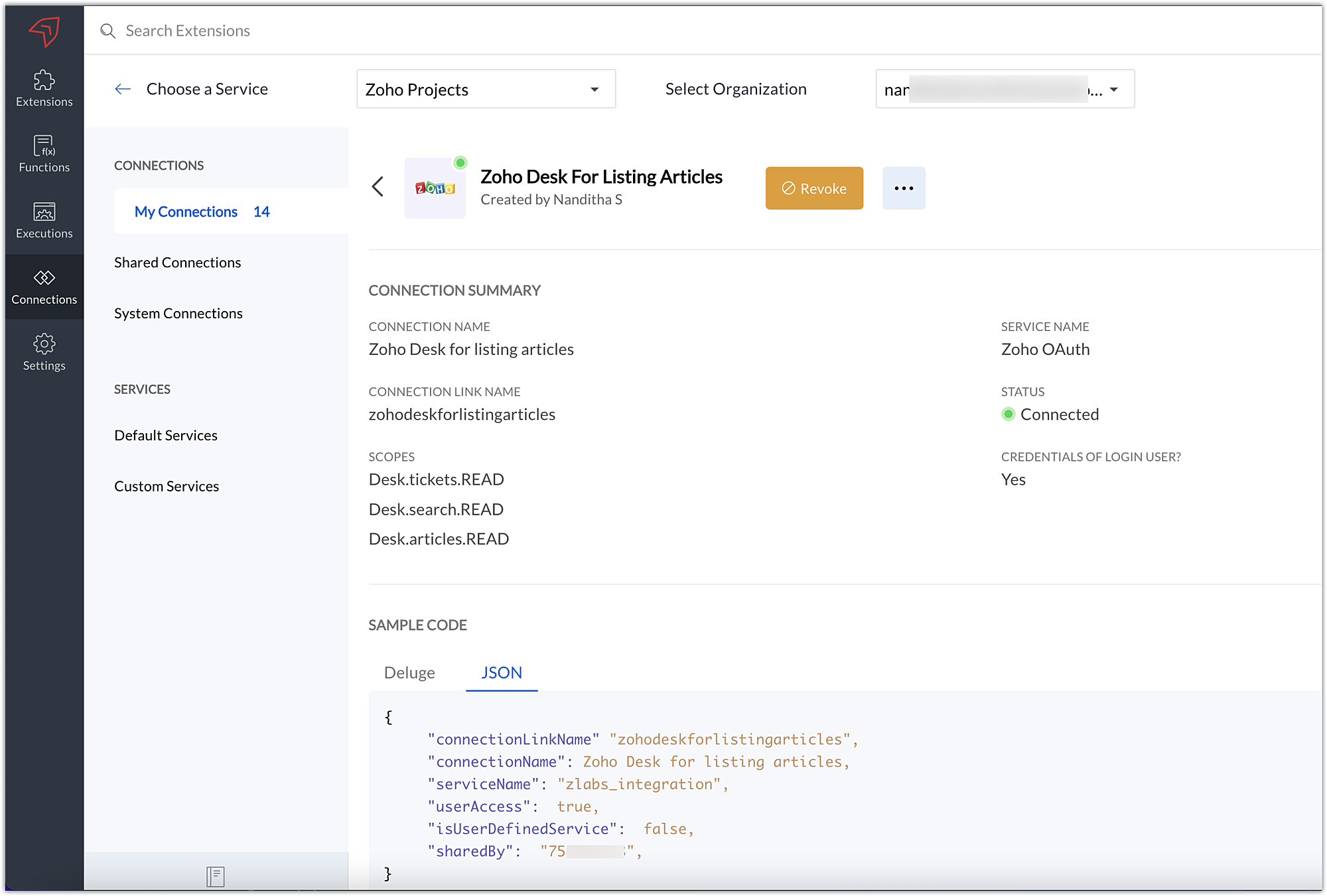
1. Connection
We have created a connection to establish a secure integration between Zoho Projects and Zoho Desk.
2. Extension Configuration
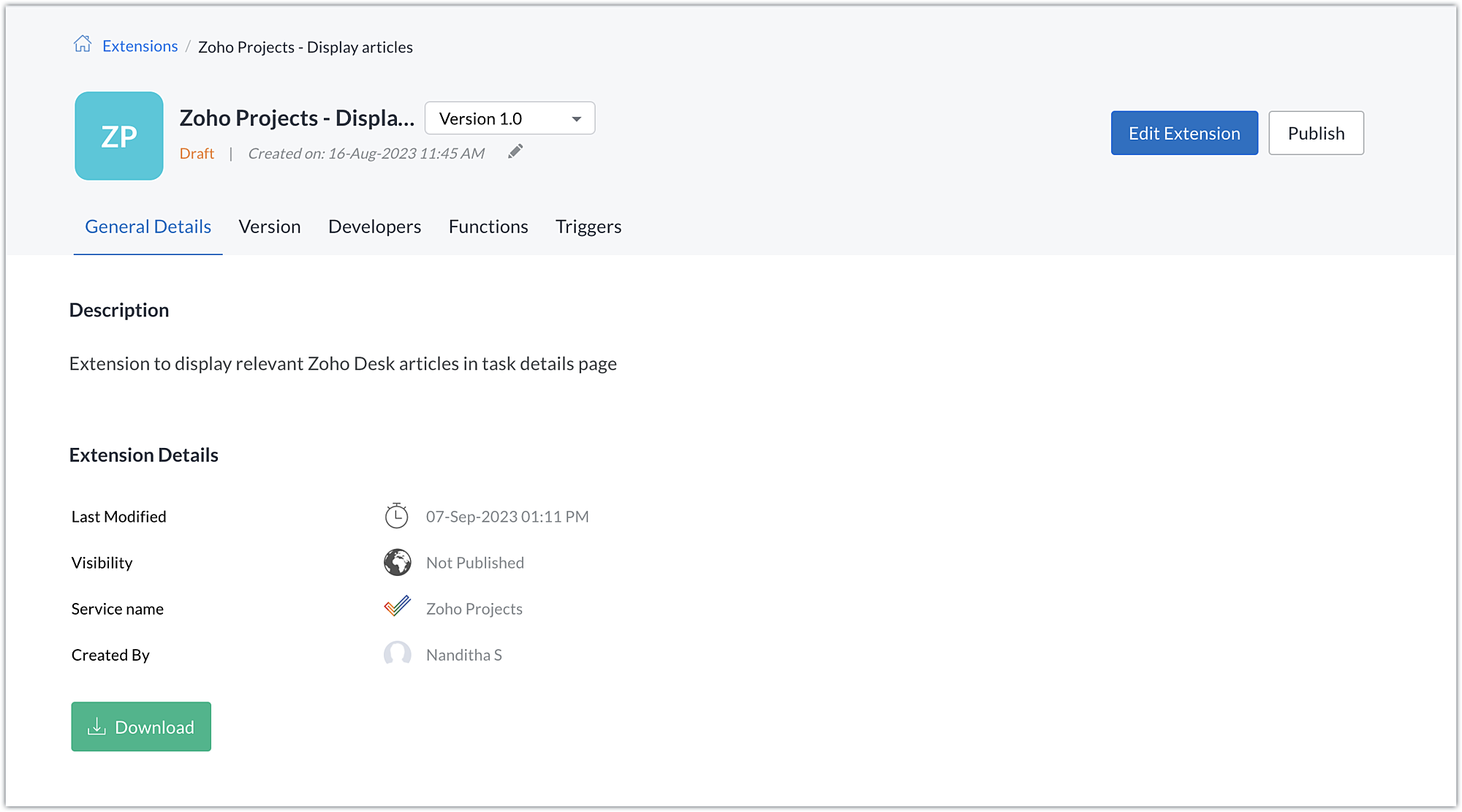
A. Extension creation: We have created a new extension for Zoho Projects.
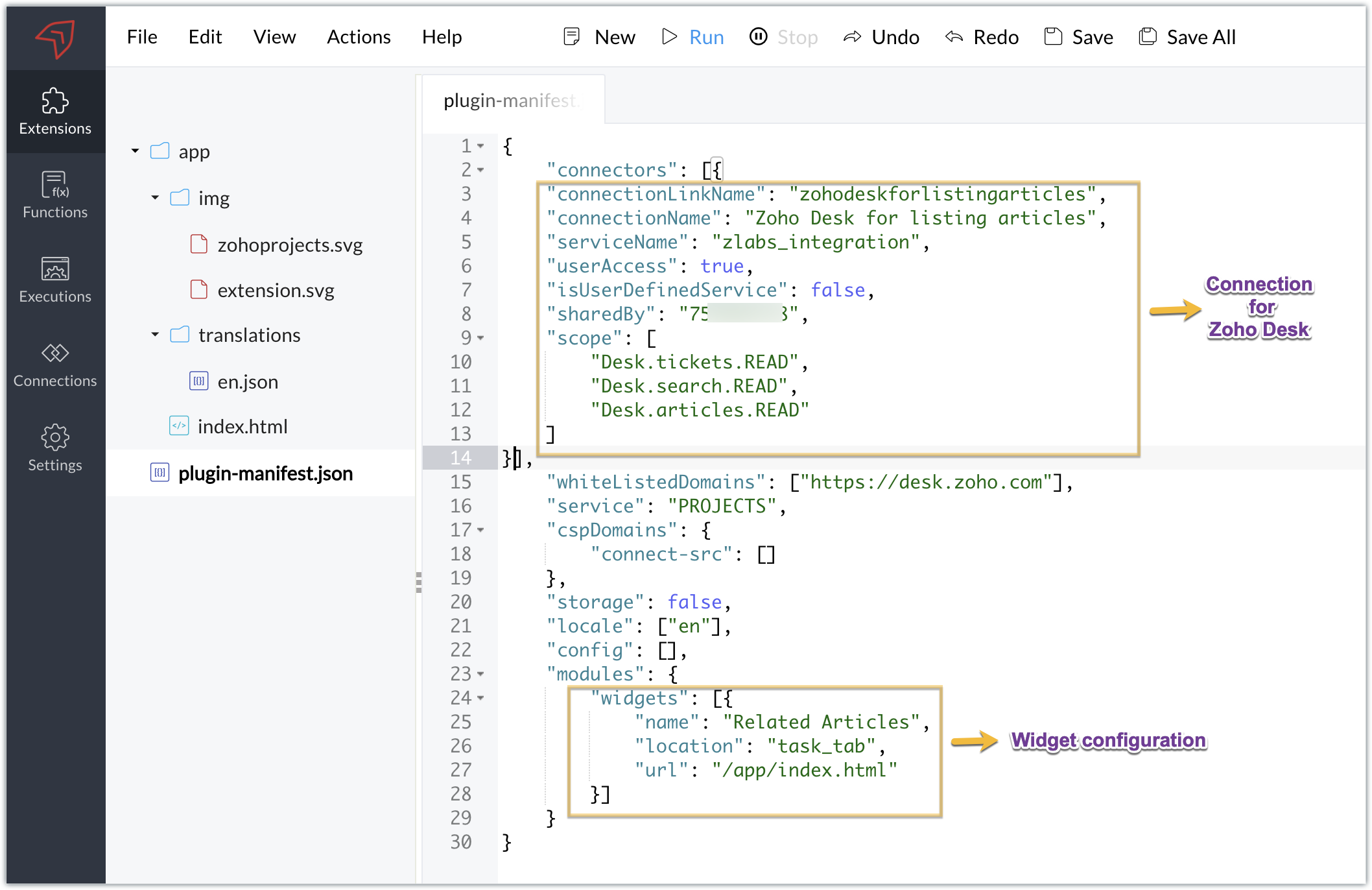
B. Plugin-manifest.json configuration: Once the extension is created, we next configure the plugin-manifest.json file to include the created connection and a widget.
For our extension use case, the plugin-manifest.json file is configured as shown in the below screenshot.
C. Setting up the widget code:
Now that we have the connection established, the extension created, and the plugin-manifest.json configured, let's go ahead and set up the custom widget code to achieve our goal.
Index.html - Widget code
<!DOCTYPE html> <html> <head> <title>App Default Screen</title> <script src="" target="_blank">https://js.zohocdn.com/projects/js/client_sdk.min.js"></script> <script src="" target="_blank">https://code.jquery.com/jquery-1.12.4.min.js"></script> <style> div.a { line-height: 200%; } </style> </head> <body> <div class="a"> <ul id="demo" style="font-size:20px"> <b>Article Details</b></ul> </div> </body> <script> var subject = ""; Util = {}; zohoprojects.init().then(function() { //Fetching the task subject using the Zoho Projects JS SDK method zohoprojects.get("task.name").then(function(response) { subject = response.data; var articledetails = { type: "GET", headers: { "orgId": "xxxxxxx", "Content-Type": "application/json" } }; var url = "https://desk.zoho.com/api/v1/articles/search?title=" + subject + "*"; //Using the request JS SDK method to invoke and get the Desk articles matching the task subject using the connection zohoprojects.request(url, articledetails, "zohodeskforlistingarticles").then(function(response) { var list = document.getElementById('demo'); var a = document.createElement("a"); var result = response.result; var data = result.data; //Looping through the articles for (i = 0; i < data.length; i++) { var title = data[i].title; var author = data[i].author; var authorname = author.name; var weburl = data[i].webUrl; var entry = document.createElement('li'); entry.innerHTML = title.link(weburl) + " by " + authorname; list.appendChild(entry); } }); }); }); </script> </html> |
- Here, we utilized the Zoho Projects JS SDK method to extract the task name, which is the task subject.
- We then used the Zoho Projects Request method to invoke the Zoho Desk API to search for articles.
- The Request method is used to make requests to third-party applications. It must be invoked with the belowparameters:
- Third-party API URL: This is the URL of the third-party application's API that needs to be invoked. In our case, we need to fetch articles from Zoho Desk based on a search value, so we used the Zoho Desk Articles Search API. We've included a search query parameter in the API as the title of the help article (wildcard search), and we've set the value of the search query parameter (title) as the task's subject. As a result, the API will look for any Zoho Desk help articles that satisfy a wildcard match with the task subject.
- Data object: Depending on the type of action being performed, each API requires a method type, body, header, and/or parameters to be invoked. To invoke the third-party application API, a data object with the necessary API details must be created. In our scenario, a header providing the Zoho Desk org ID is required to call the Zoho Desk article search API, which we have hardcoded.
- Connection: To work on the data of a third-party application safely, we would need to connect to that application. The link name of the connection created for the third-party application is the value of the connection parameter. This value will be available in the JSON code generated when the third-party application connection is established. This connection allows you to invoke the Zoho Desk API securely.
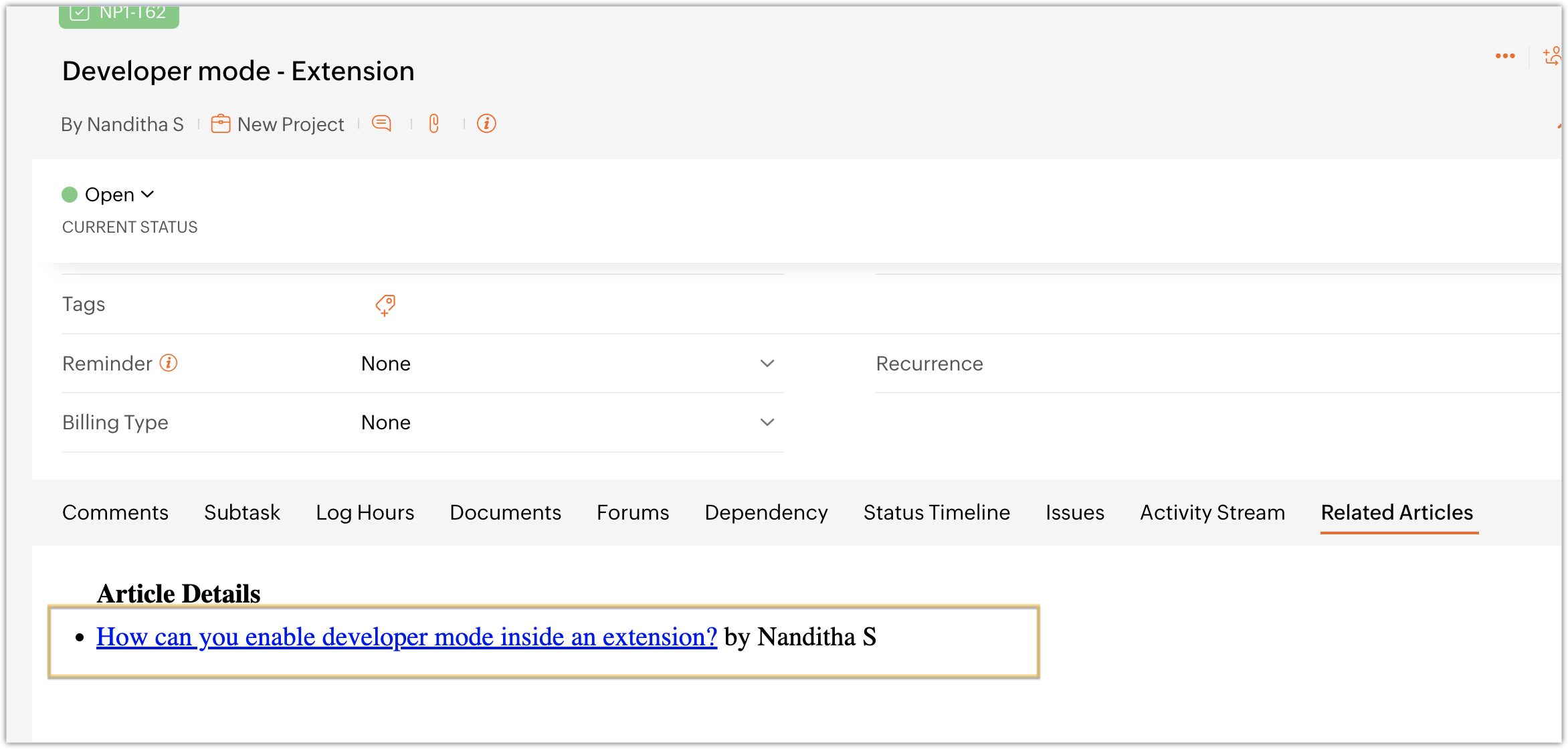
- Once the API is invoked by providing the necessary parameters for the Request method, the response for the invoked Zoho Desk search articles API is returned. We extract the information we require from the response, like the title, author name, and web URL. We then list and display this data in the Zoho Projects task details widget, Related Articles.
Sample output
- Access your Zoho Projects portal and enter into a task.
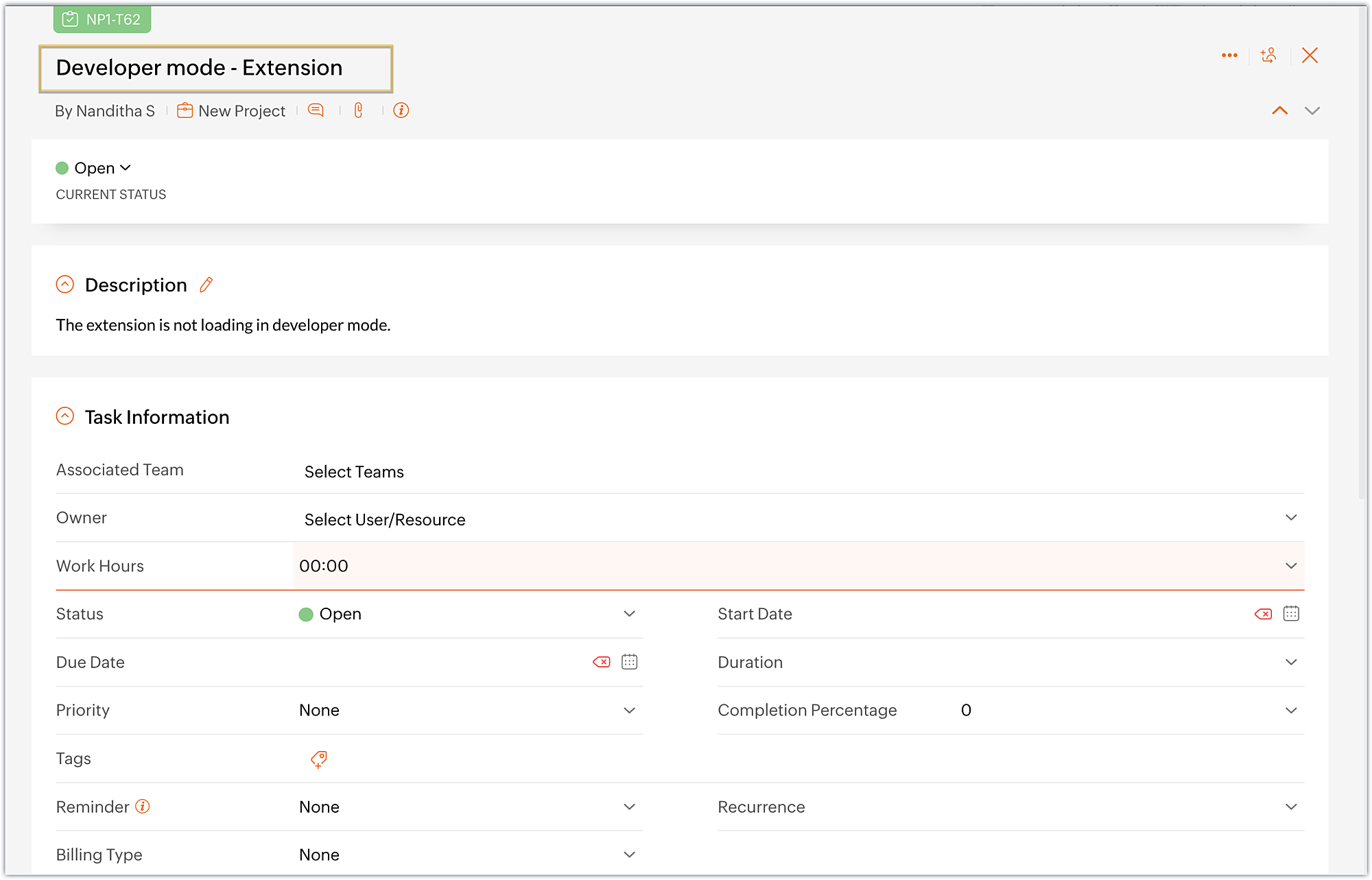
- Choose the Related Articles task tab, which is the widget we created.
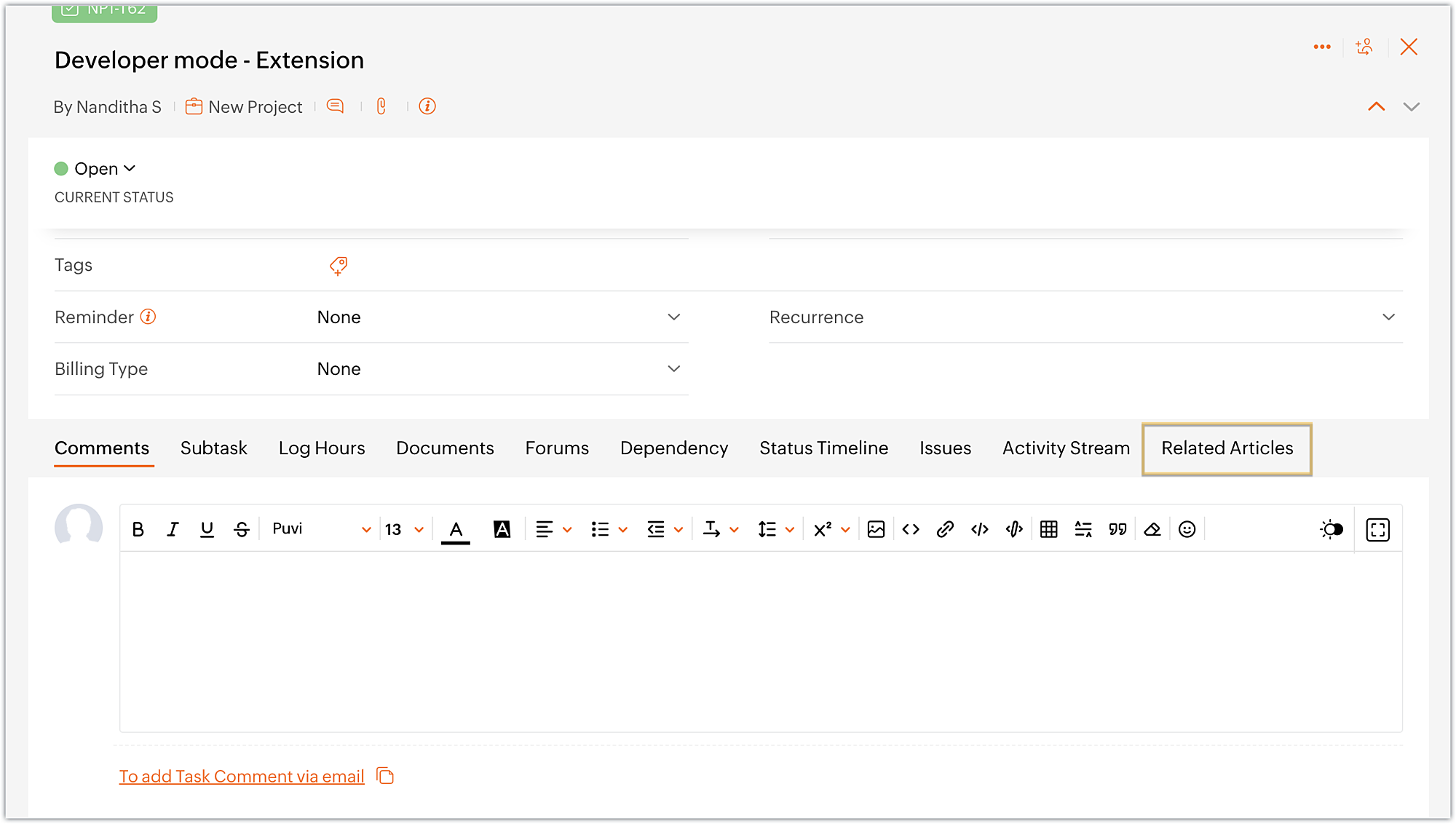
- The widget displays the available Zoho Desk articles that are related to the task at hand.
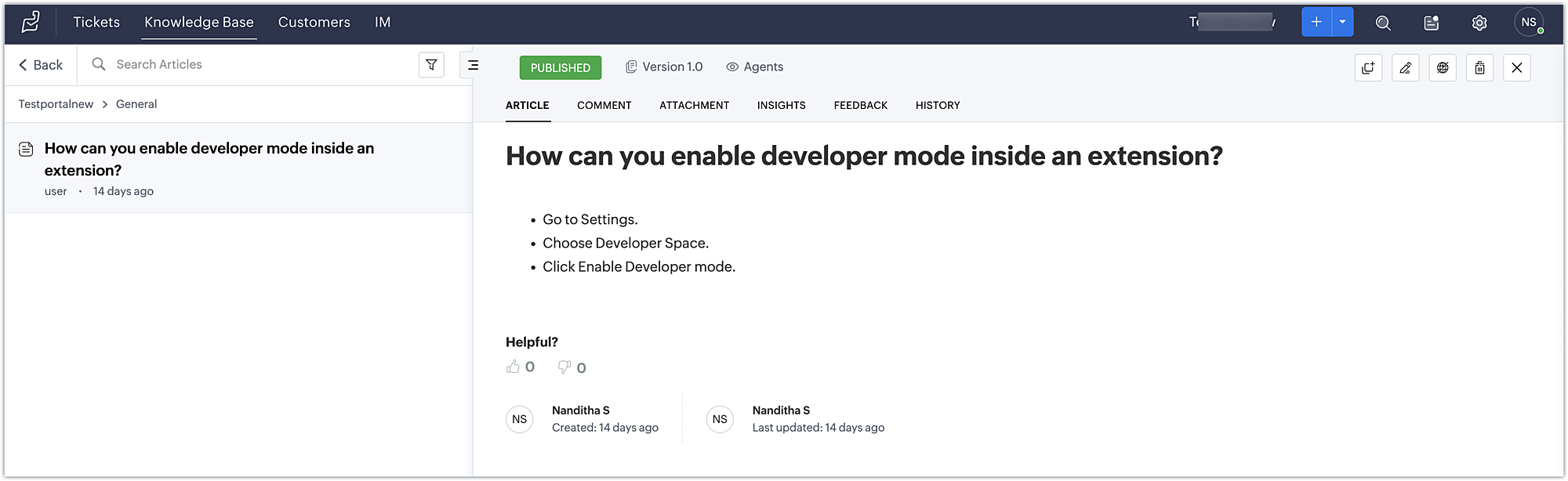
- Finally, click on an article to view its detailed information in Zoho Desk.
Using this method, developers working on Zoho Projects tasks can discover relevant articles and get helpful information to troubleshoot problems.
You can further enhance this use case by including a text box in the widget that allows the developer to enter a keyword and search for related articles using the Zoho Desk search articles API.
You can also accomplish use cases such as creating a task tab widget to associate data with a task. Every time the task loads, task-specific data can be displayed on the Task tab. To accomplish these kind of use cases, the data storage feature is available in Zoho Projects. We look forward to exploring the data storage feature,, and other use cases for custom widgets, in future posts.
We hope you found this information useful. Follow this space for further updates!
 Sign up for a Zoho Developer account and start developing extensions for Zoho products using Sigma.
SEE ALSO
Access your files securely from anywhere
New to Zoho Recruit?

Zoho Developer Community
New to Zoho LandingPage?
Zoho LandingPage Resources
New to Zoho Survey?
New to Zoho CRM Plus?
Deliver unforgettable customer experiences
New to Zoho CRM Plus?
Deliver unforgettable customer experiences
New to Zoho Marketing Plus?
Everything you need to run your marketing
New to Zoho Marketing Plus?
Everything you need to run your marketing
New to Bigin?





Topic Participants
Nanditha Somasundaram Somasundaram
Sticky Posts
Building extensions #10: Fetch customized user inputs, store them globally at the app level, and access them across entities
This data storage concept enables you to store data related to your extension for both entity properties and extension properties. In our previous piece, we looked at how to store data for entities using entity properties. In this post, we'll look atBuilding extensions #9: Store, retrieve, and access entity-specific data in widgets using data storage
Data storage - Overview Storing data related to the extension you are working on is essential. It can be saved as key-value pairs for an entity or extension, known as entity and extension properties, respectively. Data can be saved for the following entitiesBuilding extensions #7: Create custom widgets for a simplified end-user experience
Discover the benefits of using widgets! We explored the significance of widgets, prerequisites, and the availability of JS SDK methods as part of our previous post. In this post, let's go over a detailed example of using widgets along with certain ZohoBuilding extensions #6: Custom user interfaces with Widgets
Welcome to our post on Widgets for Zoho Projects! In our last post, we explored the significance of the connections feature, showed how to use it, and provided an example use case. In this article, we'll look at the importance of widgets, another featureBuilding extensions #5: Integrating applications with Zoho Projects through Connections
In our last post, we discussed the essential features that a Zoho Projects extension can provide. Starting with this post andin every subsequent post going forward, we'll go through each of those features in depth, one by one, with an example use case.
New to Zoho TeamInbox?
Zoho TeamInbox Resources
Zoho CRM Plus Resources
Zoho Books Resources
Zoho Subscriptions Resources
Zoho Projects Resources
Zoho Sprints Resources
Qntrl Resources
Zoho Creator Resources
Zoho CRM Resources
Design. Discuss. Deliver.
Zoho Show Resources

Get Started. Write Away!
Writer is a powerful online word processor, designed for collaborative work.
Zoho CRM コンテンツ
-
オンラインヘルプ
-
Webセミナー
-
機能活用動画
-
よくある質問
-
Ebook
-
-
Zoho Campaigns
- Zoho サービスのWebセミナー
その他のサービス コンテンツ
Nederlandse Hulpbronnen

ご検討中の方
Recent Topics
Automate Backups
This is a feature request. Consider adding an auto backup feature. Where when you turn it on, it will auto backup on the 15-day schedule. For additional consideration, allow for the export of module data via API calls. Thank you for your consideration.GCLID and Zoho Bookings
Is there anyway to embed a Zoho Bookings signup on a landing page and pass the GCLID information? More specifically, can this be done using auto-tagging and not manual tagging the GCLID? I know Zappier has an integration to do this but is there a betterMerge Items
Is there a work around for merging items? We currently have three names for one item, all have had a transaction associated so there is no deleting (just deactivating, which doesn't really help. It still appears so people are continuing to use it). I also can't assign inventory tracking to items used in past transactions, which I don't understand, this is an important feature moving forward.. It would be nice to merge into one item and be able to track inventory. Let me know if this is possible.Create PO from an invoice
We are a hardware and software sales company which receives orders over the internet. We drop ship most of our products from a warehouse outside of our company. Our orders get sync'd into Zoho from our store via onesaas as invoices. It would be greatBlueprint or Validation Rules for Invoices in Zoho Books
Can I implement Blueprint or Validation Rules for Invoices in Zoho Books? Example, use case could be, Agent confirms from client that payment is done, but bank only syncs transactions tomorrow. in this case, Agent can update invoice status to done, andResetting auto-number on new year
Hi everyone! We have an auto-number with prefix "D{YYYY}-", it generates numbers like D2025-1, D2025-2, etc... How can we have it auto-reset at the beginning of the next year, so that it goes to D2026-1? Thanks!The Social Wall: December 2025
Hello everyone! As we wrap up the final edition of the Social Wall for 2025, it’s the perfect time to look at what went live during December. QR code generator From paying for coffee to scanning metro tickets, QR codes are everywhere and have made everydayCustom AI solutions with QuickML for Zoho CRM
Hello everyone, Earlier, we introduced Custom AI Solutions in CRM that let you access QuickML for your custom AI needs. Building on that foundation, we’ve now enabled a deeper integration: QuickML models can be seamlessly integrated into CRM, and surfaceHelper Functions and DRY principle
Hello everyone, I believe Deluge should be able to use 'Helper functions' inside the main function. I know I can create different standalones, but this is not helpful and confusing. I don't want 10000 different standalones, and I dont want to have toIntroducing workflow automation for the Products module
Greetings, I hope all of you are doing well. We're happy to announce a few recent enhancements we've made to Bigin's Products module. The Products module in Bigin now supports Workflows, enabling you to automate routine actions. Along with this update,Power up your Kiosk Studio with Real-Time Data Capture, Client Scripts & More!
Hello Everyone, We’re thrilled to announce a powerful set of enhancements to Kiosk Studio in Zoho CRM. These new updates give you more flexibility, faster record handling, and real-time data capture, making your Kiosk flows smarter and more efficientZia Formula Expression Generator for Formula fields
Hello everyone! Formula fields are super useful when you want your CRM to calculate things for you but writing the expression is where most people slow down. You know what you want, but you’re not fully sure which function to use, how the syntax shouldIssue with Zoho Creator Form Full-Screen View in CRM Related List Integration
Hi Team, We have created a custom application in Zoho Creator and integrated it into Zoho CRM as a related list under the Vendor module, which we have renamed as Consignors. Within the Creator application, there is a form named “Pickup Request.” InsideWrapping up 2025 on a high note: CRM Release Highlights of the year
Dear Customers, 2025 was an eventful year for us at Zoho CRM. We’ve had releases of all sizes and impact, and we are excited to look back, break it down, and rediscover them with you! Before we rewind—we’d like to take a minute and sincerely thank youCustomer Parent Account or Sub-Customer Account
Some of clients as they have 50 to 300 branches, they required separate account statement with outlet name and number; which means we have to open new account for each branch individually. However, the main issue is that, when they make a payment, theyRestrict Users access to login into CRM?
I’m wanting my employees to be able to utilize the Zoho CRM Lookup field within Zoho Forms. For them to use lookup field in Zoho Forms it is my understanding that they need to be licensed for Forms and the CRM. However, I don’t want them to be able toUnknown table or alias 'A1'
I would like to create a subquery but i am getting the following error: Unknown table or alias 'A1' used in select query. This is the sql statement: SELECT A1.active_paying_customers, A1.active_trial_customers, A1.new_paying_signup, date(A1.date_active_customers),in the Zoho creator i have address field based the customer lookup im selecting the addresss , some times the customer address getting as null i want to show as blank
in the Zoho creator i have address field based the customer lookup im selecting the addresss , some times the customer address getting as null ,i want to show as blank instead of showing null. input.Billing_Address.address_line_1 = ifNUll(input.Customers_Name.Address.address_line_1,"");Question about upgrade and storage space Zoho Notebook
After upgarding my Zoho Notebook plan, I am running into the following issue. I just upgraded from a free Zoho Notebook subscription to Pro Lite after I got a notification in my Window Zoho Notebook desktop app saying that I had run out of space. However,Printing to a brother label maker
I see allot of really old unanswered posts asking how to print to a label maker from a zoho creator app. Has their been any progress on providing the capability to create a customized height & width page or print template or whatever to print labels?Sync desktop folders instantly with WorkDrive TrueSync (Beta)
Keeping your important files backed up and accessible has never been easier! With WorkDrive desktop app (TrueSync), you can now automatically sync specific desktop folders to WorkDrive Web, ensuring seamless, real-time updates across devices. Important:Track online, in-office, and client location meetings separately with the new meeting venue option
Hello everyone! We’re excited to announce meeting enhancements in Zoho CRM that bring more clarity and structure to how meetings are categorized. You can now specify the meeting venue to clearly indicate whether a meeting is being held online, at theAnnouncing new features in Trident for Mac (1.32.0)
Hello everyone! We’re excited to introduce the latest updates to Trident, which are designed to reinforce email security and protect your inbox from evolving threats. Let’s take a quick look at what’s new. Deliver quarantined emails. Organization adminsMarketing Tip #5: Improve store speed with optimized images
Slow-loading websites can turn visitors away. One of the biggest culprits? Large, uncompressed images. By optimizing your images, your store loads faster and creates a smoother shopping experience leading to higher sales. It also indirectly improves SEO.SMS to customers from within Bigin
Hi All, Is there anyone else crying out for Bigin SMS capability to send an SMS to customers directly from the Bigin interface? We have inbuilt telephony already with call recordings which works well. What's lacking is the ability to send and receiveAdmins cannot see each others' Scheduled Reports?!
Very frustrating that as an admin I cannot see what my reports my fellow admins have created and scheduled. After asking about this on the help chat, I was told the issue is trust and security. By giving someone Admin status, it means we trust them with those responsibilities. Please change this, it is not a good process to have to bother other users to change a report or change users within a report.Writer update results in BitDefender blocking it as malware
After updating Writer to latest update, Bitdefender blocked the app and writer no longer runs.Missing Import Options
Hello, do I miss something or is there no space import option inside of this application? In ClickUp, you can import from every common application. We don't want to go through every page and export them one by one. That wastes time. We want to centralizeZoho CRM Portal Field Level Permission Issue
Hi Support Team, I am using the Zoho CRM Portal and configuring field-level editing permissions. However, we are unable to restrict portal users from editing certain fields. We have created a portal and provided View and Edit (Shared Only) access forCustom Fonts in Zoho CRM Template Builder
Hi, I am currently creating a new template for our quotes using the Zoho CRM template builder. However, I noticed that there is no option to add custom fonts to the template builder. It would greatly enhance the flexibility and branding capabilities ifCollaboration with customers made easy with Zoom Meeting and Zoho Desk integration
Hello everyone! We are happy to announce that you can now integrate your Zoho Desk account with Zoom Meeting. The integration bridges the gap between digital communication and human connection, empowering teams to deliver timely support when it mattersCRM Canvas - Upload Attachments
I am in the process of changing my screens to Canvas. On one screen, I have tabs with related lists, one of which is attachments. There doesn't appear to be a way to upload documents though. Am I missing something really obvious? Does anyone haveTrueSync regularly filling up my local disk
Seems that WorkDrive's TrueSync randomly starts filling up my local hard drive space. None of the folders have been set as "Make Offline" but still it seems to randomly start making file offline. The settings of the app is so minimal and is of no realKaizen #194 : Trigger Client Script via Custom buttons
Hello everyone! Welcome back to another interesting and useful Kaizen post. We know that Client Scripts can be triggered with Canvas buttons and we discussed this with a use case in Kaizen#180. Today, let us discuss how to trigger Client Script when a[Webinar] A recap of Zoho Writer in 2025
Hi Zoho Writer users, We're excited to announce Zoho Writer's webinar for January 2026: A recap of Zoho Writer in 2025. This webinar will provide a recap of the features and enhancements we added in 2025 to enhance your productivity. Choose your preferredPicklist field shows "none" as default
Hello, Is there an option to avoid showing "none" as the default value in a picklist field? I also don't want to see any option displayed. My expectation is to have a blank bar, and then when I display the drop-down list, I can choose whichever I waStage-probability mapping feature in custom module
Hi, I'm building a custom module for manage projects. I would like to implement the stage-probability feature that Potentials has. Is this possible?Field Description is very small
Hello, The field Description in the activity is very small. Why don't try open a new window, or a bigger popup, or increase the width of the "popup". Example:StatusIQ
Please add StatusIQ to data sources. We using site24x7 and StatusIQ together and site24x7 integration is already there. Thanks and regards, TorstenIn Zoho People, the Operations buttons are frequently not visible or do not appear consistently.
In Zoho People, the Operations buttons are frequently not visible or do not appear consistently. We request you to please investigate and address this issue, as it is affecting daily HR operations and user access.Next Page