Extension Pointers #11: Publishing an Extension
Extensions are software components that help developers add features that enhance the functionality of your Zoho product.
Bundling an extension is essentially wrapping and delivering the components of an extension as a whole package. The process of building an extension does not end with its development, but also extends to its publication in order to make it useful. Bundling and publishing an extension is therefore an important part of the process, as it wraps up the extension and makes it ready for installation and use.
An extension can be published either privately or publicly. Using Sigma, you can choose to publish your extension either as a private extension or as a public extension.
➤ Private Extension: The extensions that are built for personal or specific organizational purposes are private extensions. When you publish a private extension, a hashed URL link is made available, which can be used to install the extension. This URL can be either used personally, or shared with other users or members of your organization as needed.
➤ Public Extension: The extensions that are hosted in Zoho Marketplace are public extensions. When an extension is published, an installation URL is provided along with an option to list it in Zoho Marketplace. Choosing this option makes the extension available to all Zoho users for installation and use. Listing your extension in Zoho Marketplace gives other users the chance to use the extension you've made, and also allows you to gain monetary benefits.
In this post, we will take a look at the steps on how to create and publish a basic extension either privately or publicly.
How to Develop and Publish an Extension
- Log in to your Zoho Developer Console and choose Sigma platform.
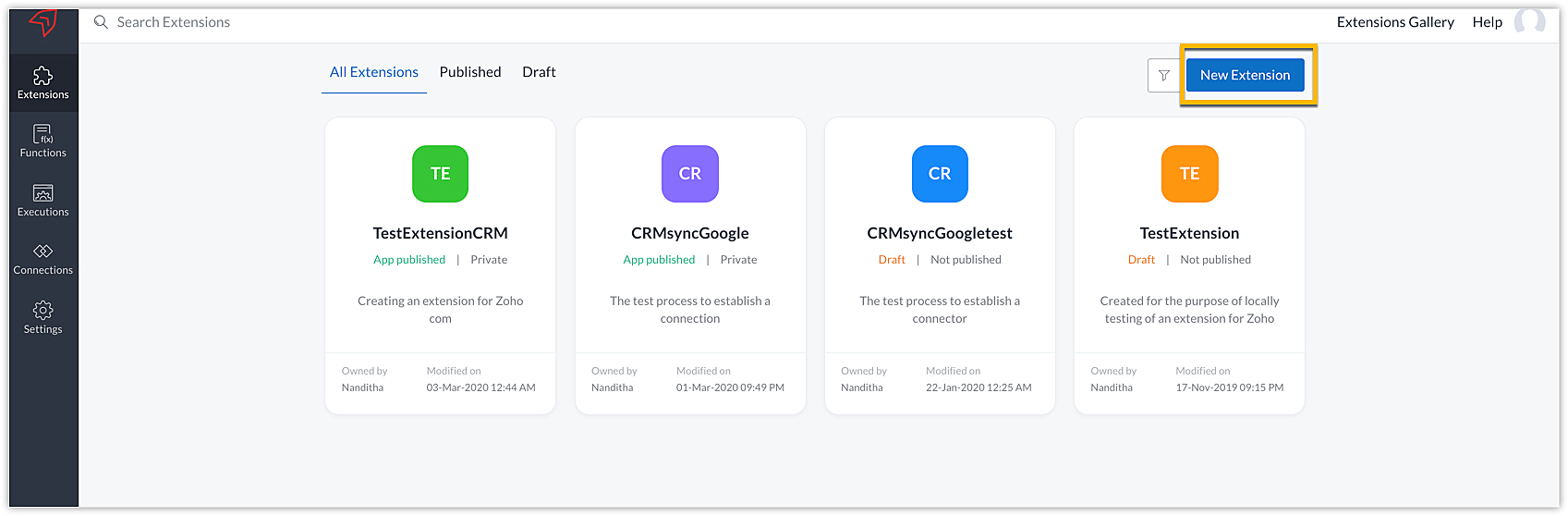
- Click New Extension in the Extensions Gallery section to create a new extension for Zoho CRM.
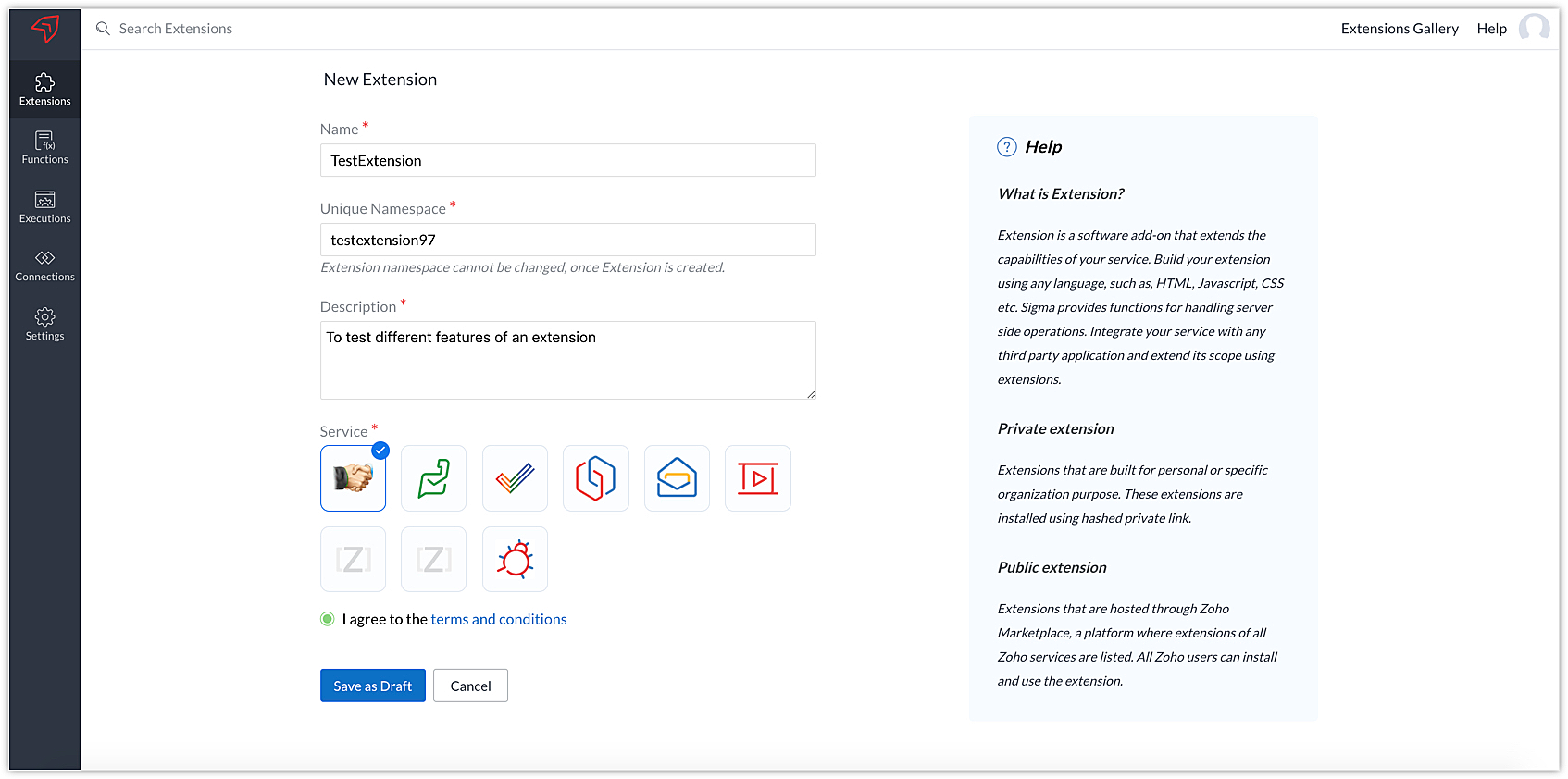
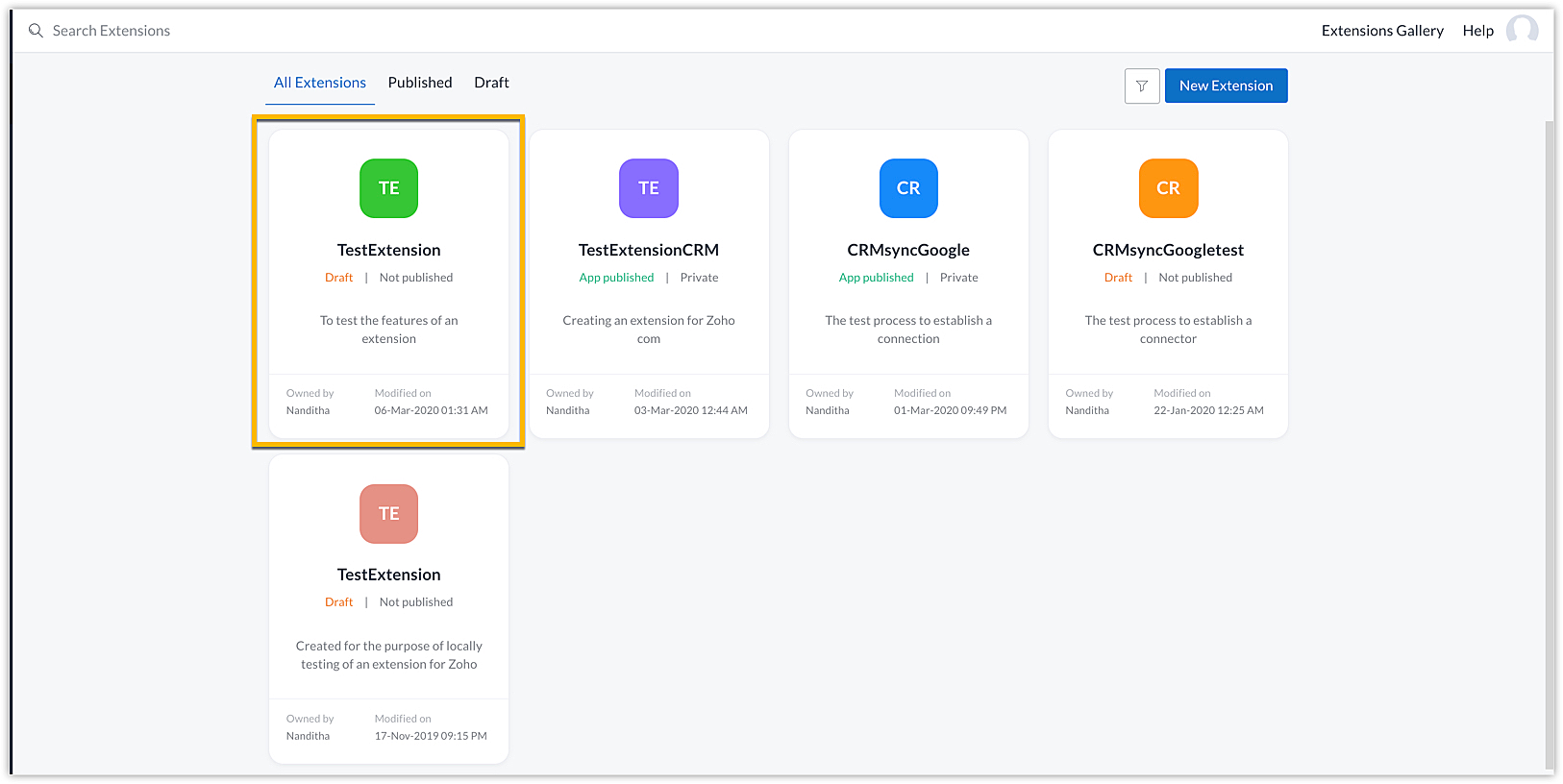
- Click Save as Draft after providing the necessary extension details, and the new extension "TestExtension" will be created for Zoho CRM.
Note: Extensions for Zoho CRM are only supported in 'US DC' currently in the Zoho developer platform. You can create a trial account in Zoho One in US DC and begin developing your Zoho CRM extension.
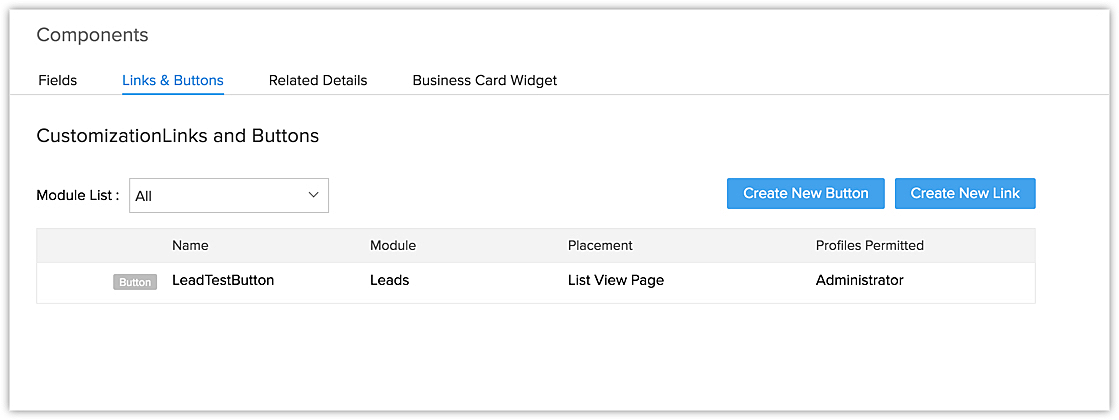
- As a small example, let us create a button, "LeadsTestButton" for the Leads Module. The function of the button is to invoke a URL which leads to a new search tab, fetching details from Google about the lead's company.
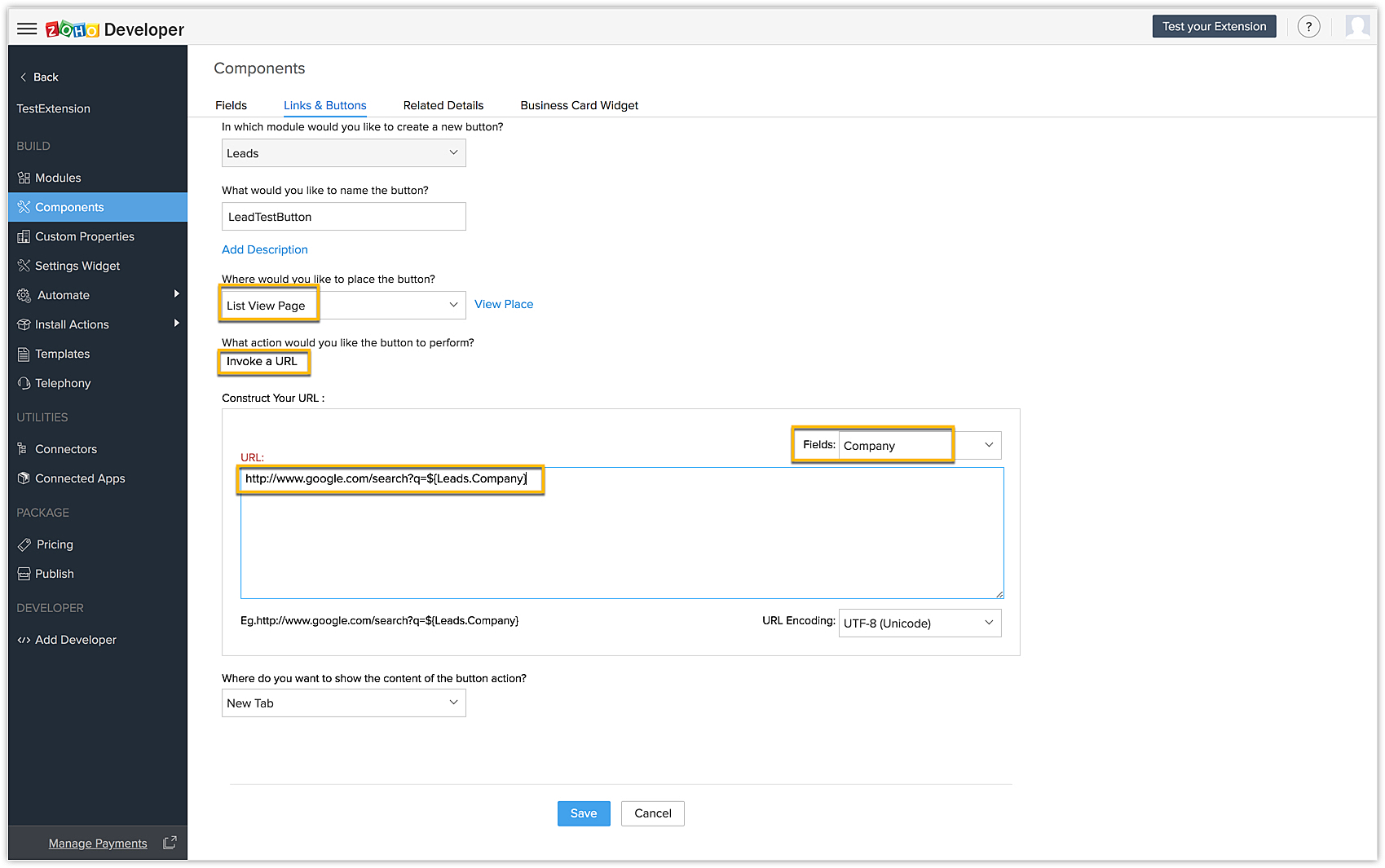
URL | http://www.google.com/search?q=${Leads.Company} |
- Provide the necessary details and click Save.
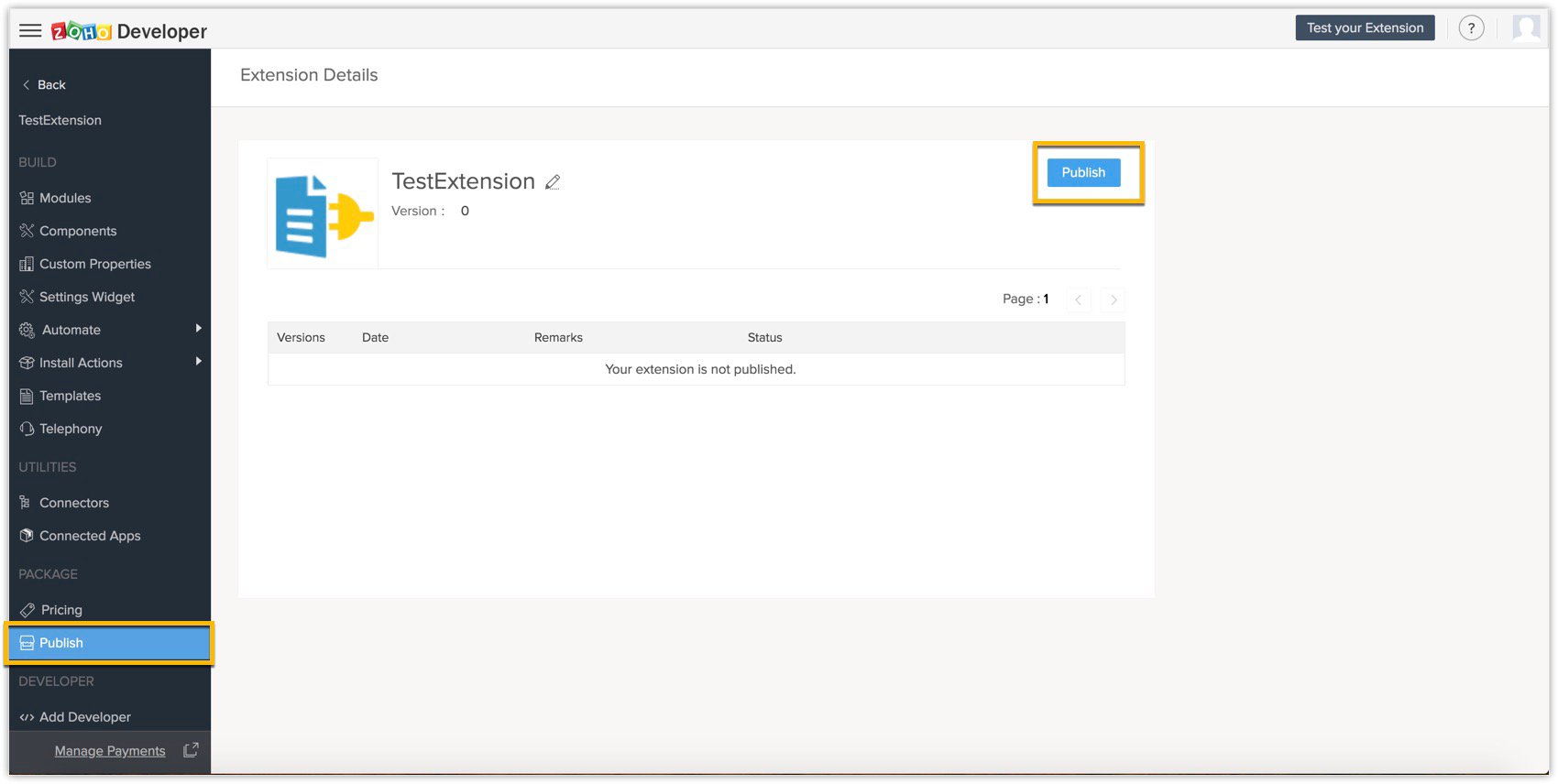
- Choose Publish from the left panel of the Zoho Developer console under Package, and then click Publish.
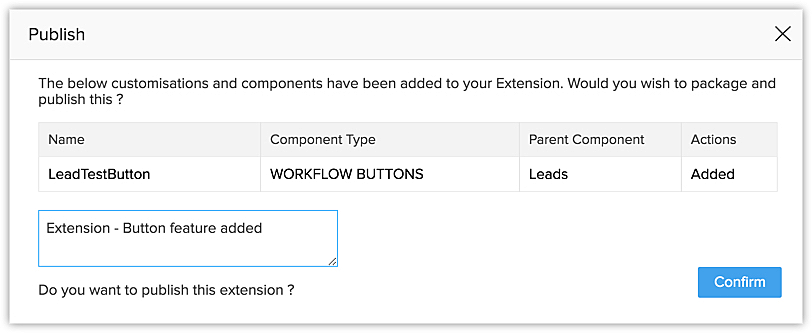
- The Publish prompt box appears displaying the features that are added to the extension. Provide the Extension release notes and click Confirm.
The extension is now published!
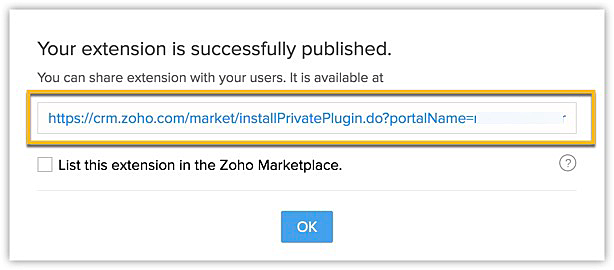
The installation URL provided can be used personally or can be shared with other users privately as needed. This falls under the category of a "Private" extension.
Checking the List this extension in the Zoho Marketplace checkbox allows you to publish your extension as a public extension. Once the checkbox is checked, you will be asked for some details about your extension, and your extension is submitted to the Marketplace team for further evaluation. For a detailed guide on listing in Marketplace, click here. After thorough evaluation and fulfilling the approval standards of the Marketplace team, the extension will be listed in Marketplace for customers to use.
Managing extension versions:
The concept of versioning goes hand in hand with publishing an extension. After an extension is published, a version number is automatically assigned to it.
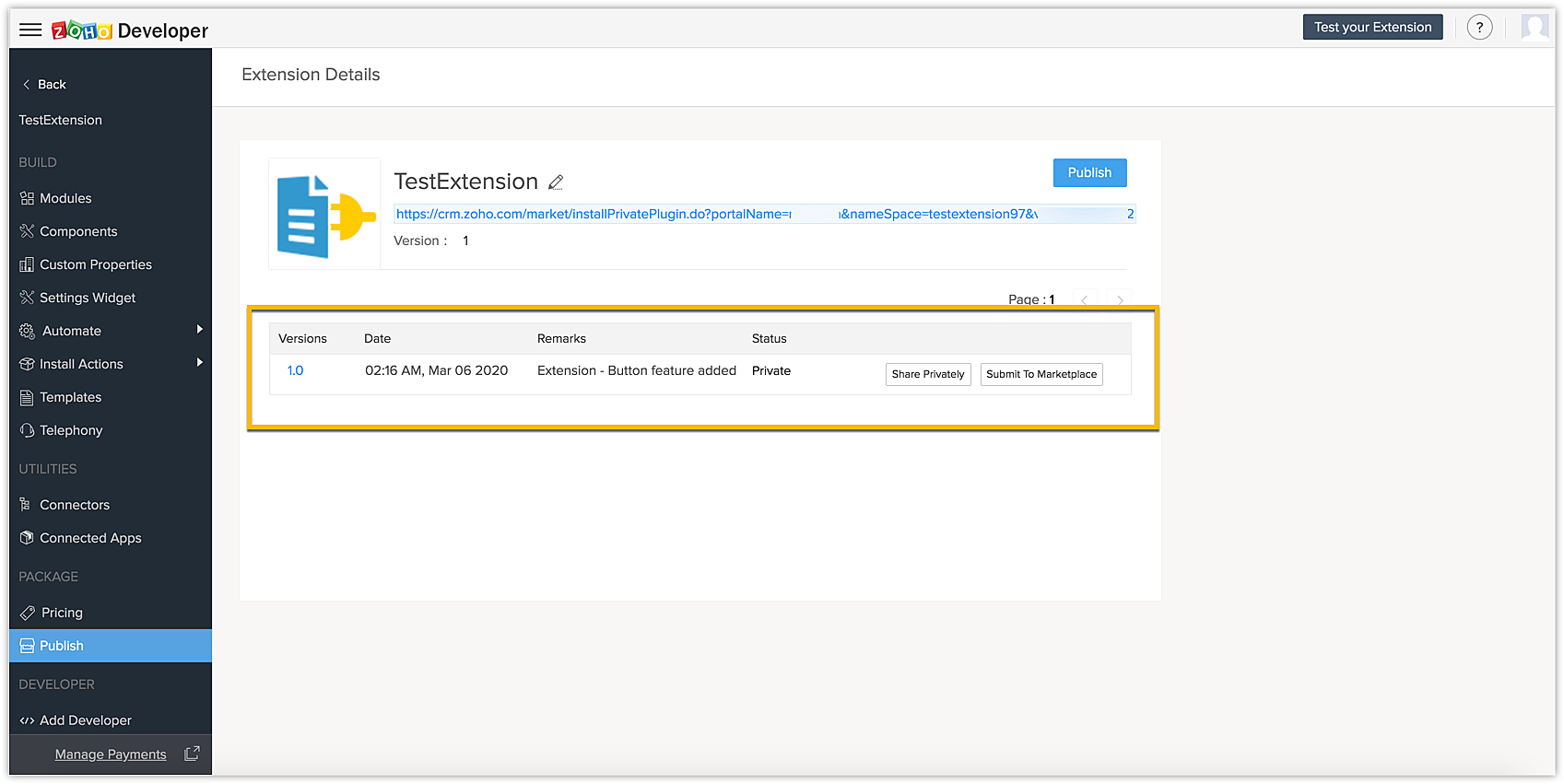
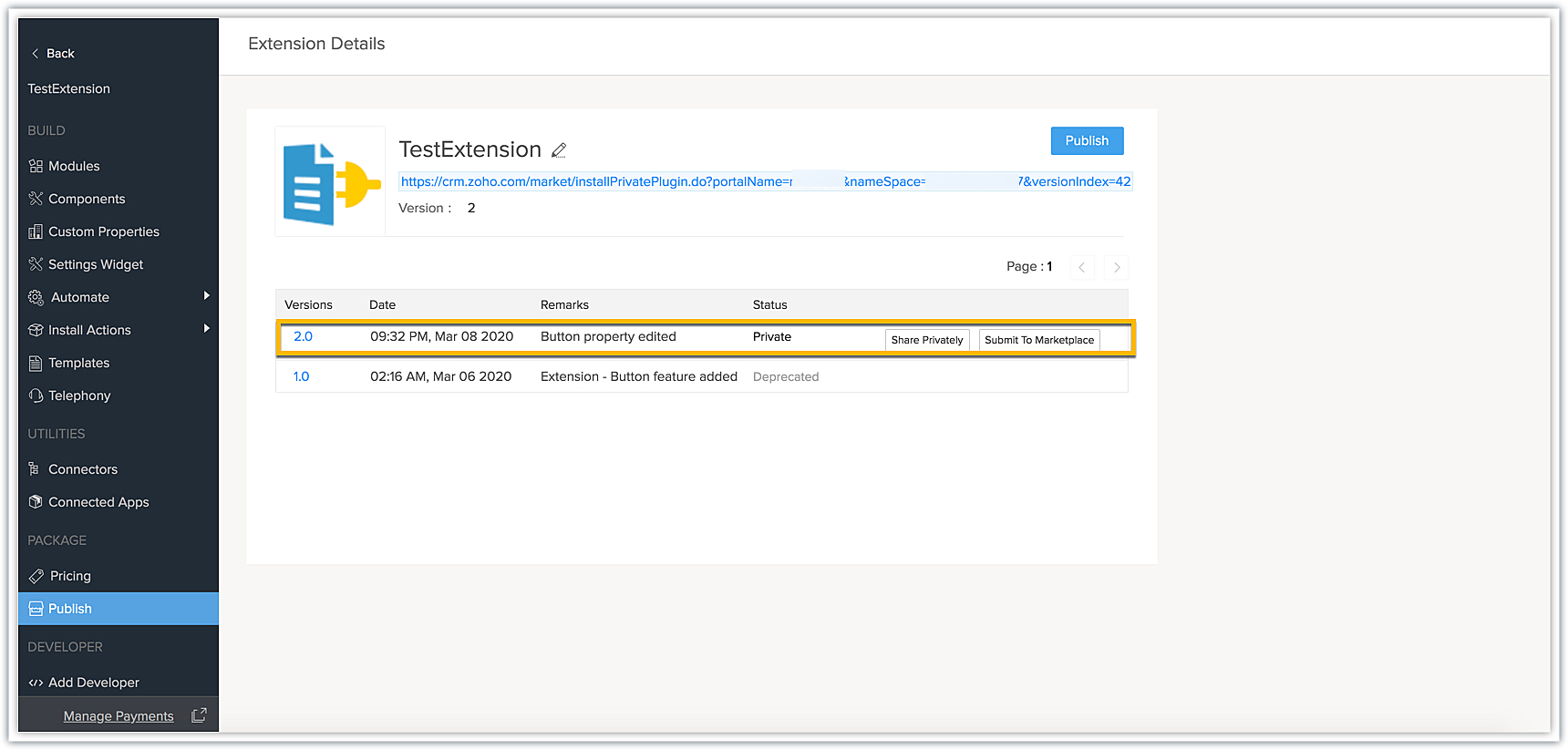
If there are any changes that need to be updated or added to the extension, either in the case of adding new components or modifying its logical functionality, these changes can be done and the extension can be re-published to obtain a new installation URL. Every time the extension is re-published, a new version is assigned sequentially and the older version gets deprecated.
In our example, let's make a change to the placement of the LeadsTestButton.
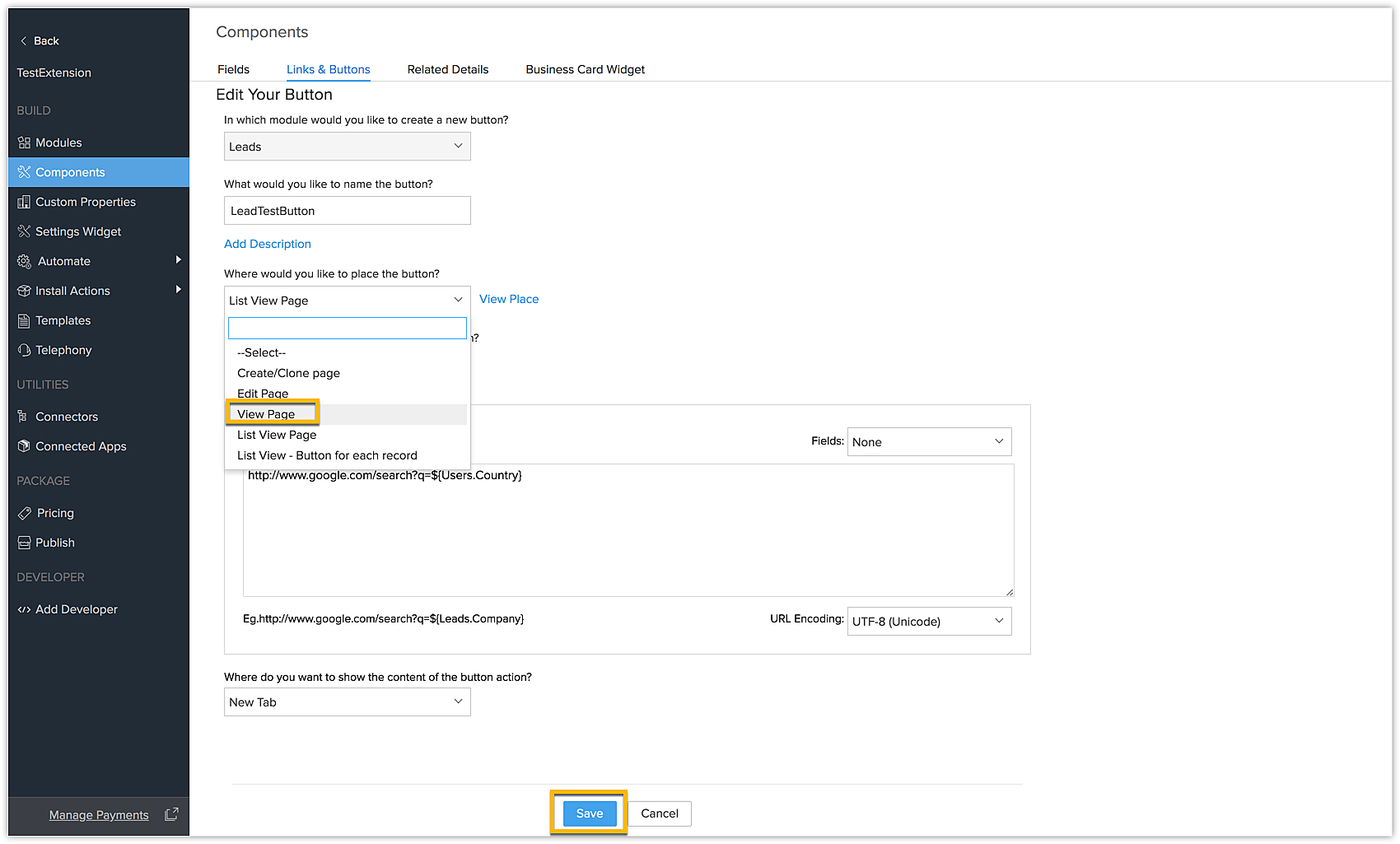
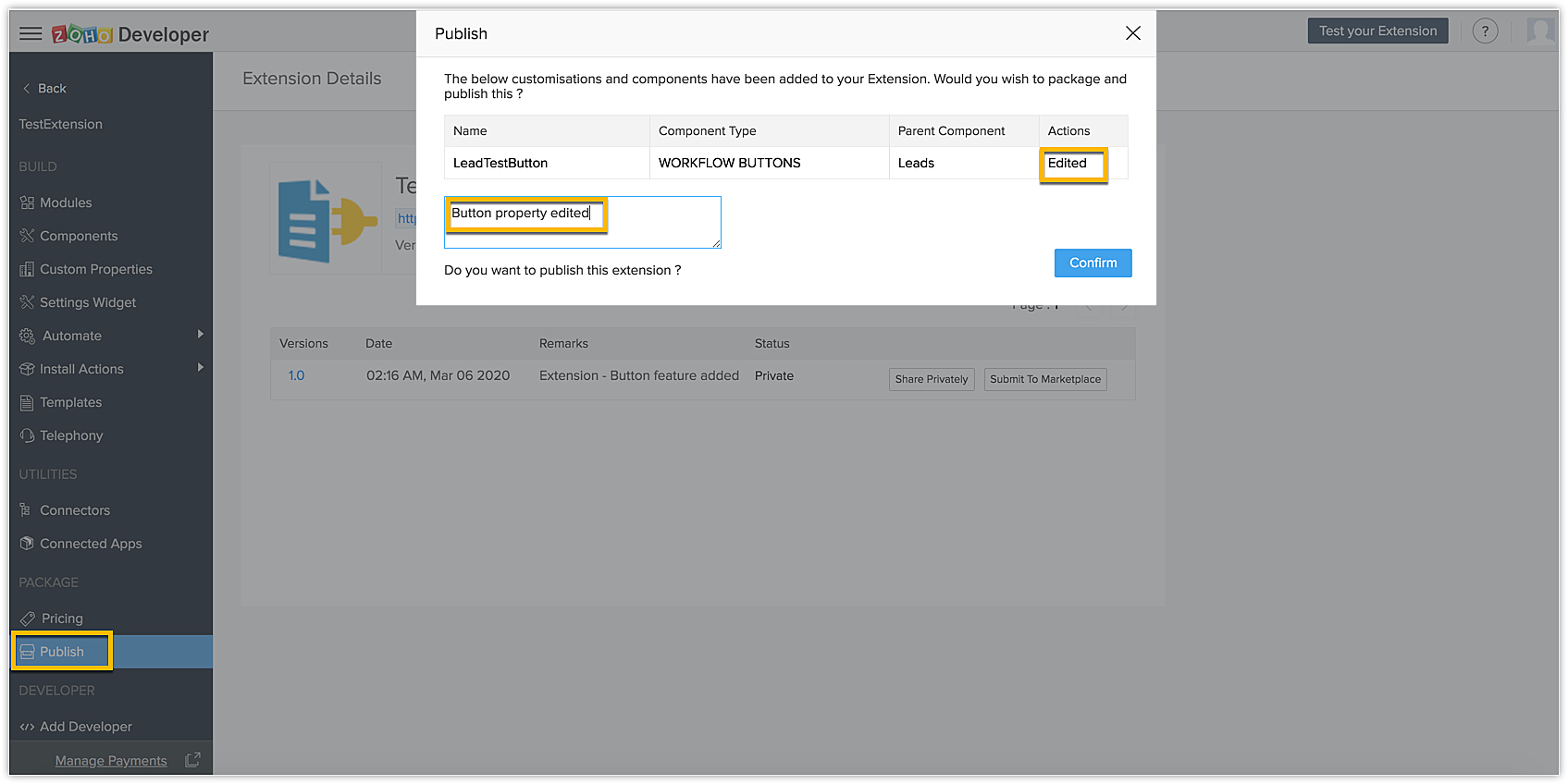
Click Publish again, provide the Extension release notes, and click Confirm on making the necessary changes.
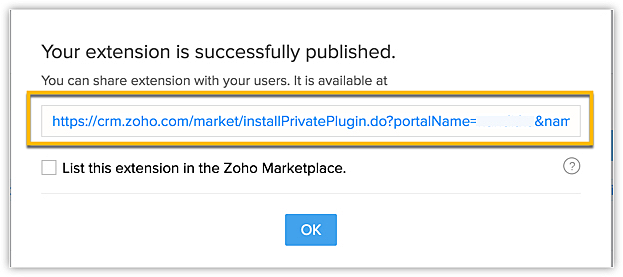
The new installation URL is provided. This URL with the modified extension features can be privately shared with other users or within the team for use.
In the case of public extensions (i.e. extensions listed in Marketplace), you can publish a new version of your extension to the Marketplace approval team. Once the approval standards have been met, the latest version is approved and updated in Marketplace. Customers who have previously installed this extension from Marketplace can update it from the "Updates" tab available from the Extensions Gallery.
Once the new version is created, the old version will be automatically deprecated.
We hope you found these detailed steps on how to publish an extension useful. Please follow this space for more information.
Access your files securely from anywhere
Centralize Knowledge. Transform Learning.
All-in-one knowledge management and training platform for your employees and customers.
New to Zoho Recruit?

Zoho Developer Community
New to Zoho LandingPage?
Zoho LandingPage Resources
New to Zoho Survey?
New to Zoho CRM Plus?
Deliver unforgettable customer experiences
New to Zoho CRM Plus?
Deliver unforgettable customer experiences
New to Zoho Marketing Plus?
Everything you need to run your marketing
New to Zoho Marketing Plus?
Everything you need to run your marketing
New to Bigin?





Topic Participants
Nanditha Somasundaram Somasundaram
Sticky Posts
Kaizen #198: Using Client Script for Custom Validation in Blueprint
Nearing 200th Kaizen Post – 1 More to the Big Two-Oh-Oh! Do you have any questions, suggestions, or topics you would like us to cover in future posts? Your insights and suggestions help us shape future content and make this series better for everyone.Kaizen #226: Using ZRC in Client Script
Hello everyone! Welcome to another week of Kaizen. In today's post, lets see what is ZRC (Zoho Request Client) and how we can use ZRC methods in Client Script to get inputs from a Salesperson and update the Lead status with a single button click. In thisKaizen #222 - Client Script Support for Notes Related List
Hello everyone! Welcome to another week of Kaizen. The final Kaizen post of the year 2025 is here! With the new Client Script support for the Notes Related List, you can validate, enrich, and manage notes across modules. In this post, we’ll explore howKaizen #217 - Actions APIs : Tasks
Welcome to another week of Kaizen! In last week's post we discussed Email Notifications APIs which act as the link between your Workflow automations and you. We have discussed how Zylker Cloud Services uses Email Notifications API in their custom dashboard.Kaizen #216 - Actions APIs : Email Notifications
Welcome to another week of Kaizen! For the last three weeks, we have been discussing Zylker's workflows. We successfully updated a dormant workflow, built a new one from the ground up and more. But our work is not finished—these automated processes are
New to Zoho TeamInbox?
Zoho TeamInbox Resources
Zoho CRM Plus Resources
Zoho Books Resources
Zoho Subscriptions Resources
Zoho Projects Resources
Zoho Sprints Resources
Qntrl Resources
Zoho Creator Resources
Zoho CRM Resources
Design. Discuss. Deliver.
Zoho Show Resources

Get Started. Write Away!
Writer is a powerful online word processor, designed for collaborative work.
Zoho CRM コンテンツ
-
オンラインヘルプ
-
Webセミナー
-
機能活用動画
-
よくある質問
-
Ebook
-
-
Zoho Campaigns
- Zoho サービスのWebセミナー
その他のサービス コンテンツ
Nederlandse Hulpbronnen

ご検討中の方
Recent Topics
Marketing Tip #26: Optimize product images for SEO
Product images can do more than make your store look good. They can also help customers discover your products through search. Since search engines can’t "see" images, they rely on text signals to understand what an image is about. Two small actions makeWhat's New in Zoho Analytics - February 2026
Hello Users! We're back with another round of updates for Zoho Analytics. This month's release focuses on giving you greater flexibility in how you visualize, manage, and act on your data - with new features like custom visualizations, remote MCP server,Clone a Module??
I am giong to repurpose the Vendors module but would like to have a separate but very similar module for another group of contacts called Buyers. I have already repurposed Contacts to Sellers. Is it possible to clone (make a duplicate) module of Vendors[Webinar] Solving business challenges: Secure, real-time, and external collaboration
Hi Zoho Writer users, We are excited to announce Zoho Writer's webinar for March 2026: Solving business challenges: Secure, real-time, and external collaboration. Zoho Writer supports real-time collaboration by allowing teams to work together in documents.Realtime Translations of Video via OnAir
It would be an amazing feature to have a drop down selector in the On Air video area for attendees to select a language to convert the original language to.can change deal colors in bigin?
can be super useful if we can change colors deals process any way to do it?You have reached the maximum limit of bank accounts that can be connected to Zoho Books through token.
I can no longer connect to my bank account to download transactions into Zoho Books. I egt the error message: "You have reached the maximum limit of bank accounts that can be connected to Zoho Books through token. To connect more accounts, write to usAssign emails to lead
I have some contacts who refers leads but there is no away to manually assign emails to lead.Print Sales Orders, Purchase Orders or Invoices from API
Hello, Is it possible to use the print option that is available in Sales Orders Purchase Orders and Invoices with the API?. I don't see any information in the docs about this. ThanksPush Forms to CRM
Hello, I created a Form but forgot to integrate to CRM before many of the Forms were filled out. Is it possible to push those entries to CRM or should I just export a CSV then upload to CRM?Layout Adjustment.
Hello Latha, Hope you are doing well. I wanted to check with you about adjusting the layout columns in the Service Report from the backend, as currently there is no capability for us to customize the layout from our end. Below is the output that I amInvoice emails repeatedly "Bounced back" from perfectly good email address of clients.
Hi For a couple of months now I am getting tens of invoice email invoices "bounced back" from perfectly sound email addresses when they are sent via Zoho Books. (see attached or an example) (the common theme seems to be that the emails are going to eitheryodlee bank fees
My bank feeds have been pretty much error-free until this recent Yodlee update. I have configured it as per the information however nothing comes through. It says that bank feeds have been refreshed as of 30th June, 2022. It is the end of the financialCreate Item group from a composite Item
I have applied my mind for hours but cannot figure this out. Can you have a composite item in an item group?. E.g. We bundle different color and size SKU's together as composite items. Also Using composite items as Bill of Materials. We want to createAmazon.in FBA multiple warehouse integration with Zoho Inventory
My organisation subscribed to Zoho One looking at the opportunity to integrate Amazon.in with Inventory. But during the configuration, we understood the integration has severe limitations when it involves multiple warehouses in the same Organisation.Feature Request - Make Available "Alias Name" Field In Item List View
Hi Zoho Inventory Team, I have noticed that the "Alias Name" field does not appear on the list of selectable columns in the Customise Columns feature in the Items module. This would be very useful to see for businesses who are using the Alias Name fieldFeature Request - Option To Hide Default System Fields on Items
Hi Zoho Inventory Team, As far as I know it is not possible to hid some of the defult system fields on Items, such as UPC, MPN, EAN, ISBN. A good use case is that in many cases ISBN is not relevant and it would be an improved user experience if we couldOpenAPI Specs are just plain wrong
The provided yml files for generating the OpenAPI specs are absolutely riddled with errors and inconsistencies. From missing fields on the objects, to just incorrectly named resource objects. I'm having to go through and manually changing the spec toZoho Inventory - Composite Items - Assembly - Single Line Item Quantity of One
Hi Zoho Inventory Team, Please consider relaxing the system rules which prevent an assembly items from consisting of a single line item and outputting a quantity of 1. A client I'm currently working with sells cosmetics and offers testers of their productsCategorize Items with Item Headers
Hello customers, Did you ever want to classify items based on specific categories to help your customers understand your invoice better? With the new Item Header feature, you can easily categorize items in your invoices and estimates and give them a common title. Item Headers are available in the Invoices, the Recurring Invoices and the Estimates module. It can be carried forward from estimates to invoices at the time of converting the estimates. To add an item header: Go to the Estimates, InvoicesZoho Creator Developer Console | Improved Distribution and Lifecycle Management for apps
Hello everyone, We're excited to introduce new enhancements now in the Zoho Creator Developer Console. These updates strengthen private app distribution through licensing controls and extend environment support across all installed apps, helping teamsZoho Notebook API
Hi there, I was wondering if you guys are planning to create an API service for this product? Currently, I have developed a custom program based on Evernote's API that allows me to automate my notes. The program completely changes the way notes are taken and makes anyone more productive, combining notes, logging, reminders, tasks and time management. I would love to deploy it on the Zoho Notebook API. In fact, I think this would be the perfect product for Zoho to package and offer as a service/product.554 5.1.1 – Mail sending blocked for the domain(s): [gmail.com]
Here's your corrected text: Hello, I hope you are doing well. I was unable to send a message and received the following error: "554 5.1.1 – Mail sending blocked for the domain(s): [gmail.com]" I tried to send and deliver an email but got this error. IAdd Reauthentication Option for Zoho Bug Tracker Integration in Zoho Desk
Hello Zoho Desk Team, We hope you're doing well. We would like to request an enhancement to the Zoho Bug Tracker integration within Zoho Desk. Current Limitation: At the moment, there is no option to reauthenticate the Zoho Bug Tracker integration inNewby Questions
Q1. The top bar of Zoho Books has a "Search in Banking (/) " field. What is the proper use of this text box? - Searching for Amazon for example has no results but there are transactions. - Is the search case sensitive? - Are regular expressions allowed?Three Zoho Billing Limitations Blocking Standard Subscription Operations
After working through Zoho Billing support for over a year on these three issues without resolution, we wanted to flag them to the broader community. We are curious whether other businesses are running into the same walls. 1. Cannot Prepone (Move Earlier)Automation #3 - Auto-sync email attachments to tickets
This is a monthly series where we pick some common use cases that have been either discussed or most asked about in our community and explain how they can be achieved using one of the automation capabilities in Zoho Desk. Most of our customers use emailCan't add a sender adress from zoho campaigns
hi, I need to change the sender address for a campaign. When i try to add it i get a message to say 'duplicated email address found while adding your sender address'. This is the first campaign i'm sending so I don't understand why this message is displayed? Thanks JaneIntroducing Workqueue: your all-in-one view to manage daily work
Hello all, We’re excited to introduce a major productivity boost to your CRM experience: Workqueue, a dynamic, all-in-one workspace that brings every important sales activity, approval, and follow-up right to your fingertips. What is Workqueue? SalesDashboard target enhancements
Often individuals in IT are creating dashboards for their sales team. The ability to create a single dashboard that can be used by multiple people is key. A components for a dashboard have the ability to filter by logged in user which is great. HoweverZoho Campaigns - Feature Request - Re-Send Existing Email Action in Automations/Journeys
Hi Zoho Campaigns and Zoho Marketing Automation teams, I would like to suggest a feature that would make building and managing complex automations significantly easier. The Feature Introduce a “Re-Send” or “Send Existing Email” action within AutomationsISO 3166-2 Compliant Country and Regions
Zoho should consider implementing ISO 3166-2 standards for countries and regions in address dropdowns. It adds a lot of noise in the data when items added programmatically conform to ISO 3166-2 (e.g., TX for Texas, CA for Canada, etc.), but the few itemsUS State abbreviations in Address fields
In regards to all Address fields within Zoho, Is there a way to change the State field to be the 2 letter abbreviation vs the full spelled out US State name? Example: "Washington" should be WA. I am able to type in the abbreviated state, but it's notZoho Books | Product updates | October 2025
Hello users, We’ve rolled out new features and enhancements in Zoho Books. From iOS 26 updates to viewing reports as charts, explore the updates designed to enhance your bookkeeping experience. Zoho Books Updates for Apple Devices At WWDC 2025, AppleBill sent for Payment Approval
Zoho Books currently supports three levels of transaction approval for bills: Draft, Submit, and Approved. We are looking to add a layer of approval like a bill marked for payment before initiating payment requests through HSBC Bank. Can you please guideKaizen #235 - Automating record restoration using Recycle Bin APIs in Zoho CRM
Welcome to another Kaizen week. Here's a question that came up in our developer forum: "I'm working on a piece of software to automate conversion of Leads into Deals based on order status from my company's website. There are some cases where a previouslyOpen PDFs using Zoho PDF Editor
Hello users, In this article, we will be exploring the open PDF capability in Zoho PDF Editor to collaboratively edit PDFs, insert text and images, add fillable and e-signature fields, and more. You can upload PDFs upto 50 MB or 150 pages. Password-protectedOne Contact with Multiple Accounts with Portal enabled
I have a contact that manages different accounts, so he needs to see the invoices of all the companies he manage in Portal but I found it not possible.. any idea? I tried to set different customers with the same email contact with the portal enabled andBank Feeds Breaking Constantly
Hey Everyone, I have already reached out to support about this issue but I am wondering if anyone else is having the same issue. My bank feeds keep breaking within days of me fixing them by updating the credentials. Its been happening for a while andTimed addition to segments
Hi there - hoping you can help me figure out a graceful way of doing this: • I want to add contacts to a Segment in Campaigns based on a Stage pick-list field value X in CRM - that bit's fine. The problem is that I only want to add them to the SegmentNext Page