Kaizen #70 - Client Script Support for Wizards
Hello everyone!
Welcome back to another interesting Kaizen post. In this post, we can discuss the recently added Client Script Support for Wizards.
What is a Wizard?
A Wizard in Zoho CRM helps you divide a long form into a series of screens. You can also have dynamic changes to your forms based on the input in Wizard using Conditional Rules in Wizard. This type of step-wise approach reduces the chances of erroneous data entry, as the partially completed form can be saved as a draft and submitted later.
What is Client Script?
Client Script gives you a seamless platform for achieving and extending your business cases in Zoho CRM by allowing Java Script code execution in your browser. To know more about the feautres of Client Script, click here.
Need for Client Script in Wizards
Client Script support for Wizard enables you to customize and extend your business cases with respect to Wizards, beyond Conditional Rules.
For example,
- Auto-populate field data while creating or editing a record using Wizard.
- Apply advanced formula computation to the fields in a Wizard.
- Achieve field validation, auto-correction, and data enrichment in Wizard.
- Display custom error messages for a specific set of users or fields in a Wizard.
Events for Wizards in Client Script
You can trigger a Client Script using the Events available for create/edit pages of Wizard.
- whenever a wizard loads - onLoad Wizard Event
- when you click on the save button in a Wizard - onBeforeSave Wizard Event
- when you navigate from one screen to another - onTransition Wizard Event
- before navigating from one screen to another screen - onBeforeTransition Wizard Event
- when you update any of the fields - onChange Wizard Event
- when you update a specific field - onChange Field Event.
ZDK Client Function | Description |
setVisibility() | Show or Hide a button or text component of a Wizard |
setContent(value) | Set text content for the text element. |
getElementByID(element_id) | Get the UIElement object. |
transitionTo(api_name) | Makes the transition to the specified screen |
getComponent(record-create-wizard) | To fetch the component details like screen information of a Wizard. record-create-wizard - is the default value of the Wizard component name. |
Note
Apart from these functions, you can use all the other ZDK functions which are not tagged as canvas.
Use Case
Med-X is a Health Care Company that uses Zoho CRM. For order creation, let us consider that there is an existing Wizard with three screens. The first screen has the product details, the second screen consists of fields related to payment using credit/debit card and the third screen consists of the address fields. The company wants to achieve the following validations and requirements using Client Script in both create and edit pages of the Wizard in Orders module.
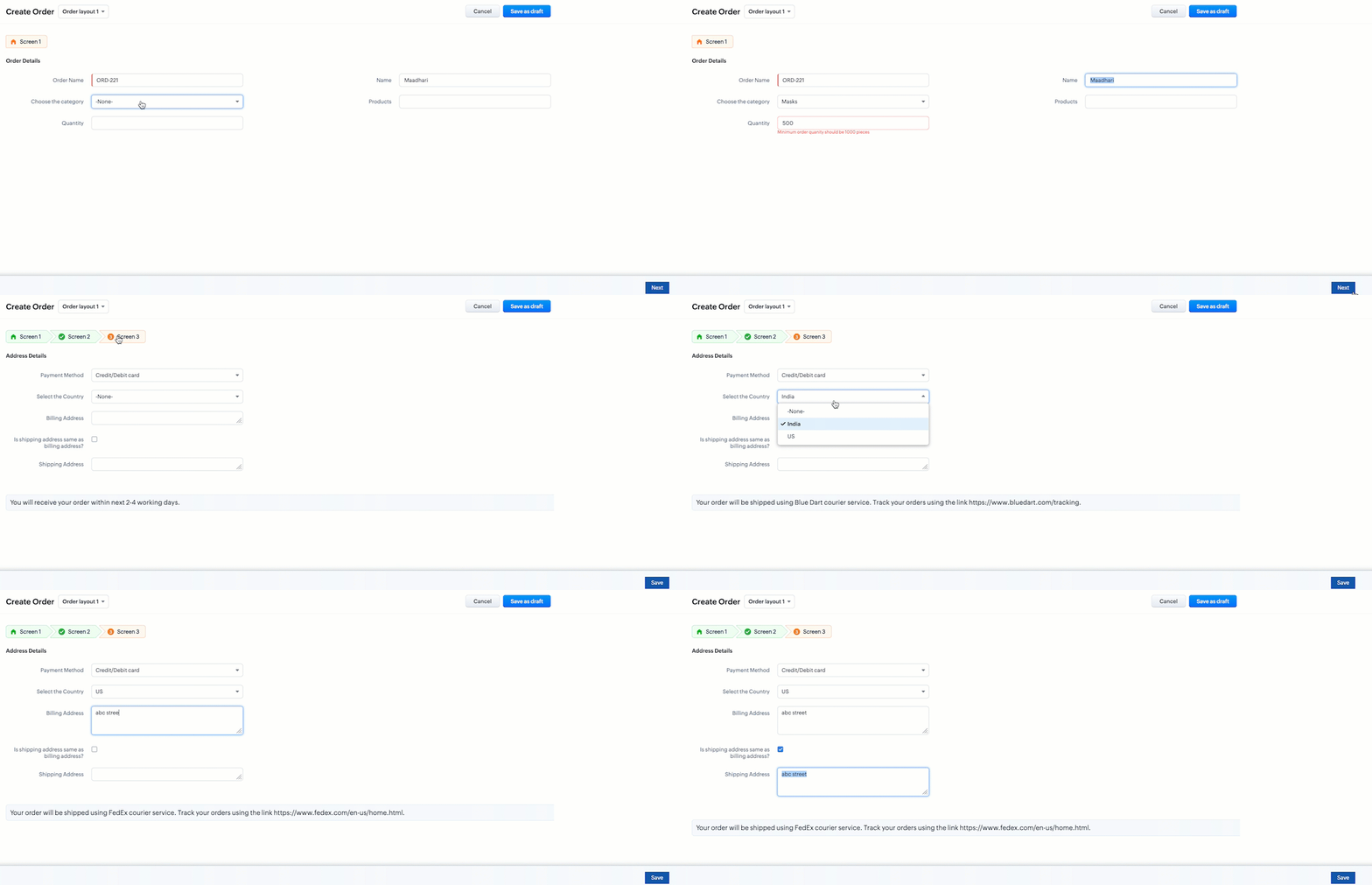
1. The minimum quantity for the Category - Masks is 1000. If the user enters a lesser value, display the error message " Minimum quantity should be 1000". The minimum quantity for the Category Surgical Instruments is 100. If the user enters a lesser value, display the error message " Minimum quantity should be 100".
2. If the field Is shipping address same as billing address? is true , then copy and populate the Shipping Address value in the field Billing Address.
3. If the payment method in screen 1 is selected as Credit/Debit card in screen 3, then the Wizard should transit to screen 2.
4. If the country selected in the field Select the Country is India then display the below text,
Your order will be shipped using the FedEx courier service. Track your order using the link https://www.fedex.com/en-us/home.html.
If the country selected is the US, then display the below message,
Your order will be shipped using the Blue Dart courier service. Track your order using this link https://www.bluedart.com/tracking.
Solution using Client Script
The requirements are for create and edit pages of the Orders Wizard. So create two scripts as follows.
- Client Script for Create Page (Wizard)
- Client Script for Edit Page (Wizard)
1. Client script for Create Page (Wizard)
- Go to Setup > Developer Space > Client Script. Click +New Script.
- Specify the details to create a script and click Next.
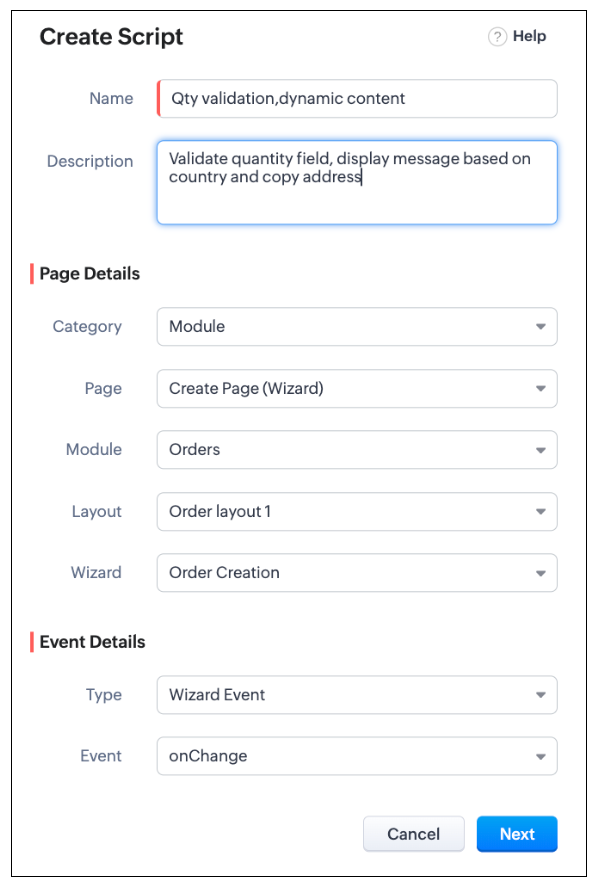
- The Client Script should run as and when the fields are updated with values. So create a Client Script with Wizard Event Type and onChange Event.
- Enter the following script and click Save.
switch (field_name) { case 'Quantity': var qty = ZDK.Page.getField("Quantity"); if ((ZDK.Page.getField("Choose_the_category").getValue() == "Surgical Instruments") && (qty.getValue() < 100)) { qty.showError("Minimum order quanity should be 100 pieces"); } else if ((ZDK.Page.getField("Choose_the_category").getValue() == "Masks") && (qty.getValue() < 1000)){ qty.showError("Minimum order quanity should be 1000 pieces"); } break; case 'Is_the_shipping_address_same_as_thbilling_address': var billAdd = ZDK.Page.getField("Billing_Address"); var shipAdd = ZDK.Page.getField("Shipping_Address"); shipAdd.setValue(billAdd.getValue()); break; case 'Payment_Method': var payment = ZDK.Page.getField("Payment_Method"); if (payment.getValue() != "COD") { log(ZDK.Page.getComponent('record-create-wizard')); ZDK.Page.getComponent("record-create-wizard").transitionTo("Screen_2"); break; } case 'Select_the_Country': var Text1 = ZDK.UI.getElementByID('Text_1'); if (ZDK.Page.getField("Select_the_Country").getValue() == 'India') { Text1.setContent("Your order will be shipped using Blue Dart courier service. Track your orders using this link."); } else if (ZDK.Page.getField("Select_the_Country").getValue() == 'US') { Text1.setContent("Your order will be shipped using FedEx courier service. Track your orders using this link"); } break; } |
- Here, the field name is the event argument that will hold the value of the field that is being changed by the user in the Wizard. With the help of this argument (field_name), you can check which field is being updated by the user using switch...case or if.. else statement. To display the error message, you can use showError(error), to change the content in the text component use setContent(), to jump to a different screen use ZDK.Page.getComponent("record-create-wizard").transitionTo("Screen_X"); and to copy the content to another field use setValue(). Here, the name record-create-wizard is constant for create and edit Wizard pages.
- Here is how the Client Script works in a Wizard,
2. Client Script for Edit Page (Wizard)
To achieve the solution for the edit page of Orders Wizard, you need to create another Client Script and select the Page as Edit Page (Wizard) as shown below.

- Use the same code and click Save.
Note
Using transitionTo(api_name), you can transit only to previous screens in Create Page (Wizard).
We hope you found this post useful. We will meet you next week with another interesting topic! Get in touch with us at support@zohocrm.com if you have any questions, or let us know in the comments.
Cheers!
Access your files securely from anywhere
Centralize Knowledge. Transform Learning.
All-in-one knowledge management and training platform for your employees and customers.
New to Zoho Recruit?

Zoho Developer Community
New to Zoho LandingPage?
Zoho LandingPage Resources
New to Zoho Survey?
New to Zoho CRM Plus?
Deliver unforgettable customer experiences
New to Zoho CRM Plus?
Deliver unforgettable customer experiences
New to Zoho Marketing Plus?
Everything you need to run your marketing
New to Zoho Marketing Plus?
Everything you need to run your marketing
New to Bigin?





Topic Participants
Maadhari M
Cameron McEvenue
Ishwarya SG
Ernesto Pena
Jeganprabhu S
Sticky Posts
Kaizen #198: Using Client Script for Custom Validation in Blueprint
Nearing 200th Kaizen Post – 1 More to the Big Two-Oh-Oh! Do you have any questions, suggestions, or topics you would like us to cover in future posts? Your insights and suggestions help us shape future content and make this series better for everyone.Kaizen #226: Using ZRC in Client Script
Hello everyone! Welcome to another week of Kaizen. In today's post, lets see what is ZRC (Zoho Request Client) and how we can use ZRC methods in Client Script to get inputs from a Salesperson and update the Lead status with a single button click. In thisKaizen #222 - Client Script Support for Notes Related List
Hello everyone! Welcome to another week of Kaizen. The final Kaizen post of the year 2025 is here! With the new Client Script support for the Notes Related List, you can validate, enrich, and manage notes across modules. In this post, we’ll explore howKaizen #217 - Actions APIs : Tasks
Welcome to another week of Kaizen! In last week's post we discussed Email Notifications APIs which act as the link between your Workflow automations and you. We have discussed how Zylker Cloud Services uses Email Notifications API in their custom dashboard.Kaizen #216 - Actions APIs : Email Notifications
Welcome to another week of Kaizen! For the last three weeks, we have been discussing Zylker's workflows. We successfully updated a dormant workflow, built a new one from the ground up and more. But our work is not finished—these automated processes are
New to Zoho TeamInbox?
Zoho TeamInbox Resources
Zoho CRM Plus Resources
Zoho Books Resources
Zoho Subscriptions Resources
Zoho Projects Resources
Zoho Sprints Resources
Qntrl Resources
Zoho Creator Resources
Zoho CRM Resources
Design. Discuss. Deliver.
Zoho Show Resources

Get Started. Write Away!
Writer is a powerful online word processor, designed for collaborative work.
Zoho CRM コンテンツ
-
オンラインヘルプ
-
Webセミナー
-
機能活用動画
-
よくある質問
-
Ebook
-
-
Zoho Campaigns
- Zoho サービスのWebセミナー
その他のサービス コンテンツ
Nederlandse Hulpbronnen

ご検討中の方
Recent Topics
Tip #58- Accessibility Controls in Zoho Assist: Learning- 'Insider Insights'
Learning should be clear and interruption-free for everyone. Timely feedback plays an important role in helping users understand actions as they happen, without breaking their focus. In this post, we’ll explore the final section of Accessibility: Learning.ZIA "Generate Content" action doesn't have contexual data from the ticket
"Generate Content" action doesn't have contexual data from the ticket. I try to get AI to help me with this ticket but it doesn't seem to have any ticket information as context. Although the ticket has a lot of information in it.Zoho Desk - Zoho FSM Integration issue on Mobile and iPad
Hello Team, I am trying to create a Work Order (WO) using the Zoho FSM integration (Add-on Service) that is integrated with Zoho Desk. The issue is that the integration is not working on mobile devices and iPads. While I am able to create the WO, Request,E-File Form 1099 Directly With the IRS From Zoho Books
The Form 1099 filing season has begun, and businesses are required to e-file certain forms with the IRS to report payments made to vendors and contractors. If your business made qualifying payments during the year, you must e-file the appropriate FormSuggestions for showing subscribed Topics in CRM (contact record)
We have several Topics set up in ZMA. We also have a sync set up between ZMA and CRM. I'd like to display the subscribed topics on the CRM Contact record. This will allow the Sales team (who uses CRM) to see at a glance what topics a Contact is subscribedReplies sometimes creating separate ticket
Sometimes when a customer responds to an email coming from Zoho Desk, instead of adding a reply to the original ticket, a separate ticket is created. This happens even though the response subject line contained the ticket number, and the person respondingRe-hide fields when option is unselected
Hi all Can anyone help me with this - when I create a 'show' field rule for when a dropdown option is selected, how to I make it so the 'show' option re-hides if that option is no longer selected?Custom Fields
There is no way to add a custom field in the "Timesheet" module. Honestly, the ability to add a custom field should be available in every module.Consultant-Only Booking Page
Zoho Bookings does not allow for Meeting Type OR Workspace-Wide booking pages to be turned off. This is detrimental to organizations that have territory-based or assigned accounts, because if prospects can go to these booking pages and either select theCustom Sorting based on other columns in table
I need the ability to apply custom sorting to a text-based dimension in the X axis where the sorting is based on another column in the table. For example, I have a chart report where the X axis is a text label. I would like to be able to sort those textFeature Request: Enable Custom PDF Layout Editor for All Modules (Including Package Slips)
Hello Zoho Community and Product Team, I am writing to share a suggestion that would significantly enhance the customization capabilities within Zoho Books. We all appreciate the power of the Custom PDF Layouts (the "New" template engine) that allowsIs there a way to invoke deluge function from within a widget?
Hi! I have custom functions in deluge and I was wondering whether there is any way to call this function through a widget? Something like on click of a button inside a widget, run the deluge custom function. Would this be possible?Can a default task Priority be set?
The "Priority" field in the Task layout does not allow a default to be set. Is there another way of doing it? Because the current default is "None" and the Zoho Kanban board design has selected this field as critical information to surface by includingAdding a threshold to a line chart based on date range
I have a line chart that is tracking a percentage over time. It also has a filter for 50 different clients. I would like to create a threshold that is based on a portion of the date range. As I understand it, this would be done by adding a column to theResize Signature field dynamically
On the tablet, it is perfect. But on smaller mobile devices and PCs, both web and application, it is too small for people to sign. Is there any plan to make the signature field size dynamically in the future update?Zoho Creator Application - New User Not able to access the application
In Zoho Creator, The newly added user not able to access the " Added Application" - User has received the Invitation Email, but while clicking "confirm Account" in the invitation Email, the following error message has appeared. "Sorry! you cannot acceptDeleting Salutation Field
We have updated our lead input screen and 'Salutation' has appeared. This is not visible in the 'Edit Pgae Layout' screen so cannot be moved to 'List of Removed Fields' Salutation is visible in the list in 'Customization - Fields' however I can only 'Edit' or 'Replace' I cannot delete and I do not need this field on my lead input screen. Please can you advise how to get rid of this. Screen shots can be provided if needed. Thank you TashaAuto-Generate & Update Asset Serial Numbers using a custom function (Assets Module)
Hello Team, I’ve been working on a script to automate one of our processes in Zoho FSM, and the core functionality has been successfully implemented. However, I’m encountering an issue related to serial number allocation, which is not working as expected.Zoho Mail iOS app update: Access Delegated Mailbox.
Hello everyone! You can now access the delegated mailbox from within the iOS version of the Zoho Mail app. To access the delegated mailbox: Open the Zoho Mail app. Go on to the 'Email' module. Tap the profile picture. Choose the delegated mailbox PleaseHow to convert Lead's country field from Text to Pick List
Hi, I would like to change the default country field in ZCRM from text to pick list. It looks like not I can't delete default country field and recreate it as pick list nor can i create an new custom field country because such a label belong to default field. So what do I have to do? Any ideas? LHow create a draft via workflow?
I wish to create a workflow rule for specific emails that creates a draft response - not an automatic email reply, but just a draft with a set response ready to be verified by an agent who can then manually select recipients. Alternatively, the workflowFunction #51: Transaction Level Profitability for Quotes
Hello everyone, and welcome back to our series! In a previous post, we shared a custom function that could determine the profitability of a Sales Order. Today, we are presenting a similar function that calculates the profitability of a Quote. The setupNew feature: Invite additional guests for your bookings
Hello everyone, Greetings from Zoho Bookings! We are happy to announce the much-awaited feature Guest Invite, which enhances your booking experience like never before. This feature allows additional participants to be invited for the bookings to makeImproved Contact Sync flow in Google Integration with Zoho CRM
Hello Everyone, Your contact sync in Google integration just got revamped! We have redesigned the sync process to give users more control over what data flows into Google and ensure that this data flows effortlessly between Zoho CRM and Google. With thisالخصم على مستوى فاتورة المبيعات
السلام عليكم ورحمة الله وبركاته مطلوب في إنشاء خصم على مستوى فاتورة المبيعات وليس على مستوى البند أريد معرفة الطريقة؟VAT and Taxes option not available
Dear ZOHO Team , The VAT and Taxes options in my ZOHO books account not available,I tried to find how to enable or check the way to use this option but unfortunately couldn't find it anywhere ,I'm in UAE ,kindly let me know what to do to solve this issueDefault Tagging on API-generated Transactions
If one assigns tags to an Item or Customer, those tags get auto-populated in each line item of an Invoice or Sales Order when one creates those documents. However, if one creates the Sales Order or Invoice via the API (either directly coding or usingDirect Feed (Bank)
Is Direct feed integration for AlRajhi and ADCB bank supported by Zoho Books in GCC/SaudiSales Order, Invoice and Payment numbers
Hi zoho friends, it is me again, the slow learner. I'm wondering if there is a way to have it so the Sales order, invoice and payment numbers are all the same? It would be easier for me if they were the same number so there is not so many reference numbersCustomer Satisfaction (CSAT) Report
From data to decisions: A deep dive into ticketing system reports The customer satisfaction (CSAT) report helps teams understand how customers feel about their support experience, identify service gaps, and continuously improve the help desk. It turnsTimeline Tracking Support for records updates via module import and bulk write api
Note: This update is currently available in Early Access and will soon be rolled out across all data centers (DCs) and for all editions of Zoho CRM. The update will be available to all users within your organization, regardless of their profiles or roles.Shifts in Zoho People vs Zoho Shifts?
Hello Zoho People Team, We hope you are doing well. We are evaluating the Shifts functionality within Zoho People and comparing it to the standalone Zoho Shifts product. We’ve encountered comments and discussions suggesting that the Shifts feature insideDisable fields in During action in Blueprint?
Hi there. I've tried field disable (setReadOnly(true)) using client script and the event is onMandatoryFormLoad on detail page, assuming it'll work on blueprint fields, but it bears no result. Is this the expected behaviour? That we can't do this yet?Develop and publish a Zoho Recruit extension on the marketplace
Hi, I'd like to develop a new extension for Zoho Recruit. I've started to use Zoho Developers creating a Zoho CRM extension. But when I try to create a new extension here https://sigma.zoho.com/workspace/testtesttestest/apps/new I d'ont see the option of Zoho Recruit (only CRM, Desk, Projects...). I do see extensions for Zoho Recruit in the marketplace. How would I go about to create one if the option is not available in sigma ? Cheers, Rémi.Subforms and automation
If a user updates a field how do we create an automation etc. We have a field for returned parts and i want to get an email when that field is ticked. How please as Zoho tells me no automation on subforms. The Reason- Why having waited for ever for FSMAllow Managers to Create Shifts for Their Departments in Zoho People
Hello Zoho People Product Team, Greetings and hope you are doing well. This feature request is related to Zoho People - please don't move it to zoho one! We would like to submit a feature request regarding shift management permissions in Zoho People.Zoho Learn and Zoho CRM integration
I would like to see an integration between Zoho Learn and Zoho CRM. 1. To be able to add articles in a related list in all modules 2. Zia to suggest related articles in a Deal or Case or Lead 3. Ability to read / search articles during a call / followMaintain steady traffic to your domain: How Domain Aliasing helps
Consider this scenario: An organization has its primary domain as administrator.com. Now it wants to shorten its domain to admin.com because it's simpler and easier to remember. However, changing the domain completely can cause the following problems:Why Sharing Rules do Not support relative date comparison???
I am creating a Sharing Rule and simply want to share where "Last Day of Coverage" (Date field) is Greater than TODAY (Starting Tomorrow). However, sharing rules don't have the option to compare a date field to a relative date (like today), only to StaticWorkflow rule only allows 10 workflow per module
Apparently a Zoho professional edition only allows 10 workflow rules per module. This makes workflow allocation literally impossible while allocating potential to different members of the team. I have 15 licenses. Is there a way in which related alerts can be varied? In other words, is it possible to have different related alerts be triggered with different rule criteria. so if I say, if potential is 'x' then trigger related alert 'x' and if potential is 'y' then trigger related alert 'y' Thanks,Next Page