Kaizen #132 - Manipulating Subforms from third-party Application using Functions
Hey folks! Welcome to a fresh week of Kaizen.
In this post, we will see how to work with subforms and external fields in a module through CRM functions.
Consider a scenario where a High School utilizes Zoho CRM to manage student records, academic performance, and offered courses. Additionally, the school employs an Exam portal for students to take examinations. After the examination, the portal sends the mark information back to Zoho CRM along with it's own course id, student id, marks & other details.
Problem Statement
When the exam portal initiates a webhook call to CRM, the high school management wants to capture that data and update the CRM subform records accordingly. This subform should act as a semester progress report for each student.
Solution Overview
To address this requirement, a custom function must be implemented. The webhook URL will be the API REST URL of the custom function in Zoho CRM. Upon receiving the notification, the function is triggered, and the details from the notification are used to manipulate the subform.
Let us walk through this process of triggering functions using a webhook to manipulate subforms.
Let us walk through this process of triggering functions using a webhook to manipulate subforms.
Prerequisites
From the Third-Party Application
- We assume that a webhook will be triggered from the third-party application when the exam is over and evaluated by the teacher. The webhook will carry the following information:
Field | Data Type | Description |
Exam Name | String | Name of the examination that the student attends. |
Student ID | Long String | Unique ID of the student within the Portal App. |
Course ID | Long String | Unique ID of the course within the Portal App. |
Marks | Integer | Total marks of the student in the particular course. |
Total Time | Integer | Time taken by the student to complete the exam. |
- The webhook URL should correspond to the API REST URL of the custom function in Zoho CRM.
From Zoho CRM
Here is a data model image of the CRM modules involved in this scenario for your ease of understanding.
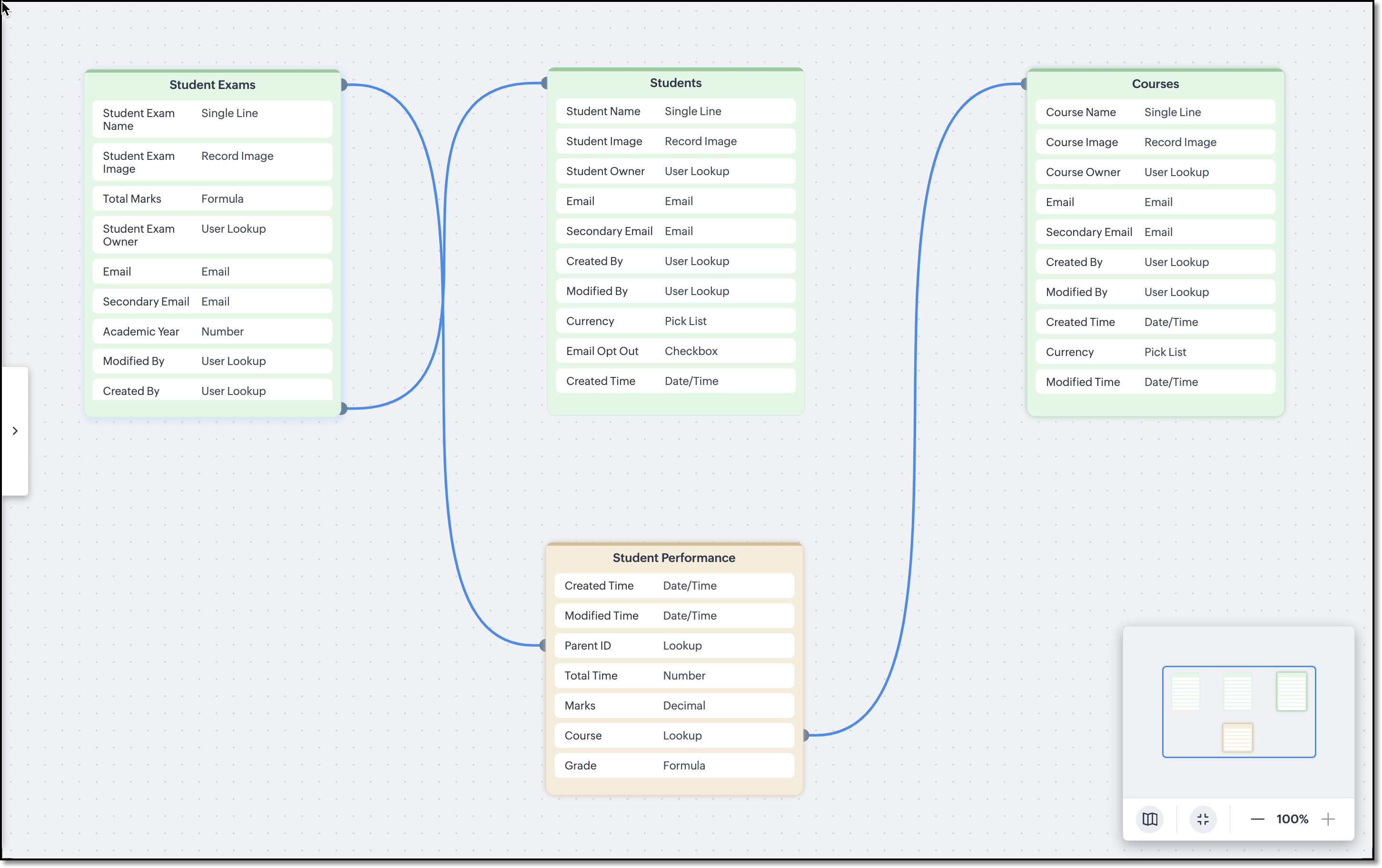
The Courses, Students and Student Exams modules are assumed to be pre-loaded with records. Following are the module wise fields that are expected to be already configured in the school's CRM org.
Courses and Students Modules
External fields named Student Code in the Students module and Course Code in the Courses module are used to match the IDs deployed in the third-party application.
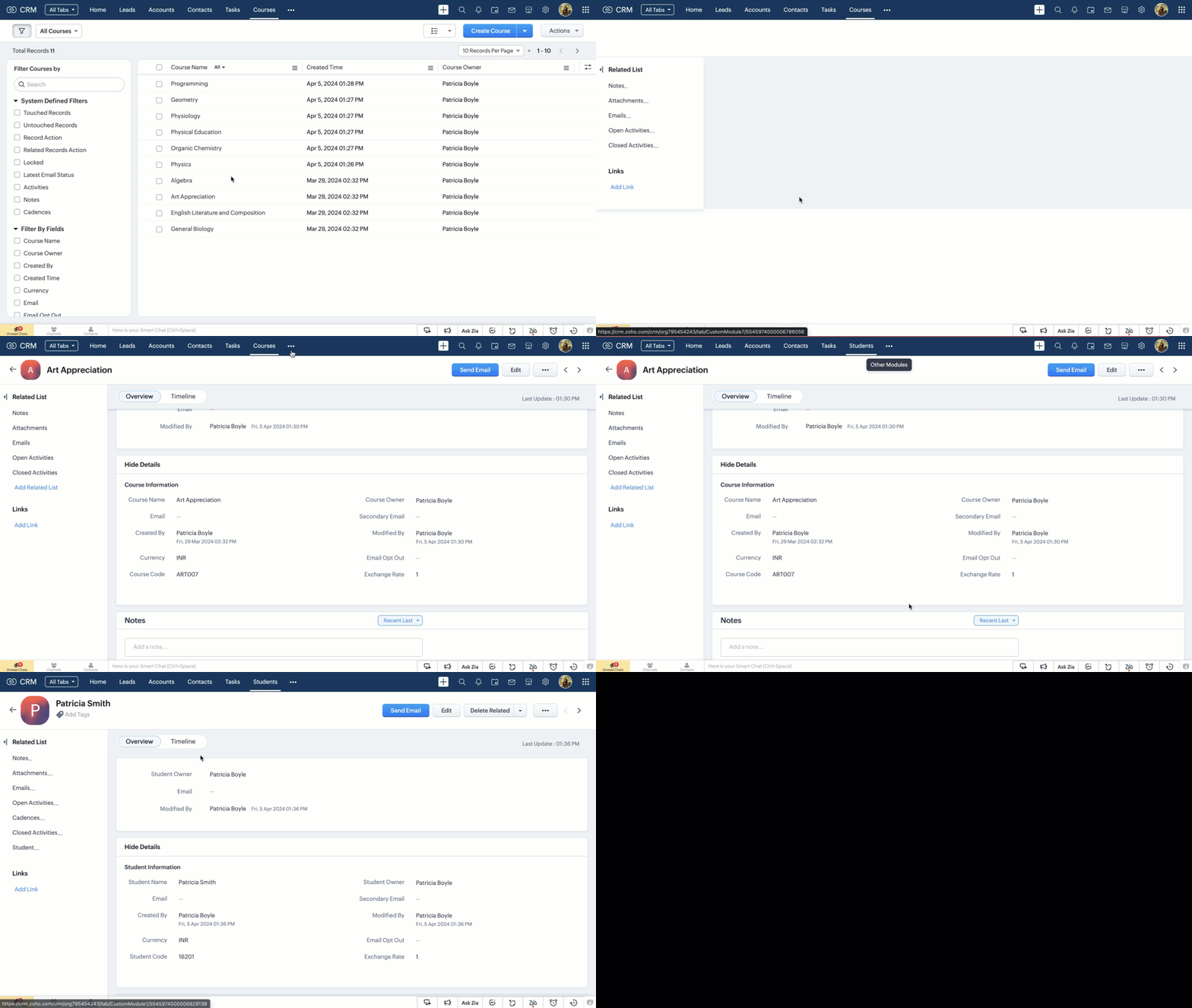

Note
External fields can be updated only using the Update Records API.
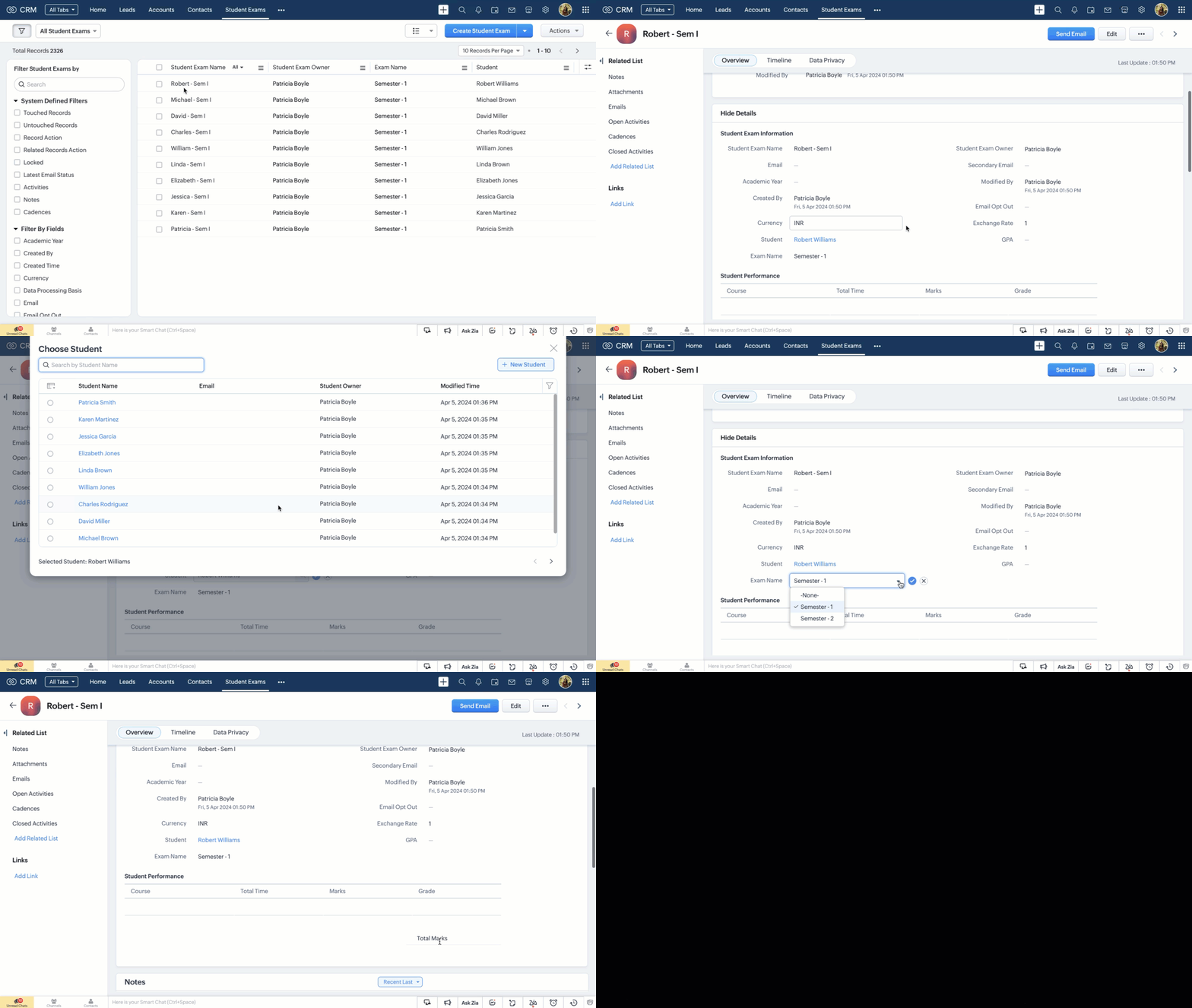
Student Exams Module
Following are the custom fields that we assume to be already available in the Student Exams module.
Field Name | Data Type | Description |
Student | Lookup | The field looks up to the Students module. |
Total Marks | Integer (Formula) | A subform aggregate field that sums up the values of the Marks field in the Student Performance subform. |
GPA | Integer (Formula) | Calculates the GPA of a student in that particular examination. |
Exam Name | String (Picklist) | List downs the examinations that are planned to be conducted for the academic year. |
Student Performance Subform
A subform named Student Performance within the Student Exams module, comprising the following fields.
Field Name | Data Type | Description |
Course | Lookup | Represents the course name and it looks up to one of the courses from the Courses module. |
Total Time | Integer | Time taken by the student to complete the exam. |
Marks | Integer | Marks of the student in the particular course. |
Grade | String (Formula) | Grading system is infused as formula and it works depending on the value in the Marks field. |
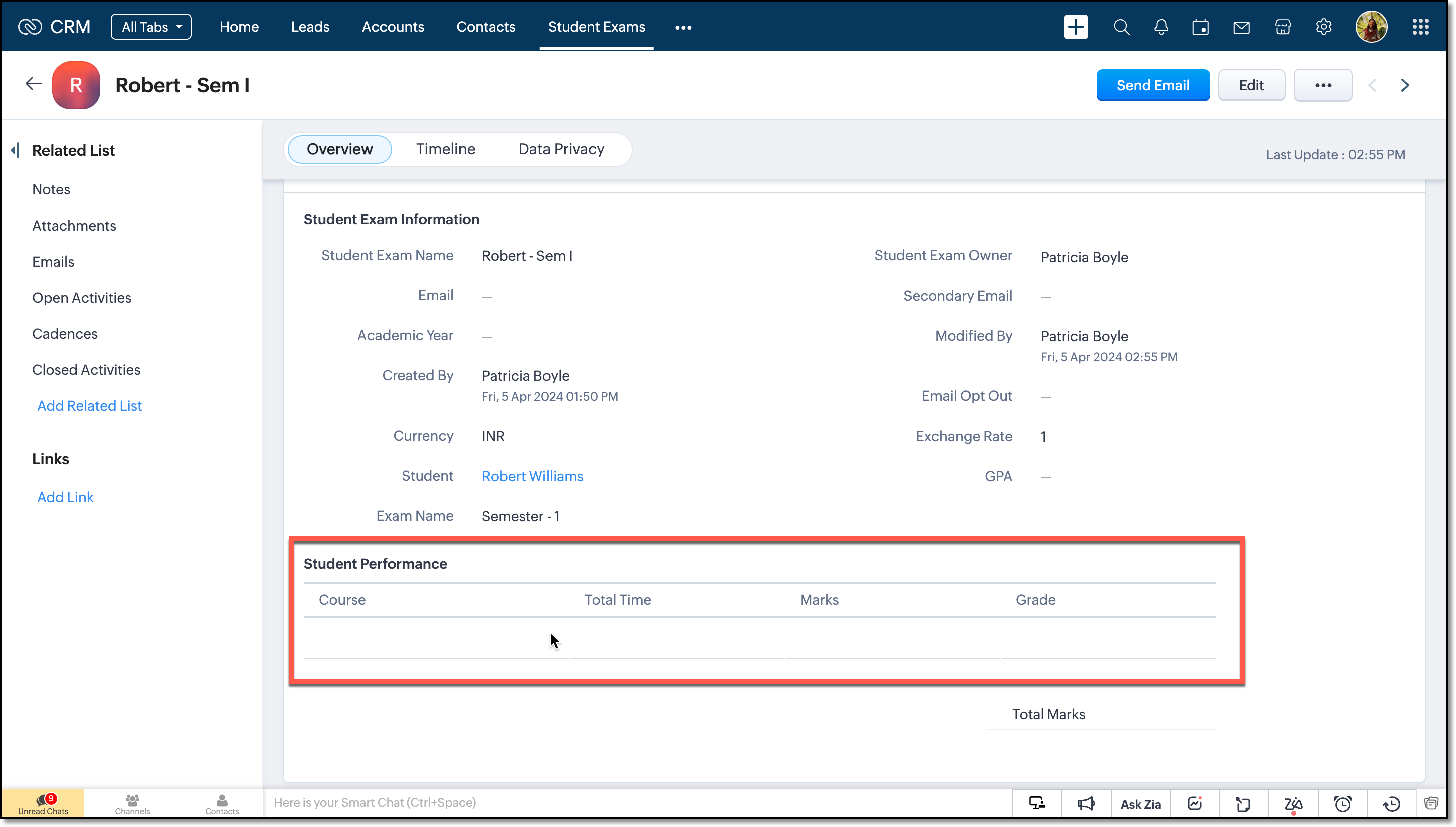
The subform is assumed to be empty and will be updated only on receiving a webhook notification from the Portal App.
Note
Make a Modules Metadata API call to get the API names of the modules and the subform. Next, fire the GET Fields API call to get the API names of the fields. We will need them in crafting the custom function.
Creating the Custom Function
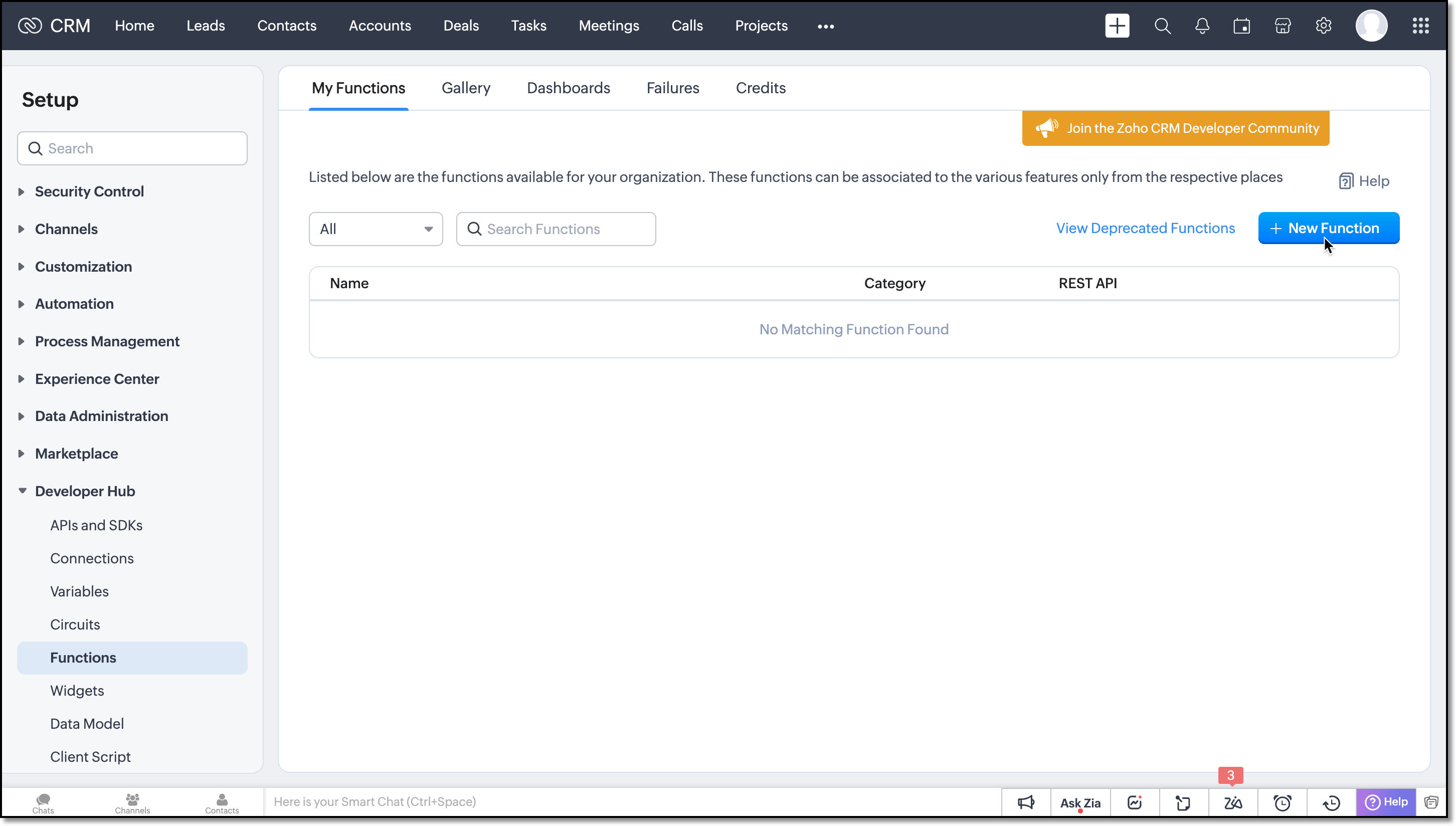
Step 1: Navigate to the Setup > Developer Hub > Functions and click the New Function button.
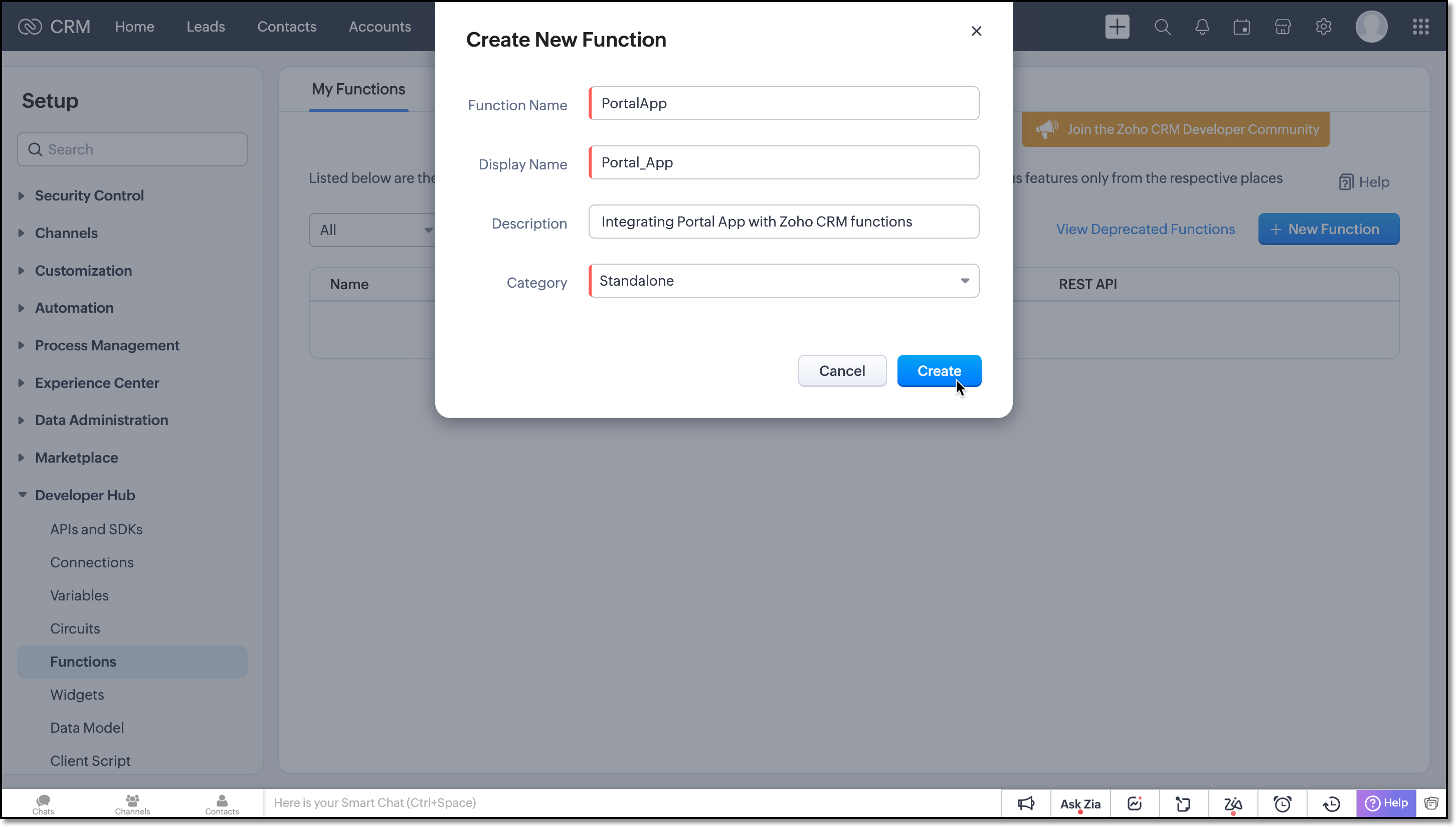
Now, create a Standalone function by filling in the details.
Flow of the Function
Argument Setup
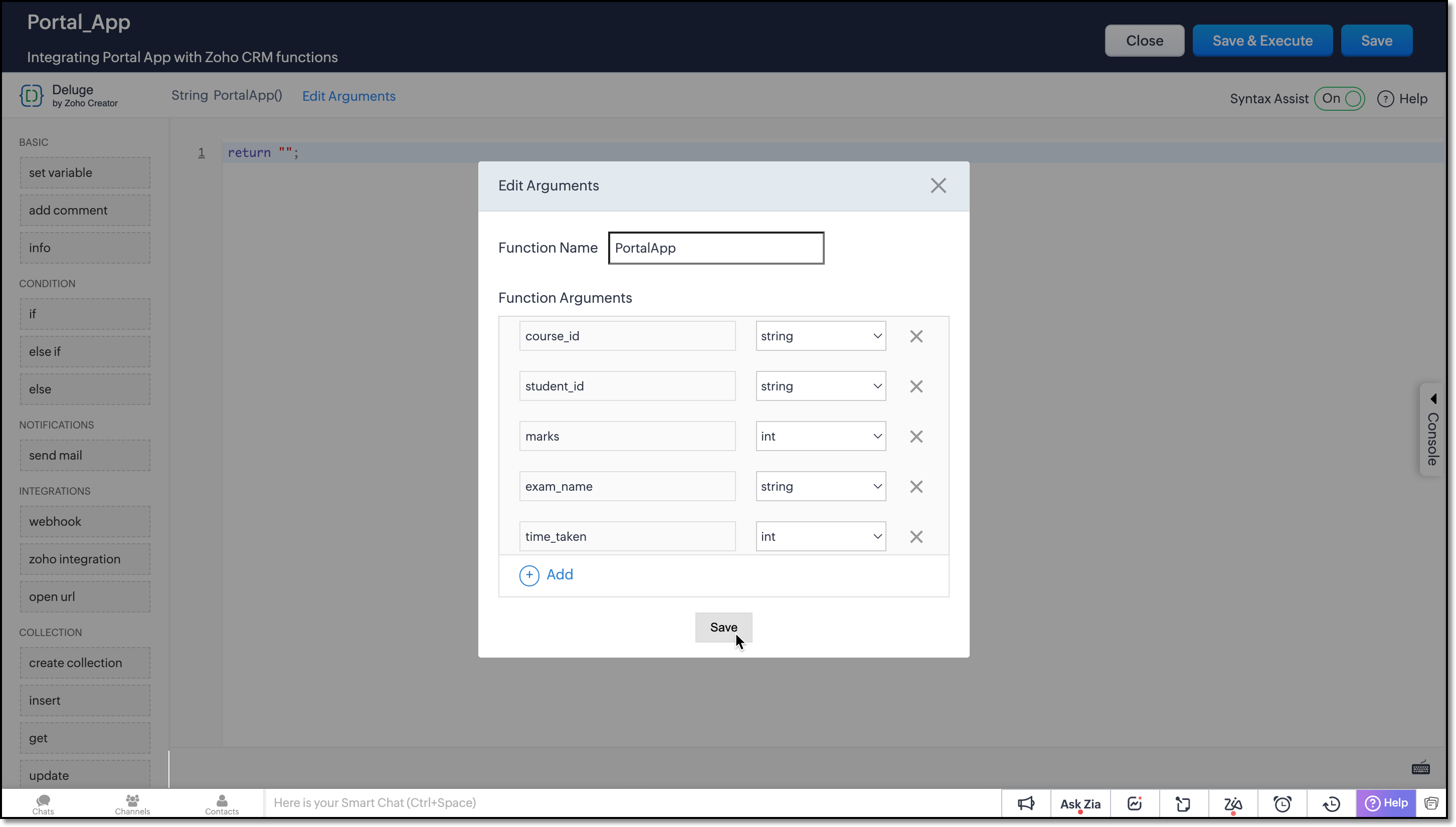
Define function arguments to receive details from the function as shown here:
Data Retrieval
Invoke the COQL API within the function to retrieve the necessary records from the Student Exams and Courses module.
student_examMap = Map(); student_examMap.put("select_query","select id from Student_Exams where Student.Student_Code =" + student_id + " and Exam_Name=" + exam_name + " limit 1"); exam_response = invokeurl [ type :POST parameters:student_examMap.toString() connection:"crm_oauth_connection" ]; exam_id = exam_response.getJSON("data").get(0).get("id"); |
Here, the query is structured to retrieve the ID of the Student Exam record where the Student lookup field corresponds to the record with the Student Code matching the student_id in the notification, and the Exam Name picklist field matches the value of exam_name from the notification.
Note: You can use only =, !=, in and not in operators for querying External fields in Zoho CRM.
courseMap = Map(); courseMap.put("select_query","select id from Courses where Course_Code =" + course_id + " limit 1"); course_response = invokeurl [ type :POST parameters:courseMap.toString() connection:"crm_oauth_connection" ]; course_id = course_response.getJSON("data").get(0).get("id"); |
In this COQL call, the query fetches the ID of the record from the Courses module whose Course Code field matches the course_id received in the notification.
Subform Update Handling
The custom function should address the following three cases inorder to effectively manipulate the subform data from the third-party application.
- Every webhook call from the Exam portal should be added as a new entry to the subform.
- If entries already exist in the subform, the function should perform PATCH operation.
- Before executing the PATCH operation, it is crucial to check whether the webhook call is for a new course or an update to the existing course. In such cases, the function should refrain from adding the course; instead, it should update the corresponding entry.
To append new entries to the subform, you can use the UPDATE Records API. Refer to this kaizen to learn more about manipulating subforms using Zoho CRM APIs.
Student Performance is a module created for the subform configured in the Student Exams module. In order to perform the PATCH operation with an Update API, make a COQL API call to the Student Performance module and fetch the existing data, if any.
subform_examMap = Map(); subform_examMap.put("select_query","select Course, Total_Time, Marks from Student_Performance where Parent_Id.id =" + exam_id); subform_response = invokeurl [ type :POST parameters:subform_examMap.toString() connection:"crm_oauth_connection" ]; |
This query retrieves the exam records of the student for that particular exam in Student Exams module, from the Student Performance subform. The subform should correspond to the parent record that matches the notification data. Since we already have the ID of that parent record from one of the previous COQL call, we have directly used the response in this query.
Now that we have the existing subform data, the function has to verify whether the data from webhook call matches any of the Course in the subform data. If it matches, the new entry replaces the existing one; otherwise, the new entry is added to the existing entries and forms a request payload called examinfo. This payload will be used in the later part of the functions to update the record in Student Exams module.
Following is how you should achieve this using for-each loop.
final_subform = List(); flag = true; if(!isBlank(subform_response)) { subform_data = subform_response.getJSON("data").toList(); if(subform_data.len() > 0) { for each data in subform_data { if(data.get("Course").get("id") == course_id) { final_subform.add({"Course":{"id":course_id},"Total_Time":time_taken,"Marks":marks}); flag = false; } else { final_subform.add(data); } } } } if(flag || isBlank(subform_response)) { final_subform.add({"Course":{"id":course_id},"Total_Time":time_taken,"Marks":marks}); } examinfo = {"Student_Performance":final_subform}; |
Next, let us update the Student Performance subform in the Student Exams module using the pre-defined integration task called Update Record in Zoho CRM functions. This task makes an Update Records API call to replace all entries within the subform. It updates the entries with the same course_id provided in the notification, inserts new entries and removes old entries accordingly.
response = zoho.crm.updateRecord("Student_Exams",exam_id,examinfo); return "nothing"; |
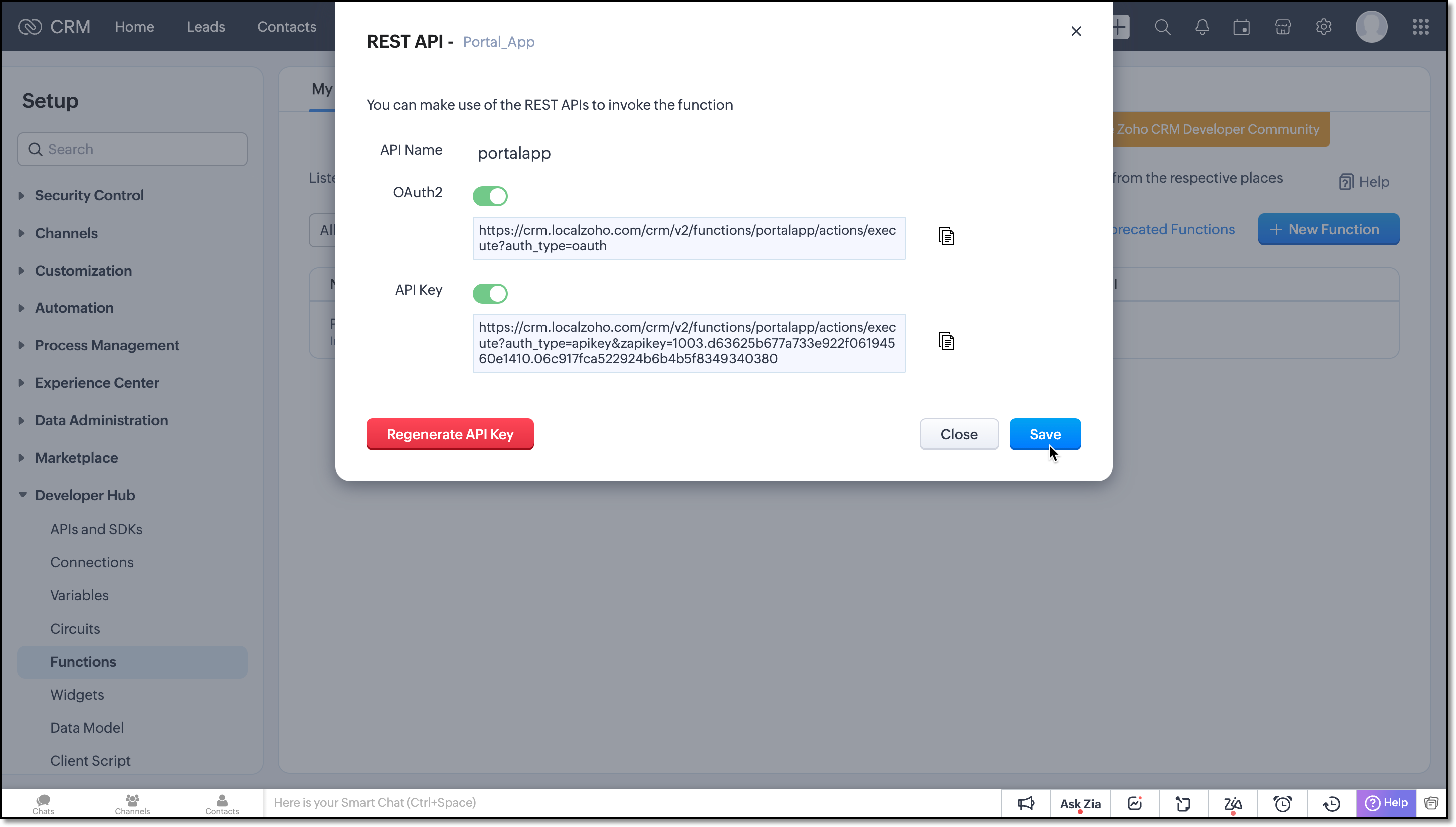
Save the function and click the more icon of the function you have created and choose REST API.
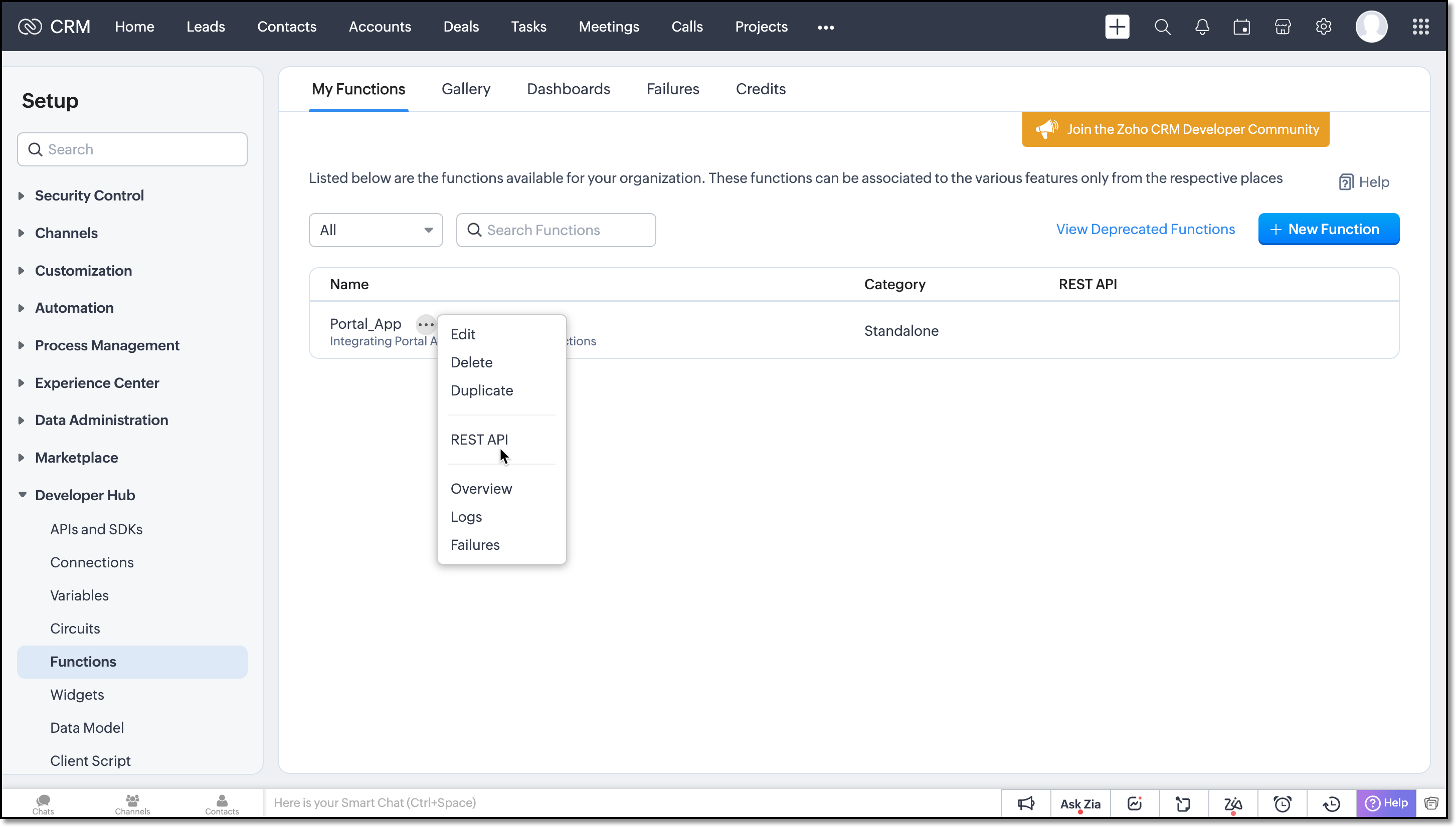
Enable the OAuth2 and API Key for the function.
Next copy the API key and provide it in the webhook URL of the Portal App.
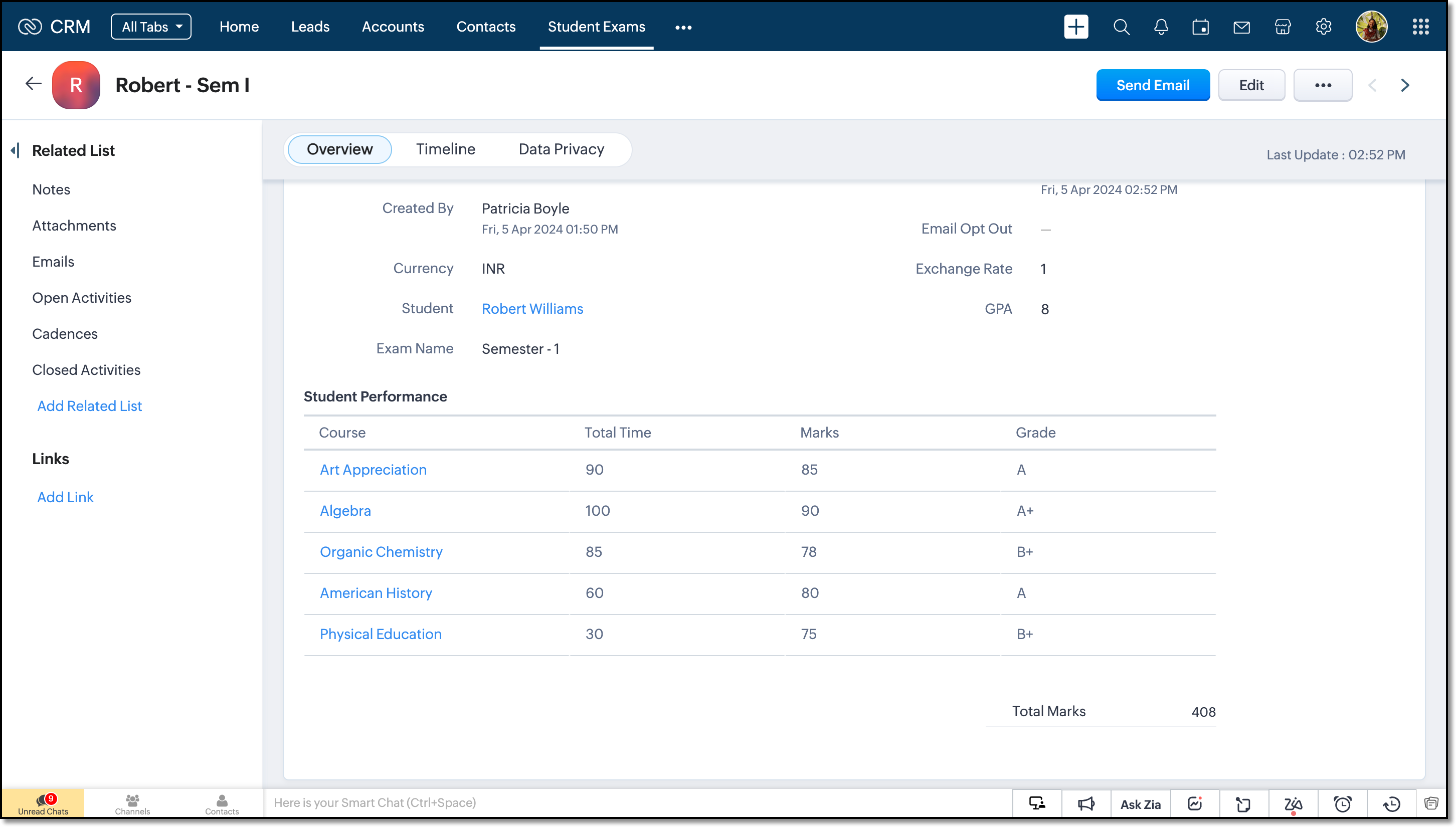
On receiving notifications to this URL the function will be triggered and the records will be updated.
We believe you found this post both beneficial and informative!
Your thoughts and perspectives matter to us. If there is a topic you would like us to delve into or if you have any questions, please feel free to drop a comment below or send us an email at support@zohocrm.com.
Stay tuned until we circle back to you on next Friday!
--------------------------------------------------------------------------------------------------------
Recommended Reads
- External IDs - An Overview
- Formula Fields - An Overview
- Subforms - Overview and guide to build a subform, Kaizen #31, Kaizen #124
- Metadata APIs - GET Modules, GET Fields
- REST APIs - Update Records API
- Query API - An Overview, Records through COQL Query, Kaizen #80 , Kaizen #81 , Limitations
- Functions - An Overview
- Deluge - An Introduction
---------------------------------------------------------------------------------------------------------

Previous Post : Kaizen #131 - Bulk Write for parent-child records using Scala SDK | Kaizen Collection: Home
Access your files securely from anywhere
Centralize Knowledge. Transform Learning.
All-in-one knowledge management and training platform for your employees and customers.
New to Zoho Recruit?

Zoho Developer Community
New to Zoho LandingPage?
Zoho LandingPage Resources
New to Zoho Survey?
New to Zoho CRM Plus?
Deliver unforgettable customer experiences
New to Zoho CRM Plus?
Deliver unforgettable customer experiences
New to Zoho Marketing Plus?
Everything you need to run your marketing
New to Zoho Marketing Plus?
Everything you need to run your marketing
New to Bigin?





Topic Participants
Kiruthiga G
Sticky Posts
Kaizen #198: Using Client Script for Custom Validation in Blueprint
Nearing 200th Kaizen Post – 1 More to the Big Two-Oh-Oh! Do you have any questions, suggestions, or topics you would like us to cover in future posts? Your insights and suggestions help us shape future content and make this series better for everyone.Kaizen #226: Using ZRC in Client Script
Hello everyone! Welcome to another week of Kaizen. In today's post, lets see what is ZRC (Zoho Request Client) and how we can use ZRC methods in Client Script to get inputs from a Salesperson and update the Lead status with a single button click. In thisKaizen #222 - Client Script Support for Notes Related List
Hello everyone! Welcome to another week of Kaizen. The final Kaizen post of the year 2025 is here! With the new Client Script support for the Notes Related List, you can validate, enrich, and manage notes across modules. In this post, we’ll explore howKaizen #217 - Actions APIs : Tasks
Welcome to another week of Kaizen! In last week's post we discussed Email Notifications APIs which act as the link between your Workflow automations and you. We have discussed how Zylker Cloud Services uses Email Notifications API in their custom dashboard.Kaizen #216 - Actions APIs : Email Notifications
Welcome to another week of Kaizen! For the last three weeks, we have been discussing Zylker's workflows. We successfully updated a dormant workflow, built a new one from the ground up and more. But our work is not finished—these automated processes are
New to Zoho TeamInbox?
Zoho TeamInbox Resources
Zoho CRM Plus Resources
Zoho Books Resources
Zoho Subscriptions Resources
Zoho Projects Resources
Zoho Sprints Resources
Qntrl Resources
Zoho Creator Resources
Zoho CRM Resources
Design. Discuss. Deliver.
Zoho Show Resources

Get Started. Write Away!
Writer is a powerful online word processor, designed for collaborative work.
Zoho CRM コンテンツ
-
オンラインヘルプ
-
Webセミナー
-
機能活用動画
-
よくある質問
-
Ebook
-
-
Zoho Campaigns
- Zoho サービスのWebセミナー
その他のサービス コンテンツ
Nederlandse Hulpbronnen

ご検討中の方
Recent Topics
Marketer's Space: New to Campaigns? Some common early mistakes that might occur
Hello Marketers, Welcome back to another post in Marketer's Space. If you're just getting started with Zoho Campaigns, things can feel exciting and slightly confusing at the same time. You're not alone. Most early frustrations come from setup gaps ratherThis user is not allowed to add in Zoho. Please contact support-as@zohocorp.com for further details
Hello, Just signed up to ZOHO on a friend's recommendation. Got the TXT part (verified my domain), but whenever I try to add ANY user, I get the error: This user is not allowed to add in Zoho. Please contact support-as@zohocorp.com for further details I have emailed as well and writing here as well because when I searched, I saw many people faced the same issue and instead of email, they got a faster response here. My domain is: raisingreaderspk . com Hope this can be resolved. Thank youPerformance issue with too many notebooks or notebooks that are too large?
I just migrated around 30 folders from Evernote. Most of these folders were created in order that the enex migration files would be < 500mb (requirement by Zoho Notebook). I want to now clean up many of these artificial notebooks mostly by combining themWorkflow Rule - Field Updates: Ability to use Placeholders
It will be great if you can use placeholder tags to update fields. For example if we want to update a custom field with the client name we can use ${CONTACT.CONTACT_FIRSTNAME}${CONTACT.CONTACT_LASTNAME}, etcNeed a Universal Search Option in Zohobooks
Hello Zoho, Need a Universal Search Option in Zohobooks to search across all transactions in our books of accounts. Please do the needful ThanksImplement Date-Time-Based Triggers in Zoho Desk
Dear Zoho Desk Support Team, We are writing to request a new feature that would allow for the creation of workflows triggered by specific date-time conditions. Currently, Zoho Desk does not provide native support for date-time-based triggers, limitingWhy is my Lookup field not being set through Desk's API?
Hello, I'm having trouble setting a custom field when creating a Ticket in Zoho Desk. The endpoint I'm consulting is "https://desk.zoho.com/api/v1/tickets" and even though my payload has the right format, with a "cf" key dedicated to all custom fields,How exactly does "Reply assistance" work in Zoho Desk? What context is sent to the LLM?
Hi, Im trying to better understand the technical behavior of the feature "Reply assistance" in Zoho Desk, and I couldn’t find detailed information in the current documentation. Specifically, I have questions about what data is actually being sent to theDeletion Workflows
Hello, Unless I missed it, we can't create deletion workflows. My usecase is to auto-delete junk leads. We have field called lead status, and an agent qualify all our new leads. When it's a junk lead she chose the correspondant value in the picklist. My goal is that the system delete them automatically. Is that possible? Planed ?URGENTImpossible to book an appointement
J'essaie plusieurs fois mais aucun créneau n''est disponible Message d'erreur lorsque j'essaie de sélectionner une dateSendpulse SMTP/IMAP Issues
It’s possible Zoho made some changes on their side. Sometimes, even if your regular password works, Zoho requires an app-specific password for external apps like SendPulse to connect via IMAP. You can create this in Zoho’s security settings and use itInsane mail security
I cannot access my email... anywhere. For some reason the password for the Mail app on my Mac is being rejected, it worked yesterday but now it doesn't? Ok let's try the web interface. I can access my general Zoho login with the password but if I wantTask list flag Internal/External for all phases
Phases are commonly used in projects to note milestones in the progression of a project, while task lists can be used to group different types of tasks together. It makes sense to be able to define a task list as either internal or external however theHAVING PROBLEM WITH SENDING EMAIL
Hi all, I'm unable to receive emails on info@germanforgirls.eu. I'm getting an error code 550. 5.1.1. invalid email recipients. Moreso, I would like info@germanforgirls.eu to be the default "send from" email and not solomon@germanforgirls.eu. Kindly seeSharing my portal URL with clients outside the project
Hi I need help making my project public for anyone to check on my task. I'm a freelance artist and I use trello to keep track on my client's projects however I wanted to do an upgrade. Went on here and so far I'm loving it. However, I'm having an issue sharing my url to those to see progress. They said they needed an account to access my project. How do I fix this? Without them needing an account.Different Task Layouts for Subtasks
I was wondering how it would be possible for a subtask to have a different task layout to the parent task.Subscription went to default (@zoho.com) address instead for custom domain
Hello! So I bought a lite sub to test things out, wanting to use my own domain. However, after passing through all the verification steps (completed now), it seems that the sub I bought was assigned to the default email that I already had with Zoho andCanvas templates and font-family
i dont understant why its always the smallest things that waste all of my time! why in some videos i see they have tamplates in the Canvas editor and i cant seem to fint it? and why oih why cant i cange the font? i just want simple Arial! help meeeeeeeeeeRe: Ca.gory groups and not all email addresses being added to a group emails
Hi, I have added emails under 'Contacts' into categories but when sending a group email and putting the category name in not all email addresses go onto the email. I have refreshed the page, deleted and redone the info etc with no luck. I only found outIMPORTANT
Dear Zoho Support Team, I am currently experiencing an issue when trying to send emails from my Zoho Mail account. Each time I attempt to send a message, I receive the following error: "Unable to send message; Reason: 554 5.1.8 Email Outgoing Blocked."Able to Send Emails from Zoho but Not Receiving Emails from Gmail
Hello, I am experiencing an issue with my shopify domain email setup and would appreciate your help. Current situation: I can successfully send emails using Zoho. I can receive emails from some services (for example, Facebook). However, I cannot receiveAnnouncing new features in Trident for Windows (v.1.38.5.0)
Hello Community! Trident for Windows just received a major update, with a range of capabilities that focuses on strengthening and enhancing communication. Let’s dive into what’s new! View complete technical email details. For those who need deeper visibilityAccounting of Amazon
I have recently started selling on Amazon.in and I am facing issues with different types of transactions: What entry to do in case of return? If I had sent two products and customer returned both the products but I had received only one and got the claimCompose Emails Faster Using Templates and Snippet
Hello everyone, We have made an enhancement to the Send as Email option in Tickets. Agents can use templates and snippets to draft their response, which helps save time and maintain consistency. The Send as Email page will display the available templatesCustomize Colors used on graphs and charts according to users desire.
It would be great if we could customize the graph's colors as we see fit. I hate that yellow is always the default color!Emails not integrating
My emails from Hubspot did not integrtate over. How do I fix that?Creating meetings from an email
Hi. Similar to Outlook, it would be helpful if a meeting can be scheduled from an email so that the attendees need not be manually entered every time it's created.Want to use Zoho Books in Switzerland. CHF support planned?
Hi, We're a Swiss company using other Zoho suite software and I discovered Zoho Books and other accounting SaaS when looking for an accounting tool. Do you intend to cover Switzerland and CHF based accounting anytime soon? RoyRouteIQ for Zoho FSM
Beste, Zou wel top zijn dat we een RouteIQ hebben voor FSM aangezien we constant moeten zien wat de beste route is voor onze monteurs. Nu moeten we een speciale aparte programma hebben om de beste route te berrekenen voor onze monteurs aangezien de planningChanges to the send mail Deluge task in Zoho CRM
Hello everyone, At Zoho, we continuously enhance our security measures to ensure a safer experience for all users. As part of our ongoing security enhancements, we're making an important update on using the send mail Deluge task in Zoho CRM. What's changing?How to Invoice Based on Timesheet Hours Logged on a Zoho FSM Work Order
Hi everyone, We’re working on optimizing our invoicing process in Zoho FSM, and we’ve run into a bit of a roadblock. Here’s our goal: We want to invoice based on the actual number of hours logged by our technicians on a job, specifically using the timesheetsInclusion is the new engagement
When in a very challenging situation, it helps to have peers or friends around you saying, “Everything will be okay.” They speak to you in common or shared language. But your inner voice comes to you in a truly uplifting language that stays close to yourDKIM verification for Squarespace website - Corrections to instructions
Zoho Campaigns DKIM TXT record instructions for Squarespace show that Host field should show: 22111._domainkey.[domain name, e.g. mywebsite.com] However, after 72hrs, I had to reach out to Squarespace tech support, and they confirmed that the domain nameDisable All
I want to disable all the fields on the form when it loads. I know there is a way to do this by listing all the fields as follows: disable Name; disable Address; disable City; ... I have over 50 fields on my form and i am wondering if there is a single command or way to just disable all fields on load. On load = disable All Thank you for any help.Migrating my email from GMAIL to ZOHO MAIL..........
I am a long time GMAIL user and I really only understand how they operate, but after reviewing your tutorials and forums online, it is quite unbelievable how much more and how much more streamlined ZOHO mail is, not to mention ZOHO's wonderful, more advanced capabilities. I do have several questions about transitioning over to ZOHO. Primarily, where is the best place to start, what do I do first? And how hard is it actually to move all my business and personal accounts over here? When I sign upiOS Zoho Mail App Crashesruni
Whenever I trying to search emails via the Zoho Mail app on my iPhone the app crashes, I am running the latest version of the app and the latest iOS version. I have all set reset the app and deleted the app and still have the same issue. Thank you inAssessment Answered - Automation (Related List)
Hello everyone, We have linked a candidate assessment to our job posting. When someone applies, they are required to answer all the assessment questions. However, some candidates submit their applications without completing the questions. In such cases,Paid Support Plans with Automated Billing
We (like many others, I'm sure) are designing or have paid support plans. Our design involves a given number of support hours in each plan. Here are my questions: 1) Are there any plans to add time-based plans in the Zoho Desk Support Plans feature? TheShared Views
Hello, is there a way to prevent an agent from changing a shared table view? I have no issues with agents being able to create and customize their own view, but when I create a view and share it to my team -- the expectation is that they are viewing itUsing Zoho answer bot across departments (help center articles from another department)
Hi Zoho Community, I’ve run into a major issue and hope someone here has experience with this setup. We currently have a Help Center in the department A where all of our knowledge base articles are maintained. However, we would like to use a Zoho AnswerNext Page