Présentation des pipelines connectés, pour une transition fluide des données entre les pipelines
Bonjour à tous !
Nous avons récemment présenté les Pipelines d'Équipes - la dernière mise à jour majeure de Bigin pour transformer et unifier les opérations clients pour les petites entreprises. L'un des retours que nous avons reçus de nos premiers utilisateurs est que lorsqu'un enregistrement atteint un certain stade dans un Team Pipeline, ils souhaitent qu'un nouvel enregistrement soit créé dans un autre Team Pipeline avec les informations reportées du pipeline précédent. Pour répondre à cette demande, nous introduisons les Pipelines connectés, une nouvelle fonctionnalité qui automatise le transfert transparent des enregistrements d'un pipeline à l'autre.
Comment les pipelines connectés peuvent-ils aider votre entreprise ?
Prenons l'exemple d'une entreprise de décoration d'intérieur - Zylker Interiors - qui propose des espaces de travail intérieurs pour les bureaux. Elle a mis en place 3 Team Pipelines différents à Bigin.
Pipeline de ventes | Pipeline de production | Pipeline d'installation |
L'équipe de vente de Zylker utilise ce pipeline pour entrer en contact avec des prospects à la recherche d'intérieurs de bureaux et les convertir en clients. | Une fois qu'un nouveau client a rejoint l'entreprise, l'unité de production de Zylker utilise ce pipeline pour gérer les ordres de production du client. | Après l'achèvement d'un ordre de production, l'expédition vers le site du client et le processus d'installation qui s'ensuit sont gérés dans ce pipeline. |
Dans le cas de Zylker, chaque fois que l'équipe de vente conclut une affaire dans le pipeline de vente, il serait idéal qu'une nouvelle commande soit instantanément créée dans le pipeline de production. De même, une fois la commande terminée dans le pipeline de production, l'idéal serait de créer automatiquement une demande d'installation correspondante dans le pipeline d'installation.
Les pipelines connectés peuvent vous aider à automatiser l'ensemble de ce processus, éliminant ainsi le travail manuel et les erreurs liées à l'intervention humaine.

Comment cela fonctionne-t-il ?
Pour réaliser des pipelines connectés, nous introduisons une nouvelle action dans les flux de travail : "Créer des enregistrements connectés".

1. Avec cette mise à jour, vous pouvez configurer un Workflow qui se déclenche chaque fois que l'étape d'une Offre est modifiée. Vous pouvez spécifier l'étape exacte dans la section Conditions.
2. Dans la section Actions, vous pouvez cliquer sur l'action "Créer des enregistrements connectés" et choisir le prochain pipeline d'équipe dans votre processus d'entreprise. Dans le cas de Zylker, il s'agira du pipeline de production après la conclusion d'une affaire dans le pipeline de vente.
3. Dans l'écran Créer un enregistrement connecté qui s'affiche, vous pouvez mapper les champs entre les deux pipelines afin que les informations de l'enregistrement de l'affaire soient correctement reportées dans l'enregistrement de la commande lorsqu'elle atteint le pipeline de production.
Désormais, chaque fois que l'équipe de vente conclut une affaire dans le pipeline de vente, une nouvelle commande est automatiquement créée dans le pipeline de production. Cela permet d'éviter les efforts manuels et de gagner du temps, car l'étape suivante du parcours du client démarre instantanément dès que l'équipe a terminé l'étape précédente.
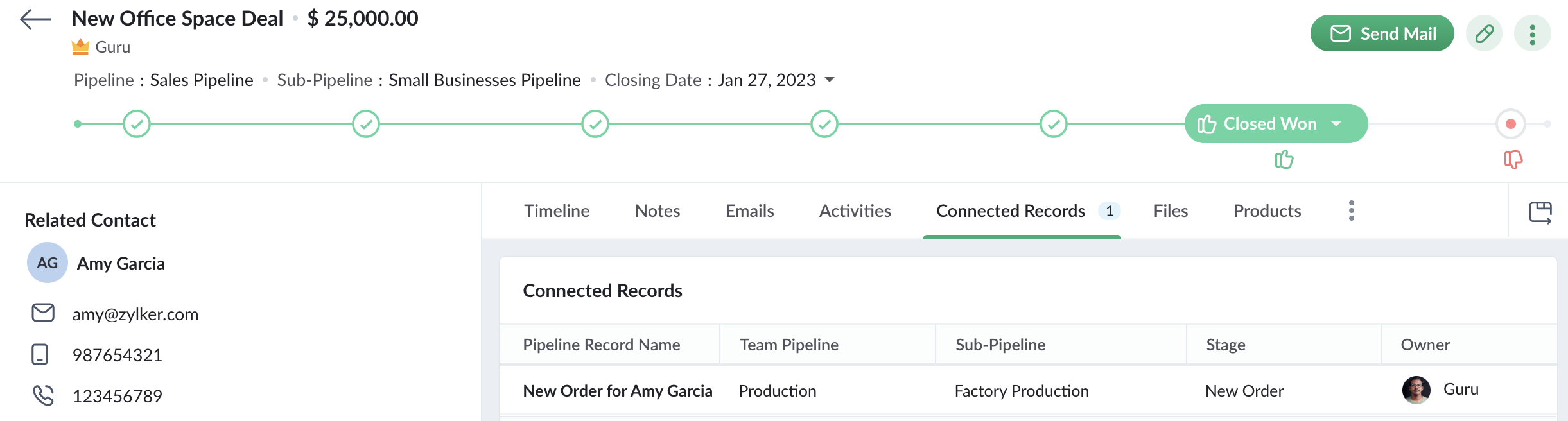
De plus, lorsqu'un commercial ouvre un enregistrement d'affaire qui a déclenché le workflow pour créer une nouvelle commande, il peut également voir l'enregistrement de la commande dans l'onglet Enregistrements connectés. Le commercial peut ainsi suivre l'état de la commande. Ainsi, Connected Pipelines permet à vos équipes de rester unies grâce à la boucle d'information connectée à travers Team Pipelines.
Disponibilité
Si vous utilisez déjà la version Team Pipelines de Bigin, alors Connected Pipelines sera déjà disponible pour vous. Vous pouvez vous en assurer en vérifiant si vous voyez l'action "Créer des enregistrements connectés" lorsque vous créez un flux de travail.
Nous avons publié un guide d'aide détaillé pour vous aider à démarrer avec Connected Pipelines.
Essayez cette nouvelle amélioration et faites-nous part de vos réactions dans les commentaires ci-dessous.
Pour ceux qui n'ont pas encore essayé Team Pipelines, nous vous suggérons de remplir ce formulaire et nous activerons Team Pipelines pour votre compte. Nous vous conseillons de passer à Team Pipelines le plus tôt possible car nous nous préparons à le déployer pour tous les utilisateurs de Bigin.
Sur quoi d'autre travaillons-nous ?
Nous avons écouté activement vos demandes de fonctionnalités et nous travaillons sur un grand nombre d'améliorations, notamment l'intégration de Whatsapp, l'affichage du calendrier pour les activités, les pages de réservation en ligne, les formulaires Web pour Team Pipelines et bien d'autres encore.
Restez à l'écoute pour de nouvelles mises à jour !
Access your files securely from anywhere

Zoho Developer Community





Topic Participants
Antoine Perrault
Sticky Posts
Bigin - Astuce #5 : Comment transférer le statut Super Admin ?
Bonjour Community France, Découvrons comment transférer le statut de Super Administrateur. Sachez que le statut de super administrateur ne peut être transféré à un autre utilisateur administrateur que par le super administrateur lui même. Pour transférerNouveau forfait Bigin Premier : Multi-devises, flux de travail avancés et plus encore !
Bonjour à tous, Nous sommes ravis d'annoncer une toute nouvelle édition de Bigin qui contient plusieurs nouvelles fonctionnalités comme la multidevise, des flux de travail avancés, des champs de recherche personnalisés et plus encore : l'édition Premier.Nouveauté Bigin : associez plusieurs contacts à une même affaire!
Bonjour à tous, Une transaction implique souvent plusieurs décideurs. Prenons l'exemple de l'entreprise Zylker qui utilise Bigin pour gérer ses pipelines de vente. Ils souhaitent acheter des meubles. Pour valider la vente, différents employés, de différentsPack débutant : vos premiers pas sur Zoho Bigin
Dans cet article nous verrons comment paramétrer votre CRM Bigin en 4 étapes : renseigner vos informations, gérer vos utilisateurs ainsi que leurs rôles et profils. Renseigner les informations de votre organisation Vous venez de vous inscrire à Zoho Bigin,Anniversaire Bigin : le CRM pour les petites entreprises évolue
Bonjour à tous ! Nous sommes de retour avec quelques annonces passionnantes. Mais d'abord, joyeux anniversaire à nous ! Bigin a eu un an récemment et nous avons un nouvel ensemble de fonctionnalités que nous sommes impatients de partager avec vous. Nous
Zoho TeamInbox Resources
Zoho CRM Plus Resources
Zoho Books Resources
Zoho Subscriptions Resources
Zoho Projects Resources
Zoho Sprints Resources
Qntrl Resources
Zoho Creator Resources
Zoho CRM Resources
Design. Discuss. Deliver.
Zoho Show Resources

Get Started. Write Away!
Writer is a powerful online word processor, designed for collaborative work.
-
オンラインヘルプ
-
Webセミナー
-
機能活用動画
-
よくある質問
-
Ebook
-
-
Zoho Campaigns
- Zoho サービスのWebセミナー
その他のサービス コンテンツ
Nederlandse Hulpbronnen

ご検討中の方
Recent Topics
zoho click, and nord VPN
Unfortunately, we've been having problems with Zoho Click, where essentially the line cuts off after about a minute's worth of conversation every time we are on VPN. Is there a way we can change this within the settings so it does not cut the line offZoho Calender
a) does the clanender in zoho project allow you to see the name of the event in the celnder view, it currently says either "Task (1) or "Milestoen (1)" b) Alternatively does the calender in Zoho project integrate with zoho calender?Matching ZOHO Payments in Banking
Our company has recently integrated ZOHO Payments into our system. This seemed really convenient at first because our customers could pay their account balance by clicking on a link imbedded in the emailed invoice. Unfortunately, we can't figure out howNew Enhancements to Zoho CRM and Zoho Creator Integration
Hello Everyone, We’ve rolled out enhancements to the Zoho Creator and Zoho CRM integration to align with recent updates made to the Zoho Creator platform. With enhancements to both the UI and functionality, This update also tightens access control byWork Type - Limitation
Hello, I'm setting up work types and have noticed, a limitation on the parts area to 10 lines. Can this be increased to 20 or greater? In addition to this, when I attempt to add the work type to a work order, the correct labour hours doesn't flow through.Emails sent through Bigin are not posting in IMAP Sent folder
I have set up my email to work from within Bigin using IMAP. I am using IMAP so I can sync my email across multiple devices - phone / laptop / desktop / iPad / etc. I want all my emails to populate my email client (outlook & iphone email) whether orTurning the page for Zoho SalesIQ: 2025 to 2026
As we wrap up 2025, we would like to take a moment to reflect on what we set out to achieve this year, what we’ve delivered, and where we’re headed next. What we focused on in 2025 This year was all about strengthening the core of engagement and AI, makingTemporary Outage in Zoho Cliq Affecting US Users – July 23, 2025
We experienced a service disruption in Zoho Cliq that impacted core functionality for users in the US region. The issue occurred between Jul 23, 2025, 06:54:00 PM IST and 07:13:13 PM IST, lasting approximately 19 minutes. To restore service stability,Zoho Cliq not working on airplanes
Hi, My team and I have been having this constant issue of cliq not working when connected to an airplane's wifi. Is there a reason for this? We have tried on different Airlines and it doesn't work on any of them. We need assistance here since we are constantlyMulti-currency and Products
One of the main reasons I have gone down the Zoho route is because I need multi-currency support. However, I find that products can only be priced in the home currency, We sell to the US and UK. However, we maintain different price lists for each.Create an Eye-Catching Announcement Widget for Your Help Center
Hello Everyone! In this week’s edition, let’s explore how to keep your customers updated with exciting news in the Help Center. See how ZylkerMobile wowed their customers by bringing updates right to their portal. ZylkerMobile, the renowned brand forSend Whatsapp with API including custom placeholders
Is is possible to initiate a session on whatsapp IM channel with a template that includes params (placeholders) that are passed on the API call? This is very usefull to send a Utility message for a transactional notification including an order numberCustomer Management: #6 Common Mistakes in Customer Handling
Managing customers doesn't usually fall apart overnight. More often, slight gaps in the process slowly become bigger problems. Incidents like missed follow-ups, billing confusion, and unhappy customers will lead to revenue loss. Many businesses don'tZoho Desk iOS app update: UI enhancement of picklist and multi picklist fields
Hello everyone! We have enhanced the UI of the picklist and multiselect picklist fields on the Zoho Desk iOS app to provide a more refined, efficient, and user-friendly experience. We have now supported an option to Search within the picklist and multiselectZoho Desk iOS app update: Revamped scribbles with Apple pencil kit
Hello everyone! We’re excited to introduce a revamped Scribble experience, rebuilt from the ground up using Apple PencilKit for smooth strokes, proper scaling, and seamless image uploads. Please update the app to the latest version directly from the AppZoho Desk Android app update: Norwegian language support
Hello everyone! In the most recent Android version of the Zoho Desk app update, we have brought in support to access the app in Norwegian language. We have introduced the Norwegian language on the IM module of the Zoho Desk app as well. Please updateFunction #53: Transaction Level Profitability for Invoices
Hello everyone, and welcome back to our series! We have previously provided custom functions for calculating the profitability of a quote and a sales order. There may be instances where the invoice may differ from its corresponding quote or sales order.Payment Vouchers
Is there any Payment Vouchers in Zoho? How can we create payment for non-trade vendors, i.e. professional fees, rent, and payment to commissioner income tax?API in E-Invoice/GST portal
Hi, Do I have to change the api in gst/e-invoice portal as I use zoho e books for my e-invoicing. If yes, please confirm the process.When I click on PDF/PRINT it makes the invoice half size
When I click PDF / Print for my invoice in Zoho Books, the generated PDF appears at half size — everything is scaled down, including the logo, text, and layout. The content does not fill the page as it should. Could someone advise what causes Zoho BooksSearch by contain letter in a column
Hello, everyone I need a filter function that searches by letter in a cell, and it should be a macro. To clarify further, if I have a column with several names and I chose a search cell and what I want is search by a single letter, for example, "a" thenEnrich your contact and company details automatically using the Data Enrichment topping
Greetings, I hope you're all doing well. We're happy to announce the latest topping we've added to Bigin: The Data Enrichment topping, powered by WebAmigo. This topping helps you automatically enhance your contact and company records in Bigin. By leveragingEasier onboarding for new users with stage descriptions
Greetings, I hope all of you are doing well. We're happy to announce a recent enhancement we've made to Bigin. You can now add descriptions to the stages in your pipeline. Previously, when creating a pipeline, you could only add stages. With this update,Can add a colum to the left of the item in Zoho Books?
I would need to add a column to the left of the item column in Books. When i create custom fields, i can only display them to the right of the item.Verifying Zoho Mail Functionality After Switching DNS from Cloudflare to Hosting Provider
I initially configured my domain's (https://roblaxmod.com/) email with Zoho Mail while using Cloudflare to manage my DNS records (MX, SPF, etc.). All services were working correctly. Recently, I have removed my site from Cloudflare and switched my domain'sAI Bot and Advanced Automation for WhatsApp
Most small businesses "live" on WhatsApp, and while Bigin’s current integration is helpful, users need more automation to keep up with volume. We are requesting features based on our customer Feedbacks AI Bot: For auto-replying to FAQs. Keyword Triggers:2025 Ask the Experts sessions wrap-up : Key highlights from the experts
Here is a rewind journey of our Ask the Experts (ATE) Sessions, where we brought you expert insights and practical best practices together in one place. This recap highlights the key takeaways, learnings, and best practices from all these sessions soHow to disable the edit option in subform
How to disable the edit option in subformAdding non-Indian billing address for my Zoho subscription
Hey Need help with adding a non-Indian billing address for my Zoho subscription, trying to edit the address to my Singapore registered company. Won't let me change the country. Would appreciate the help. Regards, RishabhMove record from one custom module to another custom module
Is it possible to create a button or custom field that will transfer a record from one custom module to another? I already have the 'Leads' module used for the Sr. Sales department, once the deal is closed they convert it to the 'Accounts' module. I would like to create a 'Convert' button for a custom module ('Locations') for the department that finds locations for each account. Once the location is secured, I want to move the record to another custom module called 'Secured Locations'. It's basicallyConvert Lead Automation Trigger
Currently, there is only a convert lead action available in workflow rules and blueprints. Also, there is a Convert Lead button available but it doesn't trigger any automations. Once the lead is converted to a Contact/Account the dataset that can be fetchedNotes Not Saving
Hello, My notes are continuously not saving. I make sure to save them, I know the process to save them. It is not operator error. I go back into a Leads profile a while later and do not see the previous notes that I have made. I then have to go back and do unnecessary research that would have been in the notes in the first place. Not a good experience and it is frustrating. Slows me down and makes me do unnecessary work. Please resolve. As a quick heads up, deleting cookies is not a fixPrefill form with CRM/Campaigns
I created a form in zForms and created prefill fields. I added this to the CRM and selected the fields so when sending from the CRM, the form works great. However, I want to use the same form in Campaigns and I want it to pull the data from CRM (whichTriggering a campaign automation from a Form
I used Forms to create a lead form that is accessed by a button on my website. The field information flows into the CRM. However, I am trying to figure out how to use Campaign automations to start a workflow (series of campaign emails) that is triggeredEmployee Appraisal Applicability - Why is Date of Joining Hard-Coded?
In the new (to me, at least) Performance Appraisal Cycle wizard, it's possible to set criteria to determine for whom the appraisal process should apply. This makes sense on its face. However, one MUST use the Date of Joining criterion as a filter. WhyFormula fields
Zoho People now supports formula fields. This post illustrates it. Formula fields are fields whose value is calculated instead of being entered by the user. Using this, number, decimal and date manipulations can be done. The value of this field could be numeric or date depending on the output of the formula. In date manipulations, the result will be given in milliseconds, which you can format as per you need. The operators we support are +, - , *, /. Formula fields get recalculated automaticallyCopy paste from word document deletes random spaces
Hello Dear Zoho Team, When copying from a word document into Notebook, often I face a problem of the program deleting random spaces between words, the document become terribly faulty, eventhough it is perfect in its original source document (and withoutIs it possible to use module field filters via URL parameters?
It would be really convenient if I could quickly link to a filter. For reference, this is the filter functionality I'm referring to: https://help.zoho.com/portal/en/kb/crm/customize-crm-account/advanced-filters/articles/advanced-filters For example: MyTransitioning FESCO Bill Project to Zoho Sheets and Integration Options
Hello Zoho Support, I'm considering transitioning my FESCO bill project from Google Sheets to Zoho Sheets and wanted to know if there are integration options to seamlessly migrate our existing work. You can view our platform here, any guidance would beSupport for Custom Fonts in Zoho Recruit Career Site and Candidate Portal
Dear Zoho Recruit Team, I hope you're doing well. We would like to request the ability to use custom fonts in the Zoho Recruit Career Site and Candidate Portal. Currently only the default fonts (Roboto, Lato, and Montserrat) are available. While theseNext Page