Unlock seamless data-capturing with QR codes
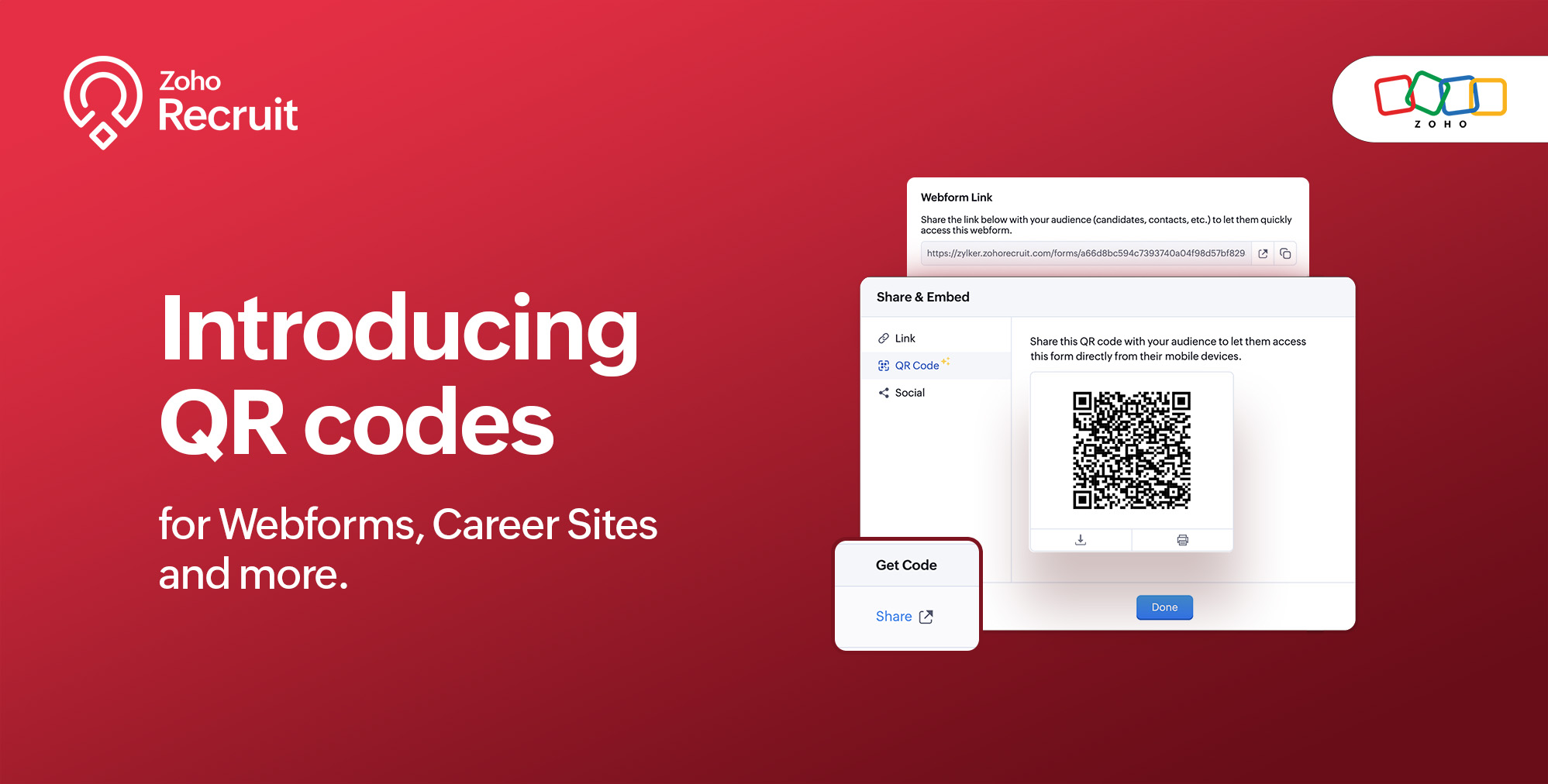
We're thrilled to share a groundbreaking enhancement that will reshape the way you connect with candidates. In our continuous efforts to enhance your recruiting experience, we proudly present the QR Code feature for Webforms, Career Sites and more. This exciting addition aims to simplify and amplify the way you engage with potential hires, promising a more efficient and seamless process.
Benefits
Unleash the full spectrum of advantages that QR Codes bring to your recruitment toolkit.
Effortless Sharing
Simplify the distribution of application forms and job listings by sharing QR codes effortlessly. Whether you're networking at an event, collaborating with partners, or reaching out through various channels, the QR codes make the process seamless. Recruiters can now disseminate vital information with just a scan, facilitating quicker connections with potential candidates.
Enhanced Candidate Experience
Elevate the candidate journey by providing swift and hassle-free access to application forms. The convenience of scanning a QR code enables candidates to engage with your opportunities instantly, reducing friction in the application process. This enhancement aims to leave a positive and lasting impression on candidates, reflecting your commitment to a user-centric recruitment experience.
Time-saving Recruitment
Say goodbye to manual data entry woes. The QR Code feature significantly reduces the time and effort invested in data collection. Candidates can efficiently fill out forms, and recruiters can focus on analyzing and selecting the best-fit talent. This time-saving aspect not only boosts overall productivity but also allows recruiters to invest more energy in strategic aspects of the recruitment process.
Streamlined Data Collection
Embrace a new era of streamlined data collection. With QR codes seamlessly linking candidates to your forms, you eliminate the need for manual information input. This not only reduces the risk of errors but also ensures that your database is populated with accurate and relevant candidate information. Streamlining data collection is a pivotal step towards creating a more efficient and error-free recruitment process.
Use Cases
Explore the various ways in which QR Codes can be seamlessly integrated into your recruitment strategy, catering to diverse scenarios and enhancing your overall outreach.
Event Recruiting
Picture a bustling career fair or industry conference where capturing candidates' attention is crucial. Utilizing QR codes to provide instant access to your Webforms and Career Sites, turns casual interactions with candidates into potential job applications. This empowers recruiters to make a lasting impression at events, fostering a bridge between in-person engagement and online application processes.
Printed Materials
Enrich your printed marketing materials, such as brochures, posters, or promotional handouts, with QR codes. Instead of directing candidates to lengthy URLs, a quick scan seamlessly guides them to relevant application forms or job listings. This not only simplifies the candidate's journey but also transforms your print materials into interactive gateways, blending the physical and digital realms for a more engaging experience.
Onboarding Efficiency
Beyond the recruitment phase, leverage QR codes to streamline the onboarding process for new hires. Include QR codes in onboarding materials, facilitating quick access to essential forms, training materials, and relevant documentation. This enhances the efficiency of the onboarding journey, ensuring a smooth transition for new employees and reinforcing a positive impression from the start.
Cross-Platform Consistency
Achieve cross-platform consistency by incorporating QR codes across various channels. Whether engaging candidates at events, through printed materials, or in the digital landscape, the QR Code feature ensures a unified application experience. This consistency not only reinforces your brand identity but also simplifies the candidate journey, making it seamless and accessible, regardless of the engagement platform.
How to get started?
Zoho Recruit automatically generates QR codes for your Webforms and Career Sites, which you can directly print or download with a click of a button. Given below are step-by-step instructions on how to find the generated QR codes.
To access the QR code of a webform;
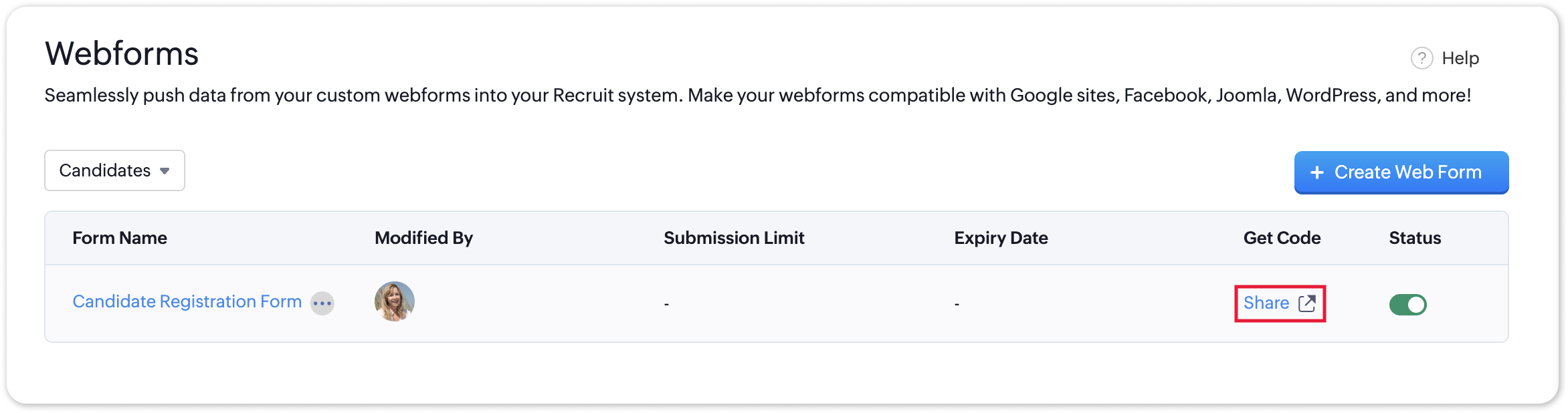
- Navigate to Setup > Career Website > Webforms and click the Share button for the webform of your choosing.
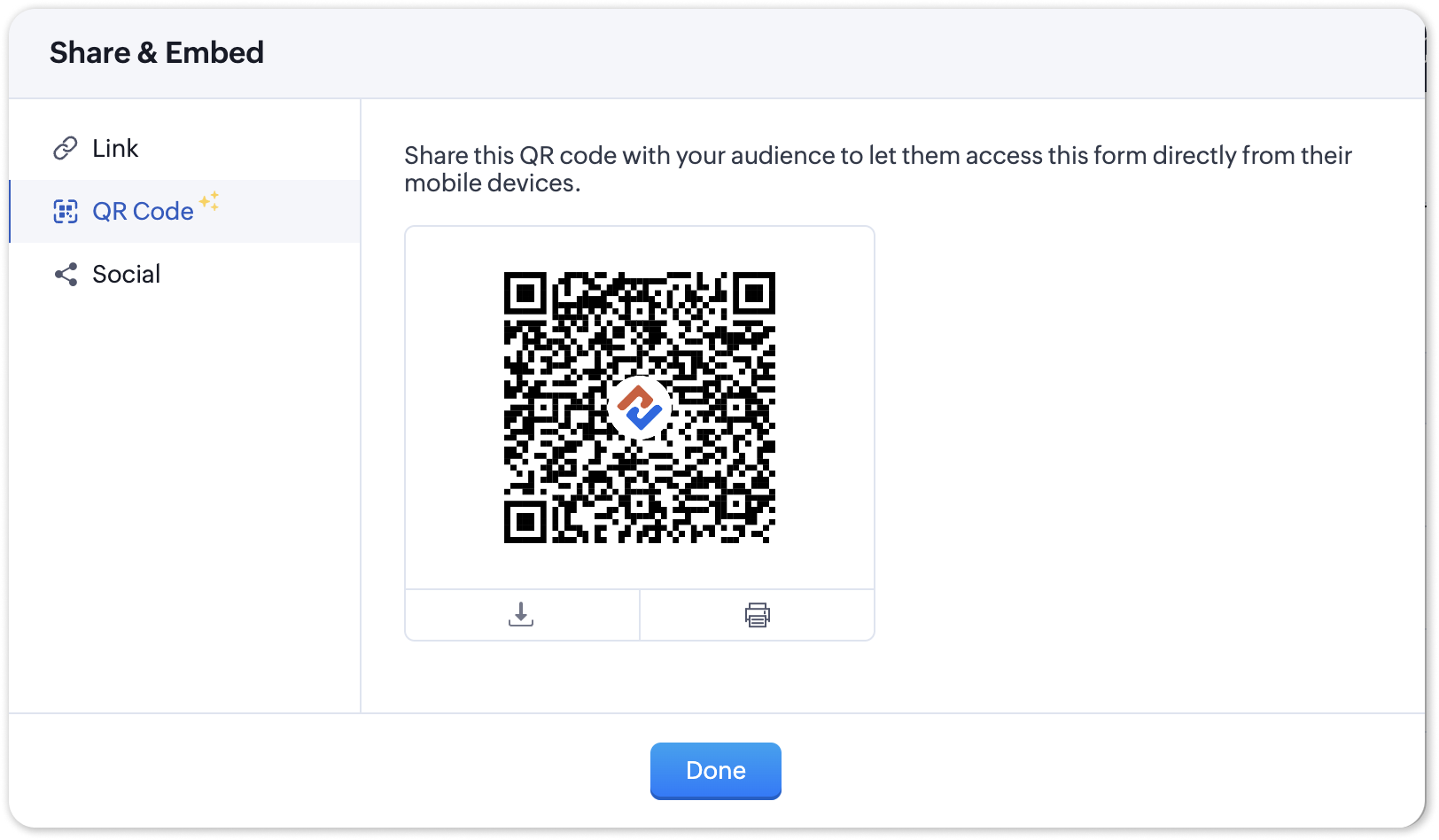
- In the Share & Embed pop-up, select the QR section.
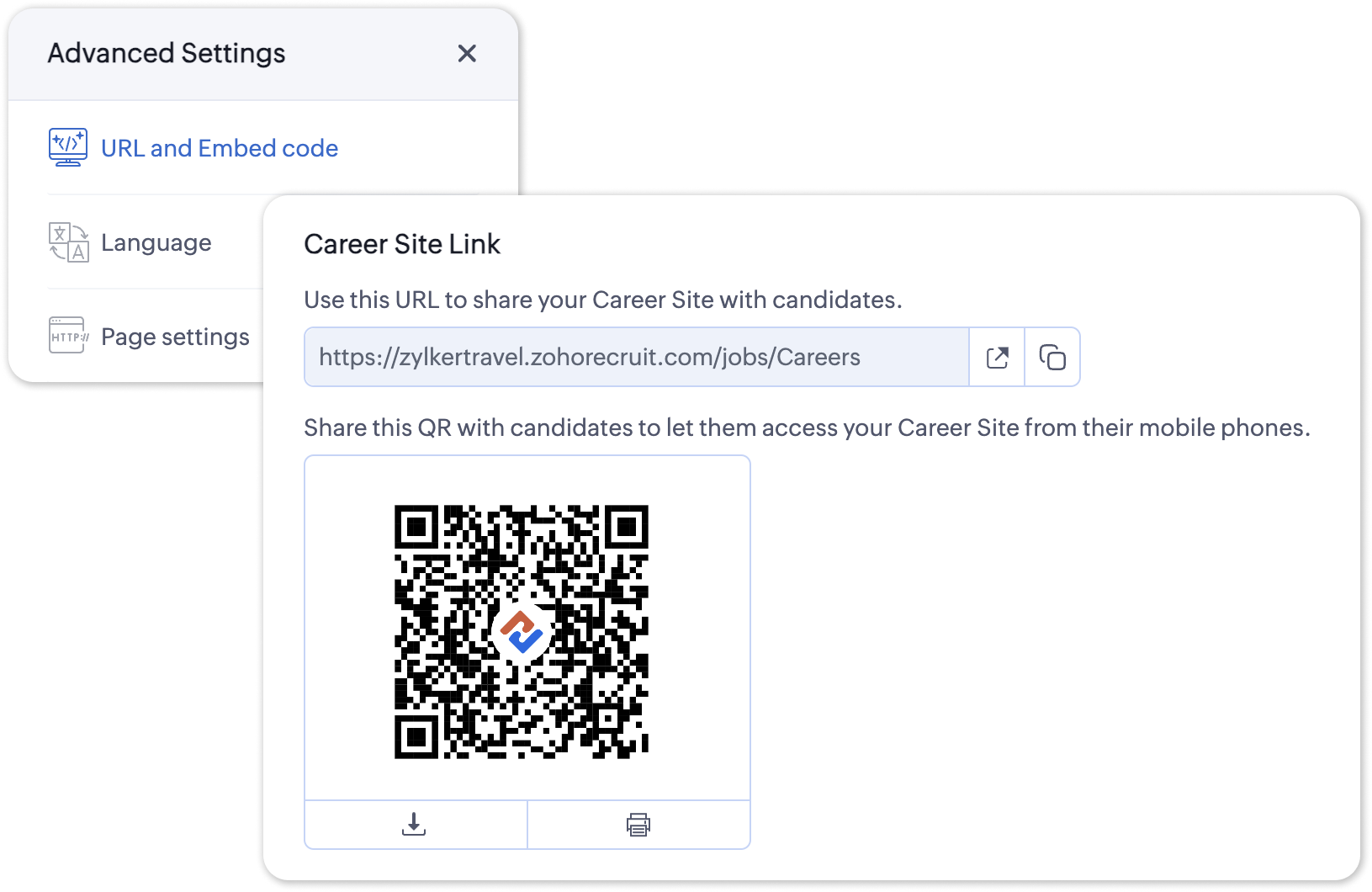
To access the QR code for your Career Site;
- Navigate to Setup > Career Website > Career Site and Customize a career site of your choosing.
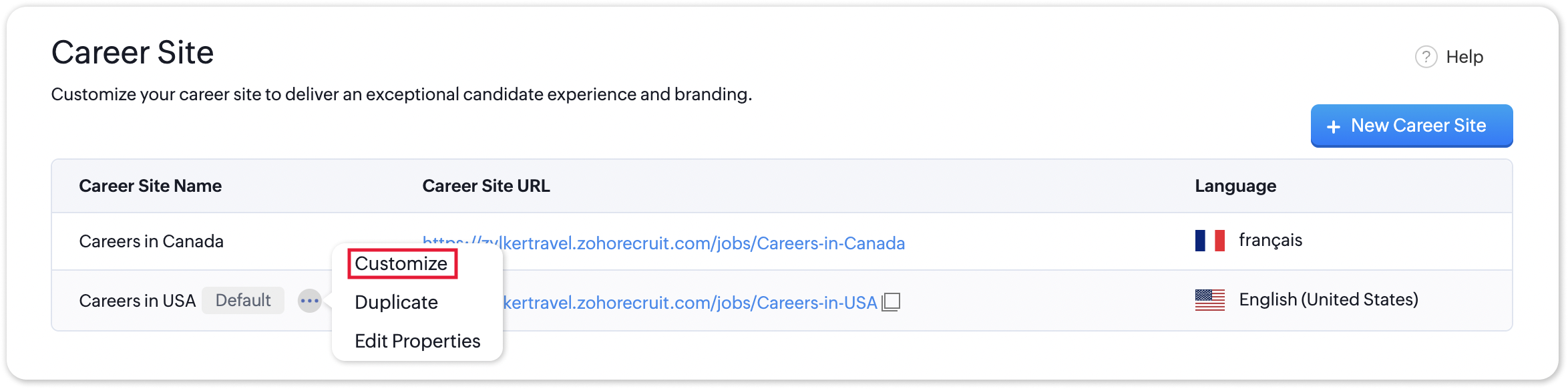
- Under the Advanced Settings section, select URL and Embed Code. The QR code for the selected career site will be displayed here.
Additional Details
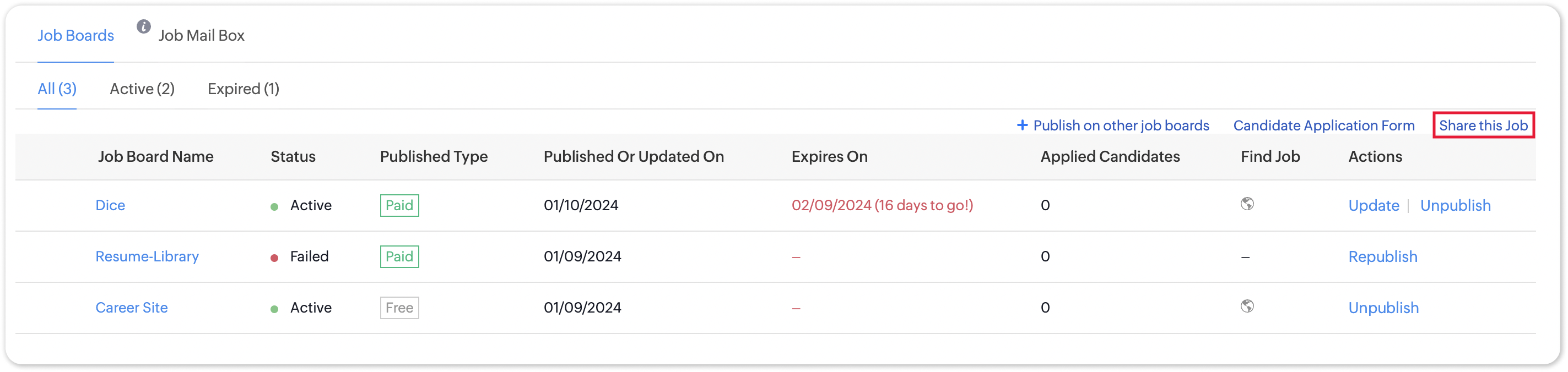
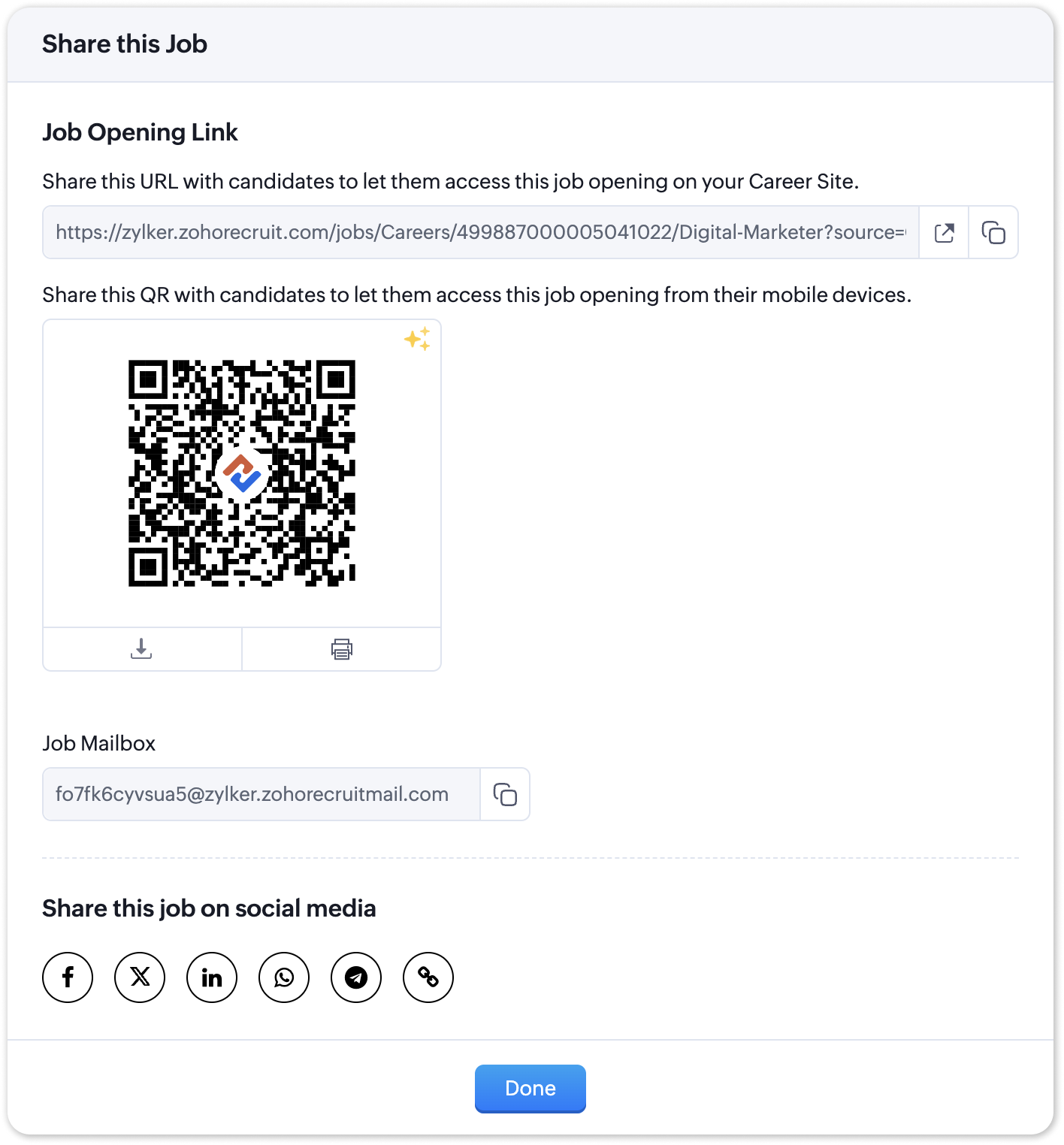
Zoho Recruit generates QR codes for every individual job listing added to your Career Site. Follow the steps given below to access the generated QR code for a published job opening.
To access the QR code for a specific Career Site job listing;
- Navigate to the published job opening and click Sourcing Summary from the Quick Access panel on the left. In the sourcing summary section, click Share this Job.
- In the pop-up that is displayed, you will be able to access the QR code for the job's Career Site listing and other key information.

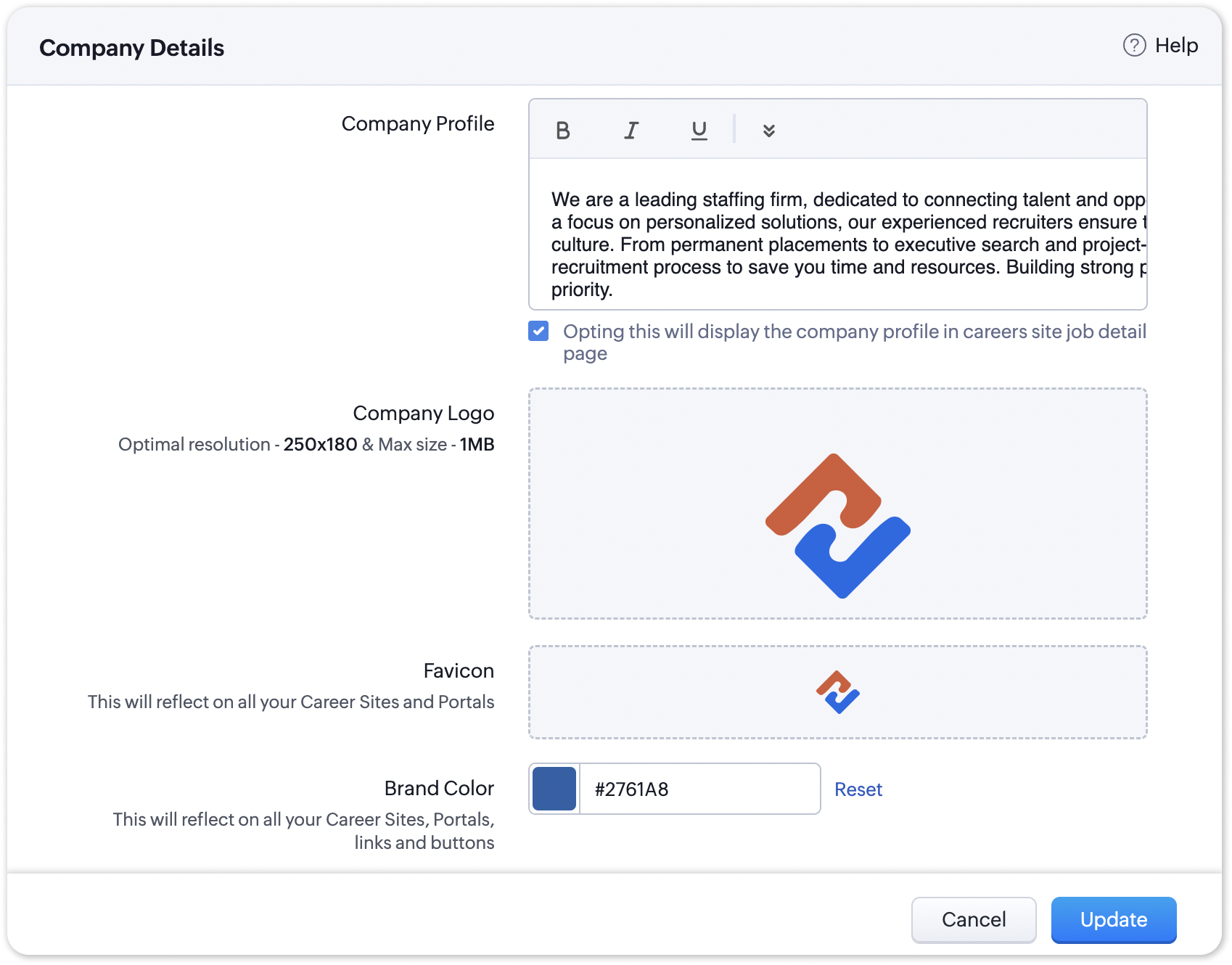
Note:
The favicon you upload during the Company Profile Verification stage will be added to your generated QR codes.
Join us in transforming recruitment into a streamlined, dynamic experience—where QR codes open doors, candidates find their path, and your team discovers a new era of efficiency.
Questions? Suggestions? Leave a comment below or reach out to our customer support team at support@zohorecruit.com.
Regards,
Team Zoho Recruit
Team Zoho Recruit
Access your files securely from anywhere
Centralize Knowledge. Transform Learning.
All-in-one knowledge management and training platform for your employees and customers.
New to Zoho Recruit?

Zoho Developer Community
New to Zoho LandingPage?
Zoho LandingPage Resources
New to Zoho Survey?
New to Zoho CRM Plus?
Deliver unforgettable customer experiences
New to Zoho CRM Plus?
Deliver unforgettable customer experiences
New to Zoho Marketing Plus?
Everything you need to run your marketing
New to Zoho Marketing Plus?
Everything you need to run your marketing
New to Bigin?





Topic Participants
Pradyumn K
Sticky Posts
Zoho Recruit Community Meetup - London 🇬🇧
Hello Recruiters! We’re excited to announce that the Zoho Recruit team is coming to the UK for an in-person Zoho User Group (ZUG) Meetup in London! This is your chance to connect with fellow Zoho users, learn from experts, and walk away with actionableAn update to improve email delivery | Email Authentication & Relay
Update Rollout Latest Update: Enterprise users (8th July, 2025) This update is now live for Enterprise plan users in all regions. This includes People Plus, but not Zoho One, which will be covered in an upcoming update. Professional users (31st May 2025)Zoho Recruit User Group Meet-up | INDIA 2025 (Venue Finalised)
Hello Zoho Recruit users from India, We’re pleased and excited to announce our 2025 edition of Zoho user group meet-up in India in five cities! In this meet-up, our team of experts will help you understand the intricate nuances to use Zoho Recruit better,Zoho Recruit is coming to the UK | Zoho Community Learning Series
Customers from the United Kingdom, Exciting news: We will be in London for the Zoho Recruit user meet up. Our team will help you better understand the intricate nuances of Zoho Recruit to help you hire faster, inform about new and upcoming features, andAsk the experts - A live Q & A discussion on Zoho Recruit
We are delighted to come back with another edition of Ask the Experts community series. This edition, we'll be focusing on everything about Zoho Recruit. The topics will focus on the features that are used/asked by the majority of users and also based
New to Zoho TeamInbox?
Zoho TeamInbox Resources
Zoho CRM Plus Resources
Zoho Books Resources
Zoho Subscriptions Resources
Zoho Projects Resources
Zoho Sprints Resources
Qntrl Resources
Zoho Creator Resources
Zoho CRM Resources
Design. Discuss. Deliver.
Zoho Show Resources

Get Started. Write Away!
Writer is a powerful online word processor, designed for collaborative work.
Zoho CRM コンテンツ
-
オンラインヘルプ
-
Webセミナー
-
機能活用動画
-
よくある質問
-
Ebook
-
-
Zoho Campaigns
- Zoho サービスのWebセミナー
その他のサービス コンテンツ
Nederlandse Hulpbronnen

ご検討中の方
Recent Topics
Moving data from one pipeline to another
Hey all, I've got some complex pipelines to build and I'd like to seperate them into seperate pipelines rather than have one mammoth one. If I create 2 pipelines, is there any easy way to use the output of Pipeline1 to be the input into Pipeline2? OrHow to export/find all deluge code.
Hi, I have a large app wich contains several forms, reports, html views, I need to find thow my application if any contains specific word, I could find it manually by editing app and see on every section(field code, on succes, on load, etc) but I would like to do it faster. Is there a way to at least export it to a file the whole deluge code on my application?Have Some Bugs in Zoho CRM Ask Zia Assistant
Hi Support Team, I have found some bugs in Zoho CRM Ask Zia Feature Please Check below screenshot, insight option is showing twice i think its in early access that's why its have some bugs .COD with Partial payment
Two reasons why we need COD with partial payment option. 1) Since we deal heavy weight products our shipping costs are too high. If shipment is rejected by customer we incur huge loss. 2) Some competitors place fake orders with different names and returnSlicers are now available in Zoho Sheet—filter your data interactively
At Zoho Sheet, we diligently track user requests and feedback. In line with this, based on extensive user requests, we've integrated Slicers to pivot tables and are delighted to announce its release. Slicers are interactive visual filters that have add,Resizing a Record Template Background Inage
Hi everyone, I have an issue which I can't seem to resolve: Basically, I'm designing a record template in certificate form. I've specified A5 landscape. I've set my background image the same dimensions with total pixels at 443,520. Whatever I try, whenUpdated font library: New font styles and custom font options in Zoho Sheet
Zoho Sheet's font library now supports 500+ font styles in 60+ languages! The updated font library is stacked with new font styles, and some of the previously available font styles have been replaced with equivalent options. There are two ways you canIntroducing Data Bars: Graphically represent changes in data within the cells
Conditional formatting has helped millions of spreadsheet users analyze and highlight their data more efficiently. In addition to the classic rules, color scales, and icon sets available in Zoho Sheet, you can now apply Data Bars, a convenient methodDefault Font Size in Desk
How do I set my default font size in Desk? It takes me about 45 minutes to find the place to set it, then, when I sign out of Zoho and log back in, it's back to font 10 again. Seems like this would be simple, but like everything with Zoho, it's buriedTip #19 - Create checkbox tracker in your spreadsheet
Hello Sheet users! We are here with yet another tip to help you get the most out of Zoho Sheet. Spreadsheets can be used to handle a variety of tasks, but ever tried using checkboxes to track the progress of your action items dynamically? Here's a sampleTip #20 - Three things you probably didn't know you can do with picklists
Hello Zoho Sheet users! We’re back with another quick tip to help you make your spreadsheets smarter. Picklists are a great tool to maintain consistency in your spreadsheet. Manually entering data is time-consuming and often leaves typos and irregularPer Level Approval for admins
We need Process admins like Zoho CRM in Zoho Books for per stage approval Currently in books, admins only have the option for Final Approval But for example, in cases like when an employee is on leave, we can't just approval one level we only have optionFeature enhancement: Highlight rows based on a cell value
Hello Sheet users, We're excited to announce a new feature enhacement, shaped directly by your valuable feedback! As you might know, conditional formatting is a great tool for anyone dealing with large data sets. Previously, if you’ve ever wanted to drawUpdating custom fields in Zoho Projects
Hi I am wondering if anyone has experience with custom fields in Zoho Projects. I am struggling to update the field using either deluge or the api endpoint. My code is: //custom_Map = map(); custom_Map = {"UDF_DOUBLE_1":"0.27"}; update_Map = map(); update_Map.put("custom_fields",custom_Map.toList());Markdown for Desk?
Hi, my company wants to use markdown for formatting text in Desk (in all modules there, especially Tickets and Helpcenter). Zoho already offers use of markdown in several products (see https://help.zoho.com/portal/en/kb/backstage/microsite-guide/formatting-with-markdown/articles/formatting-with-markdo)Change Currency symbol
I would like to change the way our currency displays when printed on quotes, invoices and purchase orders. Currently, we have Australian Dollars AUD as our Home Currency. The only two symbol choices available for this currency are "AU $" or "AUD". I wouldCalendar not working
Are we the only ones. On any browser we cannot click on any of our calendar appointments and get them to open. They just make the browser loop. WE have reached out and have been told they are working on it. The office staff are really stuck. The pointWhatsApp Message Template Quick Reply Buttons
Hello, I created my first Message Template to overcome the 24-hr messaging window and it was approved by WhatsApp/Meta. When I go to Meta, I also see that template brought from Zoho Desk, and used it via Zoho Desk IM. However, I notice that when in Meta'sAccount in Quick View Filter
I have a report that I often run against a specific Account. Every time, I have to go into the edit menu and change the Advanced Filter. I would prefer to use the Quick View Filter, but it does not allow me to use the one and only field that makes anySet Display for Numbers/Currency/etc with Client Script/Customization in Canvas List Page
Is it possible to set a display mask for a number/currency field using Client Script or customization? I have custom fields that I would like to keep the decimal places for calculation purposes, but do not need them displayed to the user. So 101.3568136.143.188.51 blocked by spamcop
Zoho mailserver seems to be blocked by spamcop. Cant send mail to my customer. Not sure what to do.🚀 WorkDrive 5.0: Evolving from a file sharing app to an intelligent content management platform: Phase 2
Hello everyone, WorkDrive's primary focus has always been to provide an intelligent and secure content management platform, simplify collaboration, and be the central repository of files for all Zoho apps. In our previous announcement, we unveiled thei keep see there is a connetion issue connecting 3rd party api on zoho when using zia
hi there , i have set up open ai api to zoho zia (copied and pasted to zoho zia) but I keep getting notificaiton "there is a connetion issue connecting 3rd party api on zoho" when using zia on top when click zia and try to type in word thereDeleting Fields in CRM Deletes Views in Analytics
Hey friends! I'm having some issues when we modify some fields within ZohoCRM. There are times where we need to sunset a field and eventually completely remove it. In these instances, it seems like a lot of views are removed in Analytics. This rangesZoho Desk Android and iOS app update: Access multilingual templates on the IM module
Hello everyone! We have introduced multilingual templates on the IM module of the Zoho Desk mobile app allowing you to send IM template messages in translated versions. iOS: Android: Please update the app to the latest version directly from the App Store/Does Zoho offer a full WhatsApp Marketing Platform (like WATI / GallaBox)?
lm exploring WhatsApp marketing and I’d like to understand what options are available within the Zoho ecosystem. Currently, I see: Zoho SalesIQ has a broadcast option, but it seems very limited — for example, it doesn’t support uploading contacts viaCustom buttons
Getting Error "You can only create 10 custom buttons per module" ! I already have more than 10 for 1 module before trying to create another. Is this a new restriction brought about by the all knowing what's best for businesses Zoho guru ? It would beThe Social Wall: October 2025
Hello everyone, As we head toward the end of the year, we’re bringing you a few updates to help give your social media efforts a strong finish. This month, we’re rolling out new enhancements across both the web and mobile app. Post Preview Have you everClient Script | Update - Support for List Page (Canvas) and Notes
Hello everyone! We are glad to announce two exciting updates in Client Script. Client Script support for List Page (Canvas) Client Script support for Notes These open the door to more dynamic and interactive customizations! 1. Client Script support forPincode Based Pricing
We want to give extra discount to customers within city limits because our shipping and packing costs are less. My proposal is assign list of pincodes to price list and assign the price list to customers whenever they sign up with pincodes. Also showfeature question: lookup field in Projects task layout
Hello, Below we have interface to configure a custom task layout, however, we need a lookup field to let pickup data from other apps, such as Zoho CRM Products module, is that possible or already in your roadmap? or a workaround to achieve it? Thanks in advance.What's New in Zoho Analytics - October 2025
Hello Users! We're are back with a fresh set of updates and enhancements to make data analysis faster and more insightful. Take a quick look at what’s new and see how these updates can power up your reports and dashboards. Explore What's New! ExtremeZoho Analytics & SQL Server - Live connect
Below are the steps I did Created a fresh database and table in my own virtual server Created a new data source connection with live connect I was able to select the tables and created the data source successfully I am getting the error when I try toExplore the Redesigned Quotes Module in Zoho Billing
Dear users, We’re excited to introduce a refreshed look for the Quotes details page in Zoho Billing! This update brings you a more efficient user interface experience without changing your existing workflow. We've enhanced layouts with organized tabs,Latest updates in Zoho Meeting | Create departments, Share PDF files
Hello all, You can now create departments to group team members within your organization. This will make it easier for you to organize department-level meetings and invite members. In webinars, use the Share material feature to share PDF files directlyUnify All Zoho Video Meeting Experiences into One Standardized Platform
Hi Zoho Team, We would like to share an important user experience concern regarding the current state of video meeting functionality across the Zoho ecosystem. The Problem Within Zoho, there are multiple ways to initiate or schedule a video meeting: ZohoImport VAT Kenya
Hi. I am quite lost on how to account for VAT when importing. We are an import and distribution company and when importing we get a customs entry with VAT which we pay and claim for this VAT as we do our monthly sales. My question is how to record this[Free Webinar] Product Updates: Quick Catch-Up Session - Part I - Creator Tech Connect
Hello Everyone! We welcome you all to the upcoming free webinar on the Creator Tech Connect Series. The Creator Tech Connect series is a free monthly webinar featuring deep-dive technical sessions designed for developers, administrators, and app builders.Project expenses in Zoho Books
Just the way timesheet is used to calculate labour cost for a particular project, how do i record other expenses against a project such as materials and consumables used for the project? So that under report, I can view the total amount expended on eachBlueprint status change
I want to change the Blueprint status of a workflow. The status is completed automatically when I added the record through API call. But I want to make it active, I don't see any options for this. Even if I draw transition from any stage , it is not visibleNext Page