Unveiling Zoho CRM's New User Interface - The NextGen UI
Hello Everyone,
Last Wednesday, May 14th,2025, we announced the public release of Zoho CRM For Everyone, our most significant update yet. This release brings a modernized CRM experience with a redesigned user interface, new capabilities for cross-functional collaboration, and greater flexibility for users across your organization.
Read our PR announcement, our forum announcement, and the blog post to know more about this release.
To help you get the most out of these updates, we’ll be publishing a series of announcements that walk you through the major enhancements now available to all Zoho CRM users.
We’re kicking off this series by spotlighting one of the most noticeable changes — the new and improved user interface, Zoho CRM's Nextgen UI.
What’s New in the NextGen UI?
- A reorganized menu option
- The sidebar
- Teamspaces
- Additional Module Views
- Interactions Tab
- Enhanced Themes and
- Night Mode
Watch this video to get an idea of how your CRM could look!
Let's dive into each of these features in detail :
Reorganization of menu options from the top band to the left-hand side vertical sidebar.
Previously, Zoho CRM housed the menu bar on the top where most of the navigation took place, as shown below.

Now, We moved the top bar to the left with a vertical sidebar that is expandable as shown below. This not only declutters the top space but also makes it easier to access your modules and features with minimal clicks.

The Sidebar
The new sidebar is now an extremely functional piece of the UI with contextual shortcuts for quick settings, neat folders for better organization of modules, and more. Learn more.
The top portion of the Sidebar houses icons to view and work with Modules, Reports, Dashboards, Requests, Marketplace, and Global Search.

The bottom portion of the sidebar now contains intuitive utility icons such as Quick create record, Mail magnet, Calendar, and more. (originally located on the top right corner of the UI).

Expanding the sidebar opens up quick-controls contextual to what you've chosen to work on. This is collapsible in order to allow you to maximize your right-hand side work area.

Contextual Shortcuts through the sidebar
You have contextual shortcuts to Setup options from here, like creating new modules or folders. While the backend Setup is still intact, these options from the sidebar options offer a quick shortcut.
Create Modules
You can create either org modules or team modules from the sidebar. This option makes it easy for users to quickly create their own modules and
configure processes instead of navigating to the setup menu every time.
Create folders
You can create modules or folders right from this location without having to navigate to the backend Setup. Folders are a great way to organize or group modules in different categories. Say you are part of the Sales teamspace and you have certain sales activities that you need to perform to touch base with customers like creating tasks, scheduling calls or meetings. So you can group Tasks, Meetings, Calls into a "Sales Activities" folder for easy access and a clutter free side bar. Learn more.

You can also directly create layouts, webforms, wizards, canvas pages, etc from the sidebar.

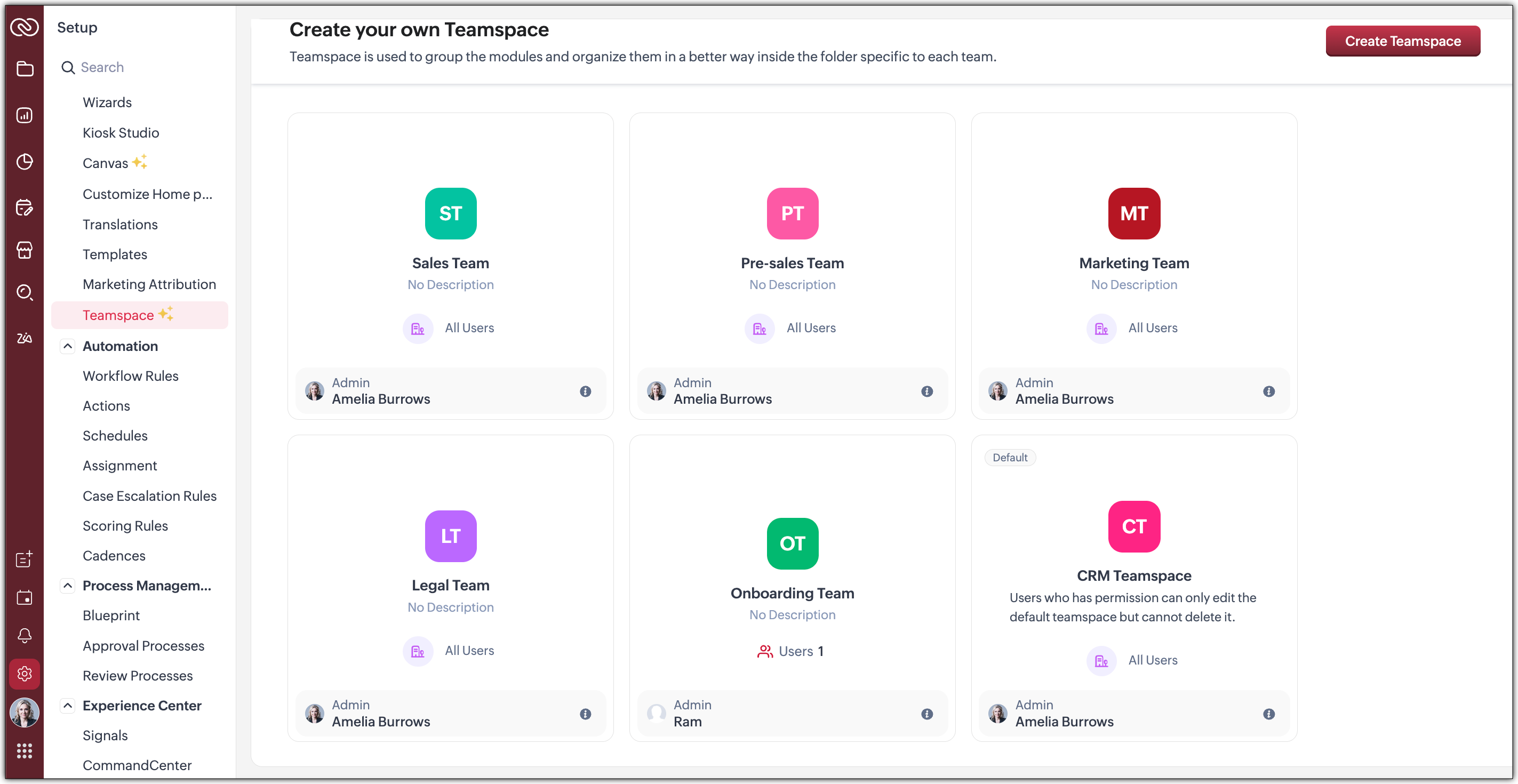
Organized Teamspaces for Focused Work
Tab Groups have been transformed into what we now call Teamspaces. If your CRM is used by multiple teams, organizing and managing their work and data can quickly become complex.
We offer a solution by giving each team a dedicated, folder-like space where all their related modules are grouped together. This setup ensures clear separation between teams, making collaboration more focused, and preventing the risk of teams crossing over or accessing modules that are not meant for them.
Hence, Teamspaces are dedicated workspaces for each department or function to organize their work. Whether you're in sales, support, or marketing, Teamspaces help reduce noise and keep your workspace relevant to your role. Learn more.

You have the option to create teamspaces from the bottom of the sidebar or from the Setup menu. The org admin would generally be the one who creates teamspaces, assigns users as teamspace admins and adds users to a teamspace.
Note : Users with the Manage teamspace permission enabled will be able to create and manage teamspaces in an org.
Teamspace Admin
A teamspace admin is generally the head of a department or a team. For example, a Sales Director could be assigned as the Sales Teamspace's Admin. Once a user becomes a teamspace admin, they can add or remove users, allow reports and dashboards to be created for modules within a teamspace.
Note : If a user is a Teamspace admin but does not have the "Manage Teamspace" permission enabled, they can only manage the specific Teamspace they’ve been assigned to as an admin. They won't be able to create new Teamspaces or manage any others.
Features offered as part of this enhanced UI
- Additional Module Views have been added to provide you with more flexibility, better insights, and improve productivity when working with module data. Thee view added are :
--> Chart View : Get a visual representation of your module data with this View
--> Grid View : Convert your module data into a spreadsheet-like interface where you can edit and manage records directly without having to open each record individually.
--> Timeline View : Look at how your module is created by viewing data plotted over a specific period of time.
--> Split View : Split your module data based on picklist fields /users or criteria to segment them for further inferences. - Interaction tab : This feature displays a timeline of a customer's journey and their engagements across different channels within your CRM.
 We will post individual announcements for each of the above features in the upcoming days.
Themes
The new UI introduces a refreshed theming experience with 13 vibrant colour options to personalize your workspace. These themes go beyond just cosmetic changes: the selected theme isn't limited to the sidebar; it flows throughout the product interface.
Once you choose a theme, the colour is consistently applied across key areas of the CRM, including buttons, tabs, menus, and other interactive elements. This cohesive design enhances visual clarity and gives your team a more engaging, unified experience tailored to their preferences.
If you want to match your brand colours or give your CRM tool a refreshed appearance, the new themes bring both customization and character to your work environment.
Dark-Mode
With the new UI, we’re excited to bring Dark Mode to your CRM experience. This feature was designed with both comfort and usability in mind.
Dark Mode offers a visually soothing alternative to the standard light interface, reducing eye strain during long hours of work, especially in low-light environments. It's not just a cosmetic change; it’s about enhancing usability and making your workspace more comfortable.
Once enabled, Dark Mode is applied consistently across the entire product, including the new UI elements like the left sidebar, buttons, forms, and interaction panels. Whether you're viewing records, managing tasks, or collaborating within Teamspaces, the darker interface ensures clarity without compromising on aesthetics or function.
This addition is part of our effort to make Zoho CRM more adaptable to user preferences and modern work styles. You can switch to Dark Mode at any time from your profile settings and choose what works best for you. Learn more.
What can you choose in this implementation?
Day : Prefer a brighter interface? Day Mode offers a clean, crisp, and classic appearance of your CRM, making it not just functional but also visually pleasing.

Night : Enjoy a sleek, modern look with reduced eye strain, especially in low-light environments. Darker UI minimizes glare and helps reduce fatigue, making it easier to work for longer periods.

Auto : Let the system decide! Auto Mode automatically switches between dark and light themes based on your device settings.

Resources
We invite you to explore these exciting updates and see how productivity increases in your CRM journey. Stay tuned for our upcoming announcements where we’ll dive deeper into each feature, helping you make the most of everything the NextGen UI has to offer.
Regards,
Serena Woolridge
Access your files securely from anywhere
Centralize Knowledge. Transform Learning.
All-in-one knowledge management and training platform for your employees and customers.
New to Zoho Recruit?

Zoho Developer Community
New to Zoho LandingPage?
Zoho LandingPage Resources
New to Zoho Survey?
New to Zoho CRM Plus?
Deliver unforgettable customer experiences
New to Zoho CRM Plus?
Deliver unforgettable customer experiences
New to Zoho Marketing Plus?
Everything you need to run your marketing
New to Zoho Marketing Plus?
Everything you need to run your marketing
New to Bigin?





Topic Participants
Serena Woolridge
Andréa Kérébel
Andrew
Ishwarya SG
K'an Thomas
Sticky Posts
Introducing Multiple Sandbox Types and Support for Module's Data Population
Register here for the upcoming Focus Group webinar on Multiple Sandbox | Help documentation to learn more about the new enhancements Hello everyone, Sandbox in CRM is a testing environment for users to create and test new configurations like workflowGood news! Calendar in Zoho CRM gets a face lift
Dear Customers, We are delighted to unveil the revamped calendar UI in Zoho CRM. With a complete visual overhaul aligned with CRM for Everyone, the calendar now offers a more intuitive and flexible scheduling experience. What’s new? Distinguish activitiesVoC in Zoho CRM is now data savvy: Explore response drilldown, summary components and participation in CRM criteria
VoC has all the goods when it comes to customer intelligence—which is why we're constantly enhancing it. We recently added the following: A customer drilldown component that shows you the list of prospects and customers behind a chart's attribute ExpandedWrapping up 2025 on a high note: CRM Release Highlights of the year
Dear Customers, 2025 was an eventful year for us at Zoho CRM. We’ve had releases of all sizes and impact, and we are excited to look back, break it down, and rediscover them with you! Before we rewind—we’d like to take a minute and sincerely thank youPresenting ABM for Zoho CRM: Expand and retain your customers with precision
Picture this scenario: You're a growing SaaS company ready to launch a powerful business suite, and are looking to gain traction and momentum. But as a business with a tight budget, you know acquiring new customers is slow, expensive, and often delivers
New to Zoho TeamInbox?
Zoho TeamInbox Resources
Zoho CRM Plus Resources
Zoho Books Resources
Zoho Subscriptions Resources
Zoho Projects Resources
Zoho Sprints Resources
Qntrl Resources
Zoho Creator Resources
Zoho CRM Resources
Design. Discuss. Deliver.
Zoho Show Resources

Get Started. Write Away!
Writer is a powerful online word processor, designed for collaborative work.
Zoho CRM コンテンツ
-
オンラインヘルプ
-
Webセミナー
-
機能活用動画
-
よくある質問
-
Ebook
-
-
Zoho Campaigns
- Zoho サービスのWebセミナー
その他のサービス コンテンツ
Nederlandse Hulpbronnen

ご検討中の方
Recent Topics
Content Security Policy
Is there a place in ZOHO CRM to add a Content Security Policy to allow for a call to a google.com map, from inside our current app? Or, how do I resolve the issue below?? jquery.js:1 Refused to load the script 'https://maps.google.com/maps/api/js?v=3.41&libraries=places&sensor=true&key=AIzaSyAyQzKeKSbLci4LwZhn9oXvtCkbUo1Ae4g&callback=map_loader'Option to select location?
As a business coach, I meet with clients at various public locations. I have two or three pre-determined locations that I meet at. I would like the client to choose the location when booking an appointment. Is there a way to do that with a single service, or is the best way to accomplish this by creating one service for each location offered?Provide a standard structure to your content using article templates
Hello everyone, When multiple writers work on different documents, maintaining a standard structure can be challenging as each of the writer follows a different writing style. However, when the structure, tone, and format of every document is different,Accessibility Spotlight Series - 1
Every user interacts with products differently, what feels intuitive to one may be challenging for another. Addressing this, accessibility is built into Zoho Project's design philosophy. This helps users navigate and perform actions with ease irrespectiveProjects Tasks Not Showing Dependencies
I'm clicking on tasks and the popup to add dependencies isn't showing. I can't disconnect the nodes either. For some reason when I slide a task backwards it says it cannot go before a predecessor, even though there is not predecessor. Double clickingDeprecation of C4 endpoint URLs
Note: This post is only for users who are still using the C4 endpoints. Hello everyone, At Zoho Creator, we're committed to continuously enhancing the security, performance, and capabilities of our platform. As part of this ongoing effort, we'll be deprecatingIntroducing AWS authentication for connections in Deluge
Hello everyone, We're incredibly excited to announce the all-new AWS authentication for connections in Deluge! This highly anticipated feature simplifies connecting to Amazon Web Services, opening up a world of possibilities and allowing you to seamlesslyCustomize User Invites with Invitation Templates
Invitation Templates help streamline the invitation process by allowing users to create customized email formats instead of sending a one-size-fits-all email. Different invitation templates can be created for portal users and client users to align withListObjects is recognized by VBA
Sub addNewRow() Dim ws As Worksheet ' Set your worksheet name Set ws = ThisWorkbook.Sheets("Invoice") ' Set your table name (change "Table1" to your actual table name) ws.ListObjects("InvItems").ListRows.Add End Sub I am getting Unknown function: LiKPI Widget dashboard select periods
I have a problem with selecting periods as a user filter. In the beste scenario I would like to have to have a period filter like Google Analytics has of Datastudio (see attachment). In the KPI widget I "Group by "inquiry_date" on week&Year". It selectsNeed a way to secure Prefill URLs in Zoho Forms (hide or encrypt prefilled values)
Hi everyone, I often use Zoho Forms with prefilled URLs to simplify the user experience — for example: https://forms.zohopublic.com/.../form?Name=David&Amount=300 However, the problem is that all prefilled values are visible and editable in the link.Can’t send emails from Zoho CRM after adding a new user — verification codes not received
Hi everyone, We recently added a new user to our Zoho CRM account and purchased an additional license. Since then, we haven’t been able to send any emails from Zoho CRM. Our Zoho Mail accounts are working perfectly, we can send and receive emails directlyCRM for email in Outlook: how to ignore addresses?
We’re using the "Zoho CRM for email" add-in for Outlook. When opening an email, the add-in displays all email addresses from the message and allows me to add them to the CRM or shows if they’re already contacts. However, sometimes people listed in ToScheduling Calls in CommandCenter / Blueprints
I would love it if you could add a function to schedule a call in the lead's record for a future date. I know you can add a Task by going to Instant Actions > Task and completing the form: These tasks go into the lead's record under Open Actions. ButQuickly send emails and sync conversations with custom email addresses in CRM
Editions: All editions DCs: All DCs Release plan: This enhancement has been released for customers in all DCs except IN and US. We will be enabling it for IN and US DC customers soon. [Update on 22 May 2024] This enhancement has been released for allZoho製品と生成AIツールの活用について
いつもありがとうございます。 弊社では、Zoho Oneを契約し、CRMを軸として、見込み客の管理から商談、その後の受注や請求の管理、サポート業務(Desk)、業務データのレポーティング(Analytics)などを行っております。 Zohoサービス自体には、Ziaというツールが搭載されているかと存じますが、それ以外の外部の生成AIツールと連携した活用などもできるのでしょうか?具体的には、CopilotなどがZohoに登録されているデータや情報を見て、対話型で必要なデータを提示してくれたり、商談や蓄積されたメモなどを分析してユーザが知見を得られるような活用ができないか、と考えております。Work with Contacts who use multiple Emails / Manage obsolete Email addresses without loosing Emails in Context
Hello List Work with Contacts who use multiple Emails Only after 1 week in using Zoho CRM productively we have contacts which randomly use 2 different email addresses. From the concept I've understood that Zoho CRM offers two email fields which are recognizedNew Field in CRM Product Module Not Visible in Zoho Creator for Mapping
I created a new single-line field in the Products module in Zoho CRM. Zoho CRM and Zoho Creator are integrated, but the newly created field in CRM is not visible in Zoho Creator when I try to map fields.I want to subscribe 1 professional user but the email only 250 per day?
When I subscribe 1 professional user, I am only able to send 250 email per day? So less? Or is it typo, 2500 rather than 250? Any sale agent or friends can clear my doubt? Thank YouHow to add a % Growth column for year-over-year comparison (2024 vs 2025)
Hello, I am trying to build a monthly revenue comparison between 2024 and 2025 in Zoho CRM Analytics. My current setup is: Module: Deals (Affaires) Filter: Stage = Closed Won Date field: Closing Date Grouping: By Month Metrics: Sum of Amount for 2024,How do you map a user picklist field to another user picklist field.
In Zoho Projects, I'm trying to map a custom field (user picklist) in Task Details to a field (user picklist) in the Project Details. How do you get the two to map to each other? This is what I currently have that works for my other fields but doesn'tNew and improved API resources for Zoho Sign Developers
Hello, Developers community! We know that for you, an API's real value depends on how quickly, easily, and reliably you can integrate the it with your application. That's why we're excited to talk about the recent improvements to our developer resources,Project Approval Process Workflow
Issue: When a new Project is created, there is lack of process/workflow that provides their manager a process to approve or review. Suggestion/Idea: Similar to “Workflow”, we need “Workflow” ability at Project level, where based on the criteria of theWhy can I not choose Unearned Revenue as an account on items?
Hello, I do not understand why we don't have the ability to code an item to unearned revenue. It is not an uncommon situation to have in business. I understand that there is the Retainer invoice as an option, however that doesn't really work for us. OurRules not working properly
I created a rule to display certain fields on certain states. But it seems to be not working. It hides the fields even when I selected California, (which is a state that should show the fields when selected)Notebook font size issue
If I copy something from somewhere and paste it in my notebook, the font size becomes smaller.Sign in process is beyond stupid. I'd rather plug my phone into USB and copy files than sign in to this POS.
792 clicks and fields to fill in just to get into a 3rd rate app is too stupid for me.cant use mail API
I have generate Auth token from https://accounts.zoho.com/apiauthtoken/nb/create?SCOPE=ZohoMail/ZohoMailApi&EMAIL_ID=Zoho Mail Username or Email ID&PASSWORD=Your Zoho Mail Password and get the token but when i use that token on http://mail.zoho.com/api/organization/Ampersand in URL parameter // EncodeURL does not work
Hi Zoho, I have a url link with a parameter. The parameter is including ampersand in some cases (Can be "H&M" or "P&I") When trying to use %26 instead of "&" (the result I get using EncodeURL()) I get H%26M instead of H&M in the parameter field. How can I solve this? Thanks! Ravidhow can we create in zoho crm a new contact when the looup does not find a similar existing one
In forms/integrations/zoho crm / ne w record tab, contact name is to be mapped with my form contact name. When I go in biew edit/lookup configuration, I don t get the options (help dedicated page simply repeat the same info you get in the app) and doesDirectory Websites
Directories are a good website category to gain search engine traffic. Directories for a professional service category as an example can help their members in search results over their individual website. It would be nice to have a directory templateManage Task on Mobile
How do we manage our task on mobile devices? It seems that there should be a standalone mobile app to handle the new task features. The new features released in regards to Task management are great by the way! Now we need to bring that all together inSet Default Payment Method & Default account
Hi, I would like to know how to set the default payment method and default bank account when recording payments in zoho books. At present we have to change these fields everytime we record a payment, which leads to potential error and as we have a veryCustomer Portal on Zoho Desk
Hi, I'd like to know more about the items below I found when setting up the Customer Portal on Zoho Desk. Could someone help me explaining these in details? Especially the 2nd and 3rd point. Thanking you in advance! Permissions Customers can sign up for Customer Portal Customers can view tickets of their organization (contacts) Customers must register to access Customer Portal Display Community in Customer Self Service portalComputer Showing Offline in Unattended Access
I have a computer that was connected to the internet but showing offline in Assist. I tried uninstalling the program and deleting it from Zoho Assist the reinstalling and it still does not show up. I have been a user for several months and am not pleased with the lack of connectivity with Assist. If this continues I will have to find another product. The computer I reinstalled it on is not even showing up in Assist now. The name is NYRVLI-PC. ThanksZoho CRM Portal Error
Hi, We’re experiencing an issue with the Zoho CRM Portal. When we try to access it, we receive an HTTPS connection error: net::ERR_CERT_COMMON_NAME_INVALID. If we proceed past that, we then get a 400 Bad Request error. Could you please help us resolveIntegrating Zoho CRM EmbeddedApp SDK with Next.js — Initialization and Data Fetching Issues
You can get an idea from my code I have given in end: First, I worked on a React project and tried the same thing — it worked. My goal was to import the Zoho script and then load contacts using the Zoho Widget SDK, which was successful in React. Now,monetizing the courses
Can I add a price for course enrollment ?Can we add zoho books features like invoices estemates etc on our zohocommerce website. When our customer login with their account they can able to see all books features in one place on zohocommerce?
Can we add zoho books features like invoices estemates etc on our zohocommerce website. When our customer login with their account they can able to see all books features in one place on zohocommerce?Taxes for EU B2B Transactions
Currently, ZC doesn't seem to have a procedure for validating VAT numbers of businesses purchasing in another EU state, and removing local VAT is valid. This is essential for all inter EU B2B trade.Next Page