We’re transitioning from Zoho ShowTime to TrainerCentral
Hello everyone,
Zoho ShowTime was originally built as a training platform to serve training agencies, HR teams, and individual trainers. As the platform grew, we realized that more creators and businesses could benefit from its capabilities. That’s why we launched a new brand, TrainerCentral, a full-featured training platform that handles everything from course creation to live sessions. With a host of new features and added capabilities in TrainerCentral, we’re saying goodbye to Zoho ShowTime and transitioning to a more advanced, comprehensive platform.
With TrainerCentral, you can design multimedia-rich courses that combine videos, documents, quizzes, and assignments to offer self-paced training. Built-in live session tools allow you to host interactive sessions including polls, chats, and surveys, to keep learners engaged. The platform simplifies learner management with detailed progress tracking, analytics, and automated certificates, helping trainers measure performance and learning outcomes with ease.
It also offers a no-code website builder that enables users to create a professional, fully branded academy website to strategize and market their online courses effectively to learners. With its robust, integrated payment gateway system, it facilitates secure, frictionless transactions across global markets.
This migration from Zoho Showtime to TrainerCentral will provide you with access to enhanced features, improved performance, and a unified training experience.
How to migrate from Zoho ShowTime to TrainerCentral.
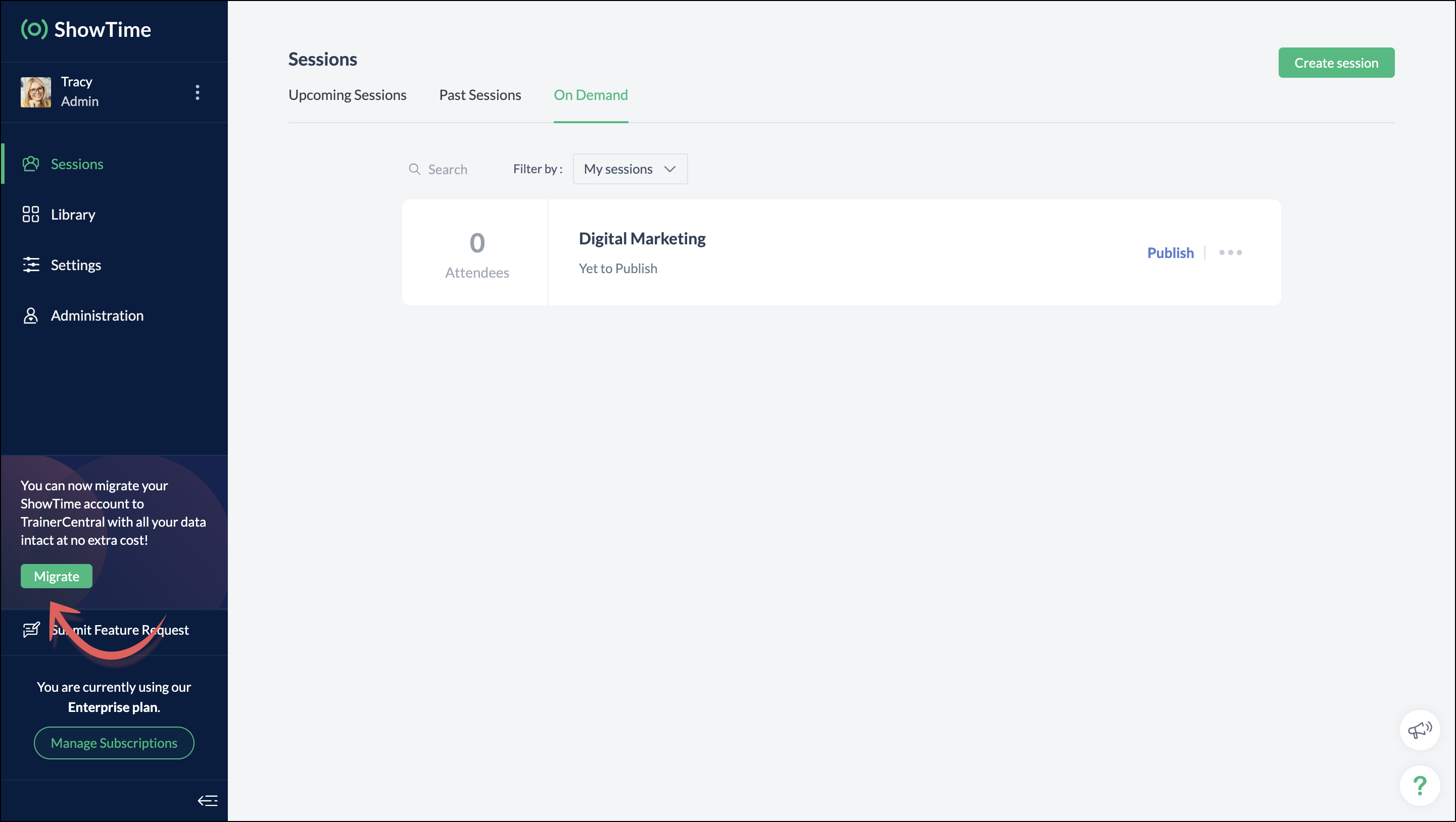
You can migrate your account from Zoho ShowTime to TrainerCentral anytime by clicking the Migrate button in the left pane and following the on-screen instructions. Once migrated, you’ll receive a notification, through which you can access your TrainerCentral account.
- Only the super admin of a Zoho ShowTime portal can migrate their portal's data to TrainerCentral.
- We’ll be disabling remote session scheduling and learner registration for on-demand sessions starting December 1, 2025. With this transition, Zoho ShowTime will reach its End of Life (EOL) on December 31, 2025.
To avoid any disruptions to your live classes, please move to TrainerCentral before December 31, 2025.
We hope this will elevate your experience to the next level.
If you have any questions, take a look at the FAQ section below, reach out to us at support@zohoshowtime.com, or just leave a comment here.
FAQ
FAQ
1. How long will the migration take?
The migration of your Zoho ShowTime data and account portal is expected to take approximately one to two hours. In the event of any technical issues or glitches during the migration, the product team will address them immediately. In such rare cases, the migration will be completed within 24–48 hours.
2. What will happen to my Zoho ShowTime account if it is not migrated before the sunset?
If you fail to migrate before the sunset, i.e., December 31, 2025, active Zoho ShowTime accounts will be automatically migrated to TrainerCentral.
3. What will happen after migration?
You will be able to access TrainerCentral with your Zoho ShowTime credentials and continue your teaching journey seamlessly, with the added benefit of new features.
4. Will there be any changes to my payment after migration?
No, there will be no changes to your payment. The amount you currently pay for your Zoho ShowTime subscription will remain the same after migration.
5. I am a Zoho ShowTime customer or Zoho One user. How will I be mapped to the TrainerCentral plan?
If you are a Zoho ShowTime customer or a Zoho One user, you will be mapped to the equivalent TrainerCentral plan automatically to ensure a seamless transition.
6. What happens if I choose not to migrate?
You can back up your data, including materials, recordings, and analytics associated with your account, and then contact our support team to delete your account.
7. I am a Zoho One user and purchased paid attendee add-ons. How do I enable them in TrainerCentral?
8. Will my configured payment gateway and ticket settings in Zoho ShowTime be migrated to my TrainerCentral account automatically?
All of the sessions and tickets created in Zoho ShowTime will be migrated without any changes to your TrainerCentral account. However, for any new sessions you create in TrainerCentral, you will need to set up your payment gateway and ticketing options again.
9. Where can I find my past sessions and library content from Zoho ShowTime in TrainerCentral after migration?

➤ Remote session: You can find previously created/conducted Zoho ShowTime remote sessions in Live Workshops → Past Sessions.
➤ On-demand session: You can find previously created/conducted Zoho ShowTime on-demand sessions in Live Workshops → On demand.
➤ All materials hosted in your ShowTime library will be moved to TrainerCentral's library.
10. Will my current integrations like Zoho CRM, Zapier, and Zoho Flow function seamlessly?
All of your Zoho CRM, Zapier, and Zoho Flow integrations and their functionalities will be migrated seamlessly to TrainerCentral. In Zapier and Zoho Flow, several additional triggers and actions are available for all courses and live workshops.
11. If I cancel my TrainerCentral subscription after migration, will I get the same plan when I resubscribe to a new TrainerCentral account?
No. The equivalent plan is provided only if you migrate from Zoho ShowTime. If you resubscribe for a new TrainerCentral account, you’ll be mapped to a new plan.
12. What if I can't see the Migrate button on my Zoho ShowTime portal?
If the Migrate button isn’t visible, please contact our support team to help you migrate from Zoho ShowTime to TrainerCentral.
Access your files securely from anywhere
New to Zoho Recruit?

Zoho Developer Community
New to Zoho LandingPage?
Zoho LandingPage Resources
New to Zoho Survey?
New to Zoho CRM Plus?
Deliver unforgettable customer experiences
New to Zoho CRM Plus?
Deliver unforgettable customer experiences
New to Zoho Marketing Plus?
Everything you need to run your marketing
New to Zoho Marketing Plus?
Everything you need to run your marketing
New to Bigin?





Topic Participants
Neeraja Raghavendran
Sticky Posts
Video tip 02: Customize your feedback and evaluation forms in Zoho ShowTime
Hello everyone, Here's a new video tip for all our ShowTime users. Today we will learn few quick, effective ways to evaluate your participants and assess your trainings conducted on Showtime, like MCQs (multiple choice questions), text-boxes, and ratings scale. Watch the below video to learn how these assessment systems help you effectively evaluate course-related knowledge and skills of your trainees on a regular basis. Follow this page to learn more such tips and stay updated on all theVideo tip 05: Host training courses under your own personalized domain and white-label your email communications.
Hello everyone, As a trainer, having your own domain name increases your brand's positioning and reach through search results on top search engines like Google, Yahoo, and Bing. Prospective customers will more readily pay for courses from an organization with a professional, established online presence. A custom domain establishes you as a leader in your area of subject expertise, helping you promote your courses and build brand recognition with your global audience. In today's video tip, we atVideo tip 04: Do you want to set up repeated training sessions at regular intervals? Learn how.
Hello everyone, Sometimes it is difficult to organize and manage your everyday work and training sessions. Scheduling recurring or repeated sessions can be even more time-consuming as you need to create and maintain the training content, schedule multiple time slots for the training, manage registrants across each session, and more. Zoho ShowTime offers a smarter option for these cases that only takes a few clicks. Play the video below to learn how to use the same presentation content and setSpotlight 03: Connect and deliver more effective trainings with ShowTimes' Viewer app
With the growing need for virtual classroom learning, the use of mobile and tablet software is quickly becoming the most convenient way to share knowledge between educators and students. According to a 2018 study, nearly 67% of digital learners now use mobile devices to complete their online coursework. Additionally, smartphone learners complete course material 45% faster than those using a computer. Considering these facts, we now introduce our next community spotlight series that will focus on ZohoVideo tip 1: Record and share trainings on Zoho ShowTime.
Hello everyone, We are excited to launch our video tip of the month series within our ShowTime's community, aimed to help our trainers and educators with brief and practical tips on delivering more effective and comprehensive training. In this month's video tip, we will show you how to record your training sessions quickly and share them with your attendees and other prospective learners externally. We hope this tip was useful. ShowTime also allows you to automatically record your live trainings
New to Zoho TeamInbox?
Zoho TeamInbox Resources
Zoho CRM Plus Resources
Zoho Books Resources
Zoho Subscriptions Resources
Zoho Projects Resources
Zoho Sprints Resources
Qntrl Resources
Zoho Creator Resources
Zoho CRM Resources
Design. Discuss. Deliver.
Zoho Show Resources

Get Started. Write Away!
Writer is a powerful online word processor, designed for collaborative work.
Zoho CRM コンテンツ
-
オンラインヘルプ
-
Webセミナー
-
機能活用動画
-
よくある質問
-
Ebook
-
-
Zoho Campaigns
- Zoho サービスのWebセミナー
その他のサービス コンテンツ
Nederlandse Hulpbronnen

ご検討中の方
Recent Topics
Power of Automation:: Automating SLA Timelines for First Response & Resolution for Issues module.
Hello Everyone, Ever wished SLAs could update automatically based on issue severity i.e no manual tracking, no missed timelines? That is exactly what one of our customers, Alex, wanted to achieve in the Issues module. So, we have setup a simple automationPower of Automation :: Quick way to associate your Projects with Zoho CRM
A custom function is a software code that can be used to automate a process and this allows you to automate a notification, call a webhook, or perform logic immediately after a workflow rule is triggered. This feature helps to automate complex tasks andFree webinar! Build smarter apps with Zoho Sign and Zoho Creator
Hello, Bring the power of digital signatures to the apps you build in Zoho Creator! Connect Zoho Sign as a microservice and enable seamless e-signature workflows in your applications. This integration allows you to automate signing tasks using Deluge.Move orders scan ISBN
Hi We have ISBN setup to be searched in items zoho but move orders dissent recognize the ISBN is there q missing configuration? regards, JSWhat's New - October 2025 | Zoho Backstage
Hey everyone! We’ve been busy rolling out a host of upgrades for Zoho Backstage. While some major features are still going through final rounds of testing to make your event experience smooth as butter, here’s what was new and improved in October 2025.Zoho People Attendance Regularization – Wrong Total Hours Displayed
While using Zoho People, I observed that the attendance regularization is showing wrong total hours when applied to past dates. For example, if a check-in is added at 10:00 AM and check-out at 6:00 PM for a previous date, the system sometimes calculatesAdd Flexible Recurrence Options for Meeting Scheduling in Zoho Cliq (e.g., Every 2 Weeks)
Hello Zoho Cliq Team, We hope you are doing well. Currently, when scheduling a meeting inside Zoho Cliq, the recurrence options are limited to Daily, Weekly, Monthly, and Yearly. There is no ability to set a meeting to occur every X weeks — for example,Subform Disabled Fields Should Remain Disabled on Edit/View
Currently, when we disable a subform field using on user input or on add new row, it works perfectly during the initial data entry. However, when the record is saved and reopened for viewing or editing, these disabled fields become editable again. ThisHow do you print a refund check to customer?
Maybe this is a dumb question, but how does anyone print a refund check to a customer? We cant find anywhere to either just print a check and pick a customer, or where to do so from a credit note.What is Resolution Time in Business Hours
HI, What is the formula used to find the total time spent by an agent on a particular ticket? How is Resolution Time in Business Hours calculated in Zohodesk? As we need to find out the time spent on the ticket's solution by an agent we seek your assistanceHide "Section" headers when using a form as a subform in "List view"
When using a form as a subform and setting the "View Type" to "List View" it is not possible to hide the section headers. This can become an issue if I have a section which is not applicable to this subform and I hide the fields within that section andAdd additional field to quick search results
IN the advanced search, we can add any field to the columns. In the regular search results (before you press enter, there is no option to modify the results. It would be super useful to include a custom field where it currently displays the pipleineNeed Help: Updating Related Records via Subform Entries in Zoho Creator
Hi everyone, I’m trying to set up a workflow in Zoho Creator where each row in a subform updates related records in another form automatically. Here’s the situation: My main form (e.g., “Receipts”) contains a subform where each row selects a related recordDisable signing in using email aliases?
Hi, I currently have user accounts that have multiple aliases, for example: Main: name@domain.com Alias: alias1@domain.com, alias2@domain.com Currently, I am able to use any of those 3 emails in the 'username' box during login, and it will log me into the email. Is there a way to setup so that email aliases cannot be used to sign on? I'd still be able to receive and send emails using those aliases in the main email account like it works now, except only the main email can be used to login. Cheers!Zoho Desk - Community - Customer Portal - Description Field UX Improvement
Hi Zoho Desk Team, As a prolific user of Zoho Cares Community, I find it very frustrating that I cannot increase the size of the Description box (this one which I am typing this message). Many apps with multi line text fields have a small handle in theAdd the same FROM email to multiple department
Hi, We have several agents who work with multiple departments and we'd like to be able to select their names on the FROM field (sender), but apparently it's not possible to add a FROM address to multiple departments. Is there any way around this? Thanks.Can I change the format of the buttons in the email templates?
Hi all! We have been working hard trying to brand our email templates, and have some way to go yet. One of the things we can't seem to edit is the green ${Cases.CUSTOMER_PORTAL_BUTTON} button and the font of the View Ticket text. Is there any way of doingLead to Contact Conversion with multiple email address fields
We are a B2C business with a strong repeat cycle, and as such it's not uncommon for customers to use multiple email addresses with us. We have both our Contacts & Leads modules set up with 3 email fields. (Primary Email / Secondary Email / Historic Email)Exporting Charts from ZohoCRM
Hi...I'm relatively new to ZohoCRM, but very happy with it so far. I have all my leads and potentials accurately entered, and like the reports that I can view, with charts at the top of the data. But when I export the data, I'm receiving only the data, whether I export as excel, csv or pdf. How can I export both the chart and the data? In case it makes a difference, I'm using the free version right now. I tried researching the other editions to see if a paid version of the software offered the abilityAutomatically Update Ticket Status in Zoho Desk Based on Actions in Zoho Projects
Hi Zoho Desk Team, Hope you’re doing well. We’re using the Zoho Desk–Zoho Projects integration to manage tasks related to customer tickets, and it works well for linking and tracking progress. However, there are a few important automation capabilitiessms long credits
I’m trying to purchase Long Code credits so I can send SMS campaigns to my contacts. However, when I click the “Buy Now” button, the page appears blank and doesn’t load any purchase options. Could you please assist me in purchasing the Long Code creditsTip #48- Power Your AI Workflows with Zoho Assist on Zapier’s MCP- 'Insider Insights'
We’re thrilled to announce that Zoho Assist is now part of Zapier’s Model Context Protocol (MCP), bringing remote support automation right into your AI ecosystem. What is MCP? The Model Context Protocol (MCP) is Zapier’s new framework designed to connect"Total Hours" on Employee Attendance Report
I'm learning that in Zoho jargon, "total hours" does not include paid breaks. Or at least not the way that my setup is working. That seems a little weird to me, since most jurisdictions in the US don't differentiate between time spent on paid break andInsert Cookie Policy in Zoho Sites
Hello, i need to insert a banner on my site because i'm in Italy so i have to respect EU laws for Cookie Policy and Privacy Policy. I see that i need to insert a code in <head> section of my site to show a banner/popup with cookie info. How i can do this? Thank you LucaMarketing Tip #1: Optimize item titles for SEO
Your item title is the first thing both Google and shoppers notice. Instead of a generic “Leather Bag,” go for something detailed like “Handcrafted Leather Laptop Bag – Durable & Stylish.” This helps your items rank better in search results and instantlyCustomer Parent Account or Sub-Customer Account
Some of clients as they have 50 to 300 branches, they required separate account statement with outlet name and number; which means we have to open new account for each branch individually. However, the main issue is that, when they make a payment, theyForced Logouts - Daily and More Frequent
In the last month or so, I've been getting "power logged out" of all of my Zoho apps at least daily, sometimes more frequently. This happens in the same browser session on the same computer, and I need to re-login to each app separately after this happens.ENTER key triggering Submit
Is it possible to stopped the ENTER key from the mandatory triggering of the Submit button on Creator form? I want forms submitted "ONLY" when the Submit button is pressed.Is it possible to assign Client user to external task ON PROJECTS' TEMPLATES?
Is it possible to assign Client user to external task ON TEMPLATES PROJECTS?Cliq does not sync messages after Sleep on Mac
I'm using the mac app of Cliq. When I open my mac after it was in sleep mode, Cliq does not sync the messages that I received. I always have to reload using cmd + R, which is not what I want when using a chat application.Link to images
I have added images in pages. I would like to link those images with linked in URL so that they open in new window. There is an option of image -> link but I am not able to use the same to open URL in new window. Please check the attached image. Can youRespond faster and smarter with Zia in your IM Inbox
You’re in the middle of a busy chat queue. New messages keep popping up. One customer sounds upset. Another is asking a long list of questions. You need context. You need speed. You need help. That’s exactly when Zia Insghts jumps into action. It showsWARNING : Smart list automatically unsubscribes your contacts.
I created a smart list of my team members based on the criterion that their email domain was @_____. The list refreshed as expected — but it ended up unsubscribing almost all members of my team. I contacted support, but it took two months to get a reply,5名限定 課題解決型ワークショップイベント Zoho ワークアウト開催のお知らせ (10/31)
ユーザーの皆さま、こんにちは。Zoho ユーザーコミュニティチームの中野です。 10月開催のZoho ワークアウトについてお知らせします。 今回はZoomにて、オンライン開催します。 参加登録はこちら(無料):https://us02web.zoom.us/meeting/register/BGYTysOnSqa9LA9eY2IKww ━━━━━━━━━━━━━━━━━━━━━━━━ Zoho ワークアウトとは? Zoho ユーザー同士で交流しながら、サービスに関する疑問や不明点の解消を目的としたSubforms in Stateless Forms
Stateless Forms are very useful, but we can't build complex data entry pages without Subforms. Can this be implemented? This would make Stateless Forms truly powerful.Custom Function not getting package details when triggered from Workflow Rules.
I have a custom function for Packages that submits a form in our Creator app that we use to generate custom shipping labels (internal staff complete deliveries so we cannot generate shipping labels straight from Inventory). When the function is executedBilling Preferences per Account
Hello, We are trying to setup Billing Preferences in Zoho Desk to set up a different pricing per account. We charge different pricing per hour per customer/account. Account A = 100 per hour Account B = 125 per hour In the Billing Preferences in Time EntryTime entry preview for custom time entry templates.
Our company needed time entries in a specific format to document our client interactions. Since we are using a custom time entry layout, we have lost the "preview" on the time entry tab. Using the default time entry layout, you get a small preview ofAble to change project on timelog entries
Ability to move the timesheet entry from one project to another. When a user adds a wrong entry a manager can change/update the timesheet entry to the correct project.Knowledge base: The nitty-gritty of SEO tags
A well-optimized knowledge base with great SEO can benefit your company by allowing customers to find help articles and support resources using search engines. This enables customers to quickly and efficiently find the information they need without directNext Page