WorkDrive - TrueSync
La fonctionnalité TrueSync de Zoho WorkDrive permet à ses utilisateurs de reproduire leurs documents WorkDrive web sur leur bureau et d'y accéder localement. Cela permet d'économiser votre espace de stockage sur l'ordinateur. TrueSync vous permet également de synchroniser les fichiers de Zoho WorkDrive web avec votre ordinateur, et vice versa.
Avec TrueSync, les données de votre ordinateur sont disponibles soit en ligne uniquement, soit hors ligne. Toute modification apportée à vos fichiers sera automatiquement synchronisée avec l'application web WorkDrive.
En ligne uniquement
Les fichiers et dossiers en ligne uniquement n'occupent pas d'espace sur le disque dur. Vous pouvez voir la liste des fichiers et dossiers disponibles dans le lecteur virtuel, mais ils ne sont pas réellement téléchargés tant que vous ne les ouvrez pas pour les afficher ou les modifier.
Disponible hors ligne
Les fichiers et dossiers dans cet état sont téléchargés et disponibles sur votre disque dur. Vous pouvez travailler directement dessus et les changements effectués sont automatiquement synchronisés avec la version web.
Bon à savoir
- L'installation ne peut être effectuée qu'avec le droit d'administrateur.
- L'application TrueSync est actuellement disponible uniquement pour les systèmes d'exploitation Windows et Mac.
- Versions d'OS supportées :
- Pour Windows : Windows 7 et supérieur
- Pour Mac : OS X 10.14 et supérieur
Icônes d'état de WorkDrive TrueSync
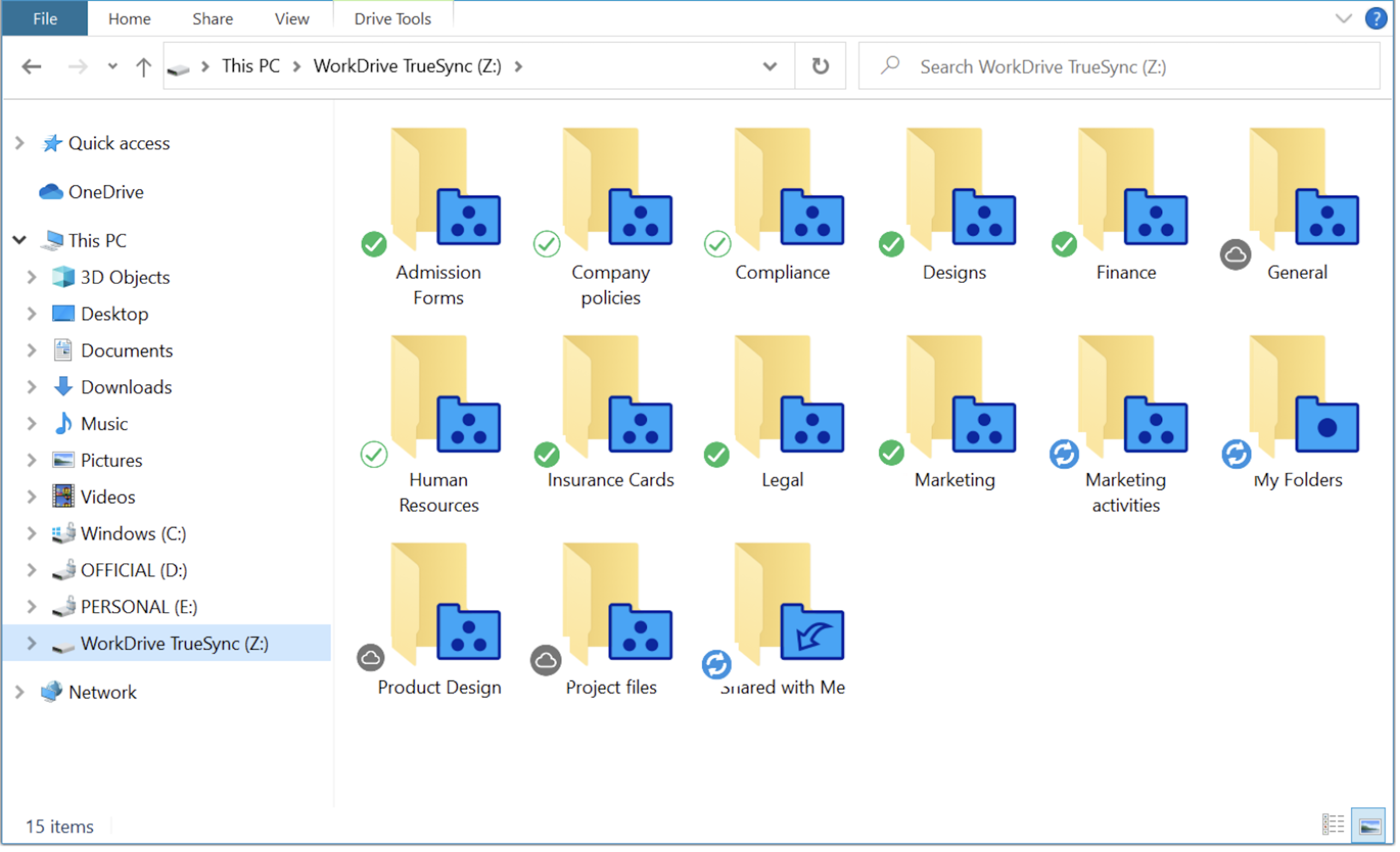
Dans le dossier WorkDrive TrueSync, les icônes d'état montrent l'état de synchronisation de tous vos fichiers et dossiers.
Les différentes icônes d'état sont :

En ligne uniquement : les fichiers sont uniquement disponibles en ligne. Lorsque vous ouvrez un fichier, il est téléchargé sur votre ordinateur pour être visualisé. Une fois que vous aurez fermé le fichier, il ne sera plus disponible sur votre ordinateur.

Disponible hors ligne : les fichiers ont été téléchargés sur votre ordinateur et sont disponibles hors ligne. Les fichiers téléchargés occuperont l'espace requis sur le disque dur.

Synchronisation partielle : lorsqu'un dossier contient une combinaison de fichiers en cloud uniquement et hors ligne, l'icône de synchronisation partielle s'affiche comme état.

Synchronisation en cours : lorsque vous synchronisez ou mettez hors ligne certains fichiers dans le lecteur virtuel, l'icône de progression s'affiche comme état jusqu'à ce que les fichiers soient téléchargés sur votre ordinateur.

Erreur de synchronisation : lorsqu'il y a une erreur dans la synchronisation ou le téléchargement des fichiers dans votre lecteur virtuel, l'icône d'état d'erreur de synchronisation s'affiche au-dessus des fichiers. Une fois le problème résolu, le fichier sera synchronisé et l'icône d'état appropriée s'affichera.
Icônes d'état manquantes dans WorkDrive TrueSync
Au sein du dossier WorkDrive TrueSync, tous les fichiers et dossiers synchronisés seront affichés. Vous pouvez vérifier ici si les icônes d'état fonctionnent ou non. Dans certains cas, les icônes d'état n'apparaissent pas sur les fichiers et dossiers du dossier TrueSync.
Les icônes d'état n'apparaîtront pas sur les fichiers et les dossiers si elles ont été désactivées dans les préférences de l'application de synchronisation.
Restrictions spécifiques à l'OS
- Windows : l'explorateur Windows ne peut charger que 11 icônes d'état à partir des applications installées sur votre système. Les icônes d'état de WorkDrive doivent figurer parmi les 11 premières afin d'être chargées par l'explorateur Windows dans le dossier de synchronisation.
- MAC : si les icônes d'état n'apparaissent pas dans le dossier WorkDrive TrueSync, assurez-vous que les extensions "Finder" pour WorkDrive sont activées.
Déplacer votre cache WorkDrive TrueSync vers un autre drive (Windows)
Votre dossier cache stocke les données des fichiers et dossiers récemment ouverts, vos données hors ligne et les données des éléments qui doivent encore être synchronisés.
Vous pouvez parfois avoir besoin de libérer de l'espace sur votre lecteur principal (C:\) pour installer d'autres programmes. Avec la fonction de déplacement du cache de WorkDrive TrueSync, il est facile de déplacer vos fichiers WorkDrive vers un autre drive de votre machine en toute sécurité afin de libérer suffisamment d'espace pour installer des applications sur votre drive primaire.
Déplacer vos fichiers cache téléchargés vers un autre drive
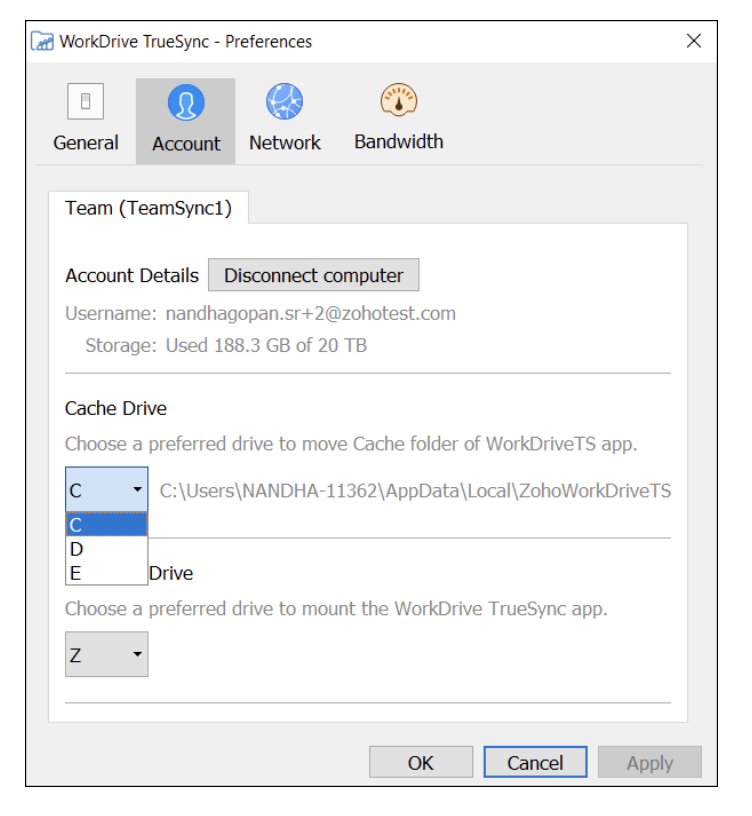
- L'application TrueSync >> Paramètres >> Préférences >> Compte.
- Sélectionnez le drive dans lequel vous voulez déplacer votre dossier de cache à partir du menu déroulant dans la section Cache Drive.
Bon à savoir
- Assurez-vous que vous avez la permission et l'accès au drive cible où vous voulez déplacer votre cache WorkDrive TrueSync.
- Vérifiez que vous disposez de suffisamment d'espace de stockage pour transférer votre cache sur un lecteur.
N'hésitez pas à nous faire part de vos questions dans la partie commentaires ci-dessous.
L'équipe Zoho France
Access your files securely from anywhere
Centralize Knowledge. Transform Learning.
All-in-one knowledge management and training platform for your employees and customers.
New to Zoho Recruit?

Zoho Developer Community
New to Zoho LandingPage?
Zoho LandingPage Resources
New to Zoho Survey?
New to Zoho CRM Plus?
Deliver unforgettable customer experiences
New to Zoho CRM Plus?
Deliver unforgettable customer experiences
New to Zoho Marketing Plus?
Everything you need to run your marketing
New to Zoho Marketing Plus?
Everything you need to run your marketing
New to Bigin?





Topic Participants
Kinjal Lodaya
Sticky Posts
Collaboration sans faille avec Zoho One
Bonjour à tous, Dans cet article nous allons voir comment Zoho One permet une collaboration à différents niveaux . La façon dont nous travaillons évolue. À mesure que les entreprises se mondialisent, la plupart des activités sont menées en équipe.
New to Zoho TeamInbox?
Zoho TeamInbox Resources
Zoho CRM Plus Resources
Zoho Books Resources
Zoho Subscriptions Resources
Zoho Projects Resources
Zoho Sprints Resources
Qntrl Resources
Zoho Creator Resources
Zoho CRM Resources
Design. Discuss. Deliver.
Zoho Show Resources

Get Started. Write Away!
Writer is a powerful online word processor, designed for collaborative work.
Zoho CRM コンテンツ
-
オンラインヘルプ
-
Webセミナー
-
機能活用動画
-
よくある質問
-
Ebook
-
-
Zoho Campaigns
- Zoho サービスのWebセミナー
その他のサービス コンテンツ
Nederlandse Hulpbronnen

ご検討中の方
Recent Topics
Custom Fonts in Zoho CRM Template Builder
Hi, I am currently creating a new template for our quotes using the Zoho CRM template builder. However, I noticed that there is no option to add custom fonts to the template builder. It would greatly enhance the flexibility and branding capabilities ifFoutmelding bij uitvoering/opslaan functie 'Left expression is of type TEXT and right expression is of type NUMBER'
Hoi! Ik heb een workflow (zie bijlage) die wordt getriggerd zodra de verwachte weekomzet van een bedrijf wordt aangepast naar een bedrag hoger dan 0. Op dat moment moet een functie (zie bijlage) gaan berekenen wat het benodigde kredietlimiet moet zijn.Hoe kun je Nederlandse loonstroken boek in Zoho Books?
Beste Community, Heeft er iemand een idee hoe je standaard loonstroken kunt inboeken in Zoho Books? Ik ben benieuwd hoe jullie dit doen en wat de mogelijkheden zijn.Unable to Filter Retail Sales Orders & Need Paid/Unpaid Filter – Zoho Books
Hi Zoho Team, Recently you introduced Retail – Standard and Retail – Premium templates for Sales Orders. However, in the Sales Order module we still cannot filter or segregate Retail Sales Orders separately from normal B2B sales orders. Because of this,Service op locatie organiseren met Zoho FSM: waar lopen organisaties tegenaan?
Bij organisaties met service teams op locatie merken we vaak dat de complexiteit niet zozeer in de planning zelf zit, maar in wat er rond die planning gebeurt. Denk aan opvolging na interventies, consistente servicerapporten, en het bijhouden van installatiesPossible to delete the "Big Deal Alert" in Zoho CRM?
Hi, Is it possible to delete the "Big Deal Alert" in Zoho CRM? My company has no need for it and I want to remove it to clean up my email templates list. Thank you. Moderation Update: Currently, the option to delete the "Big Deal Alert" template is inAllow selection of select inactive users in User data fields
Hello, We sometimes need to select a previous employee that has an inactive account in the User data field. For example, when doing database cleanup and indicating actions are done by a certain employee that weren't filled out when they were part of the[Webinar] Top 10 Most Used Zoho Analytics Features in 2025
Zoho Analytics has evolved significantly over the past year. Discover the most widely adopted features in Zoho Analytics in 2025, based on real customer usage patterns, best practices, and high-impact use cases. Learn how leading teams are turning dataDo buttons and vba msgbox work on mobile, specifially the iPhone zoho sheets app?
In Zoho sheets on the web, I inserted a button and assigned a VBA macro to it. It pops up a msgbox with some text. When I go onto the iPhone mobile zoho sheets app, the button is there. When I click on that button, the spinning asterisk appears for a[Webinar] Solving business challenges- Handling the challenge of transitioning to Zoho Writer from legacy tools
Moving to Zoho Writer is a great way to consolidate your business tools and become more agile. With multiple accessibility modes, no-code automation, and extensive integration with business apps and content platforms, Zoho Writer helps solve your organization'sHow can I effectively manage a website with your help?
I’m wondering if it’s possible to develop a custom website with specific features using Zoho as an alternative platform. My goal is to create a website similar to https://tmsim.ph, with the same kind of functionality and user experience. I would trulyIntroducing the Yes/No field: Binary decisions made beautiful
Greetings, form architects! What would you do when you need a simple yes/no answer on your form? Normally, you add a Radio field. Type Yes. Type No. Until now. The new Yes/No field is purpose-built for binary decisions. It is preconfigured, visually consistent,Move email between inboxes?
Is it possible to move emails from one team inbox to another? We would like to be able to have a single "catch-all" inbox for incoming requests, and then move the email to the appropriate department inbox. I was hoping we would be able to accomplish thisThe power of workflows in Zoho Marketing Automation - Video Webinar
In this Zoho Marketing Automation video webinar, our experts walk you through: Why you may want to create marketing workflows How to create marketing workflows Use Zoho CRM data and apply workflows to automate your marketing strategy How workflows canZoho CRM's sales trend and sales follow-up trend dashboards are now customizable
Dear Customers, We're here with good news! Sales trend and sales follow-up trend are two system-defined dashboards that help you understand trends and anomalies in your sales outreach and conversion efforts. They use Zia's intelligence to identify patternsIntroducing Rule-Based AI Coding Assistants for Zoho Finance Widgets
Hello customers, We’ve introduced rule-based AI coding assistants to speed up Zoho Finance widget development. You can try them out in Cursor AI and GitHub Copilot. This helps you build widgets quickly using simple prompts, while ensuring the generatedMarketing Tip #21: Create an About Us page
People don’t just buy products, they buy from brands they trust. An About Us page helps customers understand who you are, what you stand for, and why your business exists. It adds a human touch to your store and reassures shoppers that there’s a realZobot to handle single choice menu when dynamic list content is more than 10 items
Whatsapp supports maximum of only 10 items for its single choice menu. When we need to show a dynamic list with content more than 10, this could be challenging. We essentially need to add a next and previous buton here in order to make it functional.Add the ability to Hide Pages in Page Rules
Hi, We have Field Rules to show and hide fields and we have page Rules, but we can't hide a page in Page Rules so it isn't completed before the previous page (And then have the Deny Rules to prevent submitting without both pages completed), we can onlyColumn letter from number
Hello, I am trying to select a cell and i have the column number. How do i do this or is there a way of getting the letter from the number? Thank youZoho One Spaces UI
Zoho One も UI が新しくなっていくようです。 Switch Space Overview https://help.zoho.com/portal/en/kb/one/spaces/spaces-ui/articles/swi#Overview Your new space for personalized business productivity https://www.zoho.com/blog/one/your-new-space-for-personalized-business-productivity.htmlZoho CRM NextGen UI
Zoho CRM の Everyone 画面の UI がまた変わるのですね。NextGen UI 更新日時が1ヶ月前で、Zoho Japan でもアナウンスされていたようですが、気が付きませんでした。 【Zoho CRM】Zoho CRM for EveryoneのUIアップデートのお知らせ https://support.zoho.co.jp/portal/ja/kb/articles/zoho-crm-zoho-crm-for-everyone-s-nextgen-ui-gets-an-upgradeView Answer Bot conversations?
We are trialing Zia and are experimenting with Answer Bot on our knowledge base. So far so good! Management asks me if it is possible to view Answer Bot conversations, the purpose being to look over its shoulder and confirm that it is working as desTrain Zia answer bot on only part of Knowledge Base?
We are trialing Zia answer bot and hope to use it on the knowledge base to help our users find the information they are looking for. I have found how to train Zia on the entirety of our knowledge base. But is there a way to train it on only certain categoriesSmarter holiday planning with yearly-specific Holiday Lists
Hello everyone! Managing holidays and business hours is now easier and more efficient. Holiday Lists now support holidays that fall on different dates every year, while business hours now supports more than one holiday list. This helps businesses manageTemporary Outage in Zoho Cliq Affecting US Users – July 23, 2025
We experienced a service disruption in Zoho Cliq that impacted core functionality for users in the US region. The issue occurred between Jul 23, 2025, 06:54:00 PM IST and 07:13:13 PM IST, lasting approximately 19 minutes. To restore service stability,Function #20: Custom calculation in item table of invoices
When you create an invoice in Zoho Books, the 'Amount' of a line item is typically calculated as the product of the "Quantity" and the "Rate" of the item. For instance, if an item has a sales rate of $50 and a quantity of 5 is sold, then the amount wouldWie veröffentliche ich ein PDF Datei?
Hallo! Wie veröffentliche ich PDF Datein ich habe ein PDF Datei und den sieht ihr im Upload ich möchte ihn veröffentlichen wie? Mit Freundlichen Grüßen, Herr Bahaa Addin ChkiridZoho Campaigns: An Outstanding Email Marketing Tool
Introducing Zoho Campaigns! A product designed by Zoho, the Zoho Campaigns is made to create, deliver, and manage integrated email campaigns that can help in boosting the sales of a company and its customer base. Zoho Campaigns is actually an email marketingSync images with Shopify/Cart
Hello, sync images with shopify or other cart, it cuts out the double work of having to upload to shopify/cart and zoho. ThanksExternal User onboarding for zoho connect is not really intuitive.
So the external user is sent an invite, which has a button that directs them to login to zoho to view the invite, but if they don't have a zoho account, they cannot access that invite, which seems kinda silly, as there is not real way on for them to createHaving trouble fetching contents of Zoho Connect Feeds using the API, requesting alternative API documentation.
I'm trying to retrieve feed/post data from Zoho Connect using the API but facing challenges with the current documentation. What I've tried: OAuth authentication is working correctly (getting 200 OK responses) Tested multiple endpoints: /pulse/nativeapi/v2/feeds,How to upload file to Connect using API?
Hi there. I looked at the API documentation and nowhere did it mention how to use the API method to upload a file even though it is mentioned that it is possible to be done so. Please help.Select the task view on the board in the Zoho Connect iPhone app
Hello. How do I select the task view on the board in the Zoho Connect iPhone app? The Android app has this functionality.Auto tagging
Some of the articles I enter into Notebook get there when I enter them in Raindrop.io and IFTTT copies the articles in Notebook. When this happens the notes are tagged but instead of useful one word tags with topic the tag pertains to the specific articleConstant refresh required in lots of Zoho tabs
"Hey Zoho, if you can sync my notification bell across 15 tabs using a BroadcastChannel, why can't you send a 'Data Refresh' signal the same way? We don't need a browser reload—we just need the data to sync without us clicking F5 like it's 1999." "PS:Inserting images into Articles or Knowledgebase
Hi, Are there any plans in improving the Knowledgebase text editor so it would allow inserting images through Windows clipboard via copy-paste? Say for example I took a screenshot using the snipping tool in Windows and I'd like to insert that image toLinks not functioning in Zoho mail
Links that are included in emails I receive are not activating. Nothing at all happens when I click on them. I have researched FAQs and this forum to no avail. Any suggestions?Zoho Mail iOS app update: Manage folders and tags
Hello everyone! In the most recent version of the Zoho Mail iOS app, we have brought in support to manage(create, edit and delete) the folders and tags. Create folders Create Tags Edit/ Delete folder In addition to this, we have also brought in support[Important announcement] Zoho Writer will mandate DKIM configuration for automation users
Hi all, Effective Dec. 31, 2024, configuring DKIM for From addresses will be mandatory to send emails via Zoho Writer. DKIM configuration allows recipient email servers to identify your emails as valid and not spam. Emails sent from domains without DKIMNext Page