Zoho Creator Upcoming Updates — May 2023
Hello everyone!
We're back with more monthly updates after a short hiatus. During that time, we've been hard at work improving the user experience and adding new features to our platform. Today, we're pleased to announce a wide range of fascinating new features.
-
Portal session timeout
-
Advanced email analytics
-
Double-check before form submission
-
Import huge CSV files
- Logged-in user connections
-
Cancel button in the edit record
-
Composite fields—link names of subfields
- - - - - - - - - -
Portal session timeout
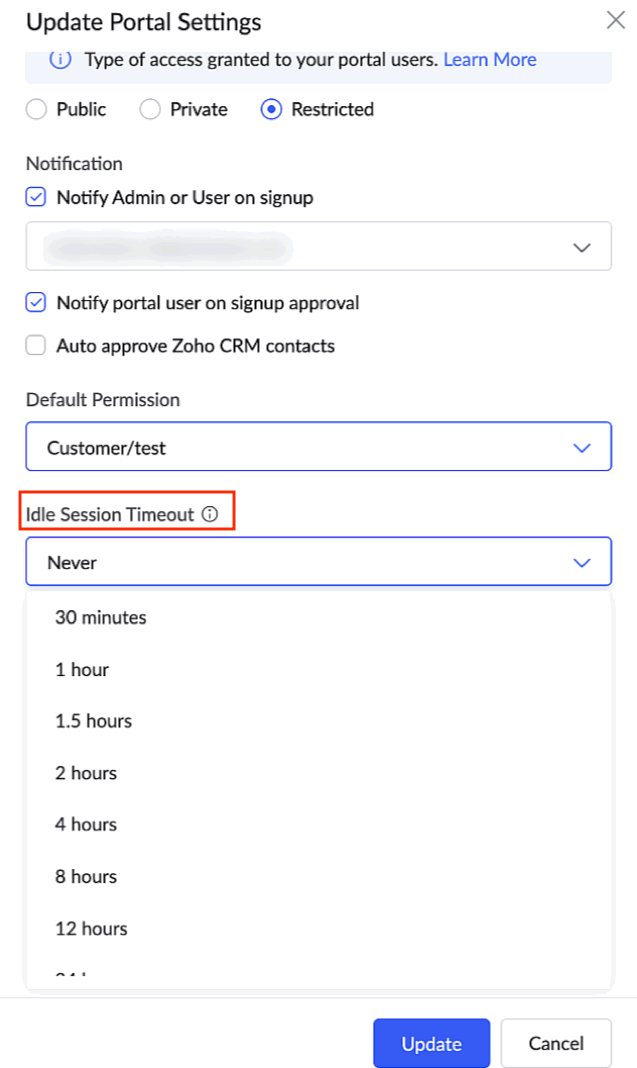
Idle session timeout is the amount of time a portal user can remain idle before the session is ended. Until now, there wasn't an option to manage session timeouts in your portals.
Now, with the aim to safeguard your portal users' accounts from potential misuse and security threats, we're giving you an option to set your own custom time out, which will determine when a session should be terminated after detecting users' portal inactivity.
Currently, portal users aren't signed off even if they stay inactive over time. Going forward, you can choose the portal timeout to be 30 minutes, 1 hour, 2 hours, 4 hours, 8 hours, 12 hours, 24 hours, or Never, which will be the default option.
What should I do?
For C6:
-
Navigate to
Portal > [Required portal] > Settings.
-
Under the Idle session timeout dropdown, choose the time from the available options.
For C5:
-
Navigate to Application Settings > Customer Portal > Settings.
- Under the Idle session timeout dropdown, choose the time from the available options.
How do I benefit?
The portal session timeout helps you augment the security of your portal users and your organization. As a portal administrator, you can take responsibility for enhancing your portals' security by preventing unauthorized access and reducing exposure to data breaches.
Applicable for:
C5, C6
Availability:
All DCs
Released on: 30-May-2023
Reference: Manage Portal Settings
- - - - - - - - - -
Advanced email analytics
In Zoho Creator, emails are sent using workflows for different transactional purposes. These advanced email analytics, provided by Zoho's own email analytic platform, ZeptoMail, will allow you track the performance of the emails that were triggered from your Creator account. You'll gain valuable insights and key metrics, such as detailed email logs, recipient activity tracking, real-time notifications, and more.
You can also view detailed reports on engagement, behavior, and email performance over time. Real-time tracking will help you stay up to date on how well your emails are performing.
Further, you can quickly identify and resolve any issues with your emails. Using the insights gathered, you can improve your email practices, optimize overall email management strategy, and ensure superior email deliverability.
What should I do?
-
Navigate to
Operations > Email Management > Email Analytics.
- Connect your ZeptoMail account to view the email analytics.
How do I benefit?
Stay informed about emails sent from your Creator account with across-the-board information on valuable email metrics, and drive better results for your business.
Applicable for:
C6
- - - - - - - - - -
Double check before form submission
One drawback with forms is that hitting the Enter key triggers the submission of the form. However, this behaviour isn't desirable in numerous scenarios, especially when there are a large number of fields in the form. The user may have intended to move to the next field, but when they click the Enter key, the partially filled form would be submitted.
Now, with the purpose of reducing errors, increasing accuracy, saving time, and providing you peace of mind, we've come up with a solution to this long-running problem. Going forward, we'll be displaying a pop-up asking for confirmation when the enter key is clicked.
What should I do?
Nothing! With this new update, Creator Forms will be smart enough to analyze your usage patterns and display the confirmation pop-up only when you use your keyboard to navigate within the form. Users who use a mouse or touch-pad to navigate will not be shown the pop-up. This ensures a win-win proposition for all.
How do I benefit?
This double check before submission is a simple, yet effective solution that not only prevents accidental submissions, it also adds an additional layer of security for your users, and ensures a smoother user experience.
Applicable for:
C5, C6
Availability:
All DCs
Released on: 07-Jun-2023
- - - - - - - - - -
Import huge CSV files
Enhancing Zoho Creator's ability to handle large datasets, we'll soon be rolling out support to import huge CSV files (up to 2GB) while creating an application, creating a form, or importing data to reports. We believe this new capability will help improve productivity and, more importantly, save time because you won't have to split your data into smaller files.
It's important to note that importing such large CSV files can be resource-intensive, and because it may take a significant amount of time we recommend that you don't edit the application while the import process is underway. Consequently, we'll also be launching a new "Recent imports" section, from where you can track the import progress.
What should I do?
Simply upload your (huge) CSV file like you normally would, and Creator will take care of the rest. It's that easy!
How do I benefit?
Support for large CSV files can help users work more efficiently, accurately, and flexibly with data, providing you with the ability to process that data to extract relevant and valuable information for your business.
Applicable for:
C5, C6
Availability:
All DCs
Released on: 23-Jun-2023
Reference: Create application by importing data, Create form by importing data and Import data to reports
- - - - - - - - - -
Logged-in user connections
Connections in Creator help you build bridges with different applications or services. However, as of this time, the connections can only be authorized by those with administrative privileges (super admins, admins, and developers). Now, with aim of empowering users, compartmentalizing information, and enhancing governance, we'll be allowing both live users or logged-in users to authenticate connections with third-party services from within the live applications they're accessing. We believe this will offer improved potential and additional rights to users over Creator App modules.
Going forward, during the process of creating a connection, we'll introduce a new option called "Who can authorize?" with two choices: Administrators only and Logged-in users.
How do I benefit?
The new logged-in user connections will result in increased security, better privacy control, and an improved user experience while working with connections with various third-party services.
Applicable for:
C6
Availability:
All DCs
Released on: 17-Jul-2023
Released on: 17-Jul-2023
Reference: Understand logged-in user connections
- - - - - - - - - -
Cancel button behavior change
A known limitation while editing records in Creator forms was that the "Cancel" button becomes non-functional in some scenarios—such as when they were opened in a new or the same window and when they were opened using a i-frame. This limitation was a minor blemish on an otherwise seamless user experience while working with Creator forms.
Now, we've managed to overcome this restriction, and soon the cancel button will be fully functional in all circumstances. While editing a record from the same window, if you click cancel, you'll be taken to the calling page. While editing a record from a new window, clicking the cancel button will close the tab.
How do I benefit?
The new behavior will provide an improved user experience as they help your users avoid being stuck in a stale position or losing their progress.
Applicable for:
C5, C6
Availability:
All DCs
- - - - - - - - - -
Composite fields: Link names of subfields
Currently, the link names of the subfields of composite fields, such as name and address, are appended with an incrementing number as we keep adding multiple fields of the same type in a form. For example, if you've added two address fields in the same form, then the link names for the subfields of the second field will be address_line_12, address_line_22, and so on.
We're fixing this now, so that the link names remain the same for all of the subfields, irrespective of the number of fields of the same type. In other words, if you have more than one address field in the same form, then the link names for the subfields of the remaining address fields will be address_line_1, address_line_2, and so on. This fix is aimed at improving the readability and subsequent usage of link names in these fields.
Notes
-
DC migration will be done from our end to update the subfields' link names, and we'll keep you updated about the progress (migration date and its status).
- Common link names will be used for the subfields of any newly added composite field and also for new Creator signups.
We request that users who have used custom link names make note of the following changes:
-
After migration, API requests that contain custom link names for subfields will not work. Instead, you can use their common link names. If you're using Creator Meta APIs to get the subfield link names, then the link name will be automatically changed once the migration is completed.
- If you've used custom link names for subfields anywhere in your app (manually), they won't work post-migration. In such cases, the custom link name should be replaced with the common link name. For example, consider the below cases:
- Using a composite subfield as a query parameter in:
- Form access URL
- Redirect to (website URL)
- OpenURL (Deluge)
- Using a composite subfield in ZML snippets: The existing ZML snippet component will break, because we don't process a ZML snippet unless it's accessed live.
Applicable for:
C5, C6
Availability:
All DCs
- - - - - - - - - -
That's it from us for the month of May 2023. We'll notify you as these new features are rolled out. In the meantime, let us know what you think about these updates in the comments below!
And finally, thank you for your continued support, and we look forward to bringing you more updates soon.
Regards,
The Zoho Creator Team
Access your files securely from anywhere
Centralize Knowledge. Transform Learning.
All-in-one knowledge management and training platform for your employees and customers.
New to Zoho Recruit?

Zoho Developer Community
New to Zoho LandingPage?
Zoho LandingPage Resources
New to Zoho Survey?
New to Zoho CRM Plus?
Deliver unforgettable customer experiences
New to Zoho CRM Plus?
Deliver unforgettable customer experiences
New to Zoho Marketing Plus?
Everything you need to run your marketing
New to Zoho Marketing Plus?
Everything you need to run your marketing
New to Bigin?





Topic Participants
Ashwin Vishal R
Piyush Goyal
Maeco - Davide
CyberNX Communications
Faruk Remane
Sticky Posts
Introducing Zoho Creator's 2025 Release Projection 2
Hello Creators! I'm Prakash, from the Creator product management team, and today I'm delighted to unveil our next set of features as part of Release Projection 2 for 2025. With thoughtful analysis and planning, we've curated powerful new capabilitiesZoho Creator - 2023 Release Projection 1
Hello everyone! A very Happy New Year to you and your family. Hope you're all good and having a great time using Zoho Creator to make your lives easier and your businesses prosper. 2022 was an action-packed year for us at Creator, and we hope to continueZoho Creator User Group meetups in a city near you! - Oct - Nov, 2023
Greetings from the Zoho Creator team! We're hosting a series of Zoho Creator meetups in various cities across the globe, and we'd love to meet you there! Our meetups are a great opportunity to network with industry peers, exchange ideas and best practices,Zoho Creator - 2023 Release Projection 2
Hello everyone! Time truly flies when you're having an incredible journey, and today we mark the completion of an eventful and action-packed six months. It feels like just yesterday when we embarked on this adventure together with the launch of our newUpcoming Updates - August 2022
Hi all, Greetings from the Zoho Creator team! Today we've got news for you on some exciting updates. And rest assured— there’s more to come! In this post, we'll be going over the upcoming features and improvements for this month as mentioned below. A
New to Zoho TeamInbox?
Zoho TeamInbox Resources
Zoho CRM Plus Resources
Zoho Books Resources
Zoho Subscriptions Resources
Zoho Projects Resources
Zoho Sprints Resources
Qntrl Resources
Zoho Creator Resources
Zoho CRM Resources
Design. Discuss. Deliver.
Zoho Show Resources

Get Started. Write Away!
Writer is a powerful online word processor, designed for collaborative work.
Zoho CRM コンテンツ
-
オンラインヘルプ
-
Webセミナー
-
機能活用動画
-
よくある質問
-
Ebook
-
-
Zoho Campaigns
- Zoho サービスのWebセミナー
その他のサービス コンテンツ
Nederlandse Hulpbronnen

ご検討中の方
Recent Topics
Custom Button makes scroll bar go down in report
I have a report with a Custom button called Completed. A colleague mentionned to me that when he pressed this custom button it scrolled down the page which is annoying since he want to stay at the same space on the repoort. There is no reload linked toQuickbooks Integrations Stopped Working
All of our Quickbooks integrations have stopped working. I am checking in to see if: a) this is a known issue b) if anyone else is having this issue. As usual, Zoho support is unavailable.sync two zoho crm
Hello everyone. Is it possible to sync 2 zoho crm? what would be the easiest way? I am thinking of Flow. I have a Custom Module that I would like to share with my client. We both use zoho crm. Regards.CRM x WorkDrive: We're rolling out the WorkDrive-powered file storage experience for existing users
Release plan: Gradual rollout to customers without file storage add-ons, in this order: 1. Standalone CRM 2. CRM Plus and Zoho One DCs: All | Editions: All Available now for: - Standalone CRM accounts in Free and Standard editions without file storageIncorrect Functioning of Time Logs API (Version 3)
We need to fetch the list of time logs for each task for our company internal usage. We are trying to achieve it by using the next endpoint: https://projects.zoho.com/api-docs#bulk-time-logs#get-all-project-time-logs Firstly, in the documentation theZoho CRM Queries Now Support Databases and Cloud Data Sources
Hello everyone! We're thrilled to announce a major enhancement to the Queries feature in Zoho CRM! Queries now support a broader range of external data sources, allowing you to fetch live data and combine it with CRM records, all using a unified querySalesforceに添付ファイルを格納したい
お世話になっております。 Salesforceに添付ファイルを格納したく、カスタムオブジェクトに連携し、 「ファイルのアップロード」項目を設けました。 実際、エラーもなく送信出来たのですが、実際生成されたカスタムオブジェクトのレコードを見ると、どこにも添付ファイルがありません。仕様として、この添付ファイルはSalesforceのどこに格納されるのでしょうか? 今回作りたいフォームは、複数の書類を添付するため、Zohoformのファイルアップロード項目「本人確認書類」「源泉徴収票」などの項目を、Salesforce側にも設けた「本人確認書類」「源泉徴収票」という各項目にURLリンクとして紐づけたいと思っておりました。Dynamic image in form works in the app but not on the customer portal.
img = frm_Fichas[ID == input.Nombre].Foto; imgno = Nophoto[ID2 = 1].Image; if(len(img) > 1) { img = img.replaceAll("/sharedBy/appLinkName/",zoho.appuri); img = img.replaceAll("viewLinkName","Fichas_de_personal_public"); img = img.replaceAll("fieldName","Foto");Is it possible to retrieve function (Deluge) code from Zoho CRM externally?
Hi Everyone, Is it possible to fetch or retrieve the Deluge function code from Zoho CRM using an external method (API or any other approach)? I would like to know if there is any way to access or extract the function script outside of Zoho CRM, or ifUplifted homepage experience
Editions: All editions. Availability update: 17th February 2026: All editions in the CA and SA DC | JP DC (Free, Standard and Professional editions) 23 February 2026: JP (All Editions) | AU, CN (Free, Standard, Professional editions) 27 February 2026:Approval Workflow for Purchase Orders Abrir
The requirement is , that all purchase orders greater than or equal to 5000 go through an approval process from certain people, but within books I only see that the approvers can be by levels or any approver but we cannot enter a rule like these. CanWeTravel + Zoho CRM Integration - Has Anyone Built a Connector or Extension?
Hi all, I'm exploring options for integrating Zoho CRM with WeTravel (booking & payment platform for tour operators). Zapier seems to be the common method but seems limited. I'm wondering if anyone in the community has developed a more comprehensive solution,Option in pipeline deal to select which hotel or branch or store if client has more than one local store
Hi, I would like to know if there is an option in the deal pipeline to select which hotel, branch, or store a deal is related to—if the company has more than one location. For example, I have a client that owns several hotels under the same company, andUndo article like/dislike
It seems to be not possible to undo your like/dislike for an article. Would be great if you can. Kind regards, HelenNested notebooks
Dear Sir/Madam, I would like to know if it is possible to nest notebooks. It would be very helpful when there are too many, as it would improve organization. Thank you for your response. Best regards.Tax in Quote
Each row item in a quote has a tax value. At the total numbers at the bottom, there is also a Tax entry. If you select tax in both of the (line item, and the total), the tax doubles. My assumption is that the Tax total should be totalling the tax fromIssue with "Send Email" from Quotes not loading Email Template data
Hi everyone, I'm currently experiencing an issue when using the "Send Email" option from a Quote record in Zoho CRM. What’s happening: When I go to the Quotes module and select a record, then click Send Email, the attached file (Quote) correctly pullsDynamically Fetching Lookup Field Display Value
I have an audit trail form, Audit_Changes, that tracks old vs new values across different forms. For lookup fields, the old/new value is the ID, but I also need the display value. What's a best practice for dynamically fetching the display value of theStop Scrolling, Start Asking: Meet Zia for Your Files
Hey everyone 👋 The era of 'scrolling and searching' is officially over. Whether it's a dense legal contract or a long meeting recording, searching for specific details is a massive time-sink. We think you should be able to interact with your files, notIntroducing a smarter, faster, and more flexible charting experience
Hello Zoho Sheet users, We're delighted to share the latest news about a major update to charts in Zoho Sheet! The new version supports dynamic data ranges, granular styling options, faster loading, and other interesting enhancements that allow you toHow to create a new Batch and update Stock via Inventory?
Hi everyone, We are building an automation where a user enters batch details (Batch Number, Mfg Date, Expiry, and Quantity) into a Custom Module. I need this to trigger an API call to Zoho Inventory to: Create the new batch for the item. Increase theHow do I open MSG files in Microsoft Word?
If you want to open MSG files in Microsoft Word is not natively supported, as MSG is an email file format created by Microsoft Outlook. However, there are professional approaches to access MSG content in Word. First, open the MSG file in Outlook and copyUnable to charge GST on shipping/packing & Forwarding charges in INDIA
Currently, tax rates only apply to items. It does not apply tax to any shipping or packing & forwarding charges that may be on the order as well. However, these charges are taxable under GST in India. Please add the ability to apply tax to these charges.How to add packing & forwarding charge in purchase order & quotation???
Hello Zoho Team I have just started using Zoho for my company and I wanted to make purchase order. My supplier charges fix 2% as packing & forwarding on Total amount of material and then they charge me tax. For example, Material 1 = 100 Rs Material 2How to create a boxplot chart in Zoho Analytics?
Hi, I'm looking forward to making a boxplot in Zoho Analytics, either with all my data or with a time segmentation. No documentation or YouTube video explaining that was found. I guess this is a feature gap. How feasible would it be to add this to Analytics?What are the create bill API line item requiered fields
While the following documentation says that the line items array is requiered it doesn't say what if any files are requiered in the array. Does anyone know? API documentation: https://www.zoho.com/inventory/api/v1/bills/#create-a-bill I'm trying to addWorkDrive issues with Windows Explorer Not Responding
We are using WorkDrive to collaborate on editing video content. We have a lot of files and quite a few are a few gigs. Recently anytime I try and work with the files Explorer freezes for a couple minutes whether it's dragging the files into Premiere orConnecting Zoho Inventory to ShipStation
we are looking for someone to help connect via API shipStation with Zoho inventory. Any ideas? Thanks. UriWhere is the settings option in zoho writer?
hi, my zoho writer on windows has menu fonts too large. where do i find the settings to change this option? my screen resolution is correct and other apps/softwares in windows have no issues. regardsUsing IMAP configuration for shared email inboxes
Our customer service team utilizes shared email boxes to allow multiple people to view and handle incoming customer requests. For example, the customer sends an email to info@xxxx.com and multiple people can view it and handle the request. How can I configureWhen Does WorkDrive integrate with Books?
When Does WorkDrive integrate with Books?POP mailbox limits
If I am accessing a remote POP mail server using Zoho Mail is there a mailbox quota for the account or is it all related to my mail account storage limits?Warranty Service and Repair in Zoho FSM
Hi There, We are a retail store that sells products and also performs installations and repairs. Our field technicians handle this work. Some repairs are covered by manufacturers, who reimburse us for both parts and labour. In these cases, we performZoho Sheet for Desktop
Does Zoho plans to develop a Desktop version of Sheet that installs on the computer like was done with Writer?WhatsApp phone number migration
Hi @Gowri V and @Pheranda Nongpiur, Thanks for implementing the promised enhancements to the integration between Zoho CRM and WhatsApp. The previous discussion has been locked, so I'm opening this new one. I am copying below a specificWebDAV support
I need WebDAV support so that I can upload/download (and modify) documents from my local file system. Is anything planned in his direction?Suggestions for Improved Table Management and Dashboard Filter Controls in Zoho Analytics
Dear Zoho Analytics Community, I hope you are doing well. I would like to share a few suggestions based on issues I am currently experiencing while working with visualizations and dashboards. Firstly, when I create a new visualization using the Sales-OrderSPF: HELO does not publish an SPF Record
I am using Zoho mail. Completed all of the required prerequisites from the dashboard to avoid any issues with mail delivery. But when checking on mail-tester.com getting the following error. Can anyone help me solve this?How do I create an update to the Cost Price from landed costs?
Hi fellow Zoho Inventory battlers, I am new to Zoho inventory and was completely baffled to find that the cost price of products does not update when a new purchase order is received. The cost price is just made up numbers I start with when the productPrice Managment
I have been in discussions with Zoho for some time and not getting what I need. Maybe someone can help explain the logic behind this for me as I fail to understand. When creating an item, you input a sales rate and purchase rate. These rates are justNext Page