Track and engage with website visitors using SalesIQ

Track and engage with website visitors using SalesIQ

What is SalesIQ?

SalesIQ in Marketing Plus helps you track and communicate with visitors on your website in real time. You can also create a chat bot (powered by AI), connect your instant messaging channels such as Facebook Messenger, Telegram, WhatsApp Business, Instagram, Line, and WeChat, making it easy for your team to keep all the interactions in a centralized space. This makes it easy for you to track their footprints online, and proactively engage with your visitors every step of the way.
Alert
To get early access to SalesIQ in Zoho Marketing Plus, please reach out to support@zohomarketingplus.com.

Why use SalesIQ in Zoho Marketing Plus? 

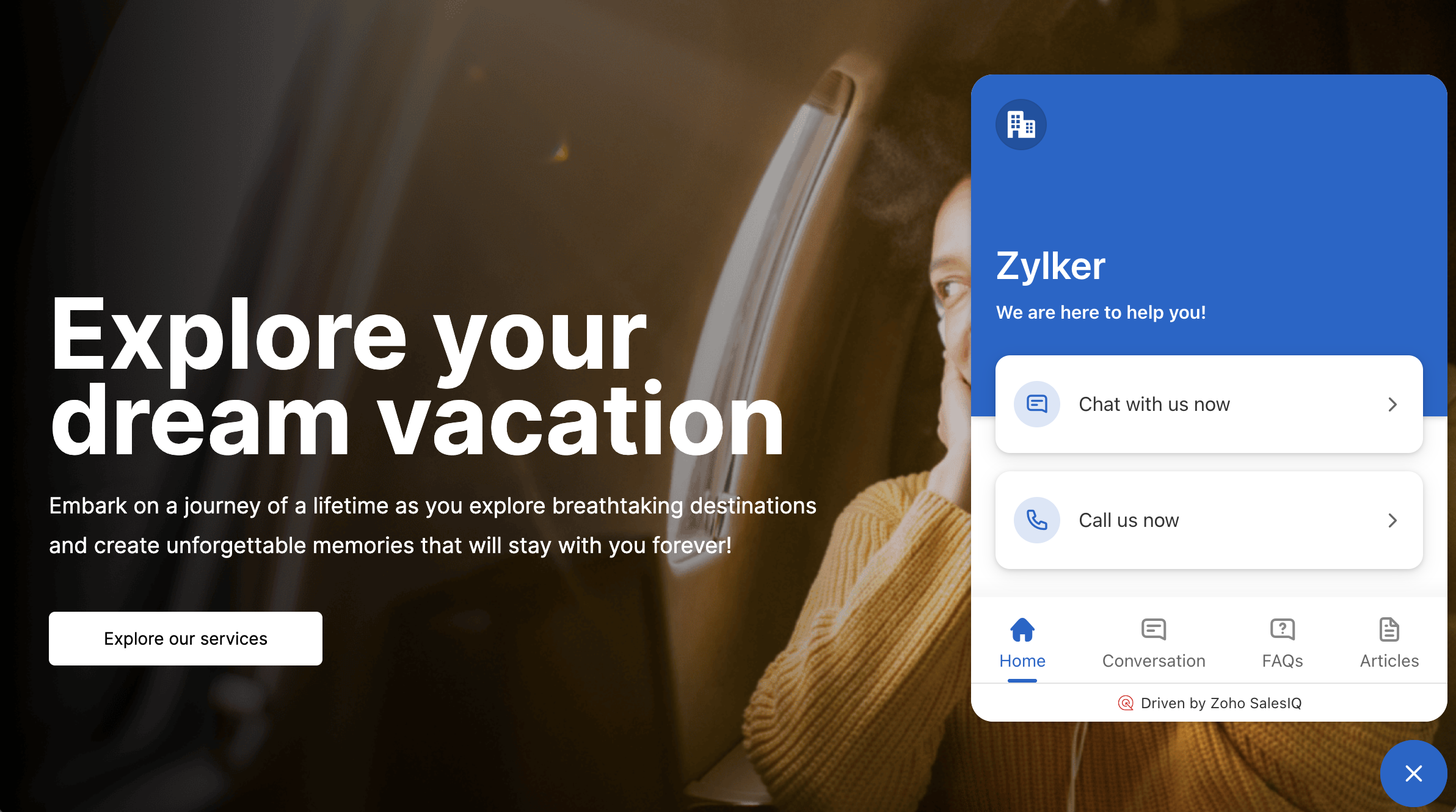
Communicate with visitors on your landing page

SalesIQ integrates with LandingPage in Marketing Plus, making it easy for the visitors to interact with your brand and get answers to their queries. Landing pages by design have a very specific purpose as part of a brand's marketing campaigns. Adding the live chat widget to the landing page gives you the edge in understanding the visitors better, engage with them, and increase the chance of conversion, thus boosting the purpose of your landing page.
Add website visitors to your campaigns mailing list

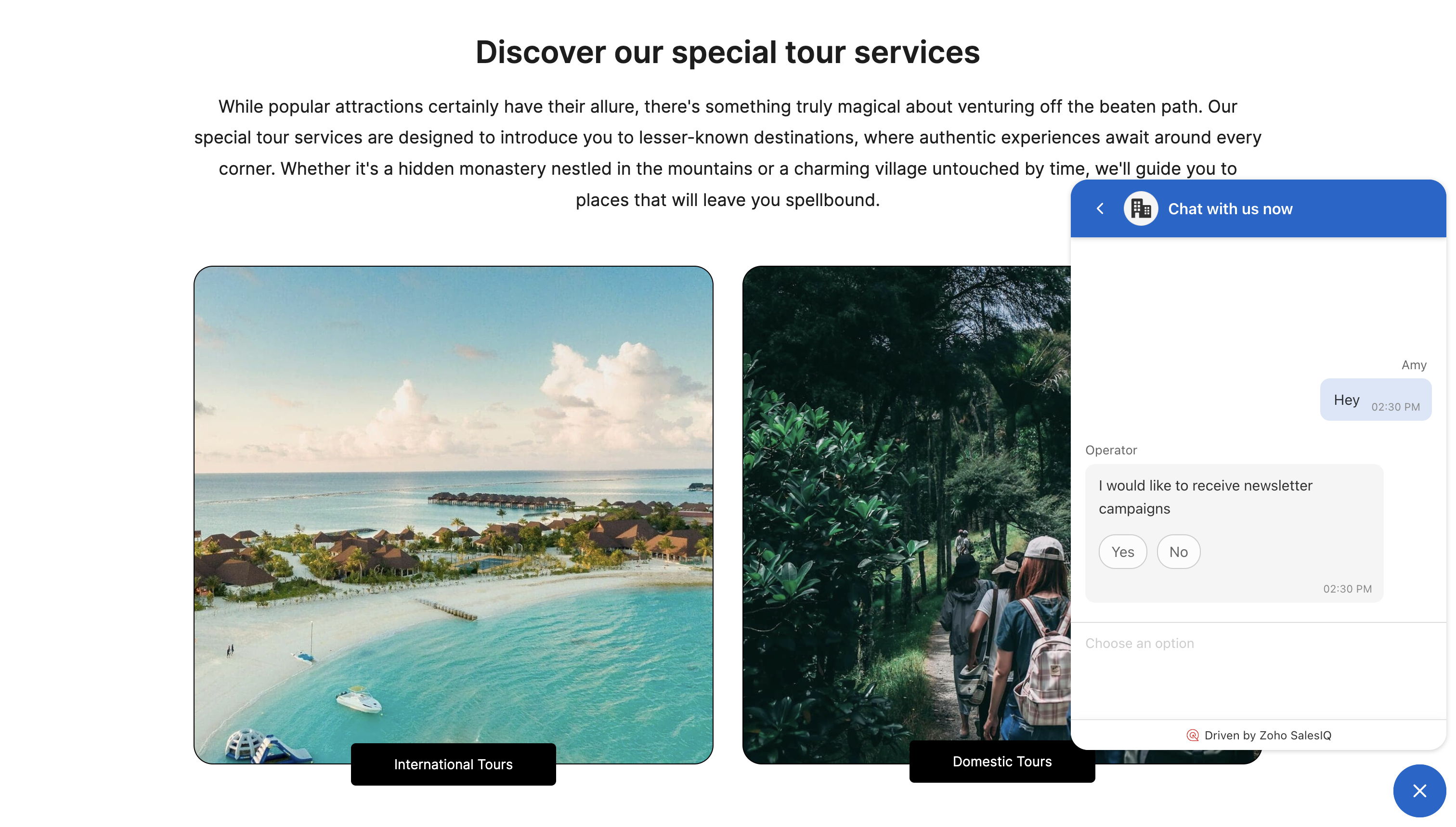
When visitors on your website engage with you via the live chat widget, that's a major sign that they are interested in what you offer. So, it's important to find a way to nurture them further and include them in your marketing campaigns.

SalesIQ integrates with Campaigns in Marketing Plus, making it easy for you to capture the prospect's information such as name, email, company details, and add them to mailing list in real time. Email is one of the best ways in which we can reach out to prospects, giving you complete control over who your audience is. Once added to the list, you can personalize the engagement, by sending out tailor made campaigns across various touchpoints and track the performance. Whenever a visitor lands on your page and initiates an interaction, you will be able to see a list of all the campaigns sent to them, along with the status of whether they have opened, clicked, or not. This gives you a complete picture of who they are, and their stage in your sales process.  
Capture visitors as leads in your CRM

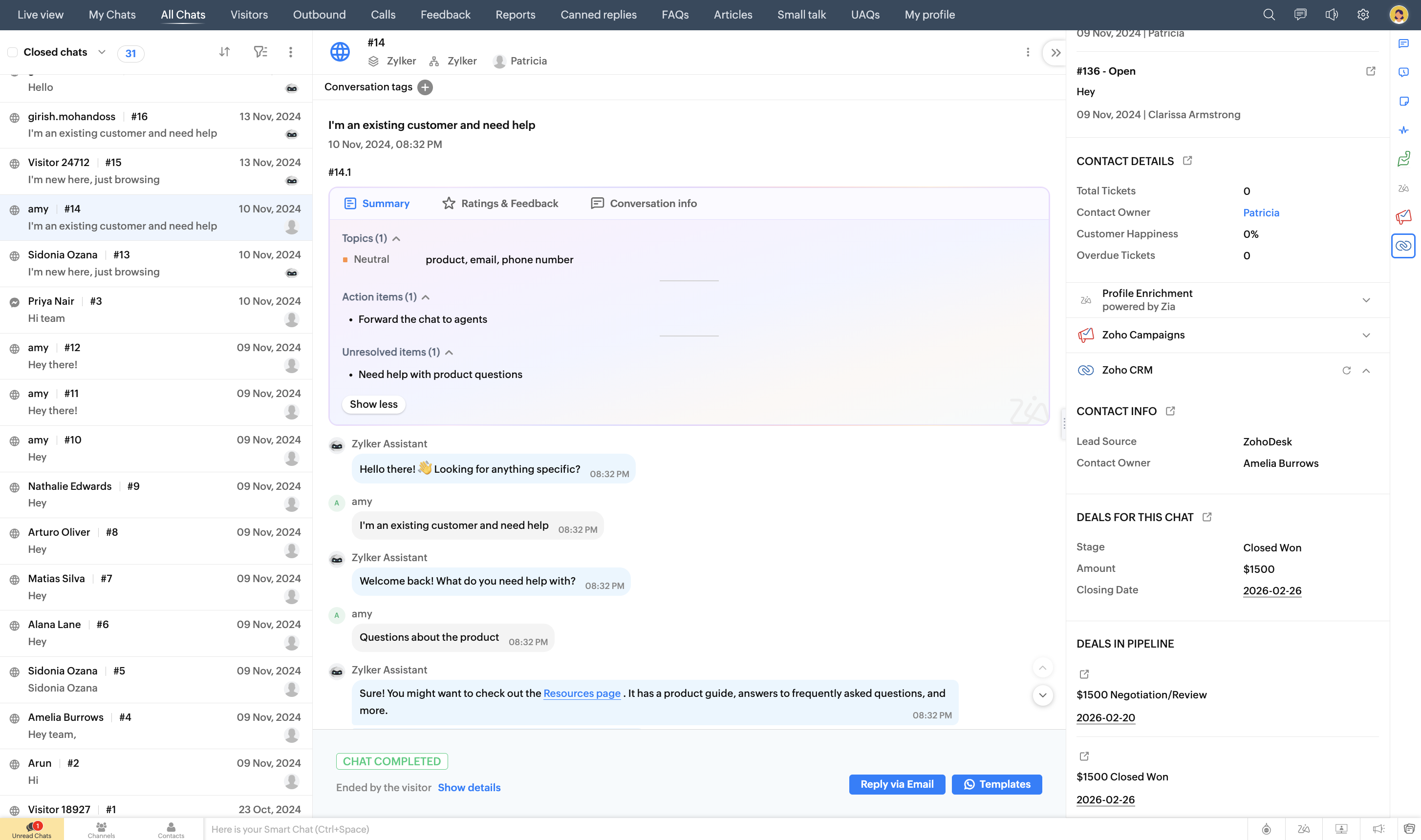
CRM acts as a centralized place where you generate and manage leads, nurture them, and convert them into customers. The entire sales process starts from here and it's important to get all your leads across channels to be available in one place.

SalesIQ integrates with Zoho CRM, Bign, and Salesforce to synchronize website visitors as leads or contacts in real time, ensuring you don't miss out on anyone important. Once they are part of your sales process, it becomes easy to assign them to your team, engage, nurture, and move them across your sales pipeline. The integration also can pull data from CRM if a visitor on your website is a lead or contact, giving the agent complete picture of who they are and what they might need, with all the necessary information needed right next to the chat window. The chat transcript will be attached to the lead in CRM, giving the sales rep all the context they need.
Understand all about your website visitor

SalesIQ gives a real time picture of who's on your website. You can also view important information such as the page the visitor is currently viewing, the page from where they initiated the chat from, contact information, recent chats with a complete timeline of when they left and returned to your website, and a lot more. With various integrations in place such as CRM, Campaigns, Analytics, Desk, and so on, you get a 360 degree view of who your website visitor is, giving the agent the power to find everything they need at their fingertips. This makes it easy for the agent to offer timely help to the website visitors, with complete context.

Adding SalesIQ to Zoho Marketing Plus

SalesIQ can be added to Zoho Marketing Plus from the Marketplace. Only the Owner, or Marketing Plus Admin can enable SalesIQ.
 
To add SalesIQ
  1. Go to Setup > Marketplace and click Try Now next to SalesIQ.

  2. Select a portal if prompted from the drop down list and click Proceed. SalesIQ module will be added to the left side panel.


      Create. Review. Publish.

      Write, edit, collaborate on, and publish documents to different content management platforms.

      Get Started Now


        Access your files securely from anywhere

          Zoho CRM Training Programs

          Learn how to use the best tools for sales force automation and better customer engagement from Zoho's implementation specialists.

          Zoho CRM Training
            Redefine the way you work
            with Zoho Workplace

              Zoho DataPrep Personalized Demo

              If you'd like a personalized walk-through of our data preparation tool, please request a demo and we'll be happy to show you how to get the best out of Zoho DataPrep.

              Zoho CRM Training

                Create, share, and deliver

                beautiful slides from anywhere.

                Get Started Now


                  Zoho Sign now offers specialized one-on-one training for both administrators and developers.

                  BOOK A SESSION


                              Quick LinksWorkflow AutomationData Collection
                              Web FormsEnterpriseOnline Data Collection Tool
                              Embeddable FormsBankingBegin Data Collection
                              Interactive FormsWorkplaceData Collection App
                              CRM FormsCustomer ServiceAccessible Forms
                              Digital FormsMarketingForms for Small Business
                              HTML FormsEducationForms for Enterprise
                              Contact FormsE-commerceForms for any business
                              Lead Generation FormsHealthcareForms for Startups
                              Wordpress FormsCustomer onboardingForms for Small Business
                              No Code FormsConstructionRSVP tool for holidays
                              Free FormsTravelFeatures for Order Forms
                              Prefill FormsNon-Profit

                              Intake FormsLegal
                              Mobile App
                              Form DesignerHR
                              Mobile Forms
                              Card FormsFoodOffline Forms
                              Assign FormsPhotographyMobile Forms Features
                              Translate FormsReal EstateKiosk in Mobile Forms
                              Electronic Forms
                              Drag & drop form builder

                              Notification Emails for FormsAlternativesSecurity & Compliance
                              Holiday FormsGoogle Forms alternative GDPR
                              Form to PDFJotform alternativeHIPAA Forms
                              Email FormsFormstack alternativeEncrypted Forms

                              Wufoo alternativeSecure Forms

                              TypeformWCAG


                                          Create. Review. Publish.

                                          Write, edit, collaborate on, and publish documents to different content management platforms.

                                          Get Started Now


                                                            You are currently viewing the help pages of Qntrl’s earlier version. Click here to view our latest version—Qntrl 3.0's help articles.


                                                                Manage your brands on social media


                                                                  • Desk Community Learning Series


                                                                  • Digest


                                                                  • Functions


                                                                  • Meetups


                                                                  • Kbase


                                                                  • Resources


                                                                  • Glossary


                                                                  • Desk Marketplace


                                                                  • MVP Corner


                                                                  • Word of the Day


                                                                  • Ask the Experts


                                                                    Zoho Sheet Resources


                                                                        Zoho Forms Resources


                                                                          Secure your business
                                                                          communication with Zoho Mail


                                                                          Mail on the move with
                                                                          Zoho Mail mobile application

                                                                            Stay on top of your schedule
                                                                            at all times


                                                                            Carry your calendar with you
                                                                            Anytime, anywhere


                                                                                  Zoho Sign Resources

                                                                                    Sign, Paperless!

                                                                                    Sign and send business documents on the go!

                                                                                    Get Started Now


                                                                                            Zoho TeamInbox Resources


                                                                                                      Zoho DataPrep Demo

                                                                                                      Get a personalized demo or POC

                                                                                                      REGISTER NOW


                                                                                                        Design. Discuss. Deliver.

                                                                                                        Create visually engaging stories with Zoho Show.

                                                                                                        Get Started Now


                                                                                                                            • Related Articles

                                                                                                                            • Maximize conversions using LandingPage

                                                                                                                              Today's business world is highly dependent on digital marketing strategies, no matter the size of the business. Marketers work on various ideas for different marketing channels and curate their websites by putting a lot of thought and effort into ...
                                                                                                                            • Enhance Website Experience

                                                                                                                               A/B Test An A/B test allows you to host two versions of a website and find out which one your visitors prefer. Any small change to the website can have a dramatic effect on the visitor's experience so it's always a good idea to test how your changes ...
                                                                                                                            • Train and engage audience through webinars

                                                                                                                              Webinars are one of the most efficient ways to engage with your prospects and customers. They can be used to educate prospects and customers around the world about your business, market your product and services, build relationships, gather feedback, ...
                                                                                                                            • Personalize websites and optimize conversion

                                                                                                                              Establishing an online presence is extremely important. It helps you build a reputation and makes it easy for prospects to find your brand online and the products or services that you offer. Ideally, prospects will find your site when they search for ...
                                                                                                                            • Communicate and collaborate with your team using Cliq

                                                                                                                              As marketers, you work towards various goals for your brand, such as increasing awareness, generating leads, working on content marketing strategies, creating a strong social media plan to widen your audience, and much more. All of these activities ...
                                                                                                                              Wherever you are is as good as
                                                                                                                              your workplace

                                                                                                                                Resources

                                                                                                                                Videos

                                                                                                                                Watch comprehensive videos on features and other important topics that will help you master Zoho CRM.


                                                                                                                                eBooks

                                                                                                                                Download free eBooks and access a range of topics to get deeper insight on successfully using Zoho CRM.


                                                                                                                                Webinars

                                                                                                                                Sign up for our webinars and learn the Zoho CRM basics, from customization to sales force automation and more.


                                                                                                                                CRM Tips

                                                                                                                                Make the most of Zoho CRM with these useful tips.


                                                                                                                                  Zoho Show Resources