Bidirectional sync between Zoho Bookings and Zoho CRM - Part 1
Hey, community members!
The default integration between Zoho CRM and Zoho Bookings is unidirectional, which means that any appointments booked, rescheduled, or deleted in Zoho Bookings will be reflected in Zoho CRM. However, any modifications made to events in Zoho CRM that originated from Zoho Bookings will not be reflected back in Zoho Bookings. Hence, as we're announcing in this community post, we've made the sync bidirectional.
This community post will cover the process of configuring appointment bookings from Zoho CRM in Zoho Bookings, as well as managing appointment statuses such as Canceled, No Show and Completed. We have addressed the rescheduling action in a separate post. To view it, please click on the following link: Reschedule Action
This community post will be beneficial for active Zoho CRM users who handle all their meetings within Zoho CRM. Additionally, you can use this community post as a reference to explore various automation possibilities tailored to your business requirements. For instance, with this post's guidance, when you update a booking's status field to "Completed" in Zoho CRM, it will automatically sync with Zoho Bookings and trigger an automated "Mark as completed" email to customers. This enhancement will improve your Zoho Bookings and Zoho CRM synchronization experience, making appointment management easier.
Prerequisites of bidirectional sync:
- Zoho Bookings Premium subscription
- Zoho CRM paid subscription
- Enable Zoho CRM integration within Zoho Bookings
The purpose of enabling the Zoho CRM integration within Zoho Bookings is to transfer booking details from Zoho Bookings to Zoho CRM. In this configuration, the mandatory field is the Booking ID, which is passed from Zoho Bookings to Zoho CRM through the integration. Whenever an appointment is booked, customer details will be sent to the designated CRM module, and a corresponding record will be created in the Meetings module within Zoho CRM, which will help in automating the workflow.
Here's the complete demo video that covers all the configurations discussed in the community post below:
Timestamps for your reference:
0:35 - Purpose of this community post
Here's the complete demo video that covers all the configurations discussed in the community post below:
Timestamps for your reference:
0:35 - Purpose of this community post
1:26 - Zoho CRM plugin installation
4:43 - Custom field creation
7:20 - Function creation
9:22 - Connection creation
10:24 - Configuring arguments
11:06 - Workflow creation
13:33 - Argument mapping
14:41 - Output verification
17:41 - Conclusion
How we're approaching this bidirectional sync
1. Booking an appointment from Zoho CRM
Install the Zoho Bookings for Zoho CRM plugin within your Zoho CRM application. This plugin enables the creation of a "New Appointment" button within the Zoho CRM Leads and Contacts module, which enables you to select the desired booking page you wish to open. You can choose from various workspace, service, or staff booking pages. After configuration, you can initiate the process of scheduling bookings directly from within your Zoho CRM account.
- Guide on Zoho Bookings and Zoho CRM plugin installation: Booking page selection for Zoho CRM plugin
2. Booking status: Completed or No Show
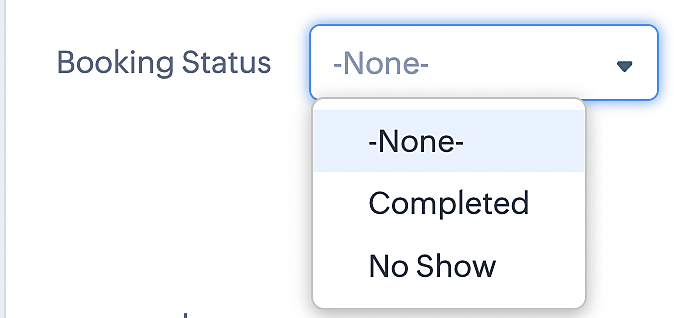
To update a booking's status (Completed or No Show), we've added a new picklist properties field named "Booking Status" in the Meetings module and configured it with two options: "completed" and "no show". Depending on the booking status chosen, the corresponding booking in Zoho Bookings will be updated.
- Details on how to add a custom field to the Meetings module : Customizing modules
- Here's a video that demonstrates how to add a field to a module in Zoho CRM: Adding fields
Reference:
3. Booking status: Canceled
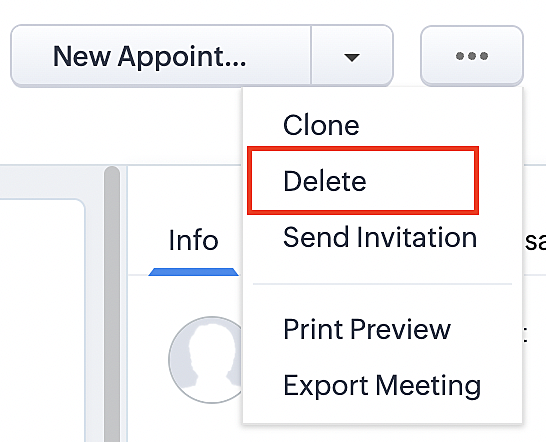
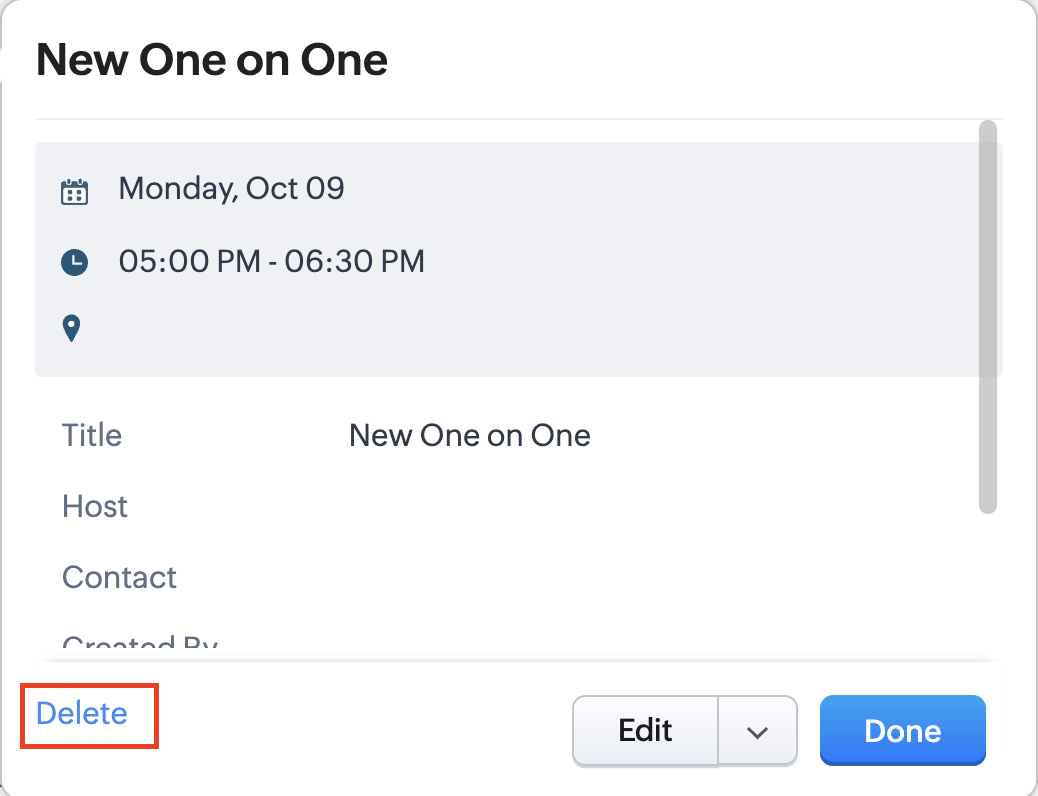
Whenever a meeting is deleted from the Meetings module, the corresponding booking in the Zoho Bookings app will also be canceled automatically. The meeting can be deleted either from the Meetings module or directly from the calendar.
To enable bidirectional sync between Zoho CRM and Zoho Bookings
Complete these steps in Zoho CRM.
Step 1: Creating connections
You first need to establish a connection between Zoho CRM and Zoho Bookings. Zoho Bookings is listed as one of the default connections in Zoho CRM, making it simple to set up. Select the Zoho Bookings connection, define the connection name and scope, and you'll be all set. This connection will enable you to link both applications and facilitate the seamless transfer of data.
Read here for more details on how to create connection in Zoho CRM: Connections
Step 2: Creating functions
In this context, we'll be creating three functions: one for marking appointments as completed, another for canceling appointments, a third for marking appointments as no shows, and a fourth for rescheduling appointments. For each function, we must also configure arguments, which pass values or data into a function when making a call. Here, we'll pass the booking ID to the function as an argument to update the necessary booking status.
i. To create a function for marking appointments as completed:
1. Go to Setup > Developer Space > Functions.
2. In the Functions page, click + Create New Function.

3. Configure the function name, display name, and description.
4. Set the category as automation.
This opens the Deluge script page.
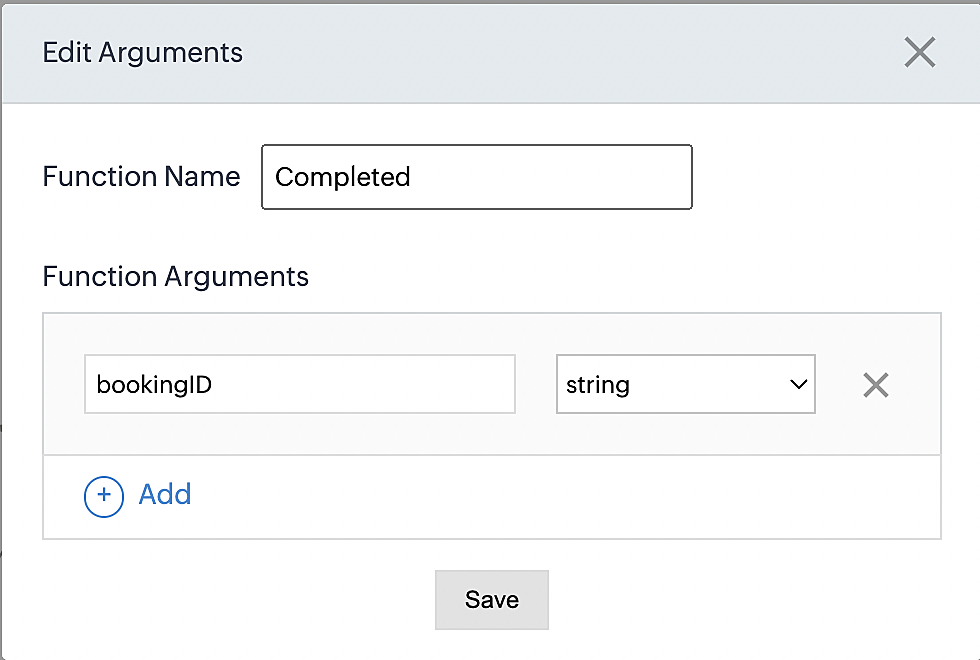
5. Next, configure the function's arguments:
A. Click on Edit Arguments on the Deluge script page.

B. Set the Parameter Name as bookingID. (Please note that the "bookingID" value is case sensitive and must match
the term used in the code).
C. Set the type as string.
Reference:
Please configure the below code in the Deluge script page.
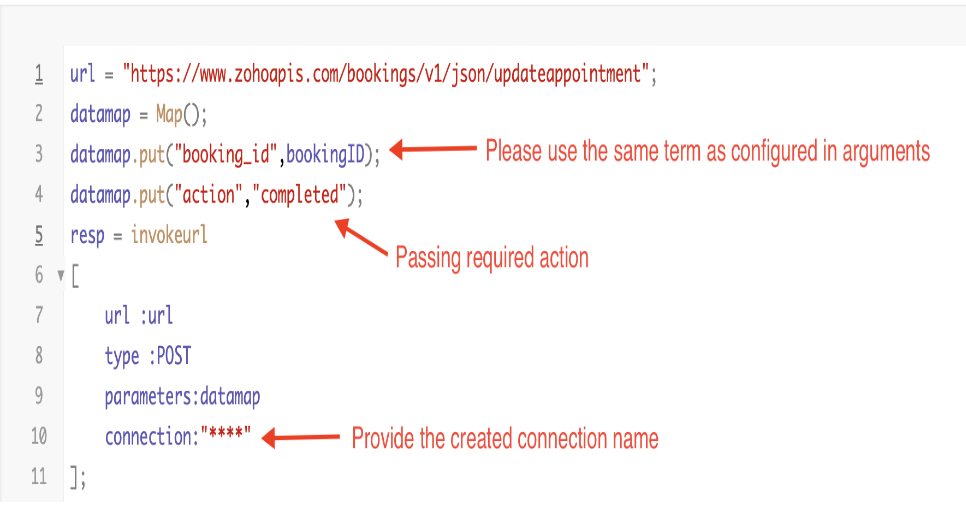
By completing these steps, we've configured a function that will mark appointments as completed.
ii. To create a function for marking appointments as no shows
1. Go to Setup > Developer Space > Functions.
2. In the Functions page, click + Create New Function.

3. Configure the function name, display name, and description.
4. Set the category as automation.
This opens the Deluge script page.
5. Next, configure the function's arguments:
A. Click on Edit Arguments on the Deluge script page.

B. Set the Parameter Name as bookingID. (Please note that the "bookingID" value is case sensitive and must match
the term used in the code).
C. Set the type as string.
Reference:
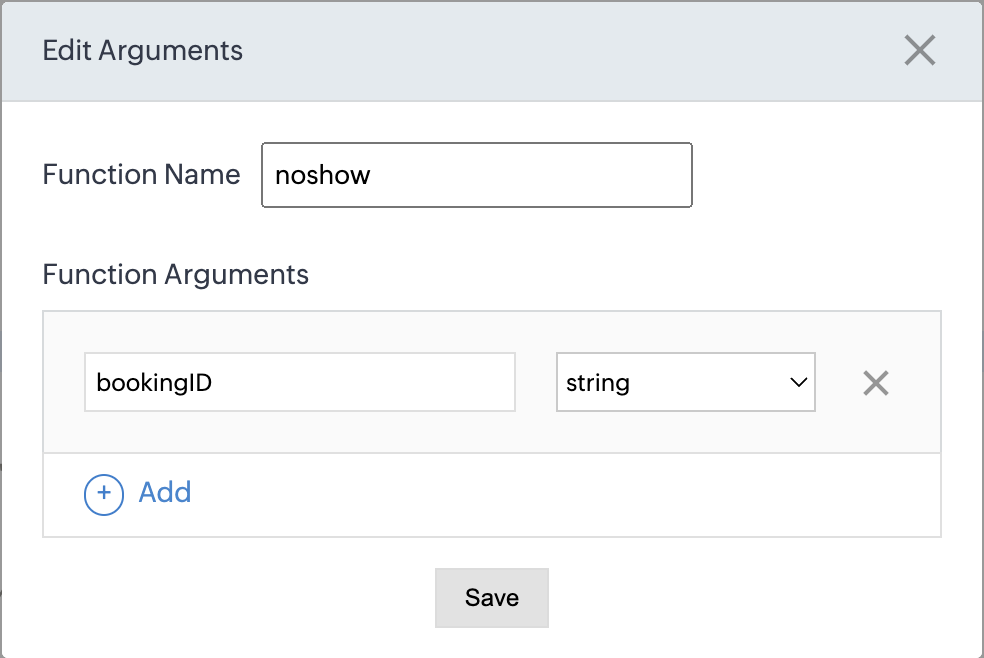
Please configure the below code on the Deluge script page.
Code link: No show
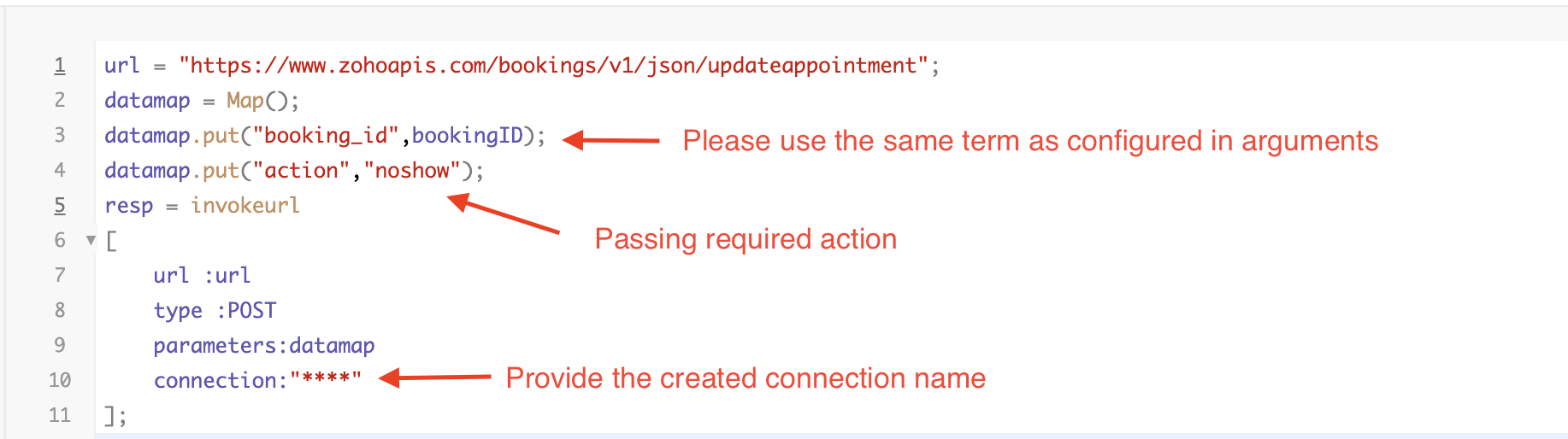
By completing these steps, we've configured a function that marks appointments as no shows.
iii. To create a function for marking appointments as canceled
1. Go to Setup > Developer Space > Functions.
2. In the Functions page, click + Create New Function.

3. Configure the function name, display name, and description.
4. Set the category as automation.
This opens the Deluge script page.
5. Next, configure the function's arguments:
A. Click on Edit Arguments on the Deluge script page.

B. Set the Parameter Name as bookingID. (Please note that the "bookingID" value is case sensitive and must match
the term used in the code).
C. Set the type as string.
Reference
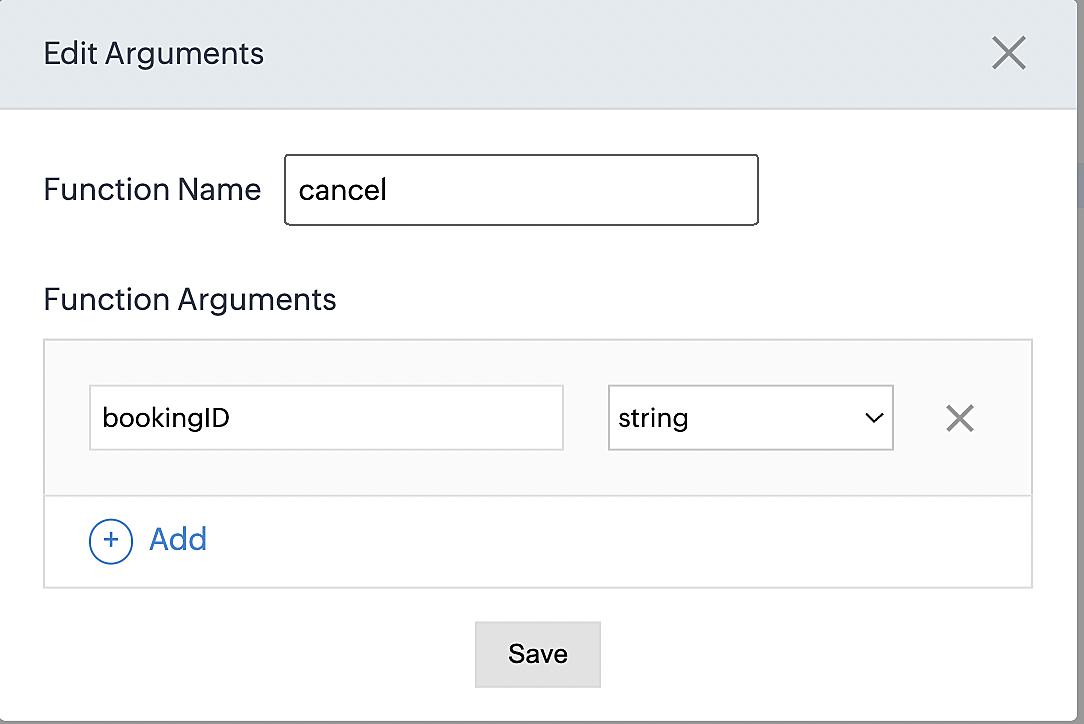
Please configure the below code on the Deluge script page.
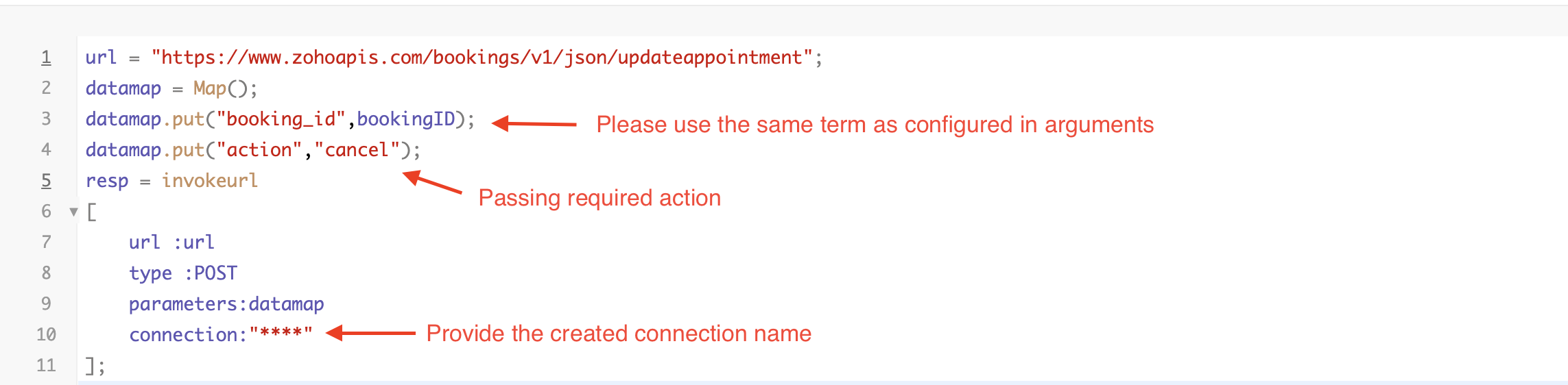
By completing these steps, we've configured a function that marks appointments as canceled.
Code explanation
Below is an explanation of the code that covers all the configurations present in the three functions mentioned above (cancel, mark as completed, and mark as no show).
Line 1: Based on the Zoho Bookings account's data center, we're setting up the API endpoint URL configuration.
Lines 2 - 4: To update appointments, we utilize the Zoho Bookings API. Within the update appointment API, there are two mandatory fields that need to be included: BookingID and action (completed/cancel/noshow).
Lines 5 - 10: We use the invokeURL task for API calls. To learn more about the invokeURL task, please refer to the following document: InvokeURL task for API calls
Now, let's proceed and learn about the process of creating a workflow and linking the established functions to it. This will enable us to automate the entire appointment status updating process.
Step 3: Creating a workflow
Workflow rules are sets of actions (email notifications, tasks and field updates) that are executed when specified conditions are met. Here, we'll generate workflow rules for each action to activate the respective function, thereby automating the appointment status updating process.
i. Creating a workflow for "canceling" appointments in Zoho Bookings when a meeting is deleted in Zoho CRM
Part 1: Creating the rule
1. Go to Setup > Automation > Workflow Rules.
2. In the Workflow Rules page, click Create Rule.

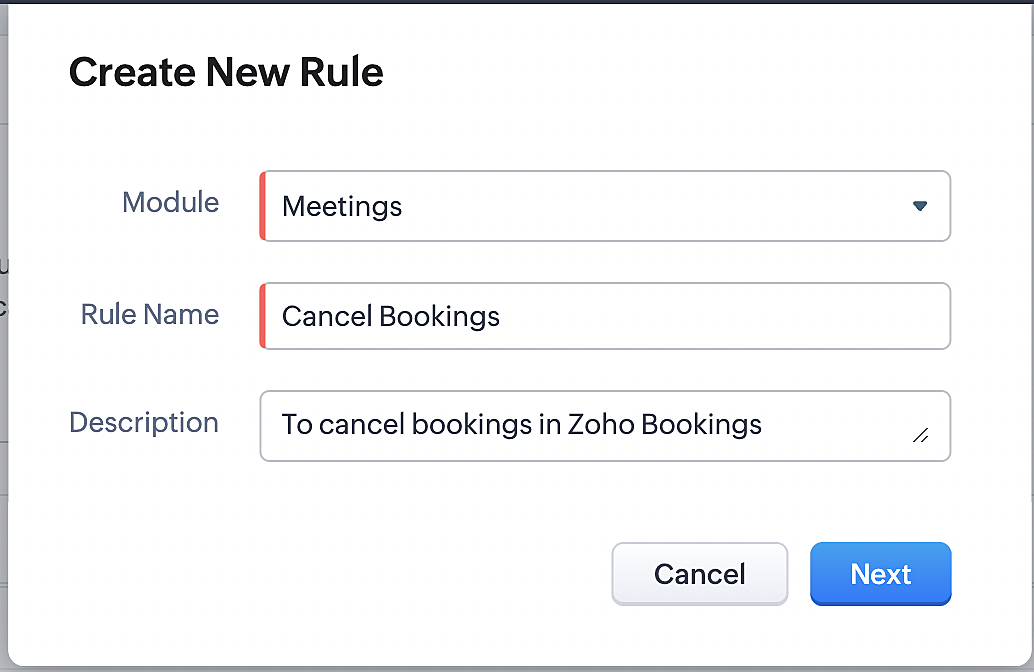
3. Select "Meetings" under Module and configure rule name and description as required.
More details: Create Rule
Reference:
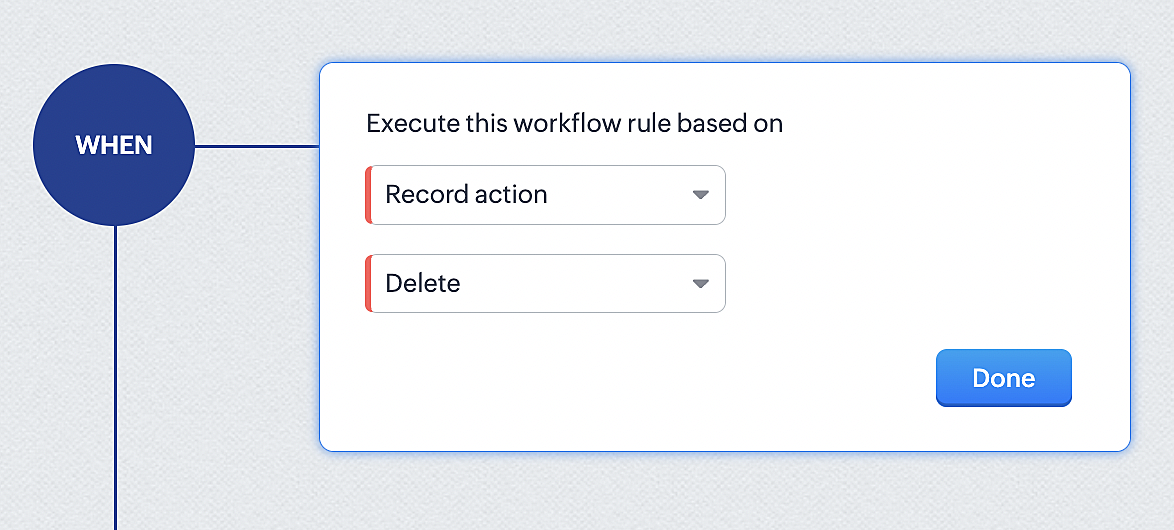
1. Select Record Action > Delete > Done to execute the rule when meetings are deleted.
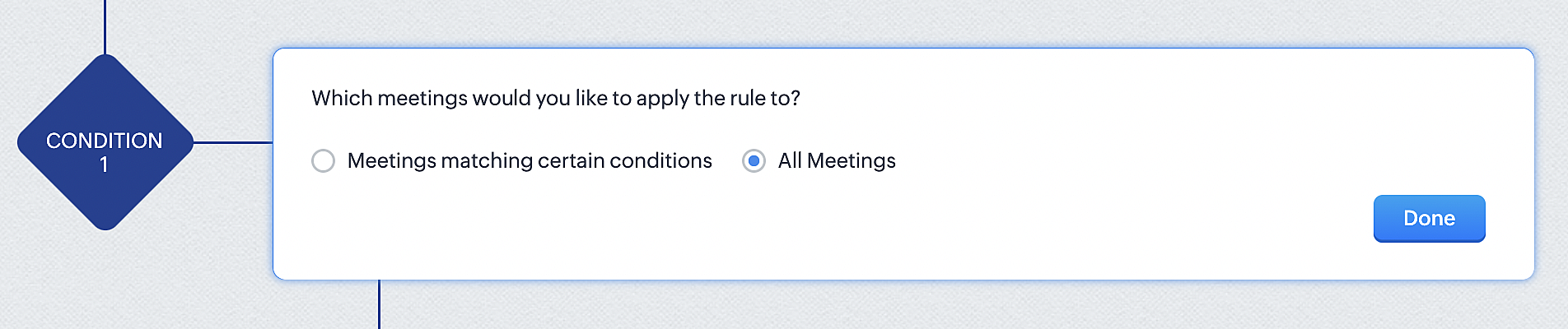
2. Configure condition > All Meetings.
3. Instant Actions > Function.
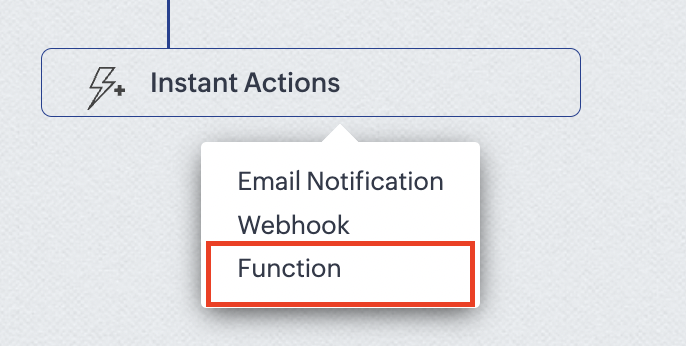
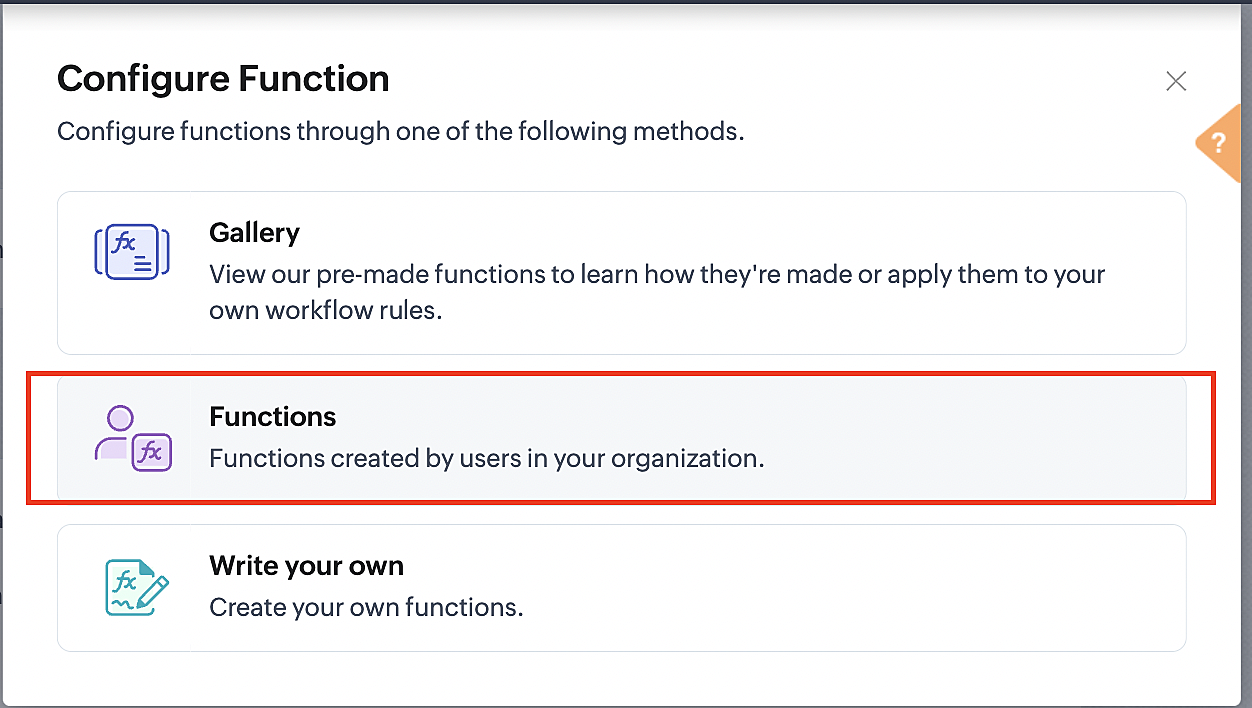
4. Click the New Function button.

5. In the Configure custom function page, select the "cancel" function you created from among the functions users in your organization have created.
Part 3: Argument mapping
1. Press # to choose an argument value.
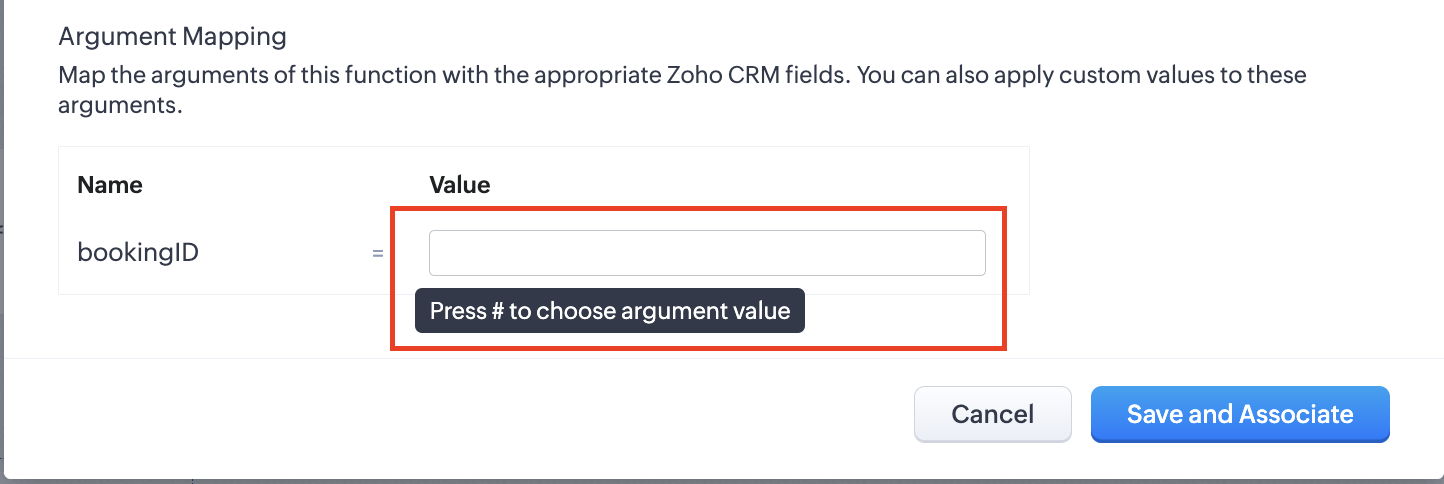
2. Select Meetings under Module and BookingId in the field.
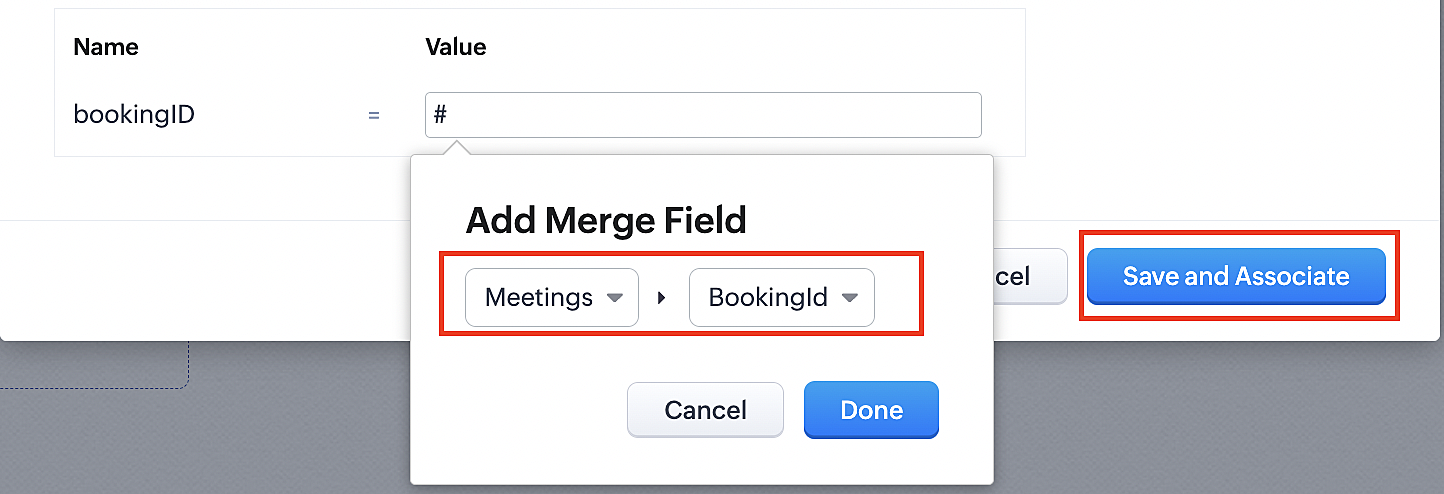
3. Click the Save and Associate button.
Reference:
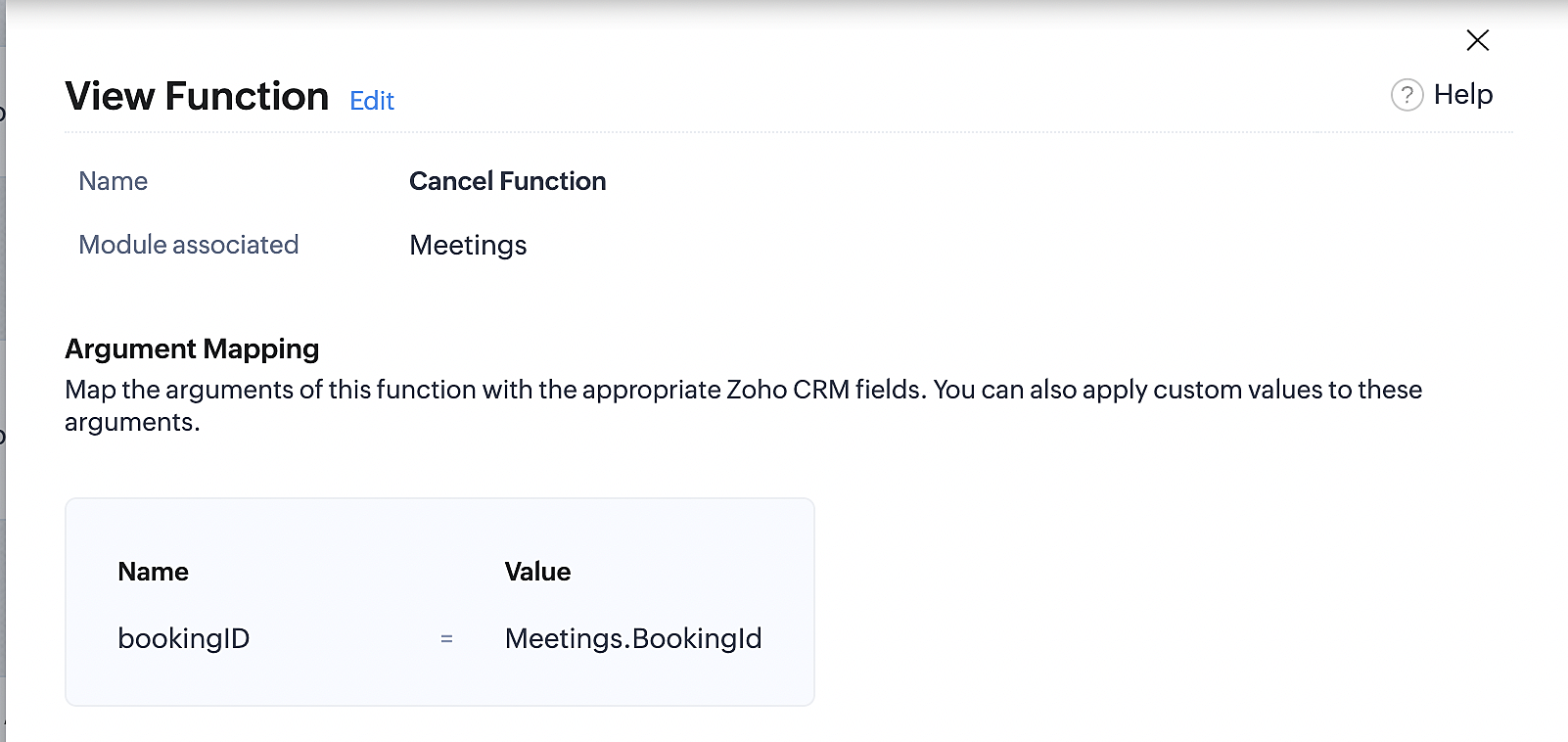
Below is the final flow of the cancel booking workflow:
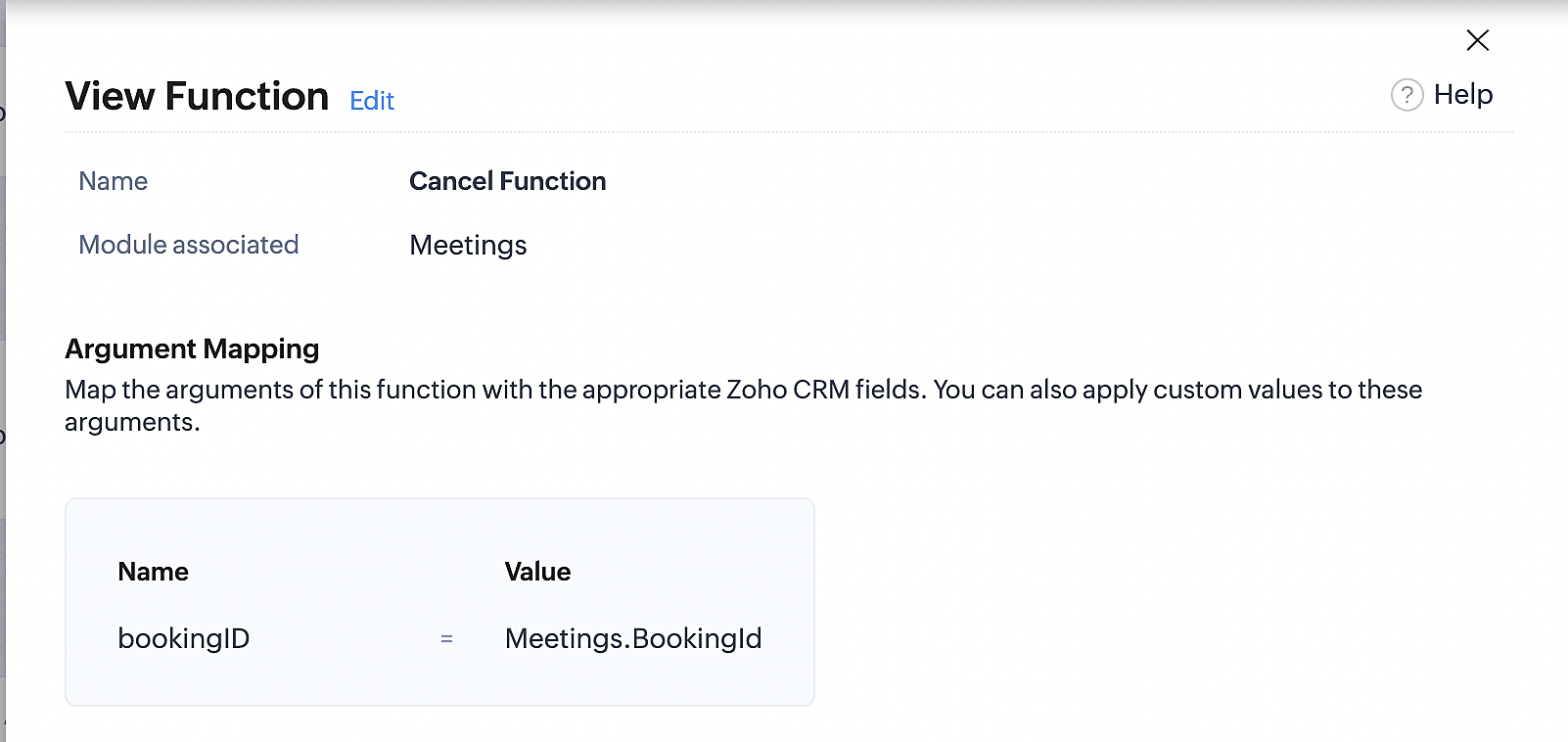
At the end of Part 3, we will have created a workflow that will be executed automatically when meetings are deleted in Zoho CRM. Simultaneously, the bookings associated with the meeting will also be canceled in Zoho Booking.
ii. Creating workflow for updating an appointment's status as "no show" in Zoho Bookings when the meeting's booking status is marked as no show in Zoho CRM
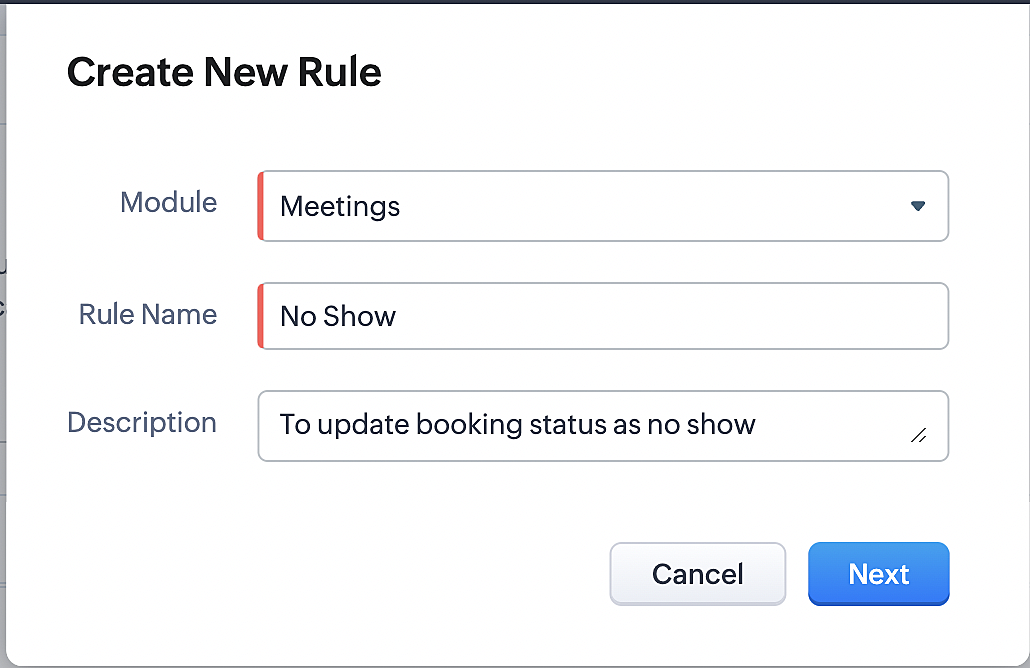
Part 4: Creating the rule
1. Go to Setup > Automation > Workflow Rules.
2. In the Workflow Rules page, click Create Rule.

3. Select Meetings under Module and configure the rule name and description as required.
Reference:
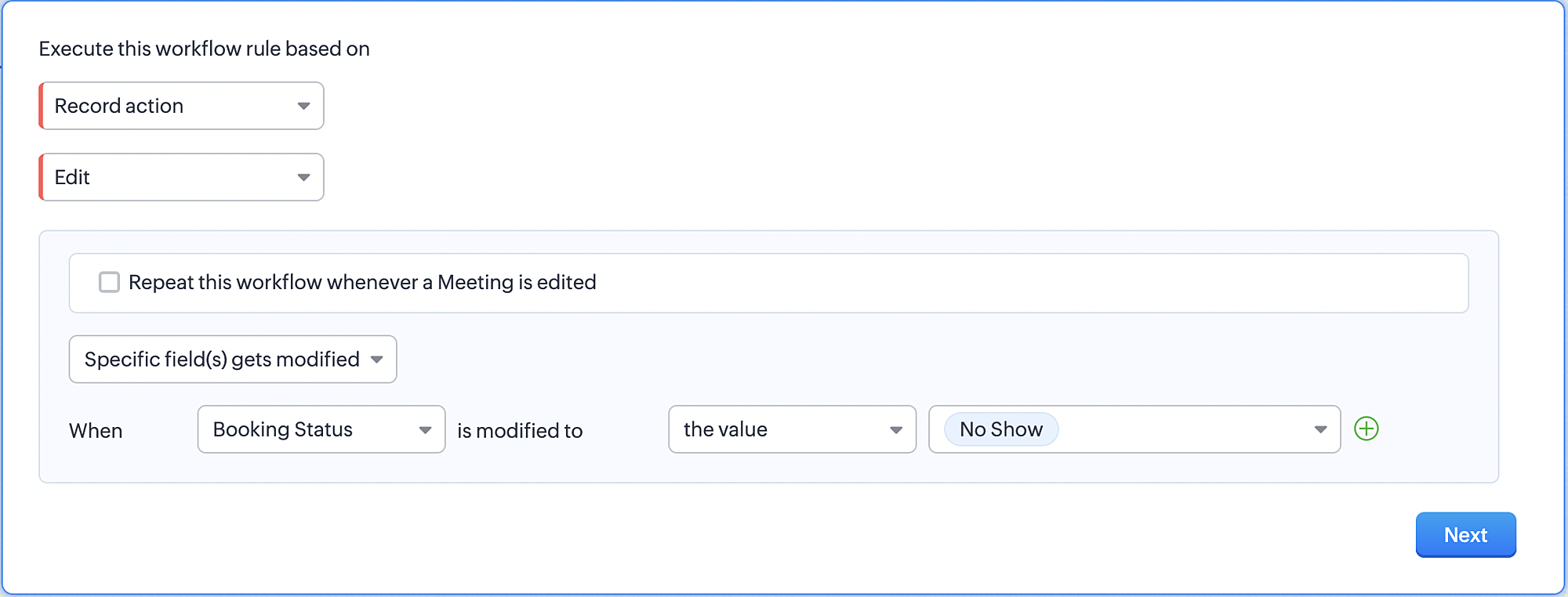
Part 5: Specifying the rule trigger
If you encounter difficulties while navigating through the steps mentioned below, please refer to Part 2 above, where we have provided step-by-step screenshots for clarification.
1. Record Action > Edit.

2. Enable the Specific field(s) gets modified and configure it per the screenshot below.
a. This is to ensure that the workflow is executed only when the booking status under the meeting module is
updated to "No Show".
updated to "No Show".
3. Configure condition > All Meetings.
4. Instant Actions > Function > New Function.
5. In the Configure custom function page, select the "no show" function you created from among the functions
users in your organization have created.
users in your organization have created.
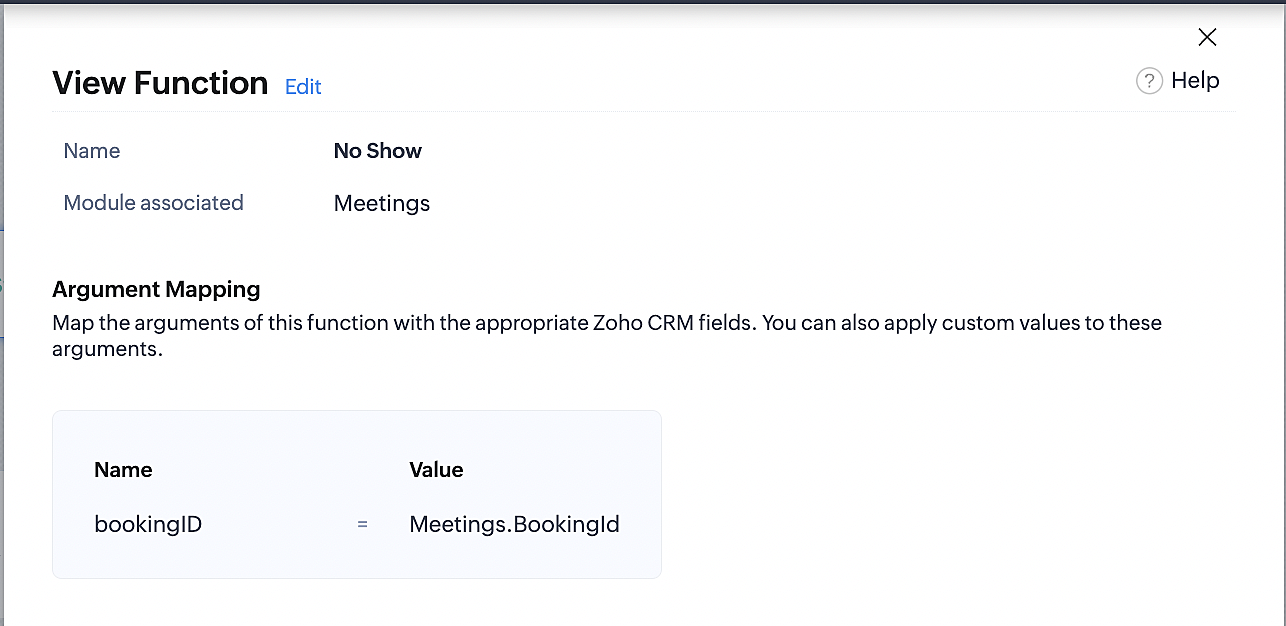
Part 6: Argument mapping:
If you encounter difficulties while navigating through the steps mentioned below, please refer to Part 3 above, where we have provided step-by-step screenshots for clarification.
1. Press # to choose an argument value.
2. Select Meetings under Module and configure the field as "BookingId".
3. Click Save and Associate button.
Reference:
Below is the final flow of the "No Show" booking status workflow:
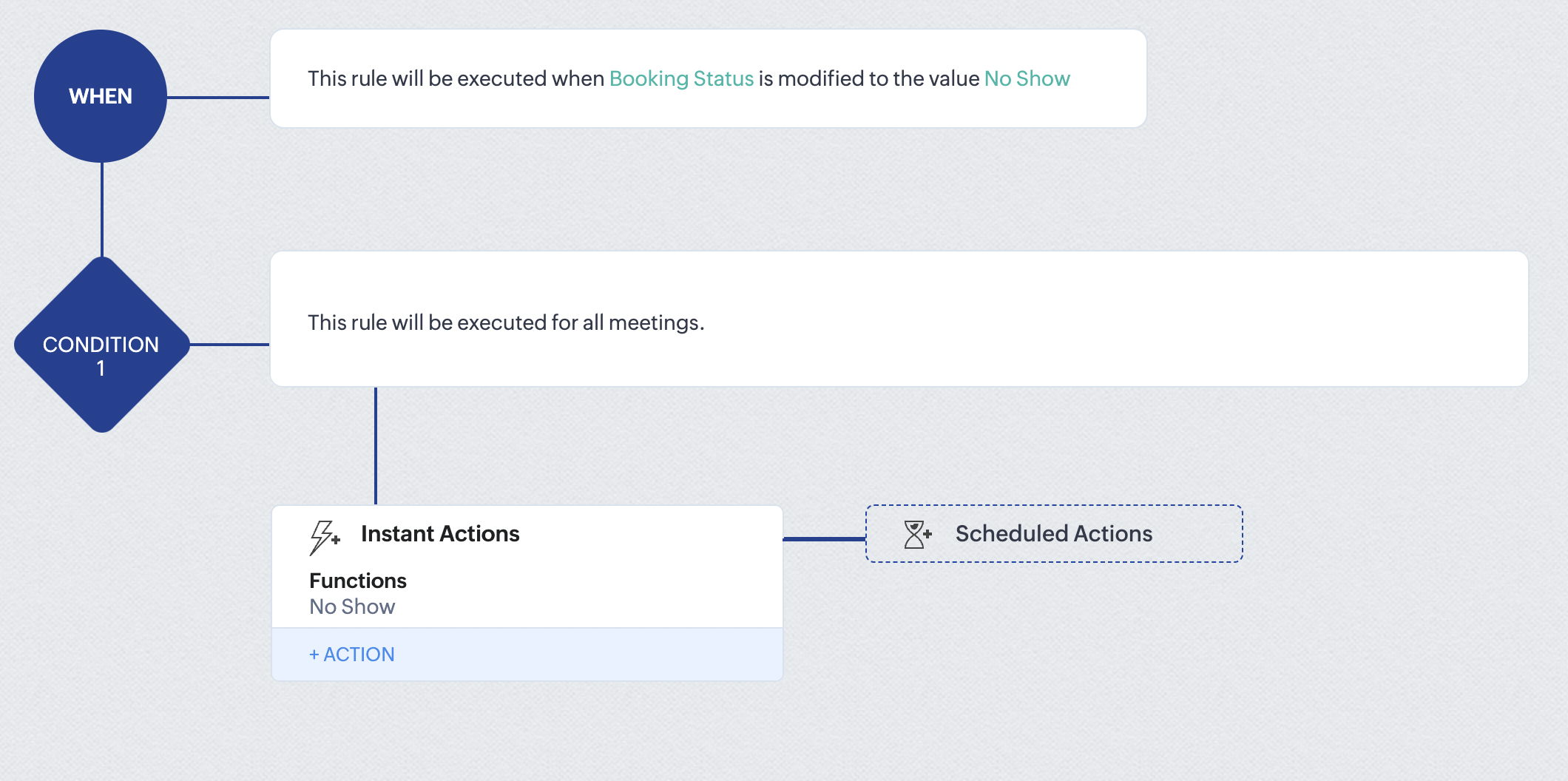
At the end of part 6, we will have created a workflow that automatically executes when the booking status field within the Zoho CRM Meetings module is updated to "No Show." This action will result in the associated bookings for that meeting also being marked as "No Show" in Zoho Bookings.
iii. Creating workflow for updating appointment status as "Completed" in Zoho Bookings when the booking status field of the meeting is marked as completed in Zoho CRM.
Part 7: Creating the rule
1. Go to Setup > Automation > Workflow Rules.
2. In the Workflow Rules page, click Create Rule.

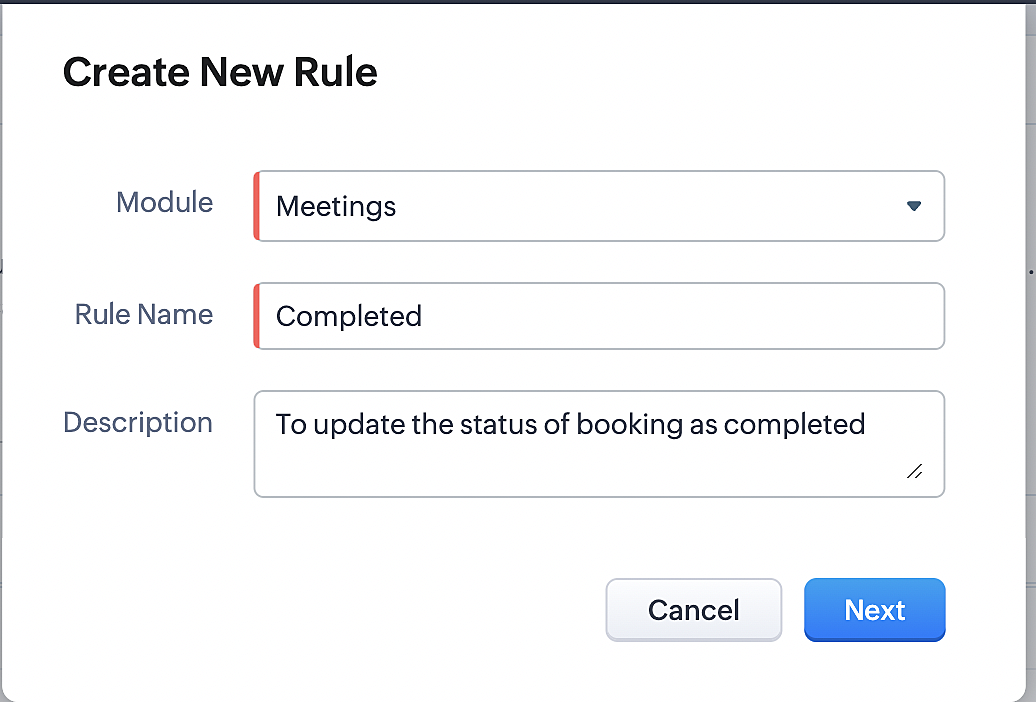
3. Select Meetings under Module and configure rule name and description as required.
Reference:
Part 8: Specifying the rule trigger
If you encounter difficulties while navigating through the steps mentioned below, please refer to Part 2 above, where we have provided step-by-step screenshots for clarification.
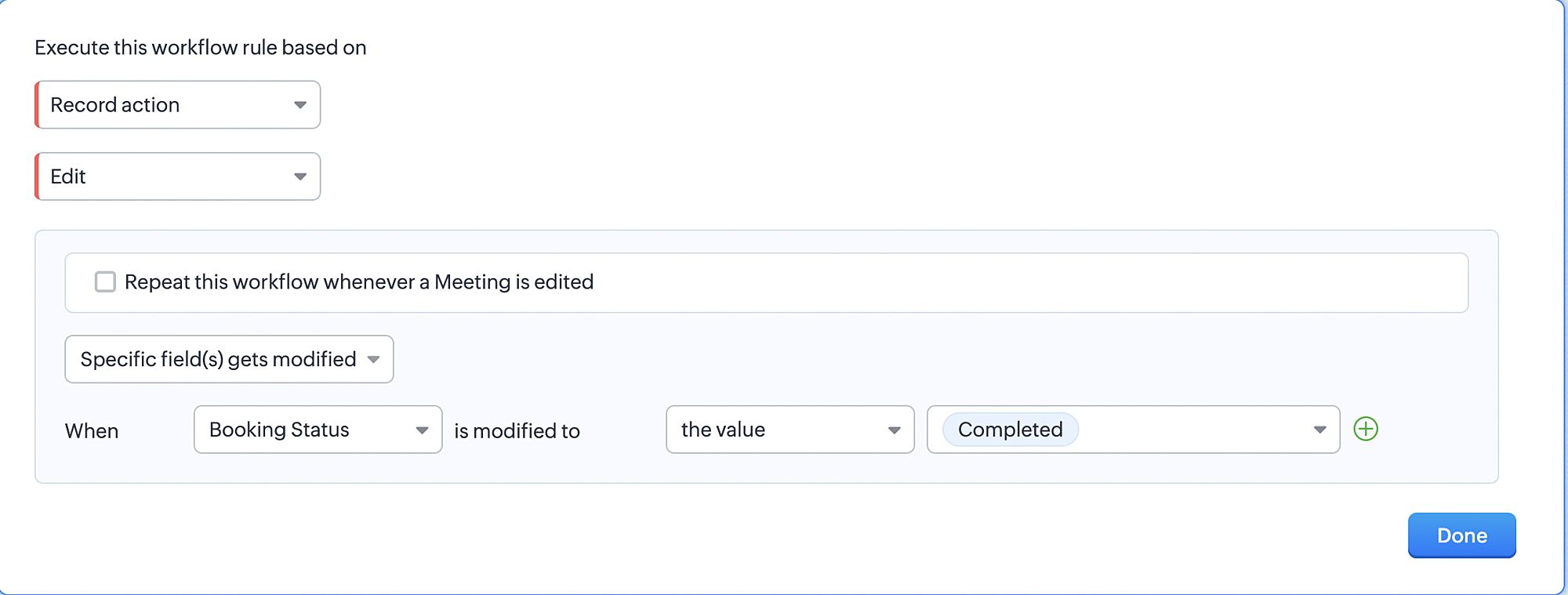
1. Record Action > Edit.

2. Enable the Specific field(s) gets modified setting and configure it per the screenshot below.
a. This serves to ensure that the workflow is executed only when the booking status under the Meetings module is
updated to "Completed".
3. Configure condition > All Meetings.
4. Instant Actions > Function > New Function.
5. In the Configure custom function page, select the "completed" function you created from among the functions users
in your organization have created.
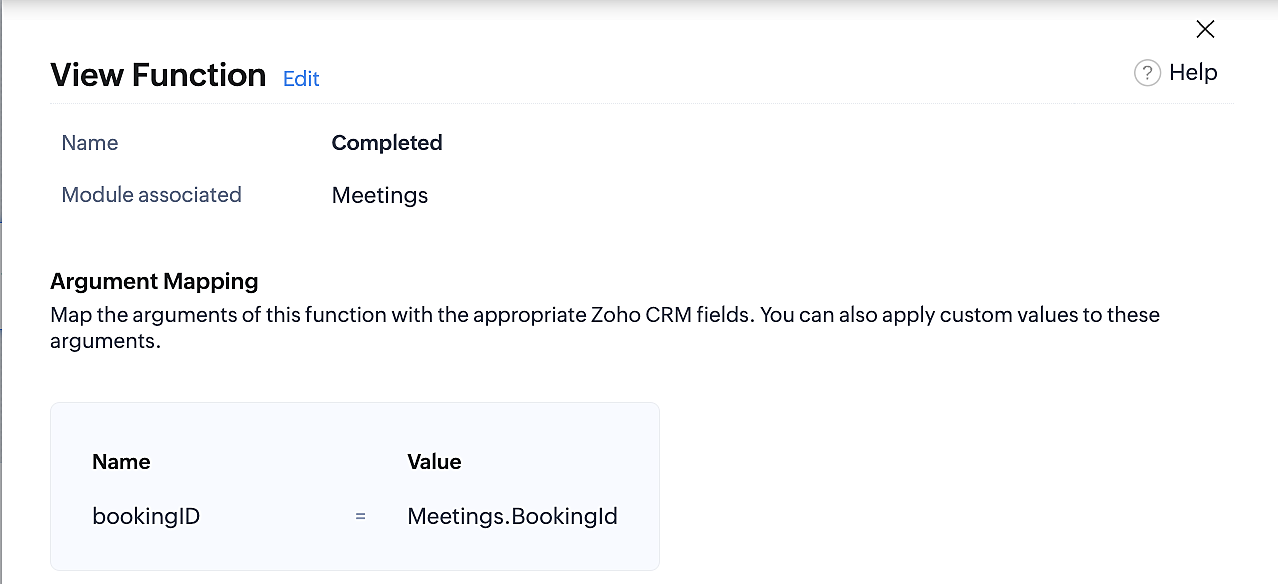
Part 9: Argument mapping:
If you encounter difficulties while navigating through the steps mentioned below, please refer to Part 3 above, where we have provided step-by-step screenshots for clarification.
1. Press # to choose an argument value.
2. Select Meetings under Module and configure the field as "BookingId".
3. Click Save and Associate button.
Reference:
Below is the final flow of the "Completed" booking status workflow:
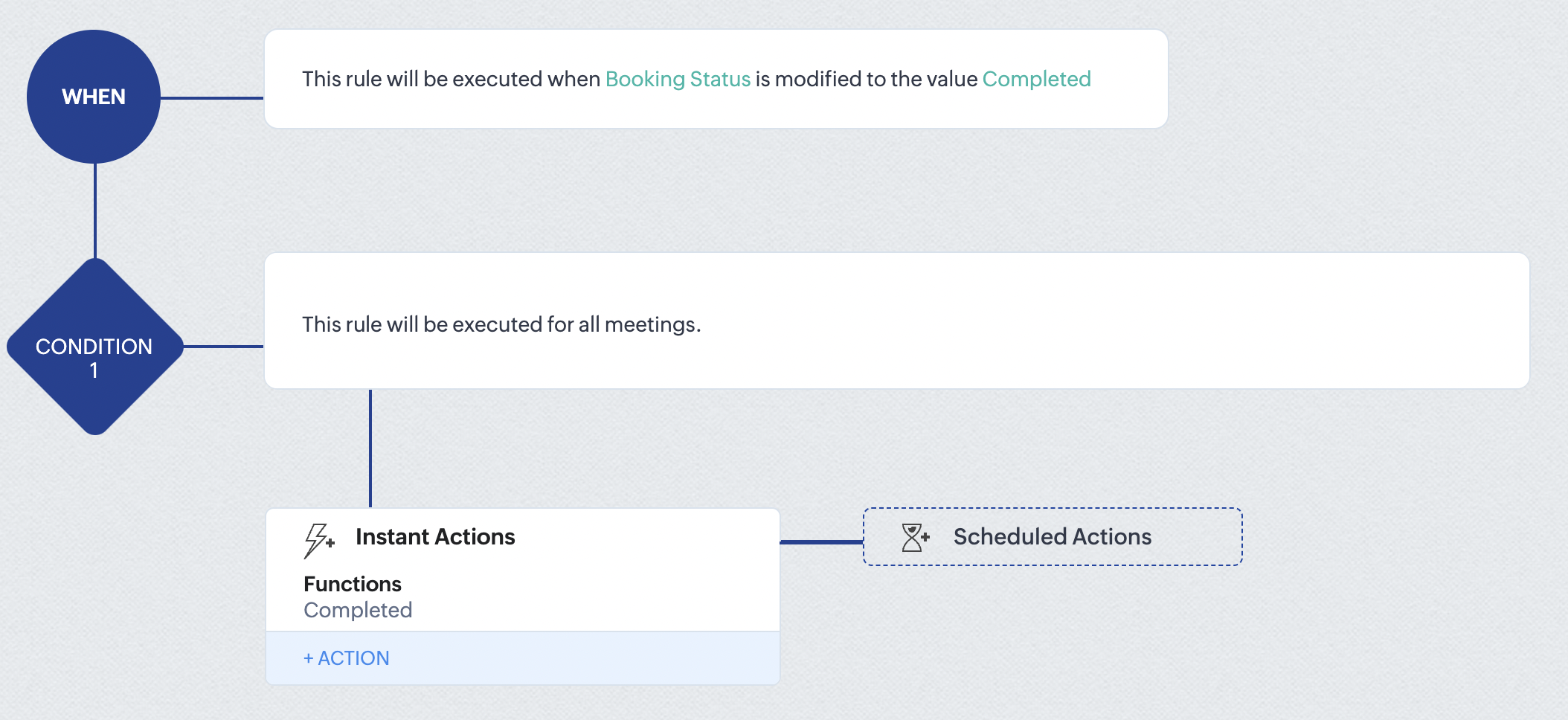
At the end of part 9, we will have created a workflow that is automatically executed when the booking status field within the Zoho CRM Meetings module is updated to "Completed." As a result, the associated bookings for that meeting will also be marked as "Completed" in Zoho Bookings.
Conclusion
We've reached the end of this community post. With the integration mentioned above in place, you'll be able to book, cancel, and update the status of appointments in Zoho Bookings directly from your Zoho CRM application. This will help you effectively manage your appointments in one place. As mentioned above, we've covered the rescheduling action in a separate post, which you can access by clicking on the following link: Reschedule Action
Furthermore, we've outlined a method for automating appointment statuses in detail. You can use this document as a reference to explore the various possibilities that suit your needs.
If you have any questions or need assistance with your configuration, please email us at hello@zohobookings.com or support@zohobookings.com.
Access your files securely from anywhere
New to Zoho Recruit?

Zoho Developer Community
New to Zoho LandingPage?
Zoho LandingPage Resources
New to Zoho Survey?
New to Zoho CRM Plus?
Deliver unforgettable customer experiences
New to Zoho CRM Plus?
Deliver unforgettable customer experiences
New to Zoho Marketing Plus?
Everything you need to run your marketing
New to Zoho Marketing Plus?
Everything you need to run your marketing
New to Bigin?





Topic Participants
Kaushik S
bruce
Ishwarya SG
PrismaNote Support
Sticky Posts
Presenting ABM for Zoho CRM: Expand and retain your customers with precision
Picture this scenario: You're a growing SaaS company ready to launch a powerful business suite, and are looking to gain traction and momentum. But as a business with a tight budget, you know acquiring new customers is slow, expensive, and often deliversGood news! Calendar in Zoho CRM gets a face lift
Dear Customers, We are delighted to unveil the revamped calendar UI in Zoho CRM. With a complete visual overhaul aligned with CRM for Everyone, the calendar now offers a more intuitive and flexible scheduling experience. What’s new? Distinguish activitiesCreate and populate a record in an instant: Introducing zero-shot field prompting to Zia's ICR
A couple of months ago, we upgraded our in-house AI image detection and validation tool, Zia Vision, with intelligent character recognition (ICR). By training Zia with sample images, you could create and enrich CRM records with data extracted from standardIn-person ZUG Meetups for Real Estate Professionals - US Q1 2026
The Real Estate Zoho User Group is going on a multi-city, in-person meetup tour across the US, and we’d love to see you there! These meetups are a great opportunity to: Connect with fellow real estate professionals using Zoho Share challenges and discoverNimble enhancements to WhatsApp for Business integration in Zoho CRM: Enjoy context and clarity in business messaging
Dear Customers, We hope you're well! WhatsApp for business is a renowned business messaging platform that takes your business closer to your customers; it gives your business the power of personalized outreach. Using the WhatsApp for Business integration
New to Zoho TeamInbox?
Zoho TeamInbox Resources
Zoho CRM Plus Resources
Zoho Books Resources
Zoho Subscriptions Resources
Zoho Projects Resources
Zoho Sprints Resources
Qntrl Resources
Zoho Creator Resources
Zoho CRM Resources
Design. Discuss. Deliver.
Zoho Show Resources

Get Started. Write Away!
Writer is a powerful online word processor, designed for collaborative work.
Zoho CRM コンテンツ
-
オンラインヘルプ
-
Webセミナー
-
機能活用動画
-
よくある質問
-
Ebook
-
-
Zoho Campaigns
- Zoho サービスのWebセミナー
その他のサービス コンテンツ
Nederlandse Hulpbronnen

ご検討中の方
Recent Topics
Default Memo from Custom Field (from Bill) when Paying with Check
Hi, we are using "Pay via Check" option to pay for our Bills in Zoho Books. I would like the memo on the check to pull directly from one of the custom field values within the Bill. Is there any way I can do this? The memo that I need is already on theWouldn't it be great to have an option to schedule sending emails in Zoho mail? Schedule send feature request
The subject says it all - but just to clarify: This is to request a new feature that would allow users to schedule the delivery of an email for a given date & time. In small companies it is quite common to work unsocial hours on customer emails. But someStatic vs Standard Subforms - New Feature; But how does it work?
I've just noticed that we now have the option of static or standard subforms, but I can't find any posts on the new feature. So, how does the new subform type work?【Zoho CRM】翻訳機能のアップデート
ユーザーの皆さま、こんにちは。コミュニティチームの藤澤です。 今回は「Zoho CRM アップデート情報」の中から、翻訳機能のアップデートをご紹介します。 翻訳機能が拡張され、Webタブ、レイアウト、セクション、ウィザード、ウィザード画面、セグメントも翻訳できるようになりました。 翻訳をエクスポートする際に、これらの要素に対応する用語もエクスポート先の言語で追加されます。 ※過去の関連記事はこちらから まず、翻訳の設定画面から「エクスポート」を選択してください。すると、TXT形式のファイルがローカル環境に出力されます。Trying to make zoho invoice have a button
Hello I am getting this error with the code below. Anyone know how to fix? Check and update the code in line 5 as there is a Exception : Variable 'invoice_id' is not defined // Define Organization ID (Replace with your actual Zoho Invoice organizationDuplicate Contacts - how to get merge or delete
I have noticed that our list of contacts in Zoho Desk duplicates contacts periodically. I have yet to identify when or why. How do I merge or delete them? I see there is a "Deduplicate" but I am unable to find anything that explains this feature.Another nightmare experience with a "Zoho Partner": Cloud Z Technologies
I found "CloudZTech" on fiverr and I hired them to do a simple $300-$500 task. They did not deliver on time and I was forced to fire them. You guys must watch out for these fake ZOHO PARTNERS, 99% of them don't have the expertise necessary to help. IPickup and delivery
Some of our products are pickup only and some delivery. Is there a way of doing this in commerce. Plus we give volume discount to all customers. We handle this in Books using pricelist and range pricing. Is there a way of doing this within commerce.Unable to change the "credentials of login user" option when creating a connection
I want to create a new Desk connection where the parameter to use 'credentials of login user' is set to YES. I'm able to create a new connection but am never given the option to change this parameter. Is this a restriction of my user profile, and if so,How can you train the Zia Bot for Desk
I added the Zia bot to my portal, but it's rarely able to answer questions, even when I have dedicated articles for the question. How can I best train it? Should I change the title of my articles, add more information inthe body copy?Direct Download Link
I saw how to share off a document to the public, which is great, but I was also wondering if there is a way to get a direct download link for a zoho doc. I would like to be able to simply send people my documents without them having to find download on the zoho page (not hard, but just for convenience)Form responses to quote process
Hello, so I am new to Zoho One. I'm fairly confident what I want to do can be done I just need guidance on how to accomplish it. I have a Zoho Form. When a customer fills out the form I want to generate a quote (that I will email to them, I do NOT wantIPv6 MX Support in 2025
There are multiple discussion on this community on IPv6 adjacent issues though the most pressing issue for IPv6 support is not solved yet the support team seems to not understand what is the issue and is steering the conversation to the wrong and misleadingZoho Books Quote - Client cannot accept quote
We are using the Zoho One plan and some of our clients have reported that they cannot accept the quote when we select their email at the bottom to send the quote to. When trying to accept, the quote prompts a message saying "You are not allowed to acceptReckon Accounts Hosted to Zoho Finance
Hi Everyone I want to transition from Reckon Accounts Hosted to Zoho Finance, as I have numerous other tasks in Zoho One, and it seems logical to make the move. (Reckon has a QuickBooks back end & is hosted on Assure now, think) I would really like toFlex Your Creativity – A New component to Canvas in Zoho CRM
Hello Everyone We’re excited to introduce Flex, a new component for Canvas in Zoho CRM! Flex is here to give you greater control over how your data is displayed in your layouts. This component enables responsive layouts that adapt across different screenVendor Assignment issue for staff in User Roales
there is a limitation in software that we can't assing Vendors to our staff - we can only assign Customers on staff wise!! There is a limitation of this software that in case i want to assign limited vendors to my staff - it's not possible. Either i willZoho Desk Community Portal Not Displaying Custom Styling Correctly
Hi Zoho Community, I’m struggling to get a custom community portal in Zoho Desk to display my branding and styling correctly, and I’d love some help troubleshooting this for a client’s support portal. Details: Setup: Zoho Desk (Professional plan, latestRemove or hide default views
I'm looking to only have the views pertinent to my organization. Is there a way to show only my custom views (or separate them to a different area or something)? If not, this should be a feature as switching from Zendesk we had this option...Wie kann ich einen Nutzer löschen?
Wir haben Zoho one. Es handelt sich um einen ehemaligen Mitarbeiter.Function #46: Auto generate list of lapsed customers using Custom Button
Hello everyone, and welcome back to our series! Customer retention is one of the key factors that impact the long-term success and sustainability of a business. High customer retention rates indicate satisfied customers, quality products or services,Before Going To The Qc stage , site ready ness file upload mandtoty how to achive this in the blue print transition
Before Going To The Qc stage , site ready ness file upload mandtoty how to achive this in the blue print transition Is it possible on click of the predelivery Transition show the alert message if site ready ness file upload empty also not move the stageAnnouncing new features in Trident for Windows (v.1.28.5.0)
Hello Community, Trident for Windows is here with exciting new features to help you stay productive and make collaboration simpler. Let’s dive into what’s new! Slash commands are now supported in the Cliq module. You can now use slash commands from theConvert time to string and remove second
Hello everyone, I have a question that I can't figure out on my own. How to convert time into string (singleline) and remove second. Like HH:mm. If I convert it as below, the result becomes null. Thank you very much. input.Time.tostring("HH:mm") result:Has anyone imported items and included the storage bin?
We have a large amount of Inventory Items. We would like to import these into Zoho Inventory but while we can import the majority of data, the storage bin refuses to map. Has anyone successfully imported the data and mapped the bin?Terms & Conditions add a rule.
Hi I'd like to format my T&C's to auto format a Deposit amount based on the Total. "Quotation is valid for 7 days from the date of issue. A 75% deposit ( R .00 )is required to confirm the booking. The remaining balance ( R .00)is due upon project completion.Zoho Inventory Feature Roadmap Visible To All
Hello, please consider making your feature roadmap visible to us users so that we know what to expect in future. This may appease current users who are seeking clarification on feature implementation dates, so that they can make an informed decision whethersend file to ftp or another external service
i'v created a zoho creator application for take a picture and rename it by phone. Now i need to send Each renamed pictures to my ftp or to specific folder on google drive...then, delete it from creator. (every picture recived it will processed by another program and stored on my Erp) HOW CAN I DO ??Feature Request - Improved booking layouts, specifically for individual booking links
I would like to see more layout options and specifically to have the meeting description beside the calendar booking function, when sharing booking links to specific consultations/meetings. Below is a screenshot from Calendly. I love this layout and itSet Conditional and Dependent Rules for Issues in Zoho Projects
An Issue Layout is a customizable form to add and update information about a specific issue. The fields in the issue layout can be changed dynamically based on user requirement using the issue layout rules. Consider a scenario where an electrical fluctuationAccounting on the Go Series-56: e-Way Bill Module in the Mobile App – A Handy Solution for Indian Businesses
Hello everyone, Managing e-Way bills just got more convenient with the Zoho Books mobile app! For businesses operating under the GST regime, e-Way bills are essential for tracking the movement of goods. Previously, you had to log in to the web app toCopying records from a Custom Module into Deals
Hello, I recently created a custom module to handle a particular type of order/transaction in our business. Having got this up and running I've realised that it would be much better to use the Deals module with a different layout instead. We've enteredCreator App on Mobile - Workflow "On Create / Edit - On Load" not triggered ?
Hi Everyone, I built an application to track assets, which is used both at the office (desktop) an in the field by technicians (mobile app). In the field, technicians open an existing form and add rows to a subform at some point. One field they have toHOW TO VIEW INDIVIDUAL COST OF NEWLY PURCHASED GOODS AFTER ALLOCATING LANDED COSTS
Hello, I have been able to allocate landed costs to the purchase cost of the new products. however, what i need to see now is the actual cost price (original cost plus landed cost), of only my newly purchased products to enable me set a selling priceCustom Function to get custom field of lookup type in Books
Hi, Here's the situation. In Purchase Order, there is a custom field (lookup) to SO. The requirement is to update to the related SO if PO get updated Right now facing challenge to get the id of custom field (lookup) in PO. Please find below the sampleCustom From Address is now Organizational Email
We're introducing a small yet meaningful change in Zoho Recruit, one that sets the foundation for bigger improvements coming your way. What’s changed? We’ve renamed the Custom From Address to Organizational Email. The new name was chosen to better reflectWhat's New in Zoho Billing Q2 2025
Hello everyone, We are excited to share the latest set of updates and enhancements made to Zoho Billing in Q2 2025, ranging from image custom fields to support for new languages. Keep reading to learn more. Upload Images From Your Desktop to Email NotificationsMap dependency on Multiselect picklist
I need help in Zoho CRM. I have 2 multi-select picklists. For example, Picklist A has country names. Picklist B has state names. Now I want to show states on the basis of the selected country from Picklist A. Both are multi-select fields, so the standardTip of the Week #63 – Keep personal emails out of team view.
Shared inboxes are great for teamwork—they let everyone stay on the same page, respond faster, and avoid duplicate replies. But not every message needs to be shared with the entire team. Think about those one-on-one chats with a manager, a quick internalEpisode III : Powering Automation: Custom Functions in Action
Hello Everyone, In our previous episodes, we explored custom functions and the Deluge programming language. If you’ve been wondering why the Episode series have been quiet, here’s the reveal! On our community, we've been showcasing custom functions integratedNext Page