Approve or deny appointments based on criteria

Approve or deny appointments based on criteria

Hey, community members!


Have you ever wondered how to automatically approve or deny appointments?


While we're still working on building that feature, we've got an alternative method to cancel appointments if they don't meet your specific criteria.

Let me share a recent client request as an example: Our customer has two types of services that are similar: One is for grown-ups and the other is for children. However, often adults mistakenly book these services without realizing that they are not intended for them. This results in unnecessary confusion for our customers, as they have to contact those who accidentally booked appointments and reschedule them, causing a significant amount of administrative work.

Here's how we helped our customer: We added a criteria field to the booking page (e.g., "What is your age?") Then, we automatically cancel appointments where the input age is greater than 15 and we'll even notify the grown-up client that their appointment has been canceled and guide them to book the appropriate service.


To make this happen, you'll need Zoho Bookings and the Zoho Flow Standard Plan.


Here's a simplified breakdown of the process in three steps:  

  • Zoho Bookings will collect the criteria data and pass it to Zoho Flow.

  • In Zoho Flow, we'll configure a workflow to verify the validity of the data.

  • If the data is invalid, Zoho Flow will trigger a cancellation request to Zoho Bookings, resulting in the appointment being canceled.


Don't forget these additional steps: Edit the booking confirmation page and notification email to proactively inform customers that their booking maybe subject to cancellation.

Let's dive into the details together!!!

STEP 1: TO BE FOLLOWED IN ZOHO BOOKINGS APPLICATION:


1. Create a mandatory field in Zoho Bookings Forms.

     A. For service booking form: Add Field

     B. For workspace booking form: Add Field


NOTE: Workspace-level settings apply to group and resource bookings, while for One-on-One bookings, you will need to make the necessary changes within the specific One-on-One service settings.

At the end of step 1, let's say we have created a mandatory field called "What is your age?". Now the customers on the booking page will have to provide their age to book an appointment.

Additional Step:

Canceling an appointment without the customer's knowledge might affect the customer experience. Therefore, we should acknowledge the customers in every possible way.


Here are some tips:


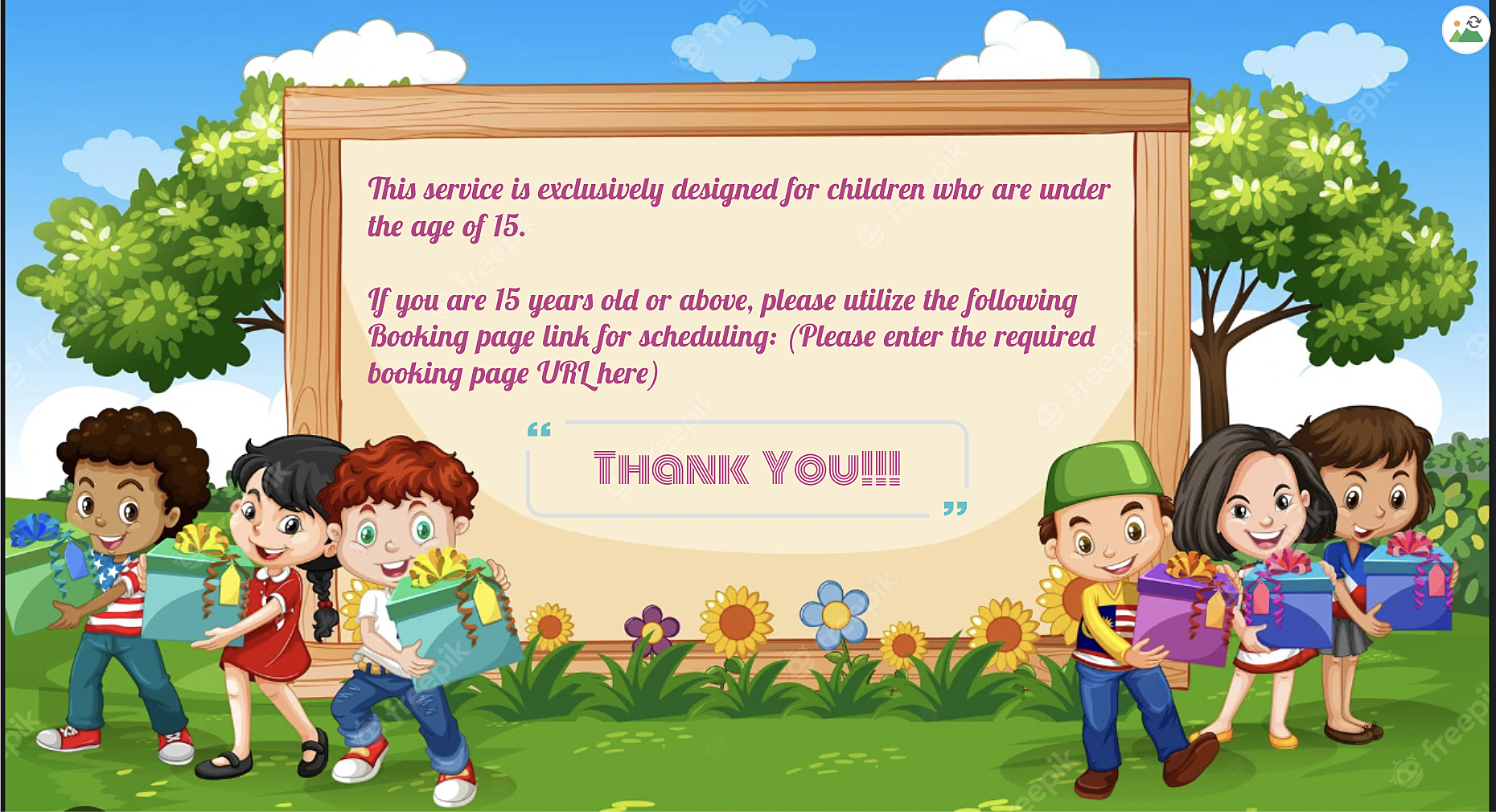
A. We can use the 'Custom Redirection' feature to redirect customers to a custom page after they book an appointment, instead of the default booking confirmation page.

Here is how to change booking confirmation page: Booking Confirmation Page


Here is the sample custom page:


B. By using the "
Terms and Conditions" check box, you can include the following message in the box: "This service is specifically designed for children under the age of 15. Bookings made by individuals above the age of 15 may be subject to cancellation". Customers will then need to check the box to confirm their agreement before completing their bookings, ensuring that they are aware of this policy.

More details: 

STEP 2: TO BE FOLLOWED IN ZOHO FLOW APPLICATION

A: Log in and search the template

  • Sign in to Zoho Flow application and create a new flow using the create flow option.

  • Select App > search for Zoho Bookings in the search bar.

  • Select the "Appointment Booked" trigger.

  • Select "Connection" and "Variable" > Done.


How to create a flow in Zoho Flow: Create a flow from scratch

How to create connection in Zoho Flow application: Create a Connection


At the end of step A, we have created a new flow including Zoho Bookings application.


B: Set Variable

  • In the Logic option > Flow Control > Set Variable > Edit the variable

  • Name the variable and in the value provide the input in following format "${trigger.customer_more_info.get("What is your age?")} " > Click on done.
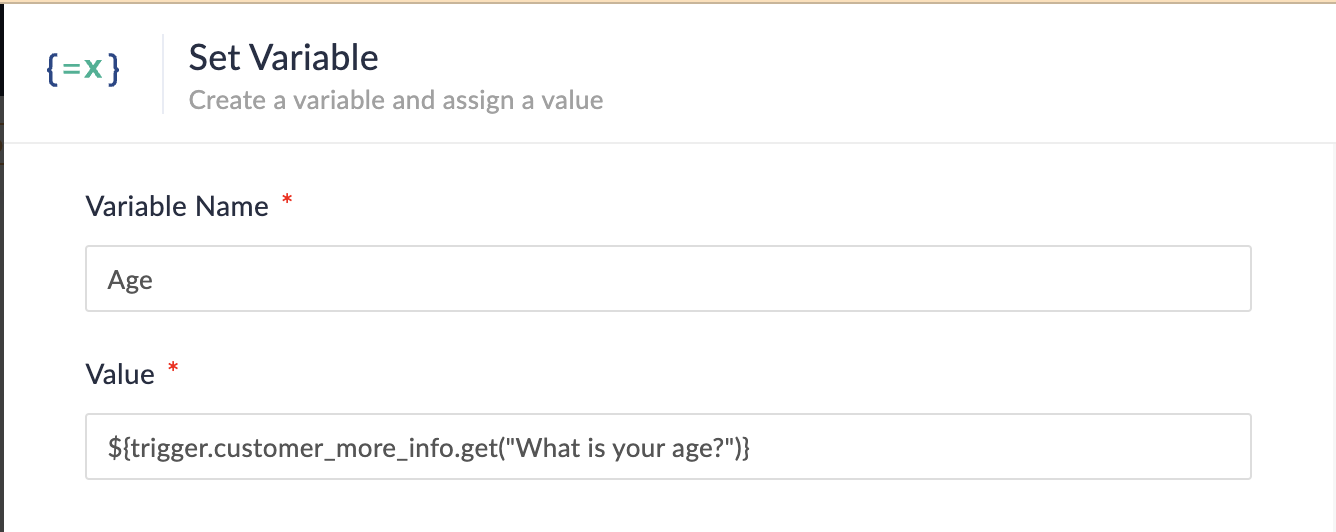


NOTE: In Step 1, we created a multi-line field named "What is your age?" If you have instead created a single-line field without spaces (e.g., "Age?") on the booking page, the format for the field would be as follows:

  • Single line field format: ${trigger.customer_more_info.fieldname}

  • Multiple line field format: ${trigger.customer_more_info.get("fieldname")}

At the end of step B, we are fetching the output of the "Age" field from the Zoho Bookings form.


C: Create Condition

  • In the Logic option > Flow Control > Decision.

  • In the condition 1, configure as Set Variable(Age) > is not null. 
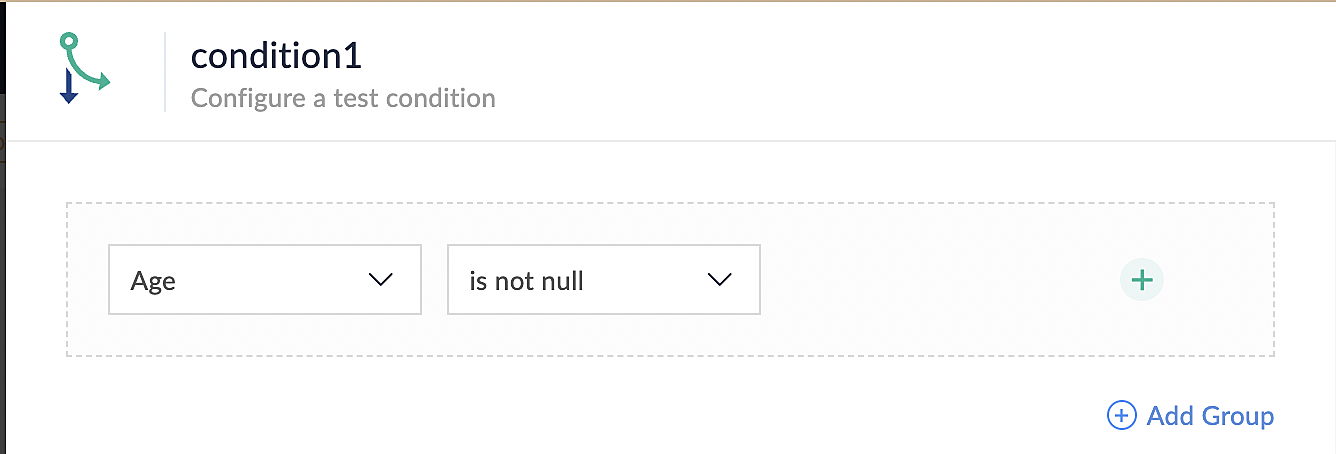

At the end of step C, we set up conditions to ensure that all bookings made through the Zoho Bookings application meet the requirements specified in the above conditions.


D: Custom Function

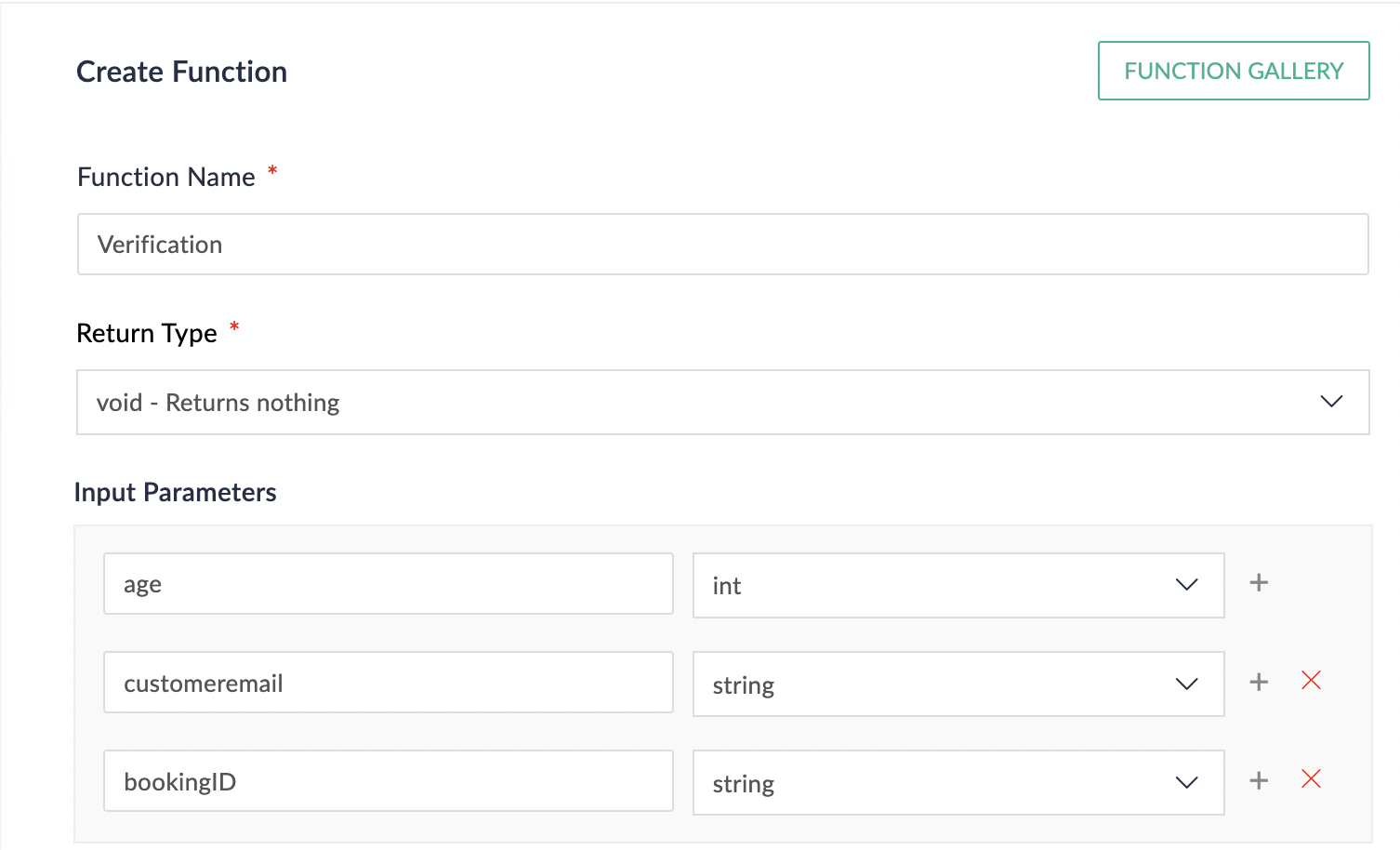
  • In the Logic option > Custom Functions > Create Function.

  • Configure function name, return type and input parameter.

  • Details on custom function: Custom Function
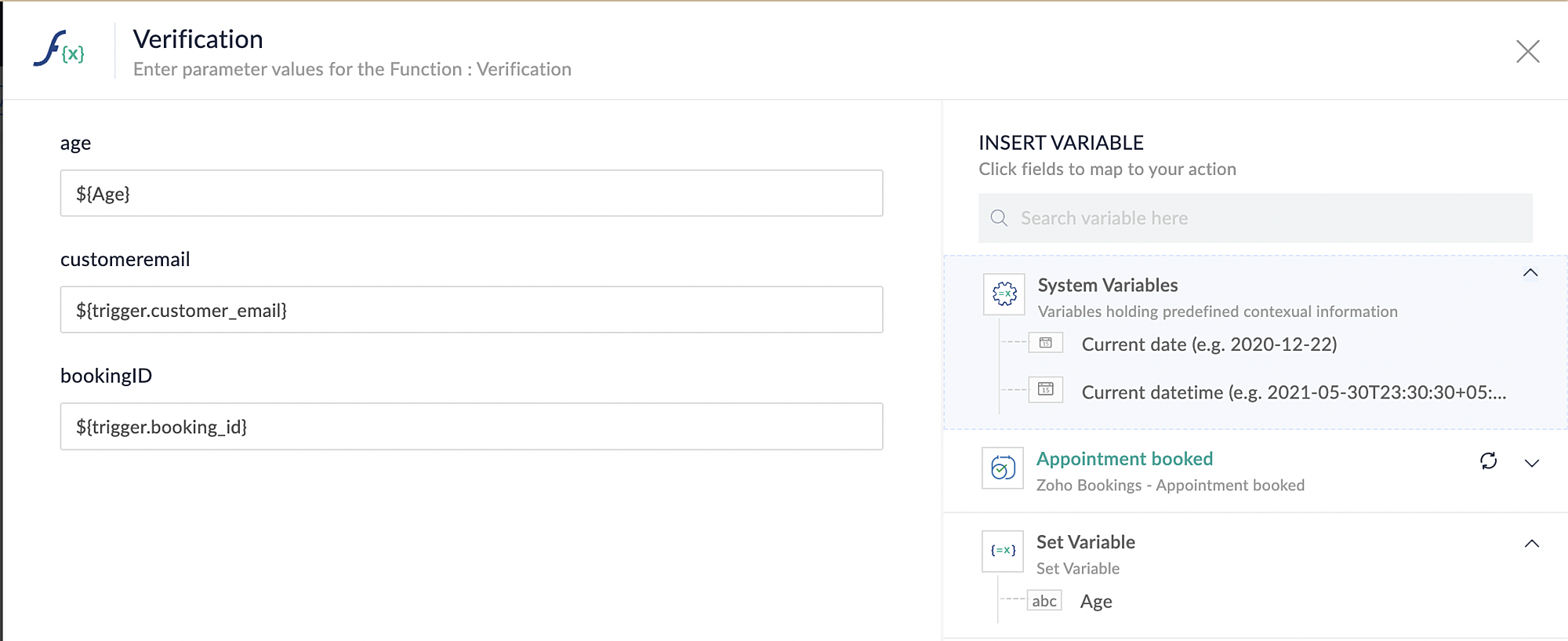
Reference below: 


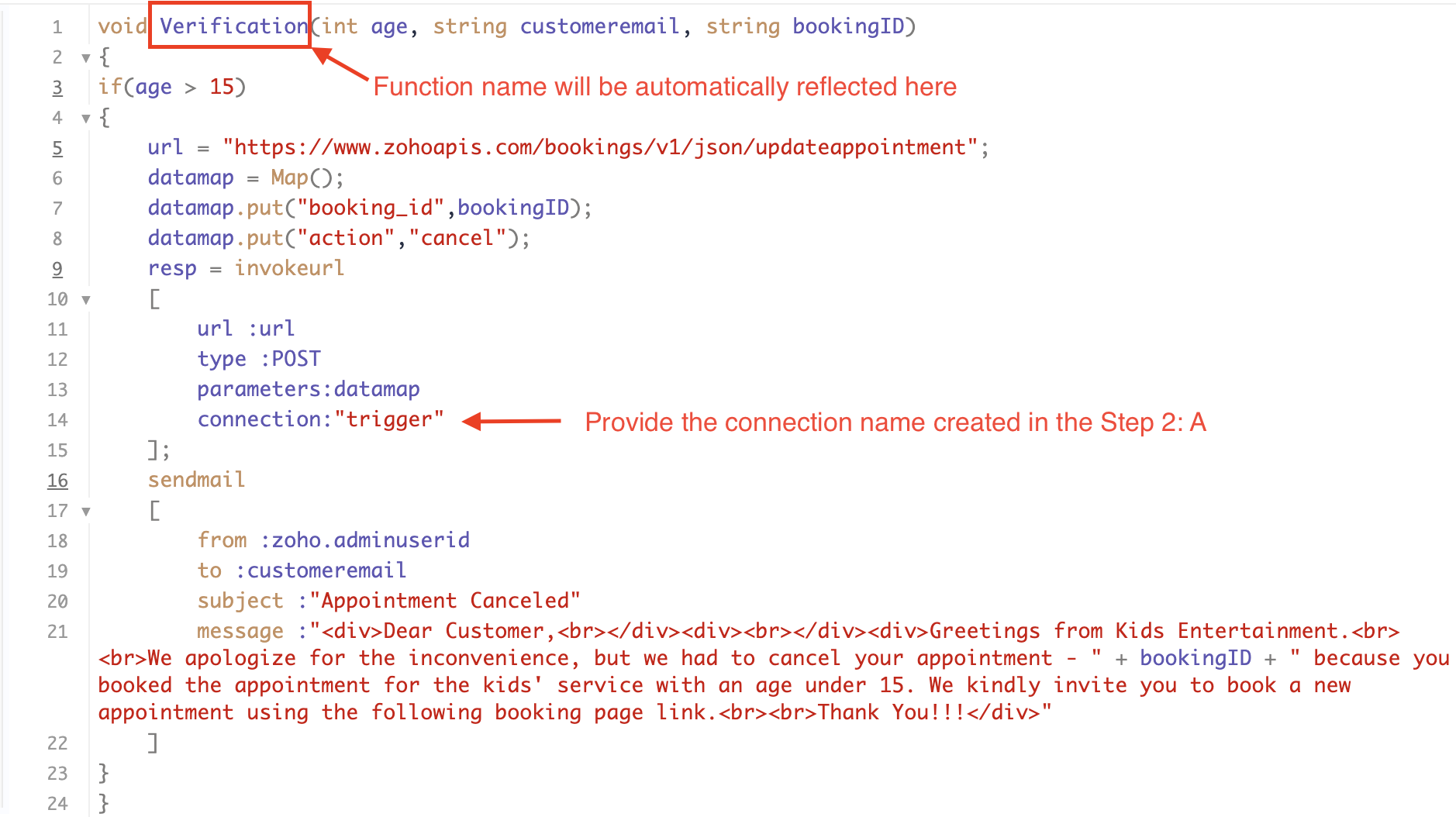
Below is the sample code which you can have for reference. You can configure and modify the code according to your specific requirements.


Code Explanation:


Line 1: To pass the input data below to the code

  • Age: This is used to verify and analyze the customer's input.

  • Customer Email: This is required to send an email notification to the customer in the event of an appointment cancellation.

  • Booking ID: This serves the purpose of identifying the specific booking that needs to be canceled using its unique booking ID.

Line 3: We are implementing an "if condition" to verify the customer's input. In this case, we will check if the entered age is greater than 15. If it meets this condition, the following loop will be executed.

Line 5 - 8: To update appointments, we are utilizing the Zoho Bookings API. Within the update appointment API, there are two mandatory fields that need to be included: BookingID and action (completed/cancel/noshow). In cases where the criteria are not met and an appointment needs to be canceled, we will pass the action field as "cancel".

Line 9 - 14: We are using invokeURL task for API calls. To know more about invokeURL task please refer to the following document: InvokeURL task for API calls

Line 16 - 21: We utilize the sendmail task to send an email to the customer when their appointment is canceled. Additionally, the Zoho Bookings application automatically sends a cancellation email to the customer in such cases. Therefore, you have the option to either use the sendmail task or rely on the default notification system to inform the customer about the cancellation of their booking.

More details on send mail task: Send Mail Task

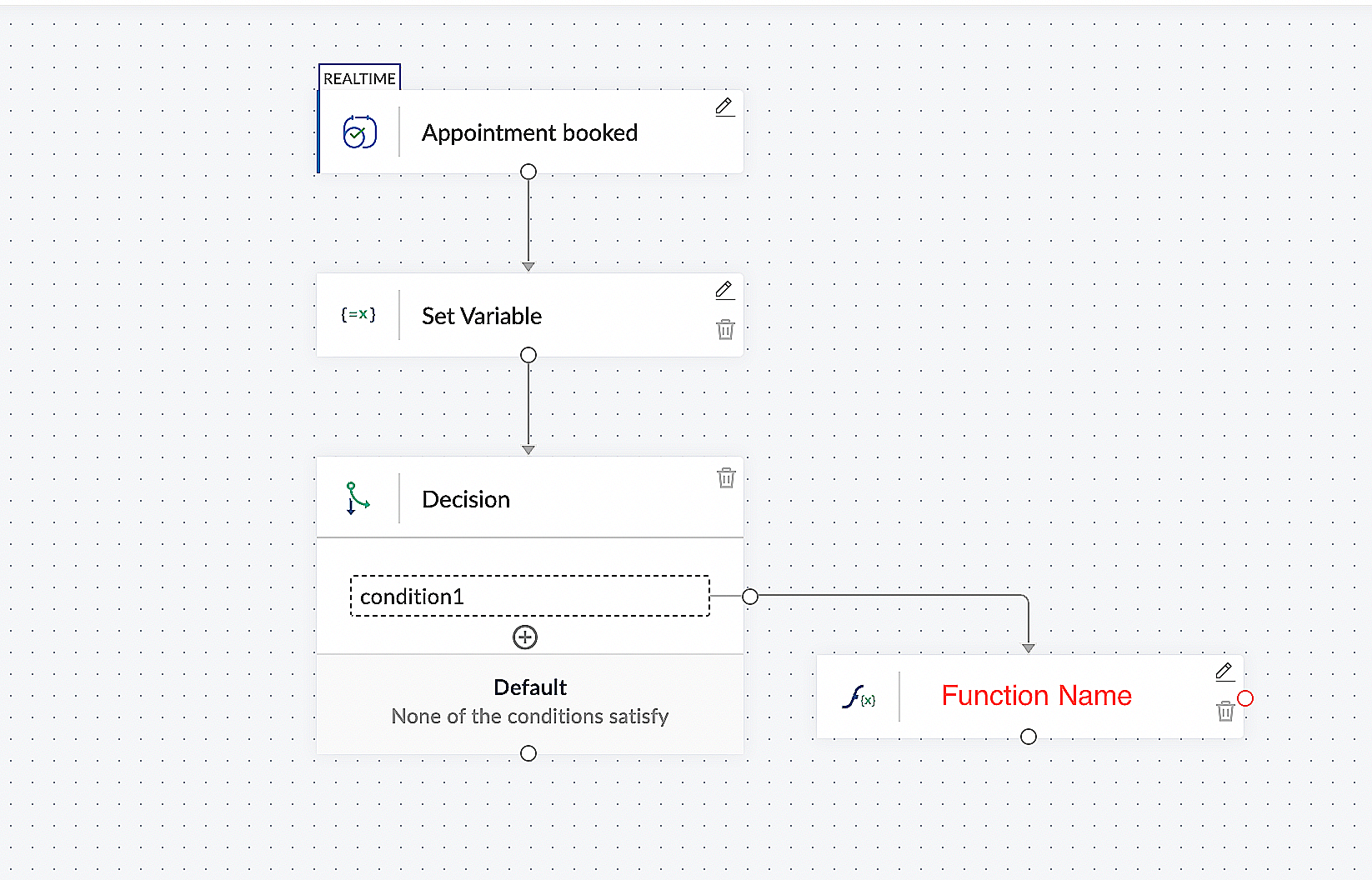
This is what the final flow will look like:


Here is the demo video:  In this demo video, we have showcased the behaviour of our setup configuration for different inputs from customers. One input satisfies the configured condition, while the other input does not meet the configured condition.


CONCLUSION:


In the preceding discussion, we have outlined a method for automatic appointment cancellation. You can use this document as a reference to explore the various possibilities that suit your needs.

In the upcoming posts, we will explore various scenarios and methods for updating the appointment status. Furthermore, we have covered the process of canceling an appointment after it has been booked.If you are wondering whether there is a way to verify customer inputs before booking an appointment, the answer is yes. We will delve into that topic in the next series.

As the above configuration may differ based on individual business requirements, we have provided a generic example for reference. If you have any questions or need assistance with configuration to align with your specific business needs, please email us at hello@zohobookings.com or support@zohobookings.com.

    Access your files securely from anywhere


                            Zoho Developer Community


                                                  • Desk Community Learning Series


                                                  • Digest


                                                  • Functions


                                                  • Meetups


                                                  • Kbase


                                                  • Resources


                                                  • Glossary


                                                  • Desk Marketplace


                                                  • MVP Corner


                                                  • Word of the Day


                                                  • Ask the Experts


                                                            • Sticky Posts

                                                            • Approve or deny appointments based on criteria

                                                              Hey, community members! Have you ever wondered how to automatically approve or deny appointments? While we're still working on building that feature, we've got an alternative method to cancel appointments if they don't meet your specific criteria. Let


                                                            Manage your brands on social media


                                                                  Zoho TeamInbox Resources


                                                                      Zoho CRM Plus Resources

                                                                        Zoho Books Resources


                                                                          Zoho Subscriptions Resources

                                                                            Zoho Projects Resources


                                                                              Zoho Sprints Resources


                                                                                Qntrl Resources


                                                                                  Zoho Creator Resources


                                                                                      Zoho CRM Resources

                                                                                      • CRM Community Learning Series

                                                                                        CRM Community Learning Series


                                                                                      • Kaizen

                                                                                        Kaizen

                                                                                      • Functions

                                                                                        Functions

                                                                                      • Meetups

                                                                                        Meetups

                                                                                      • Kbase

                                                                                        Kbase

                                                                                      • Resources

                                                                                        Resources

                                                                                      • Digest

                                                                                        Digest

                                                                                      • CRM Marketplace

                                                                                        CRM Marketplace

                                                                                      • MVP Corner

                                                                                        MVP Corner


                                                                                          Design. Discuss. Deliver.

                                                                                          Create visually engaging stories with Zoho Show.

                                                                                          Get Started Now


                                                                                            Zoho Show Resources

                                                                                              Zoho Writer

                                                                                              Get Started. Write Away!

                                                                                              Writer is a powerful online word processor, designed for collaborative work.

                                                                                                Zoho CRM コンテンツ


                                                                                                  Nederlandse Hulpbronnen


                                                                                                      ご検討中の方


                                                                                                              • Recent Topics

                                                                                                              • Start Workflow from Deluge Script

                                                                                                                I have developed a customized process from our CRM that leverages a deluge script to create a statement of work document. Once the document has been created via the merge and store function, I would like the ability to start a workdrive review & approve
                                                                                                              • Show Custom Button in Portal Listview Canvas

                                                                                                                I have created a custom button that shows in a list view of deals (internally I can see it). I have permissions to allow this button on the portal. But it is not displaying in the canvas list? Before I do too much leg work, is this function allowed?
                                                                                                              • Zoho Sites "pages" management page

                                                                                                                I have 80 plus pages on zoho sites. When I go to the "pages" link to view and edit pages, They are not in any kind of order, so I spend lots of time searching for pages when I need to edit or create new. How can I change the view order of all my pages
                                                                                                              • AI feature in Zoho Desk suggesting answers based on past ticket threads

                                                                                                                Hi I would like to suggest something that would be very useful : instead of suggesting answers based on the Knowledge Base, I think it would be great if Zia could analyze the history of all customer and agents threads, to suggest answers in new tickets.
                                                                                                              • Advanced Customization of the Help Center using JavaScript

                                                                                                                Hello everyone, The Help Center in Zoho Desk can be customized by using HTML and CSS to provide structure and enhance the page's appearance—but what if you want to add interactive and dynamic elements? You can add these effects with JavaScript, a programming
                                                                                                              • Introducing Zoho POS for the Kingdom of Saudi Arabia

                                                                                                                Hey everyone, We are excited to kick-start December with a completely personalized edition of POS for retail businesses in Saudi Arabia to help run your operations with ease. It offers four different subscription plans—Free, Standard, Professional, and
                                                                                                              • Unveiling Zoho Sites 2.0 - A new dimension in website building

                                                                                                                Dear Zoho Sites Users, We are thrilled to announce the launch of Zoho Sites 2.0 today! This refresh represents a significant step forward in the capabilities of Zoho Sites and is crucial for creating a lasting and positive impact on our customers' businesses.
                                                                                                              • Subform edits don't appear in parent record timeline?

                                                                                                                Is it possible to have subform edits (like add row/delete row) appear in the Timeline for parent records? A user can edit a record, only edit the subform, and it doesn't appear in the timeline. Is there a workaround or way that we can show when a user
                                                                                                              • Script Editor not an option

                                                                                                                I am trying to apply a script to a sheet and Script Editor is not an option. I don't want to go outside Sheets to do this (like Creator) if it can be done inside Sheets.
                                                                                                              • Zoho CRM - Writing Assistant Tone

                                                                                                                Hi Zoho CRM Team, Text in my emails often gets underlined in yellow because I tend to use a more informal tone with my client's, like using "I'm" instead of "I am". Is there some way for me to tell the system that this is my preferred writing tone, so
                                                                                                              • Not able to link email text.

                                                                                                                Kindly check Zoho Sites. I am unable to turn a text into a email link. The save button does not work. Kindly try yourself to see it not responding to save.
                                                                                                              • Migrate data from old to new account

                                                                                                                Hy, Have one Old Zoho Notebook Account with Data , want to migrate that whole Data to New Zoho Notebook Account which is in Zoho One . Is that possible ? If Yes then how?
                                                                                                              • Zoho Analytics Regex Support

                                                                                                                When can we expect full regex support in Zoho Analytics SQL such as REGEXP_REPLACE? Sometimes I need to clean the data and using regex functions is the easiest way to achieve this.
                                                                                                              • Add Custom Reports To Dashboard or Home Tab

                                                                                                                Hi there, I think it would be great to be able to add our custom reports to the Home Tab or Dashboards. Thanks! Chad
                                                                                                              • Pricing Strategies: #1 Nuances in Pricing

                                                                                                                When Clara first opened her digital printing shop, pricing was simple. She sold handmade greeting cards, planners, business cards, and other physical items at fixed label prices, individually and in bulk. One SKU, one price, one bill, and that's all it
                                                                                                              • [Free Webinar] Learning Table Series – Education Management in Zoho Creator

                                                                                                                Hello Everyone! We’re excited to invite you to another edition of Learning Table Series, where we showcase how Zoho Creator empowers industries with innovative and automated solutions. About the Learning Table Series The Learning Table Series is a free,
                                                                                                              • CRM x WorkDrive: File storage for new CRM signups is now powered by WorkDrive

                                                                                                                Availability Editions: All DCs: All Release plan: Released for new signups in all DCs. It will be enabled for existing users in a phased manner in the upcoming months. Help documentation: Documents in Zoho CRM Manage folders in Documents tab Manage files
                                                                                                              • Move attachments from one module to another with Deluge

                                                                                                                I have created a button that works just like the convert button for my custom modules. I would like this custom function to move any attachments in this record to the new module. I can't seem to find any documentation on how this can be accomplished.
                                                                                                              • Help in function code

                                                                                                                Hi, could someone look at the code below and tell me what 's wrong with it? After a deal creation or edition the code should find the related Account, than all open Deals for that Account and copy the field Total_Open_Deals from the Account record to
                                                                                                              • Automation Series: Auto-update Phase Status

                                                                                                                Hello Folks! You can auto-update your phase's status based on status of underlying tasks using custom functions. In this series, we will showcase how to create and run custom functions, using Deluge, with ease. Follow the steps below and automate your
                                                                                                              • how to add subform over sigma in the CRM

                                                                                                                my new module don't have any subform available any way to add this from sigma or from the crm
                                                                                                              • Zoho Projects - Project Details on the Project Menu

                                                                                                                Hi Project's team, I've helped may businesses setup and use Zoho Project and one thing I see time and time again is confusion on where to find the Project Details information. I would be much more intuitive if Project Details was on the menu before Dashboard.
                                                                                                              • Zoho Projects - Add Feed to Project Tabs

                                                                                                                Hi Projects Team, I'm working on a lightweight communications requirement for one of my customers in relation to communicating with their client users via Zoho Projects. I noticed that the Feed is only available in the Collaboration section, but you can
                                                                                                              • Flow - Fetch info from drop down in another module

                                                                                                                I am running into a road block which I thought would be a simple task. My goal - The account is assigned to a "route" which can be selected from a drop down menu and adds a tag to the account accordingly (easy enough). Now when I create a task for this
                                                                                                              • Show unsubscribed contacts ?

                                                                                                                Hello, I would like to display the unsubscribed contacts. Unfortunately, I do not have this subscription type as described in the documentation (https://help.zoho.com/portal/en/kb/marketing-automation-2-0/user-guide/contacts/contact-management/articles/subscription-type-24-1-2024#Subscription_Type_field.)
                                                                                                              • Zoho Developer Community Hackathon 2025 is LIVE!

                                                                                                                Hey developers! It’s that time of the year again — the Zoho Developer Community Hackathon 2025 is officially open for registrations! If you’ve been waiting for a chance to stretch your skills, try something new, or finally bring that idea to life, this
                                                                                                              • Converted Leads Not Showing in Lead Reports

                                                                                                                Converted leads are not showing in the Lead reports. How can I make converted leads visible in the report,
                                                                                                              • Text widgets in dashboards

                                                                                                                Having a text widget in a dashboard would help immensely. It would allow adding links to related documents, relevant CRM views, etc. It would allow adding explanations of the data displayed in the other widgets, about how to interpret them or about filtering.
                                                                                                              • [Webinar] Zoho Writer for content creators and publishing houses

                                                                                                                Managing multiple drafts, edits, and client reviews doesn't have to slow you down. Join our upcoming webinar to see how Zoho Writer helps content creators and publishing houses create, edit, and publish seamlessly—all in one place. You'll learn how to:
                                                                                                              • Adding Reports to Portals

                                                                                                                Is there a way to add Reports to portals so only the user can see report templates relevant to them?
                                                                                                              • How to assign one Manual to multiple Spaces?

                                                                                                                Hello, I have two spaces, one called tech knowledge and the other one called HR knowledge. I have a manual that is called HR tech. I want to assign this manual to HR knowledge and tech knowledge. How should I do that?
                                                                                                              • How can I assign courses to Spaces?

                                                                                                                How can I make courses show up here in this space?:
                                                                                                              • When will Zoho Learn be able to support SCORM files on the mobile app?

                                                                                                                When I click the SCORM content, I just get a message saying it's not possible yet. Yet implies that it will be coming soon. All I'm asking for is a realistic timeline so I know whether or not to invest my time in using it. If it will be soon, then I will
                                                                                                              • Announcing new features in Trident for Windows (v.1.35.6.0)

                                                                                                                Hello Community! Trident for Windows just got better with an update that makes working with your emails even more efficient. Let’s dive into what’s new! Work with PST files more efficiently. You can now do more than just view mounted PST files. You can
                                                                                                              • Marketing Tip #9: Track your traffic sources

                                                                                                                Not all marketing channels work equally well. Knowing whether your visitors come from Google, Instagram, or email helps you focus on what actually drives sales. Try this today: Check your Zoho Commerce reports or connect Zoho PageSense to see your top
                                                                                                              • Google Analytics import data inaccurate (as of October 11, 2025)

                                                                                                                We have Zoho Analytics connected to GA4 to import daily event data. This has been running without issue for a couple of years. However, a month ago we started noticing discrepancies. All data until October 10 lines up perfectly - October 11 onward is
                                                                                                              • E-Invoicing in Belgium with Zoho Billing

                                                                                                                Starting January 1, 2026, Belgium is introducing mandatory electronic invoices (e-invoicing) for all B2B transactions between VAT-registered businesses. Invoices and credits notes must be exchanged in a prescribed digital format. How E-Invoicing works
                                                                                                              • Zoho Recruit Slow and Freezing on all screens

                                                                                                                We have had an issue with Zoho Recruit for weeks being extremely slow and at times freezing.  We have 100 mega internet, and I went into each computer and updated the virtual memory so there is more available.  Also restarted all computers daily.  Still having the issues.  Almost unable to work.
                                                                                                              • Prevent accidental duplicate entry of Customer Ordersome

                                                                                                                Zoho Support has confirmed that Zoho currently does not have any method (using Deluge, flow or any other method) to alert a user when a sales order has been entered twice using the same customer reference number (i.e. a duplicate). Most ERP platforms
                                                                                                              • Zoho Books | Product updates | November 2025

                                                                                                                Hello users, We’ve rolled out new features and enhancements in Zoho Books. From translating email notification templates to the new transaction locking restrictions, explore the updates designed to enhance your bookkeeping experience. Making Tax Digital
                                                                                                              • Next Page