Get your emails from Zoho Mail delivered in Cliq
With a major part of communication happening over emails, it becomes quite a task to keep up with a large amount of email threads. But when a huge portion of your everyday conversation happens in a messaging platform like Zoho Cliq, why not bring in important email notifications into your chats as well?
This forum post will walk you through on connecting your Zoho Mail with Cliq so you can get your emails straight away through your chats.
First, let's see how bringing in an email from Zoho Mail to Cliq can be useful.
Scenarios:
- The support team in every organization receives a substantial amount of emails on a daily basis. There are chances that a high priority email might slip through. So, to overcome this you can create a filter and funnel the high priority email to your team's support channel in Cliq or have a dedicated support bot that will bring in your highly important email.
- Similarly, you can keep a track of all the payments made by your customers and also track down specific emails from your partners and vendors directly from Cliq chat.
Steps:
Follow the simple steps given below to bring in your emails from Zoho Mail to Cliq and centralize them.
1. Log in to your Zoho Mail and click on the settings icon, which is located at the top of the right hand panel.
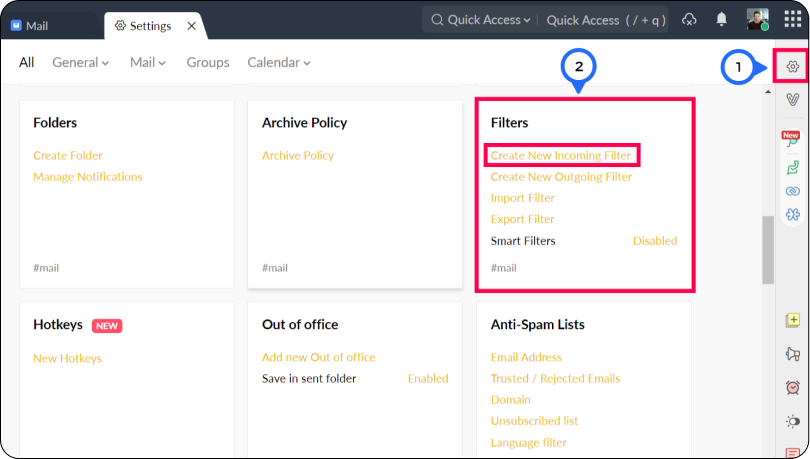
2. The second step involves creating a new incoming filter.
- Go to the filters card and click on create a new filter.
- Give your filter a name - (this is the name the filter will be identifed with).
- Condition Type - Specifies the combination of various conditions that needs to be checked for (OR, AND and All Incoming emails)
- Conditions - The parameters that needs to be satisfied by the emails
- Actions- Actions that will be performed on the emails that match the conditions
- In the actions, select Custom function(creator) from the drop down.
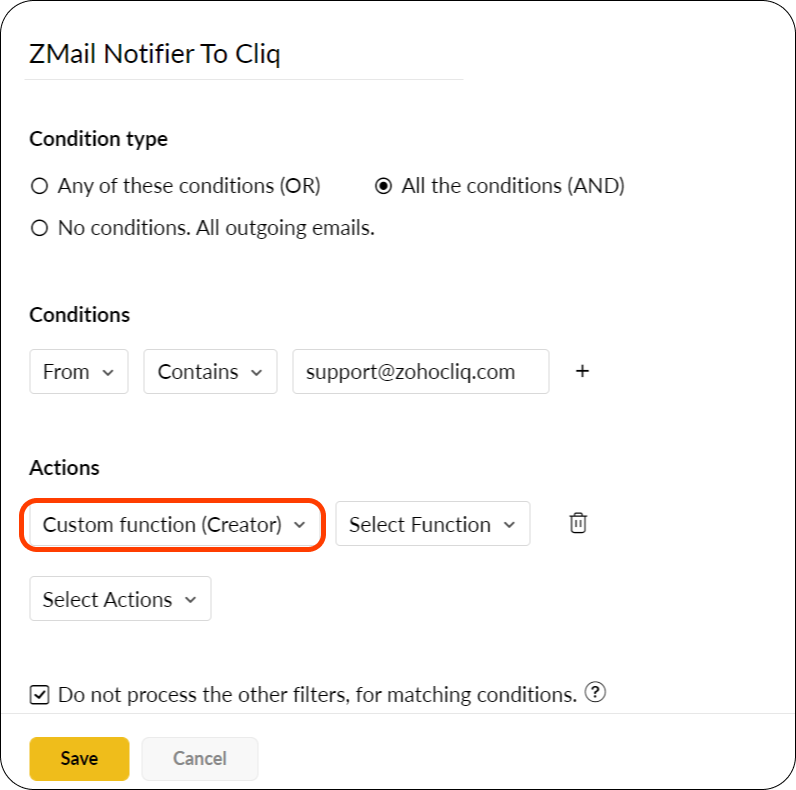
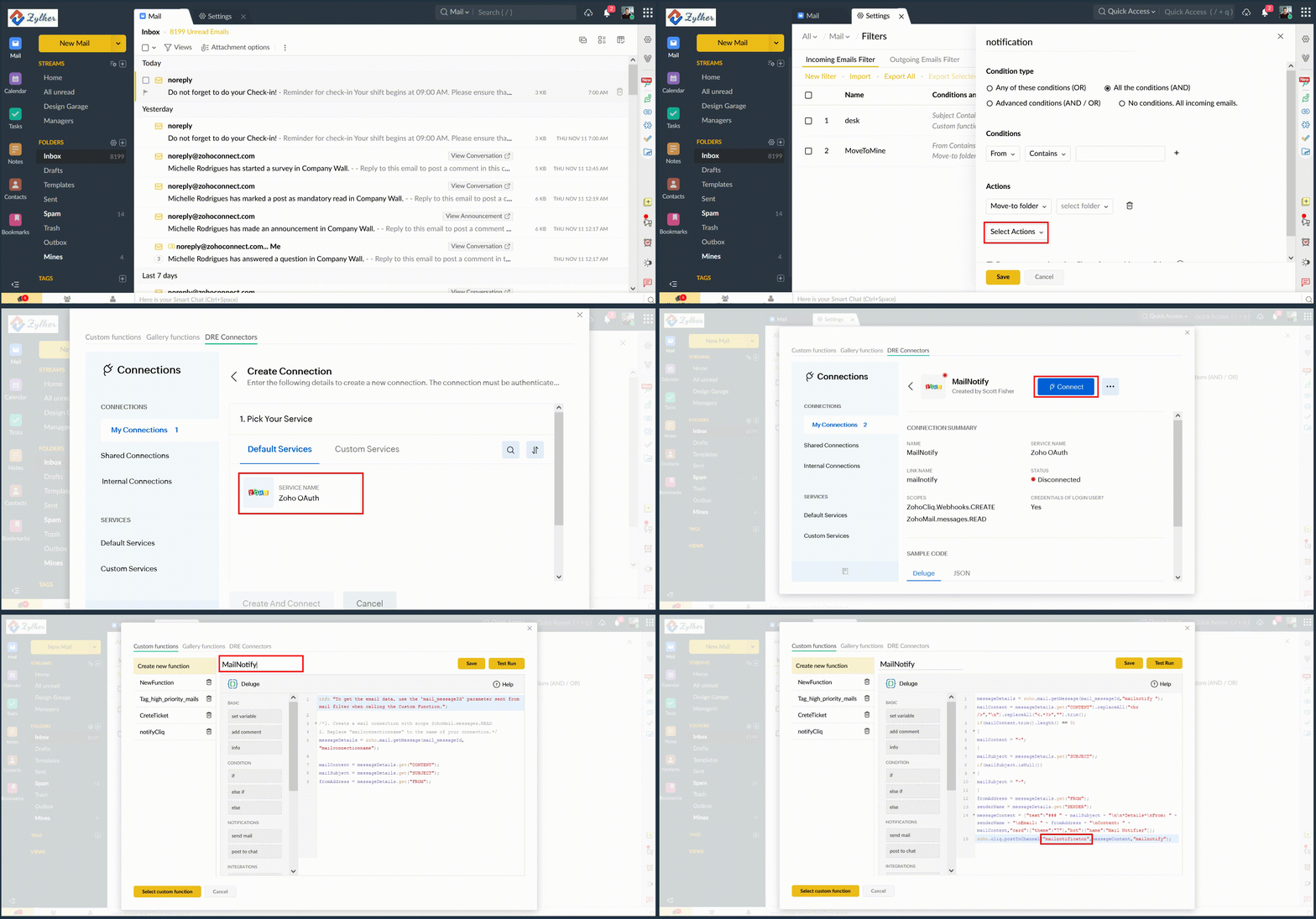
- Select Function to view the deluge script editor pop up.
- Go to the DRE Connectors tab and in My Connections, click on the Create Connection button.
- Select the Zoho OAuth service and enter your preferred connection and connection link name.
- For scopes, select the checkboxes for ZohoCliq.Webhooks.CREATE and ZohoMail.messages.READ .
- Now go back to the custom functions tab and paste the following code in the scipt editor :
- messageDetails = zoho.mail.getMessage(mail_messageId,"CONNECTION LINK NAME");
- mailContent = messageDetails.get("CONTENT").replaceAll("<br />","\n").replaceAll("<.*?>","").trim();
if(mailContent.trim().length() == 0)
{
mailContent = "-";
}
mailSubject = messageDetails.get("SUBJECT");
if(mailSubject.isNull())
{
mailSubject = "-";
}
fromAddress = messageDetails.get("FROM");
senderName = messageDetails.get("SENDER");
messageContent = {"text":"### " + mailSubject + "\n\n*Details*\nFrom: " + senderName + "\nEmail: " + fromAddress + "\nContent: " + mailContent,"card":{"theme":"7"},"bot":{"name":"Mail Notifier"}};
zoho.cliq.postToChannel("CHANNEL UNIQUE NAME",messageContent,"CONNECTION LINK NAME");
 (NOTE : Replace "CONNECTION LINK NAME" with the name of the connection link that you have created, and "CHANNEL UNIQUE NAME" with the unique name of the channel in which you want the mail posted as a chat).
3. Give your custom function a name and click on the Save button to save it.
You can also check if the function works by selecting the Test Run button to execute the code. You will be prompted to enter a message ID for the check which can be retrieved from the URL. Open any mail you want to test it on and copy the last digits in the URL, paste it in the message ID text box and proceed. Sample Response
Note: In case you want to post a response to a bot use the following syntax:
Also you can post the response in a channel (organizational, personal, team or external) using the following syntax:
Retrieving a channel's unique name :
You can retrieve the unique name of a channel by the follwing steps :
1. Hover over to the channel in the left hand side panel and select more info.
2. Click on the connectors tab
3. The API Endpoint URL contains the channel's unique name in block letters.

There you go! We hope this brief example helped you understand in bringing an email from Zoho Mail to Zoho Cliq.
In case of any queries please comment below. We'd be happy to assist you.
Regards
Divya P
Zoho Cliq
Access your files securely from anywhere
New to Zoho Recruit?

Zoho Developer Community
New to Zoho LandingPage?
Zoho LandingPage Resources
New to Zoho Survey?
New to Zoho CRM Plus?
Deliver unforgettable customer experiences
New to Zoho CRM Plus?
Deliver unforgettable customer experiences
New to Zoho Marketing Plus?
Everything you need to run your marketing
New to Zoho Marketing Plus?
Everything you need to run your marketing
New to Bigin?





Topic Participants
Divya Parameswaran
Bruce Eisenberg
Anu Anu
Peter Deleon
jithin
Sticky Posts
Automating Employee Birthday Notifications in Zoho Cliq
Have you ever missed a birthday and felt like the office Grinch? Fear not, the Cliq Developer Platform has got your back! With Zoho Cliq's Schedulers, you can be the office party-cipant who never forgets a single cake, balloon, or awkward rendition ofCustomer payment alerts in Zoho Cliq
For businesses that depend on cash flow, payment updates are essential for operational decision-making and go beyond simple accounting entries. The sales team needs to be notified when invoices are cleared so that upcoming orders can be released. In contrast,Accelerate Github code reviews with Zoho Cliq Platform's link handlers
Code reviews are critical, and they can get buried in conversations or lost when using multiple tools. With the Cliq Platform's link handlers, let's transform shared Github pull request links into interactive, real-time code reviews on channels. ShareApp Spotlight : PagerDuty for Zoho Cliq
App Spotlight brings you hand-picked apps to enhance the power of your Zoho apps and tools. Visit the Zoho Marketplace to explore all of our apps, integrations, and extensions. In today's fast-paced world, seizing every moment is essential for operationalAutomate your status with Cliq Schedulers
Imagine enjoying your favorite homemade meal during a peaceful lunch break, when suddenly there's a PING! A notification pops up and ruins your moment of zen. Even worse, you might be in a vital product development sprint, only to be derailed by a "quick
New to Zoho TeamInbox?
Zoho TeamInbox Resources
Zoho CRM Plus Resources
Zoho Books Resources
Zoho Subscriptions Resources
Zoho Projects Resources
Zoho Sprints Resources
Qntrl Resources
Zoho Creator Resources
Zoho CRM Resources
Design. Discuss. Deliver.
Zoho Show Resources

Get Started. Write Away!
Writer is a powerful online word processor, designed for collaborative work.
Zoho CRM コンテンツ
-
オンラインヘルプ
-
Webセミナー
-
機能活用動画
-
よくある質問
-
Ebook
-
-
Zoho Campaigns
- Zoho サービスのWebセミナー
その他のサービス コンテンツ
Nederlandse Hulpbronnen

ご検討中の方
Recent Topics
New enhancements in the latest version of the Zoho Meeting Android mobile app.
Hello all, In the latest version of Zoho meeting Android mobile app (v2.2.6), we have brought in support for the below enhancements. Close account: Now users will be able to close their Zoho account directly from the app. Unmute toast message: If a userShare material, Lock Meeting and revamped feedback UI in the latest version of the Meeting iOS app.
Hello all, In the latest version of the Zoho Meeting iOS mobile app (v1.6), we have brought in the below enhancements. Share material in meeting: We have introduced share material during meeting that allows participants to view supported materials suchLatest updates in Zoho Meeting | New chat feature between an organizer and co-organizer in webinars, recording consent for webinar co-organizers and attendees in the Android app, and more.
Hello everyone, We’re excited to share a few updates for Zoho Meeting. Here's what we've been working on lately: A new chat feature between an organizer and co-organizer in webinars, recording consent for webinar co-organizers and attendees in the AndroidLatest updates in Zoho Meeting | A new Files tab to manage all your PDFs, PPTs, Video files and recordings, live transcription , ability to lock settings and adaptive echo cancellation.
Hello everyone, We’re excited to share a few updates for Zoho Meeting. Here's what we've been working on lately: A new Files tab to manage all your PDFs, PPTs, Video files and recordings, live transcription during sessions, ability to lock settings andLatest updates in Zoho Meeting | Meeting Rooms , Pin video feeds and customize from and reply-to email addresses
Hello everyone, We’re excited to share a few updates for Zoho Meeting. Here's what we've been working on lately: Introducing Zoho Meeting Rooms, an immersive solution for teams to connect over virtual meetings in video conference rooms. You can also pinLatest updates in Zoho Meeting | New top bar video layout, a revamp of our in-session settings and now import webinar registrations with a CSV file
Hello everyone, We’re excited to share a few updates for Zoho Meeting. Here's are some of them : We have moved audio, video, virtual background and preferences under a single settings pop-up for better user navigation. You can now upload a CSV file containingImportant update: Changes in email sender policies
Hello, This is to announce important changes to email sender policies from Google that may impact your use of Zoho Meeting. Restriction on public domains Effective February 1, 2024, Google is implementing policies that will affect the configuration ofCamera access
My picture doesn't appear in a group discussion. (The audio is fine.) The guide says "Click the lock icon on address bar," but I can't find it. Advise, pleaseChat for webinar session, schedule meeting session for 24 hours - Zoho Meeting iOS app update
Hello, everyone! In the most recent iOS version of the Zoho Meeting app, we have introduced the chat functionality for the webinar session. To access this feature, the Organizer should have the 'Public chat' option enabled on the Zoho Meeting desktopInvoice Copy 2005116990189
Please provide the invoice for the trancaction 2005116990189Darshan Hiranandani About
Hi, I’m Darshan Hiranandani, a dedicated software developer with a strong passion for creating efficient and user-friendly applications. With a degree in Computer Science and several years of experience in the tech industry, I specialize in full-stackLatest update in Zoho Meeting | On-demand webinars
Hello everyone, We’re excited to introduce our new on-demand webinar feature, you can now provide pre-recorded sessions that your audience can access immediately, no need to wait for scheduled sessions. Benefits of On-demand webinars : Scheduling flexibilityZoho Meeting iOS app update - Join breakout rooms, access polls, paste links and join sessions, in session host controls
Hello, everyone! In the latest iOS version(v1.7) of the Zoho Meeting app, we have brought in support for the following features: Polls in meeting session Join Breakout rooms Paste link in join meeting screen Foreign time zone in the meeting details screen.Zoho Meeting app update.
Hello, everyone! In the latest Android (v2.3.7) and iOS (v1.7.1) versions of the Zoho Meeting app, we have brought in support for the following features: Report Abuse option. WorkDrive integration. Report Abuse option You can now report to us any deceptiveZoho Meeting Android app update - v2.4.0
Hello everyone! We are excited to announce that we have brought in support for the following features in the latest version of the Zoho Meeting Android app(v2.4.0): 1. Start Personal Meeting Rooms 2. Revamp of the schedule meeting screen and meeting detailsIntroducing Zoho Desk integration and a few minor enhancements
Zoho Desk Integration We've now introduced an integration between Zoho Meeting and Zoho Desk to efficiently manage meeting-related customer inquiries. With this integration, you can track, respond to, and resolve meeting-related tickets directly fromZoho Meeting iOS app update: Hearing aid, bluetooth car audio and AirPlay audio support.
Hello everyone! We are excited to announce the below new features in the latest iOS update(v1.7.4) of the Zoho Meeting app: 1. Hearing aid support: Hearing aid support has been integrated into the application. 2. Bluetooth car Audio, AirPlay audio support:Zoho Meeting Android app update: Breakout rooms, noise cancellation
Hello everyone! In the latest version(v2.6.1) of the Zoho Meeting app update, we have brought in support for the following features: 1. Join Breakout rooms. 2. Noise cancellation Join Breakout rooms. Breakout Rooms are virtual rooms created within a meetingiOS 12 update: Introducing autofill passwords and Siri Shortcuts in Zoho Vault
With this iOS 12 release, Zoho Vault users can now autofill usernames and passwords on Safari and other third-party apps. Users can enjoy a seamless login experience to their everyday apps without compromising security and also access passwords stored in Zoho vault with Siri Shortcuts by adding personalized phrases. How to enable autofill password on your iOS device? First, you need to update your device to iOS 12. Apple recommends you to take a backup before you update your device to the latestZoho Vault: A look at what's new for iOS, iPadOS, and macOS
Hi everyone, At Zoho Vault, we constantly aim to improve your security experience. Based on both internal and external feedback, we have recently rolled out updates across our iOS, iPadOS, and support for macOS platforms. Introducing the desktop app forBiometric Access Support on Zoho Vault Desktop App
Is there any plans to add biometric authentication (fingerprint, face recognition) for Vault desktop apps (Windows/macOS) to enhance security and ease of access. I would love to hear other members view on thisFree webinar: Learn the benefits of migrating to Zoho Vault's new interface
With remote work becoming more and more common across the globe, productivity and time management are now pivotal concerns for every organization. With the number of business applications employed by companies constantly increasing, a password manager like Zoho Vault saves a lot of productive hours for your team. Vault's new interface has been carefully designed to address these pressing needs, helping users increase their productivity while improving their overall online experience. This July,Free Webinar: An exclusive live Q&A session with the Zoho Vault team
As 2020 draws to an end, we're closing out a year that has seen drastic changes all around the world. Many businesses have adopted cloud solutions and a remote work culture for the first time, and this has given rise to newer cyber risks and threats thatWhy passwordless authentication should be your top security project for 2021
Hello users! We know that nobody likes to remember passwords, yet they form an indispensable part of our lives. Many of us working with any kind of technology today manage numerous passwords for personal and business accounts. With the widespread adoptionFree Webinar: See why Zoho Vault is the best alternative to LastPass
When LastPass was acquired by LogMeIn in Oct 2015, we expressed our genuine concern about how this would change the LastPass business model and how customer trust would transfer from one company to another. As we suspected, LastPass doubled their pricingManaging cyber threats when working remotely | A Customer Survey Report
The nearly universal adoption of remote work has changed the way businesses function. Globally, enterprises continue to work to find new ways to make life easier for employees working remotely. However, a commonly cited concern has been the lack of cybersecurityWorld Password Day: 5 interesting facts about passwords
It's World Password Day: that time of the year when we talk about password hygiene and the importance of safe password management. World Password Day is observed on the first Thursday of every May, and this year, we'd like to talk about some of the mostFree Webinar: Go passwordless in 2022 with Zoho Vault
Passwords have long been the preferred authentication method, largely due to their universal appeal. While they're easy for people to use and implement, they're also convenient for hackers to exploit. Reports from 2021 state that weak and stolen passwordsMyki has announced EOL for its services | Learn why Zoho Vault password manager is the best alternative
Hello Myki users, Myki has announced end-of-life for its Teams, MSP, and GUARD services, after being acquired by JumpCloud. In their recent announcement, Myki stated that they will be removing their apps and extensions from the respective stores, turningJoin our exclusive meetup with Zoho's Real Estate community
Hey there, The Zoho Vault team is conducting a meetup for all real-estate users from Zoho. During this session, we will be discussing the need for secure password management and how Vault can help you and your clients safely protect passwords and otherFree webinar: A quick walkthrough of Zoho Vault and major updates in 2023
Managing passwords is crucial for all businesses. You can securely store, share, and manage passwords effectively from anywhere with Zoho Vault. We have introduced several new features in 2023 to offer the best online experience for our users. Join ourFree webinar: Why a password manager is a “must-have” for everyone in 2024
In the past decade, we've witnessed numerous cybersecurity breaches globally, with a significant portion resulting from the "it won't happen to me" mindset. Shockingly, in 2023, 86% of breaches involved weak and stolen passwords. Password hygiene is crucialZoho Vault - Webinars 2023 - Video Recordings and Slide Decks
Hello, We wanted to offer a consolidated list of Zoho Vault webinar resources from 2023. Therefore, we're putting together a list that includes links to our webinar recordings and slide decks for easy access. Webinar Video recording Slide deck GettingFree webinar: Focal point: Building a financial ecosystem with Zoho Vault and Zoho Workplace
Hi everyone! Cyber threats against the financial sector are escalating. In the last two decades, nearly one-fifth of reported incidents targeted financial institutions, causing $12 billion in direct losses. Cybercriminals are becoming more sophisticated,New features in Zoho Vault
We’re thrilled to introduce a wave of powerful updates in Zoho Vault, designed to enhance security, streamline workflows, and improve your overall experience. Let’s dive into what’s new! Folder creation restrictions Limit who can create folders in yourJoin our World Password and Passkey Day expert Q&A 2025
Hey everyone! World Password and Passkey Day is almost here, and there's no better time to talk about something we all rely on daily—secure authentication. Did you know that a staggering 60% of hacking-related breaches are tied to weak or stolen passwords?Dashlane discontinued its free plan: Here's why Zoho Vault's free plan is worth the switch
Hey everyone, Dashlane password manager has officially announced that its free plan will be discontinued starting September 16, 2025. This change means that current free users will need to either upgrade to a paid subscription or export their data andIntroducing SecureForms in Zoho Vault
Hey everyone, Let’s face it—asking someone to send over a password or other sensitive data is rarely straightforward. You wait. You nudge. You follow up once, twice—maybe more. And when the information finally arrives, it shows up in the worst possibleClickjacking: Zoho Vault's Response
Issue: Password manager browser extensions are found to be vulnerable to clickjacking security vulnerabilities that could allow attackers to steal account credentials, TFA codes, and card details under certain conditions. Reported by: Marek Toth, IndependentFree webinar: Security that works: Building resilience for the AI-powered workforce
Hello there, Did you know that more than 51% of organizations worldwide have experienced one or more security breaches, each costing over $1 million in losses or incident response? In today’s threat landscape, simply playing defense is no longer enough.Next Page