Kaizen 231 - Embedding Zoho Desk Tickets in Zoho CRM

Hello, CRM Wizards!
We will use the Zoho Request Client inside a Related List widget to display open Zoho Desk tickets directly within the Contact record in Zoho CRM. This integration allows Sales and Support teams to access active support issues without switching applications.
Business Problem
At Zylker, a manufacturing company that manages high-value distributors and enterprise buyers, sales operations run in Zoho CRM while customer support manages warranty claims and service issues in Zoho Desk.
This separation creates operational friction during critical customer interactions.
1. Lack of visibility into open support tickets
Sales representatives cannot see ongoing support tickets when interacting with customers in CRM. This results in:
- Sales conversations happening without awareness of active complaints.
- Poor customer experience when unresolved issues surface unexpectedly.
- Reduced productivity due to frequent system switching between CRM and Desk.
2. No Controlled Escalation Mechanism
There is no structured way to initiate ticket escalations from within Zoho CRM.
Solution
This week we will focus on solving the visibility gap.
We will embed a related list widget within Contact detail page and provide real-time visibility of open tickets.
Prerequisites
2. A two-way sync between Zoho CRM and Zoho Desk is required to keep Contacts and Accounts consistent across both applications.
With this support, any change made to a Contact or Account in either application is automatically reflected in the other.
Additionally, each record in Zoho Desk stores the corresponding Zoho CRM record ID. This allows you to reference the CRM record directly and perform further customizations or integrations using that unique ID.
Follow the steps to create the two-way sync:
- Log into Zoho Desk.
- Go to Settings > Integration > Zoho.
- Choose Zoho CRM and click Integrate.
- On the Authentication page:
- Enter your email address.
- Choose the CRM organization you want to integrate with.
- Click Authorize.
- Once authenticated, the sync configuration page opens.
- Select the sync type as Two-way Sync.
- Map the fields of Accounts and Contacts modules between Zoho Desk and Zoho CRM.
- Click Start Sync to initiate the integration.

Refer to the Integrating Zoho Desk with Zoho CRM help page for more details.
3. Create a Zoho Desk connection in Zoho CRM with Desk.tickets.READ and Desk.contacts.READ scopes.
Refer to the Connections help doc for more information. Store the Connection Link Name to use while making API calls.

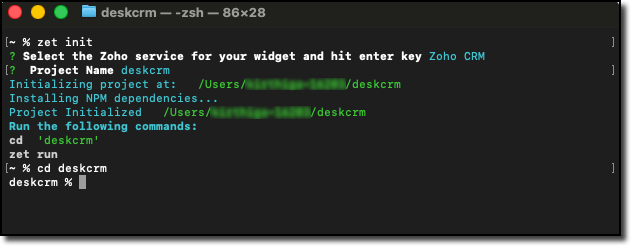
4. Create a local project folder for widget using Zoho CLI as mentioned in Creating your First Widget help guide.
Step-by-Step Implementation
In the widget project directory, code the following logic in the widget.html file.
Step - 1: Get the Current CRM Contact ID
On page load, you can capture the entity ID with the help of PageLoad event listener.
Also create a reusable ZRC instance configured with the Zoho Desk base URL and OAuth connection name.
// Initialize the embedded app ZOHO.embeddedApp.on("PageLoad", async function(data) { console.log("PageLoad data:", data); // Step 1: Get the entity (module) and entity ID (Contact record ID) if (data && data.Entity && data.EntityId) { entityModule = data.Entity; entityId = data.EntityId; console.log("Entity:", entityModule); console.log("Entity ID (CRM Contact ID):", entityId); // Create reusable ZRC instance for Zoho Desk API deskZrc = zrc.createInstance({ baseUrl: 'https://desk.zoho.com/api/v1', connection: 'desk_oauth_connection' }); await loadTickets(); } else { showError("No contact context found"); } }); ZOHO.embeddedApp.init(); |
Step - 2: Fetch Desk Contacts and Match the CRM Contact ID
Make a GET Contacts API call to the Zoho Desk API using the ZRC instance. Loop through the returned contacts and find the one whose zohoCRMContact.id matches the current CRM Contact ID.
// Step 2: Make GET contacts API call to Desk using ZRC const contactsResponse = await deskZrc.get('/contacts', { params: { limit: 100 } }); console.log("Desk Contacts Response:", contactsResponse); if (contactsResponse && contactsResponse.data) { // Parse the response data const contactsData = typeof contactsResponse.data === 'string' ? JSON.parse(contactsResponse.data) : contactsResponse.data; // Find the object where zohoCRMContact.id matches Contact record ID if (contactsData && contactsData.data && Array.isArray(contactsData.data)) { const matchingContact = contactsData.data.find(function(contact) { return contact.zohoCRMContact && contact.zohoCRMContact.id && contact.zohoCRMContact.id === entityId; }); if (matchingContact) { // Pick the id (Desk contact record ID) const deskContactId = matchingContact.id; console.log("Desk Contact ID:", deskContactId); // Proceed to fetch tickets await fetchTickets(deskContactId); } else { showEmptyState("No Desk contact found linked to this CRM contact"); } } } |
Step - 3: Fetch Open Tickets and Filter by Desk Contact ID
Make a GET Tickets API call to Zoho Desk with the following parameters:
- Specify status with Open value to retrieve only open tickets.
- Specify include with value set to contacts fetch each ticket details with its associated contact details.
Filter the API response with the matched Desk Contact ID and render the results.
async function fetchTickets(deskContactId) { try { // Step 3: Make GET Tickets API call using ZRC const ticketsResponse = await deskZrc.get('/tickets', { params: { include: 'contacts', status: 'Open', limit: 100 } }); console.log("Tickets Response:", ticketsResponse); if (ticketsResponse && ticketsResponse.data) { const ticketsData = typeof ticketsResponse.data === 'string' ? JSON.parse(ticketsResponse.data) : ticketsResponse.data; // Filter tickets where contact matches deskContactId if (ticketsData && ticketsData.data && ticketsData.data.length > 0) { const matchingTickets = ticketsData.data.filter(function(ticket) { return ticket.contact && ticket.contact.id === deskContactId; }); if (matchingTickets.length > 0) { renderTickets(matchingTickets); } else { showEmptyState("No open tickets found for this contact"); } } else { showEmptyState("No open tickets found"); } } } catch (error) { console.error("Error fetching tickets:", error); showError("Failed to fetch tickets: " + (error.message || error.toString())); } } |
Step - 4: Validate and Pack the Widget
Follow the steps given in the Widget help page to validate and package the widget. A complete working code sample is provided as attachment at the end of this post.
Creating a Related List Widget
1. Go to Zoho CRM > Setup > Developer Hub > Widgets and click Create New Widget.
2. Fill in the required details such as:
- Name: Zoho WorkDrive
- Type: Related List
- Hosting: Zoho
- File Upload: Upload the ZIP created in the dist folder within the widget project directory after packaging in the Step 4.
- Index page: /widget.html

3. Go to Customization > Modules and Fields > Contacts > Standard > Detail View. Then, create and associate the related list widget.
Refer to the Customize Related Lists help page for more information on creating a related list.

Try it Out!
Let us look at the output from the Contacts detail page in Zoho CRM.


Key Points to Remember
- Two-way sync is mandatory to link Desk contacts with CRM contacts.
- Connection setup in Zoho CRM for Desk is mandatory with Desk.tickets.READ and Desk.contacts.READ scopes. Ensure to replace the connection name in line 21.
- If the account has a large number of contacts or tickets, implement pagination using from and limit parameters to ensure all records are evaluated.
- Ensure to replace the Desk URL to ticket in line 181 with your portal name and company name.
We hope this Kaizen helps your sales team to see active issues instantly. Next week, we will look at how to establish a ticket escalation mechanism from Zoho CRM.
Have questions or suggestions? Drop them in the comments or write to us at support@zohocrm.com.
On to Better Building!
-----------------------------------------------------------------------------------------------------------
Related Reading
1. Widgets - An Overview, CLI Installation, Working with Widgets, ZRC Methods, Mobile Compatibility of Widgets and Kaizens
2. Connections - An Overview
3. CRM Customizations - Related Lists
4. Desk APIs - GET Tickets API and GET Contacts API
5. Desk Customizations - Integrate Zoho Desk with Zoho CRM
5. Desk Customizations - Integrate Zoho Desk with Zoho CRM
-----------------------------------------------------------------------------------------------------------

Previous Kaizen: Smart Discount-Based Quote Approvals Using CRM Functions and Approval Process | Kaizen Collection: Directory
Access your files securely from anywhere
Centralize Knowledge. Transform Learning.
All-in-one knowledge management and training platform for your employees and customers.
New to Zoho Recruit?

Zoho Developer Community
New to Zoho LandingPage?
Zoho LandingPage Resources
New to Zoho Survey?
New to Zoho CRM Plus?
Deliver unforgettable customer experiences
New to Zoho CRM Plus?
Deliver unforgettable customer experiences
New to Zoho Marketing Plus?
Everything you need to run your marketing
New to Zoho Marketing Plus?
Everything you need to run your marketing
New to Bigin?





Topic Participants
Kiruthiga G
Sticky Posts
Kaizen #198: Using Client Script for Custom Validation in Blueprint
Nearing 200th Kaizen Post – 1 More to the Big Two-Oh-Oh! Do you have any questions, suggestions, or topics you would like us to cover in future posts? Your insights and suggestions help us shape future content and make this series better for everyone.Kaizen #226: Using ZRC in Client Script
Hello everyone! Welcome to another week of Kaizen. In today's post, lets see what is ZRC (Zoho Request Client) and how we can use ZRC methods in Client Script to get inputs from a Salesperson and update the Lead status with a single button click. In thisKaizen #222 - Client Script Support for Notes Related List
Hello everyone! Welcome to another week of Kaizen. The final Kaizen post of the year 2025 is here! With the new Client Script support for the Notes Related List, you can validate, enrich, and manage notes across modules. In this post, we’ll explore howKaizen #217 - Actions APIs : Tasks
Welcome to another week of Kaizen! In last week's post we discussed Email Notifications APIs which act as the link between your Workflow automations and you. We have discussed how Zylker Cloud Services uses Email Notifications API in their custom dashboard.Kaizen #216 - Actions APIs : Email Notifications
Welcome to another week of Kaizen! For the last three weeks, we have been discussing Zylker's workflows. We successfully updated a dormant workflow, built a new one from the ground up and more. But our work is not finished—these automated processes are
New to Zoho TeamInbox?
Zoho TeamInbox Resources
Zoho CRM Plus Resources
Zoho Books Resources
Zoho Subscriptions Resources
Zoho Projects Resources
Zoho Sprints Resources
Qntrl Resources
Zoho Creator Resources
Zoho CRM Resources
Design. Discuss. Deliver.
Zoho Show Resources

Get Started. Write Away!
Writer is a powerful online word processor, designed for collaborative work.
Zoho CRM コンテンツ
-
オンラインヘルプ
-
Webセミナー
-
機能活用動画
-
よくある質問
-
Ebook
-
-
Zoho Campaigns
- Zoho サービスのWebセミナー
その他のサービス コンテンツ
Nederlandse Hulpbronnen

ご検討中の方
Recent Topics
Automation #13 - Auto assign tickets based on agent shift time
This is a monthly series designed to help you get the best out of Desk. We take our cue from what's being discussed or asked about the most in our community. Then we find the right use cases that specifically highlight solutions, ideas and tips to optimizeAutomation #14: Capture Jira Issue Key/ID in a Ticket Custom Field
Hello Everyone! This month's edition brings you a custom function to consolidate your records associated with Jira integration. Jira integration enables support engineers and R&D units to collaborate seamlessly on feature development, product improvement,Automation #16: Automate Ticket Reopening on Scheduled Timestamp
Hello Everyone! This edition uncovers the option to schedule reopening a ticket automatically. Zylker Finance tracks insurance policyholder activities through Zoho Desk. For policyholders who pay monthly premiums, tickets are closed upon payment completion.Automation#19:Auto-Close Tickets Upon Task Completion
Hello Everyone! We’re excited to bring you another custom function this week. In this edition, we’ll show you how to automatically close tickets when all associated tasks are marked as completed. Let’s see how ZylkaPure, a leading water filter company,Automation #15: Automatically Adding Static Secondary Contacts
Rockel is a top-tier client of Zylker traders. Marcus handles communications with Rockel and would like to add Terence, the CTO of Zylker traders to the email conversations. In this case, the emails coming from user address rockel.com should have TerenceImproved UX design for Projects CRM integration
The current integration embeds the entier projects inteface into the CRM this is confusing and allows users to get lost. For example as a user i navigate to an account and go down to the related projects list and want to get information about a specificTransformer vos stocks en décisions intelligentes avec Zoho Inventory et Zoho Analytics
Zoho Inventory permet de suivre facilement les niveaux de stock et d’anticiper les restockages. Pour de nombreuses entreprises, cela suffit à gérer les opérations au quotidien. Mais à mesure que l’activité se développe, cette clarté peut commencer à montrerSecurity Enhancements | Migrate to the Updated Policies
Hello everyone, Zoho Directory's security policies have been updated and reorganized into three new policies with features that enhance the overall organization security. These policies provide a stronger and more secure sign-in methods and improve theBring Zoho Shifts Capabilities into Zoho People Shift Module
Hello Zoho People Product Team, After a deep review of the Zoho People Shift module and a direct comparison with Zoho Shifts, we would like to raise a feature request and serious concern regarding the current state of shift management in Zoho People.How to block a WhatsApp user for sending spam
Is there a way to block those whatsapp users that just come to play and annoy our service, they also spam us. We have a waba service with sales iqInquiry regarding auto-save behavior for Zoho Sign Embedded Sending
Dear Zoho Support Team, I am currently integrating Zoho Sign's Embedded Sending functionality using iframes on my website. I would like to know if there is a way to ensure that the document state (including any added fields) is automatically saved asIntroducing Connected Records to bring business context to every aspect of your work in Zoho CRM for Everyone
Hello Everyone, We are excited to unveil phase one of a powerful enhancement to CRM for Everyone - Connected Records, available only in CRM's Nextgen UI. With CRM for Everyone, businesses can onboard all customer-facing teams onto the CRM platform toAutomation#17: Auto-Create Tasks in Zoho Projects Upon Ticket Creation in Zoho Desk
Hello Everyone, This edition delivers the solution to automatically create a task in Zoho Projects when a ticket is created in Zoho Desk. Zylker Resorts uses Zoho Desk for bookings and handling guest requests. Zylker resorts outsources cab bookings toAutomation#20 : Auto-Add Ticket Tags based on Keywords
Hello Everyone! Welcome to unveiling custom functions on our Community series. This week's post lets you add tags to your tickets automatically based on the keywords in the ticket subject and the ticket thread. Discover how this custom function helpsAutomation#21: Track Ticket Transfers Across Departments
Hello Everyone! With Halloween just around the corner, we'd like to let you know the Zoho Desk team is always there to sweep away your customer service troubles! This week, we’re excited to introduce a custom function that tracks tickets moved betweenEmail Integration - Zoho CRM - OAuth and IMAP
Hello, We are attempting to integrate our Microsoft 365 email with Zoho CRM. We are using the documentation at Email Configuration for IMAP and POP3 (zoho.com) We use Microsoft 365 and per their recommendations (and requirements) for secure email we haveHomepage not assignable to group
MS Teams for daily call operations
Hello all, Our most anticipated and crucial update is finally here! Organizations using Microsoft Teams phone system can now integrate it effectively with Zoho CRM for tasks like dialling numbers and logging calls. We are enhancing our MS Teams functionalityAutomation#22 Track Ticket Duration at Specific Status
Hello Everyone! Welcome back to the Community Learning Series! Today, we explore how Zylker Techfix, a gadget servicing firm, boosted productivity by tracking the time spent at a particular ticket status in Zoho Desk. Zylker Techfix customized Zoho Desk’sAutomation#23: Automate Guided Conversations in Zoho Desk with Business Hours
Hello Everyone, This week's edition introduces a custom function designed to automate Guided Conversations in Zoho Desk, based on your business hours. With this feature, you can align the bot's behavior with your business schedule, ensuring a smooth andAddress changes in quote form
When entering a quote, the first piece of information required is the Account, which properly populates the billing and shipping address fields. Then I use the lookup function to select a contact, and when I do, the billing and shipping addresses areAutomation#24: Auto-Update custom field from Accounts to Tickets
Hello Everyone! Welcome back to the Community Learning Series! This episode dives into how Zylker Techfix streamlines account-related ticket references. Previously, employees had to manually check account details to retrieve specific customer information,Kaizen #227 : Client Script Support for List Page (Canvas)
Hello everyone! Welcome to another week of Kaizen. In today's post lets see how Client Script can be used in Canvas List Page to mask sensitive information from specific roles and add colors to Canvas List Page records based on custom criteria.This useAutomation#25: Move Tickets to Unassigned When the Owner Is Offline
Hello Everyone, Welcome to this week's Community Series! 'Tis the holiday season—a time when work often takes a brief pause. The holiday spirit is in full swing at Zylker Techfix too, with employees taking some well-deserved time off. During this period,Automation#27: Retain Ticket Owner on Moved Tickets
Hello Everyone! This week, we present to you a custom function that retains the ticket owner when a ticket is moved from one department to another. Here’s more to help you understand the custom function: At Zylker Techfix, Alex, the Support Engineer managesAutomation#28 Notify Agents on Article Expiry
Hello Everyone! This week, we’re bringing you a feature that notifies your team when articles in the Knowledge Base are set to expire to keep your content relevant and helpful for customers. The Zoho Desk's Knowledge Base is an asset for customers toAutomation#29 Retain ticket status on moved tickets
Hello Everyone, Hear out Zylker Techfix’s Success Story on Smoother Ticket Transitions! Zylker Techfix, a gadget servicing firm committed to quick repairs and timely deliveries, faced a challenge when ticket statuses changed automatically while movingAutomation#32:Auto Add New Portal Users to the Help Center User Groups
Hello Everyone, Introducing a custom function that automates the process of adding new portal users to Help Center user groups, making user management effortless! By default, Zoho Desk allows you to assign new portal users to groups manually. But withAutomation#34 : Automate Email threading for Ticket notification
Hello Everyone, It's been a while since we've presented an automation. However, our community has been buzzing with ideas, use cases, and discussions with our community experts and Ask the Experts session. So, here we are again, presenting an automationAutomation#35 : Auto-Add Comments under the Owner's Name in Tickets via Macros
Hello Everyone, This week's custom function provides simple steps to configure a Macro for adding comments to tickets with the name of the Comment owner. When managing tickets, you can use the Comment feature to communicate internally with your team andAutomation#36: Auto-create time-entry after performing the Blueprint transition
Hello Everyone, This week’s edition focuses on configuring a custom function within Zoho Desk to streamline time tracking within the Blueprint. In this case, we create a custom field, and request the agent to enter the spending time within the singleAutomation#33: Automate Splitting Names for Existing Contact Records
An organized directory – who doesn't love one? Previously, we explored how to split contact names into First Name and Last Name for new contacts in Zoho Desk. But what about existing contacts already in your database? This week, we bring you a customWorkqueue
I really like the idea of the Workqueue generally - it will be really useful. What it seems to lack however, is the ability to customise it properly. I want to be able to show a custom view rather than just "My Leads" and "Leads Assigned in Last 3 hours".Webform & spam
Hi, We set up 2 webform on our website, fowarding the content to Zoho CRM. Since it has been opened up, we are getting lot of spam message (for now about 20 a day). To lower the amount of false new leads we added the captcha field and new enquieries areZoho CRM Web form page URL
Hi there, I am getting quite a bit of spam through my Zoho CRM Web form and want to restrict the URLs it is submittable from. I can see that I can add Location URLs but I need to be able to just add a domain so can I enter mydomain.com/* to cover allReceiving too many Spam Leads. Why?
I am receiving so many junk leads from web forms created by zoho's platform. The junk queries are increasing day by day and are affecting our business. I am continuously following up with zoho team from the past one year but not getting any satisfactoryMail Merge is not working properly as far as the AUTOMATE section is concerned
Hi there, I created a Mail Merge template for the Deal module. I would like Deal owners to mail merge their Deal records, download the Mail Merge document as a Word doc and make a few changes before sending it to the customer. Thing is, neither the "MergeCanvas Detail View Related List Sorting
Hello, I am having an issue finding a way to sort a related list within a canvas detail view. I have sorted the related list on the page layout associated with the canvas view, but that does not transfer to the canvas view. What am I missing?project name field issue- n8n
Hey guys, I have a question. I want to create a new product using the workflow. The problem is with the product name field; I don't know how to fill it in. The workflow starts with retrieving information from the leads table, retrieving links to scrapeCritical:- Eneble TDS filing for 26Q from the zoho book
We currently extract TDS data from Zoho Books and manually input it into a separate TDS software to generate the FUV file and file returns. Previously, while using Tally, we benefited from an integrated feature that seamlessly recorded transactions andNext Page