Kaizen #132 - Manipulating Subforms from third-party Application using Functions
Hey folks! Welcome to a fresh week of Kaizen.
In this post, we will see how to work with subforms and external fields in a module through CRM functions.
Consider a scenario where a High School utilizes Zoho CRM to manage student records, academic performance, and offered courses. Additionally, the school employs an Exam portal for students to take examinations. After the examination, the portal sends the mark information back to Zoho CRM along with it's own course id, student id, marks & other details.
Problem Statement
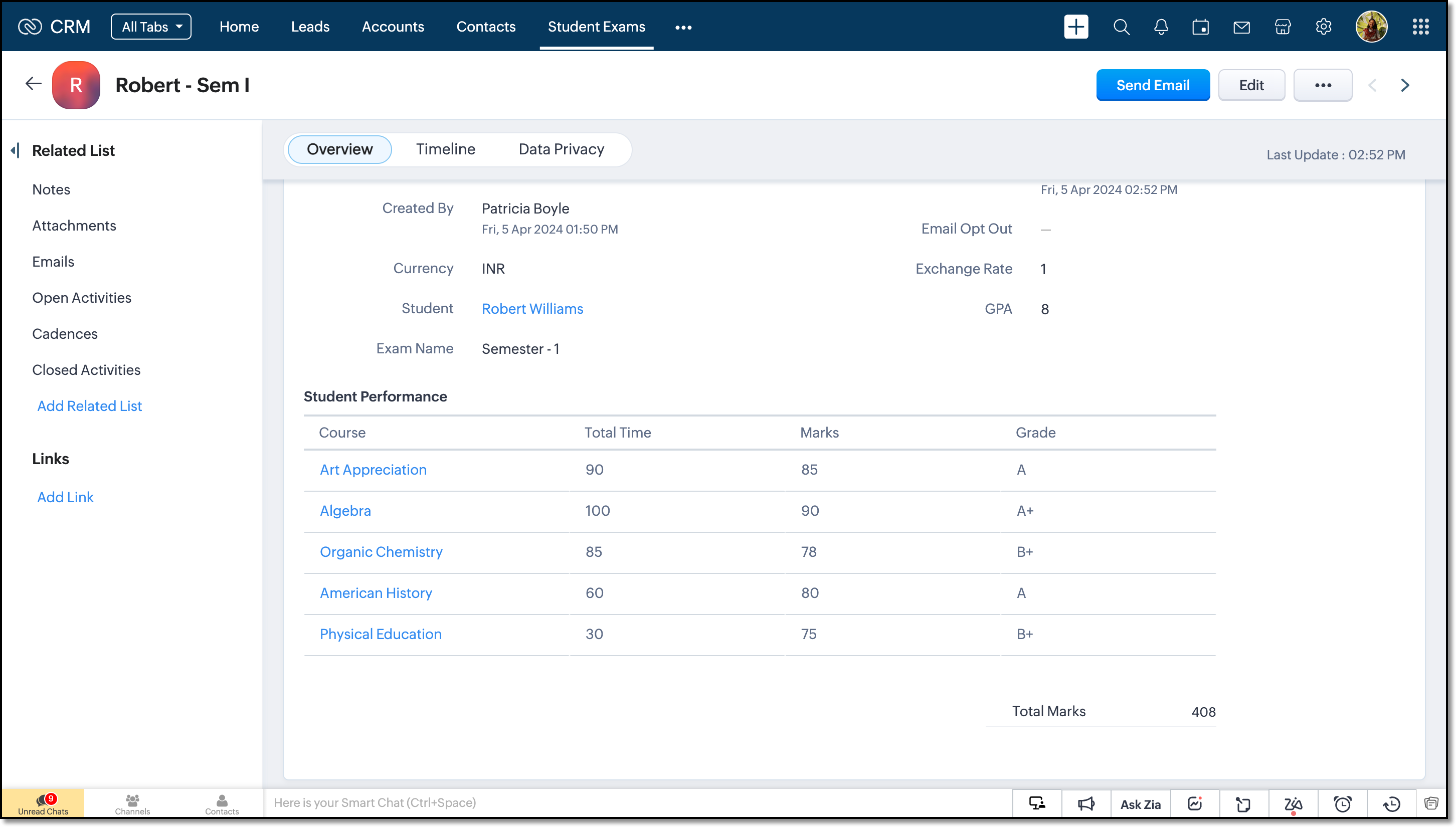
When the exam portal initiates a webhook call to CRM, the high school management wants to capture that data and update the CRM subform records accordingly. This subform should act as a semester progress report for each student.
Solution Overview
To address this requirement, a custom function must be implemented. The webhook URL will be the API REST URL of the custom function in Zoho CRM. Upon receiving the notification, the function is triggered, and the details from the notification are used to manipulate the subform.
Let us walk through this process of triggering functions using a webhook to manipulate subforms.
Let us walk through this process of triggering functions using a webhook to manipulate subforms.
Prerequisites
From the Third-Party Application
- We assume that a webhook will be triggered from the third-party application when the exam is over and evaluated by the teacher. The webhook will carry the following information:
Field | Data Type | Description |
Exam Name | String | Name of the examination that the student attends. |
Student ID | Long String | Unique ID of the student within the Portal App. |
Course ID | Long String | Unique ID of the course within the Portal App. |
Marks | Integer | Total marks of the student in the particular course. |
Total Time | Integer | Time taken by the student to complete the exam. |
- The webhook URL should correspond to the API REST URL of the custom function in Zoho CRM.
From Zoho CRM
Here is a data model image of the CRM modules involved in this scenario for your ease of understanding.
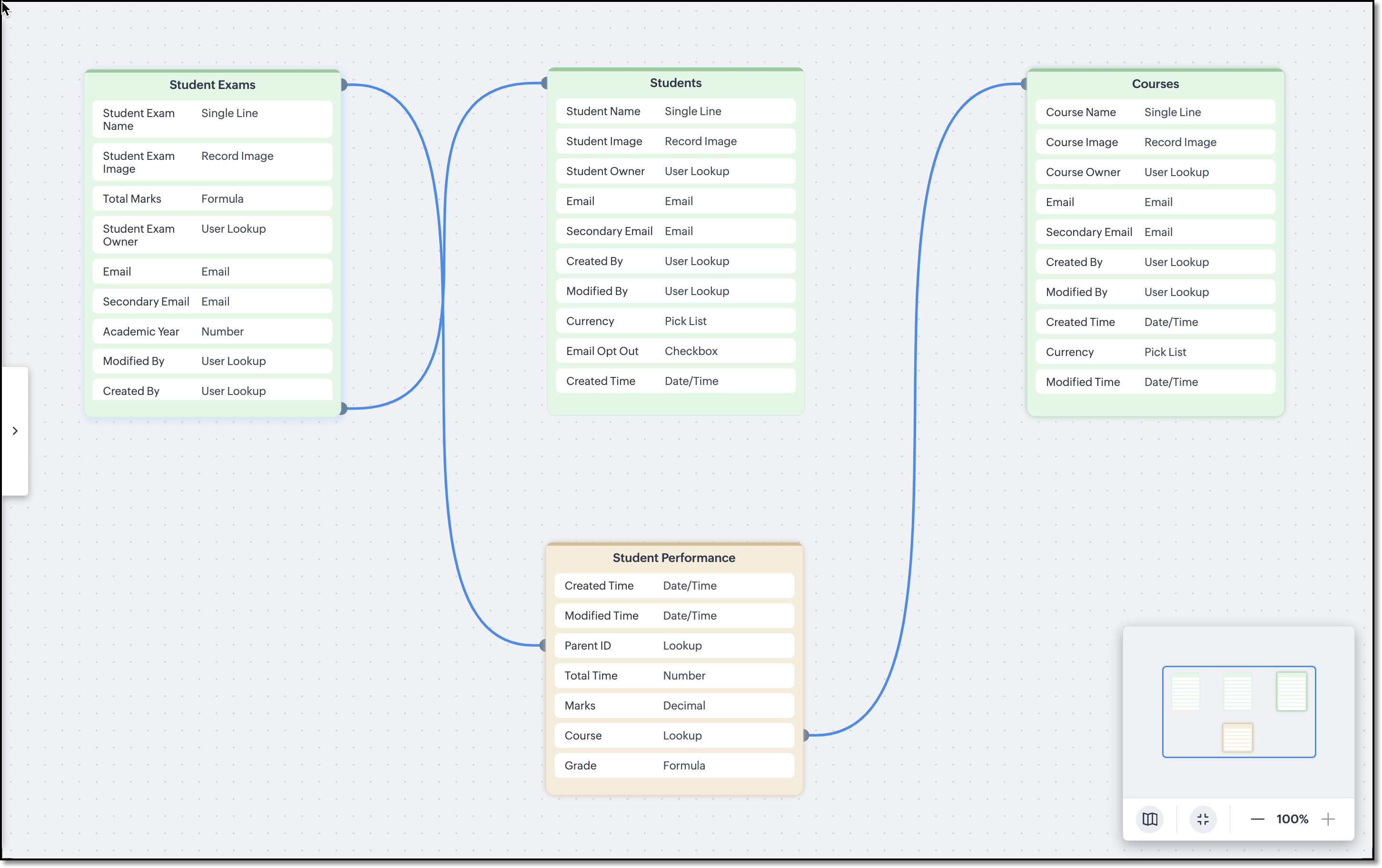
The Courses, Students and Student Exams modules are assumed to be pre-loaded with records. Following are the module wise fields that are expected to be already configured in the school's CRM org.
Courses and Students Modules
External fields named Student Code in the Students module and Course Code in the Courses module are used to match the IDs deployed in the third-party application.
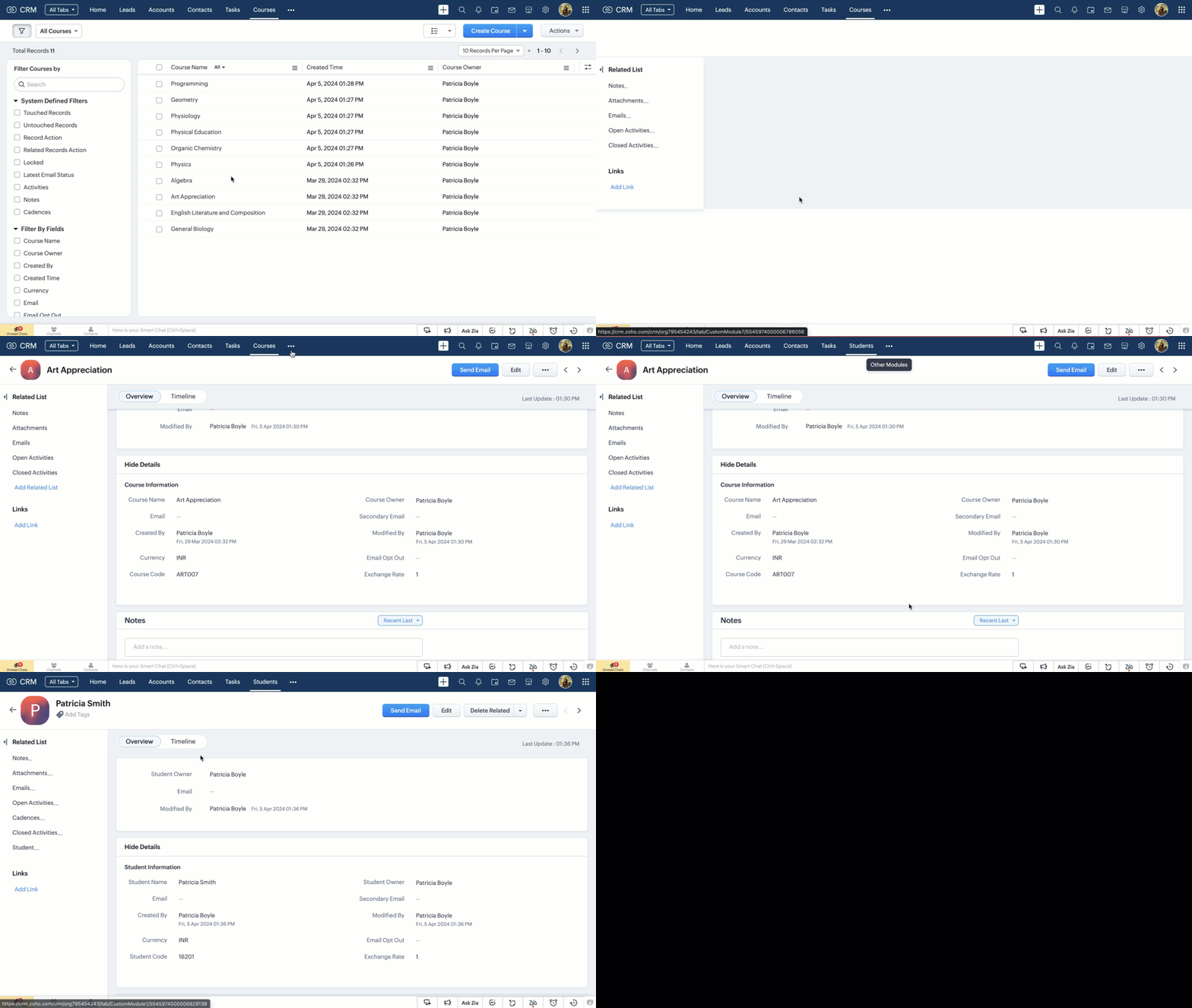

Note
External fields can be updated only using the Update Records API.
Student Exams Module
Following are the custom fields that we assume to be already available in the Student Exams module.
Field Name | Data Type | Description |
Student | Lookup | The field looks up to the Students module. |
Total Marks | Integer (Formula) | A subform aggregate field that sums up the values of the Marks field in the Student Performance subform. |
GPA | Integer (Formula) | Calculates the GPA of a student in that particular examination. |
Exam Name | String (Picklist) | List downs the examinations that are planned to be conducted for the academic year. |
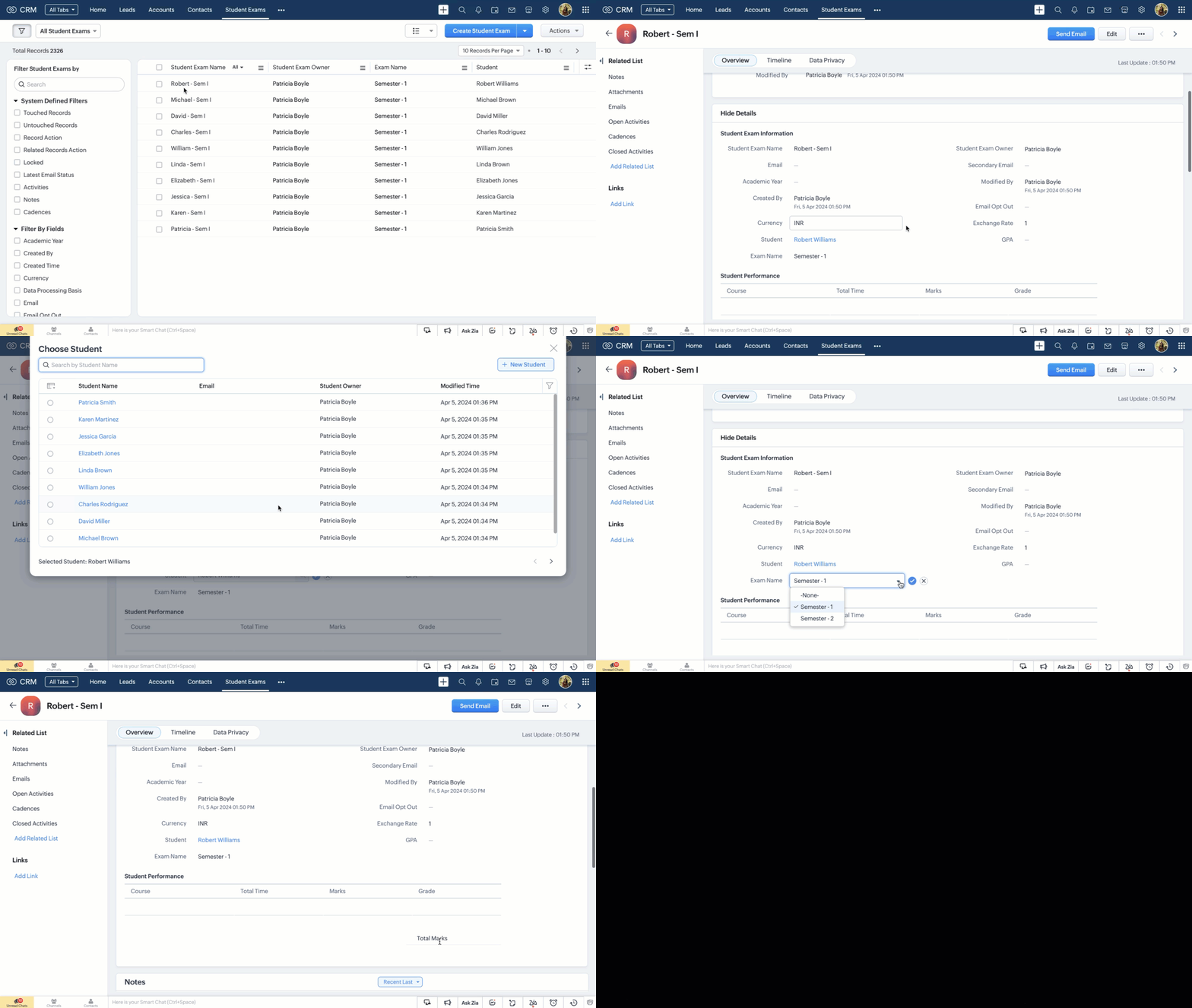
Student Performance Subform
A subform named Student Performance within the Student Exams module, comprising the following fields.
Field Name | Data Type | Description |
Course | Lookup | Represents the course name and it looks up to one of the courses from the Courses module. |
Total Time | Integer | Time taken by the student to complete the exam. |
Marks | Integer | Marks of the student in the particular course. |
Grade | String (Formula) | Grading system is infused as formula and it works depending on the value in the Marks field. |
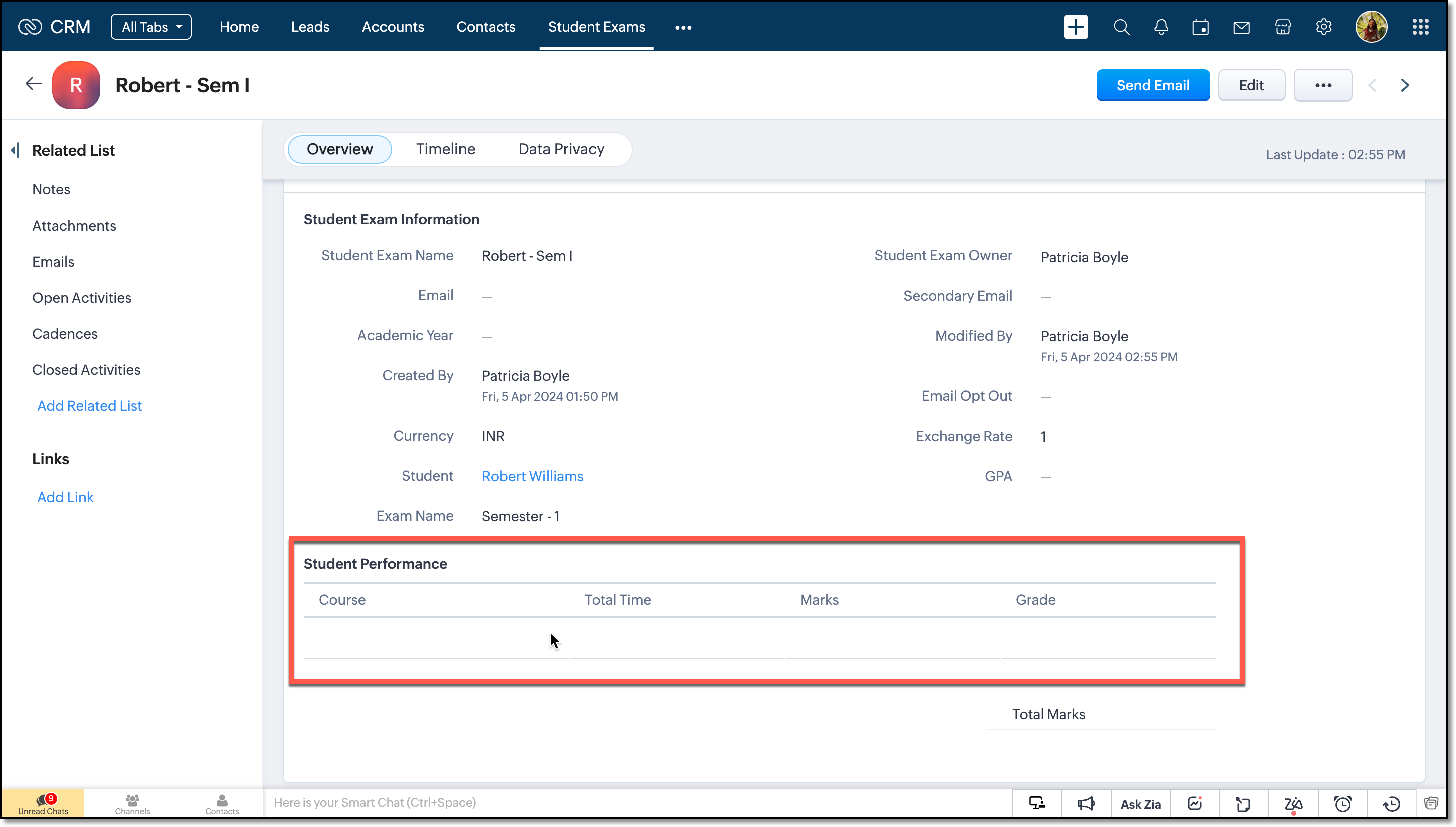
The subform is assumed to be empty and will be updated only on receiving a webhook notification from the Portal App.
Note
Make a Modules Metadata API call to get the API names of the modules and the subform. Next, fire the GET Fields API call to get the API names of the fields. We will need them in crafting the custom function.
Creating the Custom Function
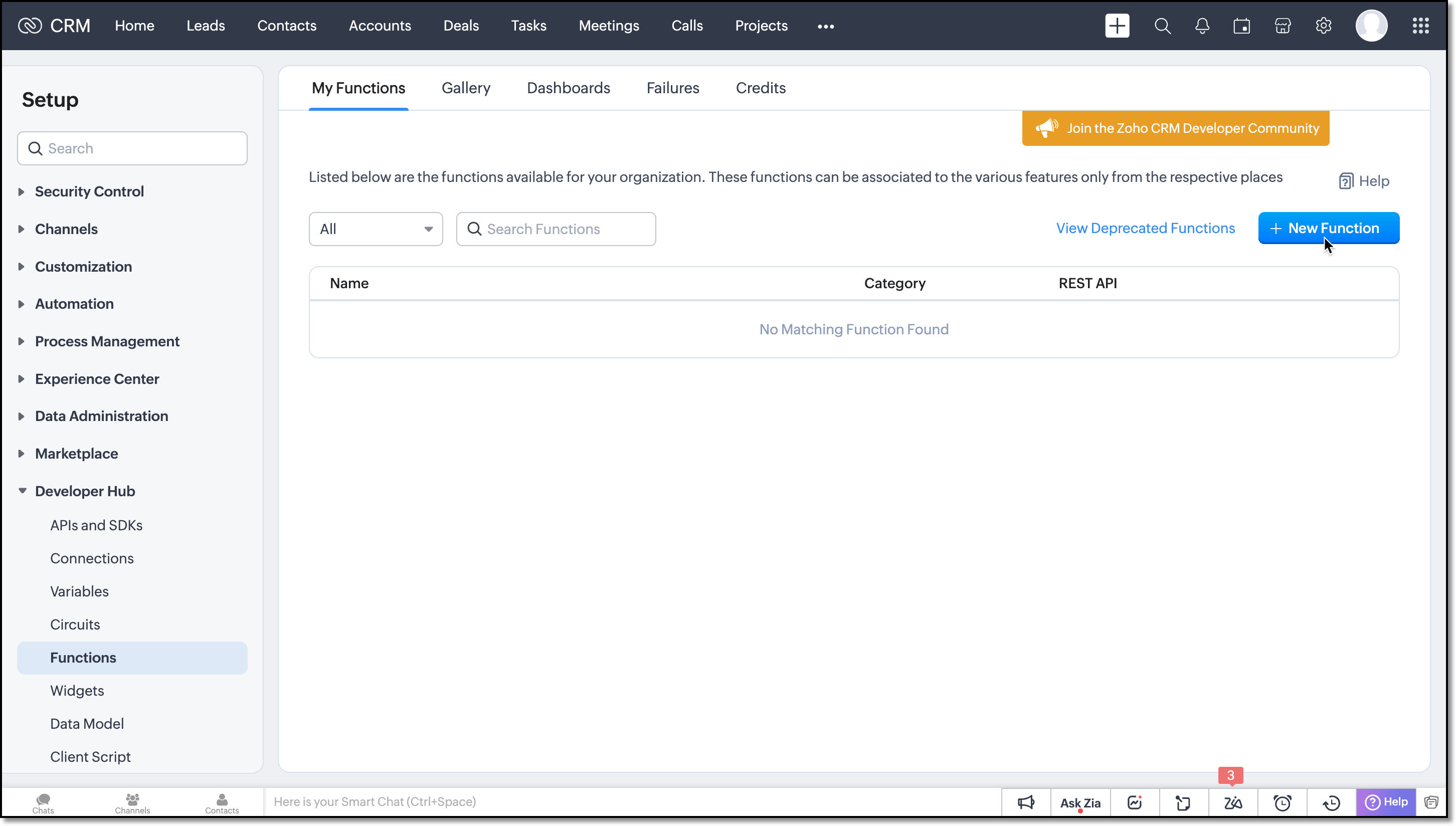
Step 1: Navigate to the Setup > Developer Hub > Functions and click the New Function button.
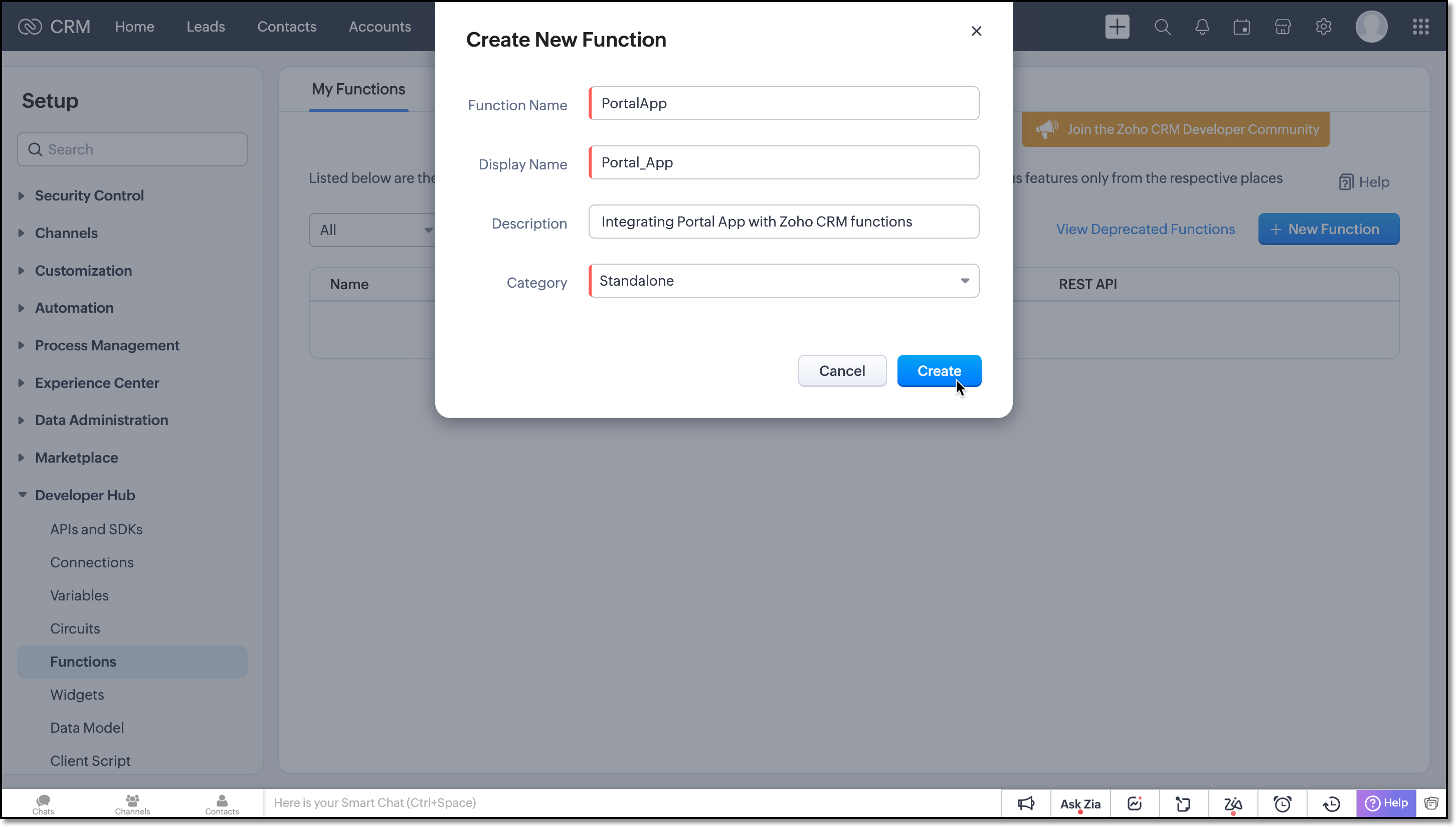
Now, create a Standalone function by filling in the details.
Flow of the Function
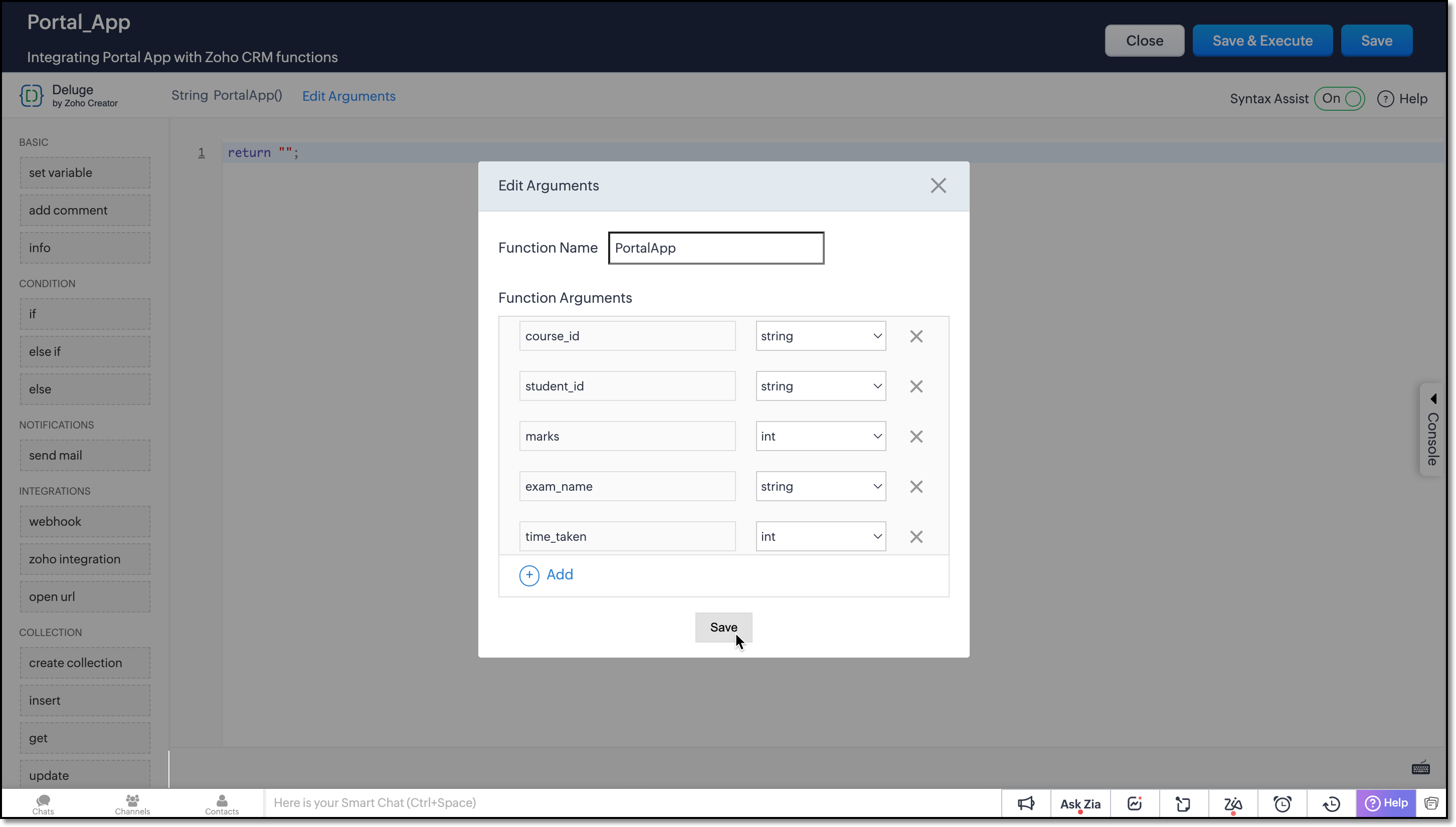
Argument Setup
Define function arguments to receive details from the function as shown here:
Data Retrieval
Invoke the COQL API within the function to retrieve the necessary records from the Student Exams and Courses module.
student_examMap = Map(); student_examMap.put("select_query","select id from Student_Exams where Student.Student_Code =" + student_id + " and Exam_Name=" + exam_name + " limit 1"); exam_response = invokeurl [ type :POST parameters:student_examMap.toString() connection:"crm_oauth_connection" ]; exam_id = exam_response.getJSON("data").get(0).get("id"); |
Here, the query is structured to retrieve the ID of the Student Exam record where the Student lookup field corresponds to the record with the Student Code matching the student_id in the notification, and the Exam Name picklist field matches the value of exam_name from the notification.
Note: You can use only =, !=, in and not in operators for querying External fields in Zoho CRM.
courseMap = Map(); courseMap.put("select_query","select id from Courses where Course_Code =" + course_id + " limit 1"); course_response = invokeurl [ type :POST parameters:courseMap.toString() connection:"crm_oauth_connection" ]; course_id = course_response.getJSON("data").get(0).get("id"); |
In this COQL call, the query fetches the ID of the record from the Courses module whose Course Code field matches the course_id received in the notification.
Subform Update Handling
The custom function should address the following three cases inorder to effectively manipulate the subform data from the third-party application.
- Every webhook call from the Exam portal should be added as a new entry to the subform.
- If entries already exist in the subform, the function should perform PATCH operation.
- Before executing the PATCH operation, it is crucial to check whether the webhook call is for a new course or an update to the existing course. In such cases, the function should refrain from adding the course; instead, it should update the corresponding entry.
To append new entries to the subform, you can use the UPDATE Records API. Refer to this kaizen to learn more about manipulating subforms using Zoho CRM APIs.
Student Performance is a module created for the subform configured in the Student Exams module. In order to perform the PATCH operation with an Update API, make a COQL API call to the Student Performance module and fetch the existing data, if any.
subform_examMap = Map(); subform_examMap.put("select_query","select Course, Total_Time, Marks from Student_Performance where Parent_Id.id =" + exam_id); subform_response = invokeurl [ type :POST parameters:subform_examMap.toString() connection:"crm_oauth_connection" ]; |
This query retrieves the exam records of the student for that particular exam in Student Exams module, from the Student Performance subform. The subform should correspond to the parent record that matches the notification data. Since we already have the ID of that parent record from one of the previous COQL call, we have directly used the response in this query.
Now that we have the existing subform data, the function has to verify whether the data from webhook call matches any of the Course in the subform data. If it matches, the new entry replaces the existing one; otherwise, the new entry is added to the existing entries and forms a request payload called examinfo. This payload will be used in the later part of the functions to update the record in Student Exams module.
Following is how you should achieve this using for-each loop.
final_subform = List(); flag = true; if(!isBlank(subform_response)) { subform_data = subform_response.getJSON("data").toList(); if(subform_data.len() > 0) { for each data in subform_data { if(data.get("Course").get("id") == course_id) { final_subform.add({"Course":{"id":course_id},"Total_Time":time_taken,"Marks":marks}); flag = false; } else { final_subform.add(data); } } } } if(flag || isBlank(subform_response)) { final_subform.add({"Course":{"id":course_id},"Total_Time":time_taken,"Marks":marks}); } examinfo = {"Student_Performance":final_subform}; |
Next, let us update the Student Performance subform in the Student Exams module using the pre-defined integration task called Update Record in Zoho CRM functions. This task makes an Update Records API call to replace all entries within the subform. It updates the entries with the same course_id provided in the notification, inserts new entries and removes old entries accordingly.
response = zoho.crm.updateRecord("Student_Exams",exam_id,examinfo); return "nothing"; |
Save the function and click the more icon of the function you have created and choose REST API.
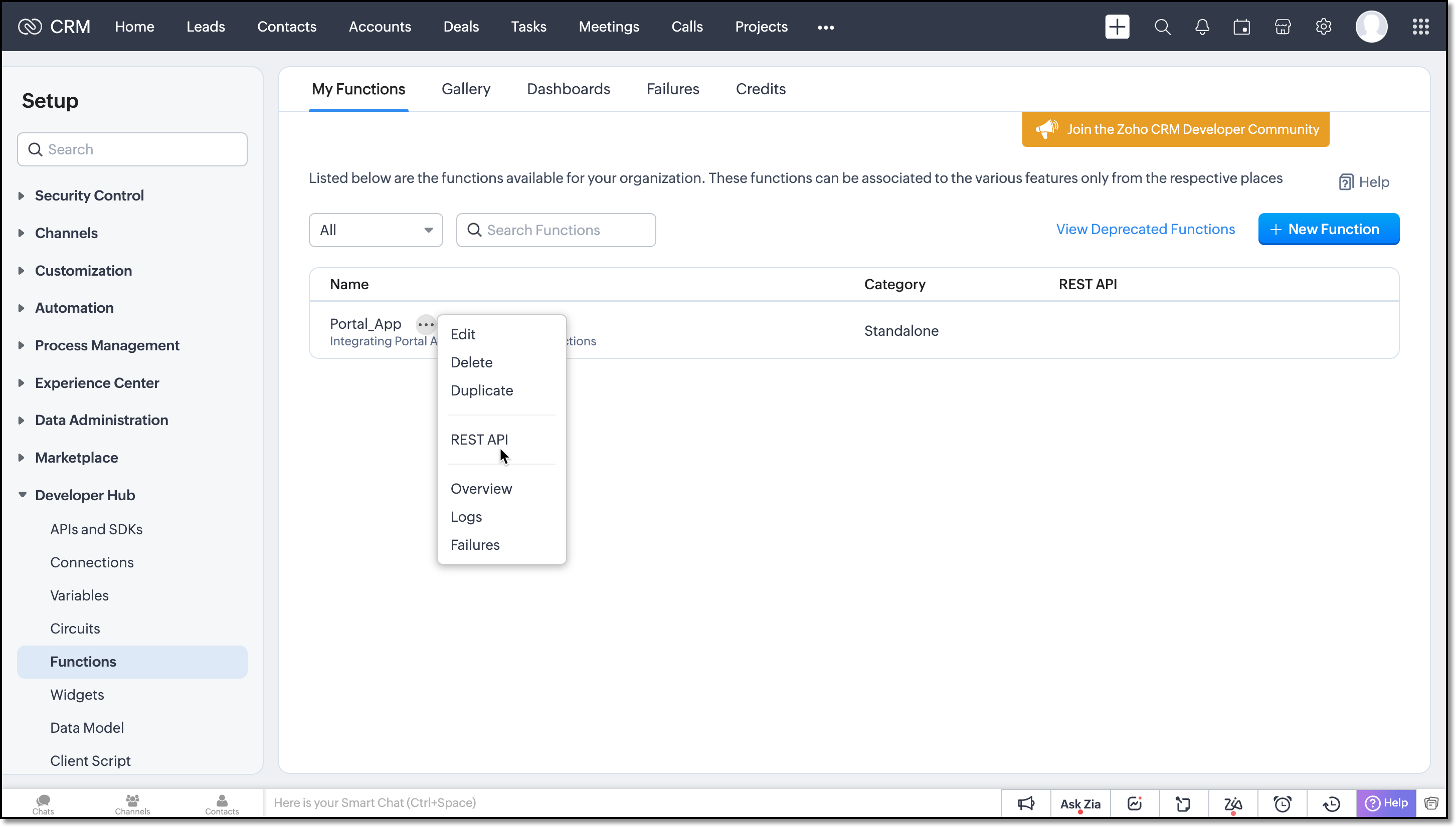
Enable the OAuth2 and API Key for the function.
Next copy the API key and provide it in the webhook URL of the Portal App.
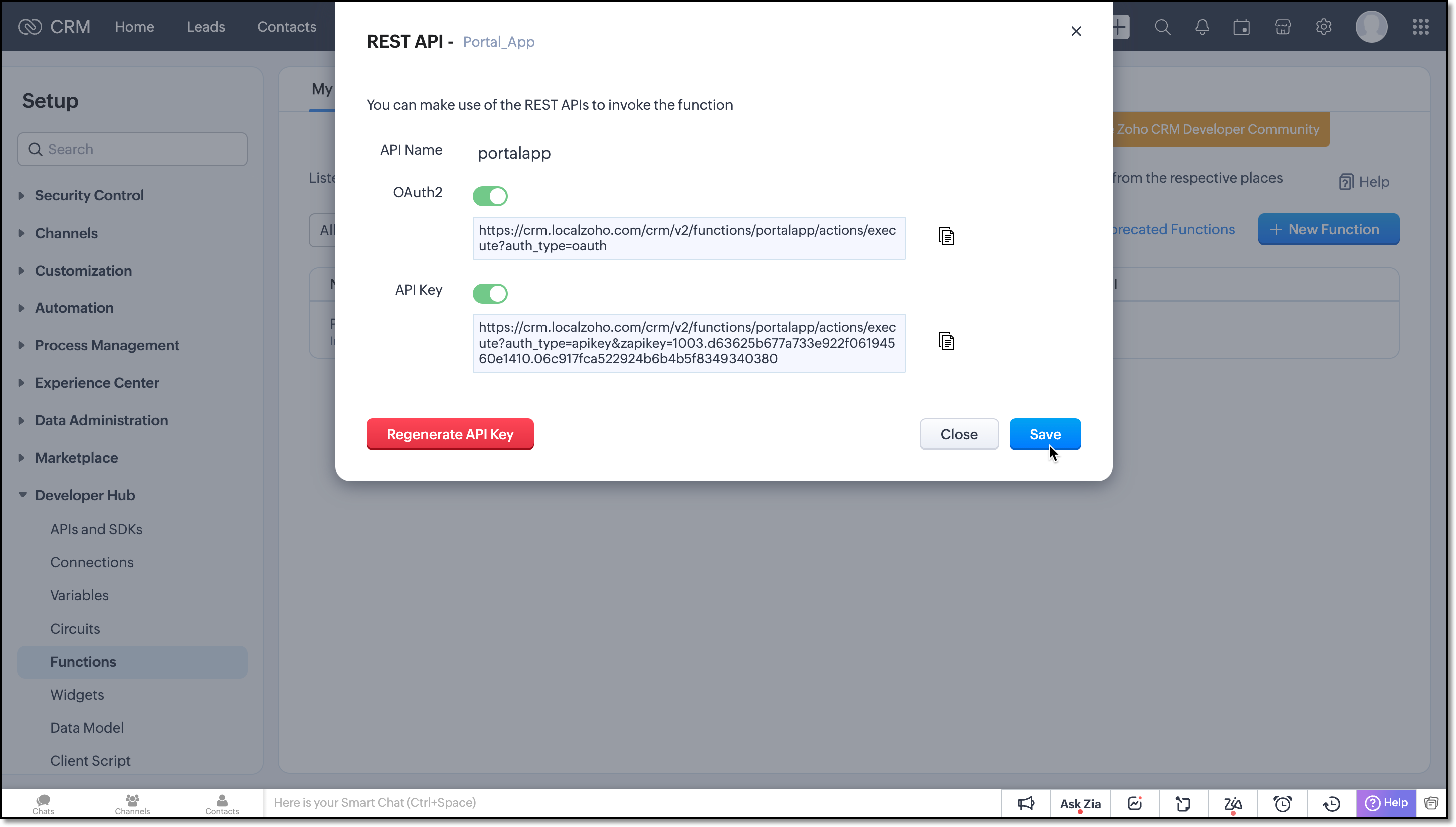
On receiving notifications to this URL the function will be triggered and the records will be updated.
We believe you found this post both beneficial and informative!
Your thoughts and perspectives matter to us. If there is a topic you would like us to delve into or if you have any questions, please feel free to drop a comment below or send us an email at support@zohocrm.com.
Stay tuned until we circle back to you on next Friday!
--------------------------------------------------------------------------------------------------------
Recommended Reads
- External IDs - An Overview
- Formula Fields - An Overview
- Subforms - Overview and guide to build a subform, Kaizen #31, Kaizen #124
- Metadata APIs - GET Modules, GET Fields
- REST APIs - Update Records API
- Query API - An Overview, Records through COQL Query, Kaizen #80 , Kaizen #81 , Limitations
- Functions - An Overview
- Deluge - An Introduction
---------------------------------------------------------------------------------------------------------

Previous Post : Kaizen #131 - Bulk Write for parent-child records using Scala SDK | Kaizen Collection: Home
Access your files securely from anywhere
Centralize Knowledge. Transform Learning.
All-in-one knowledge management and training platform for your employees and customers.
New to Zoho Recruit?

Zoho Developer Community
New to Zoho LandingPage?
Zoho LandingPage Resources
New to Zoho Survey?
New to Zoho CRM Plus?
Deliver unforgettable customer experiences
New to Zoho CRM Plus?
Deliver unforgettable customer experiences
New to Zoho Marketing Plus?
Everything you need to run your marketing
New to Zoho Marketing Plus?
Everything you need to run your marketing
New to Bigin?





Topic Participants
Kiruthiga G
Sticky Posts
Kaizen #198: Using Client Script for Custom Validation in Blueprint
Nearing 200th Kaizen Post – 1 More to the Big Two-Oh-Oh! Do you have any questions, suggestions, or topics you would like us to cover in future posts? Your insights and suggestions help us shape future content and make this series better for everyone.Kaizen #226: Using ZRC in Client Script
Hello everyone! Welcome to another week of Kaizen. In today's post, lets see what is ZRC (Zoho Request Client) and how we can use ZRC methods in Client Script to get inputs from a Salesperson and update the Lead status with a single button click. In thisKaizen #222 - Client Script Support for Notes Related List
Hello everyone! Welcome to another week of Kaizen. The final Kaizen post of the year 2025 is here! With the new Client Script support for the Notes Related List, you can validate, enrich, and manage notes across modules. In this post, we’ll explore howKaizen #217 - Actions APIs : Tasks
Welcome to another week of Kaizen! In last week's post we discussed Email Notifications APIs which act as the link between your Workflow automations and you. We have discussed how Zylker Cloud Services uses Email Notifications API in their custom dashboard.Kaizen #216 - Actions APIs : Email Notifications
Welcome to another week of Kaizen! For the last three weeks, we have been discussing Zylker's workflows. We successfully updated a dormant workflow, built a new one from the ground up and more. But our work is not finished—these automated processes are
New to Zoho TeamInbox?
Zoho TeamInbox Resources
Zoho CRM Plus Resources
Zoho Books Resources
Zoho Subscriptions Resources
Zoho Projects Resources
Zoho Sprints Resources
Qntrl Resources
Zoho Creator Resources
Zoho CRM Resources
Design. Discuss. Deliver.
Zoho Show Resources

Get Started. Write Away!
Writer is a powerful online word processor, designed for collaborative work.
Zoho CRM コンテンツ
-
オンラインヘルプ
-
Webセミナー
-
機能活用動画
-
よくある質問
-
Ebook
-
-
Zoho Campaigns
- Zoho サービスのWebセミナー
その他のサービス コンテンツ
Nederlandse Hulpbronnen

ご検討中の方
Recent Topics
Languages in Zobot
Hello, I have found a list of supported languages for the Zobot. The information specifies the languages are supported in the following 3 features: SalesIQ supports 34 different languages in the following features. Resources (Articles, FAQs, Small Talks)Function #6: Calculate Commissions for paid invoices
Zoho Books helps you automate the process of calculating and recording commissions paid to sales persons using custom functions. We've written a script that computes the commission amount based on the percentage of commission you enter and creates anAction required: Reauthorizing your Google account in Zoho Sign for automatic cloud backup to Google Drive
This is applicable to users who have already configured automatic cloud backup to Google Drive. Hi there! Google has mandated reauthorization of all preconfigured third-party integrations to ensure only the necessary scopes are shared as an improved securityZoho CRM Layouts
I have customised all our modules, Leads, Contacts and deals, and within them, I have created lots of different layouts depending on the type of Lead or contact, for example. Since the new Zoho UI came out, they have all disappeared. I have gone intoWhatsApp IM in Zoho Desk always routes to Admin instead of assigned agent
Hello Zoho Experts, I connected WhatsApp IM to my Zoho Desk account. I only assigned my Customer Service (CS) agent to the WhatsApp channel, and I did NOT include Admin in this channel. However, every new WhatsApp conversation automatically gets assignedhide resolution from help centre
to my surprise, i just found out that the resolution text is public in the helpcenter, even if 'notify customer' is off. is there a workaround to that? how do others deal with this? How zoho support does this and I don't think its used by Zoho in the first place. the resolution is meant to be private, not publicZoho Analytics + Facebook Ads: Performance Alerts for Active Campaigns
Is it possible with integration of Zoho Analytics with Facebook Ads and set up alerts or notifications for active campaigns when performance drops? For example, triggering a notification if CTR goes below a defined threshold or if other key metrics (likeMultiple upload field CRM
I desperately need the functionality to add more than one upload field to web to contacts form. How can I do this?Sort by age
It would be very helpful if there was a way to sort by age in the Age column. Please add this function if possible. Thanks!Lookup Field Option Not Available in Customization
Hello, I am trying to customize different modules (e.g., Work Orders, Systems, and others), but I am unable to find the Lookup field option in the layout customization. When I go to: Setup → Customization → Modules and Fields → Add Field The Lookup fieldScheduled sending of a poll and its results
Is there a way to schedule sending a poll to all my users and have the results sent separately to the team?Integrating Zoho Suite and apps more with Linux
I just got introduced with Zoho just couple of months ago, and I've already planned to contribute to it, even though it's not an open-source software. Still I have found it's potential to beat the tech giants and still being respective towards data privacyStore Submitted Forms as PDF
Hi there, Is there a method to store Form submissions as a PDF in workdrive for archival? I set the form to email the submission to the user and an internal inbox but I'd really love to store the final form as PDF in workdrive automatically. I can't seemCRM->INVENTORY, sync products as composite items
We have a product team working in the CRM, as it’s more convenient than using Books or Inventory—especially with features like Blueprints being available. Once a product reaches a certain stage, it needs to become visible in Inventory. To achieve this,Add an option to disable ZIA suggestions
Currently, ZIA in Zoho Inventory automatically provides suggestions, such as sending order confirmation emails. However, there is no way to disable this feature. In our case, orders are automatically created by customers, and we’ve built a custom workflowFeature Request - Gift Cards or Gift Voucher Capability in Zoho Commerce
Hi Zoho Commerce team, I'm comming accross more and more retail businesses who sell gift cards. As there is currently no way to manage this in Zoho Commerce, it is a blocker to addoption. This is particularly popular in Europe and North America. I recentlyHighlight a candidate who is "off limits"
Hello: Is there a way to highlight a candidate who is "off limits"? I would like to have the ability to make certain candidate and / or Client records highlighted in RED or something like that. This would be used for example when we may have placed a candidate somewhere and we want everyone in our company to quickly and easily see that they are off limits. The same would apply when we want to put a client or former client off limits so no one recruits out of there. How can this be done? Cheers,Closing off tasks automatically based on project status
Is there a way to close off all open tasks when a project is set as Cancelled?[Free webinar] Understanding connections and datasources in Zoho Creator - Creator Tech Connect
Hello everyone, We’re excited to invite you to another edition of the Creator Tech Connect webinar. About Creator Tech Connect The Creator Tech Connect series is a free monthly webinar featuring in-depth technical sessions designed for developers, administrators,UK payroll entries
Hey guys, Nett payroll payments are imported direct into the bank, using an external payroll system (will be glad for Zoho to have a UK payroll app) At present I have monthly recurring bills for HMRC which are auto entered & paid when due. This seemsBridge the Gap Between your Service and Finance Teams
In field service, the most expensive distance isn’t the drive to a customer’s home—it’s the gap between a finished job and a paid invoice. Zoho FSM leverages the power of Zoho Invoice to handle and manage billing operations. It enables you to: InstantlyDirect URL to "View Record"
I would like to create a button (Deluge Script) to jump to the "view record" without passing by the record menu, but I can not aford to find the right url. I don't want the "view record" as a single page. I want the "view record" in the application like the picture below: Thanks in advance for your helpLive Chat for user
Hi everyone, I’m new to Zoho Creator and wanted to ask if it’s possible to add a live chat option for all logged-in portal users so they can chat internally. I’m trying to create a customer portal similar to a service desk, but for vehicle breakdowns,SalesIQ Chat Owner to CRM Lead Owner Mapping
There is no proper mapping between the SalesIQ chat owner and the CRM lead owner. When a chat is assigned to an agent, the lead created in CRM is often assigned to a different user, forcing admins to manually change ownership every time. This createsProduct line search in quotes
Is there a way to change the search setting when you add a product line to a quote. We have created a field in products called 'Part Number' and I would like when I'm adding a product line to the quote that I can search on that field. At the moment it only searches on product description. In products I can search on the 'Part Number' field Any help welcome.Storage Limits
Hello, What is the storage limitations for each user on professional edition? Thanks, MekkiPower Pivot and Data Modeling functionality in Zoho Sheet
When will MS Excel functionalities like Power Pivot and Data Modeling functionalities be available in Zoho Sheet?Global Search placement in the new UI
Having a hard time with the global search placement in the UI redesign. Surely I can't be the only one. Previously global search placement was perfect. A bar at the top/center of the page. Exactly where you would expect it to be. Since the new UI hasWhat's New - January 2026 | Zoho Backstage
Welcome to 2026! If you thought last year was big, buckle up. We’re stepping into this year with a singular focus: unimaginable growth, elite scalability, and performance benchmarks that leave the old ways of event management in the rearview mirror. AsCliq on your mobile phone
Some of the employees in my company get their cliq on their mobile phones but it will not let them answer the call. The employee has to go to their laptop to access it.Bulk Delete Messages in Cliq
Isn't it possible to bulk delete messages in Cliq? I have them delivered to me as notifications from another service but most of them need to be deleted as not of value. I get dozens of them per day, and deleting them is already difficult is the "Delete"stock movement report by each transaction for each item
Dear Sir we are using zoho inventory for foodstuff and we lack the transaction report which clearly shows movement of an item from Opening balance of the month to Goods received in, Supplier return out, Invoice out, Sales return In, Transfer out and TransferUnable to change Company Logo
Hi Guys, I have an issue where I've uploaded a Company image in Gif format and the logo has now got a black background whereas the logo is supposed to be black not the background. I didn't think it would be an issue so I created a PNG version to uploadMetadata API Access to Functions
I think it would be incredibly helpful to have api access to every function's code. Our team primarily uses deluge functions to update fields across modules according to business logic. I would like to create a visual dependancy model for our CRM, butHistorical Sales Info - Blend with Finance Invoice Line Items, Access in CRM and Desk
My company has been using Zoho One since 2021, with sales data going back through 2020. However, we have been in business much longer, and we have historical sales information that we want to have at our fingertips when talking with customers (usuallyIntroducing Record Category in CRM: Group options to see record status at a glance.
Release update: Currently available for CN, JP, AU, CA, SA, UAE, EU, and US DCs (all editions); IN DC (Standard and Professional editions). Hello everyone, We are pleased to introduce Record Category in Zoho CRM - a new capability where the user can getService disruption in Zoho Cliq (EU Region) – February 9, 2026
Hello everyone, We’d like to inform you about a brief service disruption that affected Zoho Cliq users in the EU region earlier today. The issue has been resolved, and all services are now operating normally. Summary On February 9, 2026, Zoho Cliq experiencedSpotlight series #26 - Build slides with visual clarity using Diagram
Hello all! The feature in the spotlight this month is Diagram. Let's say you are a part of a project kickoff meeting and your teammate starts explaining the project life cycle like this: "First we ideate, then we create an initial prototype and shareClient scripts for Zoho Books ?
Good day everyone, I am looking for a way to be able to interact with the Quotes and Invoices as they are being created. Think of it like Zoho client script in Zoho CRM. But for the life of me I dont see a way to do this. The issue with having functionAbility to move emails between different Shared Mailboxes
Hi Zoho Team and Community, I would like to suggest a feature that would greatly improve the workflow for teams managing multiple Shared Mailboxes. Currently, we often receive emails in the wrong shared mailbox. While we can forward them to the correctNext Page