Nouvelle fonctionnalité Zoho Bigin : découvrez Team Pipelines
Bonjour à tous !
Il y a quelques jours, nous vous avions annoncé l'arrivée de la nouvelle version de Bigin.
Dans cet article nous avions fait le tour des nouvelles fonctionnalités développées pour booster la croissance de votre petite entreprise.
Aujourd'hui, nous abordons plus en détail la fonctionnalité la plus attendue de cette update : Team Pipelines.
Quel est l'intérêt de cette nouvelle mise à jour ?
Toute entreprise, petite ou grande, est caractérisée par de multiples opérations en contact avec la clientèle, telles que les ventes, le marketing ou le succès client.
En tant que propriétaire d'une petite entreprise, vous avez soit une équipe où chacun s'occupe de plusieurs opérations, soit des membres individuels qui s'occupent d'opérations spécifiques.
Idéalement, chaque élément d'information recueilli auprès de vos clients doit être ajouté à votre CRM afin que vous et votre équipe puissiez y accéder chaque fois que nécessaire.
En fin de compte, l'unification des informations sur les clients et la rationalisation de chaque élément de vos opérations quotidiennes deviennent la clé pour obtenir une vue panoramique sur vos clients et atteindre l'objectif difficile qui consiste à obtenir une source unique de vérité pour les données clients.
Actuellement, la plupart d'entre vous utilisent Bigin pour gérer leurs opérations de vente. Vous pouvez également renommer les modules, personnaliser les champs et les étapes de vos pipelines pour gérer des opérations autres que les ventes, comme l'accueil des clients, les études de cas marketing, la livraison des produits, etc.
Mais que se passe-t-il lorsque vous voulez gérer simultanément vos affaires, l'accueil des clients et la mise en œuvre, le tout dans le même compte Bigin ?
Ce que nous avons remarqué avec le système de pipeline actuel, c'est que la plupart des clients créent plusieurs comptes Bigin ou ont recours à d'autres outils tels que des feuilles de calcul, des logiciels d'assistance, etc. pour gérer les opérations de contact avec les clients autres que les ventes.
Mais dans de telles situations, les données de vos clients sont dispersées entre plusieurs outils, ce qui entraîne un manque de coordination entre les membres de votre équipe, avec pour conséquence un retard global dans les opérations et une expérience client amoindrie.
C'est pour remédier à ce manque d'unification que nous avons conçu Team Pipelines.
Présentation de Team Pipelines
Au cours du processus d'achat, vos clients s'adressent au service commercial, ce qui est généralement suivi dans le pipeline Deals. Si un contrat légal est impliqué dans la vente, il peut être géré par l'équipe juridique dans le pipeline juridique. Une fois l'affaire conclue, la livraison du produit peut être saisie dans le pipeline Delivery, et à chaque étape de ce pipeline, les clients peuvent être informés automatiquement de l'état de la livraison.
De même, une fois le produit livré, il peut y avoir d'autres étapes comme l'installation et l'activation qui peuvent être suivies dans les pipelines respectifs par les équipes.
Dans le parcours que nous venons de voir, au moins cinq personnes différentes travaillent ensemble pour offrir une excellente expérience aux clients.
Comment la nouvelle mise à jour va-t-elle vous aider ?
Avant Team Pipelines, aucun des membres de votre équipe n'aurait eu la visibilité des tâches et des opérations effectuées par les autres équipes. Ils auraient été obligés de s'appeler, de discuter ou de s'envoyer des e-mails, ce qui aurait rendu le parcours chaotique et inefficace pour vos clients.
À présent, avec Team Pipelines, les opérations de chaque équipe sont désormais visibles et accessibles à partir d'un seul compte Bigin. Il vous suffit de cliquer sur un contact pour connaître l'état de chaque activité associée à ce contact.
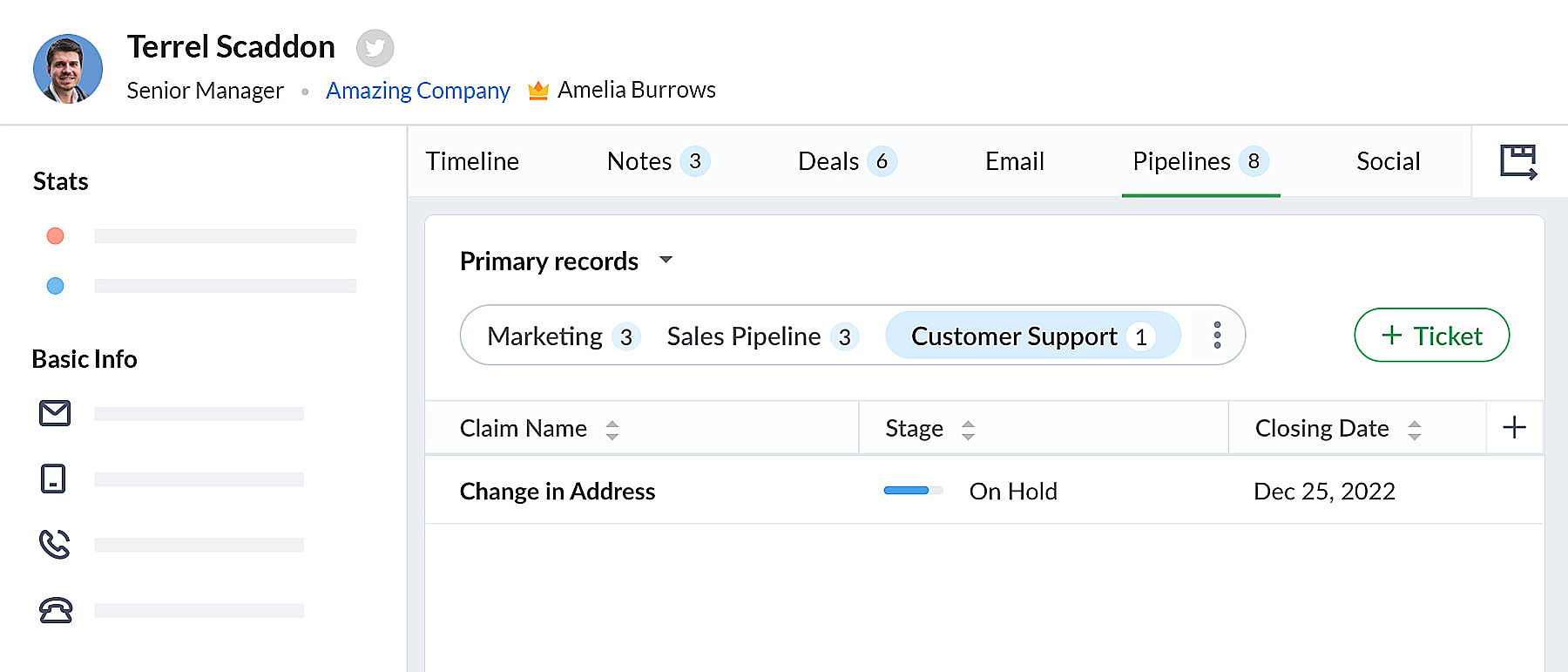 bigin pipeline
Team Pipelines et sous-pipelines : L'équipe idéale pour gérer les opérations uniques de vos clients
Au sein de chaque Team Pipelines, vous pouvez également créer différents sous-pipelines. Les sous-pipelines au sein d'un Team Pipelines ne diffèrent que par les étapes. Ainsi, au sein d'un Team Pipelines, si vous avez besoin de différents ensembles d'étapes pour différentes opérations, vous pouvez créer des sous-pipelines.
En d'autres termes, les sous-pipelines dans Bigin ne sont rien d'autre que la fonctionnalité multi-pipeline actuelle dont vous disposiez déjà.
Votre compte Bigin devient maintenant la source unique d'informations fiables sur vos clients. Il donne à tous les membres de votre équipe une vue à 360 degrés des informations sur les clients, leur permettant de gérer les relations et les interactions avec succès.
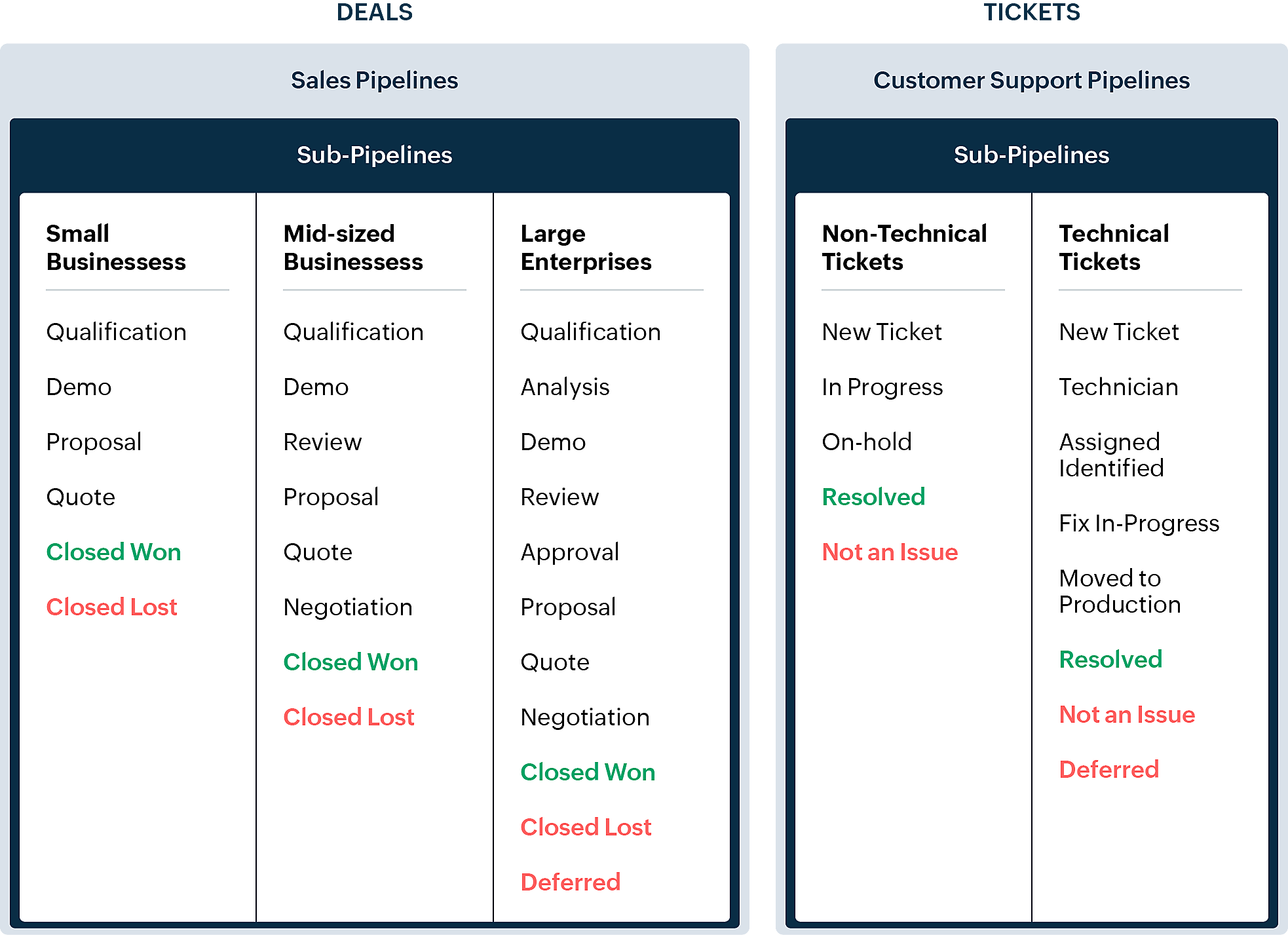
En quoi la nouvelle version est-elle différente de l'interface utilisateur Bigin existante ?
Pipelines est maintenant un module séparé dans Bigin. Là où il y avait auparavant les affaires/opportunités, vous avez maintenant les pipelines. Dans ce module, vous pouvez gérer plusieurs types d'enregistrements tels que les transactions, les tickets, les demandes, etc.
- Les anciennes versions des pipelines que vous avez créés précédemment seront disponibles en tant que sous-pipelines en bas à l'intérieur de chaque pipeline d'équipe.
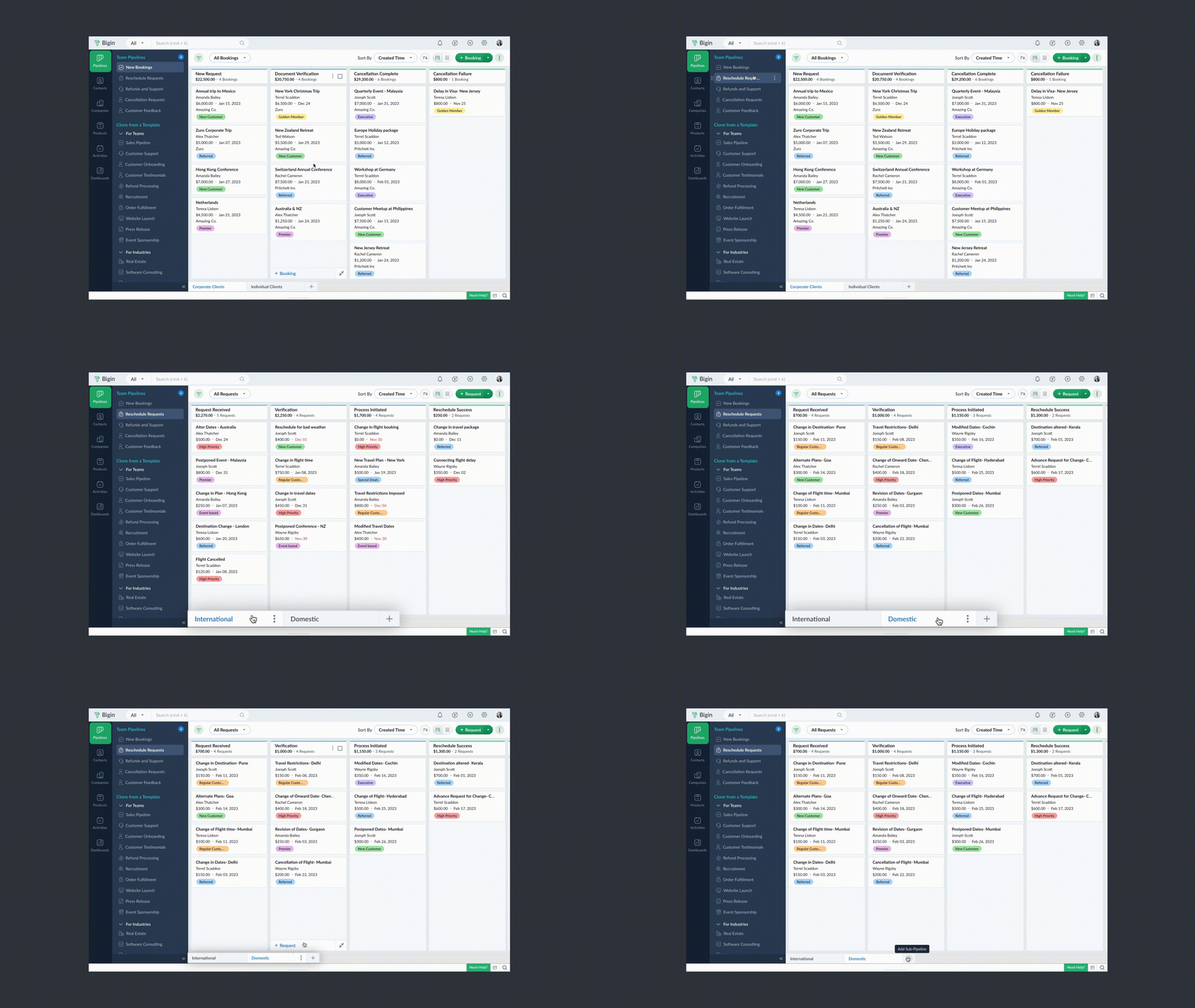
- Chaque pipeline d'équipe peut gérer un type d'enregistrement différent. Par exemple, vous pouvez gérer des transactions dans un pipeline de vente, des tickets dans un pipeline de support client, et ainsi de suite.
- Vous pouvez créer des pipelines à partir de zéro ou utiliser l'un des modèles proposés par Bigin.
- Vous pouvez rendre vos pipelines d'équipe extrêmement spécifiques aux opérations en leur donnant des noms pertinents, en choisissant les champs nécessaires, en ajoutant des étapes appropriées et en attribuant les bons profils d'utilisateurs pour accéder aux pipelines.
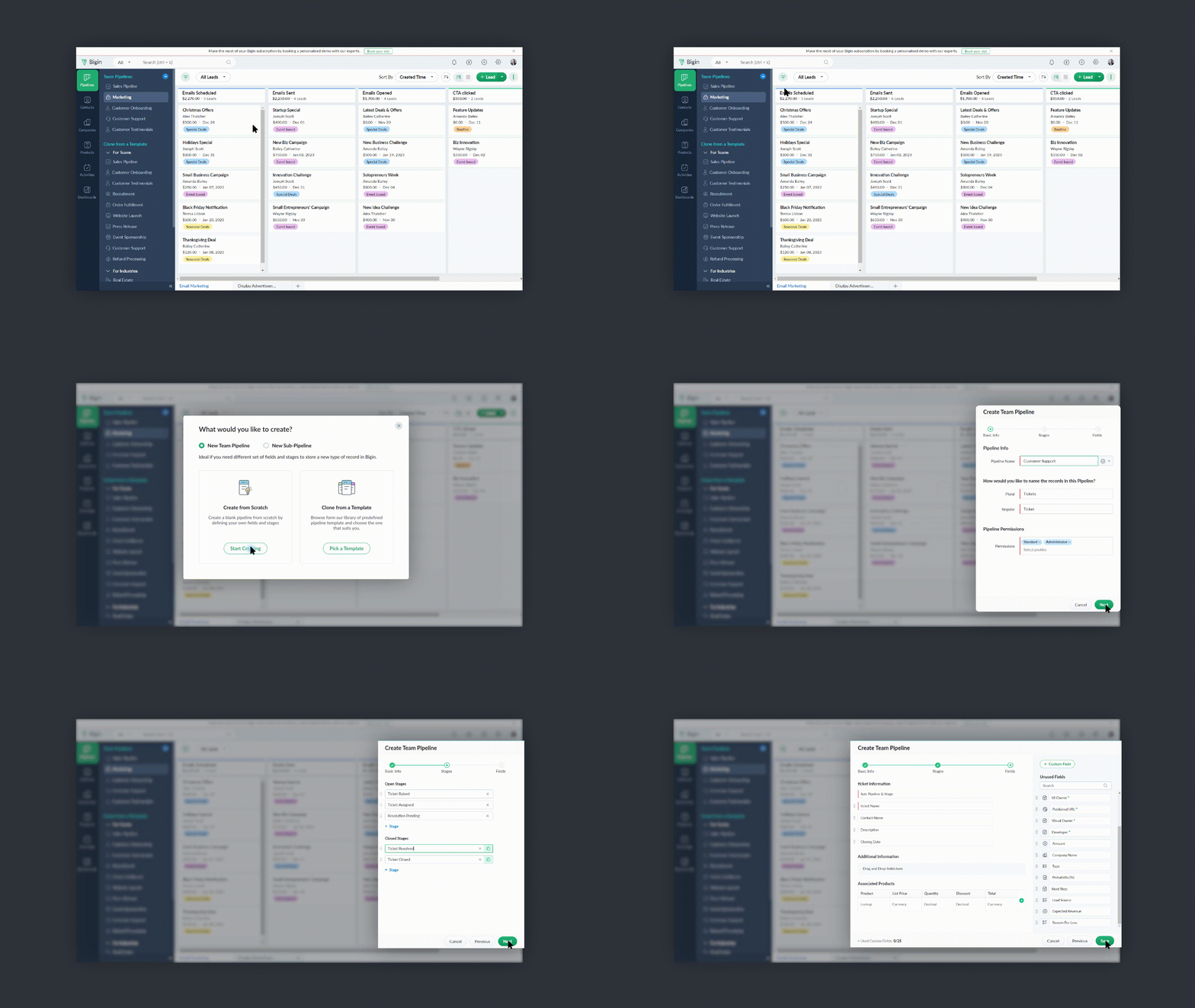
- Vous pouvez réduire le panneau Pipelines d'équipe lorsque vous n'en avez pas besoin en cliquant sur l'icône de la flèche de réduction en bas à gauche.
Comment accéder à cette nouvelle fonctionnalité ?
La fonctionnalité Team Pipelines est désormais accessible à tous nos clients directement depuis l'application Bigin. Il suffit de cliquer sur l'interface comme visible sur la photo ci-dessous :

Vous pouvez nous écrire à l'adresse support@eu.bigin.com à tout moment pour nous faire part de vos commentaires et de vos réactions.
PS : Je serai là si vous avez besoin d'aide pour la nouvelle mise à jour. Il vous suffit de laisser un commentaire dans cet article pour obtenir une réponse à vos questions.
Passez une bonne journée et à très bientôt pour découvrir les nouvelles fonctionnalités Bigin !
Access your files securely from anywhere

Zoho Developer Community





Topic Participants
Antoine Perrault
Sticky Posts
Bigin - Astuce #5 : Comment transférer le statut Super Admin ?
Bonjour Community France, Découvrons comment transférer le statut de Super Administrateur. Sachez que le statut de super administrateur ne peut être transféré à un autre utilisateur administrateur que par le super administrateur lui même. Pour transférerNouveau forfait Bigin Premier : Multi-devises, flux de travail avancés et plus encore !
Bonjour à tous, Nous sommes ravis d'annoncer une toute nouvelle édition de Bigin qui contient plusieurs nouvelles fonctionnalités comme la multidevise, des flux de travail avancés, des champs de recherche personnalisés et plus encore : l'édition Premier.Nouveauté Bigin : associez plusieurs contacts à une même affaire!
Bonjour à tous, Une transaction implique souvent plusieurs décideurs. Prenons l'exemple de l'entreprise Zylker qui utilise Bigin pour gérer ses pipelines de vente. Ils souhaitent acheter des meubles. Pour valider la vente, différents employés, de différentsPack débutant : vos premiers pas sur Zoho Bigin
Dans cet article nous verrons comment paramétrer votre CRM Bigin en 4 étapes : renseigner vos informations, gérer vos utilisateurs ainsi que leurs rôles et profils. Renseigner les informations de votre organisation Vous venez de vous inscrire à Zoho Bigin,Anniversaire Bigin : le CRM pour les petites entreprises évolue
Bonjour à tous ! Nous sommes de retour avec quelques annonces passionnantes. Mais d'abord, joyeux anniversaire à nous ! Bigin a eu un an récemment et nous avons un nouvel ensemble de fonctionnalités que nous sommes impatients de partager avec vous. Nous
Zoho TeamInbox Resources
Zoho CRM Plus Resources
Zoho Books Resources
Zoho Subscriptions Resources
Zoho Projects Resources
Zoho Sprints Resources
Qntrl Resources
Zoho Creator Resources
Zoho CRM Resources
Design. Discuss. Deliver.
Zoho Show Resources

Get Started. Write Away!
Writer is a powerful online word processor, designed for collaborative work.
-
オンラインヘルプ
-
Webセミナー
-
機能活用動画
-
よくある質問
-
Ebook
-
-
Zoho Campaigns
- Zoho サービスのWebセミナー
その他のサービス コンテンツ
Nederlandse Hulpbronnen

ご検討中の方
Recent Topics
Hide/Show Subform Fields On User Input
Hello, Are there any future updates in Hide/Show Subform Fields "On User Input"?Cloning Item With Images Or The Option With Images
Hello, when I clone an item, I expect the images to carry over to the cloned item, however this is not the case in Inventory. Please make it possible for the images to get cloned or at least can we get a pop up asking if we want to clone the images asCustom validation in CRM schema
Validation rules in CRM layouts work nicely, good docs by @Kiran Karthik P https://help.zoho.com/portal/en/kb/crm/customize-crm-account/validation-rules/articles/create-validation-rules I'd prefer validating data input 'closer to the schema'Adding Default Module Image into mail merge field
As with most people finding their way to these forums i have a specific requirement that doesn't seem to be supported by Zoho I have created 2 custom modules to suit my purpose 1 is an inventory type module that lists aluminium extrusions, and all relevantIs it possible to roll up all Contact emails to the Account view?
Is there a way to track all emails associated with an Account in one single view? Currently, email history is visible when opening an individual Contact record. However, since multiple Contacts are often associated with a single Account, it would be beneficialManaging credit cards
Hi, I'm hoping someone on this forum can help me out managing credit card accounts. Transaction are entered as expenses using the credit card account and, as expected, the card balance shows as a negative since this is clearly money I owe them. Once I make a payment, of the full amount owed, I woudl expect the balance to become zero. It doesn't, the negative balance just keeps on increasing even though the payment is reflected correctly in my main operating account. No-one at Zoho seems to understandFree Training - Explore What’s New in Zoho One 2025
Greetings! We hope you have all had a chance by now to get hands-on with the new features and updates released as part of ZO25. Yes, we understand that you may have questions and feedback. To ensure you gain a comprehensive understanding of these updates,Quick way to add a field in Chat Window
I want to add Company Field in chat window to lessen the irrelevant users in sending chat and set them in mind that we are dealing with companies. I request that it will be as easy as possible like just ticking it then typing the label then connectingHow to create a two way Sync with CRM Contacts Module?
Newbie creator here (but not to Zoho CRM). I want to create an app that operates on a sub-set of CRM Contacts - only those with a specific tag. I want the app records to mirror the tagged contacts in CRM. I would like it to update when the Creator appZoho Sheet for Desktop
Does Zoho plans to develop a Desktop version of Sheet that installs on the computer like was done with Writer?How to import data from PDF into Zoho Sheet
I am looking to import Consolidated Account Statement (https://www.camsonline.com/Investors/Statements/Consolidated-Account-Statement) into zoho sheet. Any help is appreciated. The pdf is received as attachment in the email, this document is passwordTrigger Workflow, Approval Process, Blueprint by Deluge in Zoho CRM
#Tips & Trick If you intend to activate your Workflow, Approval Process, or Blueprint through either the deluge script or Zoho CRM API during the creation, updating, or deletion of a record Try this Script mp = Map(); trigger = List(); // Workflow trigger.add("workflow");Zoho Projects Android app: Integration with Microsoft Intune
Hello everyone! We’re excited to announce that Zoho Projects now integrates with Microsoft Intune, enabling enhanced security and enterprise app management. We have now added support for Microsoft Intune Mobile Application Management (MAM) policies throughCant't update custom field when custom field is external lookup in Zoho Books
Hello I use that : po = zoho.books.updateRecord("purchaseorders",XXXX,purchaseorder_id,updateCustomFieldseMap,"el_books_connection"); c_f_Map2 = Map(); c_f_Map2.put("label","EL ORDER ID"); c_f_Map2.put("value",el_order_id); c_f_List.add(c_f_Map2); updateCustomFieldseMapAdmin asked me for Backend Details when I wanted to verify my ZeptoMail Account
Please provide the backend details where you will be adding the SMTP/API information of ZeptoMail Who knows what this means?Kaizen #223 - File Manager in CRM Widget Using ZRC Methods
Hello, CRM Wizards! Here is what we are improving this week with Kaizen. we will explore the new ZRC (Zoho Request Client) introduced in Widget SDK v1.5, and learn how to use it to build a Related List Widget that integrates with Zoho WorkDrive. It helpsSet connection link name from variable in invokeurl
Hi, guys. How to set in parameter "connection" a variable, instead of a string. connectionLinkName = manager.get('connectionLinkName').toString(); response = invokeurl [ url :"https://www.googleapis.com/calendar/v3/freeBusy" type :POST parameters:requestParams.toString()Possible to connect Zoho CRM's Sandbox with Zoho Creator's Sandbox?
We are making some big changes on our CRM so we are testing it out in CRM's Sandbox. We also have a Zoho Creator app that we need to test. Is it possible to connect Zoho CRM's Sandbox to Zoho Creator's Sandbox so that I can perform those tests?I Need Help Verifying Ownership of My Zoho Help Desk on Google Search Console
I added my Zoho desk portal to Google Search Console, but since i do not have access to the html code of my theme, i could not verify ownership of my portal on Google search console. I want you to help me place the html code given to me from Google searchTimeline Tracker
Hi Team, I am currently using Zoho Creator – Blueprint Workflows, and I would like to know if there is a way to track a timeline of the approval process within a Blueprint. Specifically, I am looking for details such as: Who submitted the record Who clickedPrimary / Other Billing Contacts
If you add an additional contact to a Zoho Billing Customer record, and then mark this new contact as the primary contact, will both the new primary and old primary still receive notifications? Can you stop notifications from going to the additional contactsIs it possible to enforce a single default task for all users in a Zoho Projects ?
In Zoho Projects, the Tasks module provides multiple views, including List, Gantt, and Kanban. Additionally, users can create and switch to their own custom views. During project review meetings, this flexibility creates confusion because different users[Free Webinar] Zoho Creator webinars - Learning Table and Creator Tech Connect Series in 2026
Hello everyone, Wishing you all a wonderful new year! May 2026 and the years ahead bring more opportunities, growth, and learning your way 🙂 We’re excited to kick off the 2026 edition of the Learning Table Series and Creator Tech Connect Series ! LearningReply and react to comments
Hi everyone! We're excited to bring to you a couple of new features that'll make your sprint process simpler. A cloud application brings with it an array of social media features that can be efficiently used in your organizational setup. As an agile scrumModule Customisation - Lookup function not available
Good evening, Within my business, I can have multiple customers, who have multiple mobile assets. When I set these assets up, I enter information such as vehicle registration, Vehicle identification number (VIN), Unit number, YOM, in addition to others.zoho click, and nord VPN
Unfortunately, we've been having problems with Zoho Click, where essentially the line cuts off after about a minute's worth of conversation every time we are on VPN. Is there a way we can change this within the settings so it does not cut the line offZoho Calender
a) does the clanender in zoho project allow you to see the name of the event in the celnder view, it currently says either "Task (1) or "Milestoen (1)" b) Alternatively does the calender in Zoho project integrate with zoho calender?Matching ZOHO Payments in Banking
Our company has recently integrated ZOHO Payments into our system. This seemed really convenient at first because our customers could pay their account balance by clicking on a link imbedded in the emailed invoice. Unfortunately, we can't figure out howNew Enhancements to Zoho CRM and Zoho Creator Integration
Hello Everyone, We’ve rolled out enhancements to the Zoho Creator and Zoho CRM integration to align with recent updates made to the Zoho Creator platform. With enhancements to both the UI and functionality, This update also tightens access control byWork Type - Limitation
Hello, I'm setting up work types and have noticed, a limitation on the parts area to 10 lines. Can this be increased to 20 or greater? In addition to this, when I attempt to add the work type to a work order, the correct labour hours doesn't flow through.Locked out of MFA due to changing phones
I have been locked out of my Zoho Books account since i changed my mobile phone over. I can get the OTP through the ZOHO Books software but i cant confirm using my phone app as nothing appears to authorise. I need to know how to register/set up my newEmails sent through Bigin are not posting in IMAP Sent folder
I have set up my email to work from within Bigin using IMAP. I am using IMAP so I can sync my email across multiple devices - phone / laptop / desktop / iPad / etc. I want all my emails to populate my email client (outlook & iphone email) whether orTurning the page for Zoho SalesIQ: 2025 to 2026
As we wrap up 2025, we would like to take a moment to reflect on what we set out to achieve this year, what we’ve delivered, and where we’re headed next. What we focused on in 2025 This year was all about strengthening the core of engagement and AI, makingTemporary Outage in Zoho Cliq Affecting US Users – July 23, 2025
We experienced a service disruption in Zoho Cliq that impacted core functionality for users in the US region. The issue occurred between Jul 23, 2025, 06:54:00 PM IST and 07:13:13 PM IST, lasting approximately 19 minutes. To restore service stability,Zoho Cliq not working on airplanes
Hi, My team and I have been having this constant issue of cliq not working when connected to an airplane's wifi. Is there a reason for this? We have tried on different Airlines and it doesn't work on any of them. We need assistance here since we are constantlyCreate an Eye-Catching Announcement Widget for Your Help Center
Hello Everyone! In this week’s edition, let’s explore how to keep your customers updated with exciting news in the Help Center. See how ZylkerMobile wowed their customers by bringing updates right to their portal. ZylkerMobile, the renowned brand forCustomer Management: #6 Common Mistakes in Customer Handling
Managing customers doesn't usually fall apart overnight. More often, slight gaps in the process slowly become bigger problems. Incidents like missed follow-ups, billing confusion, and unhappy customers will lead to revenue loss. Many businesses don'tZoho Desk iOS app update: UI enhancement of picklist and multi picklist fields
Hello everyone! We have enhanced the UI of the picklist and multiselect picklist fields on the Zoho Desk iOS app to provide a more refined, efficient, and user-friendly experience. We have now supported an option to Search within the picklist and multiselectZoho Desk iOS app update: Revamped scribbles with Apple pencil kit
Hello everyone! We’re excited to introduce a revamped Scribble experience, rebuilt from the ground up using Apple PencilKit for smooth strokes, proper scaling, and seamless image uploads. Please update the app to the latest version directly from the AppZoho Desk Android app update: Norwegian language support
Hello everyone! In the most recent Android version of the Zoho Desk app update, we have brought in support to access the app in Norwegian language. We have introduced the Norwegian language on the IM module of the Zoho Desk app as well. Please updateNext Page