We’re transitioning from Zoho ShowTime to TrainerCentral
Hello everyone,
Zoho ShowTime was originally built as a training platform to serve training agencies, HR teams, and individual trainers. As the platform grew, we realized that more creators and businesses could benefit from its capabilities. That’s why we launched a new brand, TrainerCentral, a full-featured training platform that handles everything from course creation to live sessions. With a host of new features and added capabilities in TrainerCentral, we’re saying goodbye to Zoho ShowTime and transitioning to a more advanced, comprehensive platform.
With TrainerCentral, you can design multimedia-rich courses that combine videos, documents, quizzes, and assignments to offer self-paced training. Built-in live session tools allow you to host interactive sessions including polls, chats, and surveys, to keep learners engaged. The platform simplifies learner management with detailed progress tracking, analytics, and automated certificates, helping trainers measure performance and learning outcomes with ease.
It also offers a no-code website builder that enables users to create a professional, fully branded academy website to strategize and market their online courses effectively to learners. With its robust, integrated payment gateway system, it facilitates secure, frictionless transactions across global markets.
This migration from Zoho Showtime to TrainerCentral will provide you with access to enhanced features, improved performance, and a unified training experience.
How to migrate from Zoho ShowTime to TrainerCentral.
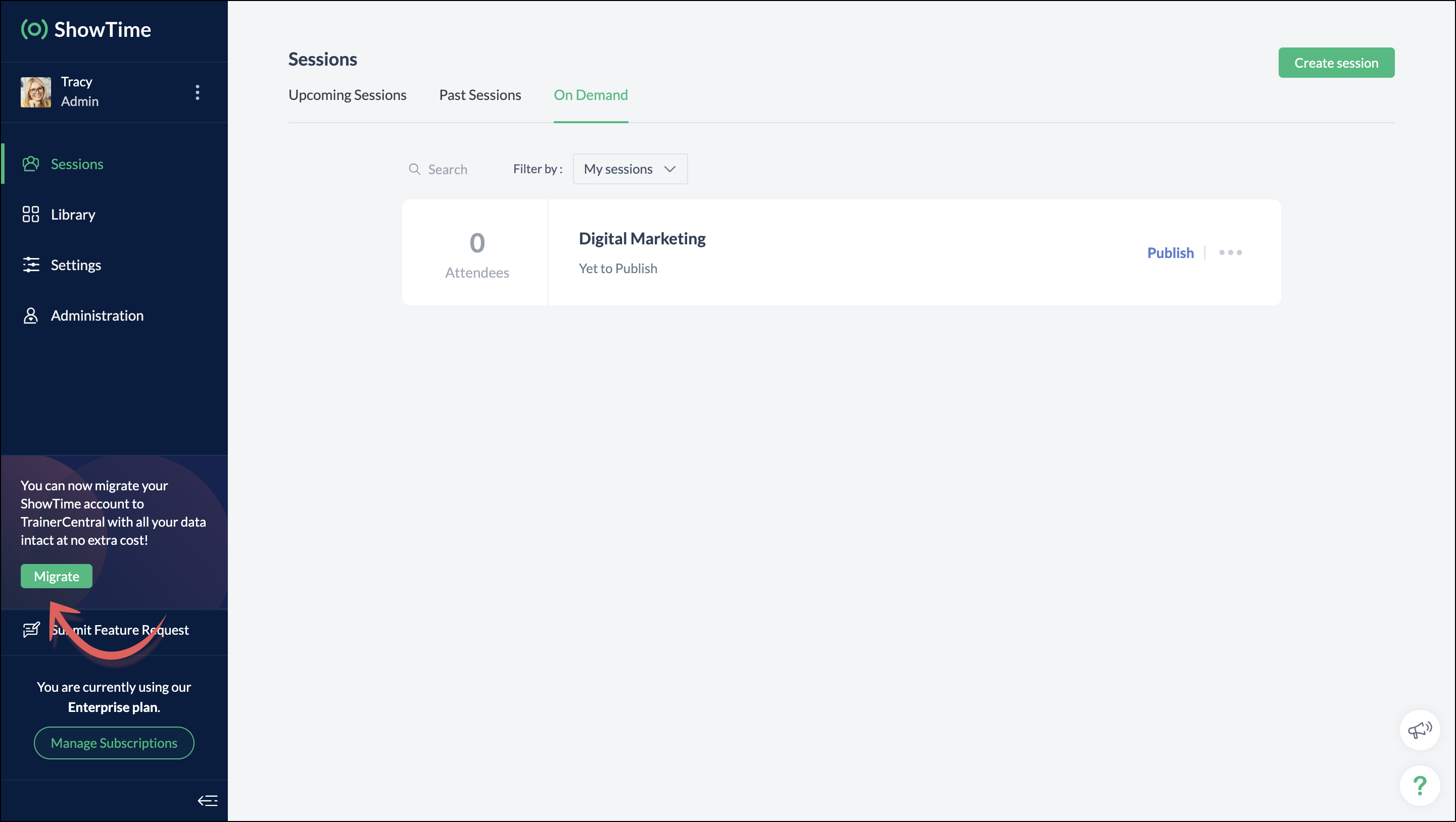
You can migrate your account from Zoho ShowTime to TrainerCentral anytime by clicking the Migrate button in the left pane and following the on-screen instructions. Once migrated, you’ll receive a notification, through which you can access your TrainerCentral account.
- Only the super admin of a Zoho ShowTime portal can migrate their portal's data to TrainerCentral.
- We’ll be disabling remote session scheduling and learner registration for on-demand sessions starting December 1, 2025. With this transition, Zoho ShowTime will reach its End of Life (EOL) on December 31, 2025.
To avoid any disruptions to your live classes, please move to TrainerCentral before December 31, 2025.
We hope this will elevate your experience to the next level.
If you have any questions, take a look at the FAQ section below, reach out to us at support@zohoshowtime.com, or just leave a comment here.
FAQ
FAQ
1. How long will the migration take?
The migration of your Zoho ShowTime data and account portal is expected to take approximately one to two hours. In the event of any technical issues or glitches during the migration, the product team will address them immediately. In such rare cases, the migration will be completed within 24–48 hours.
2. What will happen to my Zoho ShowTime account if it is not migrated before the sunset?
If you fail to migrate before the sunset, i.e., December 31, 2025, active Zoho ShowTime accounts will be automatically migrated to TrainerCentral.
3. What will happen after migration?
You will be able to access TrainerCentral with your Zoho ShowTime credentials and continue your teaching journey seamlessly, with the added benefit of new features.
4. Will there be any changes to my payment after migration?
No, there will be no changes to your payment. The amount you currently pay for your Zoho ShowTime subscription will remain the same after migration.
5. I am a Zoho ShowTime customer or Zoho One user. How will I be mapped to the TrainerCentral plan?
If you are a Zoho ShowTime customer or a Zoho One user, you will be mapped to the equivalent TrainerCentral plan automatically to ensure a seamless transition.
6. What happens if I choose not to migrate?
You can back up your data, including materials, recordings, and analytics associated with your account, and then contact our support team to delete your account.
7. I am a Zoho One user and purchased paid attendee add-ons. How do I enable them in TrainerCentral?
8. Will my configured payment gateway and ticket settings in Zoho ShowTime be migrated to my TrainerCentral account automatically?
All of the sessions and tickets created in Zoho ShowTime will be migrated without any changes to your TrainerCentral account. However, for any new sessions you create in TrainerCentral, you will need to set up your payment gateway and ticketing options again.
9. Where can I find my past sessions and library content from Zoho ShowTime in TrainerCentral after migration?

➤ Remote session: You can find previously created/conducted Zoho ShowTime remote sessions in Live Workshops → Past Sessions.
➤ On-demand session: You can find previously created/conducted Zoho ShowTime on-demand sessions in Live Workshops → On demand.
➤ All materials hosted in your ShowTime library will be moved to TrainerCentral's library.
10. Will my current integrations like Zoho CRM, Zapier, and Zoho Flow function seamlessly?
All of your Zoho CRM, Zapier, and Zoho Flow integrations and their functionalities will be migrated seamlessly to TrainerCentral. In Zapier and Zoho Flow, several additional triggers and actions are available for all courses and live workshops.
11. If I cancel my TrainerCentral subscription after migration, will I get the same plan when I resubscribe to a new TrainerCentral account?
No. The equivalent plan is provided only if you migrate from Zoho ShowTime. If you resubscribe for a new TrainerCentral account, you’ll be mapped to a new plan.
12. What if I can't see the Migrate button on my Zoho ShowTime portal?
If the Migrate button isn’t visible, please contact our support team to help you migrate from Zoho ShowTime to TrainerCentral.
Access your files securely from anywhere
New to Zoho Recruit?

Zoho Developer Community
New to Zoho LandingPage?
Zoho LandingPage Resources
New to Zoho Survey?
New to Zoho CRM Plus?
Deliver unforgettable customer experiences
New to Zoho CRM Plus?
Deliver unforgettable customer experiences
New to Zoho Marketing Plus?
Everything you need to run your marketing
New to Zoho Marketing Plus?
Everything you need to run your marketing
New to Bigin?





Topic Participants
Neeraja Raghavendran
Sticky Posts
Video tip 02: Customize your feedback and evaluation forms in Zoho ShowTime
Hello everyone, Here's a new video tip for all our ShowTime users. Today we will learn few quick, effective ways to evaluate your participants and assess your trainings conducted on Showtime, like MCQs (multiple choice questions), text-boxes, and ratings scale. Watch the below video to learn how these assessment systems help you effectively evaluate course-related knowledge and skills of your trainees on a regular basis. Follow this page to learn more such tips and stay updated on all theVideo tip 05: Host training courses under your own personalized domain and white-label your email communications.
Hello everyone, As a trainer, having your own domain name increases your brand's positioning and reach through search results on top search engines like Google, Yahoo, and Bing. Prospective customers will more readily pay for courses from an organization with a professional, established online presence. A custom domain establishes you as a leader in your area of subject expertise, helping you promote your courses and build brand recognition with your global audience. In today's video tip, we atVideo tip 04: Do you want to set up repeated training sessions at regular intervals? Learn how.
Hello everyone, Sometimes it is difficult to organize and manage your everyday work and training sessions. Scheduling recurring or repeated sessions can be even more time-consuming as you need to create and maintain the training content, schedule multiple time slots for the training, manage registrants across each session, and more. Zoho ShowTime offers a smarter option for these cases that only takes a few clicks. Play the video below to learn how to use the same presentation content and setSpotlight 03: Connect and deliver more effective trainings with ShowTimes' Viewer app
With the growing need for virtual classroom learning, the use of mobile and tablet software is quickly becoming the most convenient way to share knowledge between educators and students. According to a 2018 study, nearly 67% of digital learners now use mobile devices to complete their online coursework. Additionally, smartphone learners complete course material 45% faster than those using a computer. Considering these facts, we now introduce our next community spotlight series that will focus on ZohoVideo tip 1: Record and share trainings on Zoho ShowTime.
Hello everyone, We are excited to launch our video tip of the month series within our ShowTime's community, aimed to help our trainers and educators with brief and practical tips on delivering more effective and comprehensive training. In this month's video tip, we will show you how to record your training sessions quickly and share them with your attendees and other prospective learners externally. We hope this tip was useful. ShowTime also allows you to automatically record your live trainings
New to Zoho TeamInbox?
Zoho TeamInbox Resources
Zoho CRM Plus Resources
Zoho Books Resources
Zoho Subscriptions Resources
Zoho Projects Resources
Zoho Sprints Resources
Qntrl Resources
Zoho Creator Resources
Zoho CRM Resources
Design. Discuss. Deliver.
Zoho Show Resources

Get Started. Write Away!
Writer is a powerful online word processor, designed for collaborative work.
Zoho CRM コンテンツ
-
オンラインヘルプ
-
Webセミナー
-
機能活用動画
-
よくある質問
-
Ebook
-
-
Zoho Campaigns
- Zoho サービスのWebセミナー
その他のサービス コンテンツ
Nederlandse Hulpbronnen

ご検討中の方
Recent Topics
How to remove some users in zoho accounts
How to remove some users in Zoho accounts.Unified Inbox for all, including fetched mails
I fetch mails from different third-parties mailboxes. But I need to switch mailbox too see fetched mails. It's strange. All mailboxes have one shared disk space for own mail and fetched mail, but why do we need to switch mailbox (on the left bottom) toWhatsapp Limitation Questions
Good day, I would like to find out about the functionality or possibility of all the below points within the Zoho/WhatsApp integration. Will WhatsApp buttons ever be possible in the future? Will WhatsApp Re-directs to different users be possible basedUsers Not Automatically Being Added To WorkDrive Team
I have already created a ticket for this issue, but the support team doesn't seem to understand what's happening. Our organization started with a trial of Zoho Workplace around November 10, 2025. I created 10 users, including myself. I sent out the invites,Synchronization between Gmail and Zoho Mail
Hello! I am using Zoho Mail within the Zoho One platform. I have completed the basic setup and added all the required DNS records with our domain provider. Our goal is to set up two-way synchronization between our current Gmail inbox and Zoho Mail, butIMAP login problem
I have my domain hosted with zoho @wilson.ie I have added a new user and have enabled IMAP access to this user account The user can login to zoho mail on the web. When we enter the server settings into Outlook as per below, Outlook cannot login to theContact data removes Account data when creating a quote
Hi, Our customer has address fields in their quote layout which should be the address of the Account. They prefill the information, adding the account name - the address data is populated as per what is in the account - great. However when they then addChanges to subform in Zoho CRM Portal Timeline History Unavailable
Hi Support Team, We have noticed a feature limitation in the Zoho CRM portal. We created a portal for our vendors to edit records directly, but when vendors make updates, the Modified Time and Date fields are not being updated. Additionally, these updatesThis mobile number has been marked spam. Please contact support.
Hi Support, Can you tell me why number was marked as spam. I have having difficult to add my number as you keep requesting i must use it. My number is +63....163 Or is Zoho company excluding Philippines from their services?Function #11: Apply unused credits automatically to invoices
Today, we bring you a custom function that automatically applies unused credits from excess payments, credit notes, and retainer payments to an invoice when it is created. Prerequisites: Create a Connection named "zbooks" to successfully execute the function.Duplicating report but custom layout does not
Dear Zoho Creator, I need to duplicate a report into 10 copies, but unfortunately the custom layout (detail view) doesn’t copy along with it. I tried exporting and importing the custom layout, but the field mappings are incorrect. I believe everyone areCredit Card Readers?
We would like to use our commerce website at conferences (and eventually in store) to swipe credit cards to pay for orders. How would we accomplish this? Does Zoho have anything available for a developer write code to integrate something like Stripe TerminalStock count by bin location
Is there a configuration to make a stock count by bin or area and not by product. these is useful to manage count by area RegardsAdd Prebuilt "Partner Finder" Template with Native Zoho CRM Integration in Zoho Sites To: Zoho Sites Product Team
Hi Zoho Team, We hope you're doing well. We would like to request a prebuilt "Partner Finder" template for Zoho Sites, modeled after your excellent implementation here: 🔗 https://www.zoho.com/partners/find-partner-results.html ✅ Use Case: Our organizationHow Do I Refund a Customer Directly to Their Credit Card?
Hi, I use books to auto-charge my customers credit card. But when I create a credit note there doesn't seem to be a way to directly refund the amount back to their credit card. Is the only way to refund a credit note by doing it "offline" - or manually-Zoho Learn Course Completion Notifications/Triggers/API
Zoho Learn works great and will suit our course creation needs, but it appears to be lacking a bit when it comes to integration with other Zoho services (creator etc.) when it comes to course completion. 1) Is there an API or Zoho Flow trigger for whenEnhanced Recording Permission Controls for Zoho Cliq Meetings (Similar to Zoom)
Hello Zoho Cliq Team, We hope you are doing well. We would like to request an enhancement to the recording permission functionality in Zoho Cliq Meetings. Current Limitation: in Zoho Cliq Only hosts and co-hosts can record a meeting. Participants cannotPhone Connection
When on a call the person on the other end complains that there is static, I am cutting in and out or they can't hear me all. This happens on the cell connection as well.Can't add a sender adress from zoho campaigns
hi, I need to change the sender address for a campaign. When i try to add it i get a message to say 'duplicated email address found while adding your sender address'. This is the first campaign i'm sending so I don't understand why this message is displayed? Thanks JaneAllow customers to choose meeting venue and meeting duration on booking page
My business primarily involves one-to-one meetings with my clients. Given the hybrid-work world we now find ourselves in, these meetings can take several forms (which I think of as the meeting "venue"): In-person Zoom Phone call I currently handle theseExport History timeline
Hi, I have an idea, bout zoho desk history of the ticket it would be great if the agent or admin of the zoho desk can export the timeline of the ticket history for agent report or on other matter.Desk fails to create a new ticket on Reply email
When I send a direct email to support@mysite.com, Desk will create a new ticket as expected. When I REPLY to an email sent from support@mysite.com, Desk will NOT generate a new ticket. This is very bad. How can I fix this? Use case: In a separate systemAsk the Experts 25: Experience the full spectrum of Zoho Desk’s autumn and spring releases for 2025
Hello Everyone, We’re on the 25th episode of our ATE series! It's a true milestone in our live community interactions! It’s been an amazing journey since we started in October 2018. Zoho Desk has come a long way, evolving with the support of a wonderfulAddin Support in Zoho Sheet
Is there any addin support available in zoho sheet as like google marketplace to enhance productivity by connecting with other apps, providing AI data analysis, streamlining business processes, and more?Function #61: Automatically add free item to the invoice based on item quantity
Hello everyone, and welcome back to another Custom Function Friday! During holiday seasons or special promotions, businesses offer deals like BOGO (Buy One, Get One), Buy 3 Get 1 Free, Buy 2 at 50% off, and much more to attract customers. These promotionsNotes for Items for Future Purchase Order
Next time when I order an item, tau have to make some changes in it, that order has to be placed after 4-5 months, I want to save those changes or points somewhere in the item, how will that be possible..Schemes of different tyoe
How can easily apply hourly, day wise or month wise schemes on Bill, Quantity, and other schemes. Like I want to apply a scheme Form today to next 7 days .where i can mention in zoho books so scheme will implement automatically to all customers andClients not receiving emails
I've been informed that my emails are not being received. Is there anything that I should look into to rectify this? Many thanks!Free Plan mail accounts details
In the zoho mail pricing there's a free plan that includes: FREE PLAN Up to 25 Users 5GB* /User, 25MB Attachment Limit Webmail access only. Single domain hosting. I need to make sure that I'm able to create multiple email accounts in the form of: name@domain.comNo more IMAP/POP/SMTP on free plans even on referrals with NO NOTICE
Outraged. Just referred a colleague to use her domain (not posting it publicly here) to Zoho, just as I have other colleagues, clients, friends. Expected the exact same free plan features as I have and as everyone else I ever referred got. I was helpingUnable to receive email - "5.3.0 - Other mail system problem 554-'5.2.3 MailPolicy violation Error delivering to mailboxes'"
My users are unable to receive emails from one particular domain, apparently. The domain known to be kicked back is whitelisted in the spam control. I sent an email to support earlier this morning but I have not received a reply. The error in the titleCaixa de saída bloqueada. Como desbloquear?
Olá, meu e-mail isabela.celli@sivirino.com está com a caixa de saída bloqueada. Não consigo enviar e-mails. Acredito que tenha sido porque mandei o mesmo e-mail para várias pessoas, pedindo uma cotação de serviço. Vocês podem desbloquear para mim? QuantosZoho Forms - Improve the CRM integration field to query data from more than one module
Hi Forms team, Something I get stuck on regularly is pre-populating a form with data when that data is spread across 2 or 3 modules. For example Contacts, Accounts and Deals. I don't want to duplicate the information in CRM so I end up writing a functiondesbloquear cuenta
Buenos dias Cordial saludo Tengo una cuenta libre en zoho mail asociado a un dominio, pero uno de los usuarios se bloquea el correo porque dice que ha excedido el límite de correo, por favor podrian desbloquearla y como hago para que esta persona debe enviar sus correos sin ningun probleama. Gracias de antemanoNot Receiving Incoming Mail
I can send emails from my account but I do not receive any. I originally set up forwarding and it worked for a while and then stopped. I turned off forwarding and now do not receive any emails. Could you please check what is causing this issue? Thank youWill zoho thrive be integrated with Zoho Books?
titleBARCODE PICKLIST
Hello! Does anyone know how the Picklist module works? I tried scanning the barcode using the UPC and EAN codes I added to the item, but it doesn’t work. Which barcode format does this module use for scanning?Making preview pane "stick"
Hello, Is it possible to fix/dock the preview pane so that it's always there? The modern monitors are all very wide so there's plenty of space horizontally. Having the preview pane disappearing and appearing again when you click on an email message inReason:554 5.1.8 Email Outgoing Blocked
I have been struggling to set up my email address for some time now; it's difficult to locate what I need. Additionally, I cannot send or receive any emails. I keep receiving the "Reason: 554 5.1.8 Email Outgoing Blocked" error. There doesn't seem toTrouble Connecting Zoho Mail via IMAP in n8n – Need Help
Hi everyone 👋, I'm trying to connect my Zoho Mail account to n8n using the IMAP Email Trigger node, but I'm facing issues getting it to work fully. ✅ Here's what I’ve done so far: ✅ IMAP access is enabled in my Zoho Mail settings ✅ I’m using the correctNext Page