Extension pointers #14: Extend end-user benefits and allow personalization by implementing extensions with custom actions
From our earlier post on custom actions, we know that we can create templated actions, share them with end users, and allow them to reuse those actions to achieve personalized outcomes. In this post, we'll look at how custom actions make it easy for users to carry out these templated tasks to get customized results.
Consider the following scenario: a hardware company that already uses Zoho CRM then utilizes Zoho Projects to implement and work on the deals they've won. Assume that the Zoho Projects portal has two projects: one for handling smaller revenue deals that require minimum development and less time, and the other for managing larger revenue dealsthat will eventually demand more time and resources for execution.
As an end user processing deals in Zoho CRM, it would be extremely convenient for the company to have the deals automatically fall into the appropriate projects, such as a task based on the expected revenue. Furthermore, it would be ideal to send emails to the customer with whom they have made the deal to request anything needed from their end in order to move forward with the implementation of the deal. Let's see how we can achieve this with the help of custom actions.
We have detailed posts on the steps to create a custom action along with a live example. Now, let's reiterate and go over the steps to achieving the above use case.
Developer activities
1. Create a connector for Zoho Projects.
2. Create a custom user interface (widget-connected app) that allows the user to select the project where the deal should be created as a task, as well as add the personalized email subject and body that will be sent to the user.
3. Create a custom action in the Zoho Developer console.
- Associate the custom user interface to the custom action.
- Define an action that creates a task in the selected project and also sends an email to the customer based on the values entered by the end user in the custom UI.
Extension/end-user activities
4. Create workflows as an end-user (i.e., set criteria on expected revenue; provide personalized values for email subject and body, and choose the project in which the deal fulfilling the set criteria should be created as a task) and assign a custom action to them.
Developer activities
1. Creating a connector
- Create a new connector in your extension for Zoho Projects using the Connectors feature under Utilities in the left panel of the Zoho Developer console.
Note: Zoho Projects follows the OAuth 2.0 protocol for its authentication mechanism. You can refer to this post to learn more about the steps to register Zoho Projects and retrieve your client credentials.
- Add the necessary connector APIs for your functionality.
- The Zoho Projects REST APIs added for our example are mentioned below.
Connector API Name | Method type | URL |
Get Projects | GET | https://projectsapi.zoho.com/restapi/portal/${portalid}/projects/ |
Create project task | POST | https://projectsapi.zoho.com/restapi/portal/${portalid}/projects/${projectid}/tasks/?name=${name}&description=${description} |
2. Create a custom user interface:
1. Create a custom user interface that allows the end user to select the project in which they want to create the deal as a task, as well as enter the email subject and body that should be sent to the contact associated with the deal.
2. You can find the HTML code for the custom UI as an attachment to the post.
- In the HTML code, we have two text fields to get the user inputs for the email subject and body.
- We have also invoked the connector API to get projects from a portal. The response is then populated and displayed as a dropdown list to allow the user to select the project in which they want the deal to be created as a task.
- In the HTML code snippet, we have hard coded a static value for the Zoho Projects portal.
Note: Depending on your business use case requirements, you can create custom variables to prompt the user to input their Zoho Project portal ID, or you can create a setting widget that displays the user's portals, allowing the user to choose the portal in which they want to have the deals created as tasks as well.
- ZOHO.CRM.ACTION.setConfig - In this example, we have utilized the setConfig method. This method can be used to set values to variables which can be retrieved later through the widget's page load response.
➤ For our example, we have used the setConfig method to set various Zoho CRM deal and email (subject and body) user input values to variables. We have later obtained these saved values through the widget's page load response, which contains a configdata key with these set data as its values.➤ Sample page load response when ZOHO.CRM.ACTION.setConfig is used in our example:
"module": "Deals", "configdata": { DealTest: "Sample Digital Marketing Project" Dealdescription: "${!Deals.Description}" Dealname: "${!Deals.Deal_Name}" Message: "Sample Message" Subject: "Deal Won!" To: "${!Deals.Contact_Name.Email}" |
➤ We have then used the preset saved values available in the configdata key to prepopulate the widget UI every time it loads.
3. Create a custom action
- Go to the Zoho Developer console and select the extension in which you want to create the custom action.
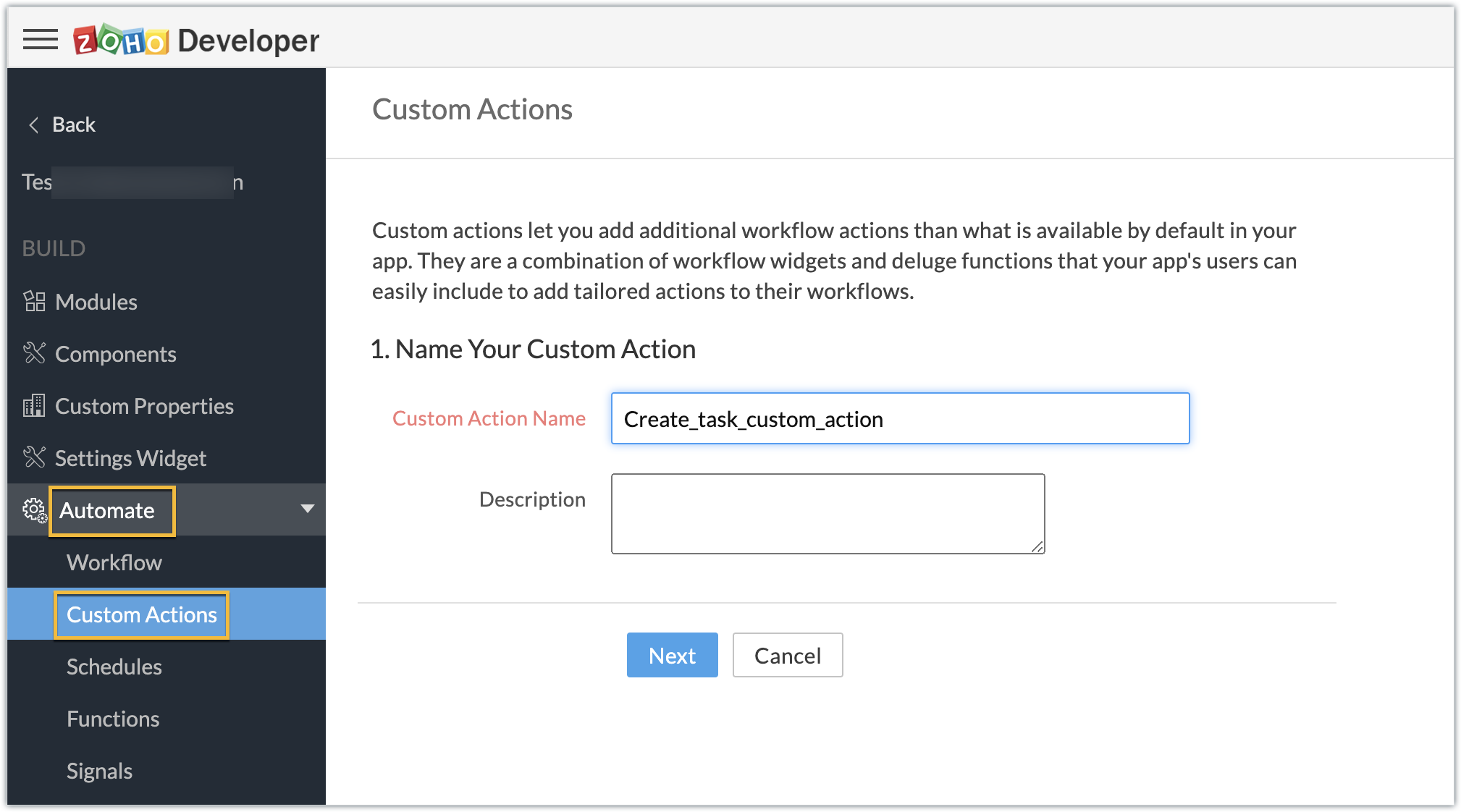
- Create a custom action by navigating through Automate - > Custom Actions, under the Build section in the left panel. Click Create Action.
- Enter the Custom Action Name and Description. Click Next.
- Provide the location of the html file (widget UI) to complete the resource path. Click Next, then click Create Function.
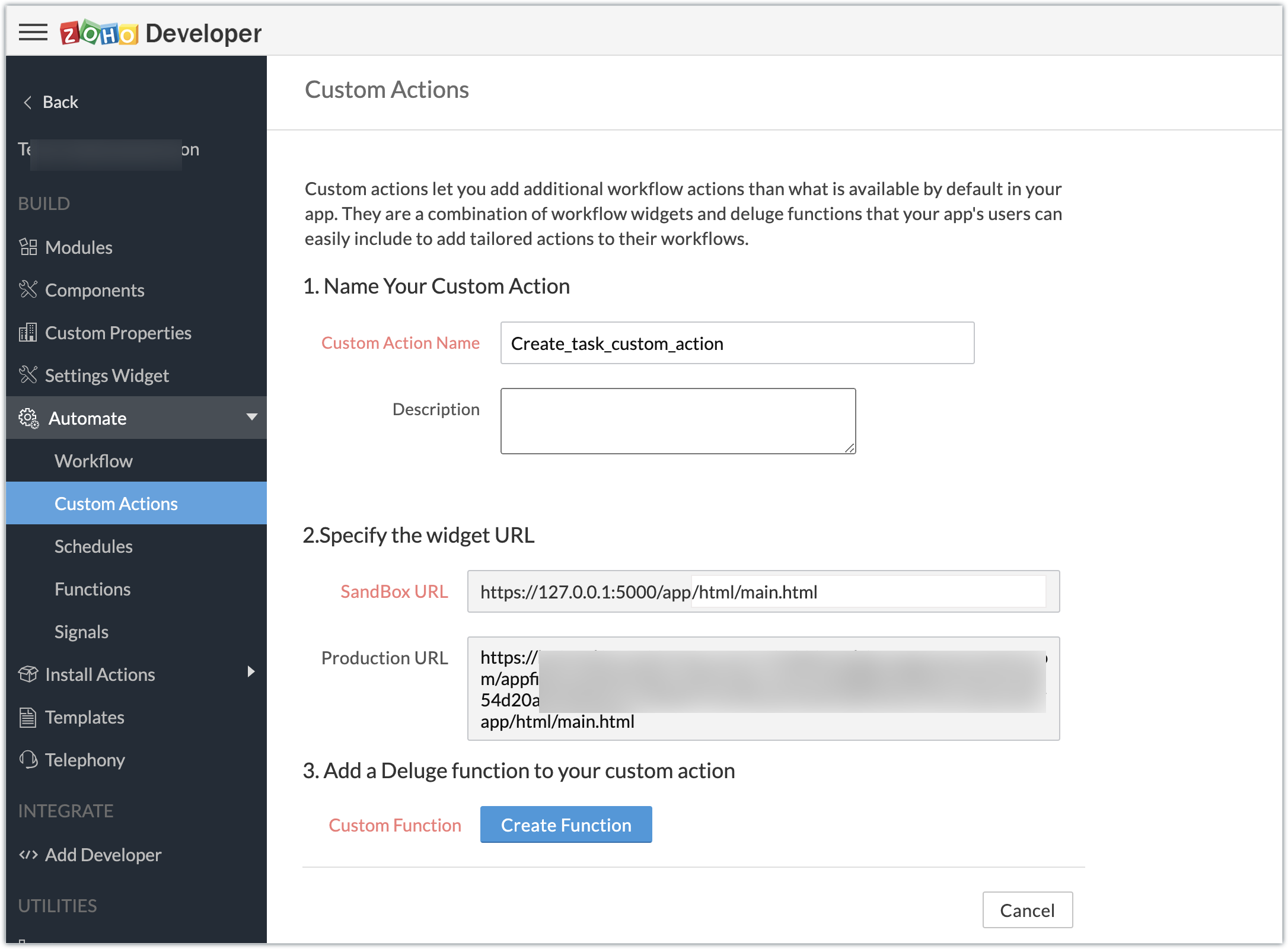
- Enter the Deluge function to perform our use case functionality.
- Click Save & Close, then click Save.
Deluge function code snippet:
dynamic_map = Map(); dynamic_map.put("portalid","xxxxxx"); dynamic_map.put("projectid",input.config.get("Dealproject")); dynamic_map.put("name",input.config.get("Dealname")); dynamic_map.put("description",input.config.get("Dealdescription")); response = zoho.crm.invokeConnector("xxxxx.zohoprojects.createprojecttask",dynamic_map); sendmail [ from :zoho.adminuserid to :input.config.get("To") subject :input.config.get("Subject") message :input.config.get("Message") ] |
- In the above Deluge code, we have performed the functionality of creating the deal as a task in Projects and sending an email to the deal's contact with the input provided by the end user in their CRM account while associating the custom action to a workflow.
Custom action in effect (End-user):
Create workflows:
- As an end user who has the extension which features the custom action installed in the Zoho CRM account, go ahead and create workflows to define criteria and associate the custom action.
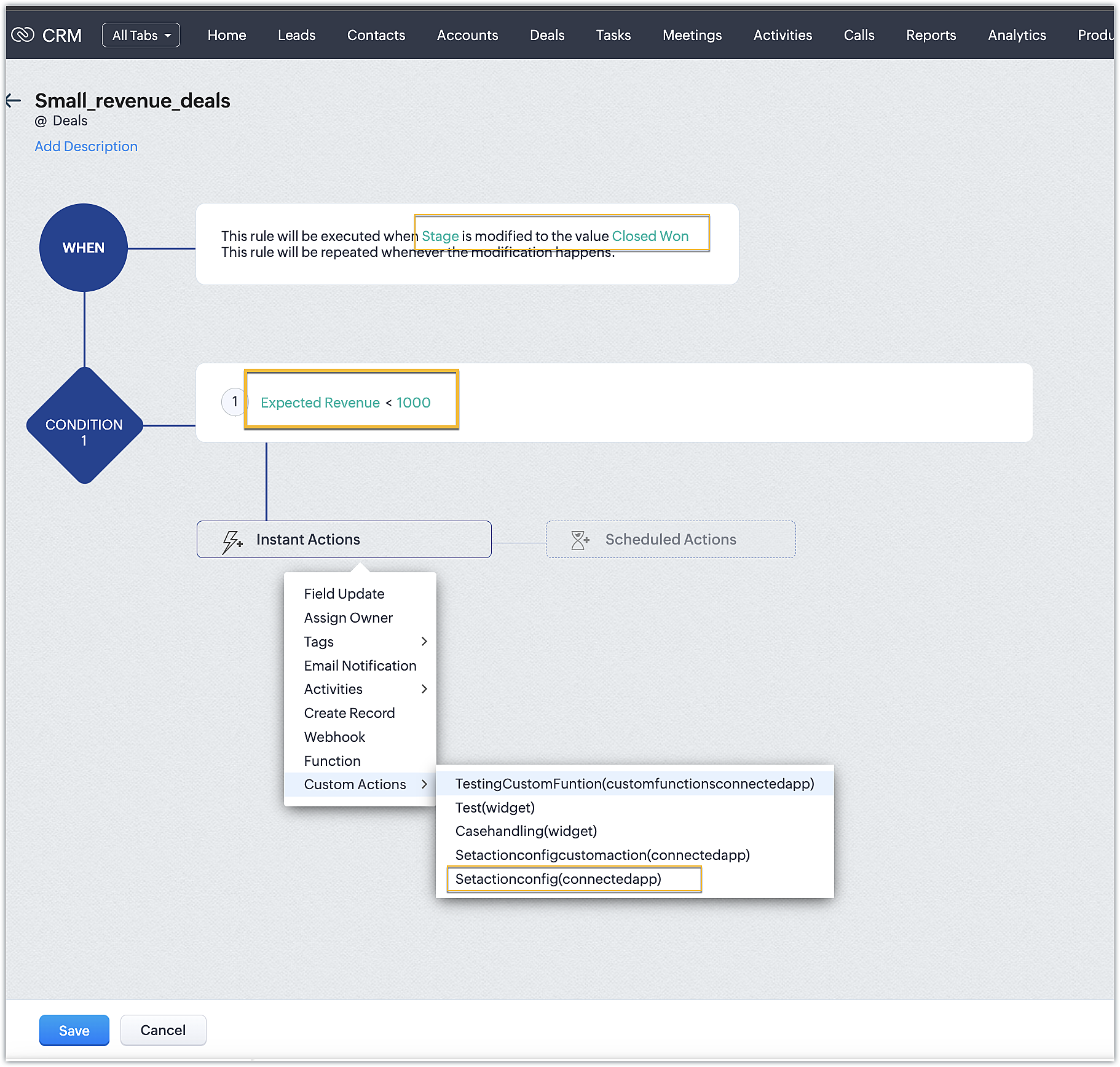
- In our case, we have two workflows:
➤ One for smaller deals where the expected revenue is less than 1000 USD
➤ One for larger deals where the expected revenue is greater than or equal to 1000USD
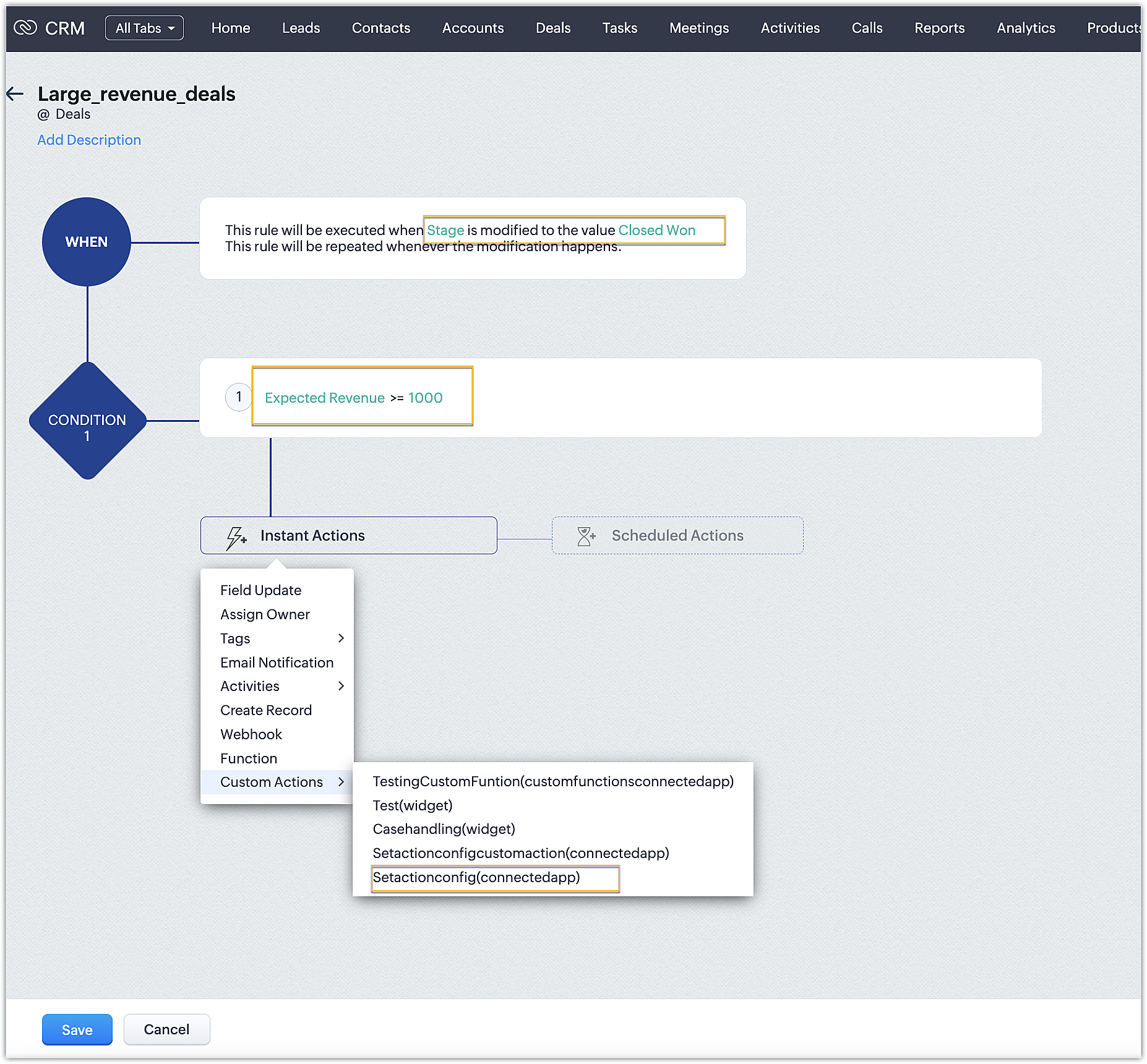
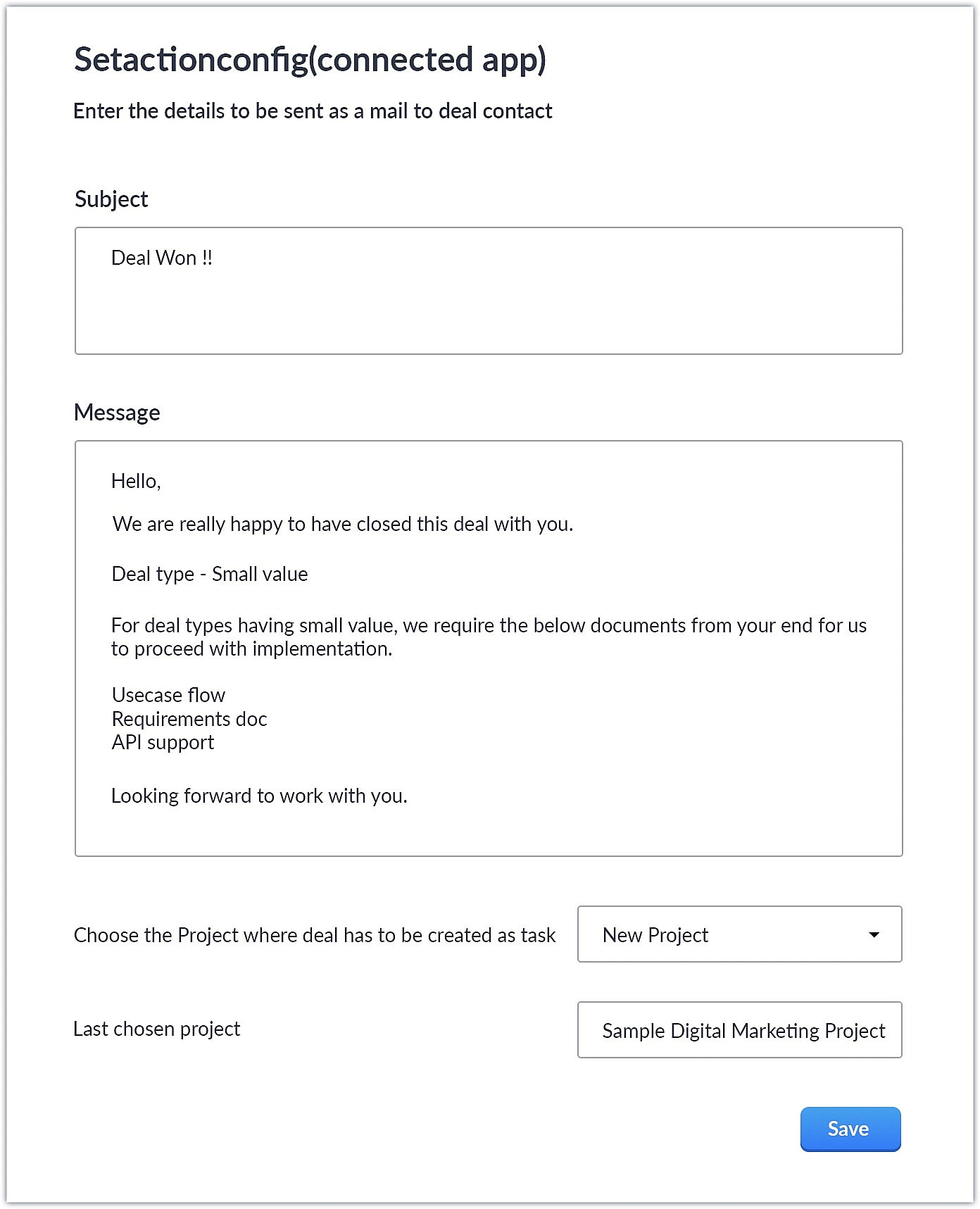
- Upon choosing the custom action, the custom UI appears where-in you can provide user specific input for email body and subject and also choose the project where you want deal to be created as a task in Zoho Projects.
Smaller revenue deals:
Larger revenue deals:
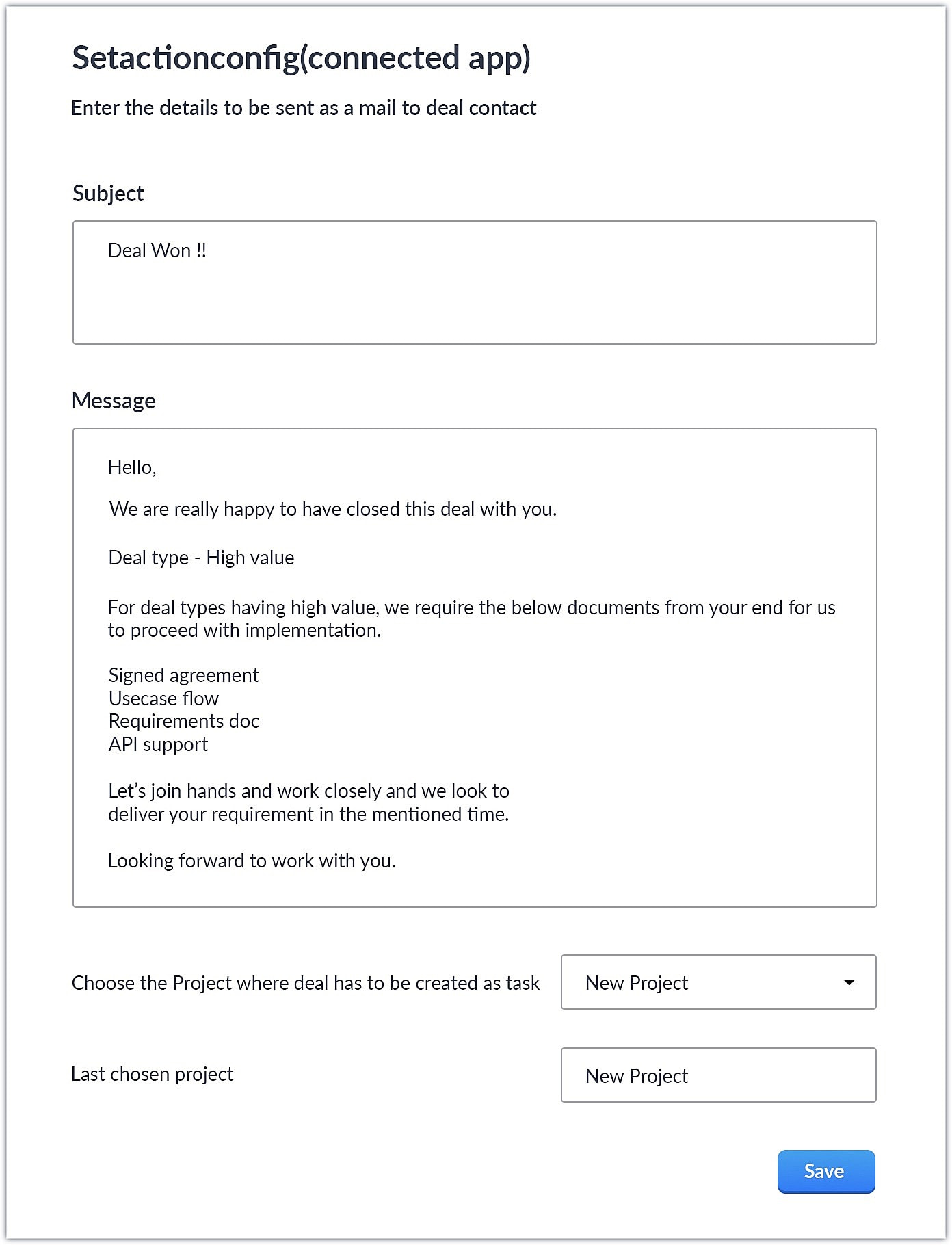
- When a deal with the necessary criteria is satisfied, an email is sent out to the deal's contact with the subject and body provided by the end user. A task is also created in Zoho Projects with some specific deal details.
This is one business case where you can use custom action. As a parallel use case to the above example itself, say you have multiple projects in Zoho Projects, each used to work on different case categories (bugs, issues, feature request, etc.). You could develop the same kind of template and allow end users to configure the criteria and outcomes accordingly.
You could also use custom actions feature to perform templated actions to obtain personalized outcomes depending on your business needs. We hope you found this information helpful. Keep following this space for more information!
SEE ALSO:
Access your files securely from anywhere
Centralize Knowledge. Transform Learning.
All-in-one knowledge management and training platform for your employees and customers.
New to Zoho Recruit?

Zoho Developer Community
New to Zoho LandingPage?
Zoho LandingPage Resources
New to Zoho Survey?
New to Zoho CRM Plus?
Deliver unforgettable customer experiences
New to Zoho CRM Plus?
Deliver unforgettable customer experiences
New to Zoho Marketing Plus?
Everything you need to run your marketing
New to Zoho Marketing Plus?
Everything you need to run your marketing
New to Bigin?





Topic Participants
Nanditha Somasundaram Somasundaram
Sticky Posts
Kaizen #198: Using Client Script for Custom Validation in Blueprint
Nearing 200th Kaizen Post – 1 More to the Big Two-Oh-Oh! Do you have any questions, suggestions, or topics you would like us to cover in future posts? Your insights and suggestions help us shape future content and make this series better for everyone.Kaizen #226: Using ZRC in Client Script
Hello everyone! Welcome to another week of Kaizen. In today's post, lets see what is ZRC (Zoho Request Client) and how we can use ZRC methods in Client Script to get inputs from a Salesperson and update the Lead status with a single button click. In thisKaizen #222 - Client Script Support for Notes Related List
Hello everyone! Welcome to another week of Kaizen. The final Kaizen post of the year 2025 is here! With the new Client Script support for the Notes Related List, you can validate, enrich, and manage notes across modules. In this post, we’ll explore howKaizen #217 - Actions APIs : Tasks
Welcome to another week of Kaizen! In last week's post we discussed Email Notifications APIs which act as the link between your Workflow automations and you. We have discussed how Zylker Cloud Services uses Email Notifications API in their custom dashboard.Kaizen #216 - Actions APIs : Email Notifications
Welcome to another week of Kaizen! For the last three weeks, we have been discussing Zylker's workflows. We successfully updated a dormant workflow, built a new one from the ground up and more. But our work is not finished—these automated processes are
New to Zoho TeamInbox?
Zoho TeamInbox Resources
Zoho CRM Plus Resources
Zoho Books Resources
Zoho Subscriptions Resources
Zoho Projects Resources
Zoho Sprints Resources
Qntrl Resources
Zoho Creator Resources
Zoho CRM Resources
Design. Discuss. Deliver.
Zoho Show Resources

Get Started. Write Away!
Writer is a powerful online word processor, designed for collaborative work.
Zoho CRM コンテンツ
-
オンラインヘルプ
-
Webセミナー
-
機能活用動画
-
よくある質問
-
Ebook
-
-
Zoho Campaigns
- Zoho サービスのWebセミナー
その他のサービス コンテンツ
Nederlandse Hulpbronnen

ご検討中の方
Recent Topics
Workdrive on Android - Gallery Photo Backups
Hello, Is there any way of backing up the photos on my android phone directly to a specific folder on Workdrive? Assuming i have the workdrive app installed on the phone in question. EmmaDynamically Fetching Lookup Field Display Value
I have an audit trail form, Audit_Changes, that tracks old vs new values across different forms. For lookup fields, the old/new value is the ID, but I also need the display value. What's a best practice for dynamically fetching the display value of theI have a problem. I use Zoho invoice
I have a problem. I use Zoho invoice, which is that when I create an invoice for a customer with specific items, let's say the value of these items is 2100, but my customers are not the type who pay the entire invoice amount at once, as they divide theAbility to Create New Items When Zoho Trident is Minimized via tray or taskbar icon
Allow users to create new items (emails, calendar events, tasks, etc.) directly from the system tray icon or by right clicking the task bar icon, even when the window is minimized or not actively running in the foreground. This enables quick access toI can not see Undeliverable emails from my Mass Email Leads activity in CRM
I am sending email templates and I can not see the Undeliverables? I only receive the "Out of Office" replies and any manual replies from the lead. Can you please let me know where the Undeliverable emails are sent so I can use the information to clean up the database?Select Zoho Contacts as Meeting Participants in Zoho Cliq
Hello Zoho Cliq Team, We hope you're doing well. We would like to request an enhancement to the meeting scheduling functionality in Zoho Cliq. Current Limitation: When scheduling a meeting in Zoho Cliq, participants can only be selected from: OrganizationAbility to Select External Users from Participants List When Scheduling Meetings
Hello Zoho Cliq Team, We hope you're doing well. We would like to request an enhancement to the meeting scheduling experience in Zoho Cliq. Current Limitation when scheduling a meeting in Zoho Cliq: External users can be selected from the list only underKaizen #212 - Map Dependency Fields in Zoho CRM using APIs
Hi Everyone!! Welcome back to another week of Kaizen series! Over the past few weeks, we have been addressing your questions and feedback shared through our Kaizen 200th feedback form. Thank you for your continued engagement and thoughtful queries. WeOutdated state in mexico
Hello Zoho team, the drop down to add the state for customers, when they introduce their state in mexico has a city named “Distrito Federal” that name changed many years ago to “ciudad de mexico”. could you please update this so my clients can find theIs anyone using Zoho Flow with airtable?
I need to build a flow that collects data from airtable and uses some of that data to create folders and files in google drive. I have fully function version of this in zapier and want to migrate to zoho. I am trying to perform a very basic fetch fromAI in Zoho Workplace: A Sneak Peek into What’s Coming!
Hello everyone, We’re super excited to share something we’ve been working on and we want you to be part of it! You may have seen our announcement blog post introducing a major evolution in how AI works within Zoho Workplace. Want to be among the firstBest way to share/download presentation files in Zoho without losing formatting?
Hello Zoho Community, I often work with PPT/PDF files in Zoho Docs and share them with colleagues. While PDFs usually give a direct download option, I’ve noticed that PPT/PPTX files sometimes only open in the viewer without a clear download link. Is thereWorkflow Failure - Notifications
Good afternoon, I have just experienced an error whereby a Workflow failed, for a reason currently unknown. The problem is that one of my users had to flag this manually (thankfully he's very thorough) and this otherwise would have flown under the radar.Introducing Bin Locations In Zoho Inventory
Hello users, We are excited to let you know that your wait for the Bin Locations feature has now come to an end! Yes, you heard us right! We are here to introduce the much-awaited Bin Locations now in Zoho Inventory. But before we dive into the featureError "Invalid client task found corresponding properties" only when triggered from workflow ?
Hi All, I am facing an error message I never encountered previously: Error in executing On Add - On Load script Error in executing thisapp.get_all_projects_api_call function. Line:(2) Error in executing thisapp.getAccessTokenFromRefreshToken function.How to interpret Campaign report statistics - definitions/explanation
I am trying to make sure I understand the Campaign report correctly Do you have a list of definitions for: Delivered - it has reached the recipient's inbox Campaign reach - is this the number that have opened the campaign email? Unique Opens Clicks/OpenSchedule a Call by Date and Time when a specific lead status is selected
Hi Wanting to create a workflow where a call can be scheduled by date & time when a specific lead status is selected. Can only currently set the date by Due Date - Trigger Date - Plus 'x' day(s) ThanksZoho CRM's Copy Customization functionality now works across DCs, for customized accounts, and more
Availability This feature is available in Standard, Professional, Enterprise, and Ultimate editions. These changes have been rolled out to all users in all DCs. For more information, please refer to these help documents: Overview | Instructions HelloHow can I bold text on Zoho Forms submit buttons?
In the old theme builder, I could bold the text on a form's submit button. With the new theme builder, I can only change the text of the header or fields in the form, and not the button itself.[Integration Edition] Deluge Learning Series – Third-Party Integrations with Deluge | October 2025
We’re excited to continue this three-month edition of the Deluge Learning Series: Session 1 – Integrating Zoho Apps with Deluge Using Built-In Integration Tasks Session 2 – Integrating Zoho Apps with Deluge Using invokeURL and invokeAPI Session 3 – Third-PartyFeature Request: Tag, Search, and Report on Individual Private Comments
Zoho Desk Team, First, I want to say that we are extensive users of Zoho Desk and it is a core part of our support operations. We rely heavily on the private comments feature for internal communication, knowledge sharing, and maintaining a clear historyZoho CRM Community Digest - August 2025 | Part 2
Hello Everyone! Here's a quick round-up of handy tips, clever workarounds, and product updates from late August. Product Updates: Meeting Enhancements in Zoho CRM! Track whether a meeting is online, in-office, or at the client’s location using the newAssistance Needed: Ticket Status Not Updating and Sorting by Last Customer Reply in Zoho Desk
Hello, I’m facing two issues in Zoho Desk that I’d like your guidance on: Ticket Status Not Updating: When a customer replies to a ticket, the status does not change to Reopened. Instead, it remains in Waiting on Customer, even after the customer’s responseRound robin
Hi, I'm trying to set up a round robin to automatically distribute tickets between agents in my team but only those tickets that are not otherwise distributed by other workflows or direct assignments. Is that possible and if so which criteria should ITime Entry Notifications
Hi All - I have support staff who place notes of their work in the time entry section of Zoho Desk. Is there a specific workflow or setting I need to enable to have the ticket holder updated via email when an entry is saved?Change text in help desk
Hi, Please let me know how can i change the this text, see screenshot.Customer happiness customisation
Hi, I was wondering if it's possible to somehow customise to whom and when customer happiness request is sent? Can you enable it only for selected tickets for example based on workflow or any other criteria (customer name, tag or anything else)? AlsoNo Zoho Support Response in Months
I want to say that I love Zoho FSM, Books, and CRM, but the support is scary bad. About 2-3 months ago, I emailed Zoho FSM support with two specific issues I needed help with, and I have still not received one single response. I also submitted a supportNull
If a result is null how do I make it so that a custom error pops up instead of the default error? Can someone write an example as if I were using the script builder?Format a "return" message
Good day, Is there a way to format the message of the "return" function in CRM deluge script?Having Trouble Opening The Candidate Portal
Recently am having trouble opening the Candidate Portal. It keeps loading but cannot display any widgets. Tried Safari, Chrome and Edge. Non of them work. Please solve the problem ASAP.Tip of the Week - Spot Risky Sales with Conditional Formatting
In Zoho Analytics, small tweaks can lead to big insights. One such feature is Conditional formatting based on other columns, your key to instantly spotting where sales success is overshadowed by product returns. Our tip this week shows you how to applyHow do I duplicate / copy a campaign
I am evaluation Zoho Campaigns and sent an email to one of my personal email accounts from Zoho Campaigns. It went into my junk file in Hotmail. I want to duplicate that same (1-page) campaign and send it to another of my personal accounts to try toFor a Bill, can "Pay via Check" - Can we also "Pay via Check" when documenting refund for payment?
We really like when we have a Bill in Zoho Books that we can record payment by selecting "Pay via Check" and that will cut the check for us from Zoho Books. However, when we have to write checks as a result of invoice overpayment, we can not select "PayCreator Change History: Ways to improve
Hi Everyone, Recently been working in developing this change history(an idea from Zoho Forms) - unlike forms that you can this with a click but using Creator, we can use "old" keyword. The concept I come up with is to put the result in a table however,Suitability of Zoho One (Single User License) for Multi-State GST Compliance & Cost Analysis
Hello Zoho Team, I am an e-commerce business owner selling on platforms like Amazon, Flipkart, and Meesho, and I'm currently using their fulfillment warehouses. I have two GSTIN registrations and am planning to register for an additional 2-3 to expandadd employees and customiz
I want a Zoho software to track employees record. I logged in a demo so now I tried adding employee, first thing when I click on add employee it takes me to a page where it says add user maximum 10 users, my first doubt why users I don't want employeesInactive User Auto Response
We use Zoho One, and we have a couple employees that are no longer with us, but people are still attempting to email them. I'd like an autoresponder to let them no the person is no longer here, and how they can reach us going forward. I saw a similarZoho People Attendance Module - Split Shifts
Hello, Our business employs a number of college students who often split their workdays between work hours and class schedules, resulting in split shifts. For example: Employee 1 works 9am to 11:30am and then leaves for class, returning to work at 3pmZoho One subscription
we have got Zoho CRM for 3 users and we paid for the app , and we have still 9 months to go , but if we join Zoho one , does it mean the payment for that subscription would be a waste? Please help. Thanks.Next Page