Kaizen #123 Data Synchronization from a third party application
Welcome back to the Kaizen series!
In last week's post in the Kaizen series, we discussed one-way data synchronization from Zoho CRM to a legacy application, utilizing Zoho CRM's Bulk Read API and Notification API. This week, we will discuss data synchronization from a third party app to Zoho CRM.
The APIs available in Zoho CRM to insert, update or upsert records are :
1) Insert, Update, and Upsert Records APIs
These are synchronous APIs that are used to perform create, update or upsert operations for up to 100 records in a Zoho CRM module. While the Insert Records API and Update Records API is used to create and update a record respectively, the Upsert Records API is used to upsert (insert or update) a record depending on the availability of the record in your org . In Upsert Records API, the system checks for duplicate records based on the values in the duplicate_check_fields json array in the input json. If the record is already present, it gets updated. If not, the record is inserted. You will get the status of these operations immediately. Read more about the Upsert Records API in this Kaizen post.
2) Bulk Write API
The Bulk Write API is an asynchronous API that is used to perform create/update/upsert operations for up to 25K records in a Zoho CRM module. A background job will be scheduled in Zoho CRM. You can check the status of the scheduled job using the Bulk Write Job Details API. Alternatively, you can configure a callback URL when you schedule the job. The details of the Bulk Write Job result are posted on the callback URL upon successful completion or failure of the job. This bulk write API involves the following steps:
- Preparing the CSV input file
- Uploading the CSV file
- Creating a bulk write job
- Checking the job's status
- Downloading the result
To learn more about these steps in the Bulk Write API and about the Bulk Write API in general, refer to the Kaizen post on the Bulk Write API.
Insert, Update, Upsert Records | Bulk Write API |
Insert, update, or upsert up to 100 records per API call. | Insert, update, or upsert up to 25000 records per API call. |
The response is available instantly. | The response to the Bulk Write API request will not be available immediately. You can check the status of the job by polling for it, or you can wait for the status to be available in the callback URL after the job has completed. |
These APIs consume one credit per 10 records. | Bulk Write API consumes 500 credits per API call. |
Input should be in JSON format | The input file should be in CSV format. |
Let us now examine four different scenarios for record insertion in a module, specifically with varying quantities: 100, 2000, 5000, and 25000 records, and discover how these APIs perform in terms of number of API calls and credits consumed.
Number of Records | Insert,Update or Upsert Records API | Bulk Write API |
100 | 1 API Call 10 API Credits | 1 API Call 500 API Credits |
2000 | 20 API Calls 200 API Credits | 1 API Call 500 API Credits |
5000 | 50 API Calls 500 API Credits | 1 API Call 500 API Credits |
25000 | 250 API Calls 2500 API Credits | 1 API Call 500 API Credits |
Clearly, if you have more than 5000 records, it is advisable to use the bulk write API, given that you are ok with the operation being run asynchronously. If you want instant results, you should use insert/update/upsert APIs. However, more API credits will be consumed in this case.
Data Sync
Consider an e-commerce company where the Order management team uses a legacy system and the Accounts team uses Zoho CRM. To ensure that the Accounts team works with near real-time data in Zoho CRM, data synchronization from the legacy application is essential. Assume that in Zoho CRM, there is a custom module named "Orders" that contains the details from the legacy system. Imagine that you are in charge of the data synchronization between Zoho CRM and the legacy system. How should you call these APIs to achieve this synchronization? The synchronization process involves two steps.
Step 1: Initial Data Sync : Initial data sync from the legacy system to Zoho CRM.
Step 2: Subsequent Data Sync : Push any new orders or updated orders to Zoho CRM.
The solution we propose here is one of the many ways in which the data sync can be achieved.
This solution is built on the below three key points:
1) Unique field in Order Module: Maintain a unique field "parent_id" in the "Orders" module. The unique identifier of the orders in your legacy system should be mapped to this parent_id field. In create bulk write job, this can be achieved by the section field_mappings. For ensuring correct working of upsert operations, you can make use of "find_by" field inside resource JSON Array in the Create Bulk Write Job API Request. You should provide the value of "find_by" as the unique field "parent_id" . To read more about find_by field refer to Create Bulk Write Job page.
2) Sync Flag in the Orders table in legacy system: For the sync, maintain a flag in your legacy system orders table for indicating whether the record is synced with Zoho CRM or not. Once the sync is done, update the flag to true. Whenever a record is modified or sync fails, the flag value should be updated to false. This ensures that in case a record that is synced gets updated during the initial sync process, this flag column helps us re-sync this record again.
3) Grouping of data to batches: For initial sync, the data volume in the table will be huge. So they have to be batched in a group of 25k records. This grouping can be done based on sorting the table with a particular column & filtering records based on the sync column with criteria sync=false.
Step 1: Initial Data Sync
Since you have multiple batches of 25k records, you have to iterate them one by one and send them to the Bulk Write API.
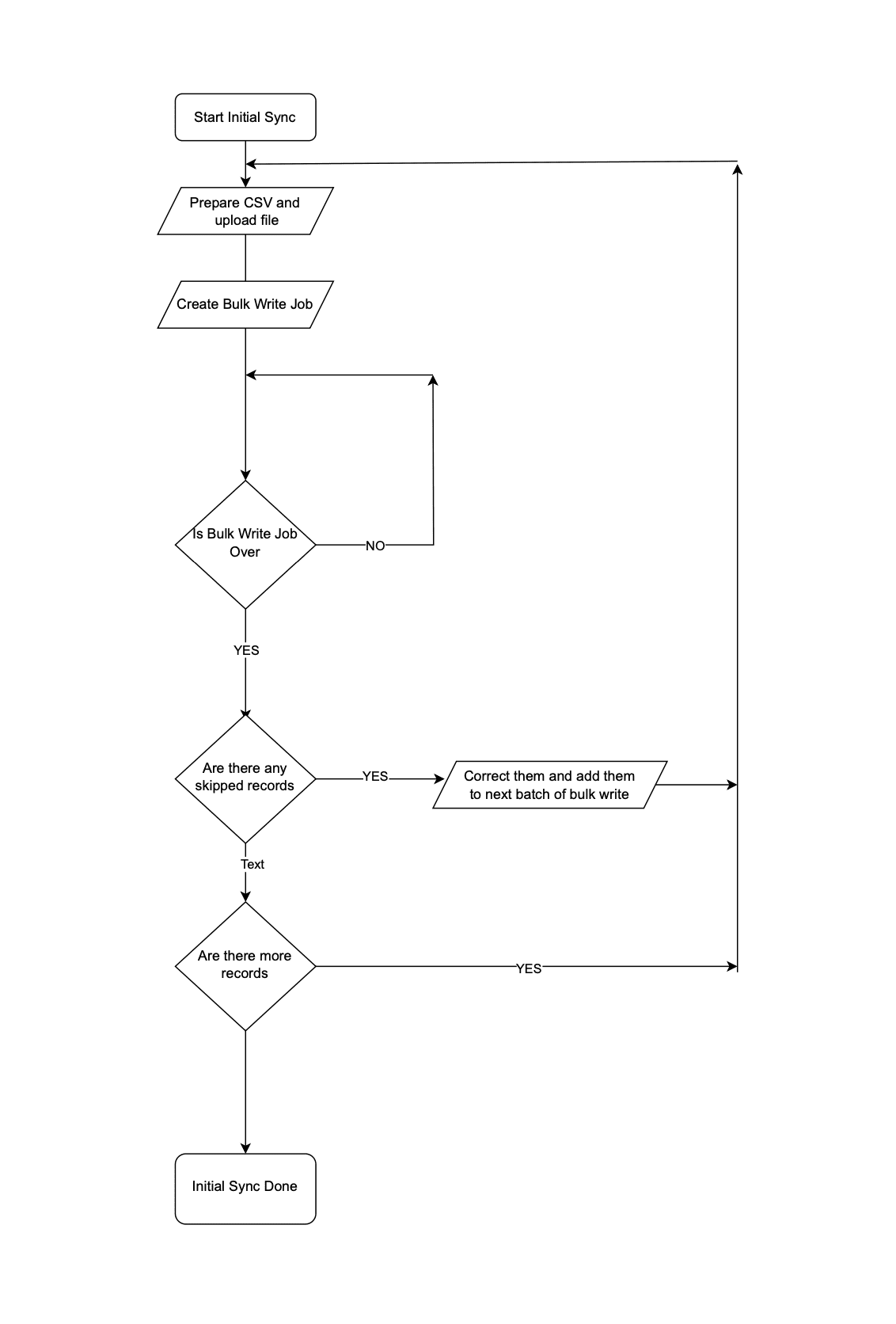 Initial Data Sync
Step 2: Subsequent Data Sync
The Order Management team continues to use the legacy application, leading to continuous creation or update of records in the Orders module.
It is not recommended to invoke Upsert Records API whenever an operation happens in Orders in the legacy system. Subsequent data syncs can be done in two ways: either by (a)near real-time sync or (b) Interval based sync.
(a) Near Real-time Sync
As we want near real-time data in Zoho CRM, it is ok for the records that are updated in the legacy system from last synchronization to be unavailable in Zoho CRM for 10 minutes.
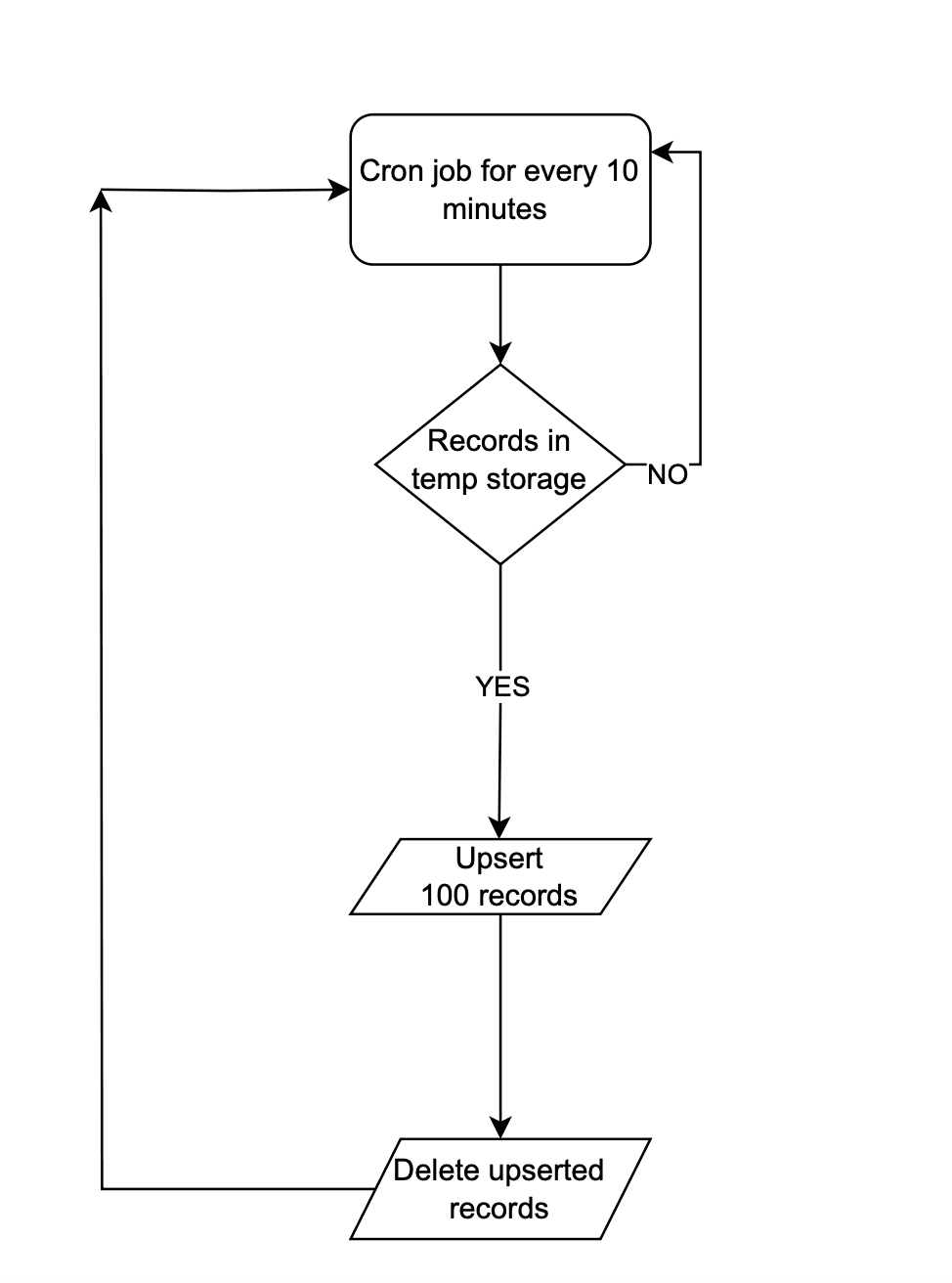 Near Real-time Sync
Instead of making API calls to Zoho CRM on every data operation, store the data in a temporary data store like a DB table or Redis. Once 100 records are accumulated in that data-store, the Upsert Records API can be promptly invoked with all these record details and followed by emptying of the data store. This approach will lead to lower consumption of API credits.
There are chances that in a period of 10 mins, 100 record operations may not happen. Scheduler jobs or CRON jobs can be created to handle the records in the data store to update records to Zoho CRM. Once these records are handled, the data store should be emptied.
(b) Interval based synchronization
For interval based synchronization, schedule bulk write API calls at suitable intervals to upsert the Orders module in Zoho CRM. Whenever there is a record operation in the legacy table, update the sync flag to "false". At regular intervals, such as every 12 or 24 hours, the bulk write API or Upsert Records API can be employed depending on the volume of the data changes.
We hope you found this article useful. We will be back next week with another interesting topic. If you have any questions, write to us at support@zohocrm.com or let us know in the comment section.
Previous Kaizen Post: Kaizen #122 - Data Synchronization using Bulk Read and Notification APIs
Related Links
Access your files securely from anywhere
Centralize Knowledge. Transform Learning.
All-in-one knowledge management and training platform for your employees and customers.
New to Zoho Recruit?

Zoho Developer Community
New to Zoho LandingPage?
Zoho LandingPage Resources
New to Zoho Survey?
New to Zoho CRM Plus?
Deliver unforgettable customer experiences
New to Zoho CRM Plus?
Deliver unforgettable customer experiences
New to Zoho Marketing Plus?
Everything you need to run your marketing
New to Zoho Marketing Plus?
Everything you need to run your marketing
New to Bigin?





Topic Participants
Mable Mary M P
Sticky Posts
Kaizen #198: Using Client Script for Custom Validation in Blueprint
Nearing 200th Kaizen Post – 1 More to the Big Two-Oh-Oh! Do you have any questions, suggestions, or topics you would like us to cover in future posts? Your insights and suggestions help us shape future content and make this series better for everyone.Kaizen #226: Using ZRC in Client Script
Hello everyone! Welcome to another week of Kaizen. In today's post, lets see what is ZRC (Zoho Request Client) and how we can use ZRC methods in Client Script to get inputs from a Salesperson and update the Lead status with a single button click. In thisKaizen #222 - Client Script Support for Notes Related List
Hello everyone! Welcome to another week of Kaizen. The final Kaizen post of the year 2025 is here! With the new Client Script support for the Notes Related List, you can validate, enrich, and manage notes across modules. In this post, we’ll explore howKaizen #217 - Actions APIs : Tasks
Welcome to another week of Kaizen! In last week's post we discussed Email Notifications APIs which act as the link between your Workflow automations and you. We have discussed how Zylker Cloud Services uses Email Notifications API in their custom dashboard.Kaizen #216 - Actions APIs : Email Notifications
Welcome to another week of Kaizen! For the last three weeks, we have been discussing Zylker's workflows. We successfully updated a dormant workflow, built a new one from the ground up and more. But our work is not finished—these automated processes are
New to Zoho TeamInbox?
Zoho TeamInbox Resources
Zoho CRM Plus Resources
Zoho Books Resources
Zoho Subscriptions Resources
Zoho Projects Resources
Zoho Sprints Resources
Qntrl Resources
Zoho Creator Resources
Zoho CRM Resources
Design. Discuss. Deliver.
Zoho Show Resources

Get Started. Write Away!
Writer is a powerful online word processor, designed for collaborative work.
Zoho CRM コンテンツ
-
オンラインヘルプ
-
Webセミナー
-
機能活用動画
-
よくある質問
-
Ebook
-
-
Zoho Campaigns
- Zoho サービスのWebセミナー
その他のサービス コンテンツ
Nederlandse Hulpbronnen

ご検討中の方
Recent Topics
Optional Items Estimate
How do you handle optional items within an estimate? In our case we have only options to choose with. (Like your software pricing, ...standard, professional, enterprise) How can we disable the total price? Working with Qty = 0 is unprofessional....Important Update : Zendesk Sell announced End of Life
Hello Zendesk users, Zendesk has officially announced that Zendesk Sell will reach its End of Life (EOL) on August 31, 2027 (Learn more). In line with this deprecation, Zoho Analytics will retire its native Zendesk Sell connector effective October 1,Zoho Sheets
Hi, I am trying to transition into Zoho sheets, I have attached the issues encountered. Server issues, file trying to upload for more than 30 mins, even once uploaded my data aren't loaded. Simple calculations are not working I have attached the sample.Zoho CRM + Zoho FSM : alignez vos équipes commerciales et techniques
La vente est finalisée, mais le parcours client ne fait que commencer ! Dans les entreprises orientées service, conclure une vente représente seulement la première étape. Ce qui suit — installation, réparation ou maintenance régulière — influence grandementTop Bar Shifting issue still not fixed yet
I mentioned in a previous ticket that on Android, the top bar shifts up when you view collections or when you're in the settings. That issue still hasn't been fixed yet. I don't wanna have to reinstall the app as I've noticed for some reason, reinstallingPower of Automation:: Automate the process of updating project status based on a specific task status.
Hello Everyone, Today, I am pleased to showcase the capabilities of a custom function that is available in our Gallery. To explore the custom functions within the Gallery, please follow the steps below. Click Setup in the top right corner > DeveloperBilling Management: #3 Billing Unbilled Charges Periodically
We had a smooth sail into Prorated Billing, a practice that ensures fairness when customers join, upgrade, or downgrade a service at any point during the billing cycle. But what happens when a customer requests additional limits or features during theNo bank feeds from First National Bank South Africa since 12 September
I do not know how Zoho Books expects its customers to run a business like this. I have contacted Zoho books numerous times about this and the say it is solved - on email NO ONE ANSWERS THE SOUTH AFRICAN HELP LINE Come on Zoho Books, you cannot expectCitation Problem
I had an previous ticket (#116148702) on this subject. The basic problem is this; the "Fetch Details" feature works fine on the first attempt but fails on every subsequent attempt, Back in July after having submitted information electronically and wasFailing to generate Access and Refresh Token
Hello. I have two problems: First one when generating Access and Refresh Token I get this response: As per the guide here : https://www.zoho.com/books/api/v3/#oauth (using server based application) I'm following all the steps. I have managed to getAuto-Forward All Incoming Mail
I have setup the Zoho Business Mail to host my own domain's mail. Is it possible to have all incoming email auto-forwarded to another email account? What I would like to do is have all incoming emails forwarded to my Yahoo or Hotmail accounts until I can complete the migration to Zoho. I can't seem to locate this setting anywhere. I don't care whether the mail is kept on the Zoho server or not at this time.Zeptomail 136.143.188.150 blocked by SpamCop
Hi - it looks like this IP is being blocked, resulting in hard bounces unfortunately :( "Reason: uncategorized-bounceMessage: 5.7.1 Service unavailable; Client host [136.143.188.150] blocked using bl.spamcop.net; Blocked - see https://www.spamcop.net/bl.shtml?136.143.188.150Apply transaction rules to multiple banks
Is there any way to make transaction rules for one bank apply to other banks? It seems cumbersome to have to re-enter the same date for every account.How to bulk update records with Data Enrichment by Zia
Hi, I want to bulk update my records with Data Enrichment by Zia. How can I do this?How do I split a large CSV file into smaller parts for import into Zoho?
Hi everyone, I’m trying to upload a CSV file into Zoho, but the file is very large (millions of rows), and Zoho keeps giving me errors or takes forever to process. I think the file size is too big for a single import. Manually breaking the CSV into smallerClient Script Payload Size Bug
var createParams = { "data": [{ "Name": "PS for PR 4050082000024714556", "Price_Request": { "id": "4050082000024714556" }, "Account": { "id": "4050082000021345001" }, "Deal": { "id": "4050082000023972001" }, "Owner": { "id": "4050082000007223004" }, "Approval_Status":lead convert between modules
Hello, The workflow we set up to automatically transfer leads registered via Zapier into the Patients module to the Leads module started to malfunction unexpectedly on September 25, 2025, at 11:00 AM. Under normal circumstances, all fields filled in theFlow Task Limits - How to Monitor, Understand Consumption?
So, I got an email last night saying that I've exhausted 70% of my tasks for this month, and encouraging me to buy more tasks. I started to dig into this, and I cannot for the life of me figure out where to find any useful information for understanding,Cross References Do Not Update Correctly
I am using cross references to reference Figures and current am just using the label and number, i.e. Figure #. As seen here: When I need to update the field, I use the update field button. But it will change the cross reference to no longer only includingHow to Track and Manage Schedule Changes in Zoho Projects
Keeping projects on track requires meticulous planning. However, unforeseen circumstances can cause changes to schedules, leading to delays. It becomes important to capture the reason for such changes to avoid them in the future. Zoho Projects acknowledgesCollaborate Feature doesn't work
Hello Team. It seems that the collaborate section is broken? I can post something but it all appears in "Discussions". In there is no way how I would mark something as Draft, Approval, post or any of the other filter categories? Also if I draft a postEdit Permission during and after approval?
When a record is sent for approval Can a user request for edit permission from the approver? We don't want to give edit permissions for all the records under approval Only on a case-by-case basis How can we achieve this?Zoho web and mobile application not workingn
Both zoho forms web and mobile application aren't working. I have checked my network connections and they are fine.Bulk Moving Images into Folders in the Library
I can't seem to select multiple images to move into a folder in order to clean up my image library and organize it. Instead, I have to move each individual image into the folder and sometimes it takes MULTIPLE tries to get it to go in there. Am I missingLatest updates in Zoho Meeting | Breakout rooms and End to end encryption
Hello everyone, We’re excited to share a few updates for Zoho Meeting. Here's what we've been working on lately: Introducing Breakout Rooms for enhanced collaboration in your online meetings and End-to-end encryption to ensure that the data is encryptedAccidentally deleted a meeting recording -- can it be recovered?
Hi, I accidentally deleted the recording for a meeting I had today. Is there a way I can recover it?How to access email templates using Desk API?
Trying to send an email to the customer associated to the ticket for an after hours notification and can't find the API endpoint to grab the email template. Found an example stating it should be: "https://desk.zoho.com/api/v1/emailtemplates/" + templateID;Update Portal User Name using Deluge?
Hey everyone. I have a basic intake form that gathers some general information. Our team then has a consultation with the person. If the person wants to move forward, the team pushes a CRM button that adds the user to a creator portal. That process isUnable to retrieve Contact_Name field contents using Web API in javascript function
Hello, I've added a field in the Purchase Order form to select and associate a Sales Order (Orden_de_venta, lookup field). I've also created a client script to complete some fields from the Sales Order (and the Quote), when the user specifies the relatedUpdating Woocommerce Variation Products Prices Via Zoho CRM
I can update product prices with this flow: But I can't update variant products. I got a code from Zoho for this, but I couldn't get it to work. It needs to find the product in the CRM from the SKU field and update the variation with the price there.Emails Disappearing From Inbox
I am experiencing the unnerving problem of having some of the messages in my inbox just disappear. It seems to happen to messages that have been in there for longer than a certain amount of time (not sure how long exactly). They are usually messages that I have flagged and know I need to act on, but have not gotten around to doing so yet. I leave them in my inbox so I will see them and be reminded that I still need to do something about them, but at least twice now I have opened my inbox and foundPower of Automation :: Automatic removal of project users once the project status is changed.
A custom function is a software code that can be used to automate a process and this allows you to automate a notification, call a webhook, or perform logic immediately after a workflow rule is triggered. This feature helps to automate complex tasks andCustomizing Form Questions per Recipient Group in Zoho Campaigns/Forms
Hello everyone, I would like to ask if it’s possible in Zoho Campaigns or Zoho Forms to send out a campaign where the form questions can be customized based on the group of recipients. Use case example: I have prepared 20 questionnaire questions. ForForms - Notification When Response Submitted
How do I set it up to generate an email notification when a response (class request) is submitted?How to disable user entry on Answer Bot in Zobot
Hi, I have an Answer Bot in my Zobot, here is the configuration: I only want the user to choose 1 of the 4 the options I have provided: When no answer found, user chooses 'I'll rephrase the question' or 'Ask a different question When answer is found,More admin control over user profiles
It's important for our company, and I'm sure many others, to keep our users inline with our branding and professional appearance. It would be useful for administrators to have more control over profile aspects such as: Profile image User names Email signaturesPlease Make Zoho CRM Cadences Flexible: Allow Inserting and Reordering Follow-Up Steps
Sales processes are not static. We test, learn, and adapt as customers respond differently than expected. Right now, Zoho Cadences do not support inserting a new step between existing follow-ups or changing the type of an existing primary step. If I realizeClear Tag & Linking Between Quotes and Sales Orders
Hi Zoho Team, In Zoho Books, when a quote is converted into a sales order, it would be extremely useful to have: A clear tag/indicator on the quote showing that it has been converted into a sales order. A direct link in the sales order back to the originatingAdd Direct Ticket Link to Zoho Help Center Portal in Email Replies
Hi Zoho Support Team, We hope you're doing well. We’d like to request a small but valuable improvement to enhance the usability of the Zoho Help Center portal (https://help.zoho.com/portal/en/myarea). Currently, when someone from Zoho replies to a support[Webinar] Deluge Learning Series - AI-Powered Automation using Zoho Deluge and Gemini
We’re excited to invite you to an exclusive 1-hour webinar where we’ll demonstrate how to bring the power of Google’s Gemini AI into your Zoho ecosystem using Deluge scripting. Whether you're looking to automate data extraction from PDFs or dynamicallyNext Page