Kaizen #123 Data Synchronization from a third party application
Welcome back to the Kaizen series!
In last week's post in the Kaizen series, we discussed one-way data synchronization from Zoho CRM to a legacy application, utilizing Zoho CRM's Bulk Read API and Notification API. This week, we will discuss data synchronization from a third party app to Zoho CRM.
The APIs available in Zoho CRM to insert, update or upsert records are :
1) Insert, Update, and Upsert Records APIs
These are synchronous APIs that are used to perform create, update or upsert operations for up to 100 records in a Zoho CRM module. While the Insert Records API and Update Records API is used to create and update a record respectively, the Upsert Records API is used to upsert (insert or update) a record depending on the availability of the record in your org . In Upsert Records API, the system checks for duplicate records based on the values in the duplicate_check_fields json array in the input json. If the record is already present, it gets updated. If not, the record is inserted. You will get the status of these operations immediately. Read more about the Upsert Records API in this Kaizen post.
2) Bulk Write API
The Bulk Write API is an asynchronous API that is used to perform create/update/upsert operations for up to 25K records in a Zoho CRM module. A background job will be scheduled in Zoho CRM. You can check the status of the scheduled job using the Bulk Write Job Details API. Alternatively, you can configure a callback URL when you schedule the job. The details of the Bulk Write Job result are posted on the callback URL upon successful completion or failure of the job. This bulk write API involves the following steps:
- Preparing the CSV input file
- Uploading the CSV file
- Creating a bulk write job
- Checking the job's status
- Downloading the result
To learn more about these steps in the Bulk Write API and about the Bulk Write API in general, refer to the Kaizen post on the Bulk Write API.
Insert, Update, Upsert Records | Bulk Write API |
Insert, update, or upsert up to 100 records per API call. | Insert, update, or upsert up to 25000 records per API call. |
The response is available instantly. | The response to the Bulk Write API request will not be available immediately. You can check the status of the job by polling for it, or you can wait for the status to be available in the callback URL after the job has completed. |
These APIs consume one credit per 10 records. | Bulk Write API consumes 500 credits per API call. |
Input should be in JSON format | The input file should be in CSV format. |
Let us now examine four different scenarios for record insertion in a module, specifically with varying quantities: 100, 2000, 5000, and 25000 records, and discover how these APIs perform in terms of number of API calls and credits consumed.
Number of Records | Insert,Update or Upsert Records API | Bulk Write API |
100 | 1 API Call 10 API Credits | 1 API Call 500 API Credits |
2000 | 20 API Calls 200 API Credits | 1 API Call 500 API Credits |
5000 | 50 API Calls 500 API Credits | 1 API Call 500 API Credits |
25000 | 250 API Calls 2500 API Credits | 1 API Call 500 API Credits |
Clearly, if you have more than 5000 records, it is advisable to use the bulk write API, given that you are ok with the operation being run asynchronously. If you want instant results, you should use insert/update/upsert APIs. However, more API credits will be consumed in this case.
Data Sync
Consider an e-commerce company where the Order management team uses a legacy system and the Accounts team uses Zoho CRM. To ensure that the Accounts team works with near real-time data in Zoho CRM, data synchronization from the legacy application is essential. Assume that in Zoho CRM, there is a custom module named "Orders" that contains the details from the legacy system. Imagine that you are in charge of the data synchronization between Zoho CRM and the legacy system. How should you call these APIs to achieve this synchronization? The synchronization process involves two steps.
Step 1: Initial Data Sync : Initial data sync from the legacy system to Zoho CRM.
Step 2: Subsequent Data Sync : Push any new orders or updated orders to Zoho CRM.
The solution we propose here is one of the many ways in which the data sync can be achieved.
This solution is built on the below three key points:
1) Unique field in Order Module: Maintain a unique field "parent_id" in the "Orders" module. The unique identifier of the orders in your legacy system should be mapped to this parent_id field. In create bulk write job, this can be achieved by the section field_mappings. For ensuring correct working of upsert operations, you can make use of "find_by" field inside resource JSON Array in the Create Bulk Write Job API Request. You should provide the value of "find_by" as the unique field "parent_id" . To read more about find_by field refer to Create Bulk Write Job page.
2) Sync Flag in the Orders table in legacy system: For the sync, maintain a flag in your legacy system orders table for indicating whether the record is synced with Zoho CRM or not. Once the sync is done, update the flag to true. Whenever a record is modified or sync fails, the flag value should be updated to false. This ensures that in case a record that is synced gets updated during the initial sync process, this flag column helps us re-sync this record again.
3) Grouping of data to batches: For initial sync, the data volume in the table will be huge. So they have to be batched in a group of 25k records. This grouping can be done based on sorting the table with a particular column & filtering records based on the sync column with criteria sync=false.
Step 1: Initial Data Sync
Since you have multiple batches of 25k records, you have to iterate them one by one and send them to the Bulk Write API.
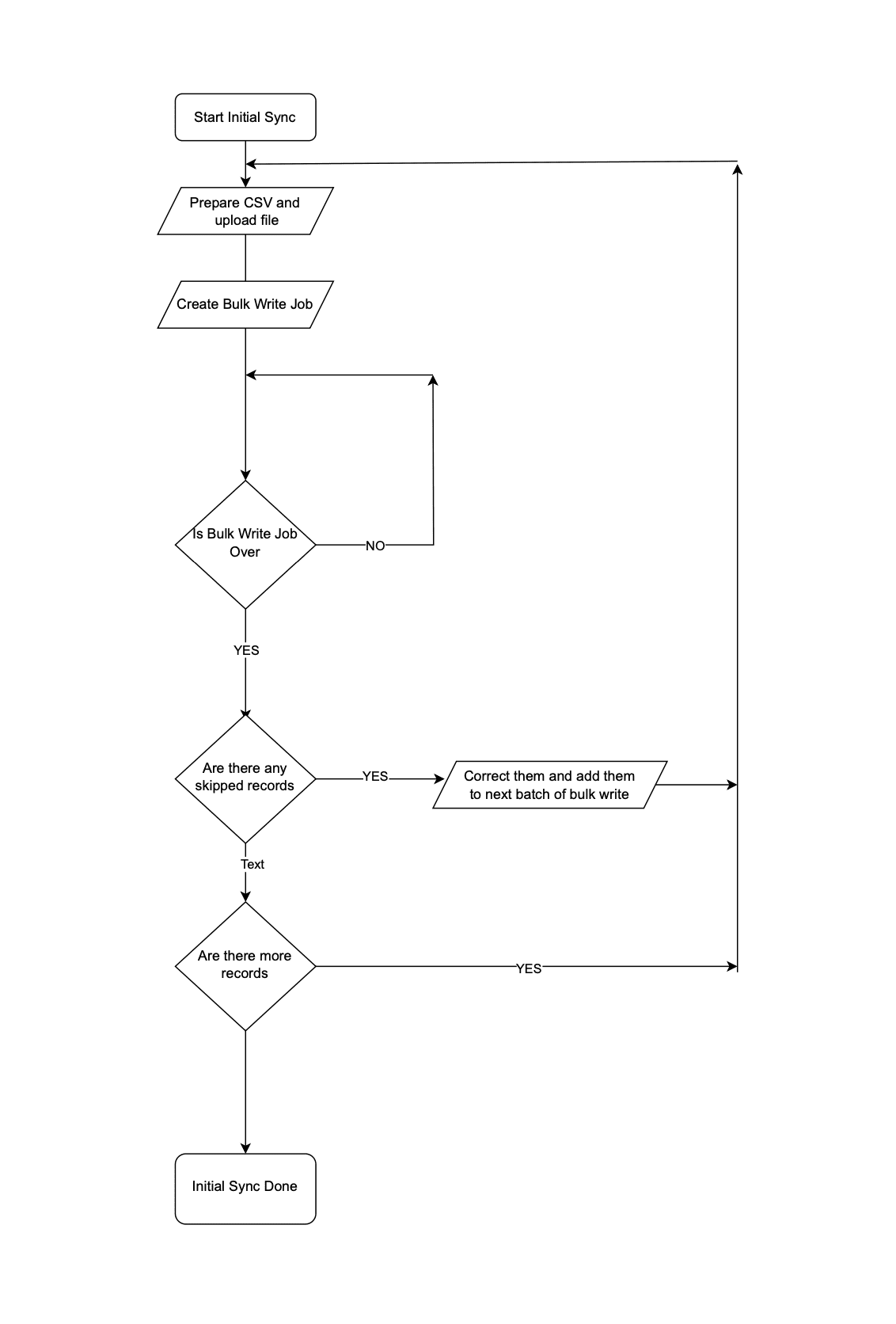 Initial Data Sync
Step 2: Subsequent Data Sync
The Order Management team continues to use the legacy application, leading to continuous creation or update of records in the Orders module.
It is not recommended to invoke Upsert Records API whenever an operation happens in Orders in the legacy system. Subsequent data syncs can be done in two ways: either by (a)near real-time sync or (b) Interval based sync.
(a) Near Real-time Sync
As we want near real-time data in Zoho CRM, it is ok for the records that are updated in the legacy system from last synchronization to be unavailable in Zoho CRM for 10 minutes.
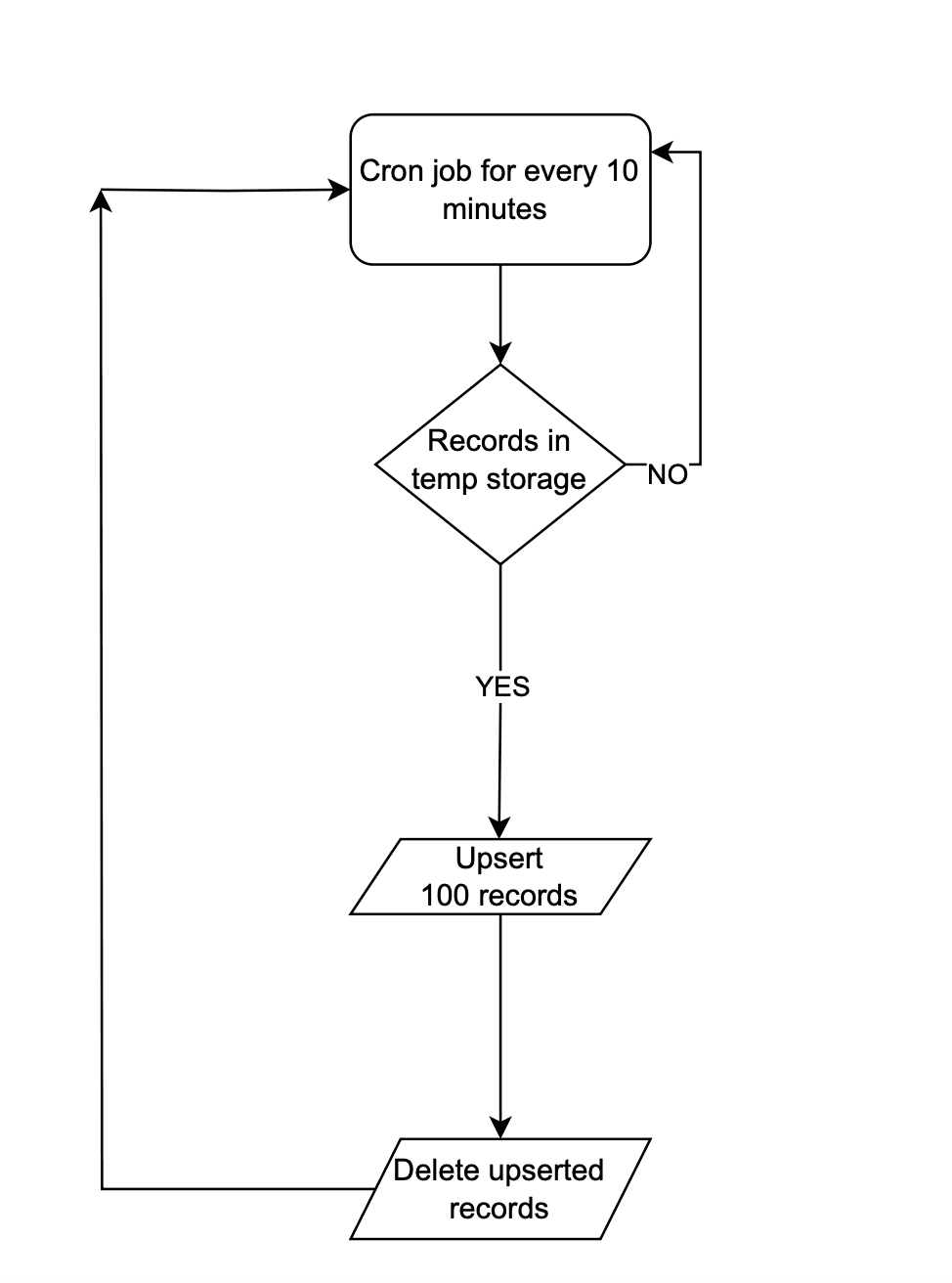 Near Real-time Sync
Instead of making API calls to Zoho CRM on every data operation, store the data in a temporary data store like a DB table or Redis. Once 100 records are accumulated in that data-store, the Upsert Records API can be promptly invoked with all these record details and followed by emptying of the data store. This approach will lead to lower consumption of API credits.
There are chances that in a period of 10 mins, 100 record operations may not happen. Scheduler jobs or CRON jobs can be created to handle the records in the data store to update records to Zoho CRM. Once these records are handled, the data store should be emptied.
(b) Interval based synchronization
For interval based synchronization, schedule bulk write API calls at suitable intervals to upsert the Orders module in Zoho CRM. Whenever there is a record operation in the legacy table, update the sync flag to "false". At regular intervals, such as every 12 or 24 hours, the bulk write API or Upsert Records API can be employed depending on the volume of the data changes.
We hope you found this article useful. We will be back next week with another interesting topic. If you have any questions, write to us at support@zohocrm.com or let us know in the comment section.
Previous Kaizen Post: Kaizen #122 - Data Synchronization using Bulk Read and Notification APIs
Related Links
Access your files securely from anywhere
Centralize Knowledge. Transform Learning.
All-in-one knowledge management and training platform for your employees and customers.
New to Zoho Recruit?

Zoho Developer Community
New to Zoho LandingPage?
Zoho LandingPage Resources
New to Zoho Survey?
New to Zoho CRM Plus?
Deliver unforgettable customer experiences
New to Zoho CRM Plus?
Deliver unforgettable customer experiences
New to Zoho Marketing Plus?
Everything you need to run your marketing
New to Zoho Marketing Plus?
Everything you need to run your marketing
New to Bigin?





Topic Participants
Mable Mary M P
Sticky Posts
Kaizen #198: Using Client Script for Custom Validation in Blueprint
Nearing 200th Kaizen Post – 1 More to the Big Two-Oh-Oh! Do you have any questions, suggestions, or topics you would like us to cover in future posts? Your insights and suggestions help us shape future content and make this series better for everyone.Kaizen #226: Using ZRC in Client Script
Hello everyone! Welcome to another week of Kaizen. In today's post, lets see what is ZRC (Zoho Request Client) and how we can use ZRC methods in Client Script to get inputs from a Salesperson and update the Lead status with a single button click. In thisKaizen #222 - Client Script Support for Notes Related List
Hello everyone! Welcome to another week of Kaizen. The final Kaizen post of the year 2025 is here! With the new Client Script support for the Notes Related List, you can validate, enrich, and manage notes across modules. In this post, we’ll explore howKaizen #217 - Actions APIs : Tasks
Welcome to another week of Kaizen! In last week's post we discussed Email Notifications APIs which act as the link between your Workflow automations and you. We have discussed how Zylker Cloud Services uses Email Notifications API in their custom dashboard.Kaizen #216 - Actions APIs : Email Notifications
Welcome to another week of Kaizen! For the last three weeks, we have been discussing Zylker's workflows. We successfully updated a dormant workflow, built a new one from the ground up and more. But our work is not finished—these automated processes are
New to Zoho TeamInbox?
Zoho TeamInbox Resources
Zoho CRM Plus Resources
Zoho Books Resources
Zoho Subscriptions Resources
Zoho Projects Resources
Zoho Sprints Resources
Qntrl Resources
Zoho Creator Resources
Zoho CRM Resources
Design. Discuss. Deliver.
Zoho Show Resources

Get Started. Write Away!
Writer is a powerful online word processor, designed for collaborative work.
Zoho CRM コンテンツ
-
オンラインヘルプ
-
Webセミナー
-
機能活用動画
-
よくある質問
-
Ebook
-
-
Zoho Campaigns
- Zoho サービスのWebセミナー
その他のサービス コンテンツ
Nederlandse Hulpbronnen

ご検討中の方
Recent Topics
What is going on with GMail extension.
Suddenly, it is popping up and saying "Please wait while we work our magic... 10%" and it sits there. Yesterday I waited for an entire hour call and it never got further. Today, it's not resolved. Is there a fix I can do? I've tried all the typicalMarketing Tip #6: Cross-sell with related products
Don’t let customers stop at just one product. Suggesting related or complementary items improves the shopping experience and increases order value. Try this today: Use the Item Recommendations feature in Zoho Commerce and add two to three suggested itemsi cannot use <b></b> to bold the message in Creator C6!!!!???What?
Dear experts and friends, Now Creator 6 blocking us from using <b></b> Anyone facing this issue? I faced it on Creator C6 Previously, it used to work. Now failed to work. Faint~ Seek guidance from everyone on how to bold the message. The super simpleZoho Writer - Option to Export as .zdoc format
I've noticed that it's not possible to export a Zoho Writer Document in the .zdoc format. Isn't zdoc, Zoho Writer's own format? My use case is that I sometimes need to create quite complex documents with floating elements, which sometimes need to become[Announcement] Enhanced Merge APIs of Zoho Writer for automating document generation using Zoho Apps data
Hi users, With the record_id parameter in Zoho Writer's Merge APIs, fields related to the given record id is automatically fetched from the Zoho app. You don't have to spend time manually mapping the records and fields in the Deluge code. Here is a samplePin multiple columns and adjust column widths in CRM subforms
Hello all, Subforms act as secondary forms or tables in which you can associate multiple line items to a primary record and thereby ensure more structured and comprehensive data organization. We've made some recent enhancements to subforms. Here's what's[Webinar] Automate sales and presales workflows with Writer
Sales involves sharing a wide range of documents with customers across the presales, sales, and post-sales stages: NDAs, quotes, invoices, sales orders, and delivery paperwork. Generating and managing these documents manually slows down the overall salesAutomate insurance document workflows with Zoho Writer
Insurance companies have to deal with creating and managing complex documents and forms, such as policy applications, explanation of benefits documents, brochures, renewals, and claim forms. Handling all of this manually is hugely time and effort intensive,Latest updates in Zoho Meeting | New End of session notification to remind everyone about the session end time
Hello everyone, We’re excited to share a new feature for Zoho Meeting ; End of session notification. With this new setting, you can choose to remind all participants or only the host about the scheduled end time of a meeting. You can also choose when[Webinar] Zoho Writer for SCM and logistics
Creating, sharing, and distributing complex documents are constant challenges in the SCM and logistics industry. That's why our next webinar is focused on how to simplify these document workflows. Join us on Jul 10, 2025 for a Zoho Writer webinar designed[Webinar] Zoho Writer for the manufacturing industry
Creating, sharing, and distributing complex documents are constant challenges in the manufacturing services industry. That's why our next webinar is focused on how to simplify these document workflows. Join us on May 8, 2025, for a Zoho Writer webinarAdd Comprehensive Accessibility Features to Zoho Writer
Hello Zoho Writer Team, We hope you are doing well. We would like to submit a feature request to enhance Zoho Writer with a full set of accessibility tools, similar to the accessibility options already available in the Zoho Desk agent interface. 🚧 Current[Webinar] Simplifying document workflows in financial services with Zoho Writer
Creating, sharing, and distributing complex documents are constant challenges in the financial services industry. That's why our next webinar is focused on how to simplify these document workflows. Join us on April 10, 2025, for a Zoho Writer webinar[Zoho Writer Webinar] Learn how to simplify your HR operations: Part 2
Hi Zoho Writer users, We're excited to announce the Zoho Writer webinar for July 2024: Learn how Zoho Writer can simplify your HR operations: Part 2. This webinar will focus on how Zoho Writer can help HR teams streamline and automate their entire hiring[Zoho Writer Webinar] Learn how to simplify your day-to-day HR operations
Hi Zoho Writer users, We're excited to announce the Zoho Writer webinar for June 2024: Learn how Zoho Writer can simplify your day-to-day HR operations. This webinar will focus on how to automate your entire hiring process and generate various types ofBranding of native system emails
Make system emails adjustable in terms of branding. We want our system to be completely white label, because it is not a CRM anymore, it's way more than that. We are following the strategy of "CRM for everyone" to use the CRM in all departments, not onlySupport “Never End” Option for Recurring Meetings in Zoho Meeting
Hello Zoho Meeting Team, Hope you are doing well. We would like to request support for creating recurring meetings with no end date in Zoho Meeting. Currently, when scheduling a recurring meeting, Zoho Meeting requires us to select a specific end date.[Important announcement] Removal of Zoho Writer's DocuFiller Add-on
Hi users, Effective 21st Feb. 2025, we will be removing the DocuFiller add-on for Zoho Writer's Fillable Templates. From that point on, the add-on's functionalities, such as sharing or publishing fillable forms for data collection and receiving submissionsWeekly Tips: Manage External Images in Zoho Mail
When you receive emails every day, whether from clients, newsletters, or services, many of them contain external images that automatically load when you open the message. While this can make emails look more engaging, it can also impact your privacy andImplementing a Self-Invoicing/Vendor Portal in Zoho Creator
Hello Zoho Community / Creator Experts, We would like to build a Self-Invoicing Portal (Vendor Portal) in Zoho Creator for our external contractors. Our goal is to allow approved contractors to log in, submit their invoice details (hours worked, projectFunction #32: Schedule low stock notifications on a timely basis to specific users of the organization
Hello everyone and welcome back to our series! For a business that heavily relies on inventory, monitoring the stock levels and getting timely notifications of low stock items will ensure a smooth sail. Zoho Books allows you to always keep a check onSINCH HUB MESSAGEMEDIA with ZOHO DESK
1) what I need from MessageMedia, 2) what I want to confirm on the Zoho Desk Dev Forum. MessageMedia – needs and requirements Goal: Send SMS from a Zoho Desk widget for EU users. Auth: HTTP Basic (API Key + Secret). Keys must not live in the browser.Function #46: Auto-Calculate Sales Margin on a Quote
Welcome back everyone! Last week's function was about displaying the discount amount in words. This week, it's going to be about automatically calculating the sales margin for a particular quote, sales order or an invoice. Business scenario Where there is sales, there's also evaluation and competition between sales reps. A healthy rivalry helps to better motivate your employees to do smart work and close deals faster and more efficiently. But how does a sales rep get evaluated? 90% of the time, it'sInvalid URL error when embedded sending url into iframe for my website when using in another region
Hi team, My site is currently working on integrating your signature feature as part of the system functionality, it's working great but recently there's been a problem like this: After successfully creating the document, i will embed a sending url intoNew features released: Data from Picture for Web, Pattern Fill, and Translation in Zoho Sheet!
Hello Sheet users, In 2024, the Zoho Sheet team focused on research and development to bring new features that add to functionalities like productivity, data management, collaboration, and more. This year, we're all set to roll them out incrementallyKaizen #59 - Creating alerts and custom messages using Client Script
Hello everyone! We are happy to resume our Zoho CRM Developer Community series - The Kaizen series! Welcome back to the new start of Kaizen! This post is about Client Script and its simple use cases involving ZDK Client functions. What is Client Script?Universal search
Hi, it would be useful if the search bar was universal-so if you entered a term, it would bring up results from contacts, candidates, clients etc all at the same time (but broken down under the relevant headings)Attachment reminder?
My team and I often need to attach files to our messages, e.g. an explanatory screenshot or a shipping label. More often that I want to admit I mention the attachment but forget to actually attach it. Some email clients have a check-for-missing-attachmentsZIA in Zoho Cliq
Is It possible to use the ZIA feature from Zoho Analytics in the Zoho Cliq?Critical Need for Global Search in Zoho FSM
Hello Zoho FSM Team, We are currently in the process of deciding whether to fully transition to Zoho FSM for managing our field service operations. At present, our team actively uses Zoho Desk (with over 50 users) and Service Fusion, which we are consideringCollections Management: # 1 Payment Collection is All About Convenience
"Sir, can you come tomorrow? My manager wasn't available for the cheque sign-off", the customer said, avoiding eye contact. Ravi forced a polite smile, but inside, he felt a sense of defeat. He had already visited the customer's office twice in the lastAudio/video quality issues with Zoho Meeting – Any roadmap for improvement?
Hi Zoho Team, We’ve been using Zoho Meeting for both internal and external meetings, and unfortunately, the experience has been consistently poor. The video and audio quality are so unreliable that it often renders meetings ineffective—especially withCash based businesses cannot use the new fixed asset module
Hello all, If your bookkeeping is reporting in cash, you cannot use the new fixed acid module, as it does all the depreciation bookings accrual and not cash. This is definitive and you can't turn them into a cash booking. They will never appear in yourZoho Learn & Zoho Connect
Hi, Is there a way to sync the knowledge base we have in Zoho Learn with the manuals section is Zoho Connect? Thanks,Apply Payment Received Amount Zoho Books Invoice
Hello team here is the sample code How can apply the payment received record over a unpaid zoho books invoice. //......................... paymentID = customer_payment.get("payment_id"); organizationID = organization.get("organization_id"); paymentmaplist[Live Webinar] New in Zoho WorkDrive: AI enhancements, Data Loss Prevention, Version Controls, and more
Hello everyone, We're excited to bring you another round of powerful updates in Zoho WorkDrive! Join us on May 15 for an exclusive live webinar where we’ll unveil the latest features designed to enhance your team’s productivity, collaboration, and dataLive webinar: Streamlining legal operations: Leveraging Zoho WorkDrive for law firm success
Hello everyone, Managing legal documents across departments and jurisdictions can be complex, but it doesn’t have to be. Join us on March 6 for an exclusive webinar where we’ll show you how Zoho WorkDrive empowers legal teams to stay compliant, organized,Live Webinar: Optimizing back-office operations in the manufacturing industry to maximize profitability
Hello everyone, We’re excited to invite you to our upcoming live webinar on February 6! Discover how Zoho WorkDrive can help manufacturing businesses optimize back-office operations, improve efficiency, and boost profitability. Our product experts willLive webinar: 2024 recap of Zoho WorkDrive
Hello everyone, We’re excited to invite you to our year-end live webinar! This session will take you through the transformative features and updates we’ve introduced in Zoho WorkDrive this year, helping you streamline document management like never before.Live webinar: Explore WorkDrive's seamless integrations with key Zoho apps
Hello everyone, We’re excited to invite you to our upcoming live webinar, where we'll delve into the seamless integration of WorkDrive with other key Zoho applications! This is a fantastic opportunity to enhance your productivity and streamline your workflowsNext Page