Exploring SalesIQ's Top Features of 2024: An Insider's Look 🔍
As we wrap up another year at Zoho SalesIQ, it's time to reflect on how far we've come. This year has been incredible for us in our journey to build a more powerful, flexible, and customer-centric engagement platform. We've introduced several features that have elevated how businesses connect with their customers across the globe. Let’s take a quick look at the highlights and top releases of the year, shall we?

We saw a wide variety of feature releases on SalesIQ focused mainly on the following areas, contributing to the overall evolution of the product.
- Enhancements for advanced customer connectivity 🌐 💬
- Expanding to a global audience 🌏
- Optimizing user experience ⚙️🎨
Enhancements for Advanced Customer Connectivity 🌐 💬
1. WeChat + SalesIQ Integration: Converse with WeChat users directly from SalesIQ! 🤝
Our integration with WeChat allowed businesses to communicate directly with WeChat users from within the SalesIQ dashboard.
- Operators could easily use SalesIQ's support tools like canned replies, articles, FAQs, tags, widgets, etc., enhancing their ability to provide contextual assistance.
- Not just that, operators can also easily nurture the leads from WeChat by easily pushing their details to CRM and also converting the chats from WeChat to helpdesk tickets, pushing them to Desk with a single click. Learn more

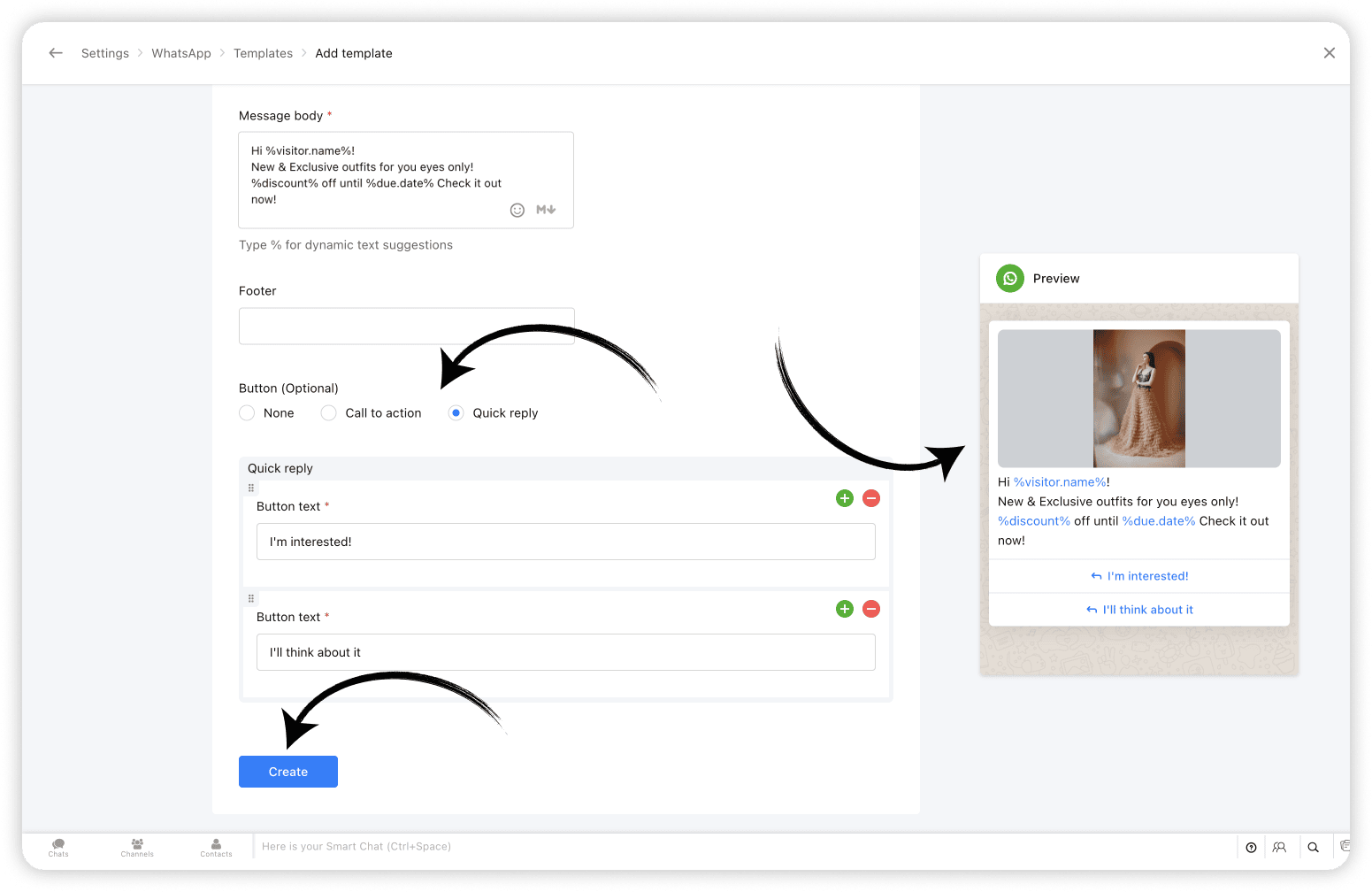
2. WhatsApp Templates: Create and share WhatsApp Templates from SalesIQ 💬
With WhatsApp templates on SalesIQ, one of the most awaited features, businesses can now create and save templates/message layouts that can be easily inserted into your WhatsApp conversations, from within your SalesIQ operator chat window.
And, Bonus? Closed WhatsApp conversations need not remain closed any more! Now you can start conversations with WhatsApp users using WhatsApp Templates. Learn more
3. Chatbots for Telegram & LINE: Expanding Automated Messaging 🤖
Already being supported on Facebook, WhatsApp and Instagram, we have now added our chatbots support for Telegram and LINE as well. This means that you can now sit back and let your bots take over chats from your Telegram and LINE audience, streamlining customer support, reducing response time and most importantly, freeing up your operators time to focus on complex queries and issues. Learn more

Expanding to a Global Audience 🌏 🤝
4. 30+ Language Support for Chatbots 🌐
To enhance and simplify global customer service further, we've expanded our chatbot's language support to over 30 languages. This ensures that your business chatbots (Zobot & Answer bot) can interact with customers in their preferred language, increasing engagement, improving customer satisfaction, and breaking down language barriers to provide seamless support. Learn more

5. Azure AI Translator: Breaking Language Barriers 🚀
With the Azure AI Translator integration, SalesIQ is now further equipped to translate chat conversations in real-time, eliminates language barriers, enabling businesses to engage effectively with customers from worldwide. While SalesIQ already supports the Google Translate integration, we have now added Azure AI Translator to its translation arsenal to cater to a wider user base to facilitate real-time visitor message translation. Learn more

6. Hebrew Right-to-Left (RTL) Support: User-friendly Chat Experience 💬
Recognizing the importance of regional customization, we introduced Right-to-Left (RTL) support for Hebrew, providing a more natural and accessible interface for our Hebrew users. SalesIQ already features RTL support in Arabic. Hebrew has now been added to the 'Right to left' bandwagon, ensuring a user-friendly experience for our Hebrew-speaking community. Learn more

Optimizing User Experience ⚙️🎨
7. SalesIQ Desktop Apps: Seamless Access Across Devices 🖥️
Another big highlight of this year was the launch of SalesIQ Desktop Apps to the App Store on Mac as well as the Microsoft store on Windows. The desktop app features exclusive options like auto-launch on device startup, Actionable notifications, access options on the Dock/Tray, Hide when Close etc, for enhanced user experience. Learn more

8. Articles support on Instant Messaging Channels 📝
SalesIQ articles support has now been extended to all Instant messaging channels, such as Facebook, Instagram, WhatsApp, Telegram, LINE, and WeChat. Operators can now share the articles to assist IM channel users. The shared articles will be displayed to the visitors in the form of URL links. Learn more

9. The All SalesIQ New Live Chat Widget: Faster and More Engaging ⚡💬
To wrap up the year, we launched a completely revamped live chat widget. Now twice as fast and fully optimized for engagement, the new widget is designed to help boost your site's SEO and reduce bounce rates. With minimized data usage it delivers consistent performance even on slower mobile networks and is also WCAG Compliant ensuring accessibility, offering an inclusive experience for all users. Learn more

Other Interesting Launches⚡
Along with the above listed top releases, we did have a few other launches that catered to user demands and expectations while adding to SalesIQ's wealth of features.
- SalesIQ-Desk Integration: Managing Tickets Within Chat 🤝 - Seamlessly edit and manage help desk tickets directly from the operator chat window, streamlining sales and support collaboration.
- Starting a Cliq Internal Chat from SalesIQ 👩💻 - Start a Cliq internal group chat right from SalesIQ for an ongoing, closed or missed conversation to discuss chat/customer-related queries with your fellow operators and Cliq users.
- Extended Chat Time: 24 Hours for IM Channels 💬 - Keep customer conversations active for up to 24 hours across Instant messaging channels, ensuring no interaction is left unresolved.
- Multi-WhatsApp Business Account (WABA) Support ⚙️ - For businesses managing multiple WhatsApp accounts, each SalesIQ brand can now be connected to its unique WABA within SalesIQ, enabling them to manage them as separate entities.
- SalesIQ TV App for Real-Time Insights 📺 - Get live updates on business performance and visitor metrics with the new SalesIQ TV App, now available on Android and Apple TV.
- Card Wait Time for Bot End Messages 💬 - Set a delay/wait time for the bot’s end card to ensure visitors have enough time to view important information before the chat closes.
- Live insights (Reports) 📊 - Get a real-time overview of incoming and outgoing chat/call volume, operator availability, and more, helping you better plan support split across teams with the live insights section on the reports dashboard.
Looking Ahead: What’s Next? 🚀
This year’s updates reflect our commitment to providing businesses with the tools they need to create meaningful, personalized connections with customers. Whether through enhanced communication options, multilingual support, or seamless integrations, every new feature has been designed with your needs in mind.
But we’re just getting started. The journey of Zoho SalesIQ is one of continuous innovation, and we’re excited to keep building and improving to help you connect with customers better, faster, and more effectively than ever before.
Thank you for being part of the Zoho SalesIQ journey. Here’s to another year of growth and innovation!
Warm regards,
Hameetha | Zoho SalesIQ
Access your files securely from anywhere
New to Zoho Recruit?

Zoho Developer Community
New to Zoho LandingPage?
Zoho LandingPage Resources
New to Zoho Survey?
New to Zoho CRM Plus?
Deliver unforgettable customer experiences
New to Zoho CRM Plus?
Deliver unforgettable customer experiences
New to Zoho Marketing Plus?
Everything you need to run your marketing
New to Zoho Marketing Plus?
Everything you need to run your marketing
New to Bigin?





Topic Participants
Hameetha Nasreen
Damilola Olaleye
Sticky Posts
Speak Your Customers' Language: SalesIQ's chatbots now support 30 languages 🤖
We're unveiling some major upgrades to our chatbot that are set to revolutionize your experience! Now SalesIQ support 30 languages for both Zobot and Answer bot. By speaking your customers' language, you can enhance engagement, improve customer satisfaction,Attention Deluge Developers: Important Update Regarding "Send Email Deluge Task"
Hi Deluge Users, We hope this message finds you well. We would like to inform you about a recent update on the Send emails deluge task. If you are using this deluge task (SalesIQ Scripts) for your Zobot, widgets, or form controllers to send emails, pleasePlug Samples #12: Verify Customer Mobile Numbers with OTP to Avoid Spam Entries
Hi Everyone! Verifying customer information is critical in business to filter out junk data and spammers. Whether it’s lead generation, appointment booking, or any other operation, ensuring quality data is essential for driving meaningful outcomes. ABig Things Just Dropped in the SalesIQ Universe: Top Upgrades You’ll Love in Nova’25
Nova'25 has landed, and it’s packed with meaningful upgrades to help you engage smarter, work faster, and scale with ease. Whether you're into proactive messaging, smarter automation, or better admin control, there's something here for everyone. Here'sYour bot just got smarter: AI-Powered routing that reads between the lines
What if your bot could tell the difference? Between a visitor who just needs a quick answer, someone actively comparing options, and a frustrated customer one click away from leaving? Most bots can't. They deliver the same response to everyone, missing
New to Zoho TeamInbox?
Zoho TeamInbox Resources
Zoho CRM Plus Resources
Zoho Books Resources
Zoho Subscriptions Resources
Zoho Projects Resources
Zoho Sprints Resources
Qntrl Resources
Zoho Creator Resources
Zoho CRM Resources
Design. Discuss. Deliver.
Zoho Show Resources

Get Started. Write Away!
Writer is a powerful online word processor, designed for collaborative work.
Zoho CRM コンテンツ
-
オンラインヘルプ
-
Webセミナー
-
機能活用動画
-
よくある質問
-
Ebook
-
-
Zoho Campaigns
- Zoho サービスのWebセミナー
その他のサービス コンテンツ
Nederlandse Hulpbronnen

ご検討中の方
Recent Topics
Zoho Projects Roadshows 2025 - USA
Dear Users, After an amazing response to our roadshows in 2024, we are excited to be back for the second year in a row! Join our team of experts as they walk you through the most-used features in Zoho Projects, explore powerful automation capabilities,Billing Management: #6 Usage Billing in SaaS
Imagine a customer shuffling across multiple subscriptions, a streaming service, a music app, cloud storage, and a design tool. Each one charges a flat monthly fee, regardless of how much or how little they use. Some months, the customer barely opensIs there anyone who has been experiencing issues regarding the Zoho Creator Certification Website in the past 2 weeks?
Dear all , I just wanted to ask is there anyone who was planning on taking the Zoho Creator Developer Certification Test in the past 2 weeks and have been facing errors stating that the website is under maintennance and also not allowed to access theAllow syncing Activities from other applications
Marketing Automation could be a much more powerful platform if you were able to sync activities into the platform (e.g. purchase, donation, etc) outside of a user doing something on your website. I'd love it if you could sync Custom CRM Modules as activities,Global Sets for Multi-Select pick lists
When is this feature coming to Zoho CRM? It would be very useful now we have got used to having it for the normal pick lists.Integración Books para cumplir la ley Crea y Crece y Ley Antifraude (VeriFactu)
Hola: En principio, en julio de 2025, entra en vigor la ley Crea y Crece y Ley Antifraude (VeriFactu). ¿Sabéis si Zoho va a cumplir con la ley para cumplir con la facturación electrónica conectada a Hacienda? GraciasAsk the Experts #1
Hello everyone! It’s time to transform how you manage projects. Define the processes. Automate the tasks. Streamline the workflows. Let us dive into automation in Zoho Projects — from configuring workflows and custom functions to building triggers, usingHow to overcome Zoho Deluge's time limit?
I have built a function according to the following scheme: pages = {1,2,3,4,5,6,7,8,9,10}; for each page in pages { entriesPerPage = zoho.crm.getRecords("Accounts",page,200); for each entry in entriesPerPage { … } } Unfortunately, we have too many entriesChecking if Creator has Change History
Like zForms - whenever an entry was updated there's an option to attached change history to email notif. Trigger -> Successful form submissionhow to use validation rules in subform
Is it possible to use validation rules for subforms? I tried the following code: entityMap = crmAPIRequest.toMap().get("record"); sum = 0; direct_billing = entityMap.get("direct_billing_details"); response = Map(); for each i in direct_billing { if(i.get("type")Adding contact role to a specific deal js sdk malfunctioning
i was trying to add the contact role to a specific deal contact but repeatedly i am getting this error: { "code": "SUCCESS", "details": { "statusMessage": { "code": "INVALID_DATA", "details": { "expected_data_type": "jsonobject" }, "message": "body",Q3 Updates from Bigin!
Hey Biginners, Hope you’re doing great! As we approach the end of 2025, we truly hope Bigin has been a part of helping you build your dream business this year! We've been busy working behind the scenes to bring you features that make running your businessClient Script | Update - Introducing Subform Events and Actions
Are you making the most of your subforms in Zoho CRM? Do you wish you could automate subform interactions and enhance user experience effortlessly? What if you had Client APIs and events specifically designed for subforms? We are thrilled to introduce{"errors":[{"id":"500","title":"Servlet execution threw an exception"}]}
Here's the call to move a file to trash. The resource_id is accurate and the file is present. header = Map(); header.put("Accept","application/vnd.api+json"); data = Map(); data_param1 = Map(); att_param1 = Map(); att_param1.put("status",51); data_param1.put("attributes",att_param1);Converting Sales Order to Invoice via API; Problem with decimal places tax
We are having problems converting a Sales Order to an Invoice via API Call. The cause of the issue is, that the Tax value in a Sales Order is sometimes calculated with up to 16 decimal places (e.g. 0.8730000000000001). The max decimal places allowed inZoho Canvas - Custom templates for related lists
Hi, I see that the example pages load always one of our related lists in a custom template, but I dont know how to work with that: 1) How can i make my own custom templates for related lists? 2) Where and how can i check out existing custom templates?Kaizen #147 - Frequently Asked Questions on Zoho CRM Widgets
Heya! It's Kaizen time again, folks! This week, we aim to address common queries about Zoho CRM Widgets through frequently asked questions from our developer forum. Take a quick glance at these FAQs and learn from your peers' inquiries. 1. Where can Iopen word file in zoho writer desktop version
"How can I open a Microsoft Word (.doc or .docx) file in Zoho Writer if I only have the file saved on my computer and Zoho Writer doesn't appear as an option when I try 'Open with'? Is there a way to directly open the .doc file in Zoho Writer?"Zoho PDF editor has a lot of issues.
Zoho PDF editor needs a lot of work. It hangs and glitches a lot. Deletes annotations and clearings randomly.Syncing contacts on Android
I'm using the Zoho mail app on Android and although I can see my contacts from within the app, they're not synced to my native contact list and so I can't access them from within the native dialer. Is there any way that I can sync my contacts into my native address book? Regards, MartinZohom mail
Plz resolve the problem . I hope u understand .Zoho sheet desktop version
Hi Zoho team Where can I access desktop version of zoho sheets? It is important as web version is slow and requires one to be online all the time to do even basic work. If it is available, please guide me to the same.ZOHO SHEETS
Where can I access desktop version of zoho sheets? It is important to do basic work If it is available, please guide me to the sameUsing Zoho Flow to create sales orders from won deal in Zoho CRM
Hi there, We are using Zoho Flow to create sales orders automatically when a deal is won in Zoho CRM. However, the sales order requires "Product Details" to be passed in "jsonobject", and is resulting in this error: Zoho CRM says "Invalid input for invalidIs Zoho Sheet available for Linux ?
Is Zoho Sheet available for Linux ?Bharat
ahow to disable staff selection Zoho Booking integrated to SalesIQ?
currently there is only one Consultant in my Zoho Bookings like this I integrate Zoho Bookings into Zoho SalesIQ to create a chatbot. Unfortunately, even though I only have one consultant for a consultation, the user have to pick the consultant. It willZoho Bookings No Sync with Outlook
Zoho Bookings appointments are showing on my Outlook Calendar but Outlook events are not showing on Zoho Bookings. How do I fix this?End Date in Zoho Bookings
When I give my appointments a 30 minutes time I would expect the software not to even show the End Time. But it actually makes the user pick an End Time. Did I just miss a setting?Custom confirmation message
How can I change the message that users see after they submit the booking form? I have to confirm some details before their appointment is officially "confirmed", so I want to change it where it doesn't say their appointment is "confirmed" but ratherIssue showing too many consultations in my workspace link.
Hi Team, I’ve set up two Workspaces to track meetings from different sources. So far, this has been working well, and the two Workspaces are differentiated without any issues. However, when I navigate to Consultations and share the link to my personalDeluge sendmail in Zoho Desk schedule can't send email from a verified email address
I am trying to add a scheduled action with ZDesk using a Deluge function that sends a weekly email to specific ticket client contacts I've already verified the email address for use in ZDesk, but sendmail won't allow it in its "from:" clause. I've attachedunblock e-mail
please unblock my e-mails info@meatnews.gr and myrtokaterini@meatnews.grChanging Corporate Structure - How Best to Adapt Current and Future Zoho Instances
My current company is Company A LLC with a dba ("doing business as" - essentially an alias) Product Name B. Basically, Company A is the legal entity and Product Name B is what customers see, but it's all one business right now. We currently have a ZohoHow to Install Zoho Workdrive Desktop Sync for Ubuntu?
Hi. I am newbie to Linux / Ubuntu. I downloaded a tar.gz file from Workdrive for installing the Workdrive Desktop Sync tool. Can someone give me step by step guide on how to install this on Ubuntu? I am using Ubuntu 19.04. Regards SenthilHow to upload own video?
How can you upload your own video on your zoho website? I do not want to use another host, but i want to insert my own files. how can i do this?Support new line in CRM Multiline text field display in Zoho Deluge
Hi brainstrust, We have a Zoho CRM field which is a Muti Line (Small) field. It has data in it that has a carriage return after each line: When I pull that data in via Deluge, it displays as: I'm hoping a way I can change it from: Freehand : ENABLED ChenilleAnnouncing new features in Trident for Windows (v.1.32.5.0)
Hello Community! Trident for Windows just got better! This update includes new features designed to improve and simplify email and calendar management—and it includes a feature you’ve been waiting for. Let’s dive into what’s new! Save emails in EML orHow to render either thumbnail_url or preview_url or preview_data_url
I get 401 Unauthorised when using these urls in the <img> tag src attribute. Guide me on how to use them!Zoho CRM Calendar | Custom Buttons
I'm working with my sales team to make our scheduling process easier for our team. We primary rely on Zoho CRM calendar to organize our events for our sales team. I was wondering if there is a way to add custom button in the Calendar view on events/meetingNext Page