Exploring SalesIQ's Top Features of 2024: An Insider's Look 🔍
As we wrap up another year at Zoho SalesIQ, it's time to reflect on how far we've come. This year has been incredible for us in our journey to build a more powerful, flexible, and customer-centric engagement platform. We've introduced several features that have elevated how businesses connect with their customers across the globe. Let’s take a quick look at the highlights and top releases of the year, shall we?

We saw a wide variety of feature releases on SalesIQ focused mainly on the following areas, contributing to the overall evolution of the product.
- Enhancements for advanced customer connectivity 🌐 💬
- Expanding to a global audience 🌏
- Optimizing user experience ⚙️🎨
Enhancements for Advanced Customer Connectivity 🌐 💬
1. WeChat + SalesIQ Integration: Converse with WeChat users directly from SalesIQ! 🤝
Our integration with WeChat allowed businesses to communicate directly with WeChat users from within the SalesIQ dashboard.
- Operators could easily use SalesIQ's support tools like canned replies, articles, FAQs, tags, widgets, etc., enhancing their ability to provide contextual assistance.
- Not just that, operators can also easily nurture the leads from WeChat by easily pushing their details to CRM and also converting the chats from WeChat to helpdesk tickets, pushing them to Desk with a single click. Learn more

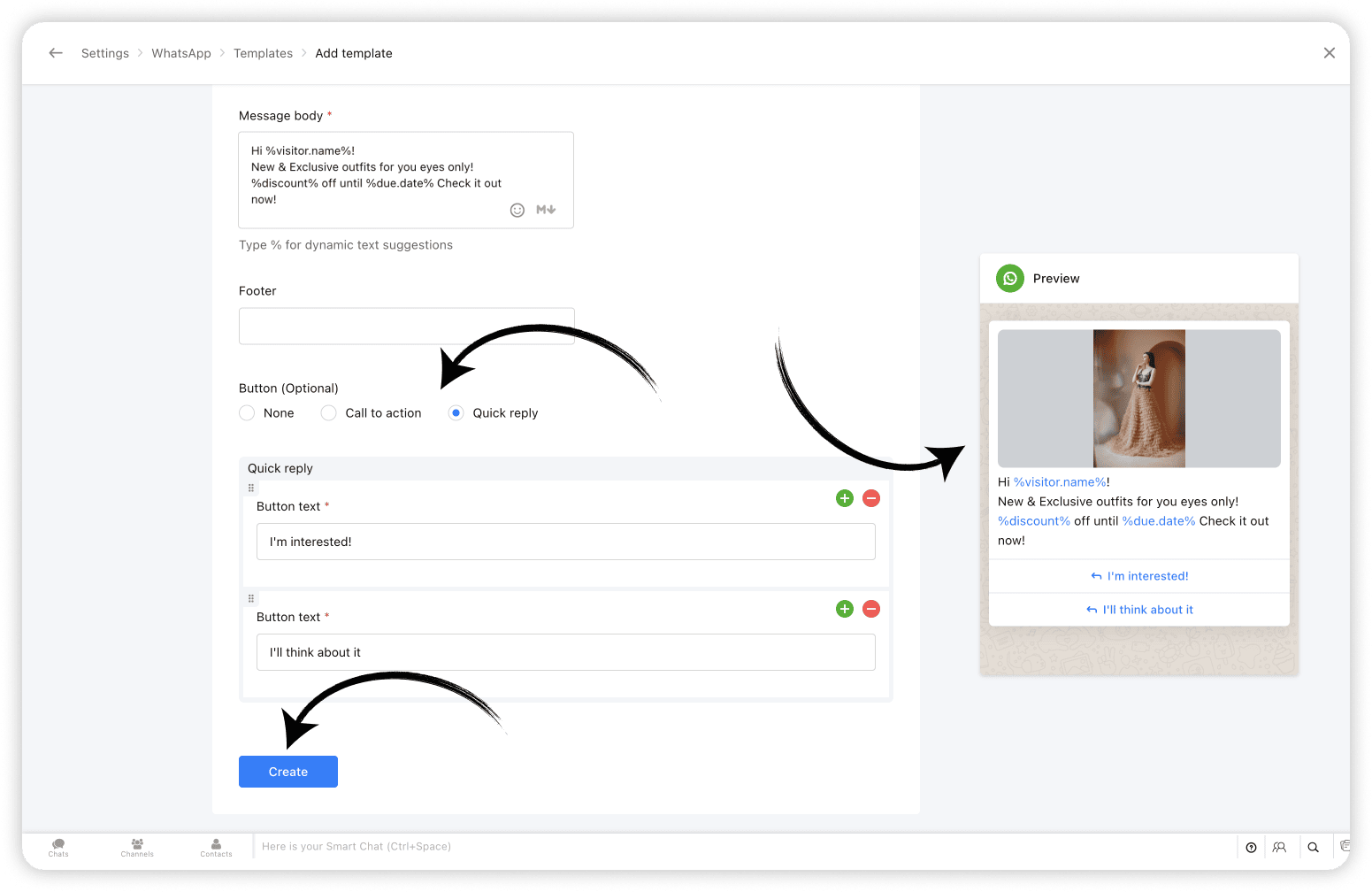
2. WhatsApp Templates: Create and share WhatsApp Templates from SalesIQ 💬
With WhatsApp templates on SalesIQ, one of the most awaited features, businesses can now create and save templates/message layouts that can be easily inserted into your WhatsApp conversations, from within your SalesIQ operator chat window.
And, Bonus? Closed WhatsApp conversations need not remain closed any more! Now you can start conversations with WhatsApp users using WhatsApp Templates. Learn more
3. Chatbots for Telegram & LINE: Expanding Automated Messaging 🤖
Already being supported on Facebook, WhatsApp and Instagram, we have now added our chatbots support for Telegram and LINE as well. This means that you can now sit back and let your bots take over chats from your Telegram and LINE audience, streamlining customer support, reducing response time and most importantly, freeing up your operators time to focus on complex queries and issues. Learn more

Expanding to a Global Audience 🌏 🤝
4. 30+ Language Support for Chatbots 🌐
To enhance and simplify global customer service further, we've expanded our chatbot's language support to over 30 languages. This ensures that your business chatbots (Zobot & Answer bot) can interact with customers in their preferred language, increasing engagement, improving customer satisfaction, and breaking down language barriers to provide seamless support. Learn more

5. Azure AI Translator: Breaking Language Barriers 🚀
With the Azure AI Translator integration, SalesIQ is now further equipped to translate chat conversations in real-time, eliminates language barriers, enabling businesses to engage effectively with customers from worldwide. While SalesIQ already supports the Google Translate integration, we have now added Azure AI Translator to its translation arsenal to cater to a wider user base to facilitate real-time visitor message translation. Learn more

6. Hebrew Right-to-Left (RTL) Support: User-friendly Chat Experience 💬
Recognizing the importance of regional customization, we introduced Right-to-Left (RTL) support for Hebrew, providing a more natural and accessible interface for our Hebrew users. SalesIQ already features RTL support in Arabic. Hebrew has now been added to the 'Right to left' bandwagon, ensuring a user-friendly experience for our Hebrew-speaking community. Learn more

Optimizing User Experience ⚙️🎨
7. SalesIQ Desktop Apps: Seamless Access Across Devices 🖥️
Another big highlight of this year was the launch of SalesIQ Desktop Apps to the App Store on Mac as well as the Microsoft store on Windows. The desktop app features exclusive options like auto-launch on device startup, Actionable notifications, access options on the Dock/Tray, Hide when Close etc, for enhanced user experience. Learn more

8. Articles support on Instant Messaging Channels 📝
SalesIQ articles support has now been extended to all Instant messaging channels, such as Facebook, Instagram, WhatsApp, Telegram, LINE, and WeChat. Operators can now share the articles to assist IM channel users. The shared articles will be displayed to the visitors in the form of URL links. Learn more

9. The All SalesIQ New Live Chat Widget: Faster and More Engaging ⚡💬
To wrap up the year, we launched a completely revamped live chat widget. Now twice as fast and fully optimized for engagement, the new widget is designed to help boost your site's SEO and reduce bounce rates. With minimized data usage it delivers consistent performance even on slower mobile networks and is also WCAG Compliant ensuring accessibility, offering an inclusive experience for all users. Learn more

Other Interesting Launches⚡
Along with the above listed top releases, we did have a few other launches that catered to user demands and expectations while adding to SalesIQ's wealth of features.
- SalesIQ-Desk Integration: Managing Tickets Within Chat 🤝 - Seamlessly edit and manage help desk tickets directly from the operator chat window, streamlining sales and support collaboration.
- Starting a Cliq Internal Chat from SalesIQ 👩💻 - Start a Cliq internal group chat right from SalesIQ for an ongoing, closed or missed conversation to discuss chat/customer-related queries with your fellow operators and Cliq users.
- Extended Chat Time: 24 Hours for IM Channels 💬 - Keep customer conversations active for up to 24 hours across Instant messaging channels, ensuring no interaction is left unresolved.
- Multi-WhatsApp Business Account (WABA) Support ⚙️ - For businesses managing multiple WhatsApp accounts, each SalesIQ brand can now be connected to its unique WABA within SalesIQ, enabling them to manage them as separate entities.
- SalesIQ TV App for Real-Time Insights 📺 - Get live updates on business performance and visitor metrics with the new SalesIQ TV App, now available on Android and Apple TV.
- Card Wait Time for Bot End Messages 💬 - Set a delay/wait time for the bot’s end card to ensure visitors have enough time to view important information before the chat closes.
- Live insights (Reports) 📊 - Get a real-time overview of incoming and outgoing chat/call volume, operator availability, and more, helping you better plan support split across teams with the live insights section on the reports dashboard.
Looking Ahead: What’s Next? 🚀
This year’s updates reflect our commitment to providing businesses with the tools they need to create meaningful, personalized connections with customers. Whether through enhanced communication options, multilingual support, or seamless integrations, every new feature has been designed with your needs in mind.
But we’re just getting started. The journey of Zoho SalesIQ is one of continuous innovation, and we’re excited to keep building and improving to help you connect with customers better, faster, and more effectively than ever before.
Thank you for being part of the Zoho SalesIQ journey. Here’s to another year of growth and innovation!
Warm regards,
Hameetha | Zoho SalesIQ
Access your files securely from anywhere
New to Zoho Recruit?

Zoho Developer Community
New to Zoho LandingPage?
Zoho LandingPage Resources
New to Zoho Survey?
New to Zoho CRM Plus?
Deliver unforgettable customer experiences
New to Zoho CRM Plus?
Deliver unforgettable customer experiences
New to Zoho Marketing Plus?
Everything you need to run your marketing
New to Zoho Marketing Plus?
Everything you need to run your marketing
New to Bigin?





Topic Participants
Hameetha Nasreen
Damilola Olaleye
Sticky Posts
Speak Your Customers' Language: SalesIQ's chatbots now support 30 languages 🤖
We're unveiling some major upgrades to our chatbot that are set to revolutionize your experience! Now SalesIQ support 30 languages for both Zobot and Answer bot. By speaking your customers' language, you can enhance engagement, improve customer satisfaction,Attention Deluge Developers: Important Update Regarding "Send Email Deluge Task"
Hi Deluge Users, We hope this message finds you well. We would like to inform you about a recent update on the Send emails deluge task. If you are using this deluge task (SalesIQ Scripts) for your Zobot, widgets, or form controllers to send emails, pleasePlug Samples #12: Verify Customer Mobile Numbers with OTP to Avoid Spam Entries
Hi Everyone! Verifying customer information is critical in business to filter out junk data and spammers. Whether it’s lead generation, appointment booking, or any other operation, ensuring quality data is essential for driving meaningful outcomes. ABig Things Just Dropped in the SalesIQ Universe: Top Upgrades You’ll Love in Nova’25
Nova'25 has landed, and it’s packed with meaningful upgrades to help you engage smarter, work faster, and scale with ease. Whether you're into proactive messaging, smarter automation, or better admin control, there's something here for everyone. Here'sYour bot just got smarter: AI-Powered routing that reads between the lines
What if your bot could tell the difference? Between a visitor who just needs a quick answer, someone actively comparing options, and a frustrated customer one click away from leaving? Most bots can't. They deliver the same response to everyone, missing
New to Zoho TeamInbox?
Zoho TeamInbox Resources
Zoho CRM Plus Resources
Zoho Books Resources
Zoho Subscriptions Resources
Zoho Projects Resources
Zoho Sprints Resources
Qntrl Resources
Zoho Creator Resources
Zoho CRM Resources
Design. Discuss. Deliver.
Zoho Show Resources

Get Started. Write Away!
Writer is a powerful online word processor, designed for collaborative work.
Zoho CRM コンテンツ
-
オンラインヘルプ
-
Webセミナー
-
機能活用動画
-
よくある質問
-
Ebook
-
-
Zoho Campaigns
- Zoho サービスのWebセミナー
その他のサービス コンテンツ
Nederlandse Hulpbronnen

ご検討中の方
Recent Topics
How to Install Zoho Workdrive Desktop Sync for Ubuntu?
Hi. I am newbie to Linux / Ubuntu. I downloaded a tar.gz file from Workdrive for installing the Workdrive Desktop Sync tool. Can someone give me step by step guide on how to install this on Ubuntu? I am using Ubuntu 19.04. Regards SenthilHow to upload own video?
How can you upload your own video on your zoho website? I do not want to use another host, but i want to insert my own files. how can i do this?Support new line in CRM Multiline text field display in Zoho Deluge
Hi brainstrust, We have a Zoho CRM field which is a Muti Line (Small) field. It has data in it that has a carriage return after each line: When I pull that data in via Deluge, it displays as: I'm hoping a way I can change it from: Freehand : ENABLED ChenilleAnnouncing new features in Trident for Windows (v.1.32.5.0)
Hello Community! Trident for Windows just got better! This update includes new features designed to improve and simplify email and calendar management—and it includes a feature you’ve been waiting for. Let’s dive into what’s new! Save emails in EML orHow to render either thumbnail_url or preview_url or preview_data_url
I get 401 Unauthorised when using these urls in the <img> tag src attribute. Guide me on how to use them!Zoho CRM Calendar | Custom Buttons
I'm working with my sales team to make our scheduling process easier for our team. We primary rely on Zoho CRM calendar to organize our events for our sales team. I was wondering if there is a way to add custom button in the Calendar view on events/meetingCreate Lead Button in Zoho CRM Dashboard
Right now to create Leads in the CRM our team is going into the Lead module, selecting the "Create Lead" button, then building out the lead. Is there anyway to add the "Create Lead" button or some sort of short cut to the Zoho CRM Dashboard to cut outSearching customer field
Hello, When entering a receipt, we select customer information. The customer information is synced with Zoho CRM. However, we can't find the customer information because it searches for words that begin with the entered value. It needs to search for wordsIntroducing Version-3 APIs - Explore New APIs & Enhancements
Happy to announce the release of Version 3 (V3) APIs with an easy to use interface, new APIs, and more examples to help you understand and access the APIs better. V3 APIs can be accessed through our new link, where you can explore our complete documentation,Outgoing blocked: Unusual activity detected.
Hello i can't send email from g.morris@adm-part.com mail, can you please help me.Zoho CRM Tracking Google Enhanced Conversions
Can anyone @Zoho, consultants, or users help me understand if Zoho CRM is going to support Google's Enhanced Conversions? I included some information from Google below about it. We use Google Adwords for our pay per click advertising for lead generation,Billing Management: #5 Usage Billing
After understanding the nuances of Advance Billing and Retainers, we will explore one of the booming billing models. Long ago, villagers drew water from a shared well in a small village. The well was a lifeline for the entire community. Ravi, the wellFunction #10: Update item prices automatically based on the last transaction created
In businesses, item prices are not always fixed and can fluctuate due to various factors. If you find yourself manually adjusting the item rates every time they change, we have the ideal time-saving solution for you. In today's post, we bring you customInventory Adjustments
Hi, How to transfer the material from one head to another ? Like materials purchased for manufacturing the laptop need to transfer from consumption inventory (Quantity of raw materials reduced) to destination inventory ( Quantity of Laptop increased)Zoho CRM Community Digest - August 2025 | Part 1
Hey everyone! The first half of August went by, and we have a few announcements and some good noteworthy discussions. So, let's take a look at them! Product Updates: Introducing Connected Records feature: Zoho CRM’s Next-Gen UI now includes ConnectedPlease make it easier to Pause syncing
right now it takes 3 clicks to get there. sounds silly, but can you make it just 2 clicks to get it done instead? thats how dropbox does it, 2 clicks to pause instead of 3.How to create a Zoho CRM report with 2 child modules
Hi all, Is it possible to create a Zoho CRM report or chart with 2 child modules? After I add the first child module, the + button only adds another parent module. It won't let me add multiple child modules at once. We don't have Zoho Analytics and wouldHow to integrate Zoho Forms with Zoho CRM on Standard Plan
Hello Zoho Support Team, I am using the Standard Zoho Forms plan (USD 30/user) and I would like to integrate Zoho Forms with Zoho CRM so that certain fields in my forms can be automatically prefilled using data from Deals in CRM. Specifically, I wantExport PDF File Name
Is it possible to change the default Zoho .pdf naming scheme for inventory items like quotations? Would like to use the the Subject as the default quote name. Is this possible?How to change the from address from 'no reply' for an email template in CRM
Hi, We have our CRM set up with the from field as sales@XXX. I have just created a series of email templates and sent a test and they are sending from noreply@zoho I have tried searching for how to change the email template but don't have the optionsZoho CRM Client Script - SetCriteria in lookup Field
Hello All One More Zoho CRM Client Script Tips & Trick. Now you can Set the Criteria on Your lookup in zoho CRM, It Comes With a Create Page, Edit Page, and Details Page (Standard). Example:- We have a Room Module that includes Room Name, Status, Campus,Kaizen #71 - Client Script ZDKs for Detail (Canvas) Page
Hello everyone! Welcome back to another interesting Kaizen post. In this post, we can discuss Client Script ZDKs support for Detail (Canvas) Page. What is Detail (Canvas) Page? A Detail(Canvas) Page allows you to customize the record detail page to yourZoho Reports Duplicating Entries
I have a custom costing tab with a table where we entre invoices. These are under a Heading (PO Subject) and notes added in the form with different line items. In the reports, I have organised the report to group per PO Subject, with the total of theValidation Rule Not Working for Mandatory Field in Zoho Blueprint
As a Zoho user, we created a validation rule for a specific field. However, we noticed that when we made the same field mandatory within a Blueprint, the validation rule we defined did not work. When we reported this issue to Zoho Support, they statedNotes Issues
Been having issues with Notes in the CRM. Yesterday it wasn't showing the notes, but it got resolved after a few minutes., Now I have been having a hard time saving notes the whole day. Notes can't be saved by the save button. it's grayed out or not grayedExport from Contacts module to Products module in Zoho CRM
Good afternoon, I would like to send a number of contact info from the Contacts module into the customized module (tickets to an event) in one operation. I have selected several contacts in the Contact module (people who I have labelled as people I wantCan’t receive emailI c
I have generated a basic for but when I submit it I don’t get a email, I’ve been in the settings and tested me email, all appears correct, can you please help meData Capture for Historical Activity (Especially One Lead Downloading Variois reports without Overwriting the info)
Is there a better way in Zoho CRM to capture and archive a lead’s historical activity—specifically whenever they download reports—so that the data is stored without being overwritten?”Client Script - Updating Field Value in Detail Page of a Lead
Hello, I'm trying to use Client Script To enrich some data of the Lead when one of my User fill the "City" field in the detail page of the Lead. This is my Script: log (value); var response = ZDK.Apps.CRM.Functions.execute("getInfoCitta", { "nomeCitta":Auto shapes in Zoho sheet.
Does Zoho sheet supports inserting auto shapes (rectangle, circle...). I did not see any option to do so. If its not supported currently, is there any plans on bring in this features. Any timelines ?How to get the call recording external ID via desk API
I have enabled phonbridge integration with Zoom Call. I am trying to access the call recording in Zoom by calling Zoom API. I have built a Desk workflow to trigger on a new call, to call a custom function. when calling the API, the response doesn't containCan't View Project Names in Mobile App
I can't view project names on PO's in the app, nor can I add that as a viewable PDF field in inventory on the computer. I've attached screenshots showing that in the mobile version whether you are on the PO, editing the PO, or viewing the PO line items,Notebook
I have purchased the monthly pro subscription of Notebook. But it does not support my XP-Pen to write something in it. So it is not useful to me. Hence I am requesting you to help me to discontinue this subscription.Domain Mapping & Image Publishing Issues on Zoho Sites
Hello, I am facing two issues with my Zoho Sites account: 1. Images not visible after publishing. 2. Domain mapping error: "Domain already exists". I am a paid customer. Please connect me with Live Chat Support or Zoho Assist so I can show my issuePrevent duplicate with custom fields?
I was wondering something about custom field/custom modules in Zoho Desk. For some reason you can make a custom field mandatory but not unique? For example, if I create a custom module to manage equipment and renewal and make a field serial number noWhere is the desktop app for Zoho Projects???
As a project manager, I need a desktop app for the projects I manage. Yes, there's the web app, which is AWESOME for cross browser and platform compatibility... but I need a real desktop app for Projects that allow me to enter offline information whereHow to Automate Monthly PDF Reports with Filters in Zoho Creator
Hi everyone, I’m trying to build an automated monthly reporting process in Zoho Creator and would appreciate suggestions or best practices from anyone who has done something similar. What I’m trying to do: I have a form called New_Customer with fieldsFeedback: Streamlining Note Management in Zoho Notebook
Dear Team/Support, I would like to share some feedback regarding the note management system that could help improve usability and accessibility for users like myself. Notebook 1 (screenshot attached): Currently, the system does not allow selecting andshowing Limit exceeded
Good afternoon...trust you're good. I've been having issues working with but it's not responding. it's showing Limit exceeded, sorry it seems like too many people are working on the sheet right now please try again later. meanwhile no one is working onUpload API
I'm trying to use the Upload API to upload some images and attach them to comments (https://desk.zoho.com/DeskAPIDocument#Uploads#Uploads_Uploadfile) - however I can only ever get a 401 or bad request back. I'm using an OAuth token with the Desk.tickets.ALLNext Page