What's new in Zoho CRM Winter '21
Delivering the best experience, both to you and your customers,
has been a cornerstone of Zoho CRM since our inception in 2005. With
every release, our goal has been to make that experience richer. This
year, we made a big stride in that journey with the launch of Canvas,
the industry's first no-code CRM design
studio. This allowed users to craft their own CRM experience and make
Zoho CRM fit seamlessly into the way they work.
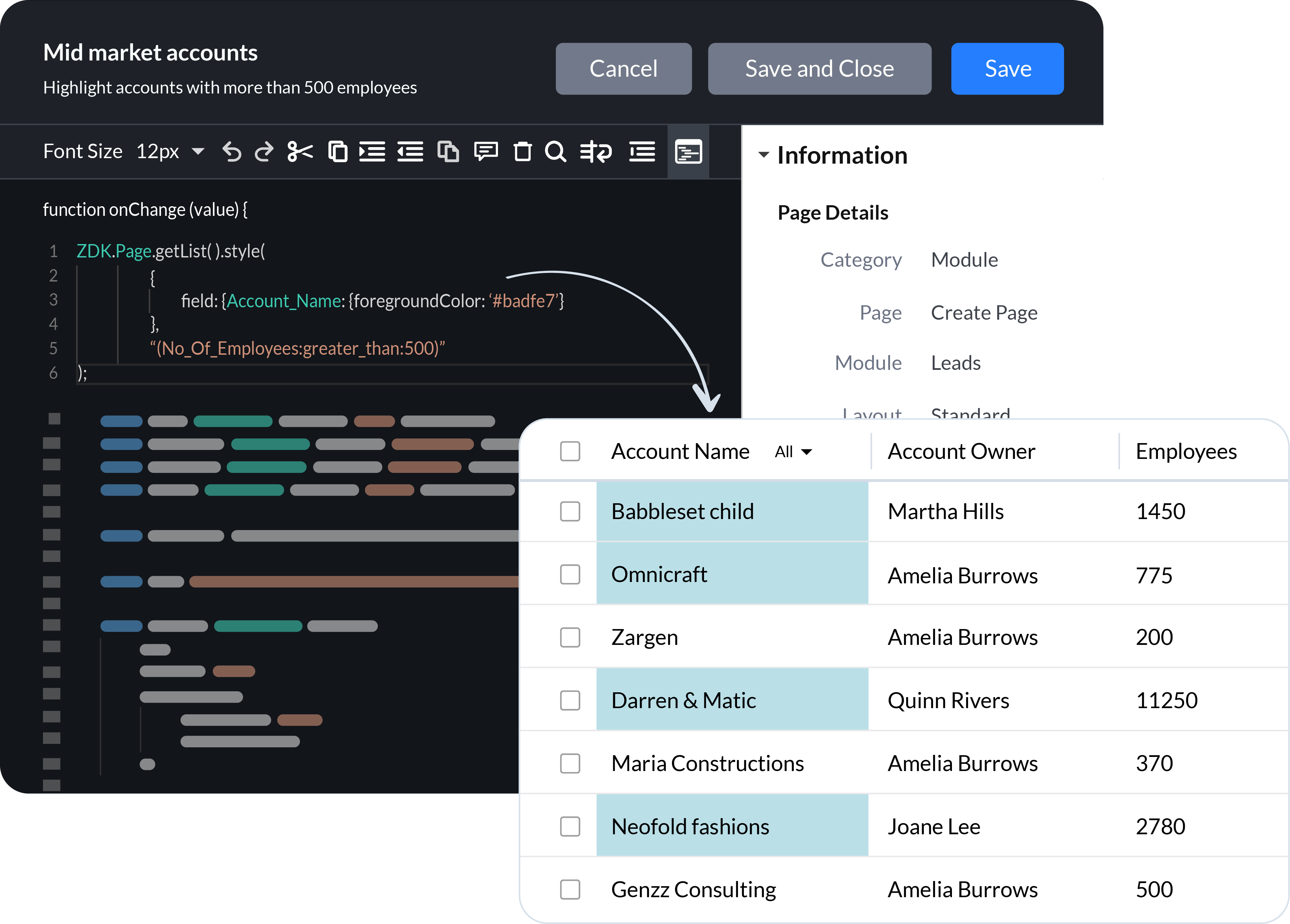
Now we're continuing the journey by adding client scripts, a pro-code tool that empowers businesses to build hyper-personalized, bespoke CRM experiences using the power of JavaScript. We've also introduced enhancements and new functionality across Zoho CRM to build on of the foundation of UX and CX we've built over the years.
Client Scripts
Sales
teams are successful when they are empowered to focus on what they do
best, closing deals and building long-term relationships with customers.
To these teams, CRM automation has become an indispensable part of their daily routine. Here's what we've added to help you automate your processes more effectively.
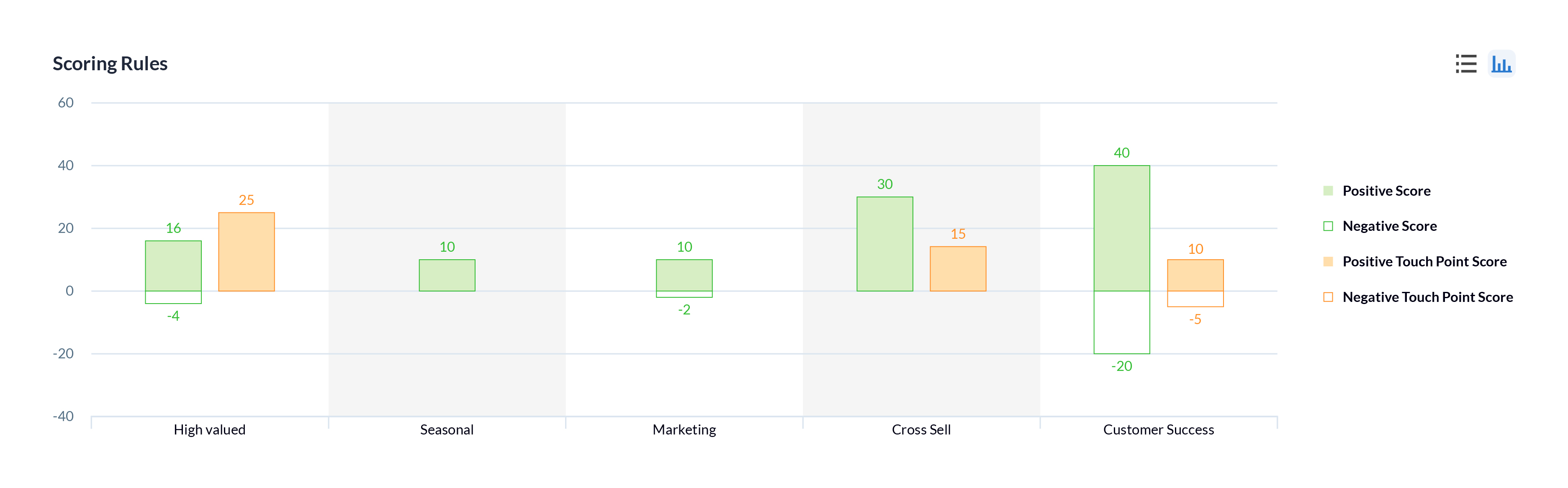
Multiple scoring rules
One of the best ways to help sales reps prioritize their prospects is through lead scoring. In Zoho CRM, you can now create multiple models that score prospects based on different factors and interactions according to the needs of the sales and other customer-facing teams in your business, to help prioritize the right prospects or customers.
Workflow failures and retries
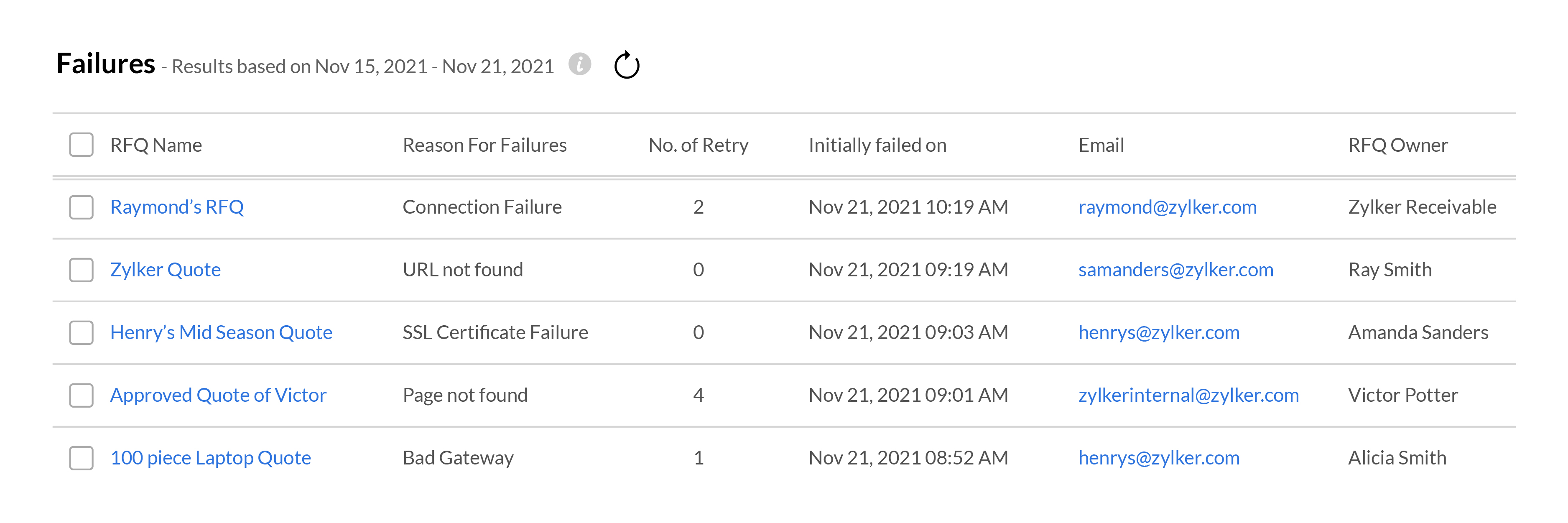
Your workflows need to run like clockwork in order for your sales team to focus on your customers. When something goes wrong with a workflow, it can disrupt the entire sales process, resulting in fewer wins and poor customer experience. To help address these situations effectively, Zoho CRM gives you in-depth
information about when and where your workflows fail, and all the
records that are affected. Your team can use this data to fix the
underlying issues and get your workflows up and running again.
Setting meaningful targets to measure performance against is key to maintaining the long-term health of your business. We're bringing some exciting changes to our forecasting and reporting systems, as well as introducing new components to help your business get granular when analyzing your business performance.
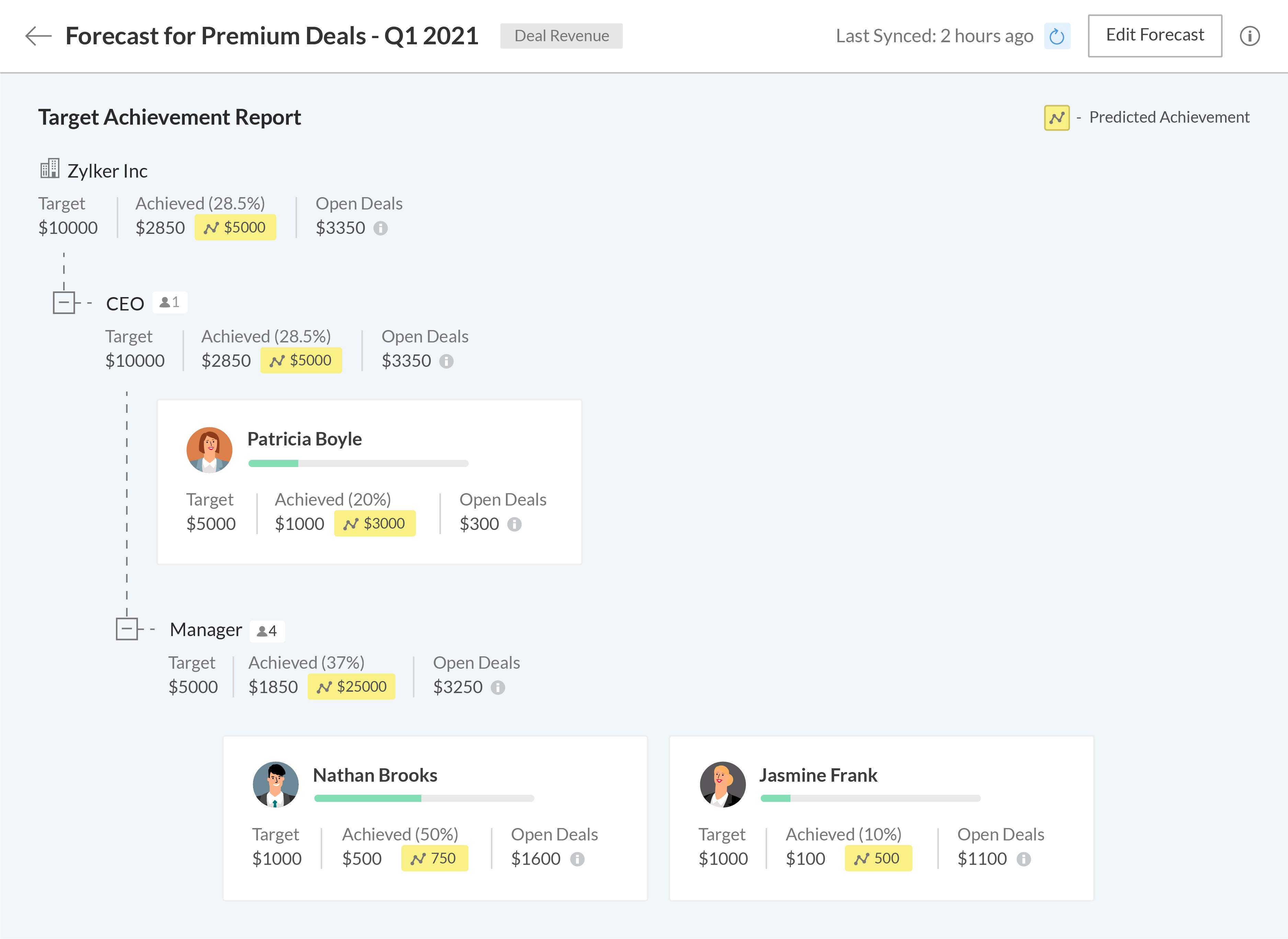
A new forecasting system built from the ground up
We've completely revamped our existing forecasting system to make it more robust and give more control to your business, allowing you to build multiple forecasts for different periods, leverage predictive AI to track where you'll stand at the end of your forecasting period, and drill down into the data to granularly compare your current performance with previous fiscal years.
The
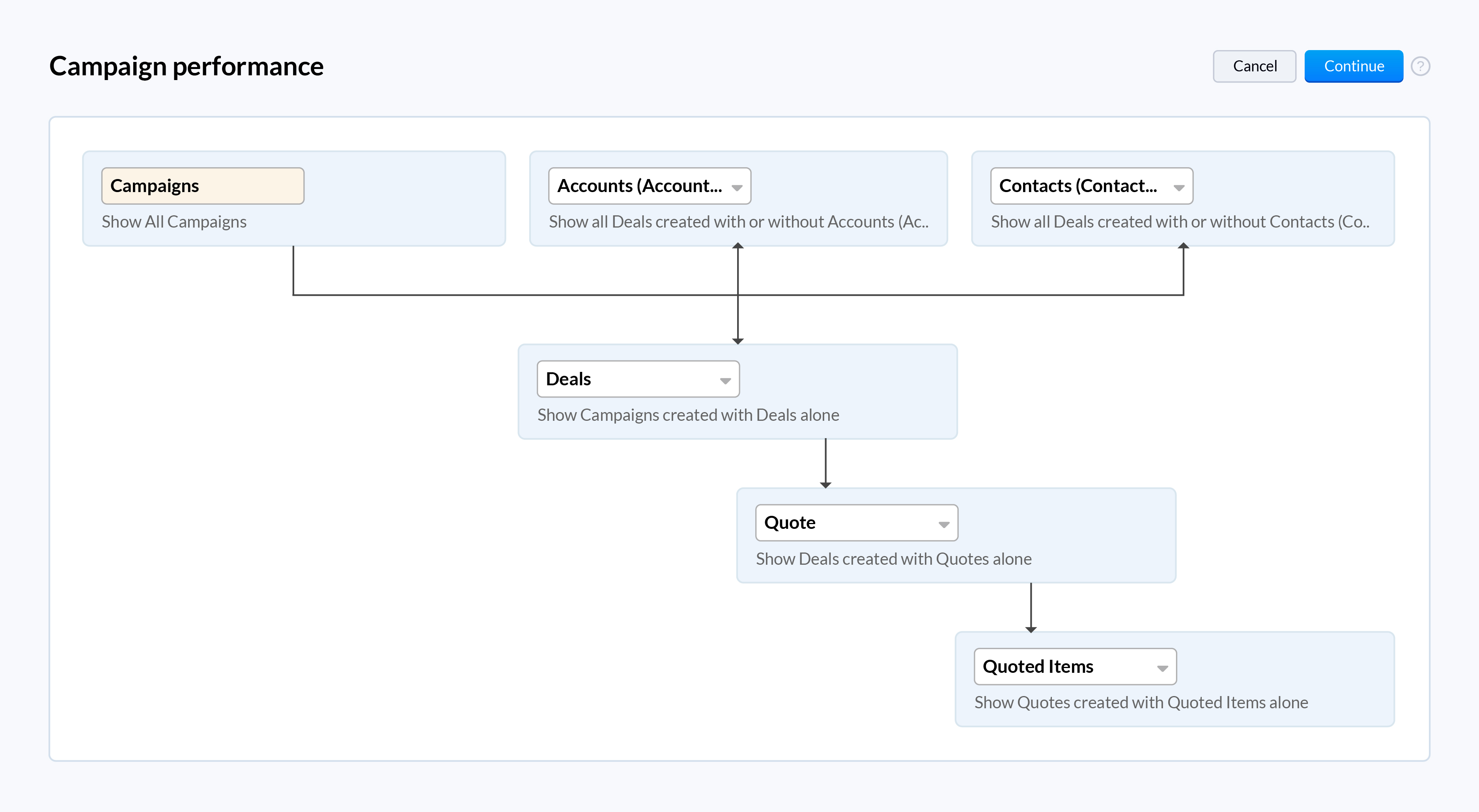
all-new Zoho CRM reports let you analyze, monitor, and track your
business health while also providing you with the ammunition you need to
make important decisions. The easy-to-use visual builder makes
generating complex and precise reports a breeze. Get more granular
access to your CRM data by viewing shared entries or unique entries in
two or more related modules with the new inclusive/exclusive
relationship tool. Expand your perspective and uncover deeper insights into your CRM data by joining multiple reports into one.
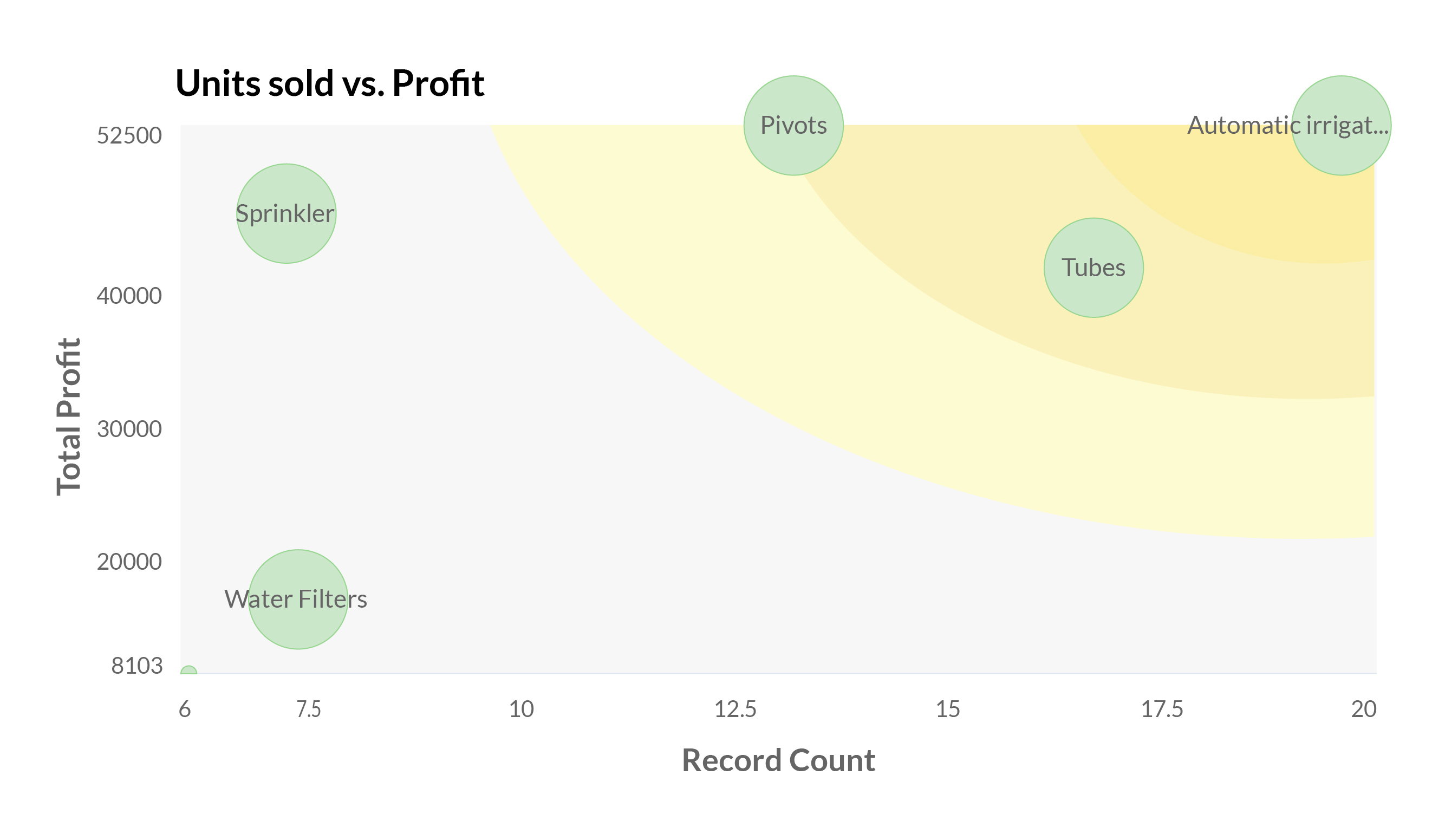
When you work with high volumes of sales data, it can often be difficult to visualize the relationship between two dimensions just by looking at raw data in standard two-dimensional charts like bar charts or pie charts. The new zone component displays your data in separate zones so it is easier to understand and analyze the areas that are doing well and the areas that need your attention.
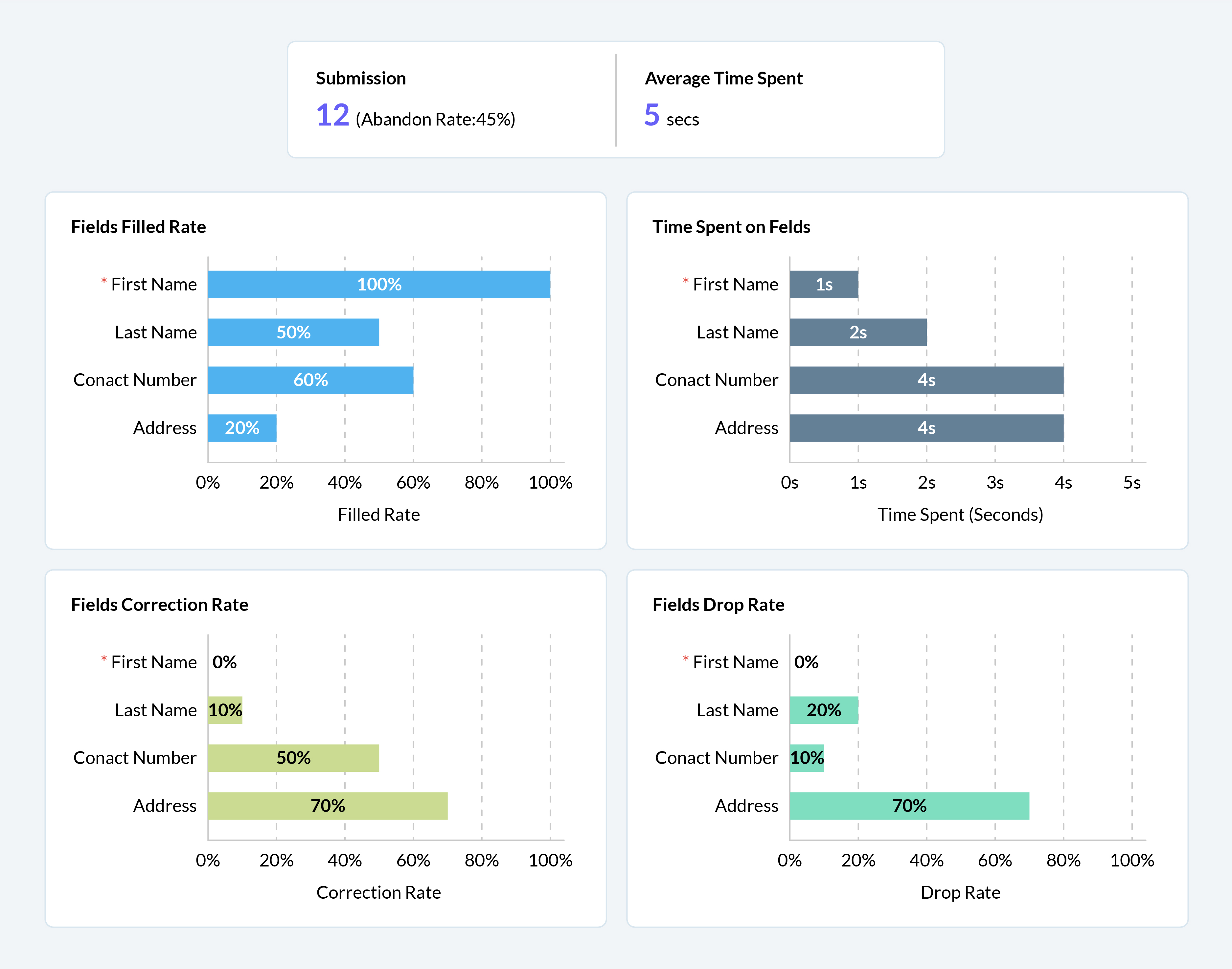
Your webforms are often the first point of interaction for prospects in their sales journey. It's vital to ensure that them submitting their information and being added to your sales cycle is as frictionless as possible. We've added a number of analytical charts to help your team measure the drop-off and abandon rates of your webforms across different devices to help you identify and eliminate friction points for your prospects.
We have some exciting updates to Zia, Zoho CRM's AI sales assistant to bring new levels of insight and customer understanding, to help you build more meaningful and personalized customer relationships.
Better recommendations for improved conversions
With the introduction of Zia's recommendations last year, we aimed to help businesses make the right pitch to their customers to maximize conversions. This year, we're adding the following capabilities to help your sales team get the most out of Zia's recommendations.
Reference customers: Zia will make recommendations to new customers based on the purchase patterns of existing customers with similar profiles and provide relevant reasoning for each recommendation.
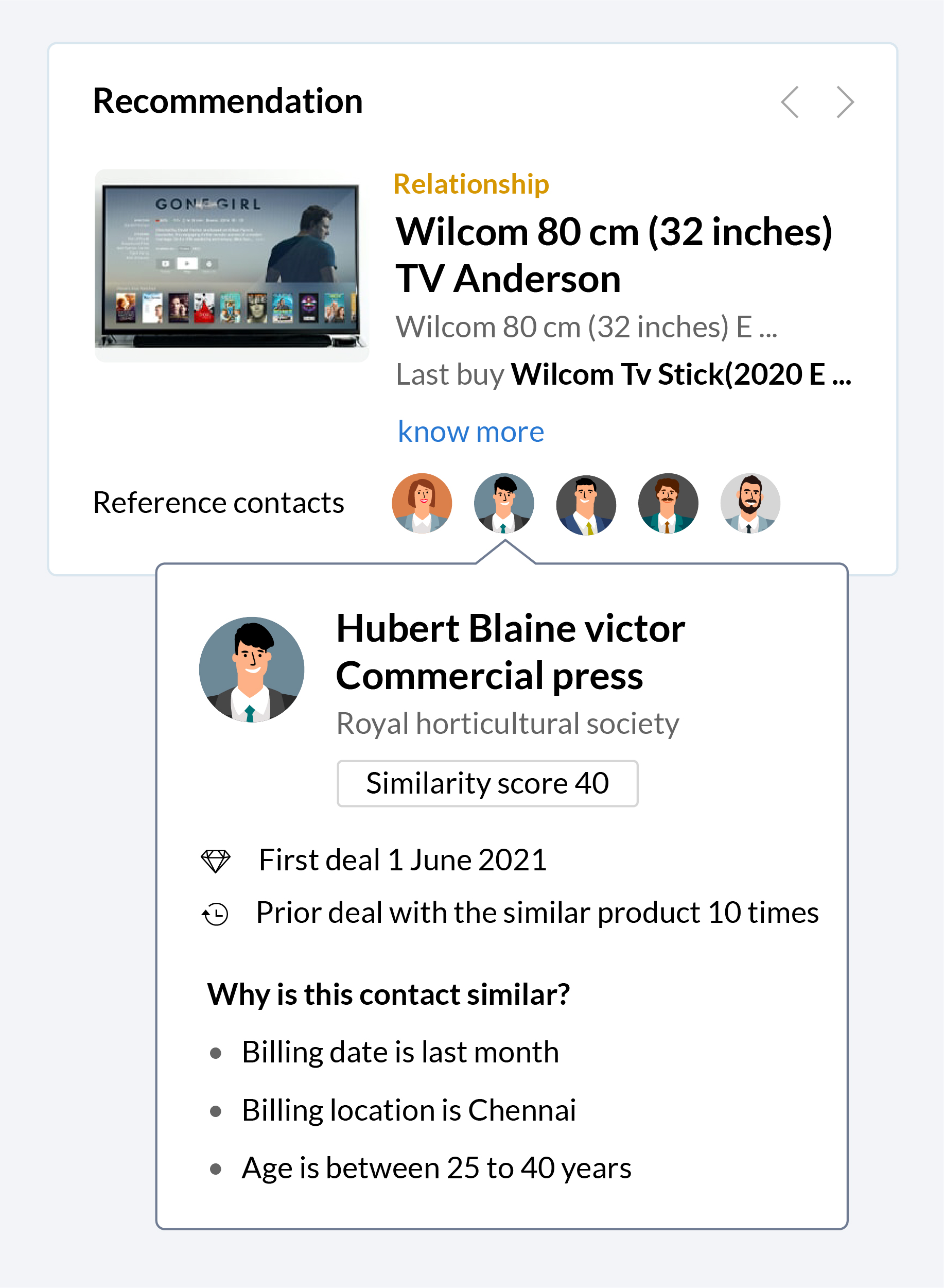
Recommendation notifications: Zia will collect information and automatically notify your sales reps when a recommendation is ready, making it easier for them to make pitches based on these recommendations when the time is right.
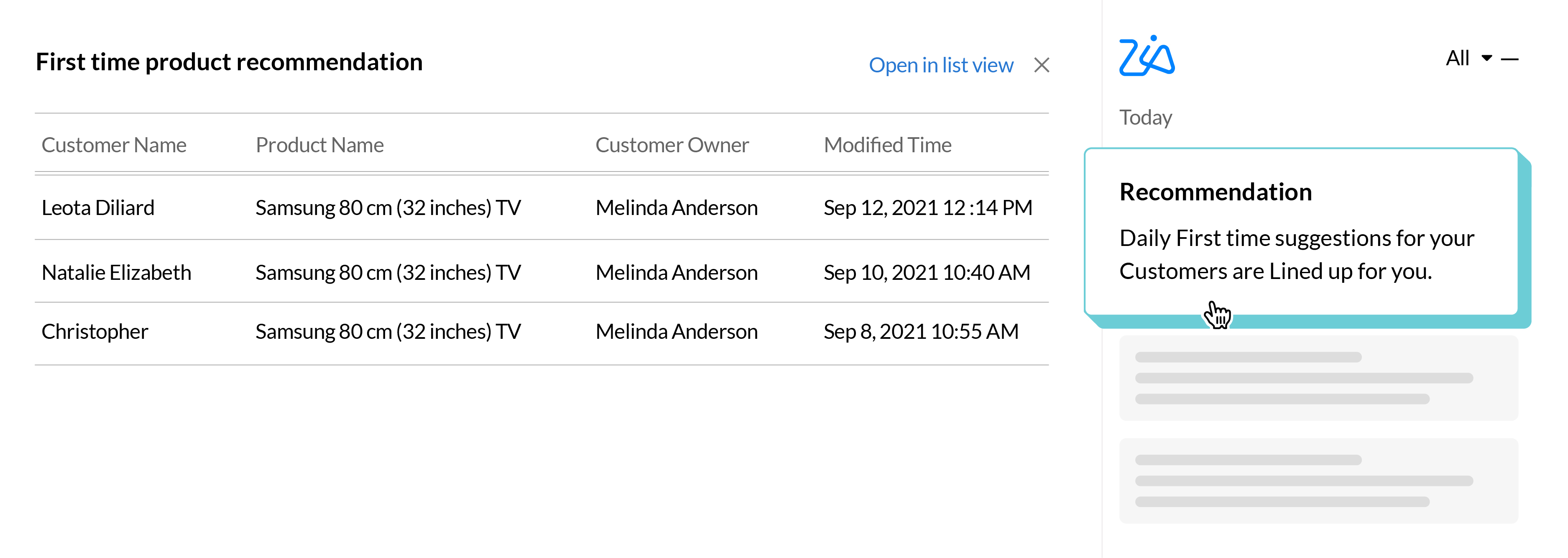
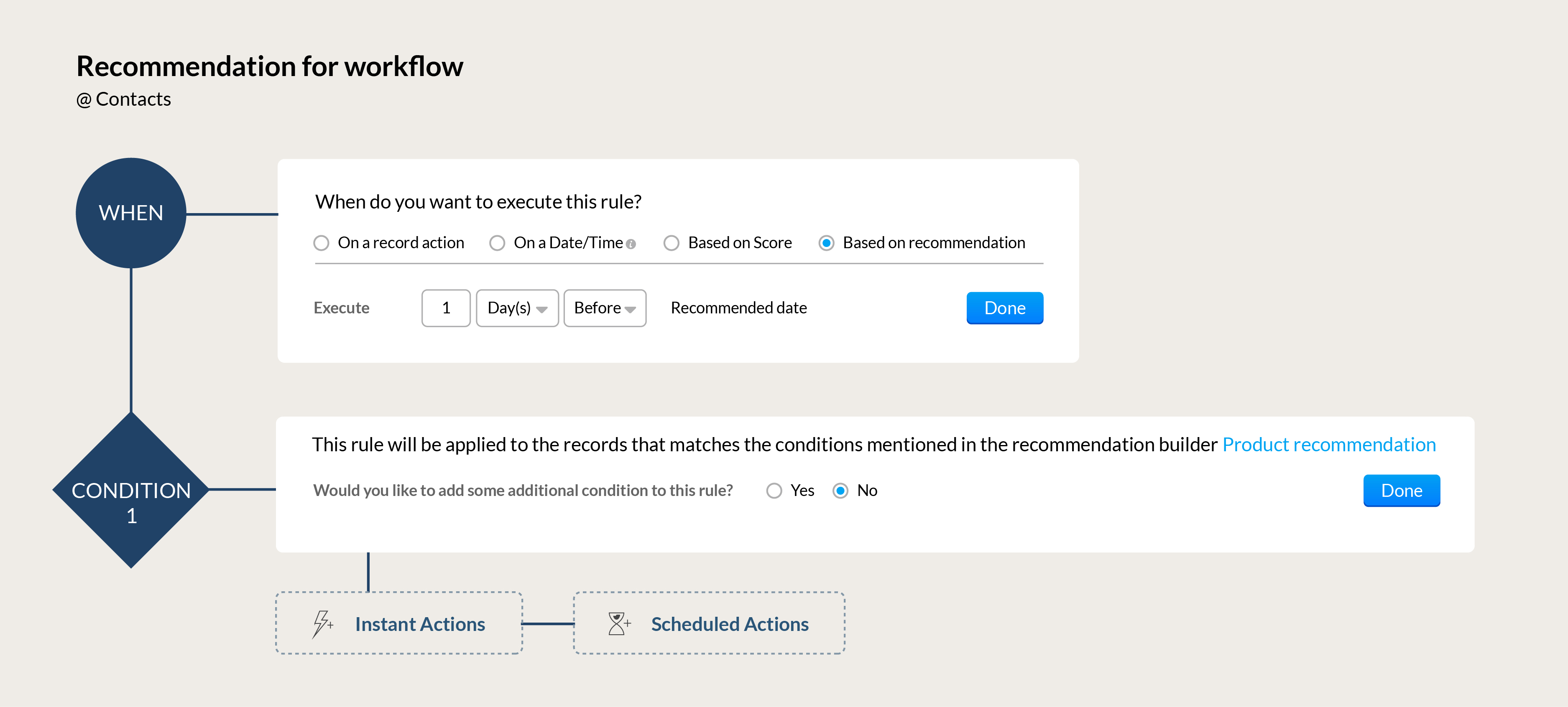
Automation for your recommendations: Build workflows that can automatically send the right communication to your customers based on Zia's recommendations. Send the perfect upsell offer to a high-value client whose membership renewal is coming up or send a re-engagement offer to a loyal customer who hasn't made a purchase in a while.
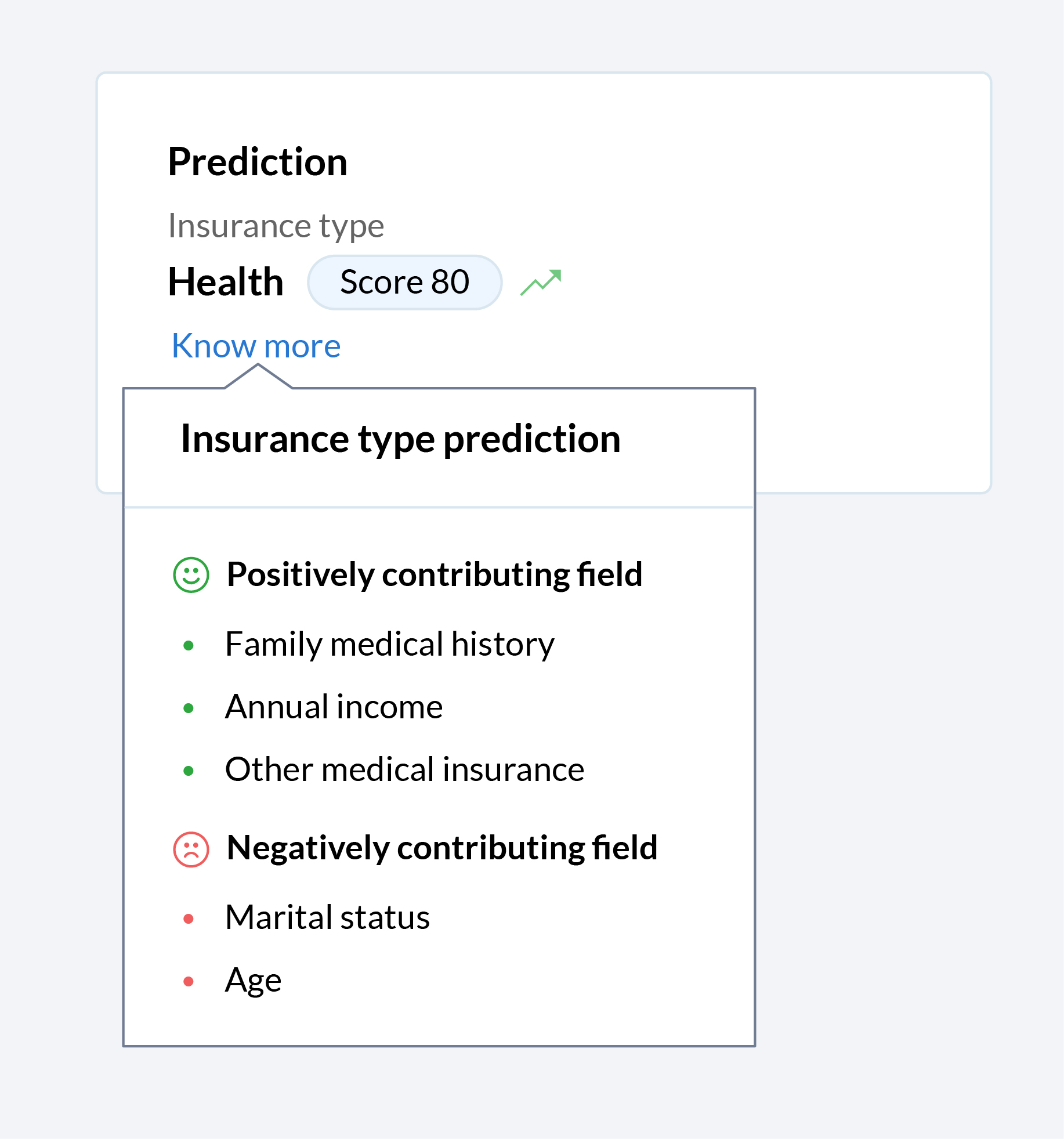
Let Zia tell you why
Zia offers a wide range of functions to make the life of your sales team easier. Zia predicts, recommends, assigns records, and more, but until now, your team only saw the end result. Now you can get a glimpse into the algorithm black box, so you can see what factors that contributed towards Zia making the recommendations, predictions, and assignments that your team relies on.
In today's hybrid working environment, it's vital for sales rep to maximize benefits across all channels of communication when engaging with prospects. To build on the robust omnichannel communication platform that's already part of the Zoho CRM system, we've introduced a number of enhancements across our email and telephony systems to help sales teams be more effective.
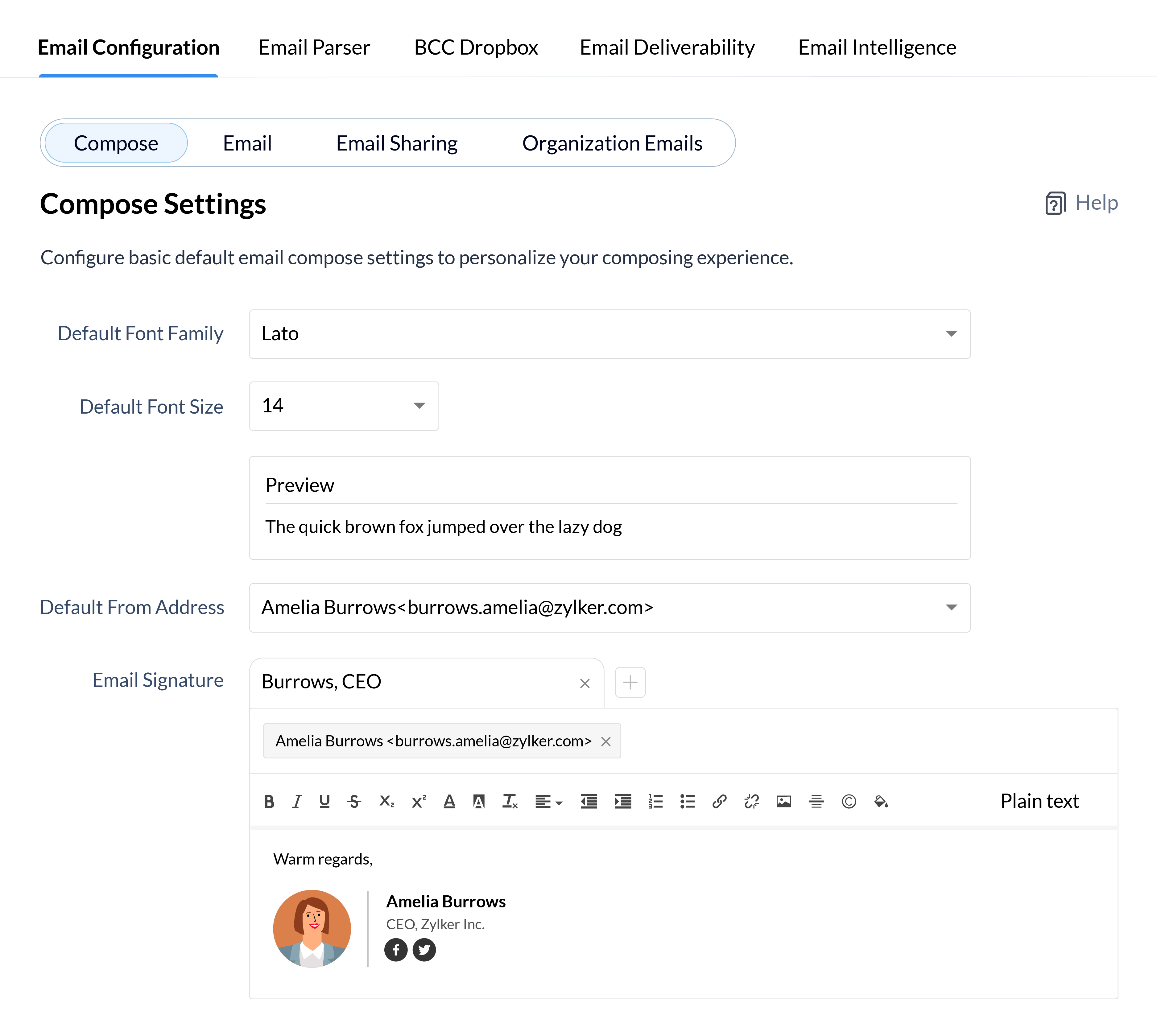
Add a personal touch to all your emails
Personalized emails are key to building long-term trust with your clients, so why not add a personal flair to all your emails to define your identity and establish your brand identity in the minds of your clients? Customize every aspect of your emails from font styles and sizes to your email signatures for your individual email address and all your email aliases.
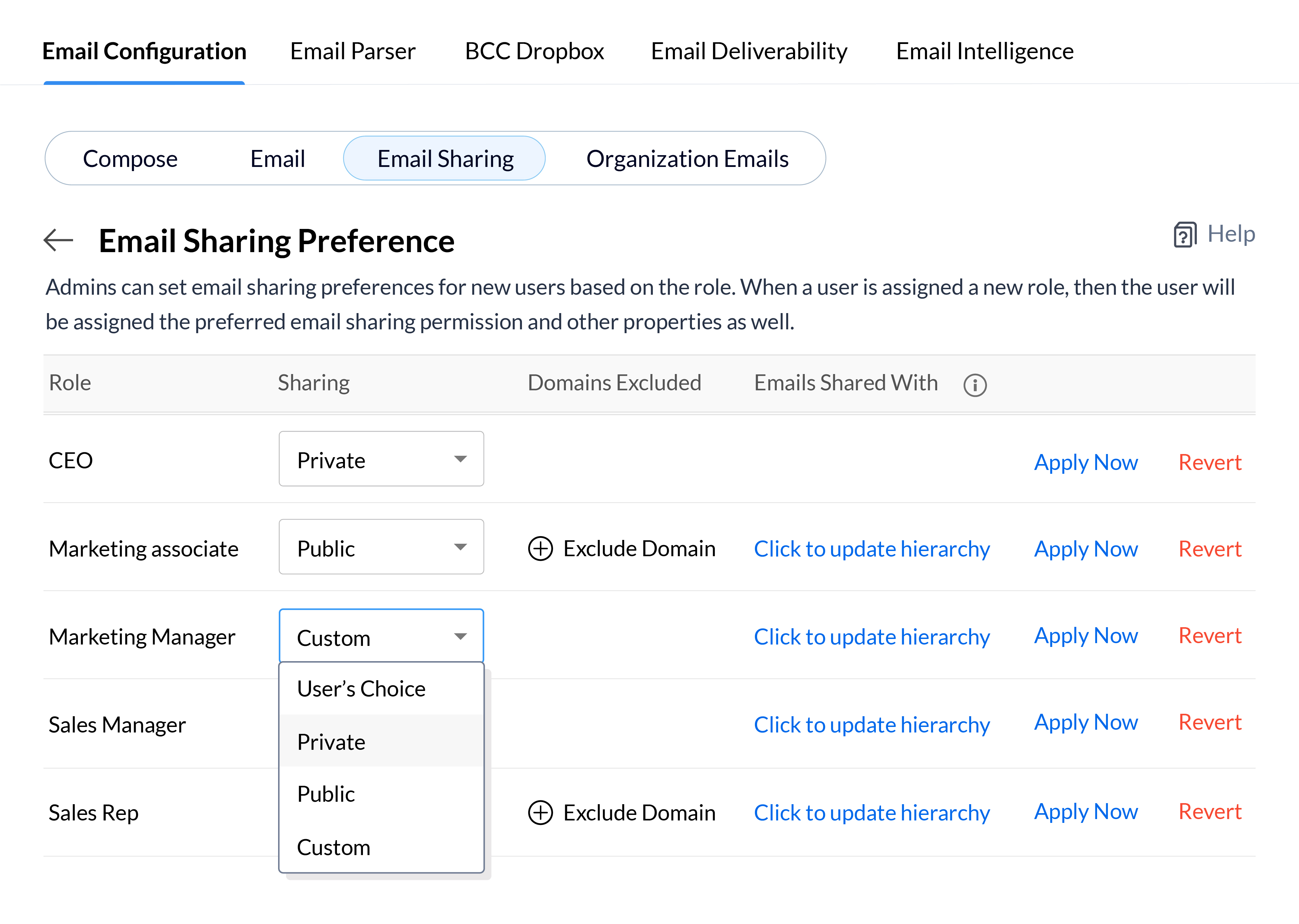
Depending on the roles of your CRM users and the nature of your email communications, you may want emails to be available to every user in your CRM, or keep them confidential and only available to a small group of key decision makers. Define your email sharing policy at the organizational level for each role and update the policy for users in bulk, so you can quickly set email sharing permissions for new employees or update them when users move to different roles in your CRM system.
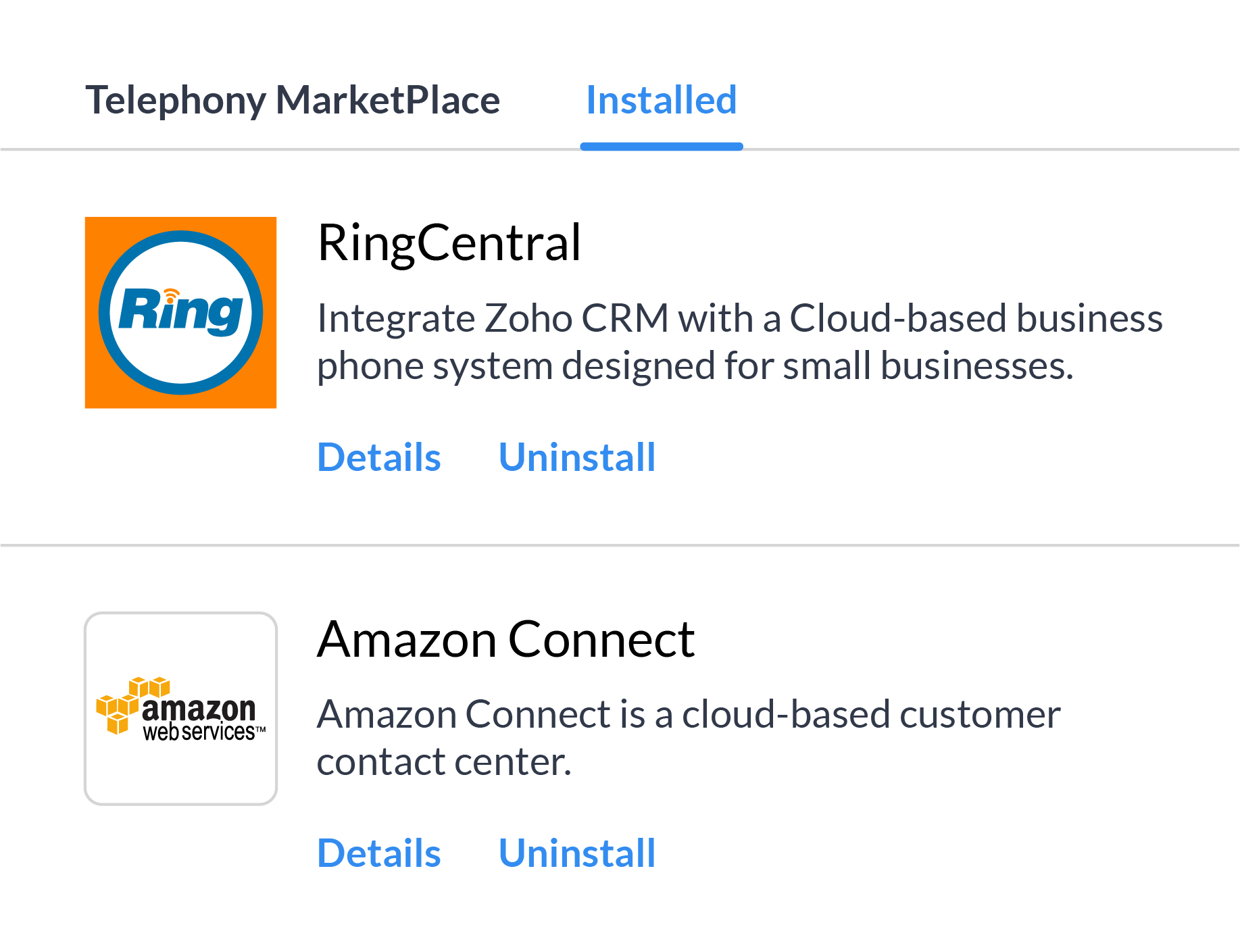
There's a whole range of reasons, from availability in all the countries you work in to cost of service, and more why it's not always feasible to depend on a single telephony vendor. Multi-vendor telephony support in Zoho CRM gives your business the flexibility to assign individuals or groups of users to different telephony systems and move users between different providers based on your business needs.
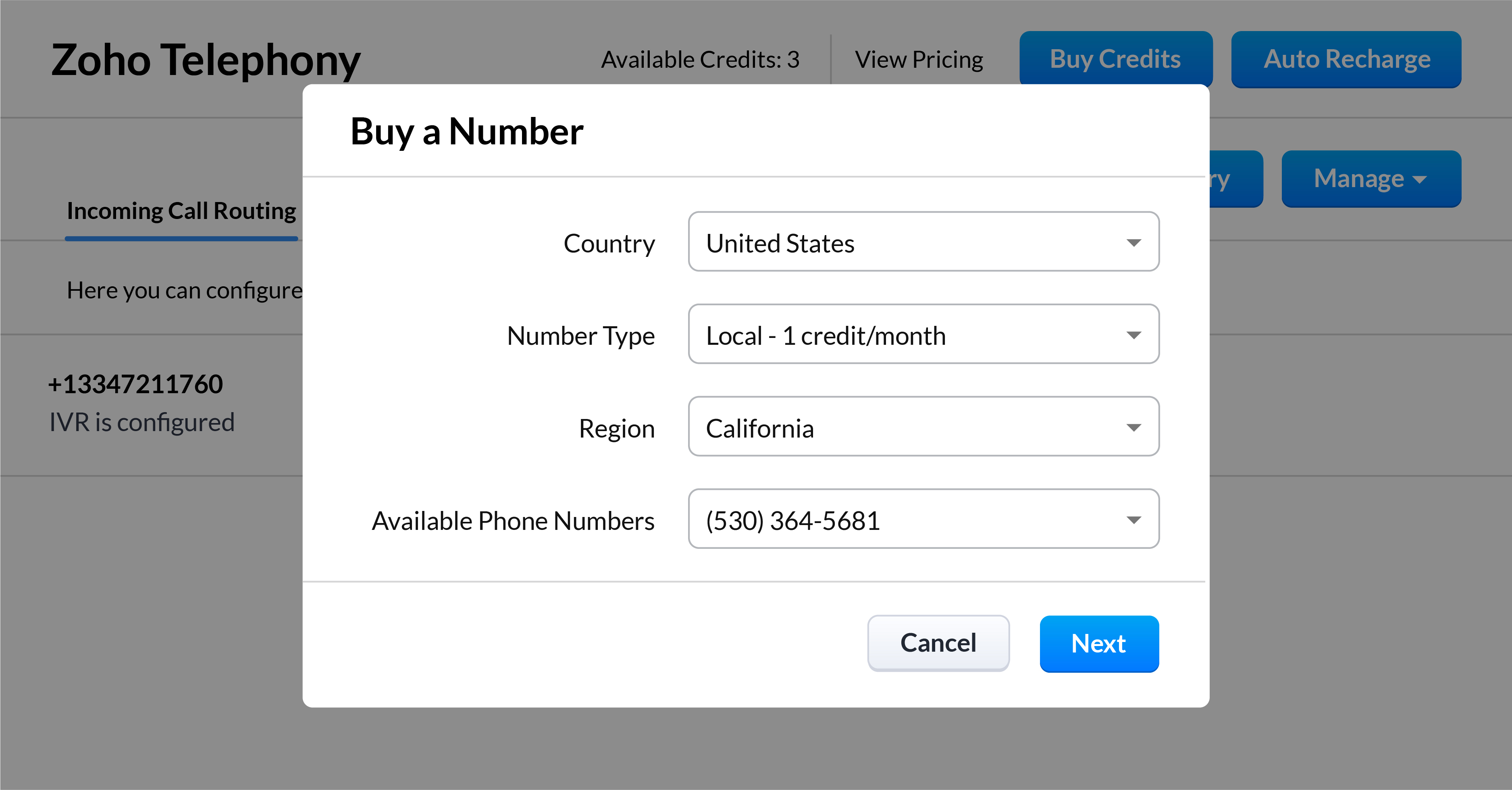
Kick off your call strategy with built-in telephony
With Zoho CRM's built-in telephony system, you don't have to worry about choosing and integrating a telephony provider. Purchase local or toll-free numbers for the users in your organization and assign unique outgoing numbers to help your sales reps build a personal connection with your customers.
*Feature will be opened in phases
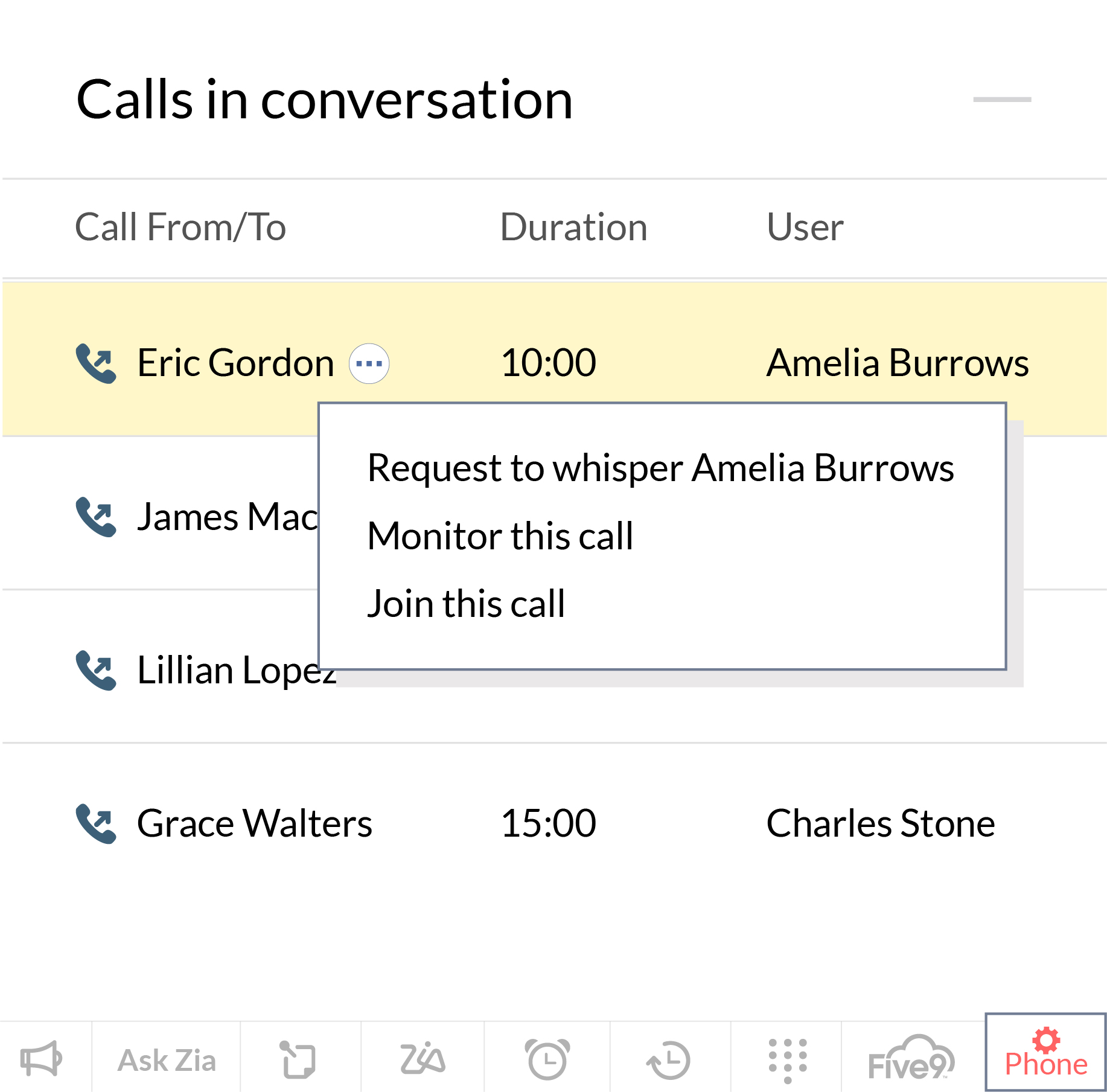
Streamline and manage your sales calls effectively
Our native integration allows managers to monitor, coach, and help their reps to get better at sales calls. Zoho CRM allows them to keep an eye on how their reps are performing in their active calls, and manage calls that are in the queue waiting. Sales managers can also coach new sales reps as they progress through a call and jump in directly to take the lead when the situation calls for it.
*Feature will be opened in phases
User Experience
This has long been an overlooked aspect of CRM solutions. In the pursuit of robust functionality, attractive prices, and strong market presence, businesses often overlook the experience these CRM solutions offer to their daily users. With the launch of Canvas, we wanted to help businesses improve the experience for daily users of Zoho CRM, and we're now introducing some intuitive functionality to make the UX even richer.
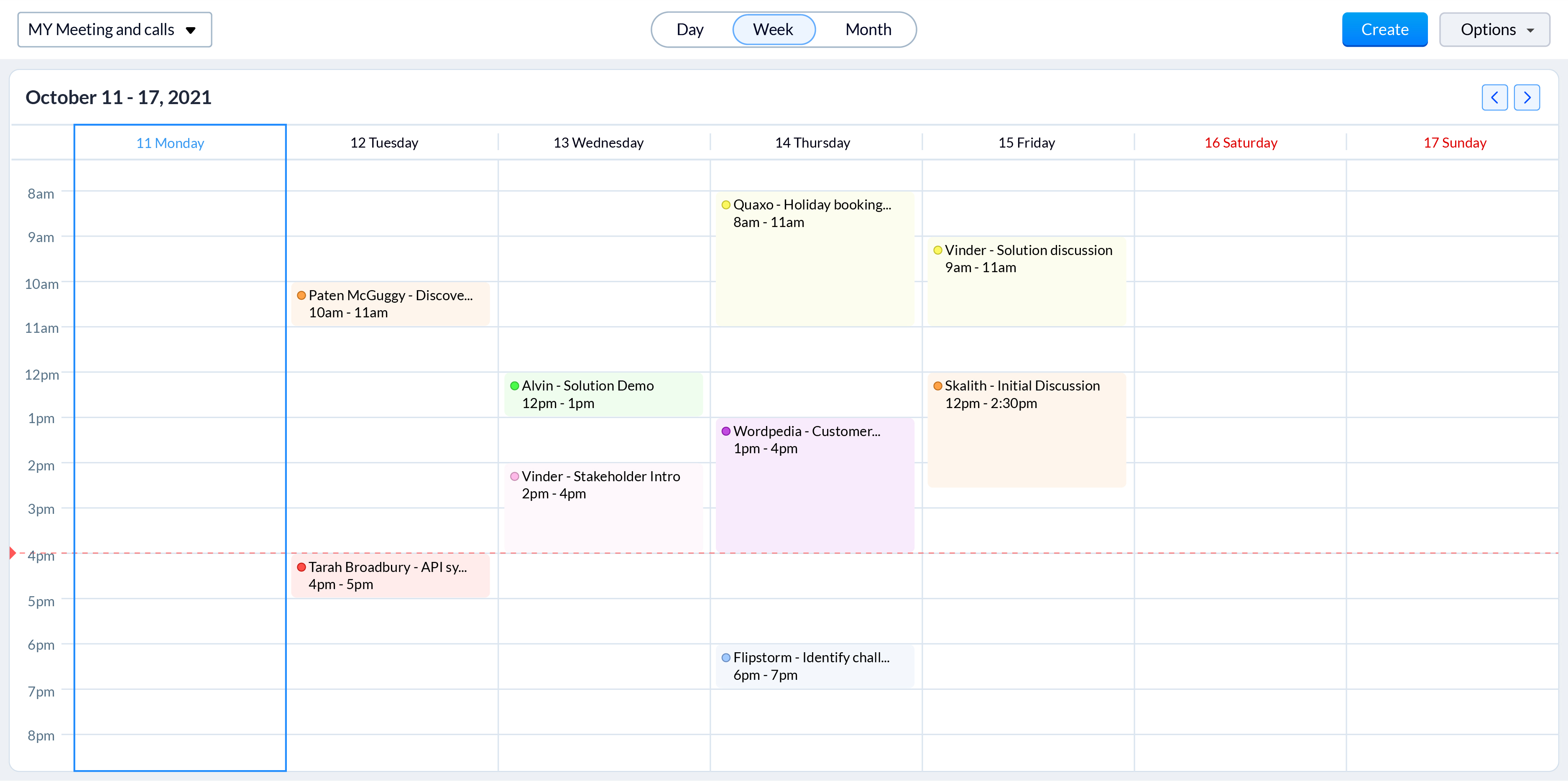
Color-coded meetings in calendars
Online meetings have become an integral part of today's hybrid working model. With sales reps engaging with prospects through online meetings more than ever, it is vital to offer them an easy way to track and prepare for them. Zoho CRM now allows sales reps to color code different meetings based on factors that are important to your business processes, such as whether they're online or in person. Now, even a quick glance at their calendar gives reps a clearer idea of all their upcoming meetings and what they need to prepare for.
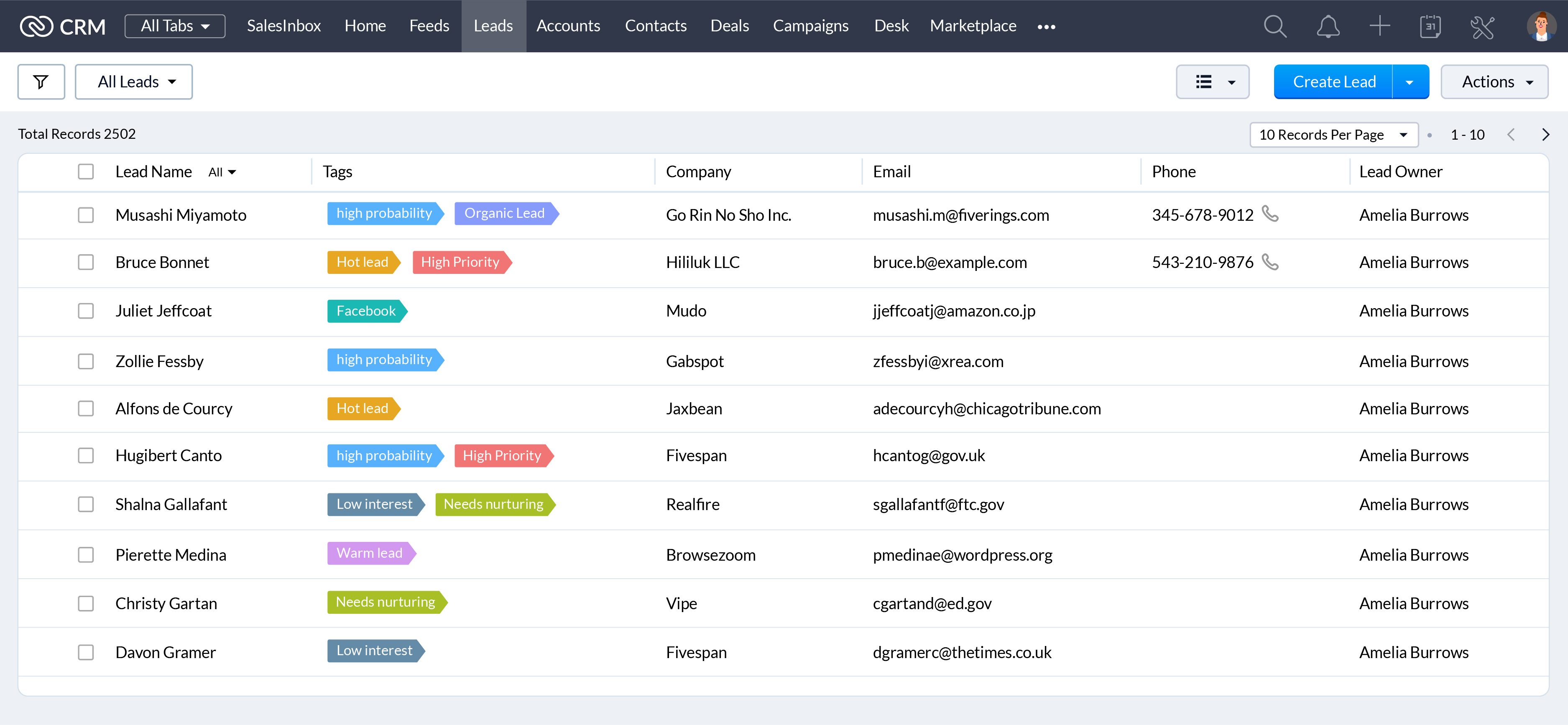
When they're working with hundreds of records everyday, a unique visual identifier makes it easier for your sales reps to search, categorize, prioritize, and segment records efficiently. Associate unique colors with your tags so your sales reps can see details like priority, deal state, associated departments, and more at a glance.
CRM administrators have one of the most challenging jobs: keeping your CRM system running like a well-oiled machine. We're announcing some exciting updates to make their jobs easier with the winter 2021 release.
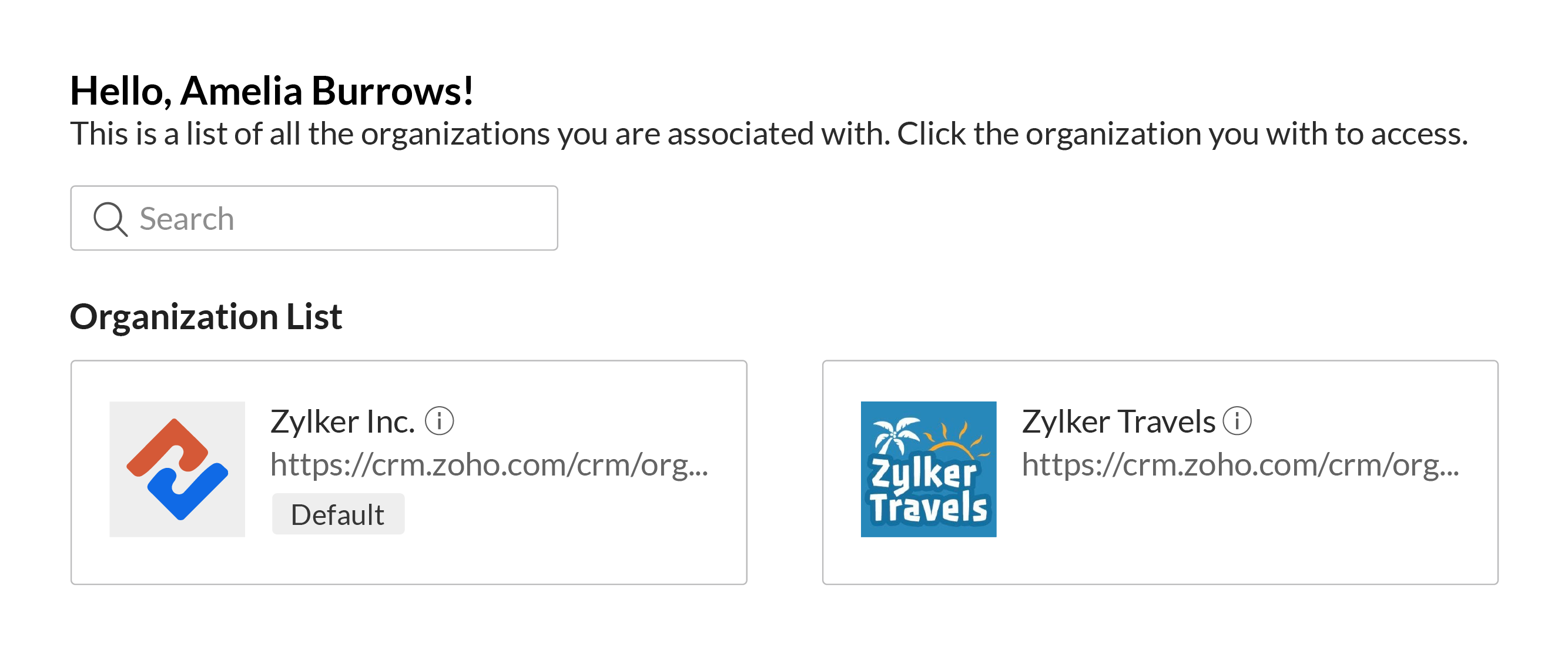
Access multiple CRM accounts with a common set of credentials
You can associate a user with multiple CRM accounts to allow business owners, upper management, and decision makers to manage multiple businesses or business units with ease. Users can switch between accounts quickly to make it easier to access key business data to help them understand growth and derive insights which can be used to prepare reports, agendas, and ideas for future planning, all with a single set of login credentials.
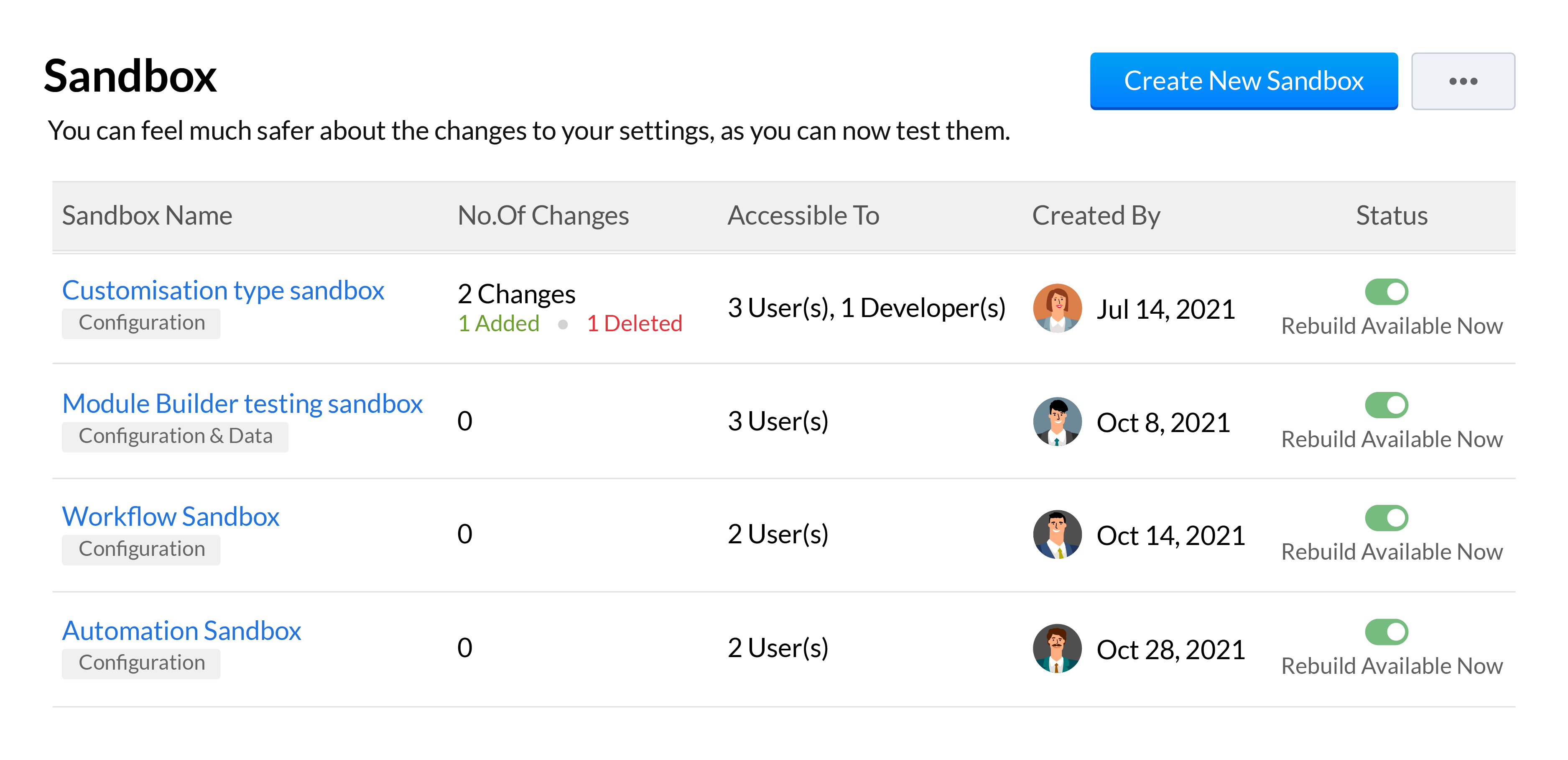
Sandboxes are essential in a CRM for testing and pushing error-free customizations to your live production account. We've added a number of features to our existing sandbox to help your developers be more effective when building and testing out customizations. This includes the ability to run multiple sandboxes, deploy all or only some settings, import sample or partial production data, and a unified deployment log to track your changes from all your sandboxes.
We'll be going over all these features across 3 overview webinars, which you can register for at the below links:
Webinar 1 | Date: 21/01/22 - This webinar will cover multiple sandbox, email sharing preferences, multi-organization support and retry support for workflow failures.
Webinar 2 | Date: 28/01/22 - This webinar will cover the new forecasting and reports system along with the new analytical components and improvements made to Zia.
That wraps up our Winter
'21 announcement and we look forward to all your thoughts and feedback
on these features and how they can be made better.
Happy selling,
Access your files securely from anywhere

Zoho Developer Community





Topic Participants
Shashank M K
Sticky Posts
Presenting ABM for Zoho CRM: Expand and retain your customers with precision
Picture this scenario: You're a growing SaaS company ready to launch a powerful business suite, and are looking to gain traction and momentum. But as a business with a tight budget, you know acquiring new customers is slow, expensive, and often deliversGood news! Calendar in Zoho CRM gets a face lift
Dear Customers, We are delighted to unveil the revamped calendar UI in Zoho CRM. With a complete visual overhaul aligned with CRM for Everyone, the calendar now offers a more intuitive and flexible scheduling experience. What’s new? Distinguish activitiesCreate and populate a record in an instant: Introducing zero-shot field prompting to Zia's ICR
A couple of months ago, we upgraded our in-house AI image detection and validation tool, Zia Vision, with intelligent character recognition (ICR). By training Zia with sample images, you could create and enrich CRM records with data extracted from standardIn-person ZUG Meetups for Real Estate Professionals - US Q1 2026
The Real Estate Zoho User Group is going on a multi-city, in-person meetup tour across the US, and we’d love to see you there! These meetups are a great opportunity to: Connect with fellow real estate professionals using Zoho Share challenges and discoverNimble enhancements to WhatsApp for Business integration in Zoho CRM: Enjoy context and clarity in business messaging
Dear Customers, We hope you're well! WhatsApp for business is a renowned business messaging platform that takes your business closer to your customers; it gives your business the power of personalized outreach. Using the WhatsApp for Business integration
Zoho TeamInbox Resources
Zoho CRM Plus Resources
Zoho Books Resources
Zoho Subscriptions Resources
Zoho Projects Resources
Zoho Sprints Resources
Qntrl Resources
Zoho Creator Resources
Zoho CRM Resources
Design. Discuss. Deliver.
Zoho Show Resources

Get Started. Write Away!
Writer is a powerful online word processor, designed for collaborative work.
-
オンラインヘルプ
-
Webセミナー
-
機能活用動画
-
よくある質問
-
Ebook
-
-
Zoho Campaigns
- Zoho サービスのWebセミナー
その他のサービス コンテンツ
Nederlandse Hulpbronnen

ご検討中の方
Recent Topics
Piss poor service in Support in Domains and email
Srijith Narayanan B contacted me today. Very pleasant fellow. Just didn't want to tell him how bad your support service is. You help the person, but you leave before we can finish the next stage. Which causes a lot of frustration. It's been 8 days nowZoho Mail android app update: Block & reject future emails, Report phishing, Spam alerts, Suspicious URL detection
Hello everyone! In the most recent Zoho Mail Android app update, we have brought in support for the following features: Block & reject future emails Report Phishing Spam alerts in the mail details screen. Suspicious URL detection. Block & reject futureZohomail does not support additional fields in mailto links
Hello, I set up Zohomail as default composer in Firefox according to manual here: https://www.zoho.com/mail/help/defaultcomposer.html#alink2 Later, I wanted to use this functionality to answer in a Linux mailing list thread using mailto link: mailto:xxxxx@kernel.org?In-Reply-To=%3C727o0521-q24p-s0qq-66n0-sn436rpqqr1p@example.com%3E&Cc=xxxxx%example.org&Subject=Re%3A%20%5BPATCH%20v2%28%29Email address for forwarding is not saving and there's no confirmation ema
Steps to reproduce: 1. Enter my forward email in the email forward section of the account 2. Click save 3. See a notification stating saved successfully 4. Refresh the page, no forward email is saved 5. No email confirmation received at the forwardingThis domain is not allowed to add in Zoho. Please contact support-as@zohocorp.com for further details
This is the error i keep getting when trying to use my Zoho Domain Mail. This domain is not allowed to add in Zoho. Please contact support-as@zohocorp.com for further details Find attached. I hope this can be resolved very quickly so i can go on and makeAuto CC - Moving Departments
We have Auto CC e-mail replies to your support mailbox enabled. We have two departments: Helpdesk (helpdesk@domain.com) Delivery (delivery@domain.com) If we create a Helpdesk ticket, and reply, replies are CC'd to helpdesk@domain.com (OK) We then moveUnable to see free plan option
Hello Zoho Support Team, I hope you are doing well. I am trying to sign up for Zoho Mail, but I am unable to see the option for the free plan. Could you please guide me on how I can access or activate the free plan? Thank you for your assistance.Sorten the domain of zoho mail ids
I recently created zoho mail id and am quite excited with the features. But one issue ig nobody wanna type this big zohoaccounts.com I mean silly bold Suggestion zmail.com (sound gmail) (attraction) or some genz words looks coolWeekly Tips : Customize your Zoho Mail Notifications
In a professional context, email communication remains one of the most crucial channels for staying connected and managing workflows. Keeping track of your emails, task updates, or important announcements can be overwhelming—especially if you are jugglingThe attendees will now be redirected to the landing webpage when they exit the webinar, set by the organizer.
Hello All, In the latest version of the Zoho Meeting iOS mobile app (v1.3.16), we have brought in the below enhancements: Post Webinar Re-direction Revamped exit UI for Webinar Post Webinar Re-direction: The attendees will now be redirected to the550-5.1.1 The email account that you tried to reach does not exist
Hi, I made sure my domain, SPF, MX records, and DKIM are all verified. I've entered the information correctly in cPanel and Email Routing is set to Remote Mail Exchanger. I am able to send, but unable to receive emails. When I sent a test reply to it, I get the following error: The response was: 550-5.1.1 The email account that you tried to reach does not exist. Please try 550-5.1.1 double-checking the recipient's email address for typos or 550-5.1.1 unnecessary spaces. Learn more at 550 5.1.1 https://support.google.com/mail/?p=NoSuchUserDownload API file contents from browser
Hi Team - is there something being planned to be able to trigger file downloads from the browser via a deluge script? i.e. retrieve a file via API, trigger the file download directly from the browser. Or... using the convertToPdf function (https://www.zoho.com/deluge/help/functions/file/convert-to-pdf.html)When using "locations" in zoho books, can you keep the two locations totally separate from each other?
I am looking to add a location but I don't want to intermingle the banking or other accounts. I want that to be like two separate independent branches that use different banking accounts, accounts payable, and accounts receivable. The people who are inAdding a Channel to SalesIQ
I have a client that currently uses Zoho CRM and Zoho Desk. They would like a live chat to place on their website that has a mobile app and chat bots (something like SalesIQ). However, they would also like to have all this work over SMS as well. Does the SalesIQ API allow this? Can I add visitors without them being a visitor on a website? Thanks! Bryan RedeagleZoho Flow Needs to Embrace AI Agent Protocols to Stay Competitive
Zoho Flow has long been a reliable platform for automating workflows and integrating various applications. However, in the rapidly evolving landscape of AI-driven automation, it risks falling behind competitors like n8n, which are pioneering advancementsImportant Features Missing
Hey all I love linkthread, but i am missing some important features. I want to be able to include my Google Tag Manager. I have all the important stuff in my GTM Container: Facebook Pixel, LinkIn Pixel, Zoho Pagesense and so on. So i am able to do retargetingZoho SignForms: Prefill parameters with spaces render as “+” in the document (even when using %20)
Hello Zoho Sign team, we are using SignForms with prefill parameters passed via URL. Spaces in parameter values are being rendered as “+” in the finalized document—even when we URL-encode spaces as %20. This is critical for us because we prefill addressesCurrency selector (based on variable) usage in comparsion
Hi, I've developed a currency selector based on the following topic, and it's working well in pivot tables and charts: https://help.zoho.com/portal/en/community/topic/how-can-i-allow-my-users-to-choose-a-currency-for-the-dashboard I also have a comparisonCustomize Column in Projects - Default View for Template?
Is there a way to have the columns you'd like to see added to a template? I want my customized columns to show up every single time I create a project from that template. It appears I can customize them in the template but when I create the project they do not transfer over. Template: See below how the columns in order are : Task, Owner, Status, Assigned, Website URL, Blog H1..etc. When I create a project from that same template it comes out as: Task, Owner, Status, Tags, Start Date, End Date, etcAsk the Experts 24: Analytics, data administration, and mobile experience with Zoho Desk
Hello Everyone! Welcome back to the Ask the Experts(ATE) series! We were so focused on our Autumn 2025 release that we didn't host an ATE session last month. In this month's ATE, we'd like to expand our areas for discussion: we'd like to listen to yourMulti-Page Forms in Zoho Creator!
Let’s make long applications easier to handle by dividing them into pages, adding a progress bar, and guiding users step by step through complex data entry. This would be a total game-changer for the user experience and could significantly boost completionEmail login error
Login successfully but email page errorShared Mailboxes Disappeared
Zoho Mail users in our company haven't been able to see their Shared Mailboxes for the past few hours. I've checked with App and Web Access, but they can't access them. When I send emails to their addresses, I get no error messages. They're still visibleRemote Server is misconfigured
Dear Team, I am unable to use email id as remote server is misconfigured. It would be really great if you could help on this and get this resolved. Thanks & Regard Rohit Guptawhy cant i access my email account. it keeps asking me for reverifiying my account by entering my password.
I cant access my account. it keeps asking me for reverifcaton by entering my password. once its entered it asks for it over and over.Free webinar alert on October 16 - Less Complexity, More Security: Workplace + Directory
Hello Zoho Workplace Community! Security and productivity shouldn't be at odds—and with Zoho, they're not. Discover how Zoho Workplace + Directory delivers seamless collaboration with enterprise-grade security, all in one integrated ecosystem. Join ourWorkdrive and ChatGPT Team Synced Connectors
Hi, we want to be able to integrate Zoho Workdrive with OpenAI’s ChatGPT Team plan. Google Drive and OneDrive both offer this, zoho please catch up asap. We dont want to have to put our company files in google drive, we want to allow chatgpt Team editionAlias Name (on items) use case in Zoho inventory
Hey, Hope everyone is well. Wondering if anyone can shed some light on the use case of Alias Names on Products in Zoho Inventory? Cheers, ChrisUpdating an Invoice Line Item's Discount Account via API Call / Deluge Custom Function
I need help updating an invoice line item's discount account via API. Below is a screenshot of the line item field I am referring to. Now the field to the left of the highlighted field (discount account) is the sales income account. I am able to modifySend e-mail with attachments
Dear Zoho, How is that possible in Zoho Flow to send an e-mail with attachment? Just a simple example: Zoho Flow checks my Zoho mails and if the conditions starts the trigger then I would like to send an email with the original email's attachment. Any idea? BR, AdamHow to I get checkboxes on a subform to update via deluge
Hello, would someone be able to tell me what I'm doing wrong here? I am trying to take the contents of a Deals subform and add them to an invoice then update the checkbox on each row so that 'add to invoice' is unticked and 'invoiced' is ticked. The outputUnified customer portal login
As I'm a Zoho One subscriber I can provide my customers with portal access to many of the Zoho apps. However, the customer must have a separate login for each app, which may be difficult for them to manage and frustrating as all they understand is thatZoho Projects - Task Owner filter at Project level
Hi Projects Team, The feature requests I would like to raise is the ability to create a custom view at the project level for projects with tasks owned by a user or users. For example "Ashley's Projects" custom view might contain a list of project in whichCadences
I have just started using Cadences for follow-up up email pipeline. Is it just me or do you find the functionality very basic? For example, it will tell me (if I go looking for it) if someone has replied to a follow-up and been unenrolled; but it won'tCustom Fonts in Zoho CRM Template Builder
Hi, I am currently creating a new template for our quotes using the Zoho CRM template builder. However, I noticed that there is no option to add custom fonts to the template builder. It would greatly enhance the flexibility and branding capabilities ifWould be really awesome to have Created Time and Modified Time showing for custom functions list
It would be SO HELPFUL to be able to sort custom functions by created time/ modified time. Also seeing a created by/ modified by with the little profile picture would be supremely helpful as well. Just really hard sometimes to find a function you wereTicket Export Does Not Include Ticket Threads
Dear Zoho Desk Support Team, I hope you’re doing well. I would like to report an issue regarding the ticket export functionality in Zoho Desk. Currently, when exporting tickets, the ticket threads or conversation history are not included — only the ticketPayments made notification
This is a really wonderful feature but we can only use it for about 50% of payments made & have to revert to sending statements which is a real chore. Credits applied to the bills paid in the notification aren't included & this causes great confusion in the accounts receivable departments. Please, please add this required feature asap ! .....Ability to add VAT to Retainer Invoices
Hello, I've had a telephone conversation a month ago with Dinesh on this topic and my request to allow for the addition of VAT on Retainer Invoices. It's currently not possible to add VAT to Retainer Invoices and it was mutually agreed that there is absolutely no reason why there shouldn't be, especially as TAX LAW makes VAT mandatory on each invoice in Europe! So basically, what i'm saying is that if you don't allow us to add VAT to Retainer Invoices, than the whole Retainer Invoices becomesZOHO DESK link with Power BI
HI, I am using ZOHO Desk for last two years and now my client is asking to integrate ZOHO desk data to Power BI so that they can use Data for reporting. Kindly guide in details so that i can give access to ZOHO desk export data for more visibility.Next Page