Kaizen #123 Data Synchronization from a third party application
Welcome back to the Kaizen series!
In last week's post in the Kaizen series, we discussed one-way data synchronization from Zoho CRM to a legacy application, utilizing Zoho CRM's Bulk Read API and Notification API. This week, we will discuss data synchronization from a third party app to Zoho CRM.
The APIs available in Zoho CRM to insert, update or upsert records are :
1) Insert, Update, and Upsert Records APIs
These are synchronous APIs that are used to perform create, update or upsert operations for up to 100 records in a Zoho CRM module. While the Insert Records API and Update Records API is used to create and update a record respectively, the Upsert Records API is used to upsert (insert or update) a record depending on the availability of the record in your org . In Upsert Records API, the system checks for duplicate records based on the values in the duplicate_check_fields json array in the input json. If the record is already present, it gets updated. If not, the record is inserted. You will get the status of these operations immediately. Read more about the Upsert Records API in this Kaizen post.
2) Bulk Write API
The Bulk Write API is an asynchronous API that is used to perform create/update/upsert operations for up to 25K records in a Zoho CRM module. A background job will be scheduled in Zoho CRM. You can check the status of the scheduled job using the Bulk Write Job Details API. Alternatively, you can configure a callback URL when you schedule the job. The details of the Bulk Write Job result are posted on the callback URL upon successful completion or failure of the job. This bulk write API involves the following steps:
- Preparing the CSV input file
- Uploading the CSV file
- Creating a bulk write job
- Checking the job's status
- Downloading the result
To learn more about these steps in the Bulk Write API and about the Bulk Write API in general, refer to the Kaizen post on the Bulk Write API.
Insert, Update, Upsert Records | Bulk Write API |
Insert, update, or upsert up to 100 records per API call. | Insert, update, or upsert up to 25000 records per API call. |
The response is available instantly. | The response to the Bulk Write API request will not be available immediately. You can check the status of the job by polling for it, or you can wait for the status to be available in the callback URL after the job has completed. |
These APIs consume one credit per 10 records. | Bulk Write API consumes 500 credits per API call. |
Input should be in JSON format | The input file should be in CSV format. |
Let us now examine four different scenarios for record insertion in a module, specifically with varying quantities: 100, 2000, 5000, and 25000 records, and discover how these APIs perform in terms of number of API calls and credits consumed.
Number of Records | Insert,Update or Upsert Records API | Bulk Write API |
100 | 1 API Call 10 API Credits | 1 API Call 500 API Credits |
2000 | 20 API Calls 200 API Credits | 1 API Call 500 API Credits |
5000 | 50 API Calls 500 API Credits | 1 API Call 500 API Credits |
25000 | 250 API Calls 2500 API Credits | 1 API Call 500 API Credits |
Clearly, if you have more than 5000 records, it is advisable to use the bulk write API, given that you are ok with the operation being run asynchronously. If you want instant results, you should use insert/update/upsert APIs. However, more API credits will be consumed in this case.
Data Sync
Consider an e-commerce company where the Order management team uses a legacy system and the Accounts team uses Zoho CRM. To ensure that the Accounts team works with near real-time data in Zoho CRM, data synchronization from the legacy application is essential. Assume that in Zoho CRM, there is a custom module named "Orders" that contains the details from the legacy system. Imagine that you are in charge of the data synchronization between Zoho CRM and the legacy system. How should you call these APIs to achieve this synchronization? The synchronization process involves two steps.
Step 1: Initial Data Sync : Initial data sync from the legacy system to Zoho CRM.
Step 2: Subsequent Data Sync : Push any new orders or updated orders to Zoho CRM.
The solution we propose here is one of the many ways in which the data sync can be achieved.
This solution is built on the below three key points:
1) Unique field in Order Module: Maintain a unique field "parent_id" in the "Orders" module. The unique identifier of the orders in your legacy system should be mapped to this parent_id field. In create bulk write job, this can be achieved by the section field_mappings. For ensuring correct working of upsert operations, you can make use of "find_by" field inside resource JSON Array in the Create Bulk Write Job API Request. You should provide the value of "find_by" as the unique field "parent_id" . To read more about find_by field refer to Create Bulk Write Job page.
2) Sync Flag in the Orders table in legacy system: For the sync, maintain a flag in your legacy system orders table for indicating whether the record is synced with Zoho CRM or not. Once the sync is done, update the flag to true. Whenever a record is modified or sync fails, the flag value should be updated to false. This ensures that in case a record that is synced gets updated during the initial sync process, this flag column helps us re-sync this record again.
3) Grouping of data to batches: For initial sync, the data volume in the table will be huge. So they have to be batched in a group of 25k records. This grouping can be done based on sorting the table with a particular column & filtering records based on the sync column with criteria sync=false.
Step 1: Initial Data Sync
Since you have multiple batches of 25k records, you have to iterate them one by one and send them to the Bulk Write API.
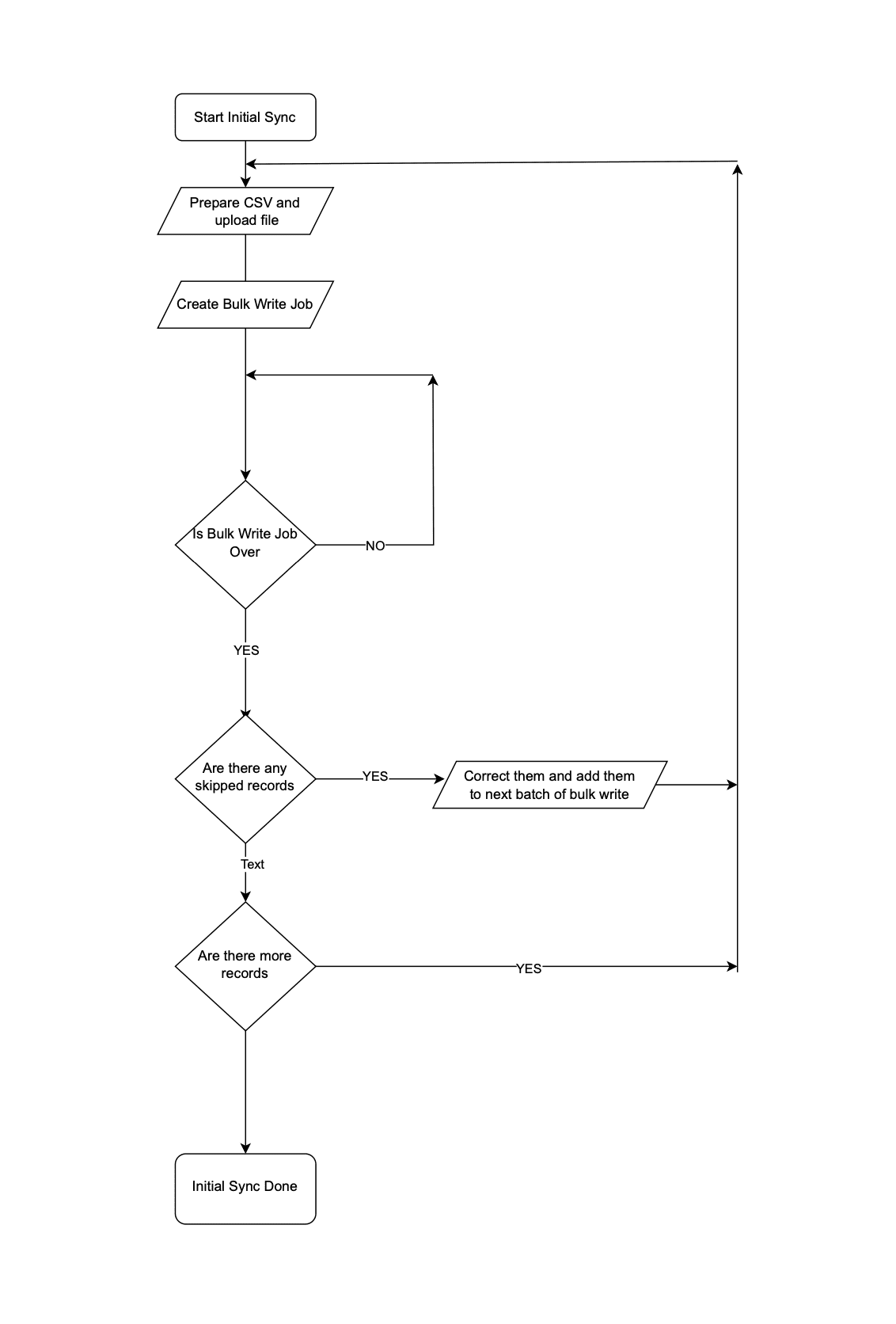 Initial Data Sync
Step 2: Subsequent Data Sync
The Order Management team continues to use the legacy application, leading to continuous creation or update of records in the Orders module.
It is not recommended to invoke Upsert Records API whenever an operation happens in Orders in the legacy system. Subsequent data syncs can be done in two ways: either by (a)near real-time sync or (b) Interval based sync.
(a) Near Real-time Sync
As we want near real-time data in Zoho CRM, it is ok for the records that are updated in the legacy system from last synchronization to be unavailable in Zoho CRM for 10 minutes.
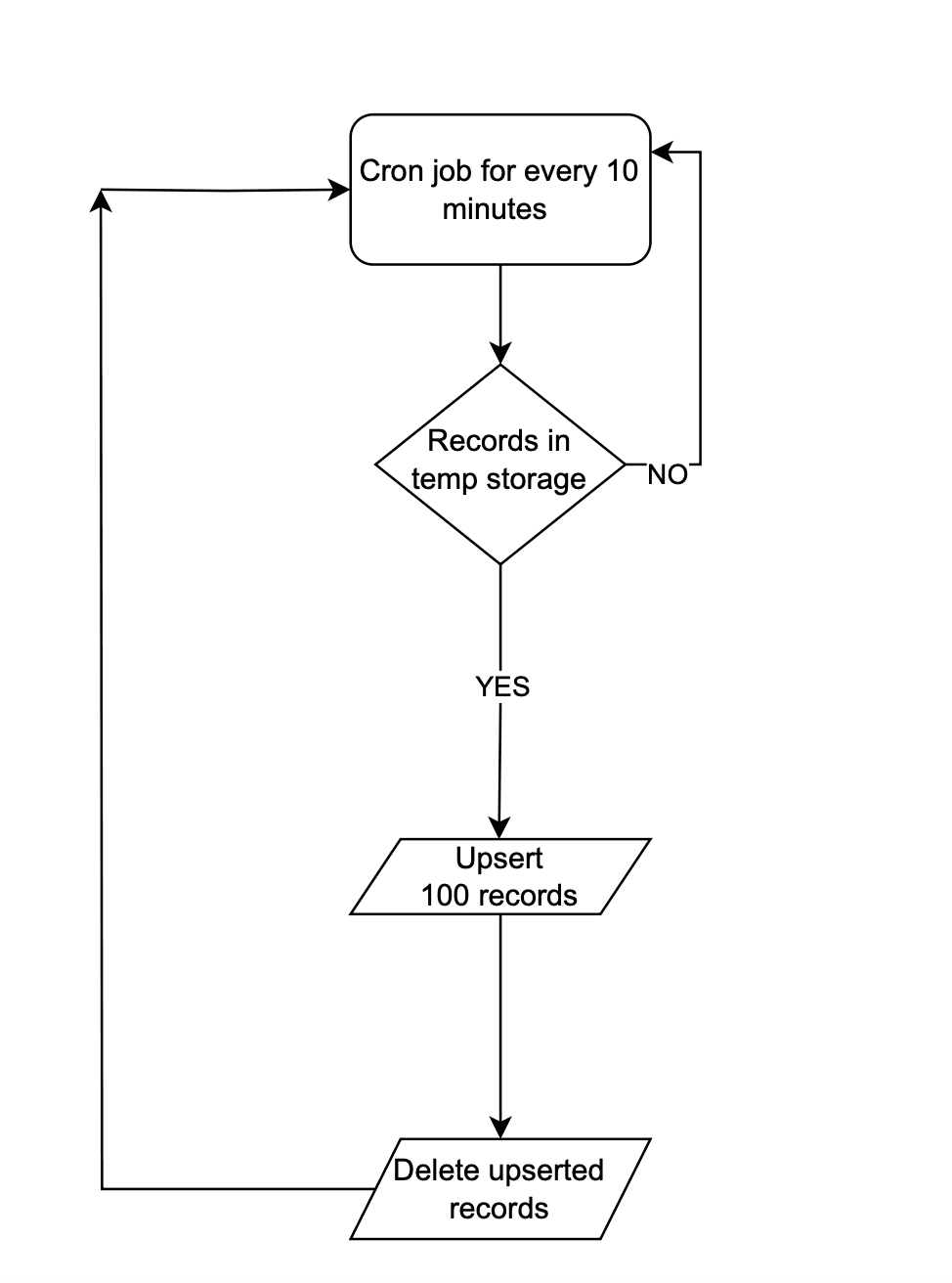 Near Real-time Sync
Instead of making API calls to Zoho CRM on every data operation, store the data in a temporary data store like a DB table or Redis. Once 100 records are accumulated in that data-store, the Upsert Records API can be promptly invoked with all these record details and followed by emptying of the data store. This approach will lead to lower consumption of API credits.
There are chances that in a period of 10 mins, 100 record operations may not happen. Scheduler jobs or CRON jobs can be created to handle the records in the data store to update records to Zoho CRM. Once these records are handled, the data store should be emptied.
(b) Interval based synchronization
For interval based synchronization, schedule bulk write API calls at suitable intervals to upsert the Orders module in Zoho CRM. Whenever there is a record operation in the legacy table, update the sync flag to "false". At regular intervals, such as every 12 or 24 hours, the bulk write API or Upsert Records API can be employed depending on the volume of the data changes.
We hope you found this article useful. We will be back next week with another interesting topic. If you have any questions, write to us at support@zohocrm.com or let us know in the comment section.
Previous Kaizen Post: Kaizen #122 - Data Synchronization using Bulk Read and Notification APIs
Related Links
Access your files securely from anywhere
Centralize Knowledge. Transform Learning.
All-in-one knowledge management and training platform for your employees and customers.
New to Zoho Recruit?

Zoho Developer Community
New to Zoho LandingPage?
Zoho LandingPage Resources
New to Zoho Survey?
New to Zoho CRM Plus?
Deliver unforgettable customer experiences
New to Zoho CRM Plus?
Deliver unforgettable customer experiences
New to Zoho Marketing Plus?
Everything you need to run your marketing
New to Zoho Marketing Plus?
Everything you need to run your marketing
New to Bigin?





Topic Participants
Mable Mary M P
Sticky Posts
Kaizen #198: Using Client Script for Custom Validation in Blueprint
Nearing 200th Kaizen Post – 1 More to the Big Two-Oh-Oh! Do you have any questions, suggestions, or topics you would like us to cover in future posts? Your insights and suggestions help us shape future content and make this series better for everyone.Kaizen #226: Using ZRC in Client Script
Hello everyone! Welcome to another week of Kaizen. In today's post, lets see what is ZRC (Zoho Request Client) and how we can use ZRC methods in Client Script to get inputs from a Salesperson and update the Lead status with a single button click. In thisKaizen #222 - Client Script Support for Notes Related List
Hello everyone! Welcome to another week of Kaizen. The final Kaizen post of the year 2025 is here! With the new Client Script support for the Notes Related List, you can validate, enrich, and manage notes across modules. In this post, we’ll explore howKaizen #217 - Actions APIs : Tasks
Welcome to another week of Kaizen! In last week's post we discussed Email Notifications APIs which act as the link between your Workflow automations and you. We have discussed how Zylker Cloud Services uses Email Notifications API in their custom dashboard.Kaizen #216 - Actions APIs : Email Notifications
Welcome to another week of Kaizen! For the last three weeks, we have been discussing Zylker's workflows. We successfully updated a dormant workflow, built a new one from the ground up and more. But our work is not finished—these automated processes are
New to Zoho TeamInbox?
Zoho TeamInbox Resources
Zoho CRM Plus Resources
Zoho Books Resources
Zoho Subscriptions Resources
Zoho Projects Resources
Zoho Sprints Resources
Qntrl Resources
Zoho Creator Resources
Zoho CRM Resources
Design. Discuss. Deliver.
Zoho Show Resources

Get Started. Write Away!
Writer is a powerful online word processor, designed for collaborative work.
Zoho CRM コンテンツ
-
オンラインヘルプ
-
Webセミナー
-
機能活用動画
-
よくある質問
-
Ebook
-
-
Zoho Campaigns
- Zoho サービスのWebセミナー
その他のサービス コンテンツ
Nederlandse Hulpbronnen

ご検討中の方
Recent Topics
Zoho CRM - Potentials Tab
Hi! When I create a Deal (Potentials tab) the header looks like this: After a refresh on the page it looks like this: What should I do so that it is displayed like in the second pic without refresh? Also I have a user that as of recently, cannot see thisUnable to create embed code for resource of workdrive using API
Hello Team, I am trying to create embed code for a resource using workdrive api in powershell, however facing some issues with injecting data in body. Followed Doc: https://workdrive.zoho.com/apidocs/v1/filefoldersharing/shareeveryone Please help, belowFeature Request - Insert URL Links in Folders
I would love to see the ability to create simple URL links with titles in WorkDrive. or perhaps a WorkDrive extension to allow it. Example use case: A team is working on a project and there is project folder in WordDrive. The team uses LucidChart to createnot able to convert pdf to jpg and other forms and vice versa.
i want to change my pdf to jpg, word, etc and some times jpg to pdf. i don't know how to do in this.Enable / show scroll bar when Mega Menu is opened
Hey there I am using the mega menu add-on and experience a "flicker" whenever the mega menu opens. The reason is, that the scrollbar, which has a width of a few pixels, stops showing when the mega menu opens. As the scrollbar disappears the whole pageReports: Custom Search Function Fields
Hi Zoho, Hope you'll add this into your roadmap. Issue: For the past 2yrs our global team been complaining and was brought to our attention recently that it's a time consuming process looking/scrolling down. Use-case: This form is a service report withHow can I transfer data from Production to Development environment?
Hi, I am using Creator V6 and would like to bring all the data in production to the Development and Testing environments? Is there an easy way of doing that or I have to export and import each table?New portal SAML authentication error: User not found
Dears, Has anyone else been experiencing this lately? I am creating a new portal authenticated by SAML (Entra ID). I followed the same process as I did with other portals, but any new portal created after this always encounters this error. I’ve been reportingDevis et facture multi page
Bonjour, je suis sur Zoho invoice et je rencontre un problème sur mes devis et factures lorsqu'ils dépassent 1 page. je me retrouve souvent avec des lignes coupées ou le sous total page 1 et le total page 2. j'aimerai savoir s'il existe une possibilitéHelp with Filtering Records, HTML Pages, and Automatic File Uploads in Zoho Creator
Hi Zoho Creator Community, I’m building a Zoho Creator application and need guidance on a few features I’ve been struggling with. I want to implement them safely and efficiently, and I’d appreciate any examples, tips, or best practices. I want users toFeature Suggestion for Zoho Websites – Inspired by Squarespace Systems
Dear Zoho Team, I’m a Zoho user and also a Squarespace Platinum Circle member, and I recently noticed the launch of Zoho Websites in India. I wanted to share some ideas for features that could enhance the platform for professional users and agencies.Custom View - Sort by Custom Field
I created a custom field for our Engineering team to know which tickets to work first by numbering them. I created a custom view to general data which includes the Engineering Priority. However, I cannot sort the Engineering Priority column ascendingZoho Indeed Intergation not pulling candidate details
We have recently integrated zoho with indeed. Prior to this our candidates came into the candidates tab via the zoho.resumes email address from indeed and it pulled through the candidates mobile number, and majority of the time a postcode. However sinceCustom View of tickets created today
How can I create a custom view that list all my ticked created in the current date? Currently, if I select the "Created Time" criteria, the "Current Time" option does not work as today. Actually, I don't know how it works this "Current Time".Lifecycle Reports
From data to decisions: A deep dive into ticketing system reports A lifecycle report captures and visualises the sequential states that a ticket undergoes across its lifespan. For instance, when a customer submits a support ticket for a faulty product,Zoho Forms - Print Button on Forms
Hi Forms team, I'm replicating a form for a client which is currently based on JotForm. I noticed that at the end of the form there is a button to print the completed form. I thought this would be something worth sharing and a nice to have in Zoho Forms.Putting Watermark on Zoho Sheet
Can this be done?Validation function not preventing candidates under 18 or over 30 from submitting the web form
Hello everyone, I’m trying to create a validation rule for the Candidate Webform in Zoho Recruit. I added a custom field called “Date of Birth”, and I want to make sure that candidates cannot submit the form unless their age is between 18 and 30 years.Report to know the history of certain Tickets on Desk
Hi there guys, As the title implies we're wondering if there's any way to get some kind of Report that allows us to check the History of various Tickets at the same time since as of today if we want to know that we have to check them 1 by 1 which is notAdvanced Usage Billing: Prepaid with Drawdown
Picture yourself at your favourite coffee shop, Bean & Brew. You come by every morning for your usual cappuccino, and occasionally you get an extra cold brew and a muffin or two in the afternoon. Interestingly, Bean & Brew has a new idea of offering aZoho Commerce in multiple languages
When will you be able to offer Zoho Commerce in more languages? We sell in multiple markets and want to be able to offer a local version of our webshop. What does the roadmap look like?Urgent Zoho Creator down!!!???
Now my zoho creator faced this issue. Anyone has idea? Urgent!!!The Social Wall: September 2025
Hello everyone, As we step into the fall season, some major updates are on the horizon. Meanwhile, here are the exciting updates we rolled out this September. Approvals in iOS Managing approvals just got more seamless on mobile. With this update, theIntroducing Detailed View for Candidates in Vendor Portal
We’ve added a new Details sub-tab inside the Vendor Portal to help vendors easily view complete candidate information after submission. With this update, vendors can now access all candidate details, from personal information to associated job openings,Zoho One Down
Zoho Team, Checking if when the services up - currently Zoho One is downHow can I track which zoho users are actively using Zoho CRM
I have several licenses of Zoho CRM. We now need to add a new user. I could purchase a new license, but before I do, I would like to see if any of our existing users are not actively using the license assigned to them. How can I determine the activityAccess to Detail View From HTML Snippet
Zoho Creator displays a detail view that slides out from the right onClick of a record in a report. Am I able to access that detail view from an html snippet, e.g. click a record in a list and display the detail view? The zc_LoadIn dialog is a bit clunky,Billing Management: #10 Solving Common Mistakes in Billing
Over the past few weeks, we have explored different facets of billing, from the simplicity of traditional one-time billing to the evolving landscape of subscriptions, retainers, and usage-based models. We've unpacked how billing isn't just about sending【開催間近 - 10/17】東京 ユーザー交流会 Vol.3 参加登録 受付中!(参加無料)
ユーザーの皆さま、こんにちは。コミュニティチームの藤澤です。 10/17(金)に、東京・新橋で「東京 ユーザー交流会 Vol.3」を開催します! ZOHOLICSよりも小規模なイベントですので、「リアル開催はちょっと緊張する…」という方も、安心してご参加いただけます✨ 当日は、初公開の事例を2つご紹介予定です! なお、セッション映像のアーカイブ配信は予定していないため、会場にお越しいただいた方だけが、登壇者へ直接質問したり、リアルな声を聞いたりできる貴重な機会となっています。 ーーーーーーーーーーーーーーーーーーーーーーーーーーーーーーーーーーーーーーーーーーLoading CSS Stylesheets into HTML Snippet
Combining html/css into a single snippet can grow quite large for a UI that has a lot of functionality/styling. To keep things tidy, are we able to pull files into an html snippet using a <link> tag? If so, what are some best practices?Notes Attachments
Two things it would be nice to have the attachment size the same as the attachments sections and it would be nice to be able to attach links like you can in the attachments section. Thank youCanvas: empty images
Hello. If I add an image field like contact photo in a Canvas design, and the field is empty, there is an ugly placeholder in its place. This doesn't happen in the standard view. In the standard view, if the contact photo is empty, nothing appears inGoogle enhanced conversions not working
Hi guys, I've connected Zoho CRM through Google Ads interface with the goal to setup the enhanced conversion tracking in Google Ads. I have to Zoho related conversion goals which you can see in the images below: For the conversion goal above I've setupSync Contacts with iPhone
Is syncing the Zoho Personal Mail contacts with the iPhone (or other mobile devices) in the works? I just dumped Yahoo & then found out that contacts sync is missing. Importing is only a stop gap and a step backwards for me.MS Teams Meeting to Zoho CRM
Has anyone figured out a good way to push MS Teams meeting info on a trigger of "meeting end" to Zoho CRM? We're looking for a way to take attendees of a meeting and meeting duration and push it into Zoho CRM after the meeting has ended. If I can justHow do I move a section or element from one page to another in the NEW Zoho Sites UI
I have a section on my home page with numerous elements within it and I'd like to move the entire section to a different page on my site so I don't have to recreate it from scratch. Is there a way for me to do that easily? I could use a quick answer on this please.Zoho Projects app update: Global Web Tabs support
Hello everyone! In the latest version(v3.10.10) of the Zoho Projects app update, we have brought in support for Global Web Tabs. You can now access the web tabs across all the projects from the Home module of the app. Please update the app to the latestExport as MP4 or GIF
Hi, Just wondering if there's a way to export/convert a presentation to an MP4 video file or even a GIF. One use case would be to use the animation functionality to create social media graphics/charts/gifs/videos. Thanks for a great tool... Rgds JonPage Layout- Horizontal Rule
When editing the layout of, for instance, the Potentials page, is there a way to insert a horizontal rule or white space in between fields? I'd like to keep a group of fields in the same Section, but would like to create some seperation in order to further group together certain fields within the Section. If this is not possible, does anybody have any other suggestions on how to create this same effect? Thank you!Zoho Books will discontinue support for older browser versions soon
Hello users, Starting from May 15, 2024, Zoho Books will no longer support the following browser versions: Browsers Version Restrictions Firefox Browser Versions older than 100 Google Chrome Versions older than 100 Microsoft Edge Versions older than 100Next Page