Exploring SalesIQ's Top Features of 2024: An Insider's Look 🔍
As we wrap up another year at Zoho SalesIQ, it's time to reflect on how far we've come. This year has been incredible for us in our journey to build a more powerful, flexible, and customer-centric engagement platform. We've introduced several features that have elevated how businesses connect with their customers across the globe. Let’s take a quick look at the highlights and top releases of the year, shall we?

We saw a wide variety of feature releases on SalesIQ focused mainly on the following areas, contributing to the overall evolution of the product.
- Enhancements for advanced customer connectivity 🌐 💬
- Expanding to a global audience 🌏
- Optimizing user experience ⚙️🎨
Enhancements for Advanced Customer Connectivity 🌐 💬
1. WeChat + SalesIQ Integration: Converse with WeChat users directly from SalesIQ! 🤝
Our integration with WeChat allowed businesses to communicate directly with WeChat users from within the SalesIQ dashboard.
- Operators could easily use SalesIQ's support tools like canned replies, articles, FAQs, tags, widgets, etc., enhancing their ability to provide contextual assistance.
- Not just that, operators can also easily nurture the leads from WeChat by easily pushing their details to CRM and also converting the chats from WeChat to helpdesk tickets, pushing them to Desk with a single click. Learn more

2. WhatsApp Templates: Create and share WhatsApp Templates from SalesIQ 💬
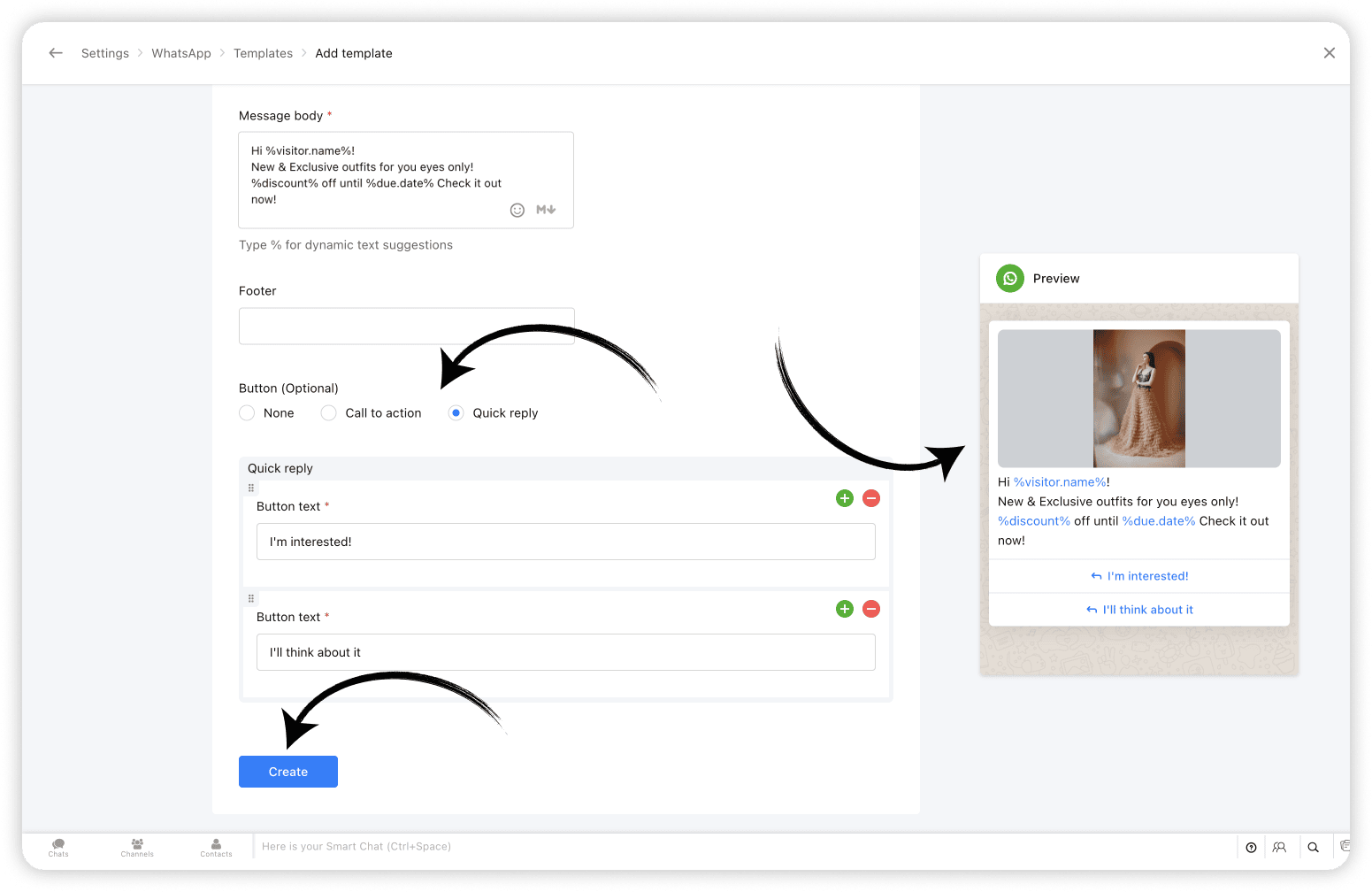
With WhatsApp templates on SalesIQ, one of the most awaited features, businesses can now create and save templates/message layouts that can be easily inserted into your WhatsApp conversations, from within your SalesIQ operator chat window.
And, Bonus? Closed WhatsApp conversations need not remain closed any more! Now you can start conversations with WhatsApp users using WhatsApp Templates. Learn more
3. Chatbots for Telegram & LINE: Expanding Automated Messaging 🤖
Already being supported on Facebook, WhatsApp and Instagram, we have now added our chatbots support for Telegram and LINE as well. This means that you can now sit back and let your bots take over chats from your Telegram and LINE audience, streamlining customer support, reducing response time and most importantly, freeing up your operators time to focus on complex queries and issues. Learn more

Expanding to a Global Audience 🌏 🤝
4. 30+ Language Support for Chatbots 🌐
To enhance and simplify global customer service further, we've expanded our chatbot's language support to over 30 languages. This ensures that your business chatbots (Zobot & Answer bot) can interact with customers in their preferred language, increasing engagement, improving customer satisfaction, and breaking down language barriers to provide seamless support. Learn more

5. Azure AI Translator: Breaking Language Barriers 🚀
With the Azure AI Translator integration, SalesIQ is now further equipped to translate chat conversations in real-time, eliminates language barriers, enabling businesses to engage effectively with customers from worldwide. While SalesIQ already supports the Google Translate integration, we have now added Azure AI Translator to its translation arsenal to cater to a wider user base to facilitate real-time visitor message translation. Learn more

6. Hebrew Right-to-Left (RTL) Support: User-friendly Chat Experience 💬
Recognizing the importance of regional customization, we introduced Right-to-Left (RTL) support for Hebrew, providing a more natural and accessible interface for our Hebrew users. SalesIQ already features RTL support in Arabic. Hebrew has now been added to the 'Right to left' bandwagon, ensuring a user-friendly experience for our Hebrew-speaking community. Learn more

Optimizing User Experience ⚙️🎨
7. SalesIQ Desktop Apps: Seamless Access Across Devices 🖥️
Another big highlight of this year was the launch of SalesIQ Desktop Apps to the App Store on Mac as well as the Microsoft store on Windows. The desktop app features exclusive options like auto-launch on device startup, Actionable notifications, access options on the Dock/Tray, Hide when Close etc, for enhanced user experience. Learn more

8. Articles support on Instant Messaging Channels 📝
SalesIQ articles support has now been extended to all Instant messaging channels, such as Facebook, Instagram, WhatsApp, Telegram, LINE, and WeChat. Operators can now share the articles to assist IM channel users. The shared articles will be displayed to the visitors in the form of URL links. Learn more

9. The All SalesIQ New Live Chat Widget: Faster and More Engaging ⚡💬
To wrap up the year, we launched a completely revamped live chat widget. Now twice as fast and fully optimized for engagement, the new widget is designed to help boost your site's SEO and reduce bounce rates. With minimized data usage it delivers consistent performance even on slower mobile networks and is also WCAG Compliant ensuring accessibility, offering an inclusive experience for all users. Learn more

Other Interesting Launches⚡
Along with the above listed top releases, we did have a few other launches that catered to user demands and expectations while adding to SalesIQ's wealth of features.
- SalesIQ-Desk Integration: Managing Tickets Within Chat 🤝 - Seamlessly edit and manage help desk tickets directly from the operator chat window, streamlining sales and support collaboration.
- Starting a Cliq Internal Chat from SalesIQ 👩💻 - Start a Cliq internal group chat right from SalesIQ for an ongoing, closed or missed conversation to discuss chat/customer-related queries with your fellow operators and Cliq users.
- Extended Chat Time: 24 Hours for IM Channels 💬 - Keep customer conversations active for up to 24 hours across Instant messaging channels, ensuring no interaction is left unresolved.
- Multi-WhatsApp Business Account (WABA) Support ⚙️ - For businesses managing multiple WhatsApp accounts, each SalesIQ brand can now be connected to its unique WABA within SalesIQ, enabling them to manage them as separate entities.
- SalesIQ TV App for Real-Time Insights 📺 - Get live updates on business performance and visitor metrics with the new SalesIQ TV App, now available on Android and Apple TV.
- Card Wait Time for Bot End Messages 💬 - Set a delay/wait time for the bot’s end card to ensure visitors have enough time to view important information before the chat closes.
- Live insights (Reports) 📊 - Get a real-time overview of incoming and outgoing chat/call volume, operator availability, and more, helping you better plan support split across teams with the live insights section on the reports dashboard.
Looking Ahead: What’s Next? 🚀
This year’s updates reflect our commitment to providing businesses with the tools they need to create meaningful, personalized connections with customers. Whether through enhanced communication options, multilingual support, or seamless integrations, every new feature has been designed with your needs in mind.
But we’re just getting started. The journey of Zoho SalesIQ is one of continuous innovation, and we’re excited to keep building and improving to help you connect with customers better, faster, and more effectively than ever before.
Thank you for being part of the Zoho SalesIQ journey. Here’s to another year of growth and innovation!
Warm regards,
Hameetha | Zoho SalesIQ
Access your files securely from anywhere
New to Zoho Recruit?

Zoho Developer Community
New to Zoho LandingPage?
Zoho LandingPage Resources
New to Zoho Survey?
New to Zoho CRM Plus?
Deliver unforgettable customer experiences
New to Zoho CRM Plus?
Deliver unforgettable customer experiences
New to Zoho Marketing Plus?
Everything you need to run your marketing
New to Zoho Marketing Plus?
Everything you need to run your marketing
New to Bigin?





Topic Participants
Hameetha Nasreen
Damilola Olaleye
Sticky Posts
Speak Your Customers' Language: SalesIQ's chatbots now support 30 languages 🤖
We're unveiling some major upgrades to our chatbot that are set to revolutionize your experience! Now SalesIQ support 30 languages for both Zobot and Answer bot. By speaking your customers' language, you can enhance engagement, improve customer satisfaction,Attention Deluge Developers: Important Update Regarding "Send Email Deluge Task"
Hi Deluge Users, We hope this message finds you well. We would like to inform you about a recent update on the Send emails deluge task. If you are using this deluge task (SalesIQ Scripts) for your Zobot, widgets, or form controllers to send emails, pleasePlug Samples #12: Verify Customer Mobile Numbers with OTP to Avoid Spam Entries
Hi Everyone! Verifying customer information is critical in business to filter out junk data and spammers. Whether it’s lead generation, appointment booking, or any other operation, ensuring quality data is essential for driving meaningful outcomes. ABig Things Just Dropped in the SalesIQ Universe: Top Upgrades You’ll Love in Nova’25
Nova'25 has landed, and it’s packed with meaningful upgrades to help you engage smarter, work faster, and scale with ease. Whether you're into proactive messaging, smarter automation, or better admin control, there's something here for everyone. Here'sYour bot just got smarter: AI-Powered routing that reads between the lines
What if your bot could tell the difference? Between a visitor who just needs a quick answer, someone actively comparing options, and a frustrated customer one click away from leaving? Most bots can't. They deliver the same response to everyone, missing
New to Zoho TeamInbox?
Zoho TeamInbox Resources
Zoho CRM Plus Resources
Zoho Books Resources
Zoho Subscriptions Resources
Zoho Projects Resources
Zoho Sprints Resources
Qntrl Resources
Zoho Creator Resources
Zoho CRM Resources
Design. Discuss. Deliver.
Zoho Show Resources

Get Started. Write Away!
Writer is a powerful online word processor, designed for collaborative work.
Zoho CRM コンテンツ
-
オンラインヘルプ
-
Webセミナー
-
機能活用動画
-
よくある質問
-
Ebook
-
-
Zoho Campaigns
- Zoho サービスのWebセミナー
その他のサービス コンテンツ
Nederlandse Hulpbronnen

ご検討中の方
Recent Topics
Portal Approval Process
Hi Zoho team and fellow users, I am seeking a method to establish a multi-step approval process between a Zoho user and a portal user (Custom Portal) to review and approve requests through the Custom Portal. For instance, within this setup, one of theNarrative 8: Intelligent in-app support that's instantly available anytime and anywhere
Behind the scenes of a successful ticketing system - BTS Series Narrative 8: Intelligent in-app support that's instantly available anytime and anywhere The App Support Across Platforms (ASAP) add-on for Zoho Desk is an independent application that integratesNavigation issue — unable to return to Customer page after opening Receipt from Transactions
Steps to reproduce: Open a Customer record. Go to Transactions tab and open a Receipt by clicking its receipt number. After viewing the receipt, clicking browser Back or closing the receipt does not reliably return me to the original Customer record (IThermal Printer Option Needed for Delivery Challan Templates
Currently in Zoho Books, the Delivery Challan template only supports A4 and A5 page sizes. However, in many businesses (especially retail and hardware), we use thermal printers (like 3-inch or 4-inch rolls) to print delivery challans. It would be verySeparate Default Payment Modes for Receipts vs. Payments
Right now, when I set a default Payment Mode via a customer invoice or Payments Received screen, that same mode shows up for vendor payments (Purchases → Payments Made). 🔹 Request: We need different default modes for: Customer receipts (e.g., defaultUpdate/Change GSTIN in GST Settings of zohobooks
We are trying to update our GSTIN under the GST settings section of our Zohobooks account Initially, we had entered a dummy GSTIN (123456789123456) to generate a sample invoice before obtaining our official GST registration. After receiving our actualLink Payment Mode and Paid Through Accounts
For most users, it's very difficult for them to understand that the Payment Mode is totally independent of the Paid Through account when paying bills. It seems (and is) redundant for them to have to select what is basically the same thing twice. The currentLets enable business to choose the default payment mode
Lets enable business to choose the default payment mode so that we do not have choose payment mode again and again for each and every transsctionsSouth African Payment Gateways
Since the "Demise" of Wave many South African users have moved over to Zoho and yet for years users have been requesting Integration with a South African Payment Gateway to no avail. Payfast was the most commonly requested gateway as it supports recurringHas anyone verified if Zoho is PCI compliant?
We are planning on using Zoho to process payments via Authorize.net. We have everything set up and are attempting to complete the PCI DSS SAQ-A requirement for our merchant account. This requires us to prove Zoho has completed the SAQ-D for Service Providers. We need a way to verify compliance, or a copy of an attestation of compliance signed by the appropriate officer at Zoho. I assume I'm not the first person to use Zoho to process payment, and therefore not the first to require this informationBigin Plugin for Outlook
Could we get this added? The Gmail version already exists, and I would like to avoid having to make a switch.Date does not fit the field
Hi There. I am having fun learning zoho sign API. Today I noticed the "Signed Date" field does not fit, or alternatively the font is to large for the auto field space. See screenshot below. The signed date field is created by putting {{Signdate}} on theMulti Page/Step Forms in creator
Greetings i was wondering if it's possible to create multipage/step forms on creator similar to what we have on zoho forms. is that possbile? ThanksPackage Geometry
how can i add the dimensions and weight capacity of the available boxes to be default in the system everytime we use it ?How to create a Master Kanban Board that syncs with Child Projects?
Hello, We're currently using Zoho Sprints for managing our interdepartmental teams, and we're looking to enhance our workflow using Kanban boards as part of a company-wide productivity improvement initiative. Our goal is to implement a project structureWriter.. Broken?
Hello, Writer has been really good to me during the months I've used it, up until now. I usually launch the app by tapping the icon and I could immediately pick up where I left off. Now I'm greeted by a loading circle not reaching 100% and I only have the option to create a new account. By pressing that button it now switches to a login screen and I can access my account. However, it seems (only speculating ofc) to be stuck in cell-phone mode? everything looks scrambled. I can't access any ofHow to access Recruit Variables in a Deluge function?
I have set up Recruit Variables in Zoho Recruit, and I would like to know how to retrieve these variables from within a Recruit custom function (Deluge). Could someone please explain the correct way to access them? I tried the following code, but it didUpon De activate a user what name doe sthe contacts candidates go under?
When deactivating a user, does the user name remain the same, as the candidate owner? If not what/who, does it change to? Do I need to change the user name in contacts and candidates before I deactivate the user?Weekly Tips: Customize alerts from your Priority Users
You might receive hundreds of emails daily, but messages from your manager, clients, or team leads often require immediate attention, as they may contain urgent requests or critical updates. How would you ensure you never miss important messages fromMaximum 100 records in Sheet View is limiting. How can I increase this?
Thanks in advance for any help with this. There was a similar post that showed answered but it did not help with increasing the number of records you see in a Sheet View. Editing in the Sheet View is fast and efficient but I have 3500 records and I needRevenue Management: #3 Revenue Recognition Simplified
In continuation of the previous post on how to compute revenue recognition, let's explore a solution that helps businesses handle real-world complexities. While the Accounting Standards provide a clear framework for recognizing revenue, the real challengePush Invoices to Xero Manually
Hi guys, I'm wondering if anyone has wanted to do this and has a workaround or knows of an app that may be able to help with this. I sell B2B and B2C. The customers can purchase on our website or through marketplace, all of which send sales to zoho. TheOpenAI error code: 1010 in a Zobot
Please see short linked screen recording. Insights welcome. Please and thank you! https://workdrive.zohoexternal.com/external/f3247ba9c872639157b707700c0300c433c7664aea924a034f4da3c3ad2e355fAbility to Create Sub-Modules in Zoho CRM
We believe there needs to be a better, more native way to manage related records in Zoho CRM without creating clutter. Ideally, Zoho would support "sub-modules" that we can create and associate under a parent module. Our use case: We have a custom moduleInstalling EMAIL Setup in New Domain
Respected Support team, I'm facing an issue with cloudflare in Pakistan, I want to setup Zoho Mail Setup but I Don't know how to enable Zoho mail setup without cloudflare. My Website https://stumbleguymod.com/ is using CF, and I want a different ZohoSignature change
I cannot see how to change signature or out of office details easily now in the new format.Inventory API - Retrieve all uploaded product / item images
I know that I can get the primary image for each product / item or composite item, by using the /image endpoint. https://inventory.zoho.com/api/v1/compositeitems/<item-id>/image?authtoken=<TOKEN> This will return only one photo, even if the item has multiple images uploaded. Is there a way to retrieve all images stored for an item via the Zoho Inventory API?Ebay Integration malfunction
My eBay integration in Inventory has always worked well. It suddenly malfunctioned. It is creating its own parts in Inventory that are unavailable instead of selling the parts I've always sold. Tech help was unable to resolve this. The latest sale attempthow to get all the records in the custom View more than 200 records , Without using the page Concept
how to get all the records in the custom View more than 200 records , Without giveing page as default in the Loop Concept Pls help how We can Achive this void schedule.Lead_Attempt_To_contact_schedule_10_30() { pages = {1,2}; for each pg in pages { query_mapThe way that Users can view the ticket
I have created users. What I would like to achieve is the following: All users under the same company account should be able to view each other’s tickets.Zoho UAE SMS/WHATSAPP
Hello everyone, so I have a question as regards DC and their impact on automation, integration and app usage. For example I am working with a UAE clientniw but each time I tried to connect their WhatsApp and sms then automate their process I tend to receiveLooking to Flag or Tag contacts/ accounts on Zoho Desk?
I am looking for a way to flag certain accounts and make it obvious on the views pages. So for example if a has a certain package or needs extra attention it is clear before even clicking on the ticket. This could be via adding a tag or flag onto an account,setting date-time field from string
hello everyone, i hope someone could help me. i have a date-time field in a form that i want to fill in from two separate fields of date, and time. i need to combine the two fields to a one date-time field but can make it work. i tried to convert theCalendars and CRM Contacts
I'm finding having multiple calendars in Zoho One so confusing. I have a few questions so I can get this straight. We have a meeting room that we have set up as a resource in Calendar. Can this be set up in Bookings and the CRM Calendar? Using Zoho Calendar,Announcing new features in Trident for Mac (v1.23.0)
Hello everyone! Trident for macOS (v.1.23.0) is here with interesting features and thoughtful enhancements to elevate your workplace communication and productivity. Here's a quick look at what's new. Record your meetings. You can now record audio andApplying a record template
Hi all, I can't figure this out. I hope you can help. The scenario: We have learners who have to complete a 'digital' journal with tasks in order to qualify. Those tasks, once completed, need a final signature from their 'Mentor', which will trigger theirQuickbooks invoice with Zoho Creator
Is it possible to push data from Zoho Creator directly to an invoice on QuickBooks? If so, where can I find information on how to do this?Help: Capture full page URL in hidden field when same Zoho Form is embedded on multiple pages (iframe)
Hi all, Goal Use one Zoho Form across multiple pages and record the exact page URL (incl. subdomain + path + hash) where the user submitted it. Example pages: https://www.example.com/cargo/ https://www.example.com/cargo/containers/#contact https://cargo.example.com/auto/Automatically Populate fields - HELP!
There have been many discussions on this but I still can't seem to get it to work for me. I am trying to create a lookup field and have other fields automatically populate. Based on the instructions in the Help Center, I should be using the "on user input". It's just not working, here is the layout... Both forms are in the same application. Current form is called Add Note, form to fetch records from is called Add Client. Lookup field is called Select_Client_ID related field in fetch form is calledPush notifications to portal users
Hi all, it is possible to send push notifications to portal users?Next Page