What's new in Zoho CRM Winter '21
Delivering the best experience, both to you and your customers,
has been a cornerstone of Zoho CRM since our inception in 2005. With
every release, our goal has been to make that experience richer. This
year, we made a big stride in that journey with the launch of Canvas,
the industry's first no-code CRM design
studio. This allowed users to craft their own CRM experience and make
Zoho CRM fit seamlessly into the way they work.
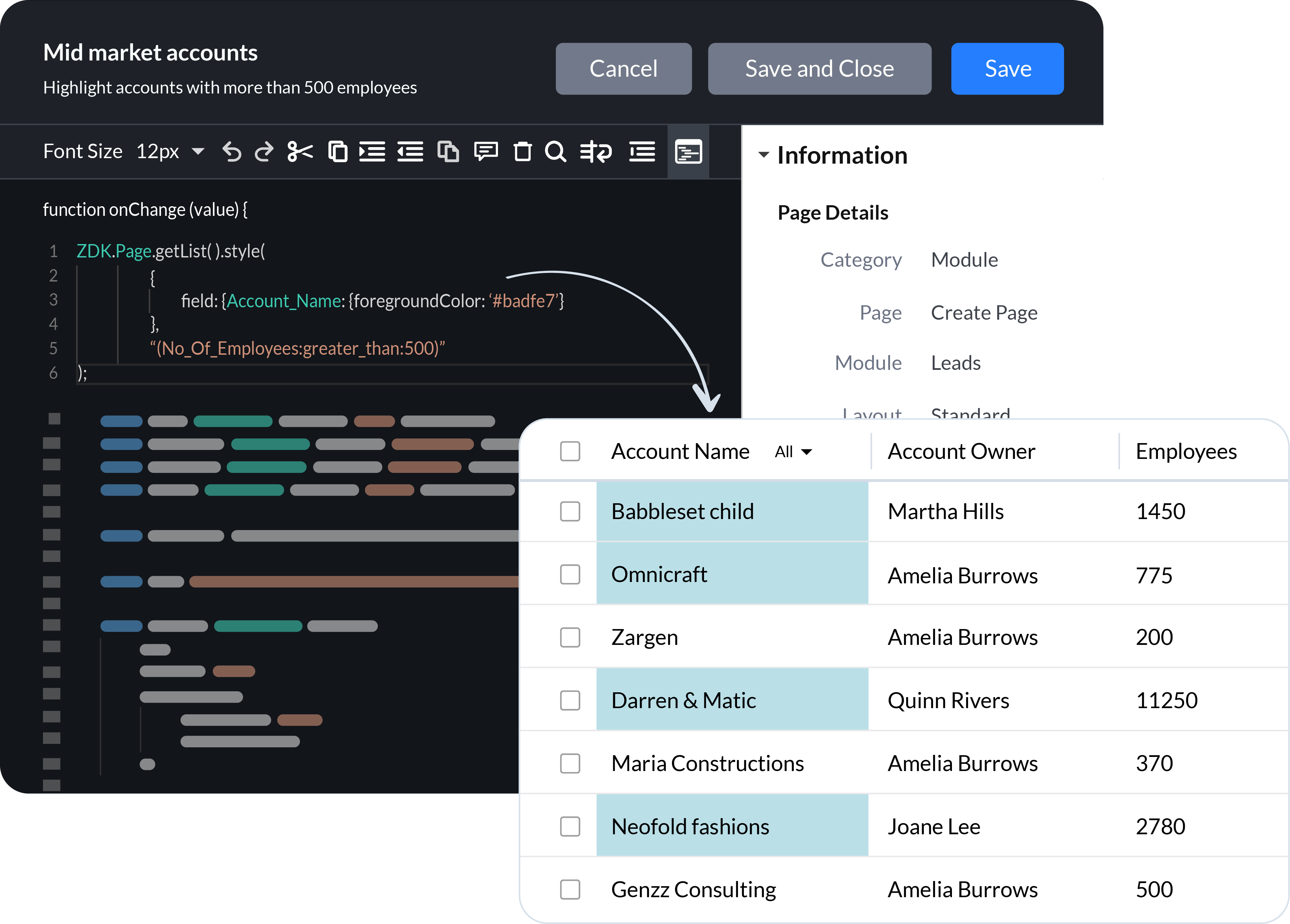
Now we're continuing the journey by adding client scripts, a pro-code tool that empowers businesses to build hyper-personalized, bespoke CRM experiences using the power of JavaScript. We've also introduced enhancements and new functionality across Zoho CRM to build on of the foundation of UX and CX we've built over the years.
Client Scripts
Sales
teams are successful when they are empowered to focus on what they do
best, closing deals and building long-term relationships with customers.
To these teams, CRM automation has become an indispensable part of their daily routine. Here's what we've added to help you automate your processes more effectively.
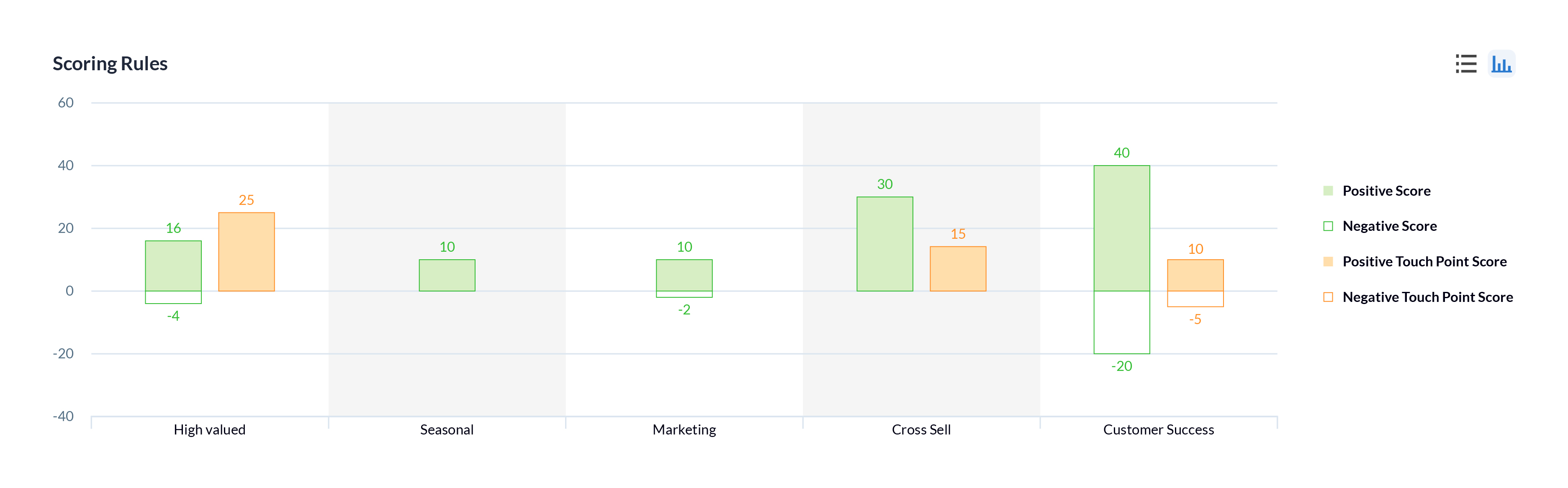
Multiple scoring rules
One of the best ways to help sales reps prioritize their prospects is through lead scoring. In Zoho CRM, you can now create multiple models that score prospects based on different factors and interactions according to the needs of the sales and other customer-facing teams in your business, to help prioritize the right prospects or customers.
Workflow failures and retries
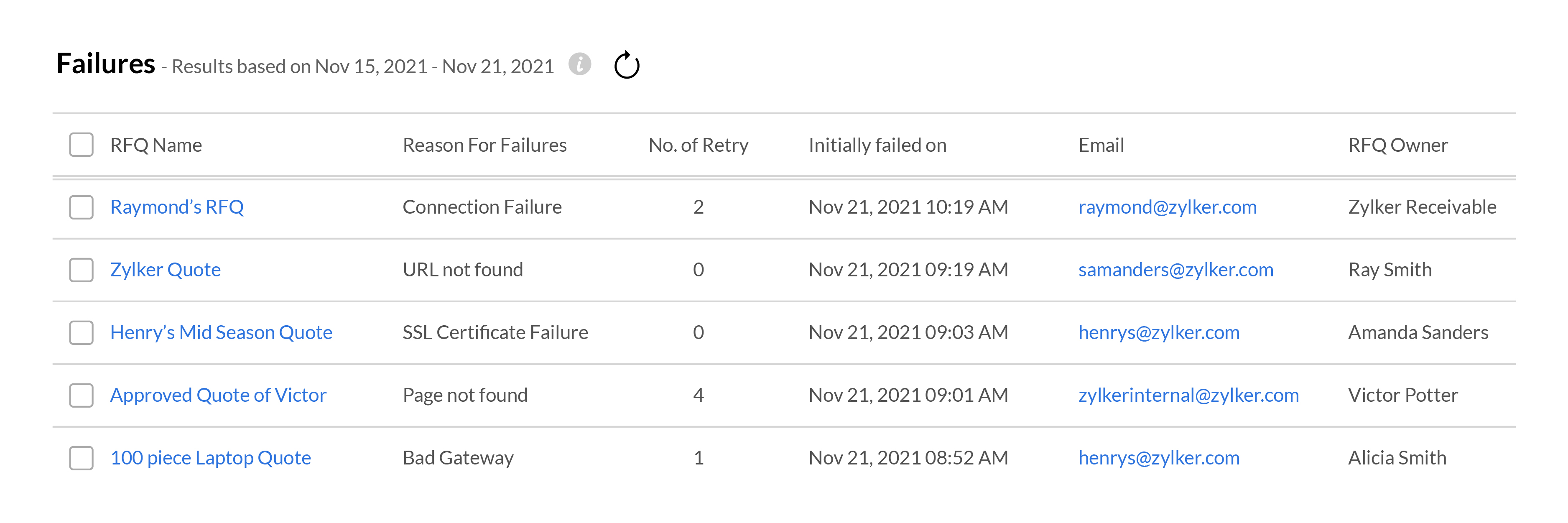
Your workflows need to run like clockwork in order for your sales team to focus on your customers. When something goes wrong with a workflow, it can disrupt the entire sales process, resulting in fewer wins and poor customer experience. To help address these situations effectively, Zoho CRM gives you in-depth
information about when and where your workflows fail, and all the
records that are affected. Your team can use this data to fix the
underlying issues and get your workflows up and running again.
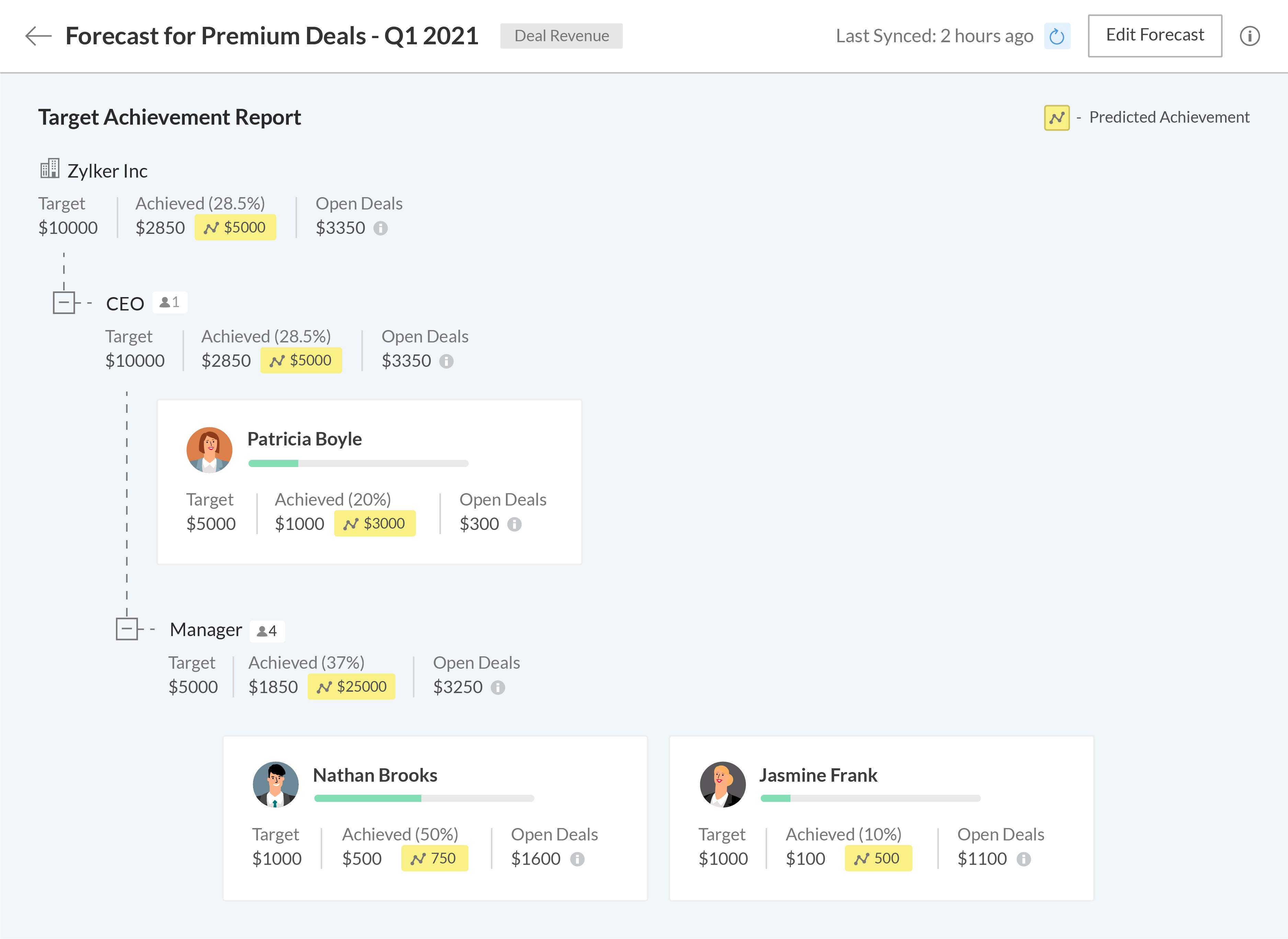
Setting meaningful targets to measure performance against is key to maintaining the long-term health of your business. We're bringing some exciting changes to our forecasting and reporting systems, as well as introducing new components to help your business get granular when analyzing your business performance.
A new forecasting system built from the ground up
We've completely revamped our existing forecasting system to make it more robust and give more control to your business, allowing you to build multiple forecasts for different periods, leverage predictive AI to track where you'll stand at the end of your forecasting period, and drill down into the data to granularly compare your current performance with previous fiscal years.
The
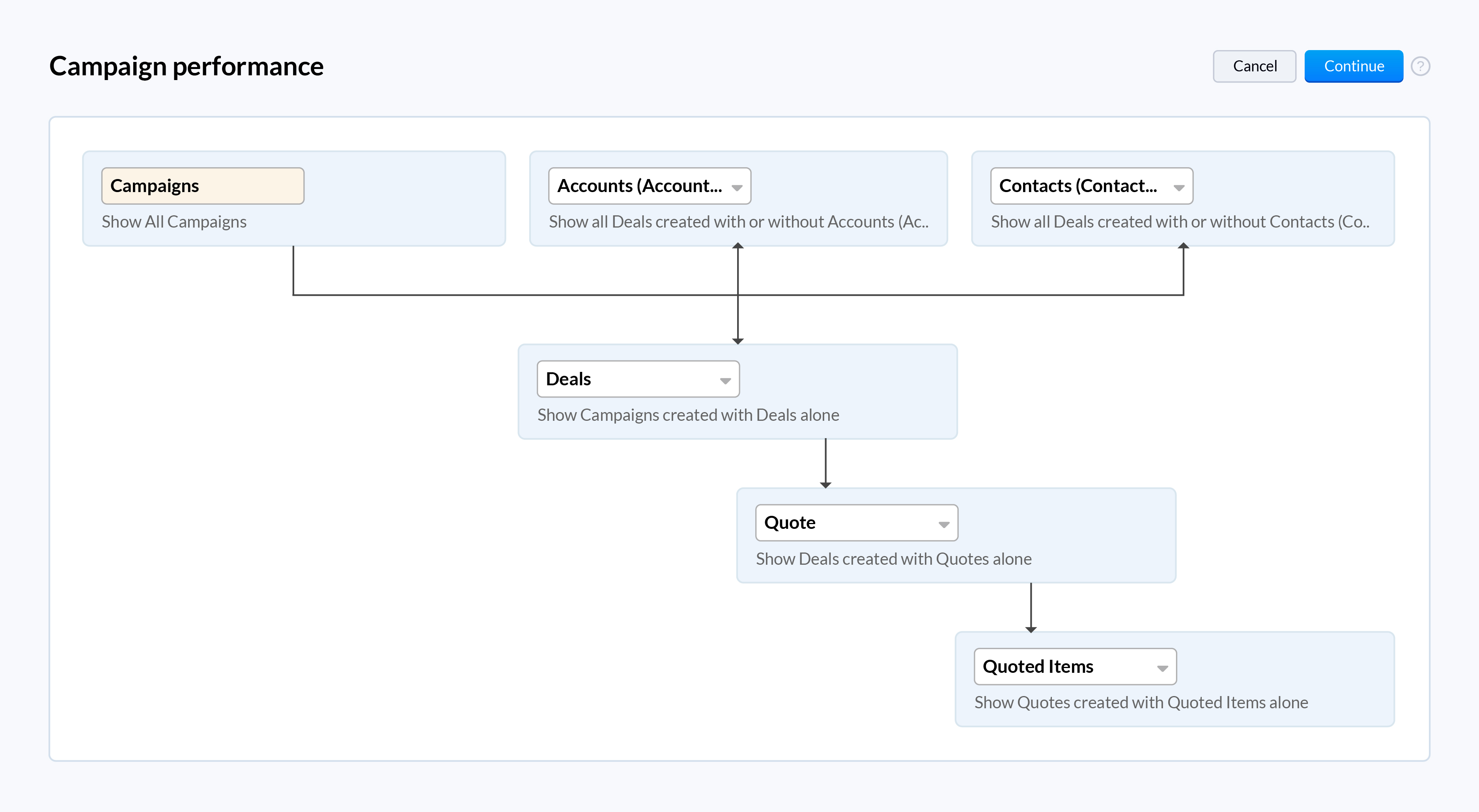
all-new Zoho CRM reports let you analyze, monitor, and track your
business health while also providing you with the ammunition you need to
make important decisions. The easy-to-use visual builder makes
generating complex and precise reports a breeze. Get more granular
access to your CRM data by viewing shared entries or unique entries in
two or more related modules with the new inclusive/exclusive
relationship tool. Expand your perspective and uncover deeper insights into your CRM data by joining multiple reports into one.
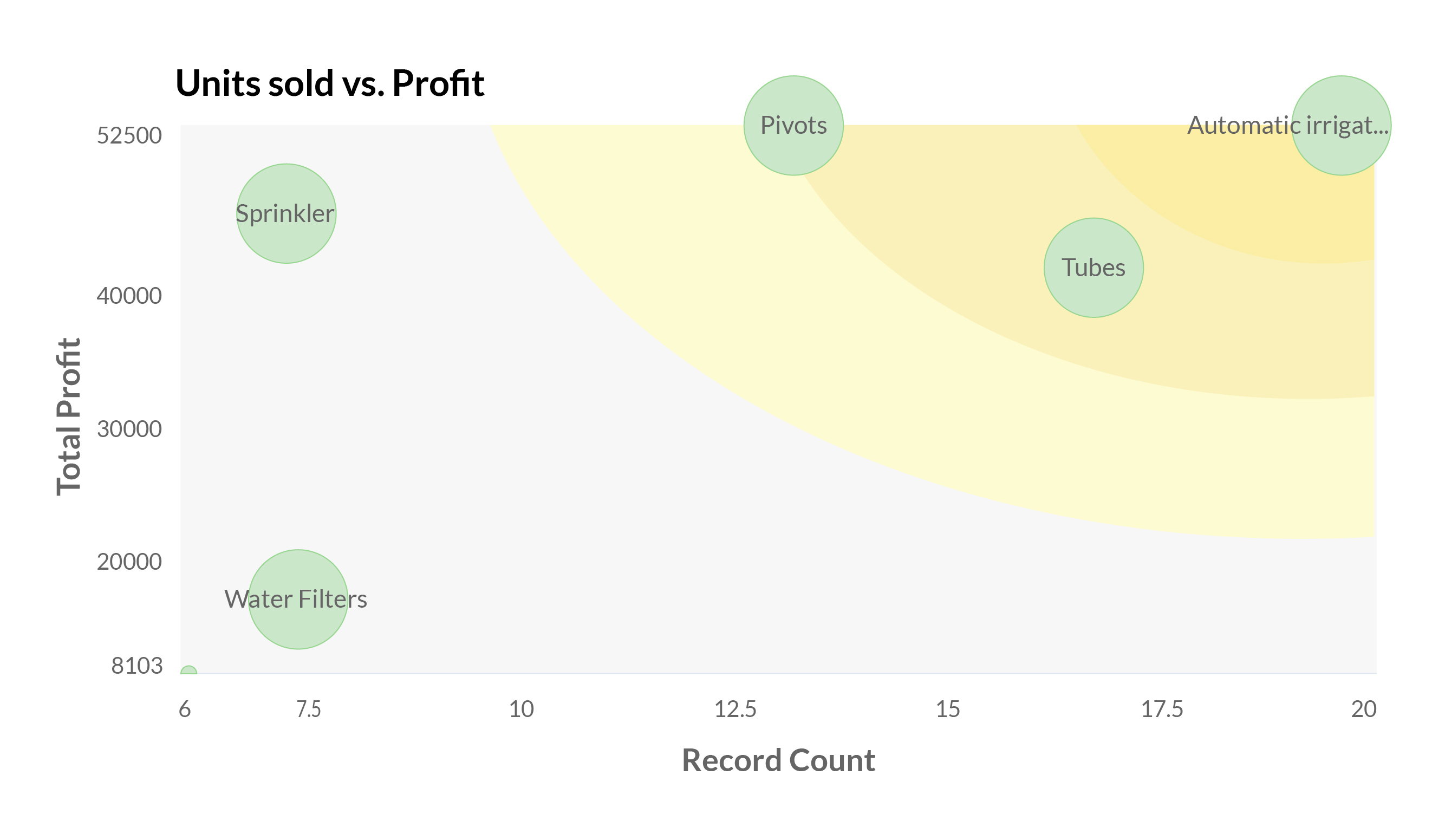
When you work with high volumes of sales data, it can often be difficult to visualize the relationship between two dimensions just by looking at raw data in standard two-dimensional charts like bar charts or pie charts. The new zone component displays your data in separate zones so it is easier to understand and analyze the areas that are doing well and the areas that need your attention.
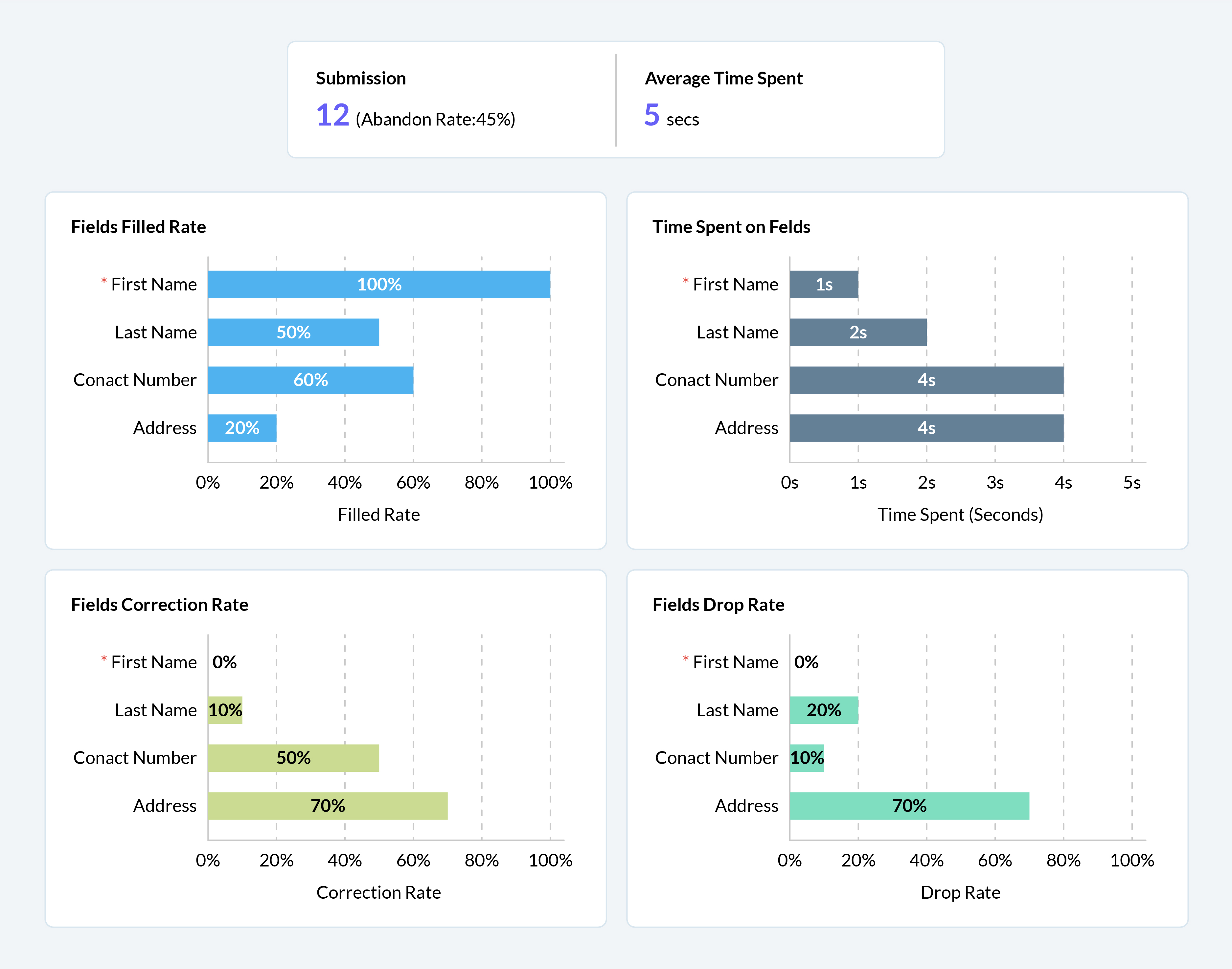
Your webforms are often the first point of interaction for prospects in their sales journey. It's vital to ensure that them submitting their information and being added to your sales cycle is as frictionless as possible. We've added a number of analytical charts to help your team measure the drop-off and abandon rates of your webforms across different devices to help you identify and eliminate friction points for your prospects.
We have some exciting updates to Zia, Zoho CRM's AI sales assistant to bring new levels of insight and customer understanding, to help you build more meaningful and personalized customer relationships.
Better recommendations for improved conversions
With the introduction of Zia's recommendations last year, we aimed to help businesses make the right pitch to their customers to maximize conversions. This year, we're adding the following capabilities to help your sales team get the most out of Zia's recommendations.
Reference customers: Zia will make recommendations to new customers based on the purchase patterns of existing customers with similar profiles and provide relevant reasoning for each recommendation.
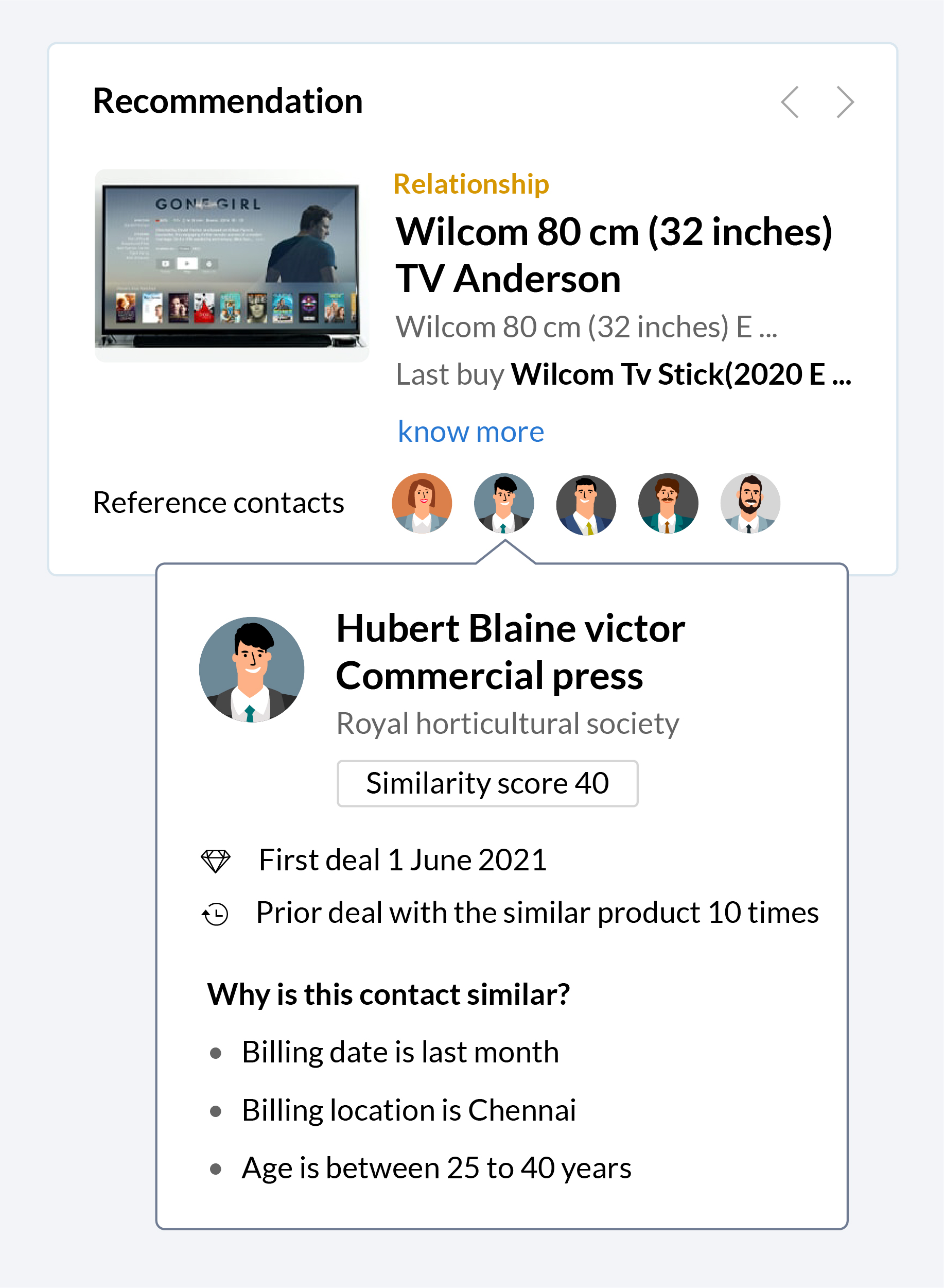
Recommendation notifications: Zia will collect information and automatically notify your sales reps when a recommendation is ready, making it easier for them to make pitches based on these recommendations when the time is right.
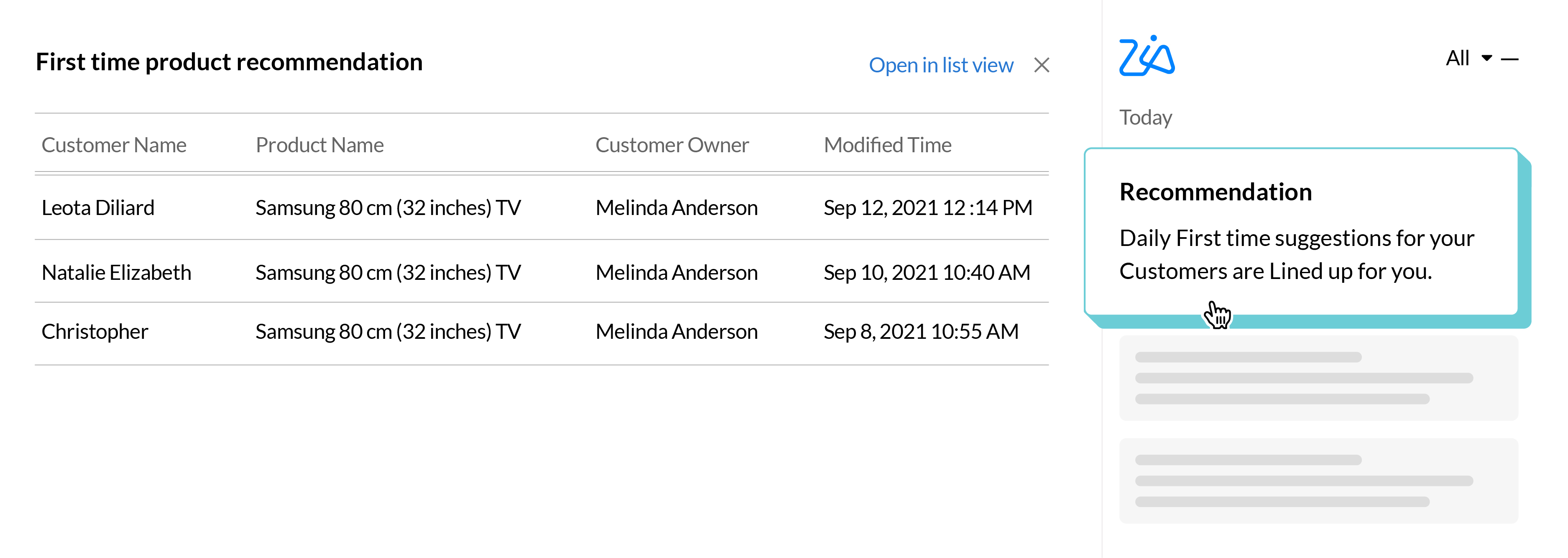
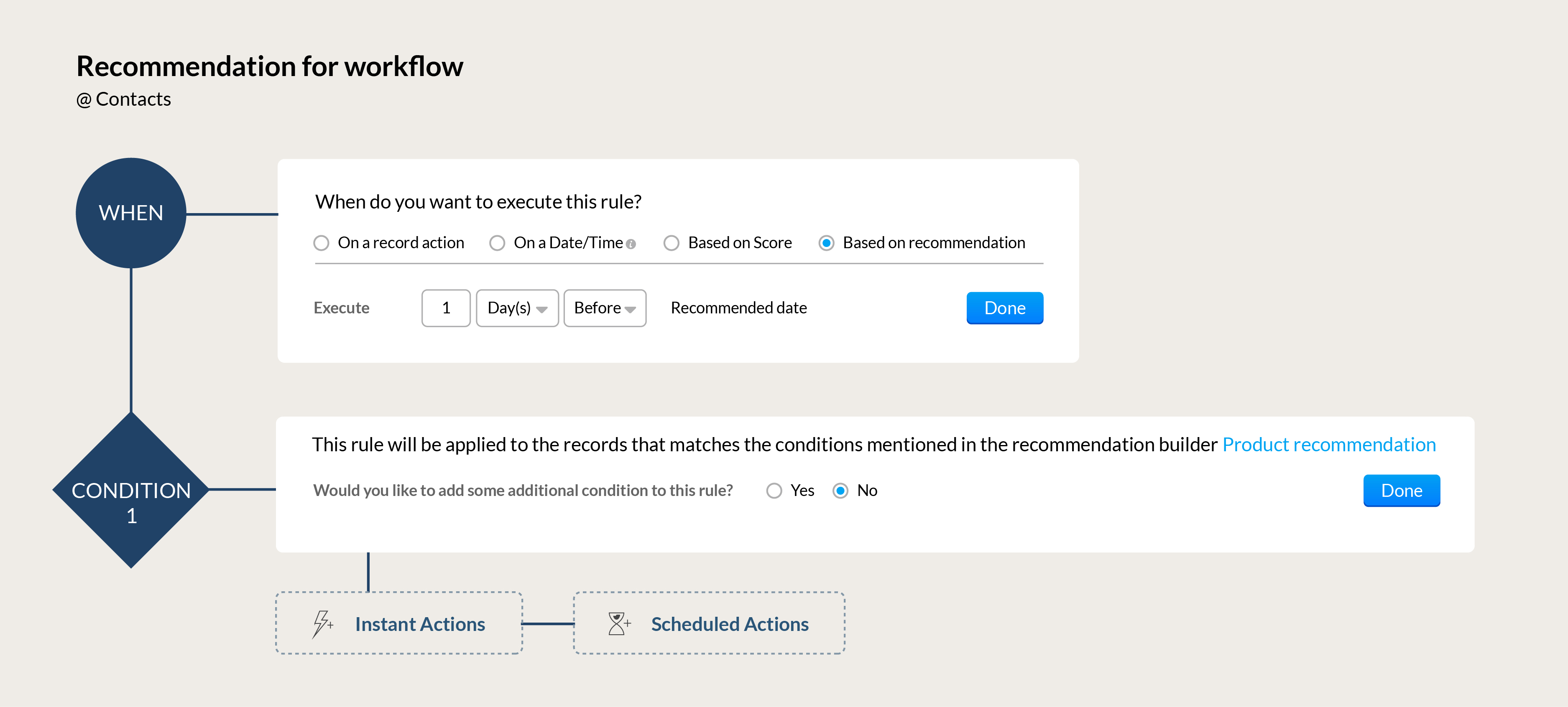
Automation for your recommendations: Build workflows that can automatically send the right communication to your customers based on Zia's recommendations. Send the perfect upsell offer to a high-value client whose membership renewal is coming up or send a re-engagement offer to a loyal customer who hasn't made a purchase in a while.
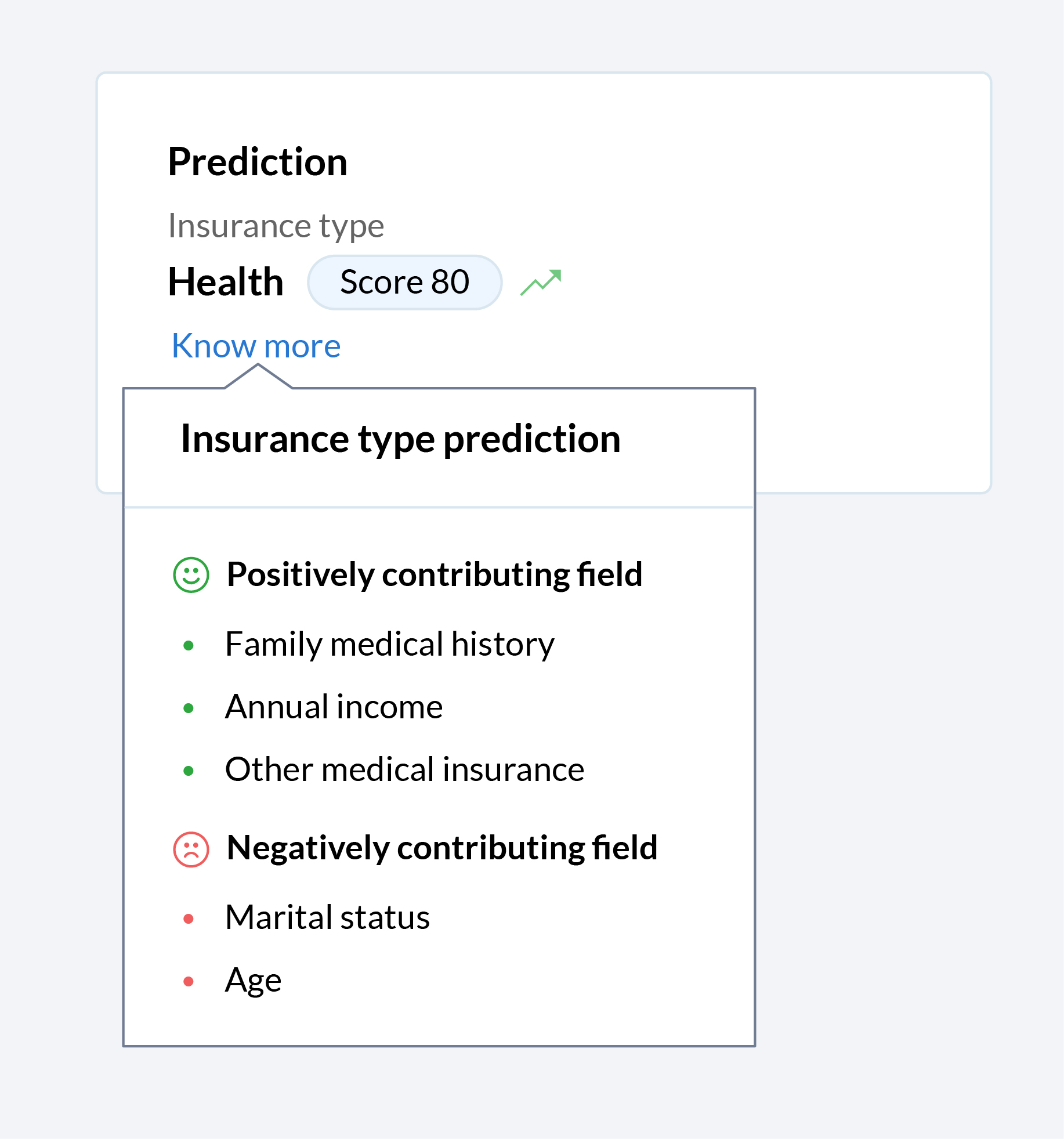
Let Zia tell you why
Zia offers a wide range of functions to make the life of your sales team easier. Zia predicts, recommends, assigns records, and more, but until now, your team only saw the end result. Now you can get a glimpse into the algorithm black box, so you can see what factors that contributed towards Zia making the recommendations, predictions, and assignments that your team relies on.
In today's hybrid working environment, it's vital for sales rep to maximize benefits across all channels of communication when engaging with prospects. To build on the robust omnichannel communication platform that's already part of the Zoho CRM system, we've introduced a number of enhancements across our email and telephony systems to help sales teams be more effective.
Add a personal touch to all your emails
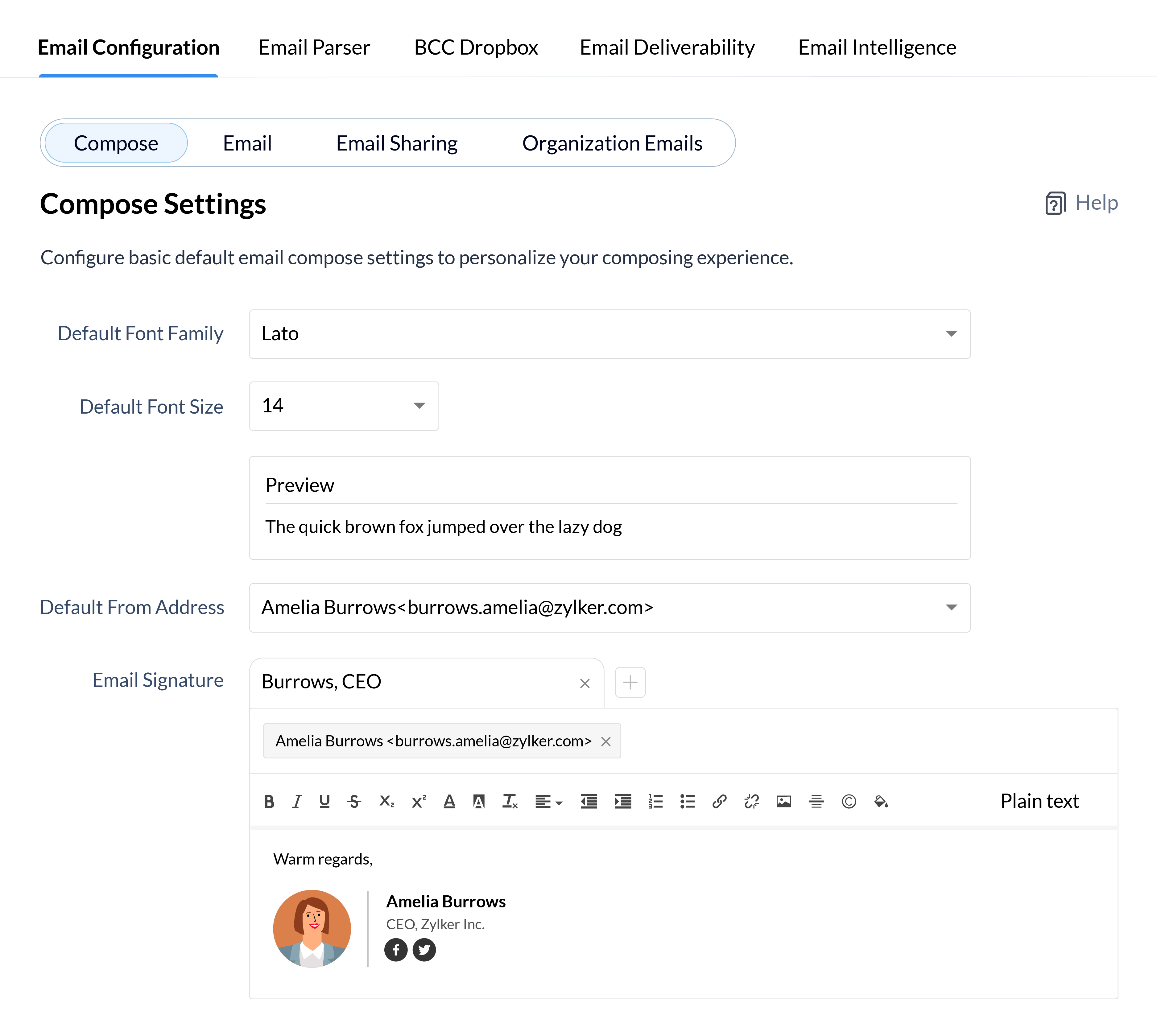
Personalized emails are key to building long-term trust with your clients, so why not add a personal flair to all your emails to define your identity and establish your brand identity in the minds of your clients? Customize every aspect of your emails from font styles and sizes to your email signatures for your individual email address and all your email aliases.
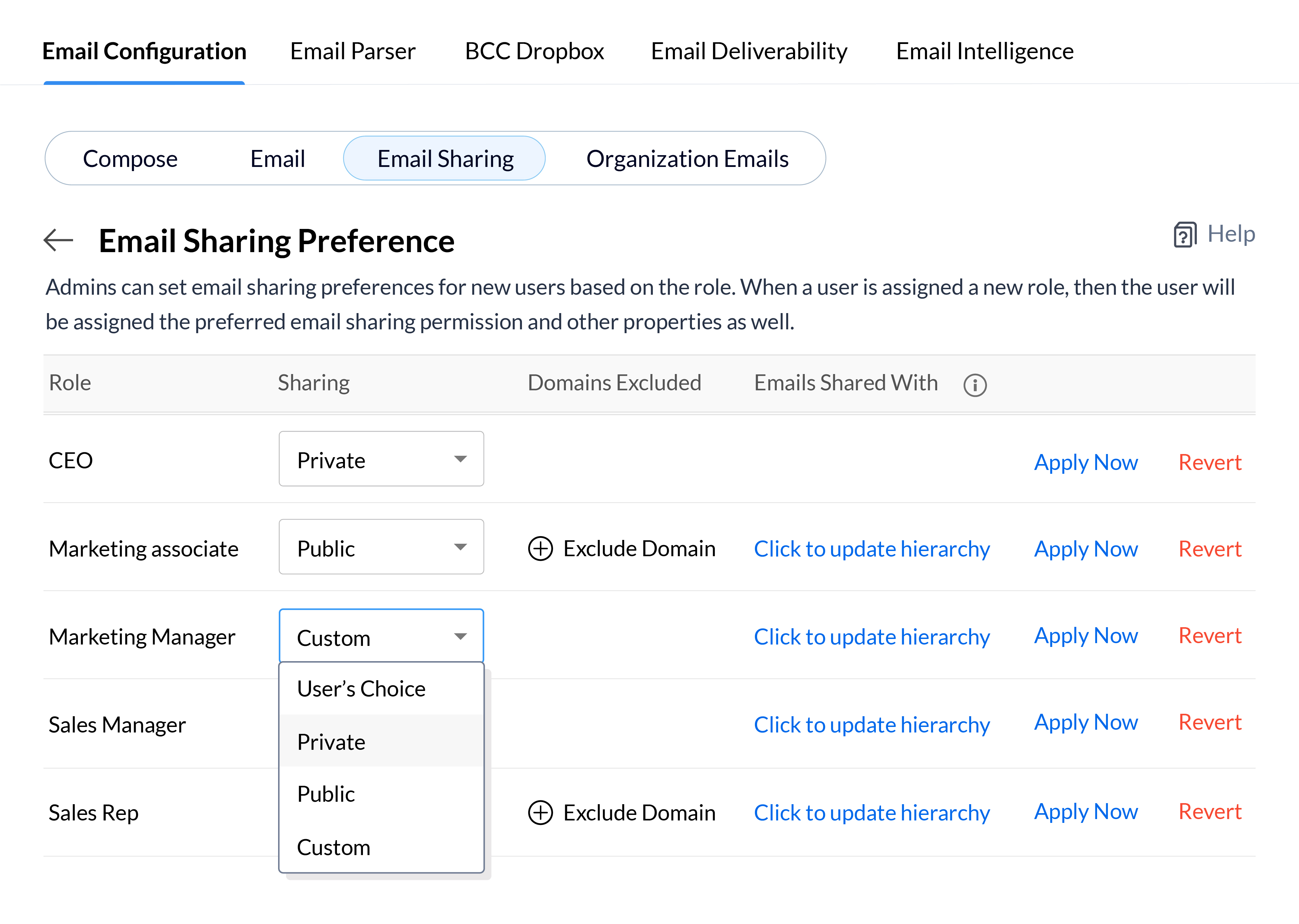
Depending on the roles of your CRM users and the nature of your email communications, you may want emails to be available to every user in your CRM, or keep them confidential and only available to a small group of key decision makers. Define your email sharing policy at the organizational level for each role and update the policy for users in bulk, so you can quickly set email sharing permissions for new employees or update them when users move to different roles in your CRM system.
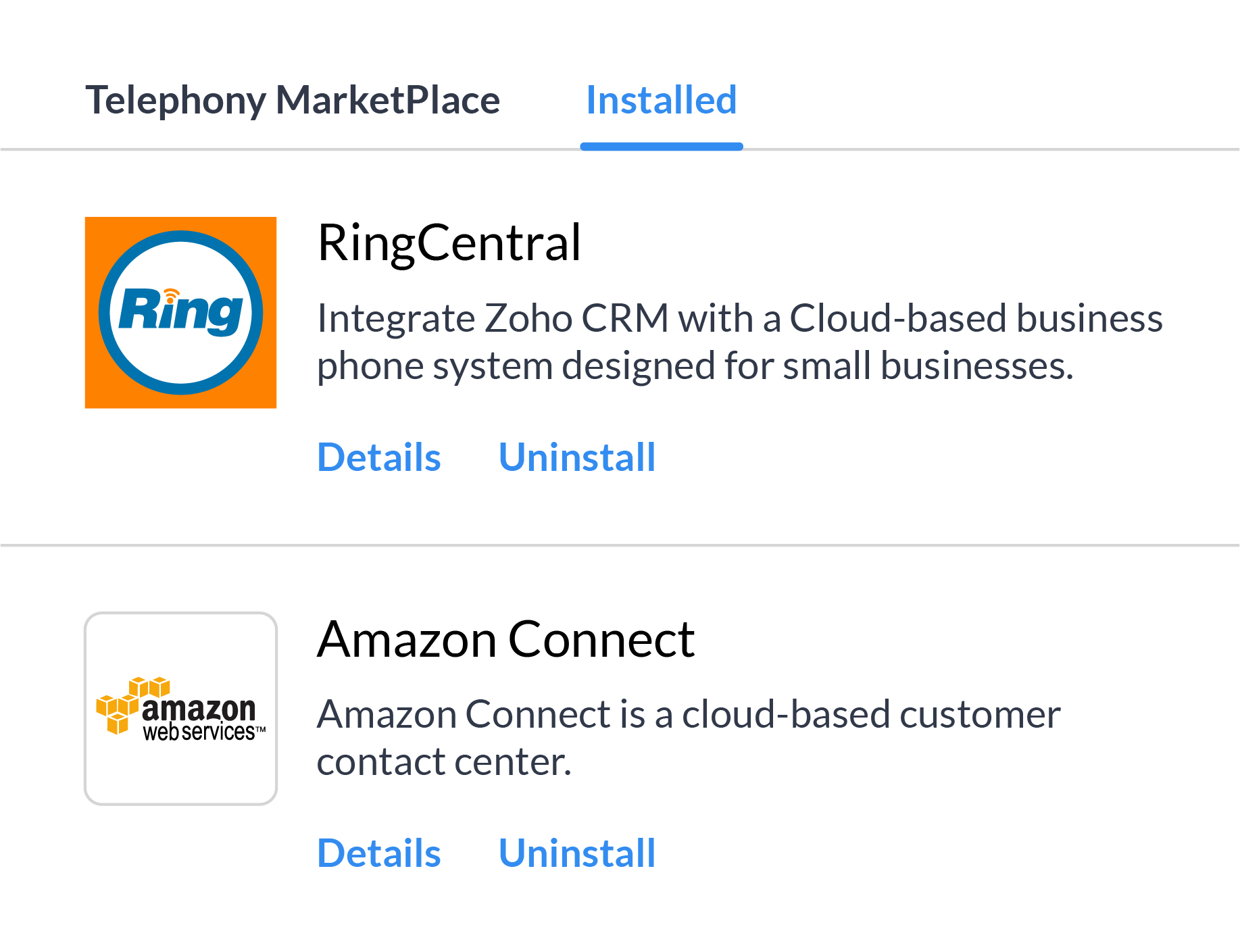
There's a whole range of reasons, from availability in all the countries you work in to cost of service, and more why it's not always feasible to depend on a single telephony vendor. Multi-vendor telephony support in Zoho CRM gives your business the flexibility to assign individuals or groups of users to different telephony systems and move users between different providers based on your business needs.
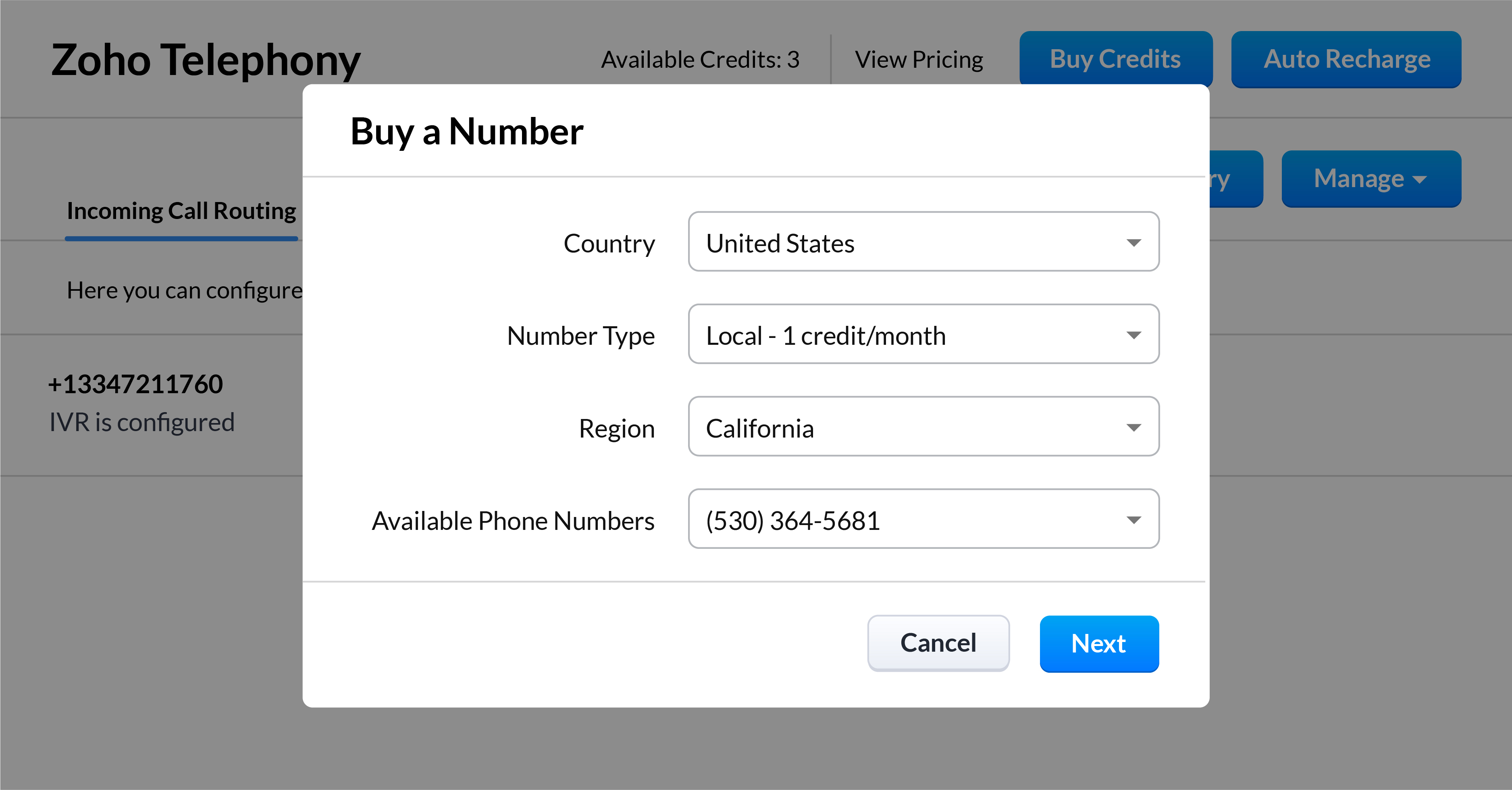
Kick off your call strategy with built-in telephony
With Zoho CRM's built-in telephony system, you don't have to worry about choosing and integrating a telephony provider. Purchase local or toll-free numbers for the users in your organization and assign unique outgoing numbers to help your sales reps build a personal connection with your customers.
*Feature will be opened in phases
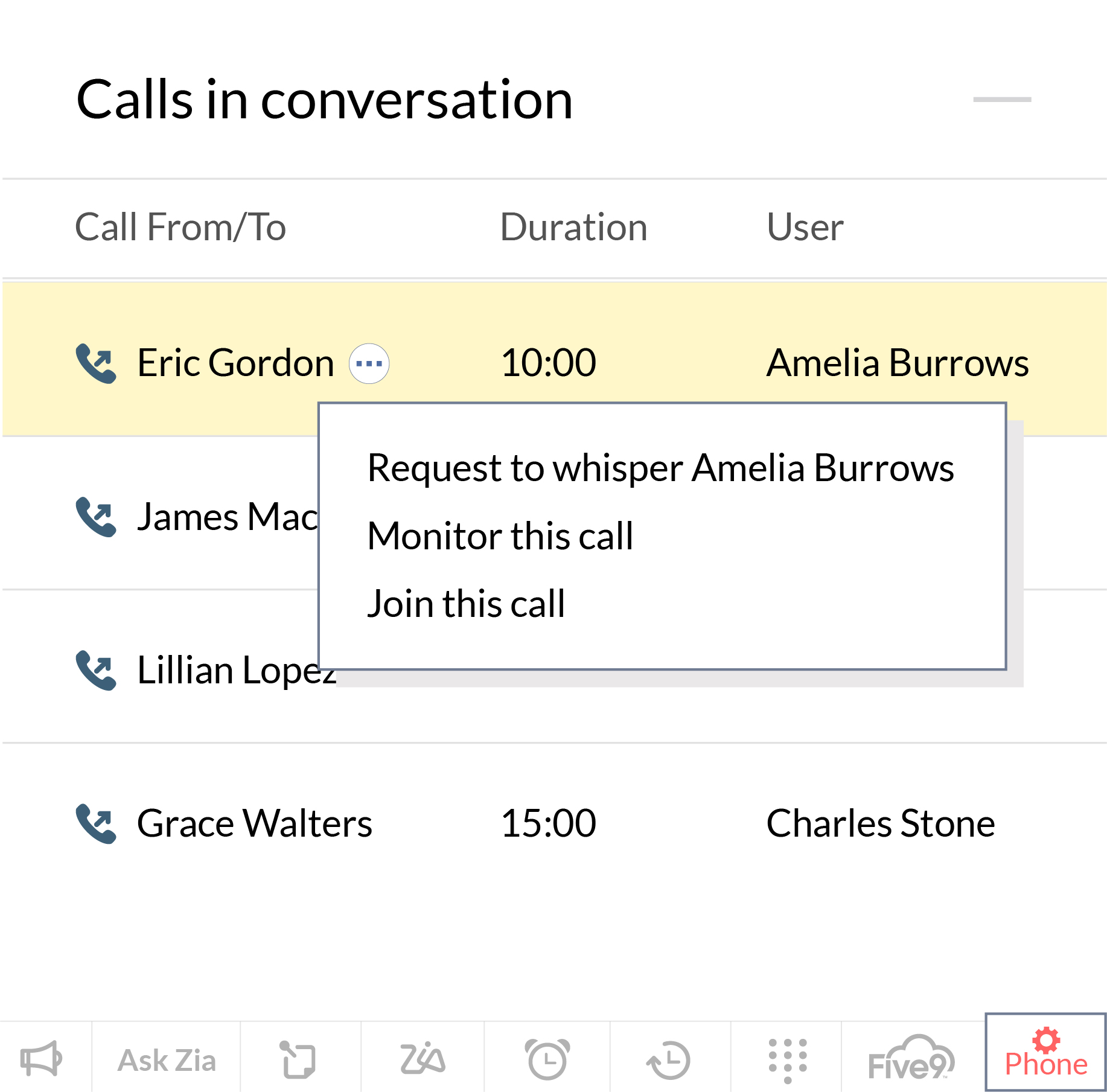
Streamline and manage your sales calls effectively
Our native integration allows managers to monitor, coach, and help their reps to get better at sales calls. Zoho CRM allows them to keep an eye on how their reps are performing in their active calls, and manage calls that are in the queue waiting. Sales managers can also coach new sales reps as they progress through a call and jump in directly to take the lead when the situation calls for it.
*Feature will be opened in phases
User Experience
This has long been an overlooked aspect of CRM solutions. In the pursuit of robust functionality, attractive prices, and strong market presence, businesses often overlook the experience these CRM solutions offer to their daily users. With the launch of Canvas, we wanted to help businesses improve the experience for daily users of Zoho CRM, and we're now introducing some intuitive functionality to make the UX even richer.
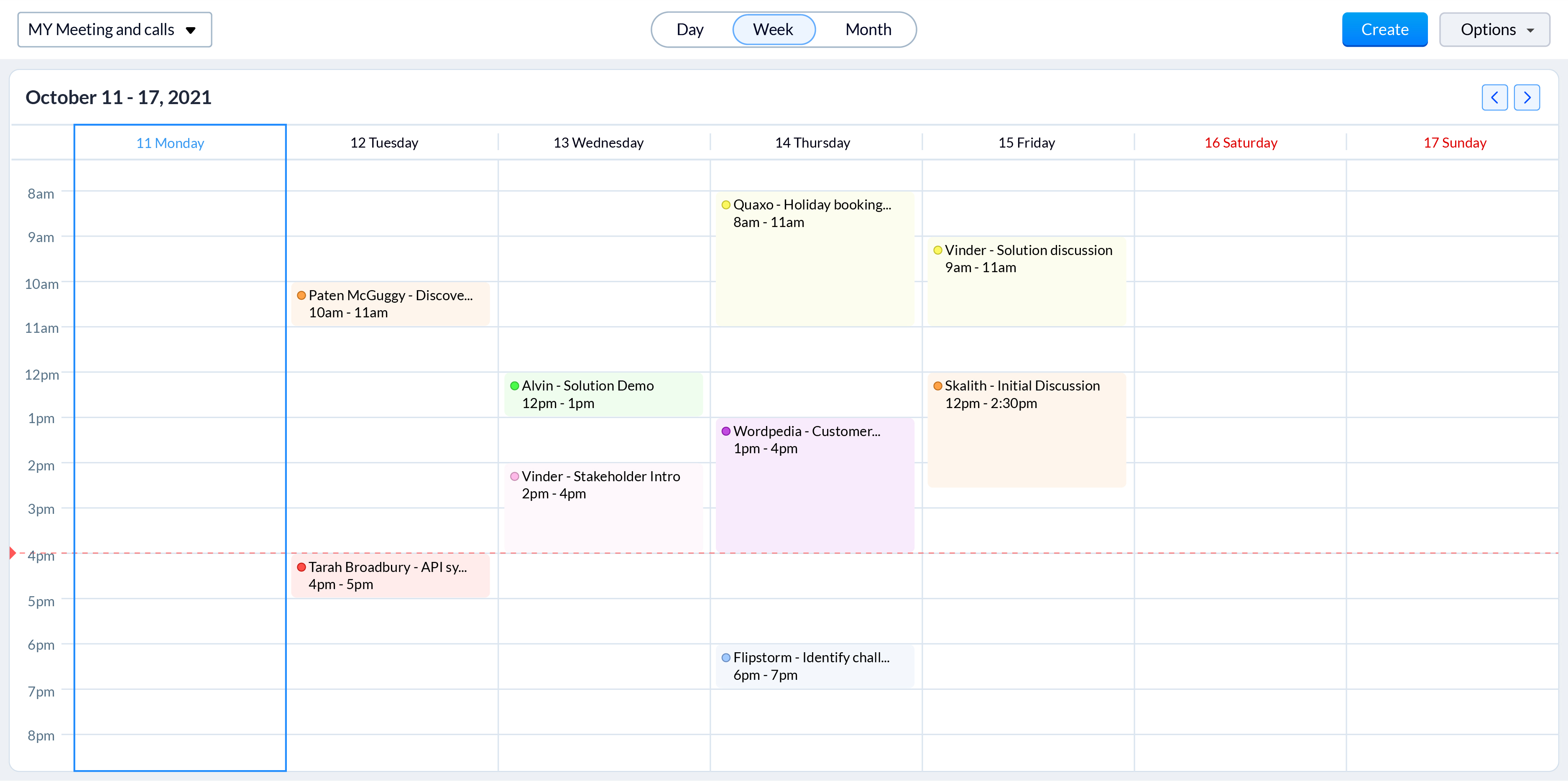
Color-coded meetings in calendars
Online meetings have become an integral part of today's hybrid working model. With sales reps engaging with prospects through online meetings more than ever, it is vital to offer them an easy way to track and prepare for them. Zoho CRM now allows sales reps to color code different meetings based on factors that are important to your business processes, such as whether they're online or in person. Now, even a quick glance at their calendar gives reps a clearer idea of all their upcoming meetings and what they need to prepare for.
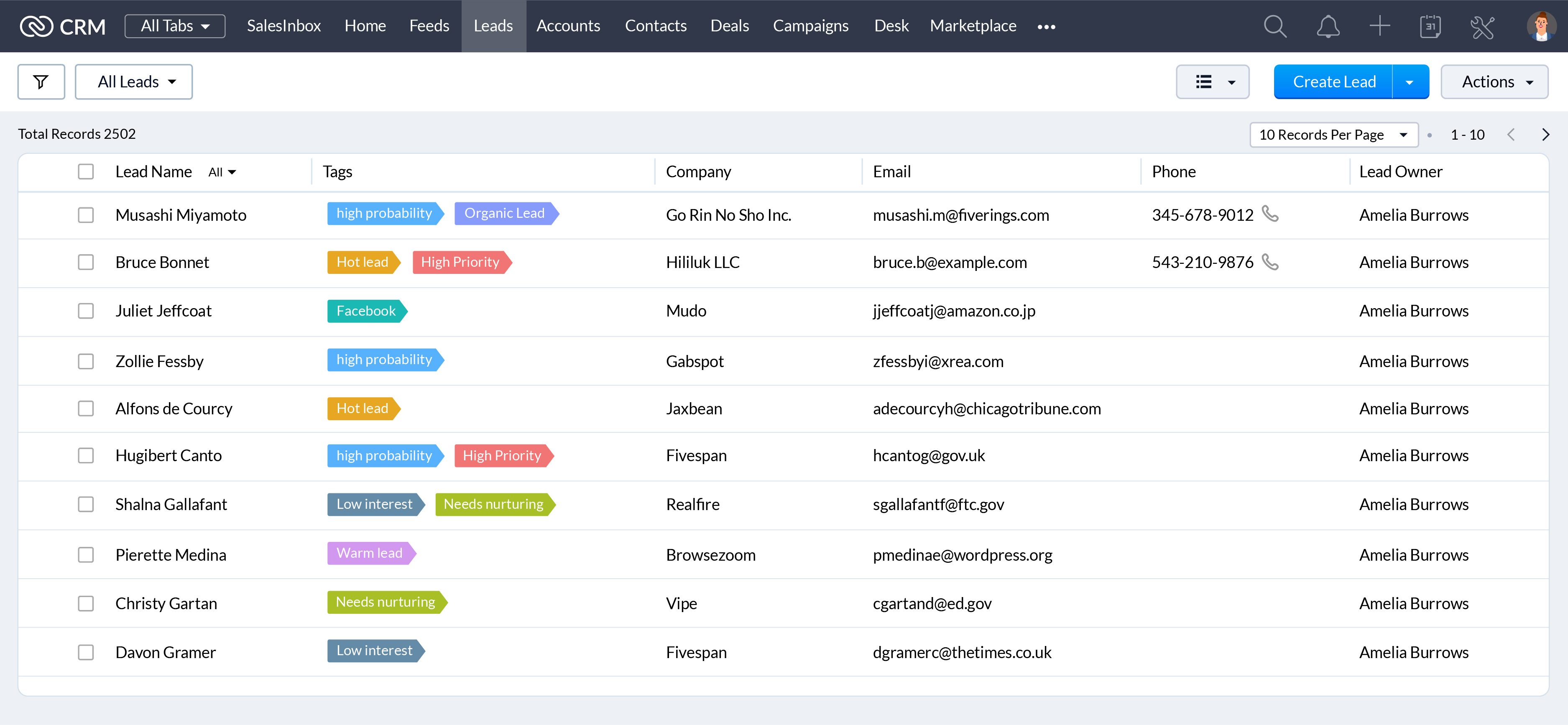
When they're working with hundreds of records everyday, a unique visual identifier makes it easier for your sales reps to search, categorize, prioritize, and segment records efficiently. Associate unique colors with your tags so your sales reps can see details like priority, deal state, associated departments, and more at a glance.
CRM administrators have one of the most challenging jobs: keeping your CRM system running like a well-oiled machine. We're announcing some exciting updates to make their jobs easier with the winter 2021 release.
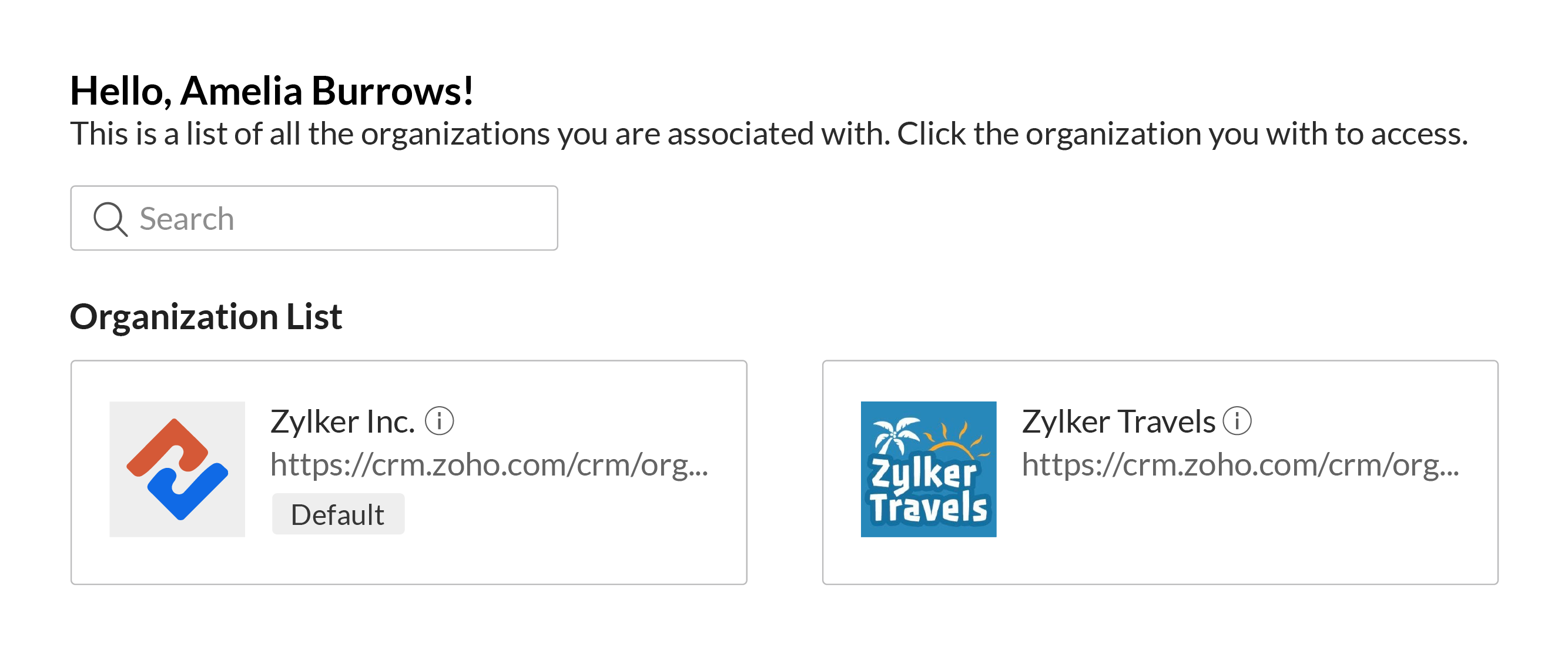
Access multiple CRM accounts with a common set of credentials
You can associate a user with multiple CRM accounts to allow business owners, upper management, and decision makers to manage multiple businesses or business units with ease. Users can switch between accounts quickly to make it easier to access key business data to help them understand growth and derive insights which can be used to prepare reports, agendas, and ideas for future planning, all with a single set of login credentials.
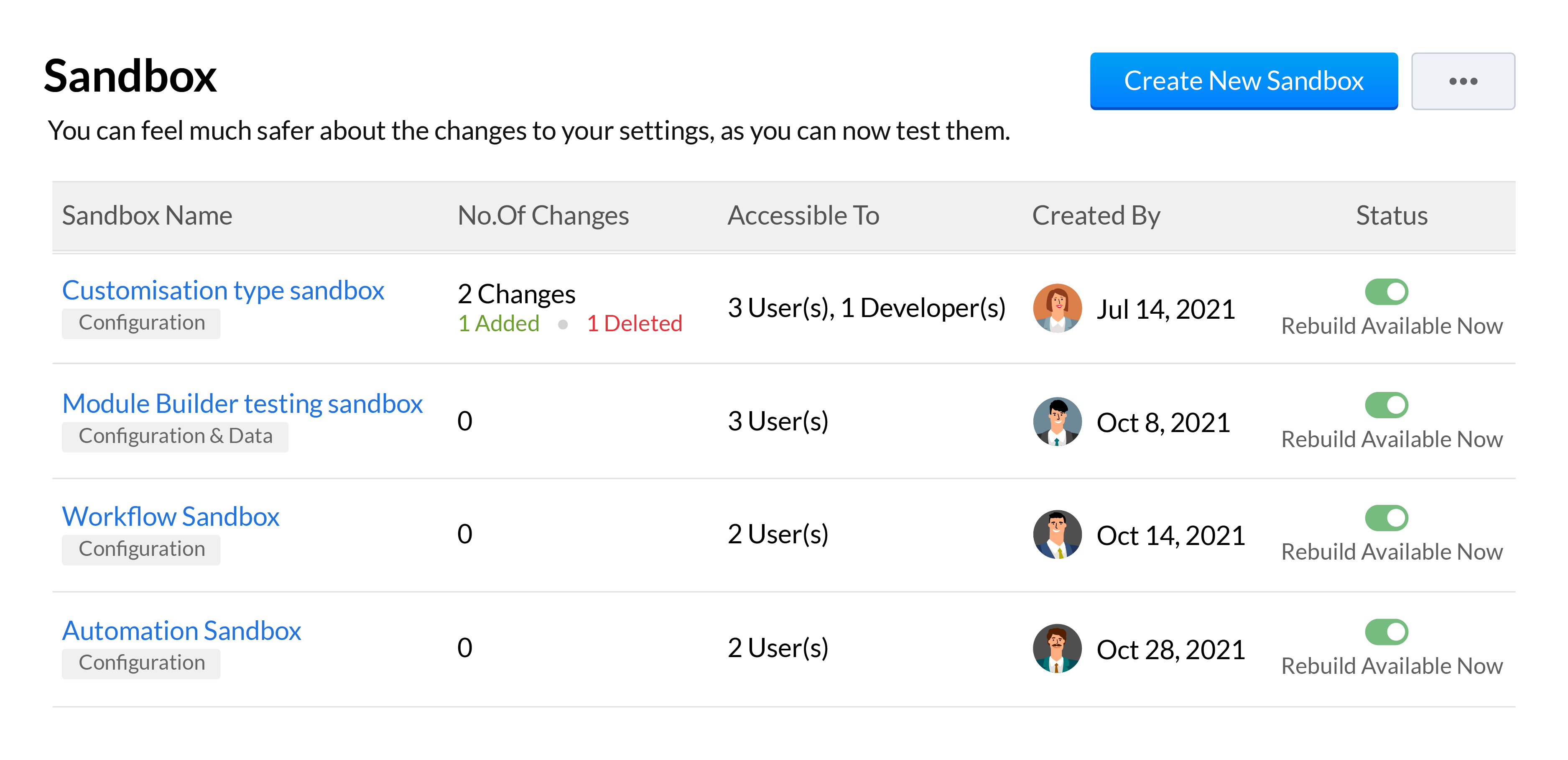
Sandboxes are essential in a CRM for testing and pushing error-free customizations to your live production account. We've added a number of features to our existing sandbox to help your developers be more effective when building and testing out customizations. This includes the ability to run multiple sandboxes, deploy all or only some settings, import sample or partial production data, and a unified deployment log to track your changes from all your sandboxes.
We'll be going over all these features across 3 overview webinars, which you can register for at the below links:
Webinar 1 | Date: 21/01/22 - This webinar will cover multiple sandbox, email sharing preferences, multi-organization support and retry support for workflow failures.
Webinar 2 | Date: 28/01/22 - This webinar will cover the new forecasting and reports system along with the new analytical components and improvements made to Zia.
That wraps up our Winter
'21 announcement and we look forward to all your thoughts and feedback
on these features and how they can be made better.
Happy selling,
Access your files securely from anywhere
All-in-one knowledge management and training platform for your employees and customers.

Zoho Developer Community





Topic Participants
Shashank M K
Sticky Posts
Introducing Multiple Sandbox Types and Support for Module's Data Population
Register here for the upcoming Focus Group webinar on Multiple Sandbox | Help documentation to learn more about the new enhancements Hello everyone, Sandbox in CRM is a testing environment for users to create and test new configurations like workflowGood news! Calendar in Zoho CRM gets a face lift
Dear Customers, We are delighted to unveil the revamped calendar UI in Zoho CRM. With a complete visual overhaul aligned with CRM for Everyone, the calendar now offers a more intuitive and flexible scheduling experience. What’s new? Distinguish activitiesVoC in Zoho CRM is now data savvy: Explore response drilldown, summary components and participation in CRM criteria
VoC has all the goods when it comes to customer intelligence—which is why we're constantly enhancing it. We recently added the following: A customer drilldown component that shows you the list of prospects and customers behind a chart's attribute ExpandedWrapping up 2025 on a high note: CRM Release Highlights of the year
Dear Customers, 2025 was an eventful year for us at Zoho CRM. We’ve had releases of all sizes and impact, and we are excited to look back, break it down, and rediscover them with you! Before we rewind—we’d like to take a minute and sincerely thank youPresenting ABM for Zoho CRM: Expand and retain your customers with precision
Picture this scenario: You're a growing SaaS company ready to launch a powerful business suite, and are looking to gain traction and momentum. But as a business with a tight budget, you know acquiring new customers is slow, expensive, and often delivers
Zoho TeamInbox Resources
Zoho CRM Plus Resources
Zoho Books Resources
Zoho Subscriptions Resources
Zoho Projects Resources
Zoho Sprints Resources
Qntrl Resources
Zoho Creator Resources
Zoho CRM Resources
Design. Discuss. Deliver.
Zoho Show Resources

Get Started. Write Away!
Writer is a powerful online word processor, designed for collaborative work.
-
オンラインヘルプ
-
Webセミナー
-
機能活用動画
-
よくある質問
-
Ebook
-
-
Zoho Campaigns
- Zoho サービスのWebセミナー
その他のサービス コンテンツ
Nederlandse Hulpbronnen

ご検討中の方
Recent Topics
Move email between inboxes?
Is it possible to move emails from one team inbox to another? We would like to be able to have a single "catch-all" inbox for incoming requests, and then move the email to the appropriate department inbox. I was hoping we would be able to accomplish thisUpdating records through Zoho Sheets View doesn't update timeline or trigger workflow rules
I have noticed that when i update a series of record with the zoho sheets view (see here http://d.pr/i/ahnR) it doesn't update timeline history or trigger workflow rules. I am using it in the Deals module. Looking forward for some more info. DenisManage control over Microsoft Office 365 integrations with profile-based sync permissions
Greetings all, Previously, all users in Zoho CRM had access to enable Microsoft integrations (Calendar, Contacts, and Tasks) in their accounts, regardless of their profile type. Users with administrator profiles can now manage profile-based permissionsinability to use different primary address on invoice per location
my company operates in two different locations with different email address. The problems then is the inability to edit the primary to suite the invoice for the second location.AI Search and Record Retrieval Inside Zoho Creator – Is This Possible?
Is it possible to integrate an AI assistant into Zoho Creator that can intelligently search, retrieve, and analyze records within the application’s forms and reports? Can AI access and query existing Creator data securely using Deluge or APIs to provideRename Service Report
Some of our customers are requesting the name of the service report PDF to be in a specific format, for example, instead of REP-001.PDF some are requesting to include their name like customername.pdf. is that possible?AI Search and Record Retrieval Inside Zoho Creator – Is This Possible?
Is it possible to integrate an AI assistant into Zoho Creator that can intelligently search, retrieve, and analyze records within the application’s forms and reports? Can AI access and query existing Creator data securely using Deluge or APIs to provideScheduled AU Data Center Database Version Upgrade for Zoho Forms
Dear Zoho Forms' users, We would like to update you on a scheduled AU Data Center database version upgrade for Zoho Forms. Find the schedule below: Migration window: Sunday, 22nd February 2026 12.00 AM to 12.30 AM AEDT This migration is a part of ourCannot get code to work with v2.mergeAndStore!
Please can someone help me pass subform items into a repeating mail merge table row using v2.mergeAndStore? I have a mail merge template created in Writer and stored in Workdrive. This template is referenced by a custom CRM function which merges all ofHotmail is blocking the zoho mail IP
Greetings, Since last Tuesday (5 days ago today) I wrote to Zoho support and I still haven't received a single response (Ticket ID: 2056917). Is this how you treat people who pay for your email service? I am making this public so that those who want toZoho Bookings and Survey Integration through Flow
I am trying to set up flows where once an appointment is marked as completed in Zoho Bookings, the applicable survey form would be sent to the customer. Problem is, I cannot customise flows wherein if Consultation A is completed, Survey Form A would beZoho CRM Community Digest - December 2025 | Part 2
Hello Everyone! During the final weeks of December, Zoho CRM introduced updates that not only enhanced product capabilities but also offered deeper guidance through Kaizen posts. This section highlights what was released and shared in the last two weeksCRUD actions for Resources via API
Hello, is it possible to perform CRUD actions through the API for Resources? We want to create a sync from Zoho CRM Car record to Bookings resources to create availabilities for Car bookings. For Test drives, not only the sales person needs to be available,Kaizen #186 : Client Script Support for Subforms
Hello everyone! Welcome back to another exciting Kaizen post on Client Script! In this edition, we’re taking a closer look at Client Script Support for Subforms with the help of the following scenario. " Zylker, a manufacturing company, uses the "Orders"Unable to Assign Multiple Categories to a Single Product in Zoho Commerce
Hello Zoho Commerce Support Team, I am facing an issue while assigning categories to products in Zoho Commerce. I want to assign multiple categories to a single product, but in the Item edit page, the Category field allows selecting only one categoryオンライン勉強会のお知らせ Zoho ワークアウト (2/19 参加無料)
ユーザーの皆さま、こんにちは。コミュニティチームの中野です。 2月開催のZoho ワークアウトについてお知らせします。 今回はZoomにて、オンライン開催します。 ▶︎参加登録はこちら(無料) https://us02web.zoom.us/meeting/register/6AyVUxp6QDmMQiDGXGkxPA ━━━━━━━━━━━━━━━━━━━━━━━━ Zoho ワークアウトとは? Zoho ユーザー同士で交流しながら、サービスに関する疑問や不明点の解消を目指すイベント「Zohodoubts about customer happiness in zoho desk
Good afternoon, Desk community. The reason for my message is that I have a question regarding the customer satisfaction surveys we can ask our clients to rate our service. I know that in Desk, you can activate Customer Happiness to send a survey to theCOQL API in JS Widget only pulling 200 records
Hello! We've been building a custom homepage widget using the Zoho JS SDK, and it seems that this https://help.zwidgets.com/help/latest/ZOHO.CRM.API.html#.coql only allows 200 records. I thought the limit was 2000 for COQL queries, but am I mistaken?Standard Description Field - Can I change label or add dd tooltip
Is there a way fo you guys to allow the customer to change the label name for the description field in the customer portal when submitting tickets. Or at least allow us to add a tooltip to clarify what description we need from them. I know I can create my own separate multi line description field but if I do that, it doesn't have the nice toolbar with Bold, Italic, Underline, color, font, indent, etc. Can you please allow us to add a tooltip to the zoho standard description field?Introducing parent-child ticketing in Zoho Desk [Early access]
Hello Zoho Desk users! We have introduced the parent-child ticketing system to help customer service teams ensure efficient resolution of issues involving multiple, related tickets. You can now combine repetitive and interconnected tickets into parent-childAbility to CC on a mass email
Ability to CC someone on a mass email.Different Task Layouts for Subtasks
I was wondering how it would be possible for a subtask to have a different task layout to the parent task.Shift Question
Can someone explain why it says weekend during Monday-Friday? Manager set Zoho up and has handed over to me and I can't get figured out how to change this.Compensation | Salary Packages - Hourly Wage Needed
The US Bureau of Labor Statistics says 55.7% of all workers in the US are paid by the hour. I don't know how that compares to the rest of the world, but I would think that this alone would justify the need for having an hourly-based salary package option.Customizing Helpcenter texts
I’m customizing the Zoho Desk Help Center and I’d like to change the wording of the standard widgets – for example, the text in the “Submit Ticket” banner that appears in the footer, or other built-in widget labels and messages. So far, I haven’t foundAbility to Edit Ticket Subject when Splitting a Ticket
Often someone will make an additional or new request within an existing ticket that requires we split the ticket. The annoying part is that the new ticket maintains the subject of the original ticket after the split so when the new ticket email notificationAutomatically Update Form Attachment Service with Newly added Fields
Hi, When I have a Form Setup and connected to a 3rd Party Service such as OneDrive for Form Attachments, when I later add a new Upload Field I have to remove and redo the entire 3rd Party Setup from scratch. This needs to be improved, such as when newReopen ticket on specific date/time
Is there a way that we can close a ticket and setup a reopen of that ticket on a specific date and time? (without using the "on hold" ticket option)API credit COQL COUNT
The docs describe API credits in COQL from the LIMIT perspective: https://www.zoho.com/crm/developer/docs/api/v8/COQL-Overview.html When using aggregate functions such as `COUNT` or `SUM`, is that billed as 1 API credit?Weekly Tips : Save Time with Saved Search
Let's assume your work requires you to regularly check emails from important clients that have attachments and were sent within a specific time period. Instead of entering the same conditions every time—like sender, date range, and attachments included—youRemove 'This is an automated mail from Zoho Sign' in footer
Hi there, Is it possible to remove or change the text under the e-mail templates? I can't figure out how to do that: Would love to hear from you. Kind regards, TristanOrganize and manage PDFs with Zoho PDF Editor's dashboard
Hello users, Zoho PDF Editor's dashboard is a one-stop place to upload, sort, share PDF files, and more. This article will explore the various capabilities that Zoho PDF Editor's dashboard offers. A few highlights of Zoho PDF Editor's dashboard: UploadCustom function return type
Hi, How do I create a custom deluge function in Zoho CRM that returns a string? e.g. Setup->Workflow->Custom Functions->Configure->Write own During create or edit of the function I don't see a way to change the default 'void' to anything else. AddingPassing Info from Function to Client Script
Hello, I have recently started making use of client script for buttons, allowing me to give the user information or warnings before they proceed. This is great. However, I have never quite managed to pass back any extra information from the function toDrag 'n' Drop Fields to a Sub-Form and "Move Field To" Option
Hi, I would like to be able to move fields from the Main Page to a Sub-Form or from a Sub-Form to either the Main Page or another Sub-Form. Today if you change the design you have to delete and recreate every field, not just move them. Would be nice toZoho Payroll for Canada
Is anyone else having problems getting setup for Canada?Passing the CRM
Hi, I am hoping someone can help. I have a zoho form that has a CRM lookup field. I was hoping to send this to my publicly to clients via a text message and the form then attaches the signed form back to the custom module. This work absolutely fine whenOne Contact with Multiple Accounts with Portal enabled
I have a contact that manages different accounts, so he needs to see the invoices of all the companies he manage in Portal but I found it not possible.. any idea? I tried to set different customers with the same email contact with the portal enabled andUser Automation: User based workflow rules & webhooks
User management is an undeniable part of project management and requires adequate monitoring. As teams grow and projects multiply, manual coordination for updating users & permissions becomes difficult and can give way to errors. User automation in ZohoDisable Zoho Contacts
We don't want to use this app... How can we disable it?Next Page