Kaizen #123 Data Synchronization from a third party application
Welcome back to the Kaizen series!
In last week's post in the Kaizen series, we discussed one-way data synchronization from Zoho CRM to a legacy application, utilizing Zoho CRM's Bulk Read API and Notification API. This week, we will discuss data synchronization from a third party app to Zoho CRM.
The APIs available in Zoho CRM to insert, update or upsert records are :
1) Insert, Update, and Upsert Records APIs
These are synchronous APIs that are used to perform create, update or upsert operations for up to 100 records in a Zoho CRM module. While the Insert Records API and Update Records API is used to create and update a record respectively, the Upsert Records API is used to upsert (insert or update) a record depending on the availability of the record in your org . In Upsert Records API, the system checks for duplicate records based on the values in the duplicate_check_fields json array in the input json. If the record is already present, it gets updated. If not, the record is inserted. You will get the status of these operations immediately. Read more about the Upsert Records API in this Kaizen post.
2) Bulk Write API
The Bulk Write API is an asynchronous API that is used to perform create/update/upsert operations for up to 25K records in a Zoho CRM module. A background job will be scheduled in Zoho CRM. You can check the status of the scheduled job using the Bulk Write Job Details API. Alternatively, you can configure a callback URL when you schedule the job. The details of the Bulk Write Job result are posted on the callback URL upon successful completion or failure of the job. This bulk write API involves the following steps:
- Preparing the CSV input file
- Uploading the CSV file
- Creating a bulk write job
- Checking the job's status
- Downloading the result
To learn more about these steps in the Bulk Write API and about the Bulk Write API in general, refer to the Kaizen post on the Bulk Write API.
Insert, Update, Upsert Records | Bulk Write API |
Insert, update, or upsert up to 100 records per API call. | Insert, update, or upsert up to 25000 records per API call. |
The response is available instantly. | The response to the Bulk Write API request will not be available immediately. You can check the status of the job by polling for it, or you can wait for the status to be available in the callback URL after the job has completed. |
These APIs consume one credit per 10 records. | Bulk Write API consumes 500 credits per API call. |
Input should be in JSON format | The input file should be in CSV format. |
Let us now examine four different scenarios for record insertion in a module, specifically with varying quantities: 100, 2000, 5000, and 25000 records, and discover how these APIs perform in terms of number of API calls and credits consumed.
Number of Records | Insert,Update or Upsert Records API | Bulk Write API |
100 | 1 API Call 10 API Credits | 1 API Call 500 API Credits |
2000 | 20 API Calls 200 API Credits | 1 API Call 500 API Credits |
5000 | 50 API Calls 500 API Credits | 1 API Call 500 API Credits |
25000 | 250 API Calls 2500 API Credits | 1 API Call 500 API Credits |
Clearly, if you have more than 5000 records, it is advisable to use the bulk write API, given that you are ok with the operation being run asynchronously. If you want instant results, you should use insert/update/upsert APIs. However, more API credits will be consumed in this case.
Data Sync
Consider an e-commerce company where the Order management team uses a legacy system and the Accounts team uses Zoho CRM. To ensure that the Accounts team works with near real-time data in Zoho CRM, data synchronization from the legacy application is essential. Assume that in Zoho CRM, there is a custom module named "Orders" that contains the details from the legacy system. Imagine that you are in charge of the data synchronization between Zoho CRM and the legacy system. How should you call these APIs to achieve this synchronization? The synchronization process involves two steps.
Step 1: Initial Data Sync : Initial data sync from the legacy system to Zoho CRM.
Step 2: Subsequent Data Sync : Push any new orders or updated orders to Zoho CRM.
The solution we propose here is one of the many ways in which the data sync can be achieved.
This solution is built on the below three key points:
1) Unique field in Order Module: Maintain a unique field "parent_id" in the "Orders" module. The unique identifier of the orders in your legacy system should be mapped to this parent_id field. In create bulk write job, this can be achieved by the section field_mappings. For ensuring correct working of upsert operations, you can make use of "find_by" field inside resource JSON Array in the Create Bulk Write Job API Request. You should provide the value of "find_by" as the unique field "parent_id" . To read more about find_by field refer to Create Bulk Write Job page.
2) Sync Flag in the Orders table in legacy system: For the sync, maintain a flag in your legacy system orders table for indicating whether the record is synced with Zoho CRM or not. Once the sync is done, update the flag to true. Whenever a record is modified or sync fails, the flag value should be updated to false. This ensures that in case a record that is synced gets updated during the initial sync process, this flag column helps us re-sync this record again.
3) Grouping of data to batches: For initial sync, the data volume in the table will be huge. So they have to be batched in a group of 25k records. This grouping can be done based on sorting the table with a particular column & filtering records based on the sync column with criteria sync=false.
Step 1: Initial Data Sync
Since you have multiple batches of 25k records, you have to iterate them one by one and send them to the Bulk Write API.
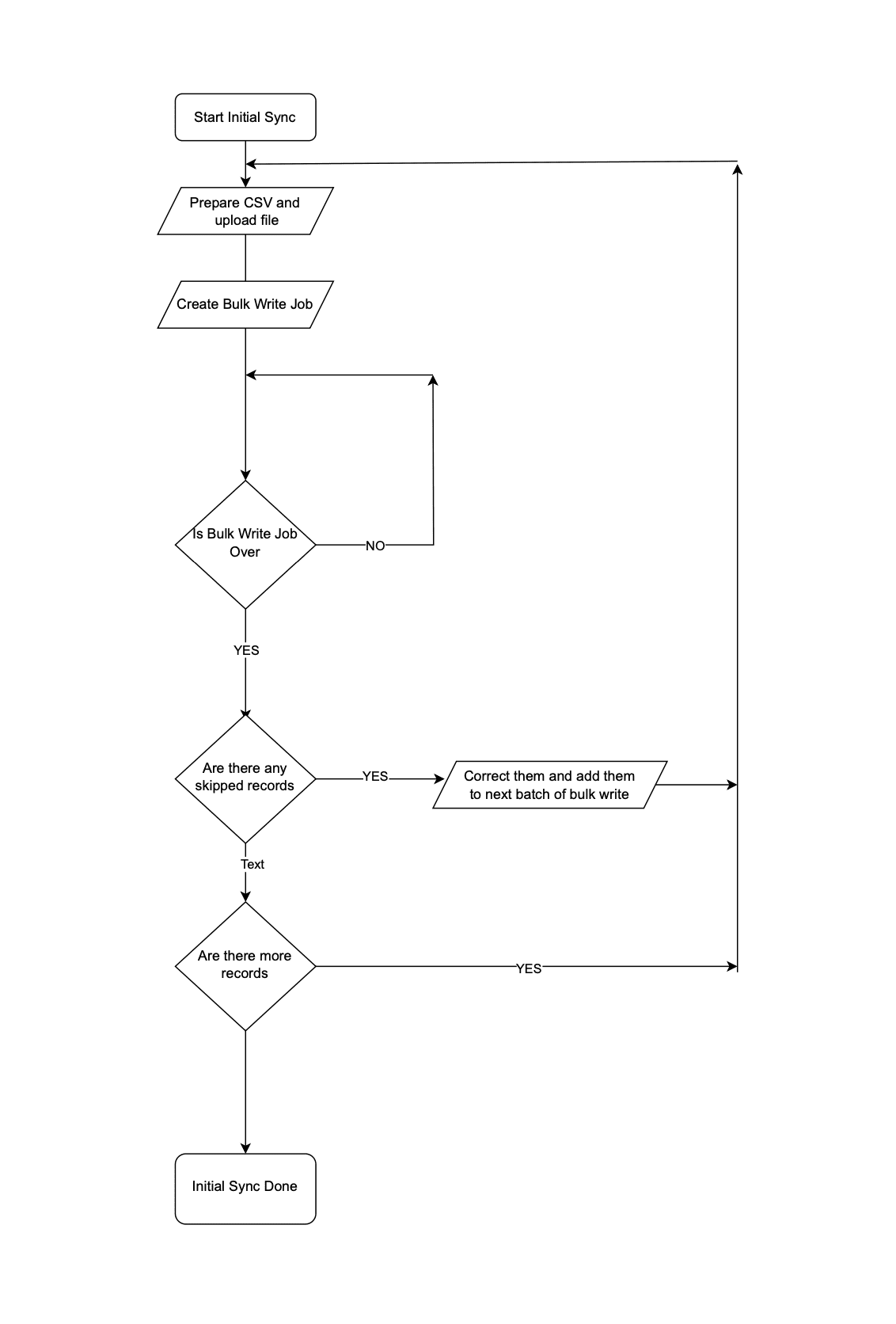 Initial Data Sync
Step 2: Subsequent Data Sync
The Order Management team continues to use the legacy application, leading to continuous creation or update of records in the Orders module.
It is not recommended to invoke Upsert Records API whenever an operation happens in Orders in the legacy system. Subsequent data syncs can be done in two ways: either by (a)near real-time sync or (b) Interval based sync.
(a) Near Real-time Sync
As we want near real-time data in Zoho CRM, it is ok for the records that are updated in the legacy system from last synchronization to be unavailable in Zoho CRM for 10 minutes.
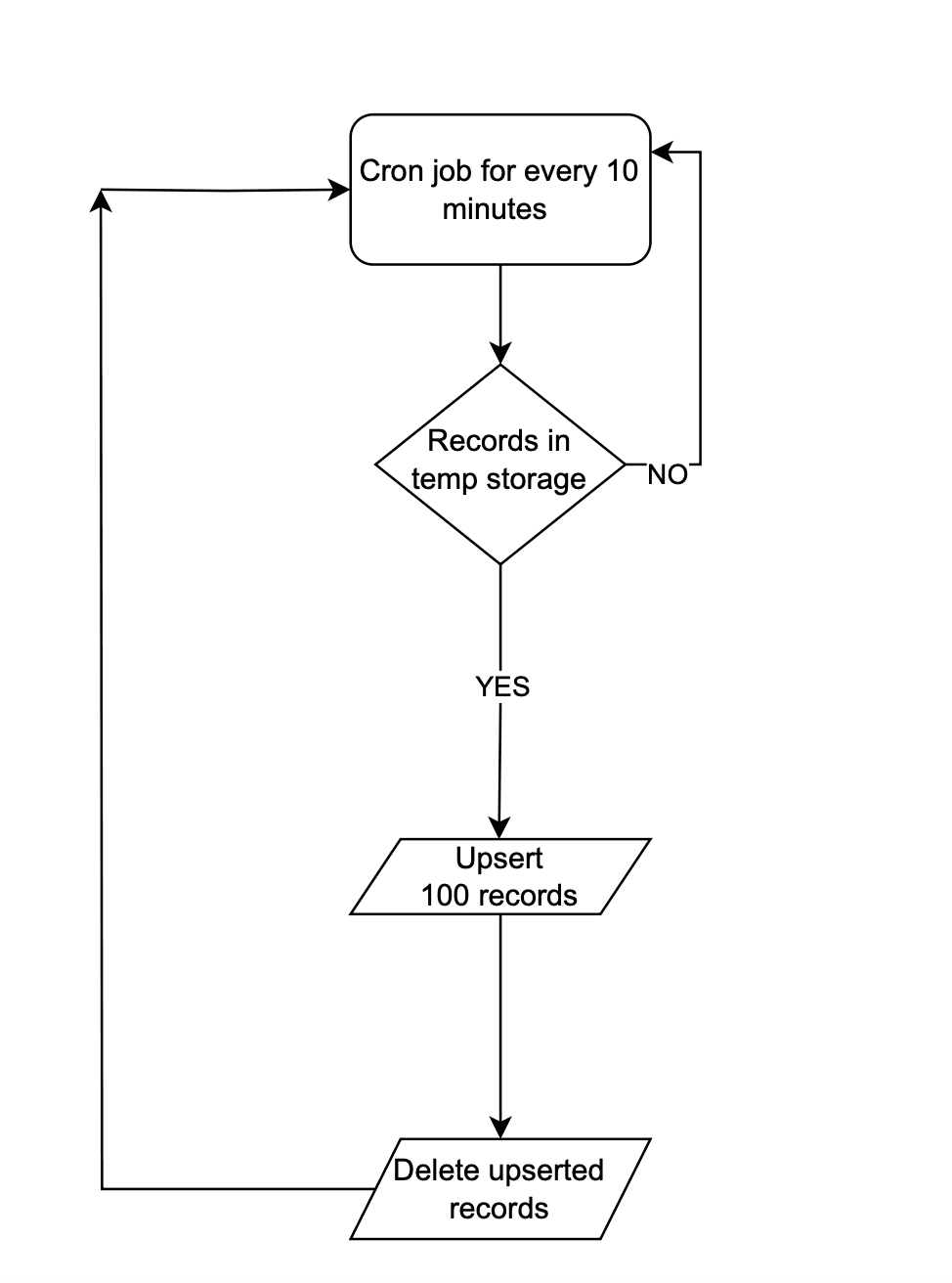 Near Real-time Sync
Instead of making API calls to Zoho CRM on every data operation, store the data in a temporary data store like a DB table or Redis. Once 100 records are accumulated in that data-store, the Upsert Records API can be promptly invoked with all these record details and followed by emptying of the data store. This approach will lead to lower consumption of API credits.
There are chances that in a period of 10 mins, 100 record operations may not happen. Scheduler jobs or CRON jobs can be created to handle the records in the data store to update records to Zoho CRM. Once these records are handled, the data store should be emptied.
(b) Interval based synchronization
For interval based synchronization, schedule bulk write API calls at suitable intervals to upsert the Orders module in Zoho CRM. Whenever there is a record operation in the legacy table, update the sync flag to "false". At regular intervals, such as every 12 or 24 hours, the bulk write API or Upsert Records API can be employed depending on the volume of the data changes.
We hope you found this article useful. We will be back next week with another interesting topic. If you have any questions, write to us at support@zohocrm.com or let us know in the comment section.
Previous Kaizen Post: Kaizen #122 - Data Synchronization using Bulk Read and Notification APIs
Related Links
Access your files securely from anywhere
Centralize Knowledge. Transform Learning.
All-in-one knowledge management and training platform for your employees and customers.
New to Zoho Recruit?

Zoho Developer Community
New to Zoho LandingPage?
Zoho LandingPage Resources
New to Zoho Survey?
New to Zoho CRM Plus?
Deliver unforgettable customer experiences
New to Zoho CRM Plus?
Deliver unforgettable customer experiences
New to Zoho Marketing Plus?
Everything you need to run your marketing
New to Zoho Marketing Plus?
Everything you need to run your marketing
New to Bigin?





Topic Participants
Mable Mary M P
Sticky Posts
Kaizen #198: Using Client Script for Custom Validation in Blueprint
Nearing 200th Kaizen Post – 1 More to the Big Two-Oh-Oh! Do you have any questions, suggestions, or topics you would like us to cover in future posts? Your insights and suggestions help us shape future content and make this series better for everyone.Kaizen #226: Using ZRC in Client Script
Hello everyone! Welcome to another week of Kaizen. In today's post, lets see what is ZRC (Zoho Request Client) and how we can use ZRC methods in Client Script to get inputs from a Salesperson and update the Lead status with a single button click. In thisKaizen #222 - Client Script Support for Notes Related List
Hello everyone! Welcome to another week of Kaizen. The final Kaizen post of the year 2025 is here! With the new Client Script support for the Notes Related List, you can validate, enrich, and manage notes across modules. In this post, we’ll explore howKaizen #217 - Actions APIs : Tasks
Welcome to another week of Kaizen! In last week's post we discussed Email Notifications APIs which act as the link between your Workflow automations and you. We have discussed how Zylker Cloud Services uses Email Notifications API in their custom dashboard.Kaizen #216 - Actions APIs : Email Notifications
Welcome to another week of Kaizen! For the last three weeks, we have been discussing Zylker's workflows. We successfully updated a dormant workflow, built a new one from the ground up and more. But our work is not finished—these automated processes are
New to Zoho TeamInbox?
Zoho TeamInbox Resources
Zoho CRM Plus Resources
Zoho Books Resources
Zoho Subscriptions Resources
Zoho Projects Resources
Zoho Sprints Resources
Qntrl Resources
Zoho Creator Resources
Zoho CRM Resources
Design. Discuss. Deliver.
Zoho Show Resources

Get Started. Write Away!
Writer is a powerful online word processor, designed for collaborative work.
Zoho CRM コンテンツ
-
オンラインヘルプ
-
Webセミナー
-
機能活用動画
-
よくある質問
-
Ebook
-
-
Zoho Campaigns
- Zoho サービスのWebセミナー
その他のサービス コンテンツ
Nederlandse Hulpbronnen

ご検討中の方
Recent Topics
Automating Ticket Responses Using Zoho Desk's AI Features
We’re looking to set up an automation within Zoho Desk that can analyze incoming emails or tickets and automatically respond with relevant knowledge base articles based on the content of the request. Could you please guide us on how to configure thisService locations are tied to contacts?
Trying the system out. And what I discovered is that it seems that the whole logic of the app is, I'd say, backwards. There is a Customer - a company. The company has contact persons and service locations can be associated with different contact persons.Enhancements to Zoho Map integration tasks
Hello everyone, We're excited to announce enhancements to the Zoho Map integration tasks in Deluge, which will boost its performance. This post will walk you through the upcoming changes, explain why we're making them, and detail the steps you need toBug in Total Hour Calculation in Regularization for past dates
There is a bug in Zoho People Regularization For example today is the date is 10 if I choose a previous Date like 9 and add the Check in and Check out time The total hours aren't calculated properly, in the example the check in time is 10:40 AM checkNarrative 12: Sandbox - Testing without the risk
Behind the scenes of a successful ticketing system: BTS Series Narrative 12: Sandbox - Testing without the risk What is a sandbox environment? A sandbox environment is a virtual playground that allows you to test freely and experiment with various elementsAnnouncing new features in Trident for Mac (1.27.0)
Hello everyone! Trident for macOS (v1.27.0) is here with new features and enhancements to improve scheduling and managing your calendar events. Let's take a quick look at them. Stay aligned across time zones. Both the scheduled and original time zonesSlow uploads of large files
I'm wanting to use Workdrive for transferring large images and video (we're talking things from 100MB-5GB). I'm running solo on a 500MBit/sec fiber connection. I'm getting upload speeds to Workdrive of no more than about 1-3Mbytes/sec when going throughneed to upload from airtable to google drive
I have a zapier zap that automates between airtable and google drive. When a customer uploads a new file into airtable via a client portal interface, zapier uploads that file into a folder linked to that customer's project record. I need to replicateCan't delete functions that are associated with deleted workflow rules
We have a handful of functions that were once associated with a workflow rule, but the rule has been deleted. The function still thinks it is associated so I can't assign it to a new rule. It is starting to get really messy because we have a list of functionsDefault Sorting on Related Lists
Is it possible to set the default sorting options on the related lists. For example on the Contact Details view I have related lists for activities, emails, products cases, notes etc... currently: Activities 'created date' newest first Emails - 'createdCredit Management: #1 Credit You Owe vs Credits Owed to the Business
Think about the last time you ordered food online. You might have paid in advance through your card, but you received a $20 refund because your order got delayed or cancelled. In most apps, refunds don't go into the bank account directly; instead, they'reTip #46- Turn Every Session into an Insight with Zoho Assist survey report- 'Insider Insights'
Delivering exceptional remote support isn’t just about resolving issues, it’s about understanding how both customers and technicians experience each session. That’s where Survey Report in Zoho Assist come in. You can configure and customize survey questionsCRM/Bookings integration edits Contact names
Hi there, I've installed the extension that connects Zoho CRM and Zoho Bookings. When we get a new appointment from Bookings from an existing Contact, that Contact's record shows this: First Name was updated from asd to blank value Last Name was updatedDomain Change
“Please update my Email-in domain from @biginmail.biginmail.in to @biginmail.zoho.com. Messages to the .in domain are bouncing.”Webhooks Limit Exceeded
Today, I received an error message saying, 'Total number of Webhook call exceeded', but when I look at Manage > Billing, it doesn't look like any of my invokeURL calls are being logged. Following the advice from this thread: https://help.zoho.com/portal/en/community/topic/webhooks-daily-limits-in-zoho-creatorAuto select option in CRM after Zoho Form merge
Hi, I have a dropdown field in Zoho CRM that is filled with a Zoho Form. The data is filled but not automatically shown. After selecting the right value in the dropdown the information a second field is shown. So the question is; how can I make the dropdownBring your CRM data straight into your presentations in Zoho Show
Let's say you are working on a presentation about your team's sales pipeline for an upcoming strategy meeting. All the information you need about clients and leads is in Zoho CRM, but you end up copying details from the CRM into your slides, adjustingZoho People 2.0 Help Manual
Hello All, Zoho People Help Documentation is now available at this link. Please go through and get in touch with us at support@zohopeople.com in case of any questions. Regards, Hemalatha Chandrasekaran | Zoho PeopleIntroducing New APIs in Zoho Contracts
We are excited to announce the release of new APIs in Zoho Contracts to help you automate and manage every stage of your contract lifecycle more efficiently. Here’s a quick overview of what’s new: 1. Complete Contract Draft You can use this API to completeVimeo
For me Vimeo is the most important video social channel for media and filmmakers. Would others agree and like it added to Zoho Social.Delete a department or category
How do I delete a Department? Also, how do I delete a Category? This is pretty basic stuff here and it's impossible to find.Organization Emails in Email History
How can I make received Org Emails to show up here?How to setup pricing in Zoho
Hi everyone, I am relatively new here and have just moved from my old inventory system to the Zoho one. I am trying to get my head around how it all works. I am mostly setup connected to a shopify store, but I do manual sales also For manual invoicing,Prefilled Date fields auto-changed and then locked when using “Edit as new”
If a document out for signature has date fields (not SignedDate fields) that were pre-filled before sending, and then you use “Edit as new” to create a new version of the same document, the value of those date fields gets automatically changed to todayAccess Phone Field Components (Country Code) Directly
Hello everyone, I'd like to propose an enhancement for the Phone field in Zoho Creator. The Problem: The Phone field captures the country code and local number separately, but stores them as a single string (e.g., +1234567890). To get the country code,Send mass messages through WhatsApp from the Tickets module
Hi Everyone! Effective communication is key to delivering prompt and reliable customer support. Because WhatsApp is one of the most widely used and familiar messaging platforms, it's an effective channel for agents to reach customers who have submittedLead Owner Signature Merge Field
I want to automatically insert a signature (i.e. contact info usually found at the bottom of an email) into an email template, depending on who the lead owner is. What is the merge code for the Signature from a Users profile? CRM > Settings > Customization > Templates There is a popup near the bottom of the edit screen which says: "You can insert a Signature, which is available as a merge field in the users section." It is also referenced on this page: https://help.zoho.com/portal/en/kb/crm/customize-crm-account/customizing-templates/articles/template-builder#Merge_FieldsHow do I create a time field?
I want a field that only records time. I can only see how to create a date-time field. If I do that and enter a time, without a date, nothing is recorded. If I create a number or decimal field, I cannot use it in time calculations. All I want is a fieldAlternating columns - How to reverse order on mobile - Responsive template
Can the order of alternating columns be reversed on mobile so that image comes before the text? Example: Desktop Row 1 column Left (image) , column right (text) Row 2 column Left (text) , column right (image) Mobile Currently Row 1 Image over text RowInvokeURL butchering JSON for OpenAI API calls
My organization works with mostly educational institutions. We have a custom module called "Schools", which is the user-entered school name they put when using our service (which they enter along with their state and zip code). We want to map this toCustom order for Current Stage (Blueprint field)
Hi! I suggest adding the option to set a custom order in reports for the Blueprint field ‘Current Stage’. Currently, these fields can only be sorted in ascending or descending order. Thanks!CRM E-mail Sync from Outlook
We are exploring Zoho as a possible new solution for our company. We are trying to understand further on how e-mail sync works. We use outlook. Our current CRM logs anytime we e-mail a customer so we can see in the CRM the message sent to the customer.Run your help desk on your schedule
In business, time is of the essence. This is especially true in a function like customer service, where KPIs such as response time and agent availability are the measures of success. Perhaps the most crucial consideration one needs to make about time is your hours of operation. These set expectations for your customer and for employees. To make communicating this information easier, we've revamped the way business hours and holiday lists work in Zoho Desk. In order to accommodate teams that workThe Customer Happiness REST API is broken
1. We are unable to extract the customerHappiness ( https://desk.zoho.com/DeskAPIDocument#CustomerHappiness#CustomerHappiness_ListallcustomerHappiness) object using the ticketNumber criteria. We keep getting HTTP 429 even when we limit to 60 calls perZoho Expense and Chase Bank Visa credit cards - Direct Feed?
Our company uses JP Morgan Chase Visa credit cards. We can't be the first to try and use a combination of Zoho Expense + Chase Bank + Visa Credit Cards --- anyone successful with this combination? 1. The direct feed automation isn't working. When I goImpossibile inviare il messaggio;Motivo:554 5.1.8 Indirizzo del mittente bloccato
" Impossibile inviare il messaggio;Motivo:554 5.1.8 Indirizzo del mittente bloccato" Hi need to send email, how can fix this? Thanks, AliceImage inputed in Zoho Form were displayed to small in exported version
Good evening, my name is athallah, i am a trainee in government office Right now, i use Zoho form to digitalize an airfield monitoring form. my problem is, the image were to small to displayed in exported version. it really bad for formal presentationAPI. How do I get responses submitted to the form?
Hi, I'm trying to retrieve a list of form responses via the API. I've created a Self Client application in API Console. What scoup should I enter? What are the endpoints? Is there documentation on this anywhere? I've wasted a lot of time searching. GPTQuestion about Zoho CRM Professional plan users
Hello! I have a question about the Zoho CRM Professional plan. Is the pricing charged per user or per organization? Are there any free users included in this plan, or do I need to pay for each additional user separately? Thank you!Communicating with emojis
On July 17, we celebrate World Emoji Day! We're a bit late 😐 sharing insights about this day. But we just couldn't let it pass without a mention 😊 because emojis have a meaningful connection with customer service 💬 🤝. We do not want to miss out onNext Page