What's new in Zoho CRM Winter '21
Delivering the best experience, both to you and your customers,
has been a cornerstone of Zoho CRM since our inception in 2005. With
every release, our goal has been to make that experience richer. This
year, we made a big stride in that journey with the launch of Canvas,
the industry's first no-code CRM design
studio. This allowed users to craft their own CRM experience and make
Zoho CRM fit seamlessly into the way they work.
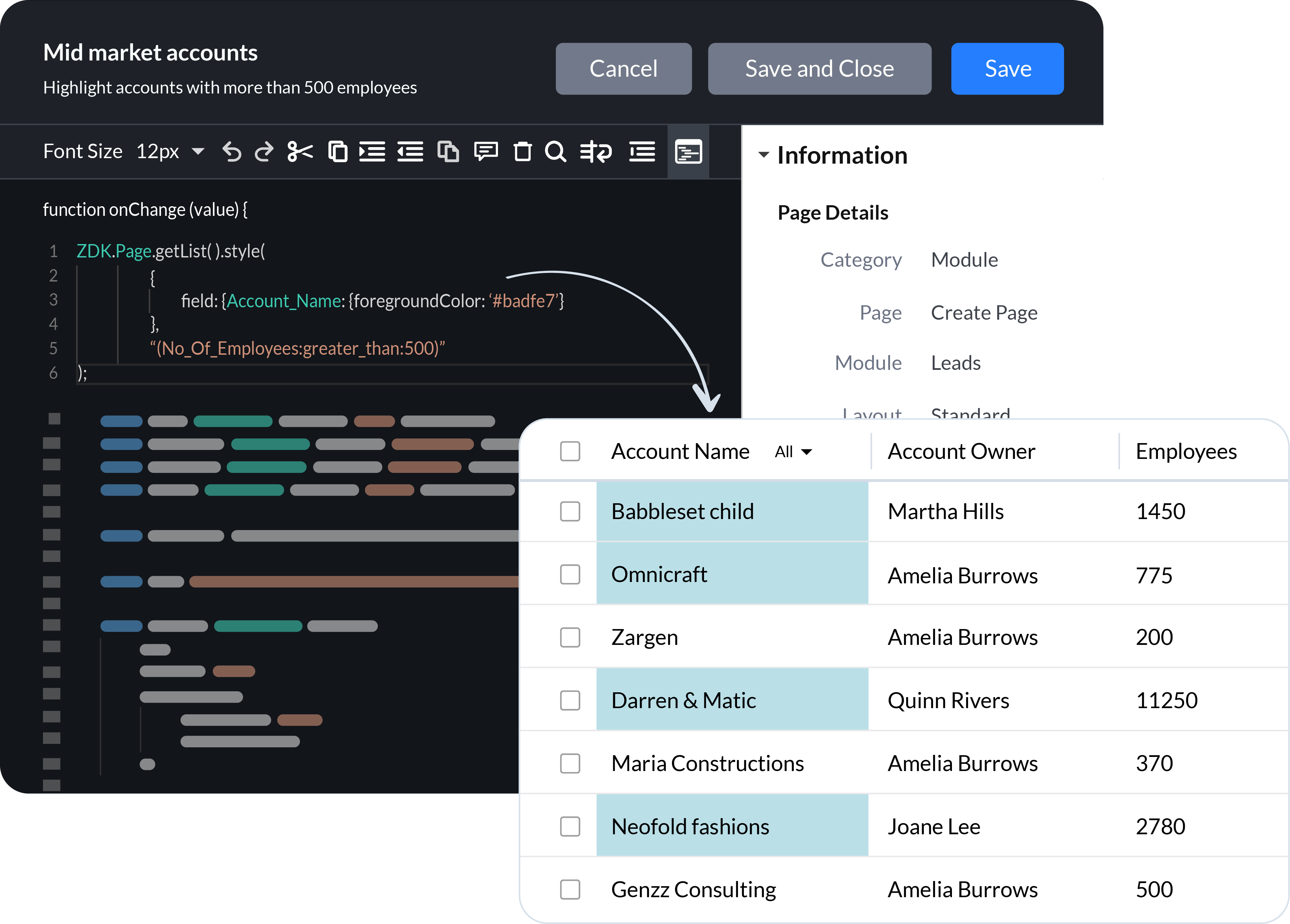
Now we're continuing the journey by adding client scripts, a pro-code tool that empowers businesses to build hyper-personalized, bespoke CRM experiences using the power of JavaScript. We've also introduced enhancements and new functionality across Zoho CRM to build on of the foundation of UX and CX we've built over the years.
Client Scripts
Sales
teams are successful when they are empowered to focus on what they do
best, closing deals and building long-term relationships with customers.
To these teams, CRM automation has become an indispensable part of their daily routine. Here's what we've added to help you automate your processes more effectively.
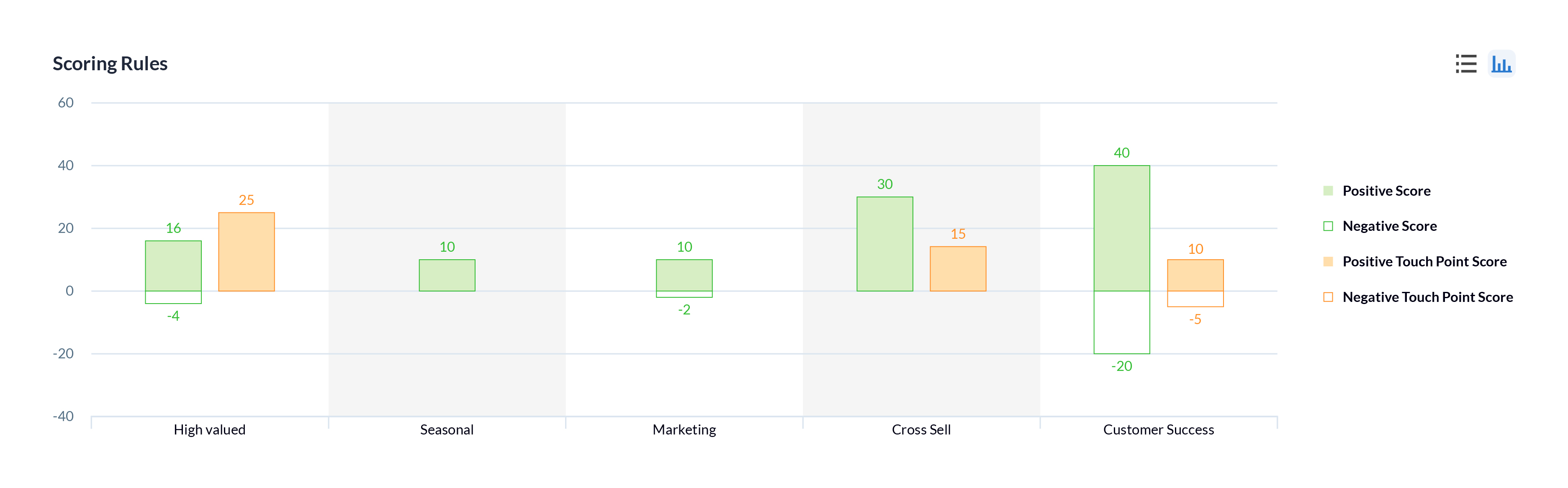
Multiple scoring rules
One of the best ways to help sales reps prioritize their prospects is through lead scoring. In Zoho CRM, you can now create multiple models that score prospects based on different factors and interactions according to the needs of the sales and other customer-facing teams in your business, to help prioritize the right prospects or customers.
Workflow failures and retries
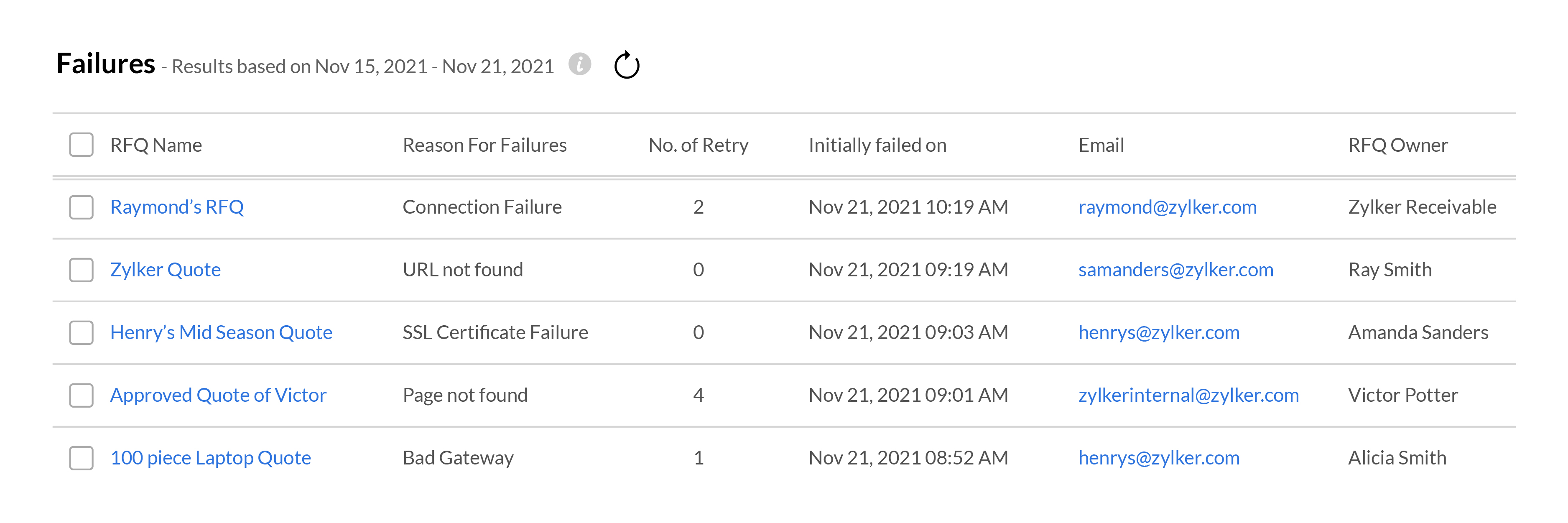
Your workflows need to run like clockwork in order for your sales team to focus on your customers. When something goes wrong with a workflow, it can disrupt the entire sales process, resulting in fewer wins and poor customer experience. To help address these situations effectively, Zoho CRM gives you in-depth
information about when and where your workflows fail, and all the
records that are affected. Your team can use this data to fix the
underlying issues and get your workflows up and running again.
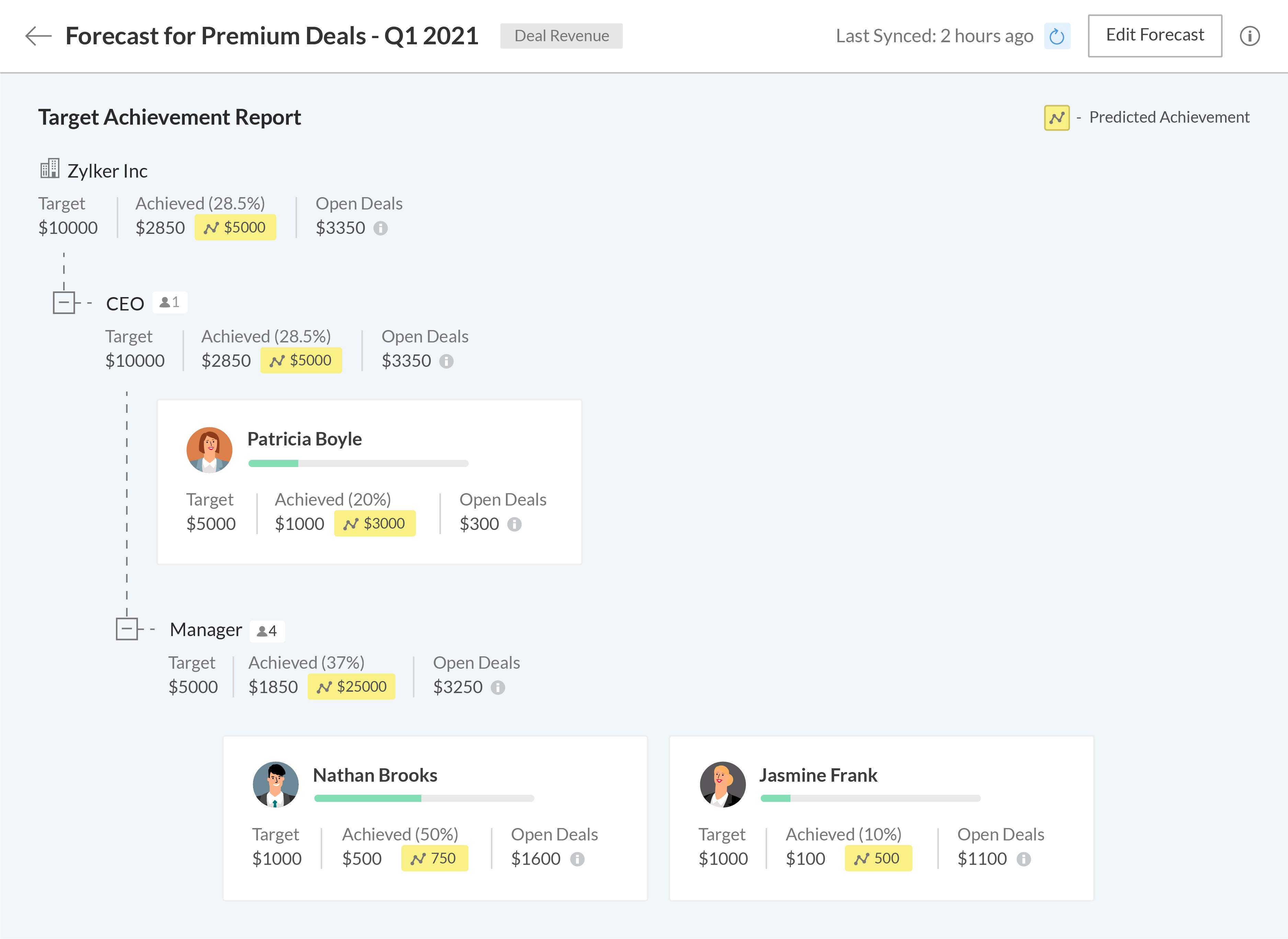
Setting meaningful targets to measure performance against is key to maintaining the long-term health of your business. We're bringing some exciting changes to our forecasting and reporting systems, as well as introducing new components to help your business get granular when analyzing your business performance.
A new forecasting system built from the ground up
We've completely revamped our existing forecasting system to make it more robust and give more control to your business, allowing you to build multiple forecasts for different periods, leverage predictive AI to track where you'll stand at the end of your forecasting period, and drill down into the data to granularly compare your current performance with previous fiscal years.
The
all-new Zoho CRM reports let you analyze, monitor, and track your
business health while also providing you with the ammunition you need to
make important decisions. The easy-to-use visual builder makes
generating complex and precise reports a breeze. Get more granular
access to your CRM data by viewing shared entries or unique entries in
two or more related modules with the new inclusive/exclusive
relationship tool. Expand your perspective and uncover deeper insights into your CRM data by joining multiple reports into one.
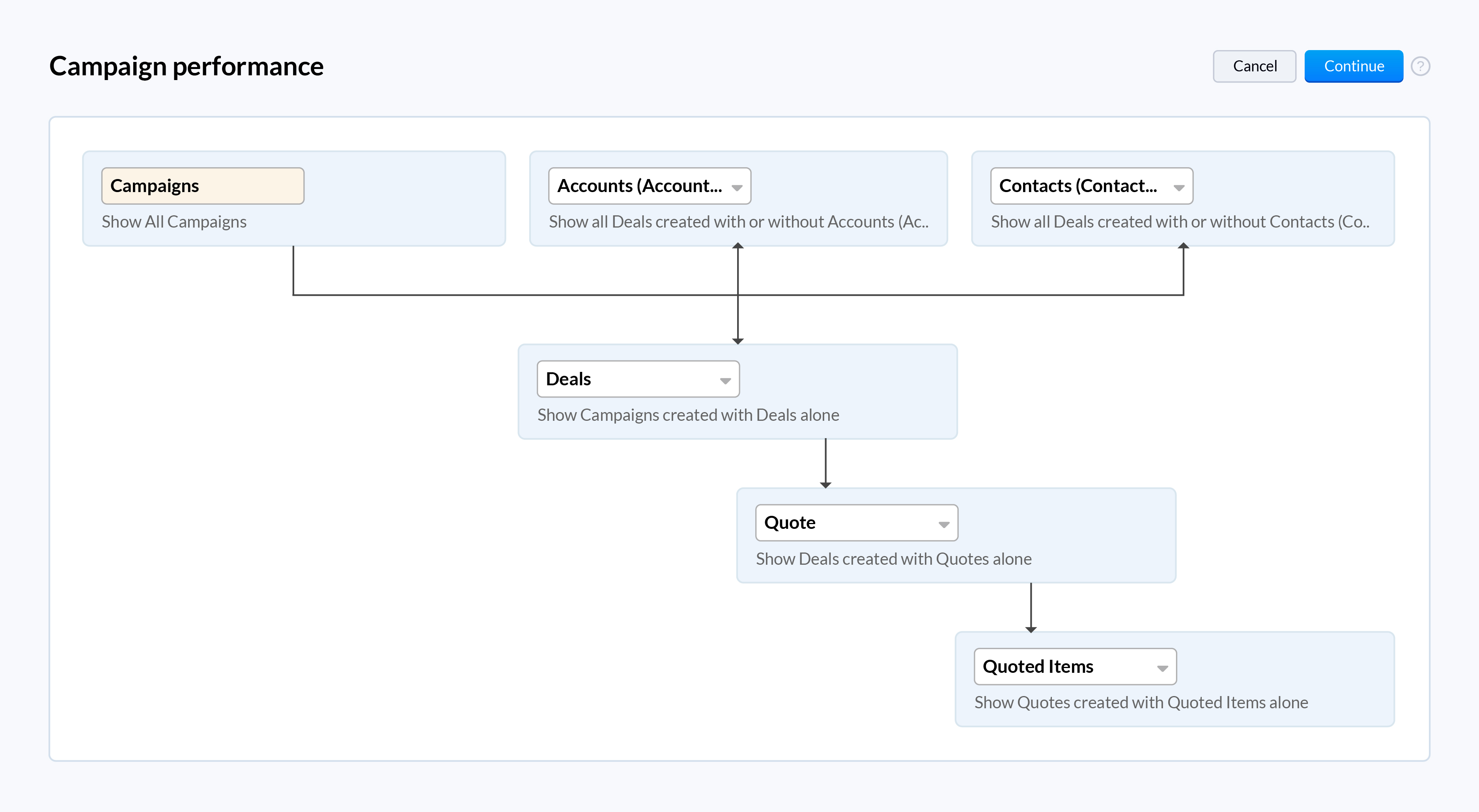
When you work with high volumes of sales data, it can often be difficult to visualize the relationship between two dimensions just by looking at raw data in standard two-dimensional charts like bar charts or pie charts. The new zone component displays your data in separate zones so it is easier to understand and analyze the areas that are doing well and the areas that need your attention.
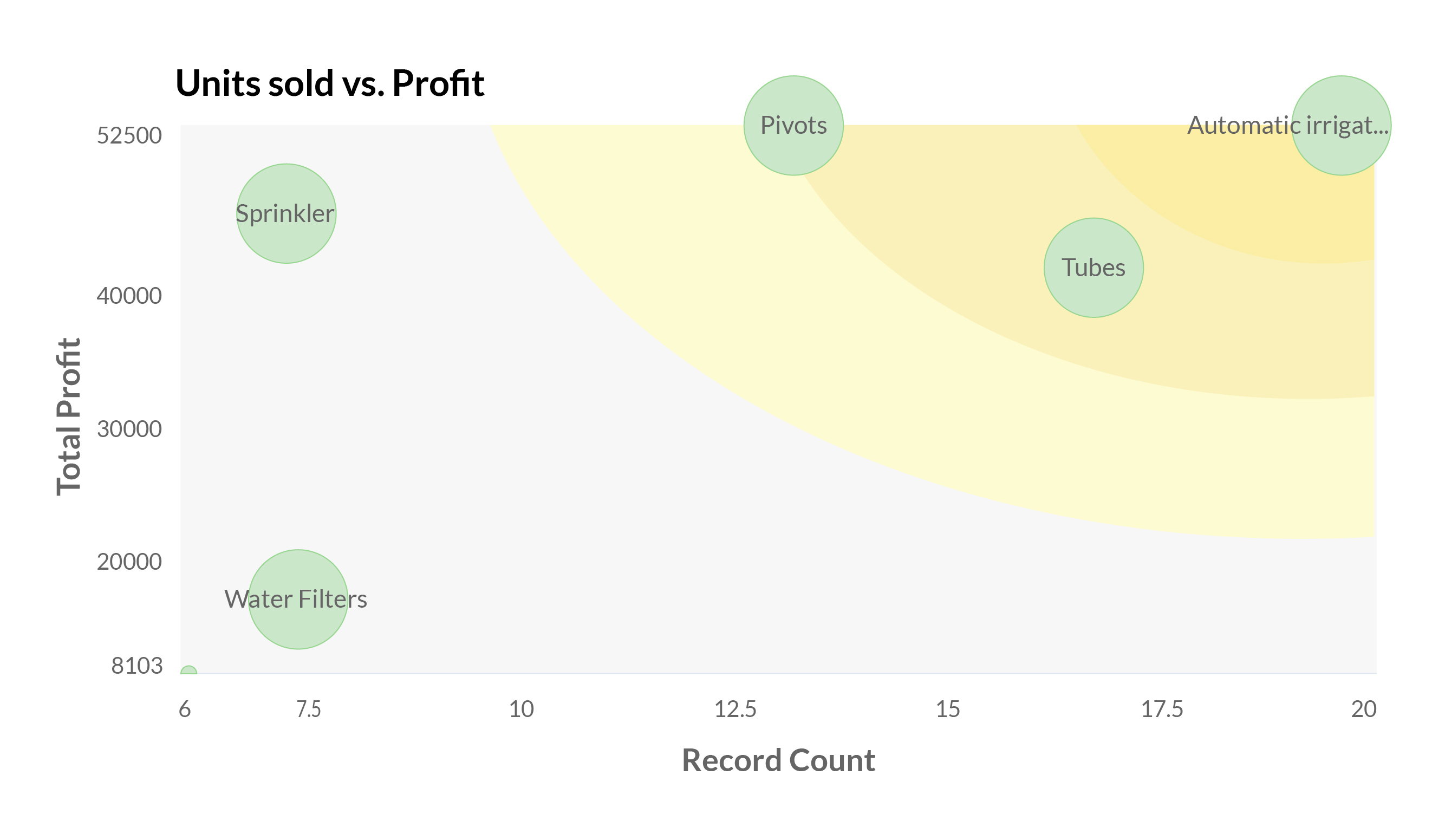
Your webforms are often the first point of interaction for prospects in their sales journey. It's vital to ensure that them submitting their information and being added to your sales cycle is as frictionless as possible. We've added a number of analytical charts to help your team measure the drop-off and abandon rates of your webforms across different devices to help you identify and eliminate friction points for your prospects.
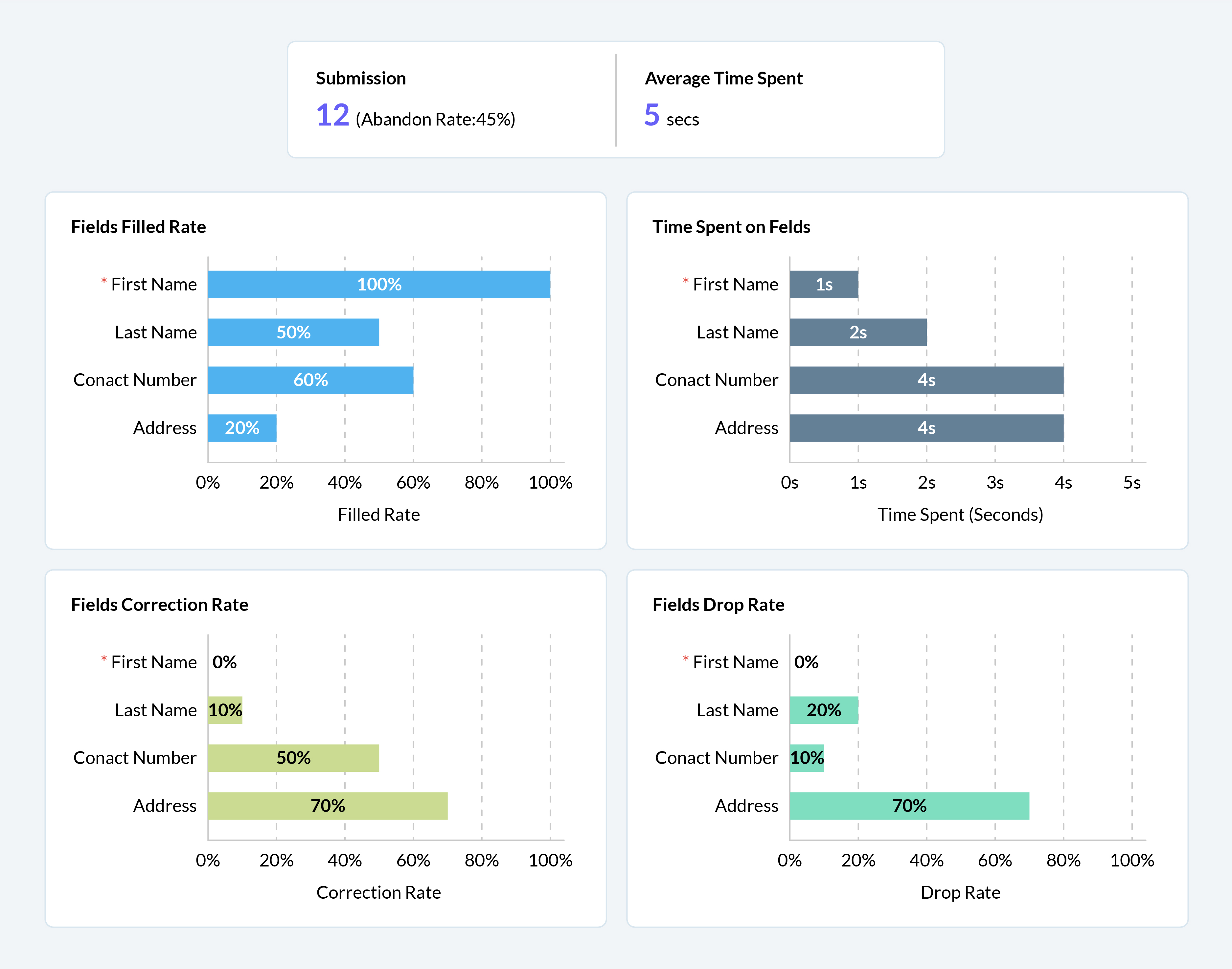
We have some exciting updates to Zia, Zoho CRM's AI sales assistant to bring new levels of insight and customer understanding, to help you build more meaningful and personalized customer relationships.
Better recommendations for improved conversions
With the introduction of Zia's recommendations last year, we aimed to help businesses make the right pitch to their customers to maximize conversions. This year, we're adding the following capabilities to help your sales team get the most out of Zia's recommendations.
Reference customers: Zia will make recommendations to new customers based on the purchase patterns of existing customers with similar profiles and provide relevant reasoning for each recommendation.
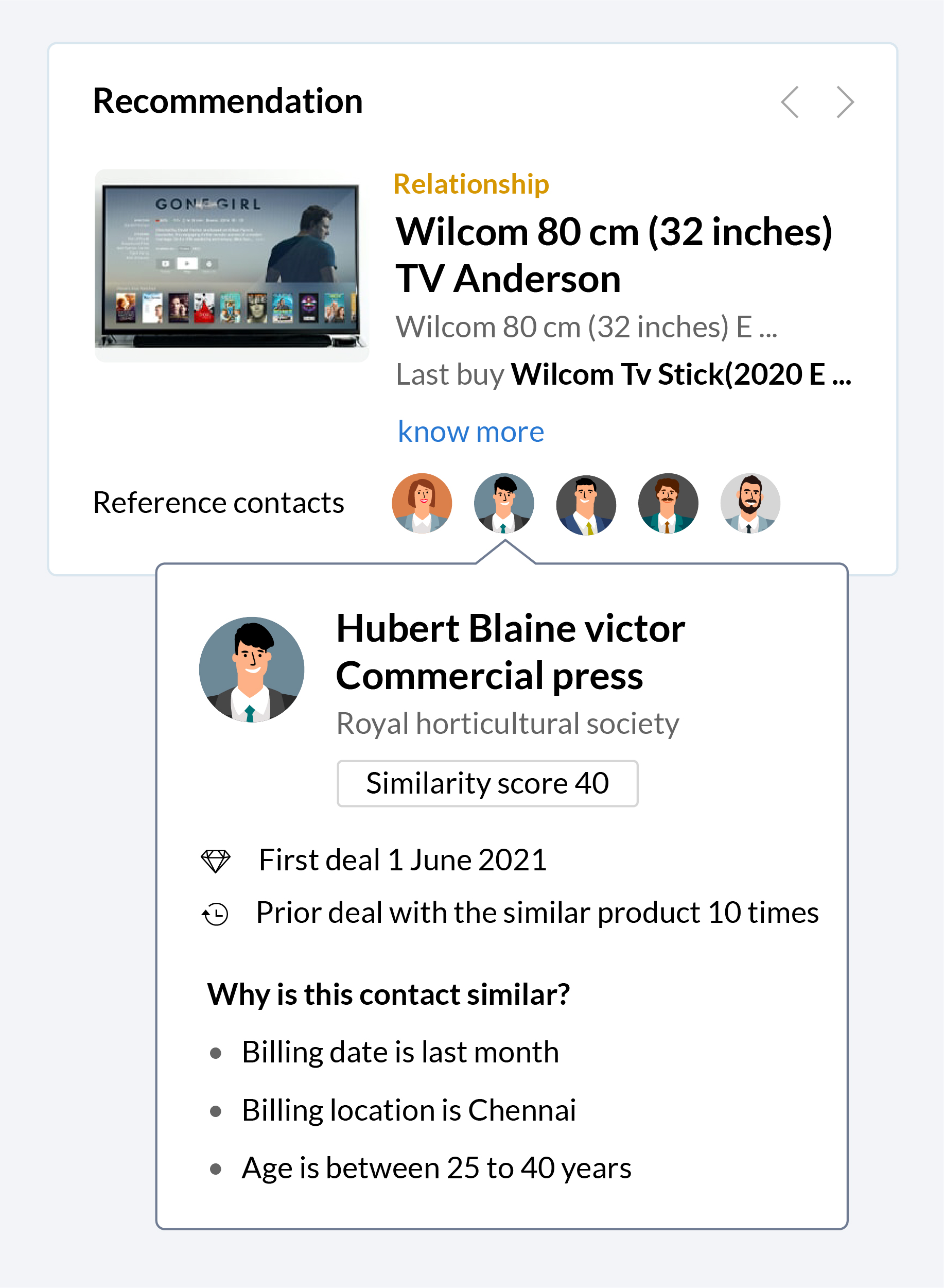
Recommendation notifications: Zia will collect information and automatically notify your sales reps when a recommendation is ready, making it easier for them to make pitches based on these recommendations when the time is right.
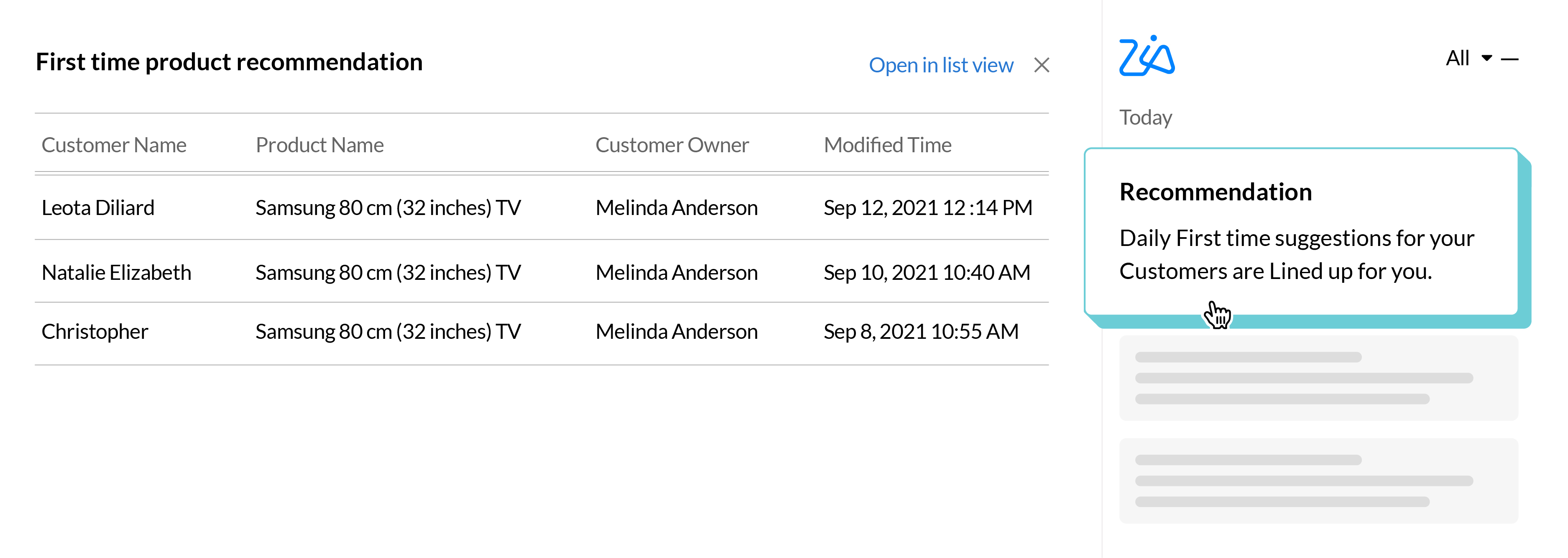
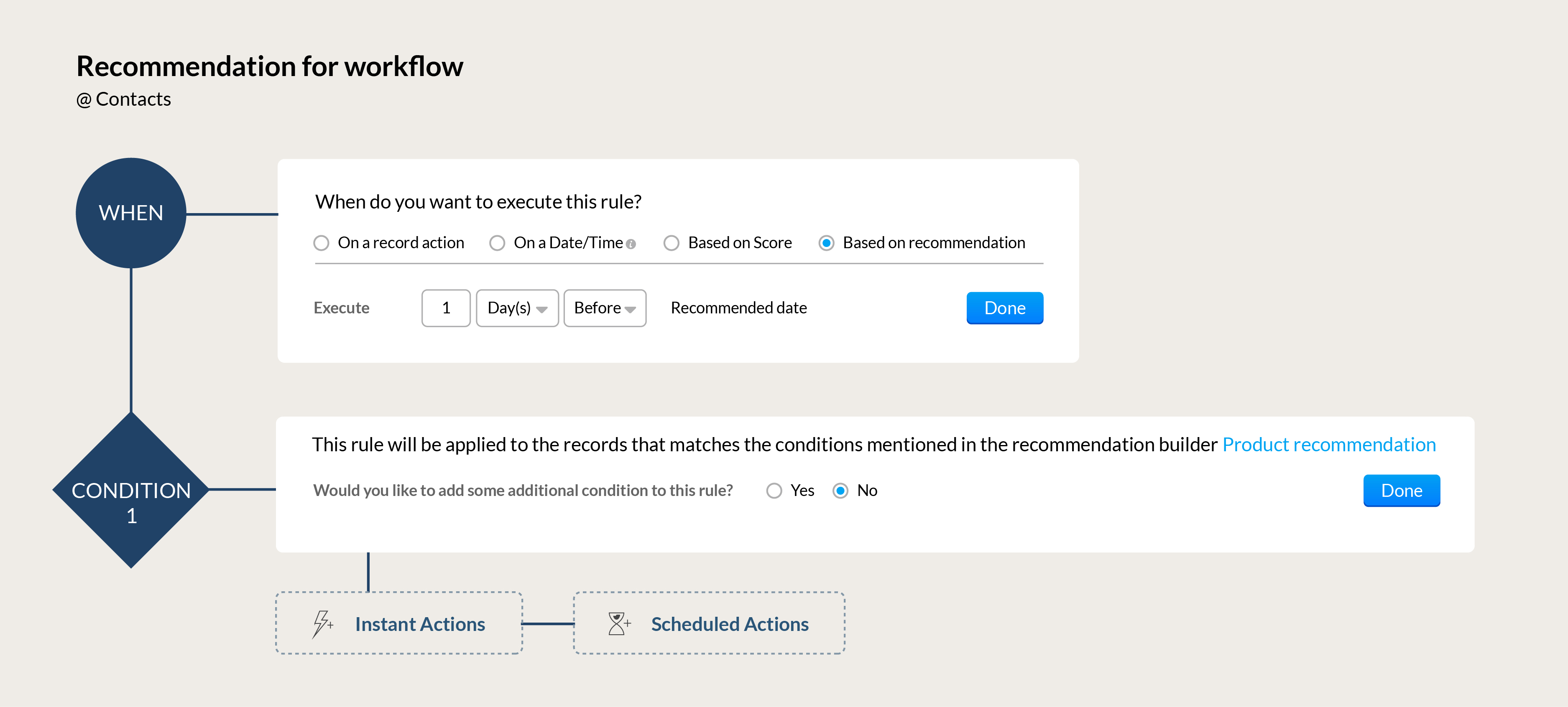
Automation for your recommendations: Build workflows that can automatically send the right communication to your customers based on Zia's recommendations. Send the perfect upsell offer to a high-value client whose membership renewal is coming up or send a re-engagement offer to a loyal customer who hasn't made a purchase in a while.
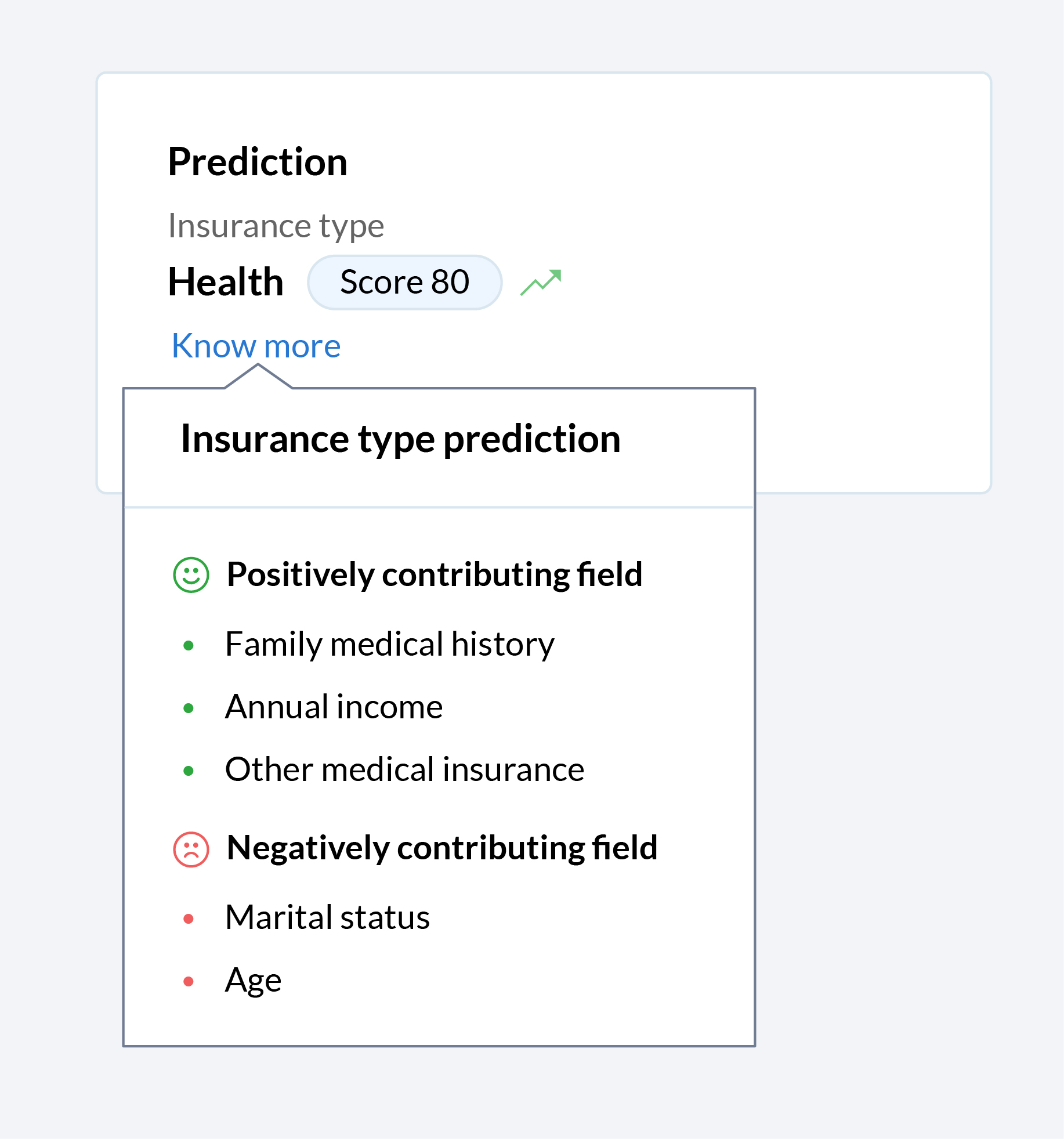
Let Zia tell you why
Zia offers a wide range of functions to make the life of your sales team easier. Zia predicts, recommends, assigns records, and more, but until now, your team only saw the end result. Now you can get a glimpse into the algorithm black box, so you can see what factors that contributed towards Zia making the recommendations, predictions, and assignments that your team relies on.
In today's hybrid working environment, it's vital for sales rep to maximize benefits across all channels of communication when engaging with prospects. To build on the robust omnichannel communication platform that's already part of the Zoho CRM system, we've introduced a number of enhancements across our email and telephony systems to help sales teams be more effective.
Add a personal touch to all your emails
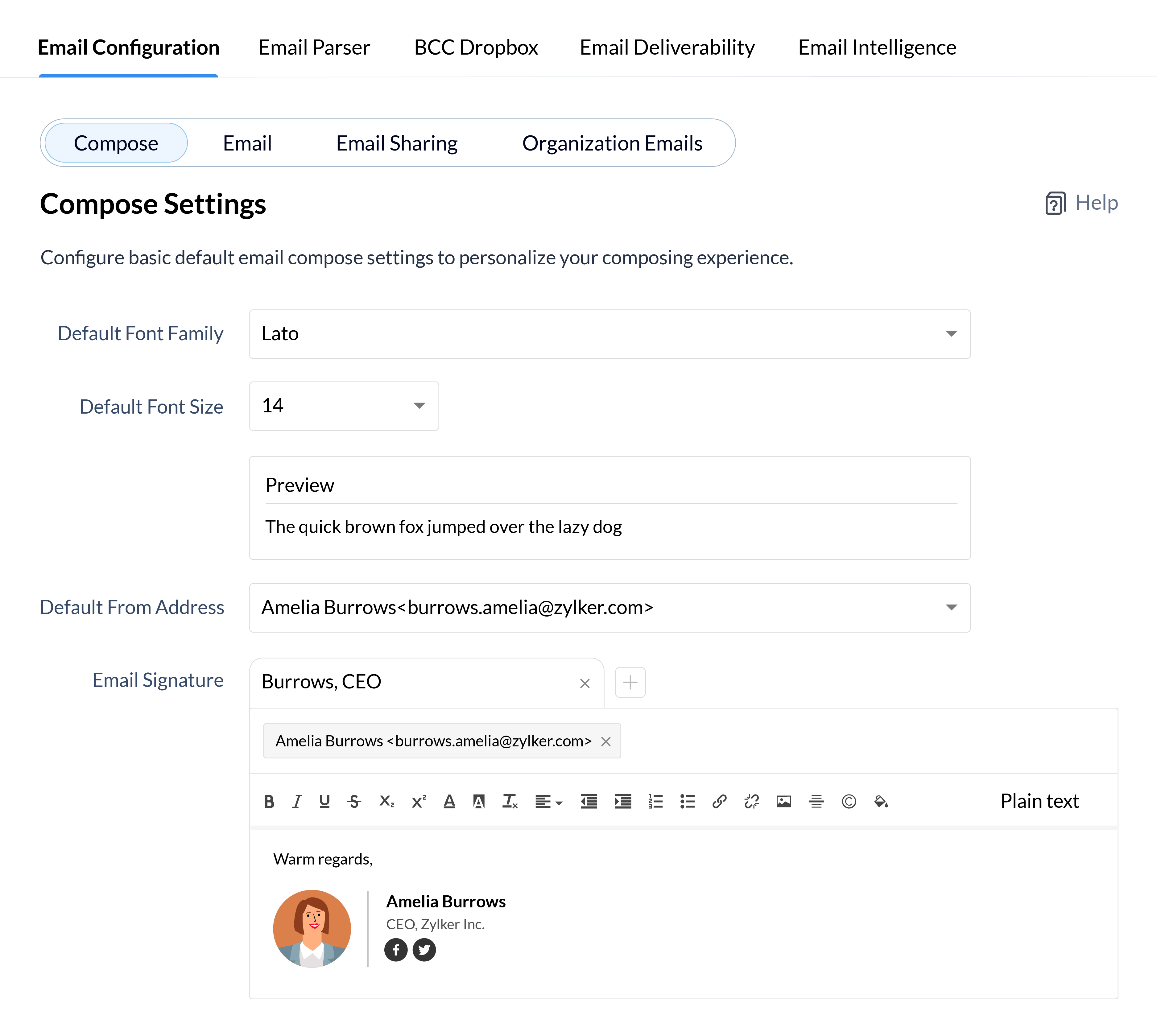
Personalized emails are key to building long-term trust with your clients, so why not add a personal flair to all your emails to define your identity and establish your brand identity in the minds of your clients? Customize every aspect of your emails from font styles and sizes to your email signatures for your individual email address and all your email aliases.
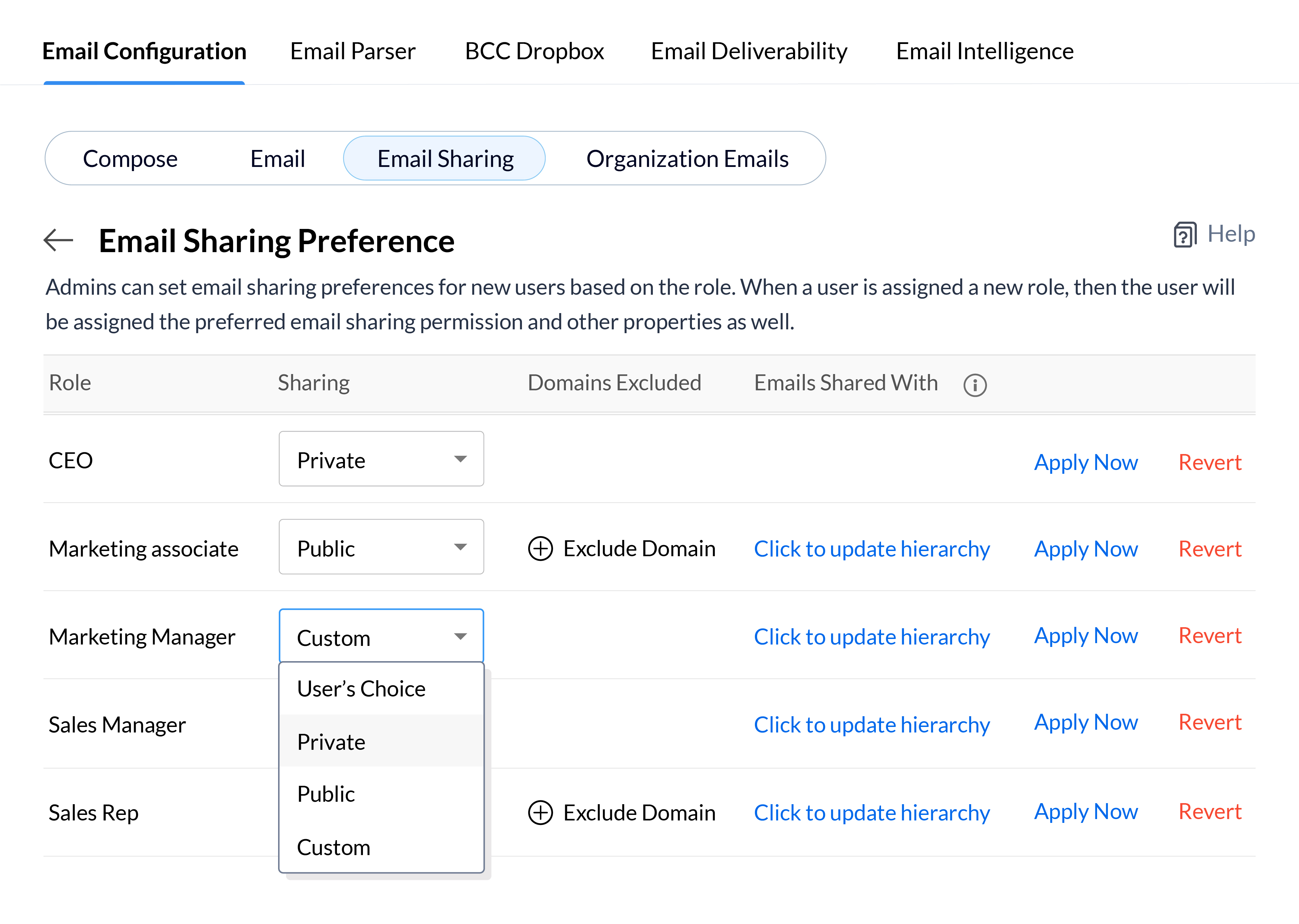
Depending on the roles of your CRM users and the nature of your email communications, you may want emails to be available to every user in your CRM, or keep them confidential and only available to a small group of key decision makers. Define your email sharing policy at the organizational level for each role and update the policy for users in bulk, so you can quickly set email sharing permissions for new employees or update them when users move to different roles in your CRM system.
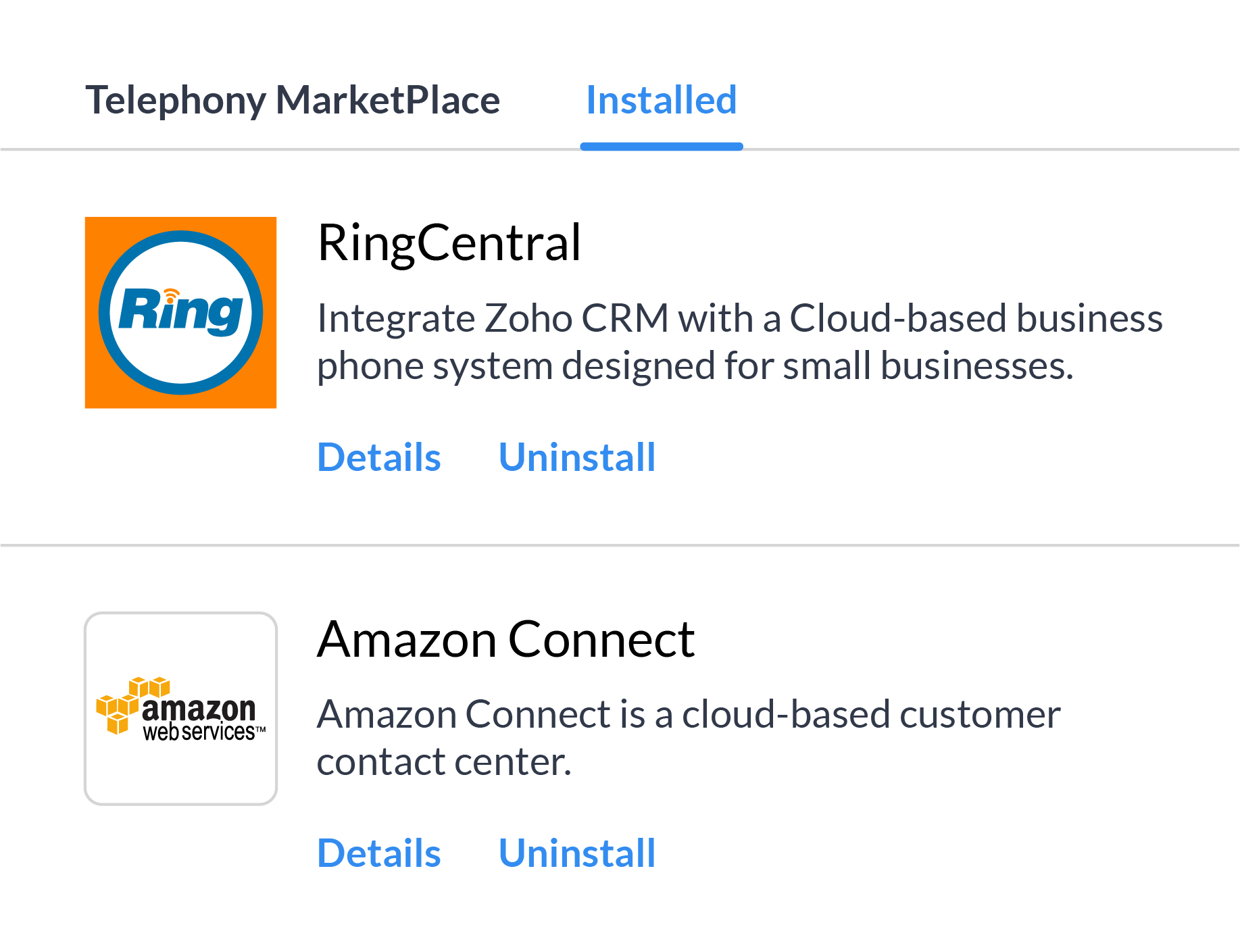
There's a whole range of reasons, from availability in all the countries you work in to cost of service, and more why it's not always feasible to depend on a single telephony vendor. Multi-vendor telephony support in Zoho CRM gives your business the flexibility to assign individuals or groups of users to different telephony systems and move users between different providers based on your business needs.
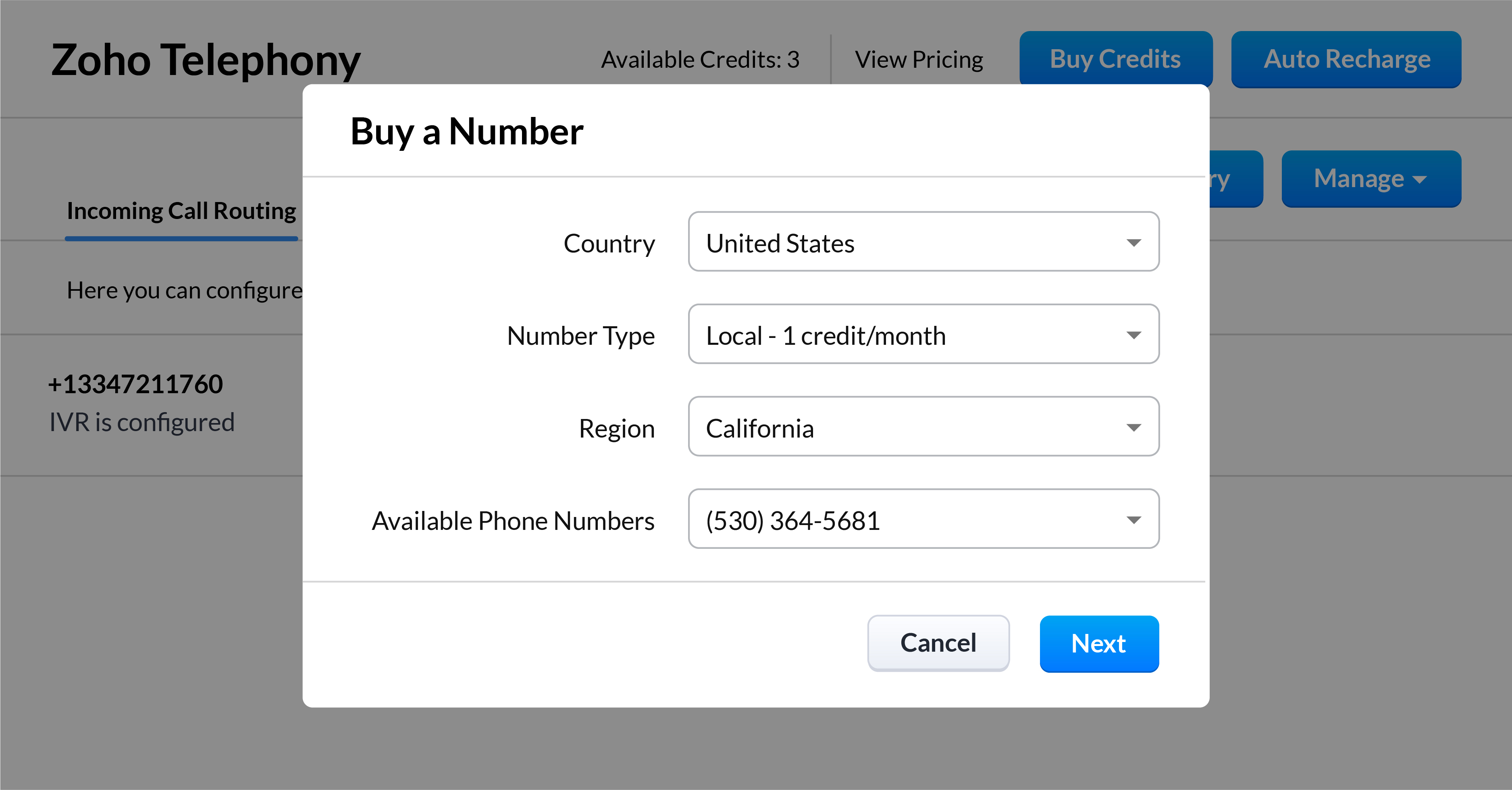
Kick off your call strategy with built-in telephony
With Zoho CRM's built-in telephony system, you don't have to worry about choosing and integrating a telephony provider. Purchase local or toll-free numbers for the users in your organization and assign unique outgoing numbers to help your sales reps build a personal connection with your customers.
*Feature will be opened in phases
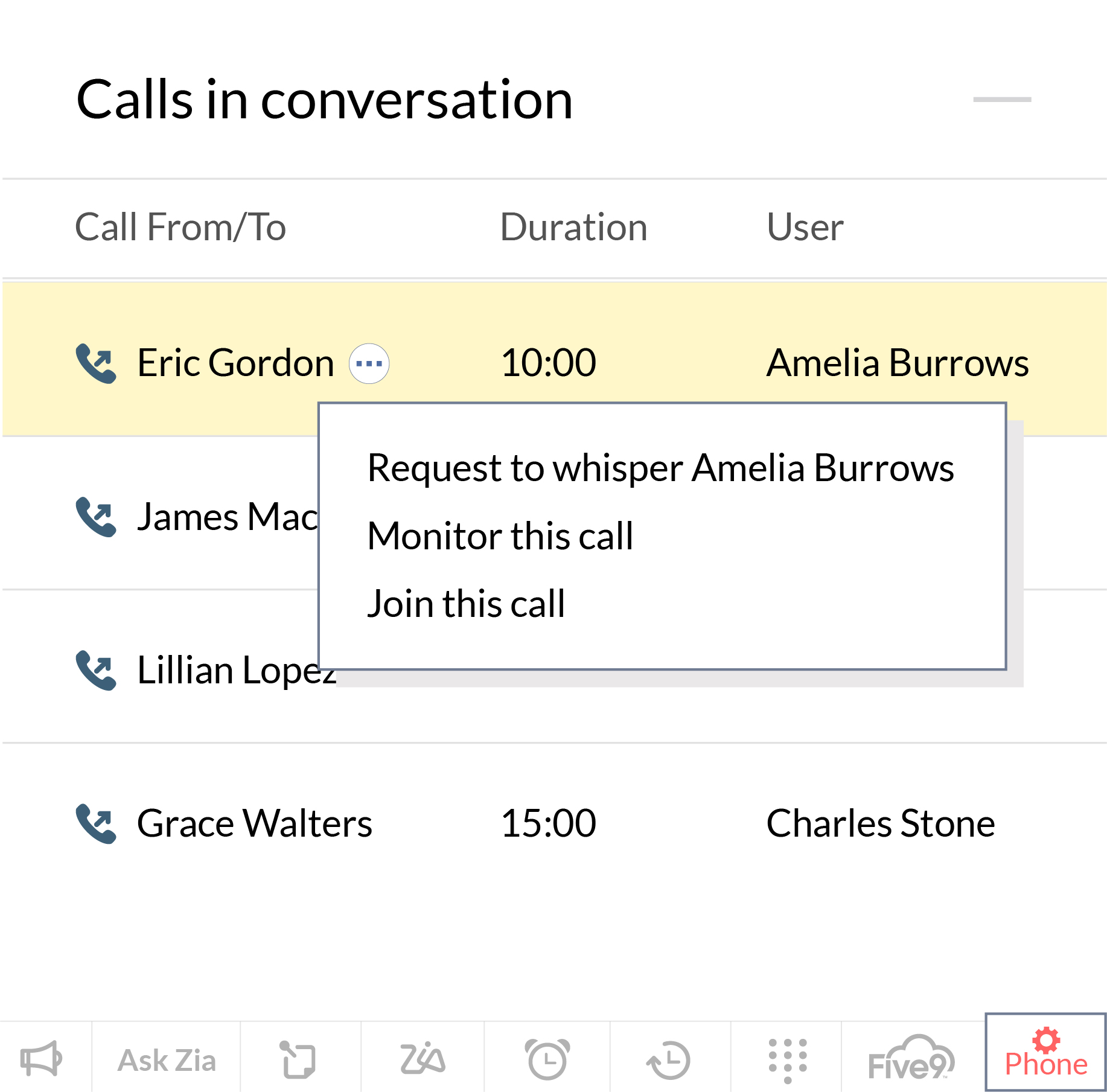
Streamline and manage your sales calls effectively
Our native integration allows managers to monitor, coach, and help their reps to get better at sales calls. Zoho CRM allows them to keep an eye on how their reps are performing in their active calls, and manage calls that are in the queue waiting. Sales managers can also coach new sales reps as they progress through a call and jump in directly to take the lead when the situation calls for it.
*Feature will be opened in phases
User Experience
This has long been an overlooked aspect of CRM solutions. In the pursuit of robust functionality, attractive prices, and strong market presence, businesses often overlook the experience these CRM solutions offer to their daily users. With the launch of Canvas, we wanted to help businesses improve the experience for daily users of Zoho CRM, and we're now introducing some intuitive functionality to make the UX even richer.
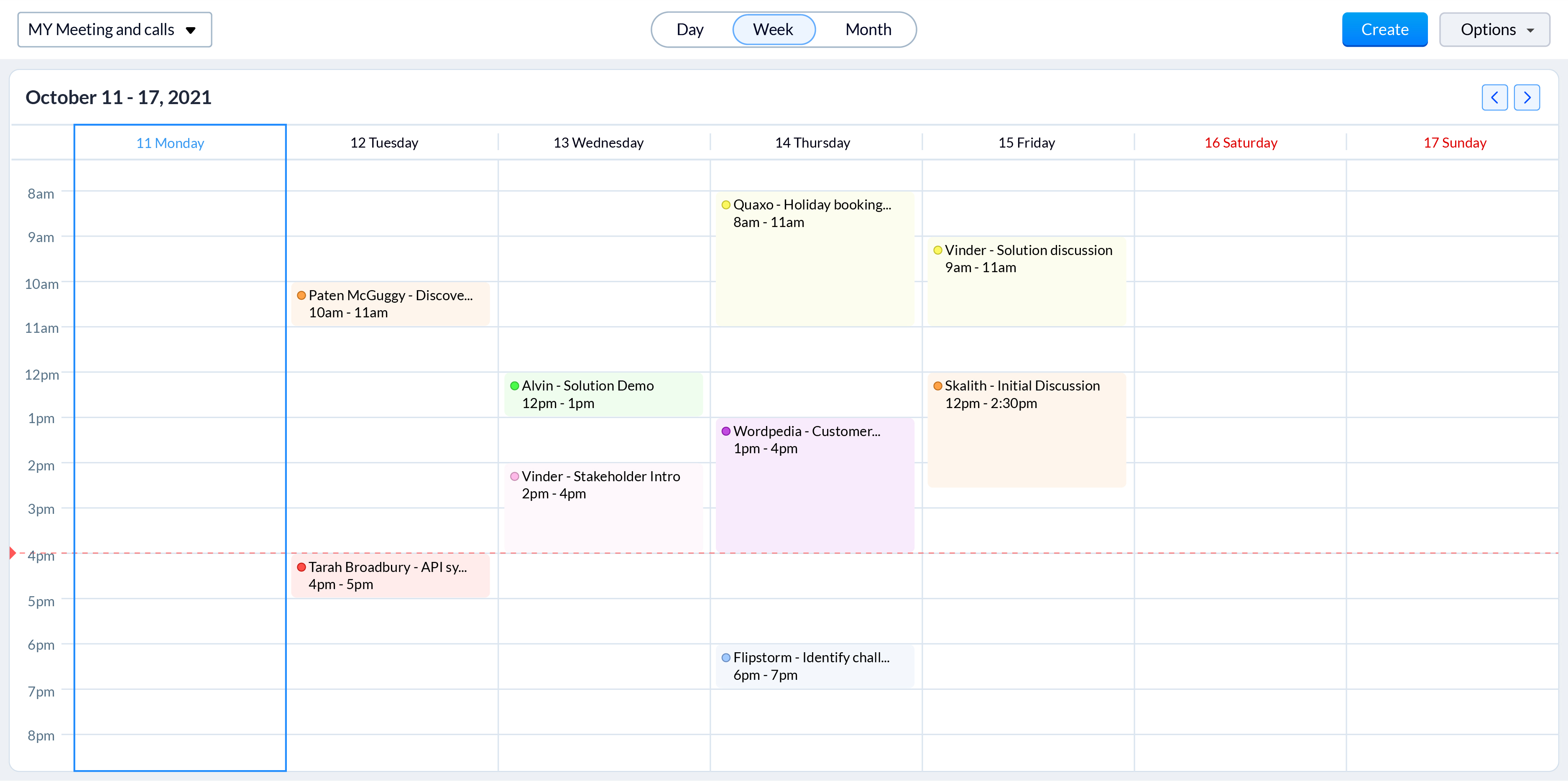
Color-coded meetings in calendars
Online meetings have become an integral part of today's hybrid working model. With sales reps engaging with prospects through online meetings more than ever, it is vital to offer them an easy way to track and prepare for them. Zoho CRM now allows sales reps to color code different meetings based on factors that are important to your business processes, such as whether they're online or in person. Now, even a quick glance at their calendar gives reps a clearer idea of all their upcoming meetings and what they need to prepare for.
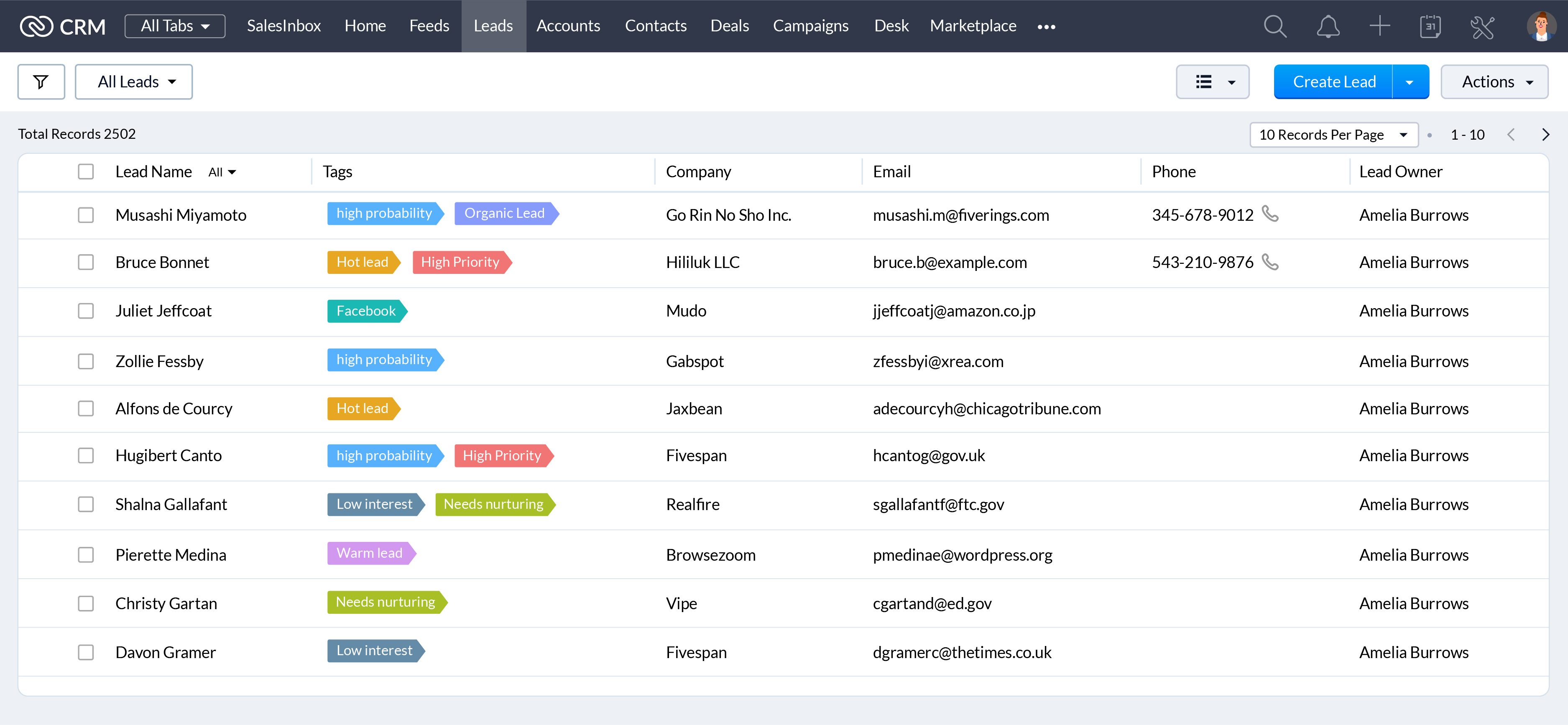
When they're working with hundreds of records everyday, a unique visual identifier makes it easier for your sales reps to search, categorize, prioritize, and segment records efficiently. Associate unique colors with your tags so your sales reps can see details like priority, deal state, associated departments, and more at a glance.
CRM administrators have one of the most challenging jobs: keeping your CRM system running like a well-oiled machine. We're announcing some exciting updates to make their jobs easier with the winter 2021 release.
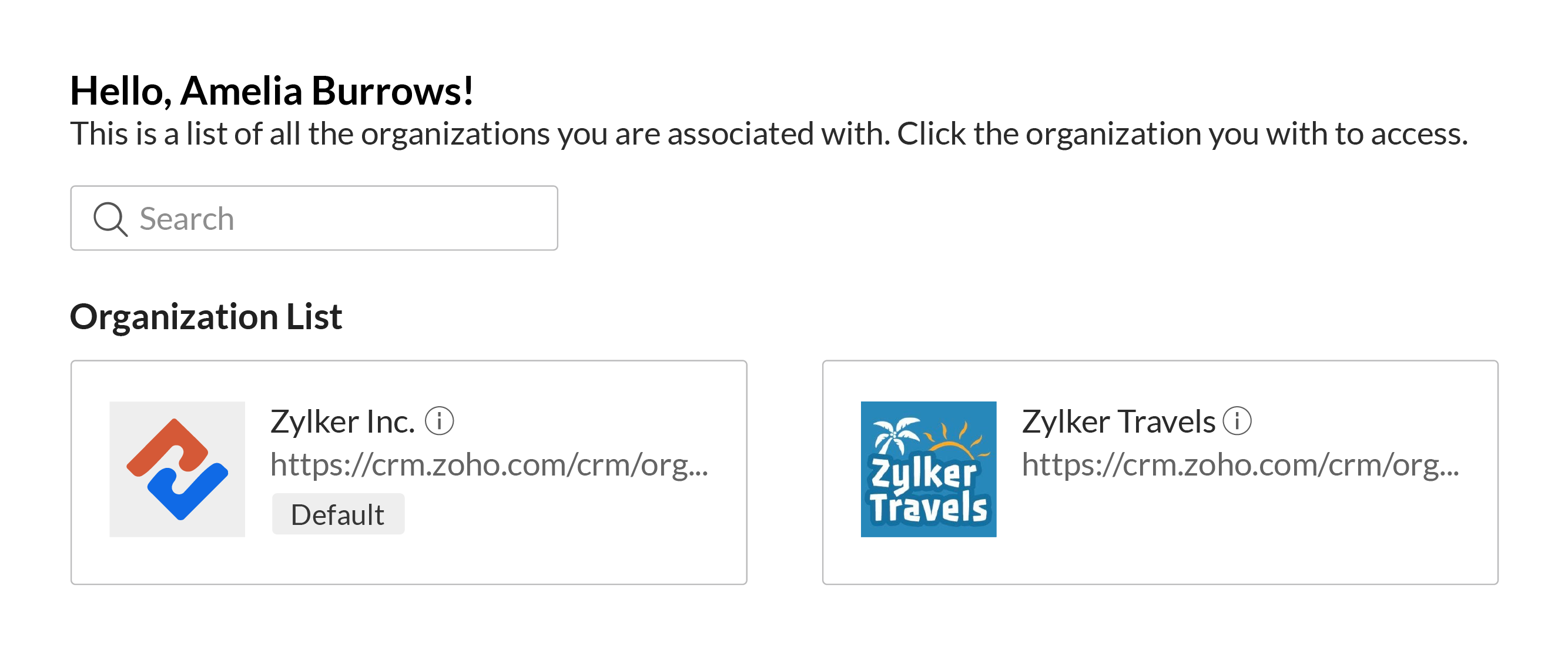
Access multiple CRM accounts with a common set of credentials
You can associate a user with multiple CRM accounts to allow business owners, upper management, and decision makers to manage multiple businesses or business units with ease. Users can switch between accounts quickly to make it easier to access key business data to help them understand growth and derive insights which can be used to prepare reports, agendas, and ideas for future planning, all with a single set of login credentials.
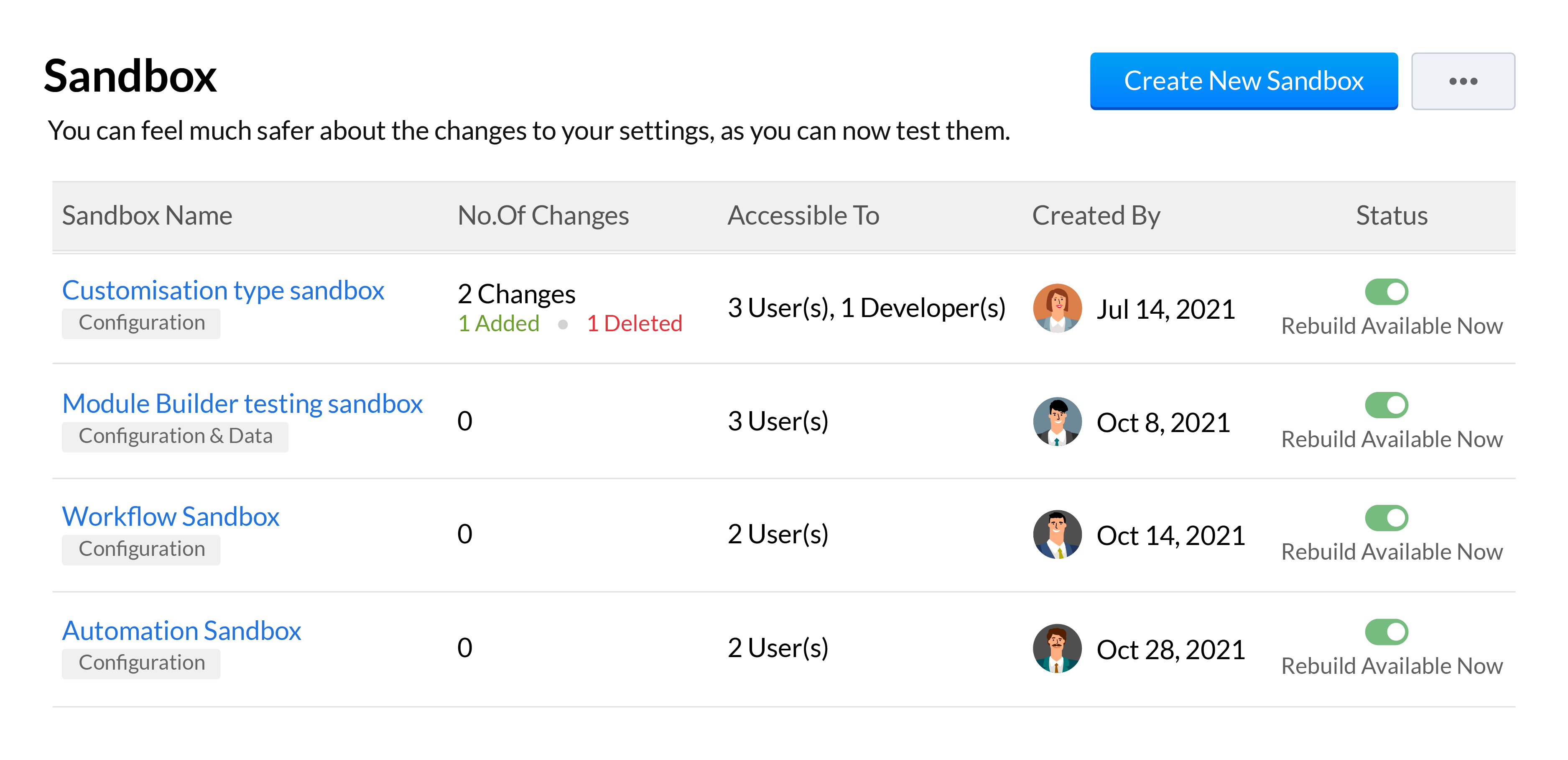
Sandboxes are essential in a CRM for testing and pushing error-free customizations to your live production account. We've added a number of features to our existing sandbox to help your developers be more effective when building and testing out customizations. This includes the ability to run multiple sandboxes, deploy all or only some settings, import sample or partial production data, and a unified deployment log to track your changes from all your sandboxes.
We'll be going over all these features across 3 overview webinars, which you can register for at the below links:
Webinar 1 | Date: 21/01/22 - This webinar will cover multiple sandbox, email sharing preferences, multi-organization support and retry support for workflow failures.
Webinar 2 | Date: 28/01/22 - This webinar will cover the new forecasting and reports system along with the new analytical components and improvements made to Zia.
That wraps up our Winter
'21 announcement and we look forward to all your thoughts and feedback
on these features and how they can be made better.
Happy selling,
Access your files securely from anywhere

Zoho Developer Community





Topic Participants
Shashank M K
Sticky Posts
Presenting ABM for Zoho CRM: Expand and retain your customers with precision
Picture this scenario: You're a growing SaaS company ready to launch a powerful business suite, and are looking to gain traction and momentum. But as a business with a tight budget, you know acquiring new customers is slow, expensive, and often deliversGood news! Calendar in Zoho CRM gets a face lift
Dear Customers, We are delighted to unveil the revamped calendar UI in Zoho CRM. With a complete visual overhaul aligned with CRM for Everyone, the calendar now offers a more intuitive and flexible scheduling experience. What’s new? Distinguish activitiesCreate and populate a record in an instant: Introducing zero-shot field prompting to Zia's ICR
A couple of months ago, we upgraded our in-house AI image detection and validation tool, Zia Vision, with intelligent character recognition (ICR). By training Zia with sample images, you could create and enrich CRM records with data extracted from standardIn-person ZUG Meetups for Real Estate Professionals - US Q1 2026
The Real Estate Zoho User Group is going on a multi-city, in-person meetup tour across the US, and we’d love to see you there! These meetups are a great opportunity to: Connect with fellow real estate professionals using Zoho Share challenges and discoverNimble enhancements to WhatsApp for Business integration in Zoho CRM: Enjoy context and clarity in business messaging
Dear Customers, We hope you're well! WhatsApp for business is a renowned business messaging platform that takes your business closer to your customers; it gives your business the power of personalized outreach. Using the WhatsApp for Business integration
Zoho TeamInbox Resources
Zoho CRM Plus Resources
Zoho Books Resources
Zoho Subscriptions Resources
Zoho Projects Resources
Zoho Sprints Resources
Qntrl Resources
Zoho Creator Resources
Zoho CRM Resources
Design. Discuss. Deliver.
Zoho Show Resources

Get Started. Write Away!
Writer is a powerful online word processor, designed for collaborative work.
-
オンラインヘルプ
-
Webセミナー
-
機能活用動画
-
よくある質問
-
Ebook
-
-
Zoho Campaigns
- Zoho サービスのWebセミナー
その他のサービス コンテンツ
Nederlandse Hulpbronnen

ご検討中の方
Recent Topics
How do you print a refund check to customer?
Maybe this is a dumb question, but how does anyone print a refund check to a customer? We cant find anywhere to either just print a check and pick a customer, or where to do so from a credit note.What is Resolution Time in Business Hours
HI, What is the formula used to find the total time spent by an agent on a particular ticket? How is Resolution Time in Business Hours calculated in Zohodesk? As we need to find out the time spent on the ticket's solution by an agent we seek your assistanceHide "Section" headers when using a form as a subform in "List view"
When using a form as a subform and setting the "View Type" to "List View" it is not possible to hide the section headers. This can become an issue if I have a section which is not applicable to this subform and I hide the fields within that section andAdd additional field to quick search results
IN the advanced search, we can add any field to the columns. In the regular search results (before you press enter, there is no option to modify the results. It would be super useful to include a custom field where it currently displays the pipleineNeed Help: Updating Related Records via Subform Entries in Zoho Creator
Hi everyone, I’m trying to set up a workflow in Zoho Creator where each row in a subform updates related records in another form automatically. Here’s the situation: My main form (e.g., “Receipts”) contains a subform where each row selects a related recordDisable signing in using email aliases?
Hi, I currently have user accounts that have multiple aliases, for example: Main: name@domain.com Alias: alias1@domain.com, alias2@domain.com Currently, I am able to use any of those 3 emails in the 'username' box during login, and it will log me into the email. Is there a way to setup so that email aliases cannot be used to sign on? I'd still be able to receive and send emails using those aliases in the main email account like it works now, except only the main email can be used to login. Cheers!Zoho Desk - Community - Customer Portal - Description Field UX Improvement
Hi Zoho Desk Team, As a prolific user of Zoho Cares Community, I find it very frustrating that I cannot increase the size of the Description box (this one which I am typing this message). Many apps with multi line text fields have a small handle in theAdd the same FROM email to multiple department
Hi, We have several agents who work with multiple departments and we'd like to be able to select their names on the FROM field (sender), but apparently it's not possible to add a FROM address to multiple departments. Is there any way around this? Thanks.Can I change the format of the buttons in the email templates?
Hi all! We have been working hard trying to brand our email templates, and have some way to go yet. One of the things we can't seem to edit is the green ${Cases.CUSTOMER_PORTAL_BUTTON} button and the font of the View Ticket text. Is there any way of doingLead to Contact Conversion with multiple email address fields
We are a B2C business with a strong repeat cycle, and as such it's not uncommon for customers to use multiple email addresses with us. We have both our Contacts & Leads modules set up with 3 email fields. (Primary Email / Secondary Email / Historic Email)Exporting Charts from ZohoCRM
Hi...I'm relatively new to ZohoCRM, but very happy with it so far. I have all my leads and potentials accurately entered, and like the reports that I can view, with charts at the top of the data. But when I export the data, I'm receiving only the data, whether I export as excel, csv or pdf. How can I export both the chart and the data? In case it makes a difference, I'm using the free version right now. I tried researching the other editions to see if a paid version of the software offered the abilityAutomatically Update Ticket Status in Zoho Desk Based on Actions in Zoho Projects
Hi Zoho Desk Team, Hope you’re doing well. We’re using the Zoho Desk–Zoho Projects integration to manage tasks related to customer tickets, and it works well for linking and tracking progress. However, there are a few important automation capabilitiessms long credits
I’m trying to purchase Long Code credits so I can send SMS campaigns to my contacts. However, when I click the “Buy Now” button, the page appears blank and doesn’t load any purchase options. Could you please assist me in purchasing the Long Code creditsTip #48- Power Your AI Workflows with Zoho Assist on Zapier’s MCP- 'Insider Insights'
We’re thrilled to announce that Zoho Assist is now part of Zapier’s Model Context Protocol (MCP), bringing remote support automation right into your AI ecosystem. What is MCP? The Model Context Protocol (MCP) is Zapier’s new framework designed to connect"Total Hours" on Employee Attendance Report
I'm learning that in Zoho jargon, "total hours" does not include paid breaks. Or at least not the way that my setup is working. That seems a little weird to me, since most jurisdictions in the US don't differentiate between time spent on paid break andInsert Cookie Policy in Zoho Sites
Hello, i need to insert a banner on my site because i'm in Italy so i have to respect EU laws for Cookie Policy and Privacy Policy. I see that i need to insert a code in <head> section of my site to show a banner/popup with cookie info. How i can do this? Thank you LucaMarketing Tip #1: Optimize item titles for SEO
Your item title is the first thing both Google and shoppers notice. Instead of a generic “Leather Bag,” go for something detailed like “Handcrafted Leather Laptop Bag – Durable & Stylish.” This helps your items rank better in search results and instantlyCustomer Parent Account or Sub-Customer Account
Some of clients as they have 50 to 300 branches, they required separate account statement with outlet name and number; which means we have to open new account for each branch individually. However, the main issue is that, when they make a payment, theyForced Logouts - Daily and More Frequent
In the last month or so, I've been getting "power logged out" of all of my Zoho apps at least daily, sometimes more frequently. This happens in the same browser session on the same computer, and I need to re-login to each app separately after this happens.ENTER key triggering Submit
Is it possible to stopped the ENTER key from the mandatory triggering of the Submit button on Creator form? I want forms submitted "ONLY" when the Submit button is pressed.Is it possible to assign Client user to external task ON PROJECTS' TEMPLATES?
Is it possible to assign Client user to external task ON TEMPLATES PROJECTS?Cliq does not sync messages after Sleep on Mac
I'm using the mac app of Cliq. When I open my mac after it was in sleep mode, Cliq does not sync the messages that I received. I always have to reload using cmd + R, which is not what I want when using a chat application.Link to images
I have added images in pages. I would like to link those images with linked in URL so that they open in new window. There is an option of image -> link but I am not able to use the same to open URL in new window. Please check the attached image. Can youRespond faster and smarter with Zia in your IM Inbox
You’re in the middle of a busy chat queue. New messages keep popping up. One customer sounds upset. Another is asking a long list of questions. You need context. You need speed. You need help. That’s exactly when Zia Insghts jumps into action. It showsWARNING : Smart list automatically unsubscribes your contacts.
I created a smart list of my team members based on the criterion that their email domain was @_____. The list refreshed as expected — but it ended up unsubscribing almost all members of my team. I contacted support, but it took two months to get a reply,5名限定 課題解決型ワークショップイベント Zoho ワークアウト開催のお知らせ (10/31)
ユーザーの皆さま、こんにちは。Zoho ユーザーコミュニティチームの中野です。 10月開催のZoho ワークアウトについてお知らせします。 今回はZoomにて、オンライン開催します。 参加登録はこちら(無料):https://us02web.zoom.us/meeting/register/BGYTysOnSqa9LA9eY2IKww ━━━━━━━━━━━━━━━━━━━━━━━━ Zoho ワークアウトとは? Zoho ユーザー同士で交流しながら、サービスに関する疑問や不明点の解消を目的としたSubforms in Stateless Forms
Stateless Forms are very useful, but we can't build complex data entry pages without Subforms. Can this be implemented? This would make Stateless Forms truly powerful.Custom Function not getting package details when triggered from Workflow Rules.
I have a custom function for Packages that submits a form in our Creator app that we use to generate custom shipping labels (internal staff complete deliveries so we cannot generate shipping labels straight from Inventory). When the function is executedBilling Preferences per Account
Hello, We are trying to setup Billing Preferences in Zoho Desk to set up a different pricing per account. We charge different pricing per hour per customer/account. Account A = 100 per hour Account B = 125 per hour In the Billing Preferences in Time EntryTime entry preview for custom time entry templates.
Our company needed time entries in a specific format to document our client interactions. Since we are using a custom time entry layout, we have lost the "preview" on the time entry tab. Using the default time entry layout, you get a small preview ofAble to change project on timelog entries
Ability to move the timesheet entry from one project to another. When a user adds a wrong entry a manager can change/update the timesheet entry to the correct project.Knowledge base: The nitty-gritty of SEO tags
A well-optimized knowledge base with great SEO can benefit your company by allowing customers to find help articles and support resources using search engines. This enables customers to quickly and efficiently find the information they need without directFull Text Customization & Translation in SalesIQ Chat Widget Settings
Dear Zoho SalesIQ Team, Greetings, We would like to request an important enhancement to the chat widget customization options in Zoho SalesIQ. Current Limitation: At the moment, only some of the text shown in the chat widget is editable or translatableIntroducing swipe actions in the Zoho CRM Android app
Hello everyone, How much time do you spend each day on your list view? Probably quite a lot. Since it's such an important part of your work, wouldn't it be easier if you could take action directly from your list view instead of opening each record oneContent Security Policy
Is there a place in ZOHO CRM to add a Content Security Policy to allow for a call to a google.com map, from inside our current app? Or, how do I resolve the issue below?? jquery.js:1 Refused to load the script 'https://maps.google.com/maps/api/js?v=3.41&libraries=places&sensor=true&key=AIzaSyAyQzKeKSbLci4LwZhn9oXvtCkbUo1Ae4g&callback=map_loader'Option to select location?
As a business coach, I meet with clients at various public locations. I have two or three pre-determined locations that I meet at. I would like the client to choose the location when booking an appointment. Is there a way to do that with a single service, or is the best way to accomplish this by creating one service for each location offered?Unified WhatsApp Number Management in Zoho Desk and SalesIQ
Dear Zoho Desk Support Team, We are currently utilizing both Zoho Desk and Zoho SalesIQ for our customer support operations. While both platforms offer WhatsApp integration, we are facing challenges due to the requirement of separate WhatsApp numbersProvide a standard structure to your content using article templates
Hello everyone, When multiple writers work on different documents, maintaining a standard structure can be challenging as each of the writer follows a different writing style. However, when the structure, tone, and format of every document is different,Accessibility Spotlight Series - 1
Every user interacts with products differently, what feels intuitive to one may be challenging for another. Addressing this, accessibility is built into Zoho Project's design philosophy. This helps users navigate and perform actions with ease irrespectiveProjects Tasks Not Showing Dependencies
I'm clicking on tasks and the popup to add dependencies isn't showing. I can't disconnect the nodes either. For some reason when I slide a task backwards it says it cannot go before a predecessor, even though there is not predecessor. Double clickingNext Page