Kaizen #123 Data Synchronization from a third party application
Welcome back to the Kaizen series!
In last week's post in the Kaizen series, we discussed one-way data synchronization from Zoho CRM to a legacy application, utilizing Zoho CRM's Bulk Read API and Notification API. This week, we will discuss data synchronization from a third party app to Zoho CRM.
The APIs available in Zoho CRM to insert, update or upsert records are :
1) Insert, Update, and Upsert Records APIs
These are synchronous APIs that are used to perform create, update or upsert operations for up to 100 records in a Zoho CRM module. While the Insert Records API and Update Records API is used to create and update a record respectively, the Upsert Records API is used to upsert (insert or update) a record depending on the availability of the record in your org . In Upsert Records API, the system checks for duplicate records based on the values in the duplicate_check_fields json array in the input json. If the record is already present, it gets updated. If not, the record is inserted. You will get the status of these operations immediately. Read more about the Upsert Records API in this Kaizen post.
2) Bulk Write API
The Bulk Write API is an asynchronous API that is used to perform create/update/upsert operations for up to 25K records in a Zoho CRM module. A background job will be scheduled in Zoho CRM. You can check the status of the scheduled job using the Bulk Write Job Details API. Alternatively, you can configure a callback URL when you schedule the job. The details of the Bulk Write Job result are posted on the callback URL upon successful completion or failure of the job. This bulk write API involves the following steps:
- Preparing the CSV input file
- Uploading the CSV file
- Creating a bulk write job
- Checking the job's status
- Downloading the result
To learn more about these steps in the Bulk Write API and about the Bulk Write API in general, refer to the Kaizen post on the Bulk Write API.
Insert, Update, Upsert Records | Bulk Write API |
Insert, update, or upsert up to 100 records per API call. | Insert, update, or upsert up to 25000 records per API call. |
The response is available instantly. | The response to the Bulk Write API request will not be available immediately. You can check the status of the job by polling for it, or you can wait for the status to be available in the callback URL after the job has completed. |
These APIs consume one credit per 10 records. | Bulk Write API consumes 500 credits per API call. |
Input should be in JSON format | The input file should be in CSV format. |
Let us now examine four different scenarios for record insertion in a module, specifically with varying quantities: 100, 2000, 5000, and 25000 records, and discover how these APIs perform in terms of number of API calls and credits consumed.
Number of Records | Insert,Update or Upsert Records API | Bulk Write API |
100 | 1 API Call 10 API Credits | 1 API Call 500 API Credits |
2000 | 20 API Calls 200 API Credits | 1 API Call 500 API Credits |
5000 | 50 API Calls 500 API Credits | 1 API Call 500 API Credits |
25000 | 250 API Calls 2500 API Credits | 1 API Call 500 API Credits |
Clearly, if you have more than 5000 records, it is advisable to use the bulk write API, given that you are ok with the operation being run asynchronously. If you want instant results, you should use insert/update/upsert APIs. However, more API credits will be consumed in this case.
Data Sync
Consider an e-commerce company where the Order management team uses a legacy system and the Accounts team uses Zoho CRM. To ensure that the Accounts team works with near real-time data in Zoho CRM, data synchronization from the legacy application is essential. Assume that in Zoho CRM, there is a custom module named "Orders" that contains the details from the legacy system. Imagine that you are in charge of the data synchronization between Zoho CRM and the legacy system. How should you call these APIs to achieve this synchronization? The synchronization process involves two steps.
Step 1: Initial Data Sync : Initial data sync from the legacy system to Zoho CRM.
Step 2: Subsequent Data Sync : Push any new orders or updated orders to Zoho CRM.
The solution we propose here is one of the many ways in which the data sync can be achieved.
This solution is built on the below three key points:
1) Unique field in Order Module: Maintain a unique field "parent_id" in the "Orders" module. The unique identifier of the orders in your legacy system should be mapped to this parent_id field. In create bulk write job, this can be achieved by the section field_mappings. For ensuring correct working of upsert operations, you can make use of "find_by" field inside resource JSON Array in the Create Bulk Write Job API Request. You should provide the value of "find_by" as the unique field "parent_id" . To read more about find_by field refer to Create Bulk Write Job page.
2) Sync Flag in the Orders table in legacy system: For the sync, maintain a flag in your legacy system orders table for indicating whether the record is synced with Zoho CRM or not. Once the sync is done, update the flag to true. Whenever a record is modified or sync fails, the flag value should be updated to false. This ensures that in case a record that is synced gets updated during the initial sync process, this flag column helps us re-sync this record again.
3) Grouping of data to batches: For initial sync, the data volume in the table will be huge. So they have to be batched in a group of 25k records. This grouping can be done based on sorting the table with a particular column & filtering records based on the sync column with criteria sync=false.
Step 1: Initial Data Sync
Since you have multiple batches of 25k records, you have to iterate them one by one and send them to the Bulk Write API.
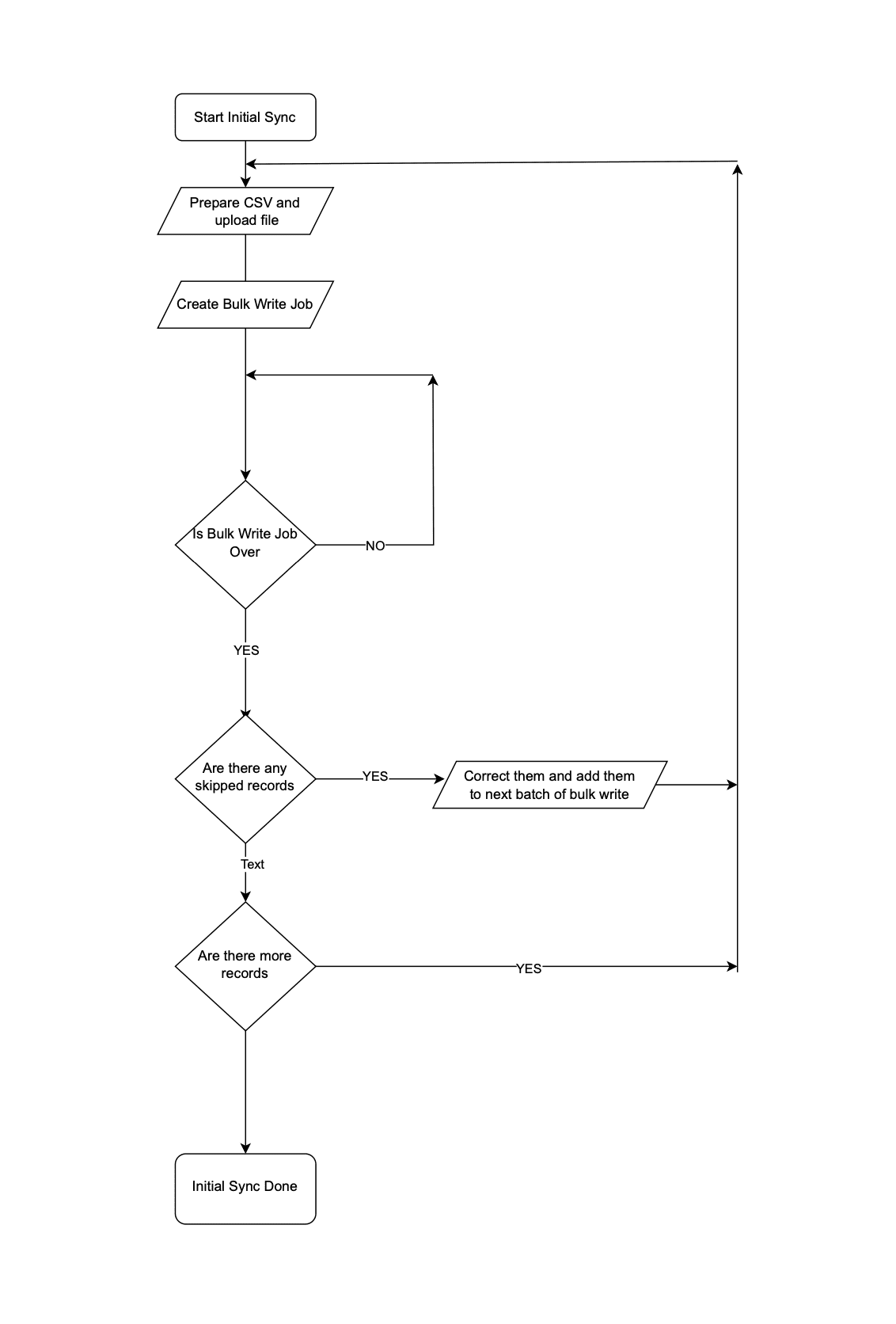 Initial Data Sync
Step 2: Subsequent Data Sync
The Order Management team continues to use the legacy application, leading to continuous creation or update of records in the Orders module.
It is not recommended to invoke Upsert Records API whenever an operation happens in Orders in the legacy system. Subsequent data syncs can be done in two ways: either by (a)near real-time sync or (b) Interval based sync.
(a) Near Real-time Sync
As we want near real-time data in Zoho CRM, it is ok for the records that are updated in the legacy system from last synchronization to be unavailable in Zoho CRM for 10 minutes.
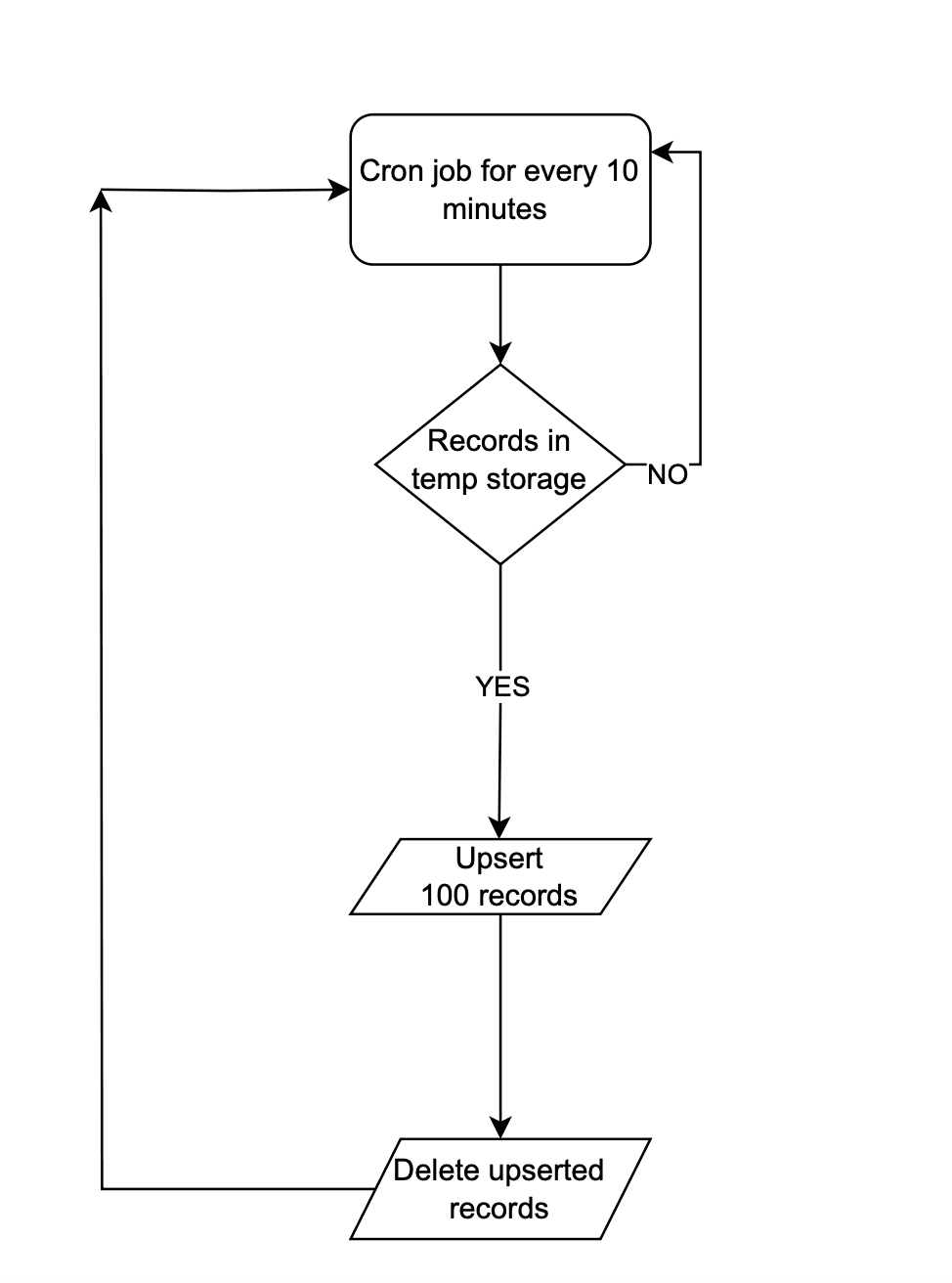 Near Real-time Sync
Instead of making API calls to Zoho CRM on every data operation, store the data in a temporary data store like a DB table or Redis. Once 100 records are accumulated in that data-store, the Upsert Records API can be promptly invoked with all these record details and followed by emptying of the data store. This approach will lead to lower consumption of API credits.
There are chances that in a period of 10 mins, 100 record operations may not happen. Scheduler jobs or CRON jobs can be created to handle the records in the data store to update records to Zoho CRM. Once these records are handled, the data store should be emptied.
(b) Interval based synchronization
For interval based synchronization, schedule bulk write API calls at suitable intervals to upsert the Orders module in Zoho CRM. Whenever there is a record operation in the legacy table, update the sync flag to "false". At regular intervals, such as every 12 or 24 hours, the bulk write API or Upsert Records API can be employed depending on the volume of the data changes.
We hope you found this article useful. We will be back next week with another interesting topic. If you have any questions, write to us at support@zohocrm.com or let us know in the comment section.
Previous Kaizen Post: Kaizen #122 - Data Synchronization using Bulk Read and Notification APIs
Related Links
Access your files securely from anywhere
Centralize Knowledge. Transform Learning.
All-in-one knowledge management and training platform for your employees and customers.
New to Zoho Recruit?

Zoho Developer Community
New to Zoho LandingPage?
Zoho LandingPage Resources
New to Zoho Survey?
New to Zoho CRM Plus?
Deliver unforgettable customer experiences
New to Zoho CRM Plus?
Deliver unforgettable customer experiences
New to Zoho Marketing Plus?
Everything you need to run your marketing
New to Zoho Marketing Plus?
Everything you need to run your marketing
New to Bigin?





Topic Participants
Mable Mary M P
Sticky Posts
Kaizen #198: Using Client Script for Custom Validation in Blueprint
Nearing 200th Kaizen Post – 1 More to the Big Two-Oh-Oh! Do you have any questions, suggestions, or topics you would like us to cover in future posts? Your insights and suggestions help us shape future content and make this series better for everyone.Kaizen #226: Using ZRC in Client Script
Hello everyone! Welcome to another week of Kaizen. In today's post, lets see what is ZRC (Zoho Request Client) and how we can use ZRC methods in Client Script to get inputs from a Salesperson and update the Lead status with a single button click. In thisKaizen #222 - Client Script Support for Notes Related List
Hello everyone! Welcome to another week of Kaizen. The final Kaizen post of the year 2025 is here! With the new Client Script support for the Notes Related List, you can validate, enrich, and manage notes across modules. In this post, we’ll explore howKaizen #217 - Actions APIs : Tasks
Welcome to another week of Kaizen! In last week's post we discussed Email Notifications APIs which act as the link between your Workflow automations and you. We have discussed how Zylker Cloud Services uses Email Notifications API in their custom dashboard.Kaizen #216 - Actions APIs : Email Notifications
Welcome to another week of Kaizen! For the last three weeks, we have been discussing Zylker's workflows. We successfully updated a dormant workflow, built a new one from the ground up and more. But our work is not finished—these automated processes are
New to Zoho TeamInbox?
Zoho TeamInbox Resources
Zoho CRM Plus Resources
Zoho Books Resources
Zoho Subscriptions Resources
Zoho Projects Resources
Zoho Sprints Resources
Qntrl Resources
Zoho Creator Resources
Zoho CRM Resources
Design. Discuss. Deliver.
Zoho Show Resources

Get Started. Write Away!
Writer is a powerful online word processor, designed for collaborative work.
Zoho CRM コンテンツ
-
オンラインヘルプ
-
Webセミナー
-
機能活用動画
-
よくある質問
-
Ebook
-
-
Zoho Campaigns
- Zoho サービスのWebセミナー
その他のサービス コンテンツ
Nederlandse Hulpbronnen

ご検討中の方
Recent Topics
I can not see Undeliverable emails from my Mass Email Leads activity in CRM
I am sending email templates and I can not see the Undeliverables? I only receive the "Out of Office" replies and any manual replies from the lead. Can you please let me know where the Undeliverable emails are sent so I can use the information to clean up the database?Select Zoho Contacts as Meeting Participants in Zoho Cliq
Hello Zoho Cliq Team, We hope you're doing well. We would like to request an enhancement to the meeting scheduling functionality in Zoho Cliq. Current Limitation: When scheduling a meeting in Zoho Cliq, participants can only be selected from: OrganizationAbility to Select External Users from Participants List When Scheduling Meetings
Hello Zoho Cliq Team, We hope you're doing well. We would like to request an enhancement to the meeting scheduling experience in Zoho Cliq. Current Limitation when scheduling a meeting in Zoho Cliq: External users can be selected from the list only underKaizen #212 - Map Dependency Fields in Zoho CRM using APIs
Hi Everyone!! Welcome back to another week of Kaizen series! Over the past few weeks, we have been addressing your questions and feedback shared through our Kaizen 200th feedback form. Thank you for your continued engagement and thoughtful queries. WeOutdated state in mexico
Hello Zoho team, the drop down to add the state for customers, when they introduce their state in mexico has a city named “Distrito Federal” that name changed many years ago to “ciudad de mexico”. could you please update this so my clients can find theIs anyone using Zoho Flow with airtable?
I need to build a flow that collects data from airtable and uses some of that data to create folders and files in google drive. I have fully function version of this in zapier and want to migrate to zoho. I am trying to perform a very basic fetch fromAI in Zoho Workplace: A Sneak Peek into What’s Coming!
Hello everyone, We’re super excited to share something we’ve been working on and we want you to be part of it! You may have seen our announcement blog post introducing a major evolution in how AI works within Zoho Workplace. Want to be among the firstBest way to share/download presentation files in Zoho without losing formatting?
Hello Zoho Community, I often work with PPT/PDF files in Zoho Docs and share them with colleagues. While PDFs usually give a direct download option, I’ve noticed that PPT/PPTX files sometimes only open in the viewer without a clear download link. Is thereWorkflow Failure - Notifications
Good afternoon, I have just experienced an error whereby a Workflow failed, for a reason currently unknown. The problem is that one of my users had to flag this manually (thankfully he's very thorough) and this otherwise would have flown under the radar.Introducing Bin Locations In Zoho Inventory
Hello users, We are excited to let you know that your wait for the Bin Locations feature has now come to an end! Yes, you heard us right! We are here to introduce the much-awaited Bin Locations now in Zoho Inventory. But before we dive into the featureError "Invalid client task found corresponding properties" only when triggered from workflow ?
Hi All, I am facing an error message I never encountered previously: Error in executing On Add - On Load script Error in executing thisapp.get_all_projects_api_call function. Line:(2) Error in executing thisapp.getAccessTokenFromRefreshToken function.How to interpret Campaign report statistics - definitions/explanation
I am trying to make sure I understand the Campaign report correctly Do you have a list of definitions for: Delivered - it has reached the recipient's inbox Campaign reach - is this the number that have opened the campaign email? Unique Opens Clicks/OpenSchedule a Call by Date and Time when a specific lead status is selected
Hi Wanting to create a workflow where a call can be scheduled by date & time when a specific lead status is selected. Can only currently set the date by Due Date - Trigger Date - Plus 'x' day(s) ThanksZoho CRM's Copy Customization functionality now works across DCs, for customized accounts, and more
Availability This feature is available in Standard, Professional, Enterprise, and Ultimate editions. These changes have been rolled out to all users in all DCs. For more information, please refer to these help documents: Overview | Instructions HelloHow can I bold text on Zoho Forms submit buttons?
In the old theme builder, I could bold the text on a form's submit button. With the new theme builder, I can only change the text of the header or fields in the form, and not the button itself.[Integration Edition] Deluge Learning Series – Third-Party Integrations with Deluge | October 2025
We’re excited to continue this three-month edition of the Deluge Learning Series: Session 1 – Integrating Zoho Apps with Deluge Using Built-In Integration Tasks Session 2 – Integrating Zoho Apps with Deluge Using invokeURL and invokeAPI Session 3 – Third-PartyFeature Request: Tag, Search, and Report on Individual Private Comments
Zoho Desk Team, First, I want to say that we are extensive users of Zoho Desk and it is a core part of our support operations. We rely heavily on the private comments feature for internal communication, knowledge sharing, and maintaining a clear historyZoho CRM Community Digest - August 2025 | Part 2
Hello Everyone! Here's a quick round-up of handy tips, clever workarounds, and product updates from late August. Product Updates: Meeting Enhancements in Zoho CRM! Track whether a meeting is online, in-office, or at the client’s location using the newAssistance Needed: Ticket Status Not Updating and Sorting by Last Customer Reply in Zoho Desk
Hello, I’m facing two issues in Zoho Desk that I’d like your guidance on: Ticket Status Not Updating: When a customer replies to a ticket, the status does not change to Reopened. Instead, it remains in Waiting on Customer, even after the customer’s responseRound robin
Hi, I'm trying to set up a round robin to automatically distribute tickets between agents in my team but only those tickets that are not otherwise distributed by other workflows or direct assignments. Is that possible and if so which criteria should ITime Entry Notifications
Hi All - I have support staff who place notes of their work in the time entry section of Zoho Desk. Is there a specific workflow or setting I need to enable to have the ticket holder updated via email when an entry is saved?Change text in help desk
Hi, Please let me know how can i change the this text, see screenshot.Customer happiness customisation
Hi, I was wondering if it's possible to somehow customise to whom and when customer happiness request is sent? Can you enable it only for selected tickets for example based on workflow or any other criteria (customer name, tag or anything else)? AlsoNo Zoho Support Response in Months
I want to say that I love Zoho FSM, Books, and CRM, but the support is scary bad. About 2-3 months ago, I emailed Zoho FSM support with two specific issues I needed help with, and I have still not received one single response. I also submitted a supportNull
If a result is null how do I make it so that a custom error pops up instead of the default error? Can someone write an example as if I were using the script builder?Format a "return" message
Good day, Is there a way to format the message of the "return" function in CRM deluge script?Having Trouble Opening The Candidate Portal
Recently am having trouble opening the Candidate Portal. It keeps loading but cannot display any widgets. Tried Safari, Chrome and Edge. Non of them work. Please solve the problem ASAP.Tip of the Week - Spot Risky Sales with Conditional Formatting
In Zoho Analytics, small tweaks can lead to big insights. One such feature is Conditional formatting based on other columns, your key to instantly spotting where sales success is overshadowed by product returns. Our tip this week shows you how to applyHow do I duplicate / copy a campaign
I am evaluation Zoho Campaigns and sent an email to one of my personal email accounts from Zoho Campaigns. It went into my junk file in Hotmail. I want to duplicate that same (1-page) campaign and send it to another of my personal accounts to try toFor a Bill, can "Pay via Check" - Can we also "Pay via Check" when documenting refund for payment?
We really like when we have a Bill in Zoho Books that we can record payment by selecting "Pay via Check" and that will cut the check for us from Zoho Books. However, when we have to write checks as a result of invoice overpayment, we can not select "PayCreator Change History: Ways to improve
Hi Everyone, Recently been working in developing this change history(an idea from Zoho Forms) - unlike forms that you can this with a click but using Creator, we can use "old" keyword. The concept I come up with is to put the result in a table however,Suitability of Zoho One (Single User License) for Multi-State GST Compliance & Cost Analysis
Hello Zoho Team, I am an e-commerce business owner selling on platforms like Amazon, Flipkart, and Meesho, and I'm currently using their fulfillment warehouses. I have two GSTIN registrations and am planning to register for an additional 2-3 to expandadd employees and customiz
I want a Zoho software to track employees record. I logged in a demo so now I tried adding employee, first thing when I click on add employee it takes me to a page where it says add user maximum 10 users, my first doubt why users I don't want employeesInactive User Auto Response
We use Zoho One, and we have a couple employees that are no longer with us, but people are still attempting to email them. I'd like an autoresponder to let them no the person is no longer here, and how they can reach us going forward. I saw a similarZoho People Attendance Module - Split Shifts
Hello, Our business employs a number of college students who often split their workdays between work hours and class schedules, resulting in split shifts. For example: Employee 1 works 9am to 11:30am and then leaves for class, returning to work at 3pmZoho One subscription
we have got Zoho CRM for 3 users and we paid for the app , and we have still 9 months to go , but if we join Zoho one , does it mean the payment for that subscription would be a waste? Please help. Thanks.How Zoho CRM Can Enhance Your Faucets Accessories Business Operations?
In today's competitive market, having a reliable CRM system is crucial for managing customer relationships and streamlining business operations. For businesses in the faucets accessories niche, Zoho CRM offers powerful tools to help manage everythingDashboard
I’m currently working on a project using the Zoho IoT Cloud with an ESP32 and MQTT. I’ve successfully connected the ESP32 to Wi-Fi and MQTT, and the data from the ESP32 is displayed in the telemetry section of the cloud. However, when I try to createCan i connect 2 instagram accounts to 1 brand?
Can i connect 2 instagram accounts to 1 brand? Or Do i need to create 2 brands for that? also under what subscription package will this apply?Zoho Forms - Improved Sub-Forms
Hi Forms team, I'm helping a client move from JotForms to Zoho Forms and I've found another opportunity for improvement. In the below screenshot, JotForm left and Zoho Forms right. The Zoho Forms Sub-Form is quite a poor visually. There is no way to makeNext Page