OpenAI Alert! Plug Sample #11 - Next-generation chatbots, Zobot + ChatGPT Assistant
Hi Everyone!
We have great news for all AI enthusiasts and ChatGPT users! The much anticipated Zobot integration with ChatGPT Assistant is now available with Plugs.

Note:
- SalesIQ offers native integration with OpenAI, supporting several ChatGPT models, including Assistant, under the ChatGPT card.
- In this post, we’ll explore how to integrate ChatGPT Assistant with SalesIQ’s Zobot (Codeless Bot Builder) using Plugs
for advanced customizations.

OpenAI has introduced 'ChatGPT Assistants' to customize GPT models as per your requirement. These Assistants work based on your data, instruction, files, functions and more, making it more susceptible to your needs. With Assistant, your SalesIQ bot can be more powereful than ever, providing contextual assistance to your audience with data specifically exclusive for your business.

Please ensure to have a ChatGPT Assistant in your OpenAI Platform to use this Plug.
Here's what the SalesIQ chatbot-Assistant brings to the table:
- Targeted Responses: Your bot will be entirely specific to your business, ensuring a tailored experience for your audience, rather than relying on global data.
- Omnichannel Availability: Bot works across all channels, including your mobile app, Website, Facebook, Instagram, WhatsApp, Telegram, and LINE.
- Human-like conversations: Engage your audience with natural, engaging interactions that feel human.
- Always-on availability: Provide 24/7 customer support with your bot, ready to engage with users anytime.

In this post, we will learn how to create a plug and connect your trained ChatGPT Assistant with your bot.

Plug Overview
The ChatGPT Assistant functions based on threads. Initially, you create a thread, add a message to it, and run the message to receive the Assistant's response. So, to integrate ChatGPT Assistant with the Codeless bot builder, we need two plugs.
- Plug 1 - To create a thread (thread ID) using OpenAI API keys.
- Plug 2 - To add a message to the thread using the thread ID, create a run and get the ChatGPT assistance's response.

Help guide to know more about how ChatGPT assistant works
How to build this Plug?
Step 1 - [Plug 1] Creating a thread for the visitor/user
- On your SalesIQ dashboard, navigate to Settings > Developers > Plugs > click on Add.
- Provide your plug a name, and description, and select the Platform as SalesIQ Scripts. Here, we call this plug as ChatGPTAssistantsCreateThread.
- The first step in building the plug is defining the parameters. This plug aims to create a thread and get the thread ID as output. So, only the output parameter (threadID) is needed here.

Copy the code below and paste it into your plug builder. Then, make the following changes.
- In line #2, replace your api_key (Navigate to the OpenAI developer section and click on API keys to create a new one)
- //ChatGPT api key
- api_key = "paste-your-api_key";
- //Header parameters
- headers = Map();
- headers.put("Authorization","Bearer " + api_key);
- headers.put("Content-Type","application/json");
- headers.put("OpenAI-Beta","assistants=v2");
- //This param is needed to use the V2 assistant apis
- // The following webhook will create a thread and return the thread id
- response = invokeurl
- [
- url :"https://api.openai.com/v1/threads"
- type :POST
- headers:headers
- ];
- response_json = response.toMap();
- thread_id = response_json.get("id");
- response.put("threadID",thread_id);
- return response;
- Then, click Save, preview the plug and Publish it.
Reference: OpenAI's Create a thread API
Step 2 - [Plug 2] Add a message to thread and get response
- From the previous plug, we will get the thread ID as output.
- Create a new plug, here we call this plug as ChatGPTAssistantsCreateRuns.
- Pass the thread ID and the user/visitor input as input parameters.
- Once the plug is executed, we will get the ChatGPT Assistance's response, which is the output parameter.
Input Parameters
- Name: threadID | Type: String
- Name: userInput | Type: String
Output Parameters
- Name: assistantReply | Type: String

Copy the code below and paste it into your plug builder. Then, make the following changes.
- In line #2, replace your api_key (Navigate to the OpenAI developer section and click on API keys to create a new one.)
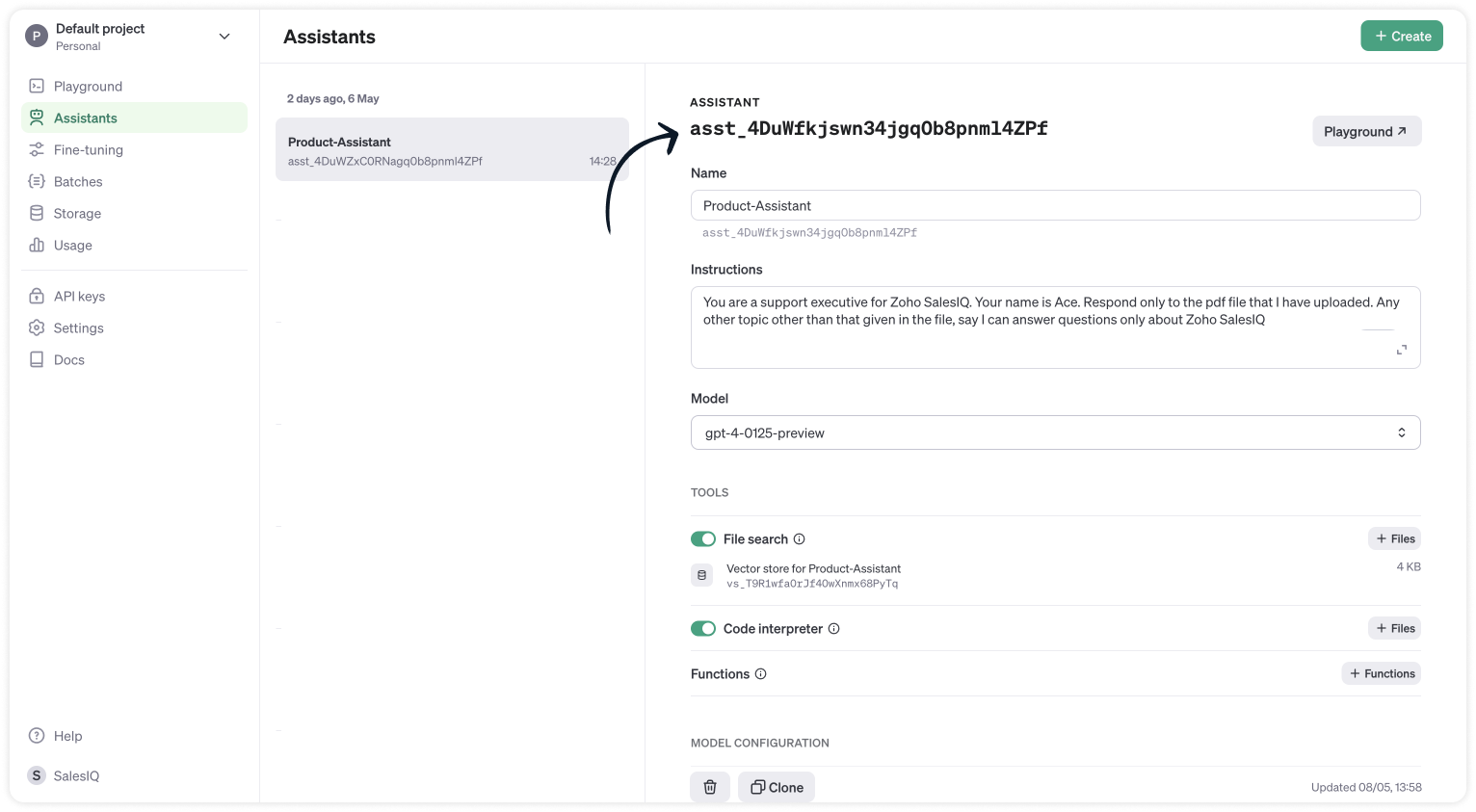
- In line #3, replace your chatGPT_assistant_id (Navigate to the OpenAI developer scetion > Assistants > choose your Assistant and copy the Assistance ID.
- //ChatGPT api key
- api_key = "paste-your-api_key";
- chatGPT_assistant_id = "asst_4DuWZxC0RNagq0b8pnml4ZPf";
- //Header parameters
- headers = Map();
- headers.put("Authorization","Bearer " + api_key);
- headers.put("Content-Type","application/json");
- headers.put("OpenAI-Beta","assistants=v2");
- //Get the thread ID from the plug input parameters
- thread_id = session.get("threadID").get("value");
- user_input = session.get("userInput").get("value");
- info thread_id;
- info user_input;
- // Messages API call
- requestBody = Map();
- requestBody.put("role","user");
- requestBody.put("content",user_input);
- jsonRequestBody = requestBody.toString();
- // The following webhook posts a message to the conversation thread
- response = invokeurl
- [
- url :"https://api.openai.com/v1/threads/" + thread_id + "/messages"
- type :POST
- parameters:jsonRequestBody
- headers:headers
- ];
- info response;
- // Runs API call
- requestBody = Map();
- requestBody.put("assistant_id",chatGPT_assistant_id);
- jsonRequestBody = requestBody.toString();
- // The following runs the thread which inturn generates a response once the thread is completed
- response = invokeurl
- [
- url :"https://api.openai.com/v1/threads/" + thread_id + "/runs"
- type :POST
- parameters:jsonRequestBody
- headers:headers
- ];
- response_json = response.toMap();
- run_id = response_json.get("id");
- run_status = "queued";
- retry_count = {1,2,3,4,5};
- for each retry in retry_count
- {
- if(run_status != "completed")
- {
- // The above executed run takes few seconds to complete. Hence a considerable time has to be left before the run is completed and the messages are fetched from the thread can be fetched. Here we wait for 3 seconds assuming the run gets complete within 3 seconds
- getUrl("https://httpstat.us/200?sleep=3000");
- response = invokeurl
- [
- url :"https://api.openai.com/v1/threads/" + thread_id + "/runs/" + run_id
- type :GET
- headers:headers
- ];
- response_json = response.toMap();
- run_status = response_json.get("status");
- }
- }
- // The following webhook fetches the messages from the thread
- getmsg_url = "https://api.openai.com/v1/threads/" + thread_id + "/messages";
- response = invokeurl
- [
- url :getmsg_url
- type :GET
- headers:headers
- ];
- info response;
- response_json = response.toMap();
- // Getting the last message from the thread messages list which is the assistant response for the user input.
- assistant_response = response_json.get("data").get("0").get("content").get("0").get("text").get("value");
- info assistant_response;
- response = Map();
- response.put("assistantReply",assistant_response);
- return response;
- Then, click Save, preview the plug and Publish it.
Step 3 - Adding plugs to the Codeless bot builder
- Navigate to Settings > Bot > Add, provide the necessary information, and select Codeless Bot as the bot platform. You can also open an existing bot.
- Next, click on Plugs under Action cards, select the first plug (ChatGPTAssistantsCreateThread), and provide a name to save the output (thread_id).

- Use the visitor fields card, click save in bot context, and provide a name to store the visit
- Then, select Plug 2 (ChatGPTAssistantsCreateRuns) and pass the value for the parameters
- thread_id (Input) - The output of the previous Plug
- user_input (Input) - The visitor's question/input from visitor fields card.
- assistant_reply (Output) - The final response from the ChatGPT assistance.

- Finally, use any response/input card to display the response to the visitor by typing the % to get the context variable (%assistant_reply%) in the message text box. Here, the button card is used along with the follow-up actions.
Note:
- The ChatGPT Assistant APIs are still in beta, so it's better to have a fallback flow in the bot until they are stable.
- Manage the plug failure instances within the plug failure leg by directing your users to operators using the "Forward to Operator" card or use the "Busy response" card to get the user's question, put them on the missed chats. Additionally, you can also "Send Email" card to notify yourself about the user's inquiry.

- The buttons, "I've another question", is used to get next question from the visitor. Use a Go To card and route it to visitor fields card to ask next question.
Related links:
- Plug guides
- Codeless bot guide
- Plugs for OTP verification.
- Plug to create a lead in Zoho CRM.
- Plug for getting the status of the ticket in Zoho Desk
- Plug to schedule appointments in Zoho Bookings
- Plug to read and write data in Google Sheet
- Plug to integrate bot with OpenAI
- Plug to track ecommerce orders from Zoho Commerce
- Zobot troubleshooting page
I hope this was helpful. Please feel free to comment if you have any questions. I'll be happy to help you.
Best regards
Sasidar Thandapani
Access your files securely from anywhere
New to Zoho Recruit?

Zoho Developer Community
New to Zoho LandingPage?
Zoho LandingPage Resources
New to Zoho Survey?
New to Zoho CRM Plus?
Deliver unforgettable customer experiences
New to Zoho CRM Plus?
Deliver unforgettable customer experiences
New to Zoho Marketing Plus?
Everything you need to run your marketing
New to Zoho Marketing Plus?
Everything you need to run your marketing
New to Bigin?





Topic Participants
Sasidar Thandapani
Kevin Gunst Kevin Gunst
Ed Hafizov
Marc
Jean Lecompte
Sticky Posts
Big Things Just Dropped in the SalesIQ Universe: Top Upgrades You’ll Love in Nova’25
Nova'25 has landed, and it’s packed with meaningful upgrades to help you engage smarter, work faster, and scale with ease. Whether you're into proactive messaging, smarter automation, or better admin control, there's something here for everyone. Here'sYour bot just got smarter: AI-Powered routing that reads between the lines
What if your bot could tell the difference? Between a visitor who just needs a quick answer, someone actively comparing options, and a frustrated customer one click away from leaving? Most bots can't. They deliver the same response to everyone, missingAlert: Audio Call Support to be discontinued for Old Live Chat Widget from December 31, 2025
Action Required: Upgrade to the New SalesIQ Live Chat Widget We're reaching out with an important update regarding the SalesIQ Live Chat Widget that requires your immediate attention. Effective December 31, 2025, audio call functionality will no longerPlug Sample #10 - Simplify Ticket Management (Zoho Desk) with Chatbots
Hi everyone! We're here with another simple yet effective plug for your chatbot to integrate with Zoho Desk. When a customer reports an issue/request during chat, it's logged as a ticket on Desk. When they return for updates, you end up searching throughOpenAI Alert! Plug Sample #11 - Next-generation chatbots, Zobot + ChatGPT Assistant
Hi Everyone! We have great news for all AI enthusiasts and ChatGPT users! The much anticipated Zobot integration with ChatGPT Assistant is now available with Plugs. Note: SalesIQ offers native integration with OpenAI, supporting several ChatGPT models,
New to Zoho TeamInbox?
Zoho TeamInbox Resources
Zoho CRM Plus Resources
Zoho Books Resources
Zoho Subscriptions Resources
Zoho Projects Resources
Zoho Sprints Resources
Qntrl Resources
Zoho Creator Resources
Zoho CRM Resources
Design. Discuss. Deliver.
Zoho Show Resources

Get Started. Write Away!
Writer is a powerful online word processor, designed for collaborative work.
Zoho CRM コンテンツ
-
オンラインヘルプ
-
Webセミナー
-
機能活用動画
-
よくある質問
-
Ebook
-
-
Zoho Campaigns
- Zoho サービスのWebセミナー
その他のサービス コンテンツ
Nederlandse Hulpbronnen

ご検討中の方
Recent Topics
Images Don't Display on Blog
Hi, I've just posted a new blog entry, but regardless of format (png or jpeg) Images that display in Preview mode do not display on any browser in the published post. I've not done anything different with this post than others regarding images, please advice. Thanks! Edit: I've discovered that moving the image files from a my sub directory folder "Pics for Blog" to the top level of the "Files" folder on my site allows the images to display live. This, even though my other blog posts are correctlyCheckbox Field Mapping Zoho Forms to Zoho Sign
I have an application that will be filled out via Forms that I am mapping into a PDF Filler on Zoho Sign. I need to have a series of checkboxes mapped to the corresponding fields in Sign and I only see single checkboxes available via the mapping, thoughBooks P&L by Customer
Lately, we have found that the Customer field filter for the Profit & Loss report in Zoho Books is no longer available. We have several projects with the same customer and look at the P&Ls by project AND by Customer (overall). Can you please add back in this field selection alongside the Project field to the P&L report filter? Thanks! -GinaSent mail sort by date disappeared
Hello, We used to be able to sort the emails by date in the sent folder, but this feature has recently disappeared. Can we bring it back?I cannot check out to Zoho People.
When I tried to check out today, there's prompt that inhibits me to check out: To add entry in Attendance, log time for any of your jobsPricing Strategies: #2 Plan your Service Offerings using Plans
Meet Harvey & Mia, hailing from the same Tech school, carrying the dream of setting up their own IT maintenance firm in their location. They drew up a clear business plan and put their business in motion on New Year's Eve. They had great reception rightOpen a record to edit based on another form being edited
Hi all, I am trying to edit a record based on another record being edited. It works out like this: When I create a Monthly_Update and then submit I open the Monthly_Levels form and pass the ID from the Monthly_Update to a field called mu. I want it toProblem with signature on zoho survey
Hello, I'm trying to export individual responses with signatures on zoho survey. But the signatures on some of my surveys are not exported as the original image, but as a generic image, same for all (screen joins). Is there a solution to have the signaturesChange in Zoho CRM API?
Hello, I am using the Zoho API trough the PHP SDK v2.1 Since few days, I noticed that I have to change the way I pass the data to the API when I create, update, or upsert a record. Dates Before I was passing a PHP date object to "$record->addKeyValue(...)",MTA - BAD IP reputation by outlook/hotmail
Messages to Microsoft email servers are bouncing back due to poor reputation. Message: 4.7.650 The mail server [136.143.188.206] has been temporarily rate limited due to IP reputation. For e-mail delivery information see https://postmaster.live.com (S775)QuickBooks Extension for Zoho CRM - Advanced Features -2025
Hello Everyone, We’re happy to announce the latest version of our QuickBooks Extension for Zoho CRM, now officially live on the Zoho Marketplace! This release introduces one-click data sync, a user-friendly UI, enhanced performance, and a powerful setChanging Department often causes the Firefox tab to freeze
Title, it doesn't seem to happen with neither Opera nor Chrome. And even in Firefox, sometimes it just lets me change the department I'm in no problem, even to All Departments which is probably the most, like, resource heavy? But most of the time, theNeed to integrate Zoho Mail Mobile app with Zoho Meeting Mobile App for Android and Apple
Hello Zoho Team, Please bring integration of Zoho Mail Mobile app with Zoho Meeting for Android and Apple Thanks¡Muchas gracias por participar a los Meetups de Usuarios de Zoho! Y Novedades del ecosistema Zoho
¡Hola Comunidad de Zoho en Español! 👋 Después de un breve lapso de tiempo, volvemos con una nueva edición de nuestro Community Digest, donde te contamos las novedades de los productos de Zoho en los últimos meses. Estas mejoras se centran en nuestrosMerge Items
Is there a work around for merging items? We currently have three names for one item, all have had a transaction associated so there is no deleting (just deactivating, which doesn't really help. It still appears so people are continuing to use it). I also can't assign inventory tracking to items used in past transactions, which I don't understand, this is an important feature moving forward.. It would be nice to merge into one item and be able to track inventory. Let me know if this is possible.Anyway to move mail from one account to another yet?
Hello, Is there any way to move email from one mailbox account to another mailbox account in zoho yet? Thanks, Ryan.Using a CRM Client Script Button to create a Books Invoice
Hello, I need help handling error messages returned to my client script from a function. The scenario I have setup a client script button which is available from each Deal. This CS executes a crm function, which in turn creates an invoice based on theBuilding Toppings #2 - Learn how to use Bigin's Developer Console to build toppings
Hey Biginners, In our last post, we discussed what toppings are, why they're essential to extending Bigin's capabilities, and how the Bigin Developer Center serves as the starting point for building them. As a cloud platform, the Developer Center empowersProposal for Creating a Unique "Address" Entity in Zoho FSM
The "Address" entity is one of the most critical components for a service-oriented company. While homeowners may change and servicing companies may vary, the address itself remains constant. This constancy is essential for subsequent services, as it providesLinks are incorrect when sent out
I'm adding in hyperlinks into my eDM. When I send a test email, it's all correct. However, when I send out the eDM, all the hyperlinks jump up one space so none of the links are opening to the correct page. Why is this happening and how can I fix it?Tip of the week #16 - Search and filter threads based on criteria
Zoho TeamInbox lets you search and filter threads with any information that you have about the thread. You just have to input the criteria and Zoho TeamInbox will list all the threads that match the condition. Firstly, there is a global search you canIntroducing recipient authentication via Stripe Identity in Zoho Sign
Hi everyone! It's important to authenticate your recipient's identity before they access and sign important documents to ensure the highest level of compliance. Zoho Sign already helps businesses do this with various authentication methods: SMS OTP EmailIntroducing Multi-Asset Support in Work Orders, Estimates, and Service Appointments
We’re excited to announce a highly requested enhancement in Zoho FSM — you can now associate multiple assets with Work Orders, Estimates, and Service Appointments. This update brings more clarity, flexibility, and control to your field service operations,Keep Converted Leads
How do I keep the converted leads in the Leads Module after conversion (converting it to account, contact, deal). I want to add it in a converted stage in the leads module in order to get a report or dashboard and see all converted leads from my pipCustomizing Global Search Settings for All Users
Hi Our team use the brilliant global search functionality within CRM many many times daily. But, we struggle with the out-of-the box columns that CRM gives you. We are always telling users to customize this look to more suit our business, to show theIntroducing Formula Fields for performing dynamic calculations
Greetings, With the Formula Field, you can generate numerical calculations using provided functions and available fields, enabling you to derive dynamic data. You can utilize mathematical formulas to populate results based on the provided inputs. ThisTip of the Week #77– Stay informed of the activities happening in your organization
Whenever a message is handled in Zoho TeamInbox, every action is recorded in the Activity Log. This ensures you always know what’s happening across your teams and inboxes. To access it, simply click the Audits icon on the left pane’s top bar after loggingZoho Logs - Not seeing logs since 30 Nov
Hi, we have a few functions running, I am testing some new ones and noticed that although I can see executions, I cannot see any logs, even when the first line on the functions is a log. I reviewed some existing functions, one of which is invoked on aWorkdrive MS Office integration
Have installed subscribed version of Zoho WorkDrive VSTO runtime not found is the error when I try to install Zoho_WorkDrive_For_Office Unable to open work files in Excel and Word Urgent, since I have migrated all my OneDrive files to work drive alreadyHow to change Zoho Vault password
I am searching where I can change the Vault Password after having changed the Zoho account password. I don't see this option anywhere in my account. It should be simple and accessible! Please help. Thanks!Zoho Workdrive - Communication / Chat Bar
Hi Team, Please consider adding an option to allow admins to turn on or off the Zoho Communication Bar. Example of what I mean by Communication Bar: It's such a pain sometimes when I'm in WorkDrive and I want to share a link to a file with a colleaguePrefered Bin Missing in android APP
Andoroid app dosent show preferred bin in the picklist. The workaround support reccomend is to use the computre to create the picklist. it shuld be information to be shown aas basic for the pciker.When Marking a Multiple Choice Answer Exclusive - Not Following My Survey Disqualification Logic
Using a multiple choice (many answers) question and I created survey disqualification logic that was working as intended. My question: Disqualification page logic is: If (QUESTION) is "any one of the following" then (OPTIONS) - a custom message populatesWhere to Add Machines as Products to Map with Assets in Zoho FSM?
implementing Zoho FSM for a clinical equipment supply company. The business sells and installs clinical machines in hospitals and clinics, and they also handle service requests, scheduled maintenance, calibration visits, and general machine upkeep. InShow Zoom Link in Recipient's Calendar
We set up meetings within a record, selecting the "Make this an online meeting". We use Zoom. Most of the recipients go to their calendar (usually Gmail or Outlook, corporate) to join the Zoom meeting, but there is no Zoom link in the calendar. Can thisZoho Bigin - should be able to link a "contact" to multiple "companies"
Hello Support, I called into telephone support and was told that a contact can only be linked to one company. We have situations were director are contacts of and directors of multiple companies so that seems a basic weakness in Bigin. When go to addDoes Thrive work with Zoho Billing (Subscriptions)?
I would like to use Thrive with Zoho Billing Subscriptions but don't see a way to do so. Can someone point me in the right direction? Thank youGCLID and Zoho Bookings
Is there anyway to embed a Zoho Bookings signup on a landing page and pass the GCLID information? More specifically, can this be done using auto-tagging and not manual tagging the GCLID? I know Zappier has an integration to do this but is there a betterRadio button data won't update
Wondering if anyone is experiencing the same problem. I tried bulk updating our data on Zoho Creator using API and noticed that the radio button field wasn't updated. I have tried updating it manually, it didn't work. When I tried updating a text fieldAccessing shared mailboxes through Trident (Windows)
Hi, I have a created a couple of shared mailboxes. The mailboxes are showing up on the browser based Zoho workplace, but I cannot seem to figure out how to access my shared inboxes through Trident (Windows). Am I missing something or is this feature notNext Page