What's new in Zoho CRM Winter '21
Delivering the best experience, both to you and your customers,
has been a cornerstone of Zoho CRM since our inception in 2005. With
every release, our goal has been to make that experience richer. This
year, we made a big stride in that journey with the launch of Canvas,
the industry's first no-code CRM design
studio. This allowed users to craft their own CRM experience and make
Zoho CRM fit seamlessly into the way they work.
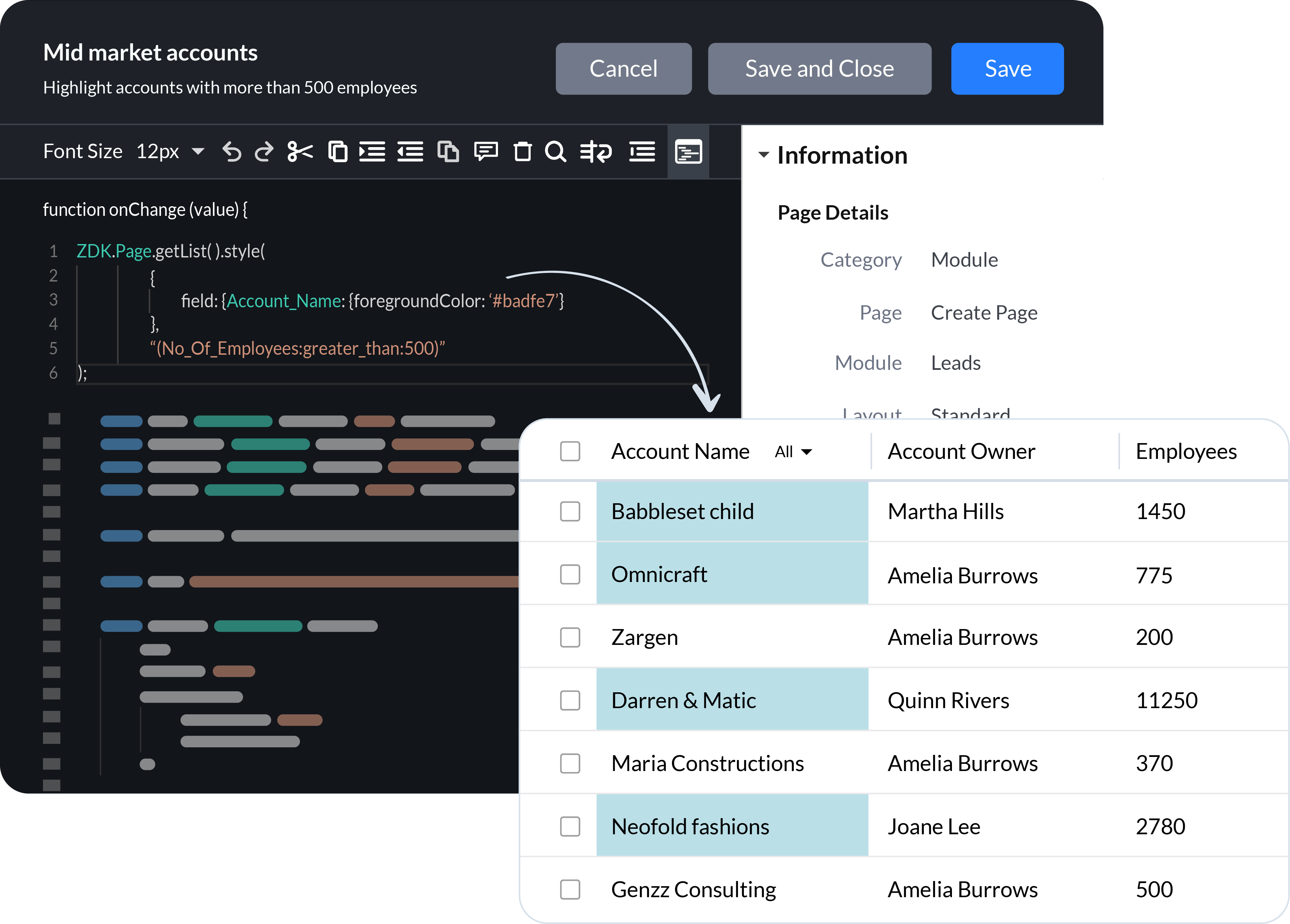
Now we're continuing the journey by adding client scripts, a pro-code tool that empowers businesses to build hyper-personalized, bespoke CRM experiences using the power of JavaScript. We've also introduced enhancements and new functionality across Zoho CRM to build on of the foundation of UX and CX we've built over the years.
Client Scripts
Sales
teams are successful when they are empowered to focus on what they do
best, closing deals and building long-term relationships with customers.
To these teams, CRM automation has become an indispensable part of their daily routine. Here's what we've added to help you automate your processes more effectively.
Multiple scoring rules
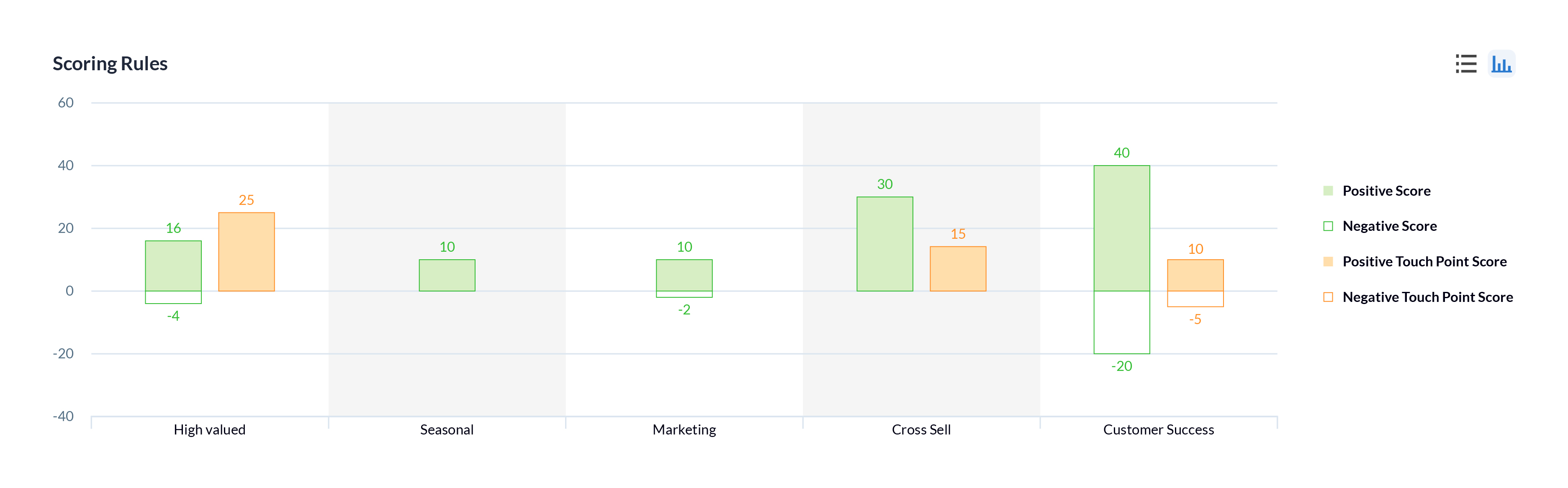
One of the best ways to help sales reps prioritize their prospects is through lead scoring. In Zoho CRM, you can now create multiple models that score prospects based on different factors and interactions according to the needs of the sales and other customer-facing teams in your business, to help prioritize the right prospects or customers.
Workflow failures and retries
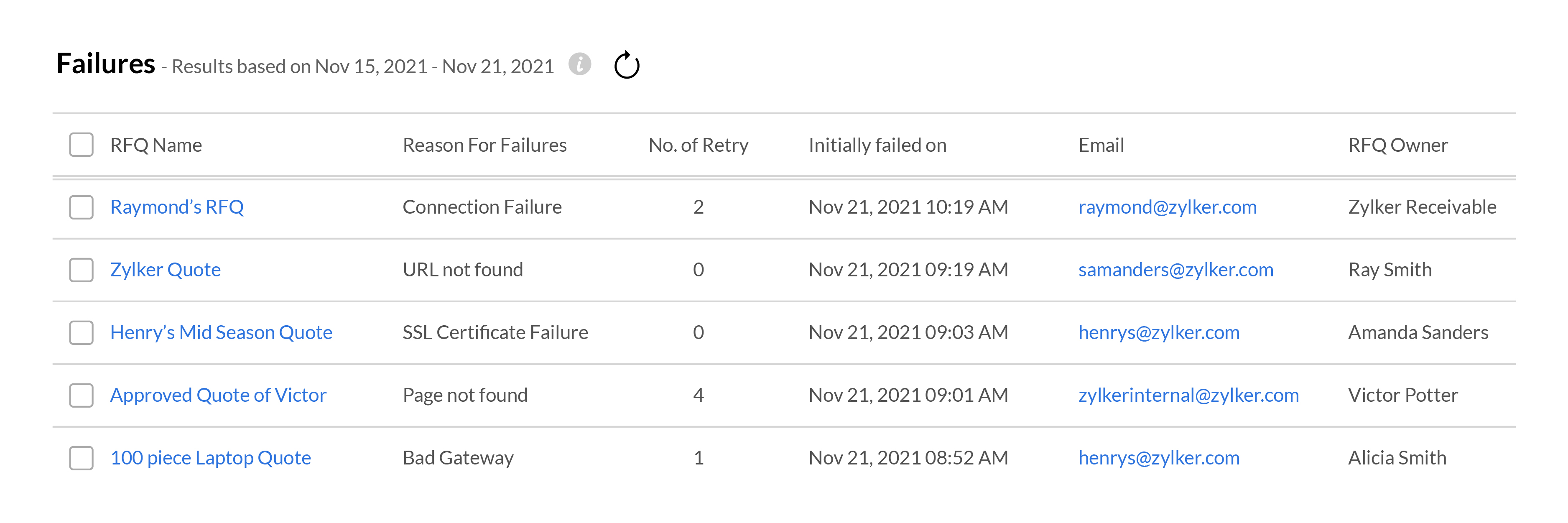
Your workflows need to run like clockwork in order for your sales team to focus on your customers. When something goes wrong with a workflow, it can disrupt the entire sales process, resulting in fewer wins and poor customer experience. To help address these situations effectively, Zoho CRM gives you in-depth
information about when and where your workflows fail, and all the
records that are affected. Your team can use this data to fix the
underlying issues and get your workflows up and running again.
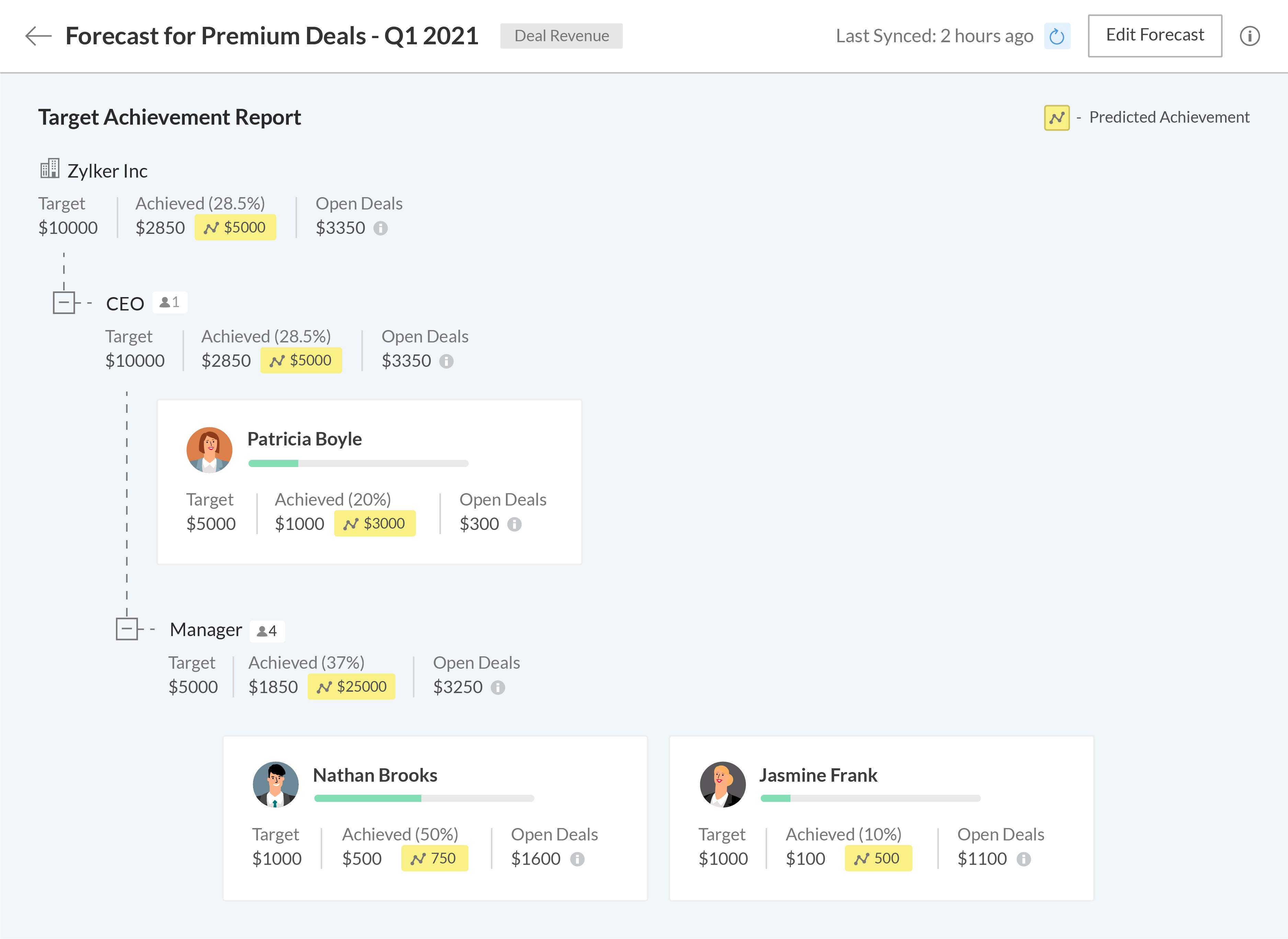
Setting meaningful targets to measure performance against is key to maintaining the long-term health of your business. We're bringing some exciting changes to our forecasting and reporting systems, as well as introducing new components to help your business get granular when analyzing your business performance.
A new forecasting system built from the ground up
We've completely revamped our existing forecasting system to make it more robust and give more control to your business, allowing you to build multiple forecasts for different periods, leverage predictive AI to track where you'll stand at the end of your forecasting period, and drill down into the data to granularly compare your current performance with previous fiscal years.
The
all-new Zoho CRM reports let you analyze, monitor, and track your
business health while also providing you with the ammunition you need to
make important decisions. The easy-to-use visual builder makes
generating complex and precise reports a breeze. Get more granular
access to your CRM data by viewing shared entries or unique entries in
two or more related modules with the new inclusive/exclusive
relationship tool. Expand your perspective and uncover deeper insights into your CRM data by joining multiple reports into one.
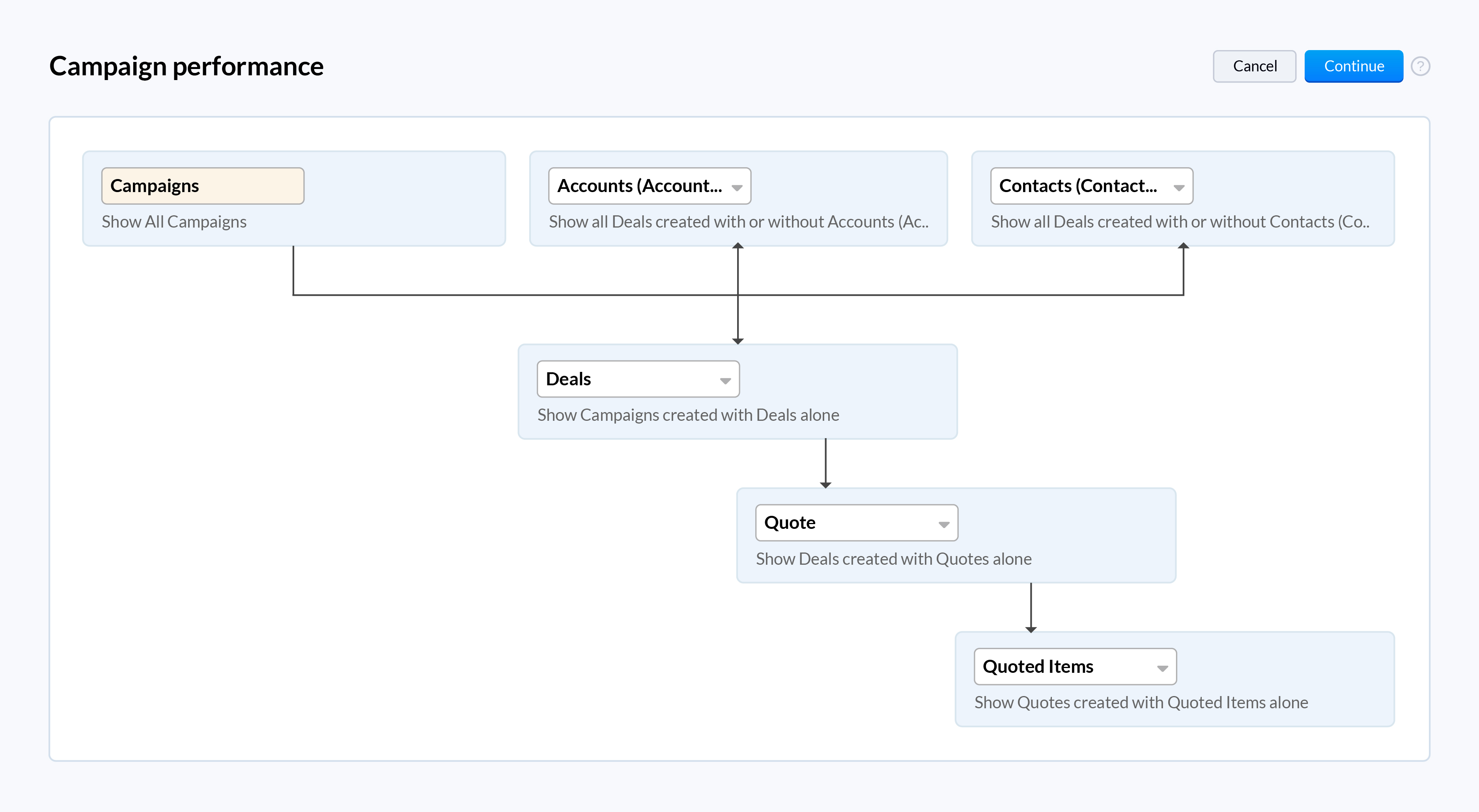
When you work with high volumes of sales data, it can often be difficult to visualize the relationship between two dimensions just by looking at raw data in standard two-dimensional charts like bar charts or pie charts. The new zone component displays your data in separate zones so it is easier to understand and analyze the areas that are doing well and the areas that need your attention.
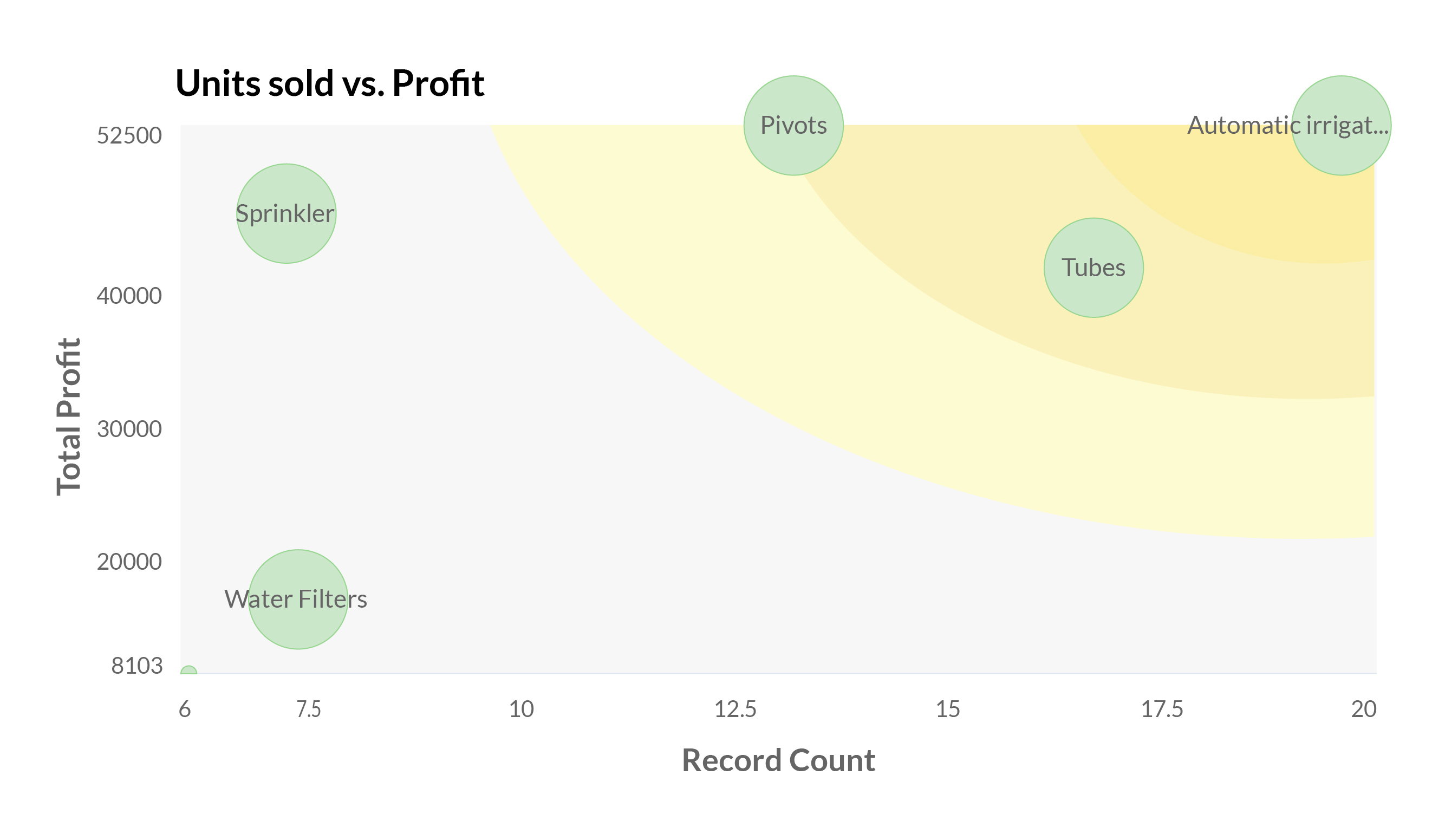
Your webforms are often the first point of interaction for prospects in their sales journey. It's vital to ensure that them submitting their information and being added to your sales cycle is as frictionless as possible. We've added a number of analytical charts to help your team measure the drop-off and abandon rates of your webforms across different devices to help you identify and eliminate friction points for your prospects.
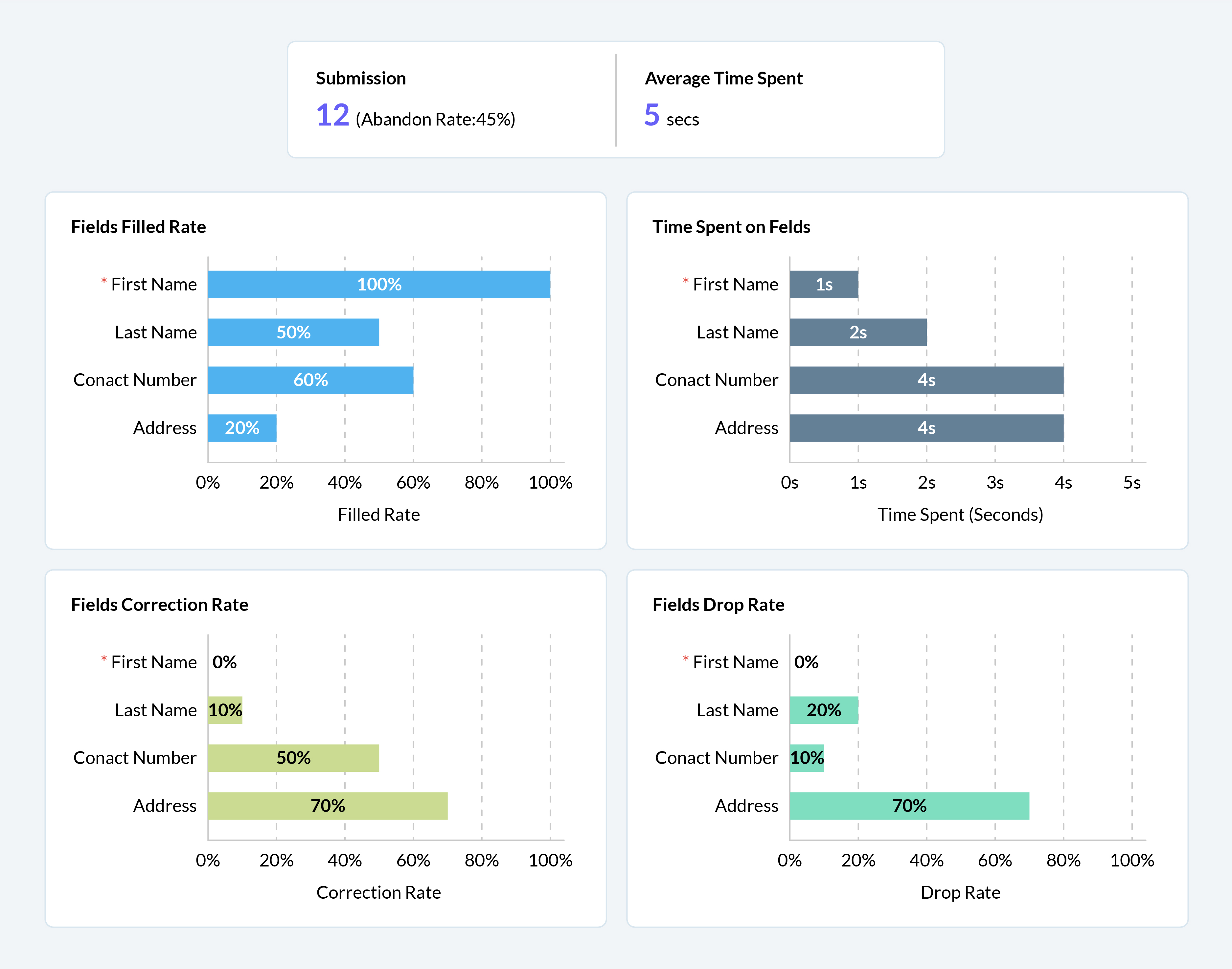
We have some exciting updates to Zia, Zoho CRM's AI sales assistant to bring new levels of insight and customer understanding, to help you build more meaningful and personalized customer relationships.
Better recommendations for improved conversions
With the introduction of Zia's recommendations last year, we aimed to help businesses make the right pitch to their customers to maximize conversions. This year, we're adding the following capabilities to help your sales team get the most out of Zia's recommendations.
Reference customers: Zia will make recommendations to new customers based on the purchase patterns of existing customers with similar profiles and provide relevant reasoning for each recommendation.
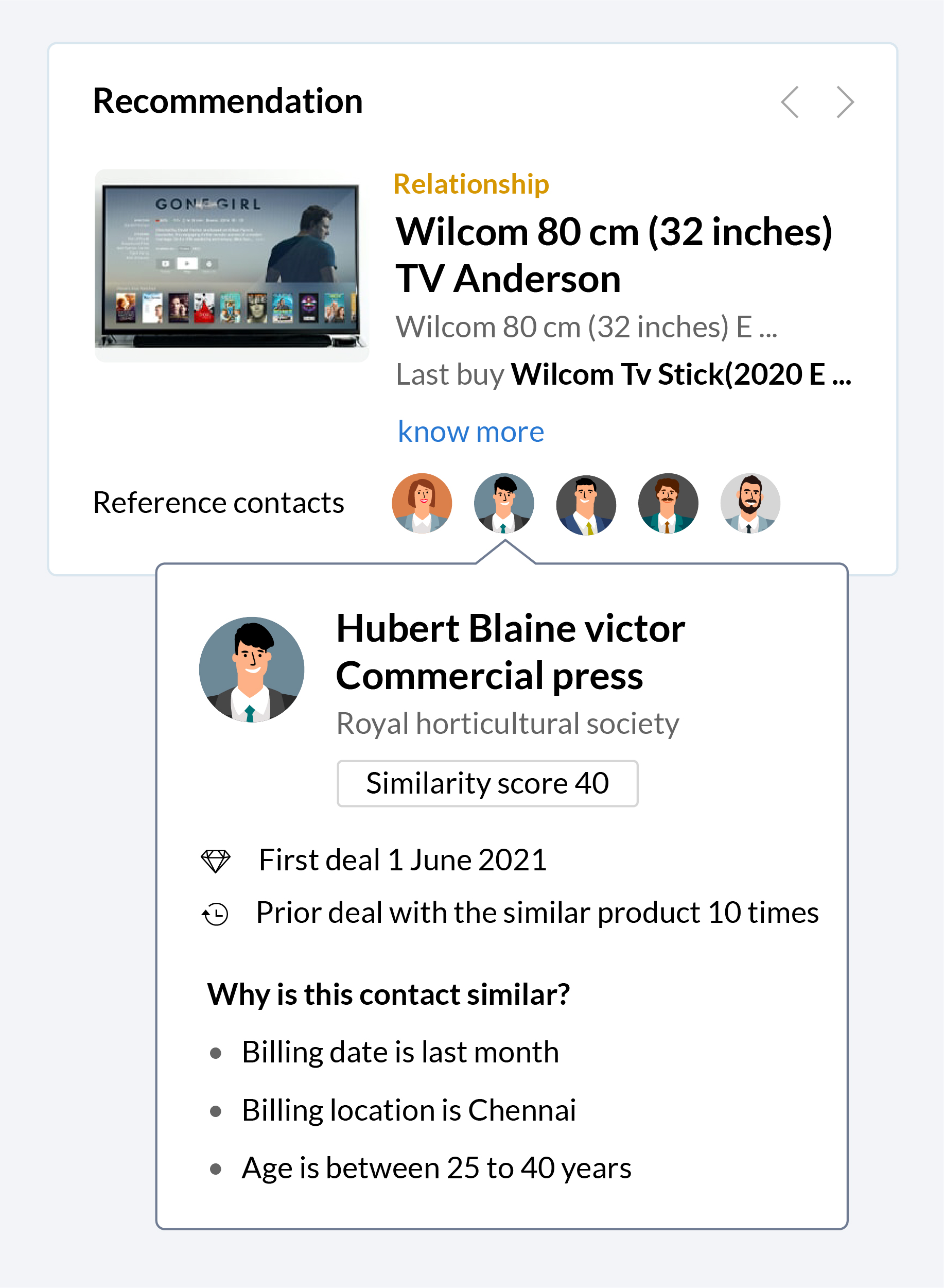
Recommendation notifications: Zia will collect information and automatically notify your sales reps when a recommendation is ready, making it easier for them to make pitches based on these recommendations when the time is right.
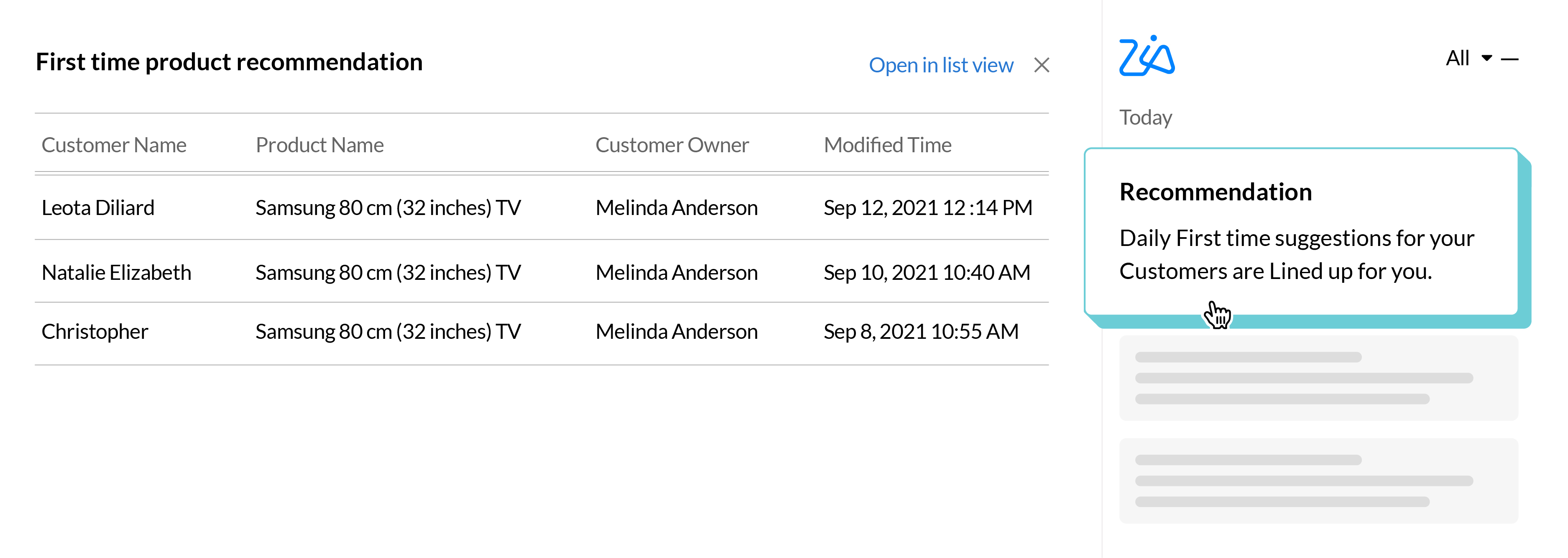
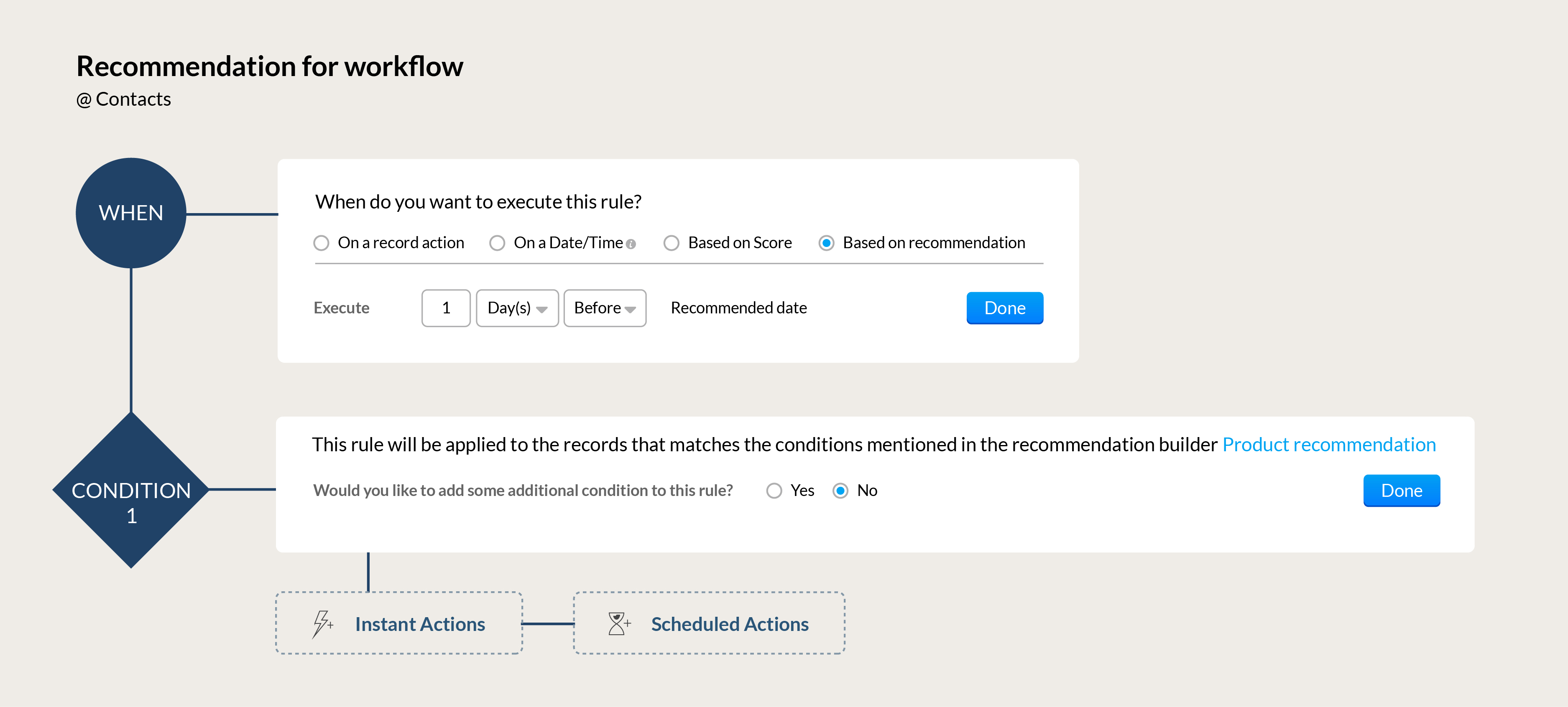
Automation for your recommendations: Build workflows that can automatically send the right communication to your customers based on Zia's recommendations. Send the perfect upsell offer to a high-value client whose membership renewal is coming up or send a re-engagement offer to a loyal customer who hasn't made a purchase in a while.
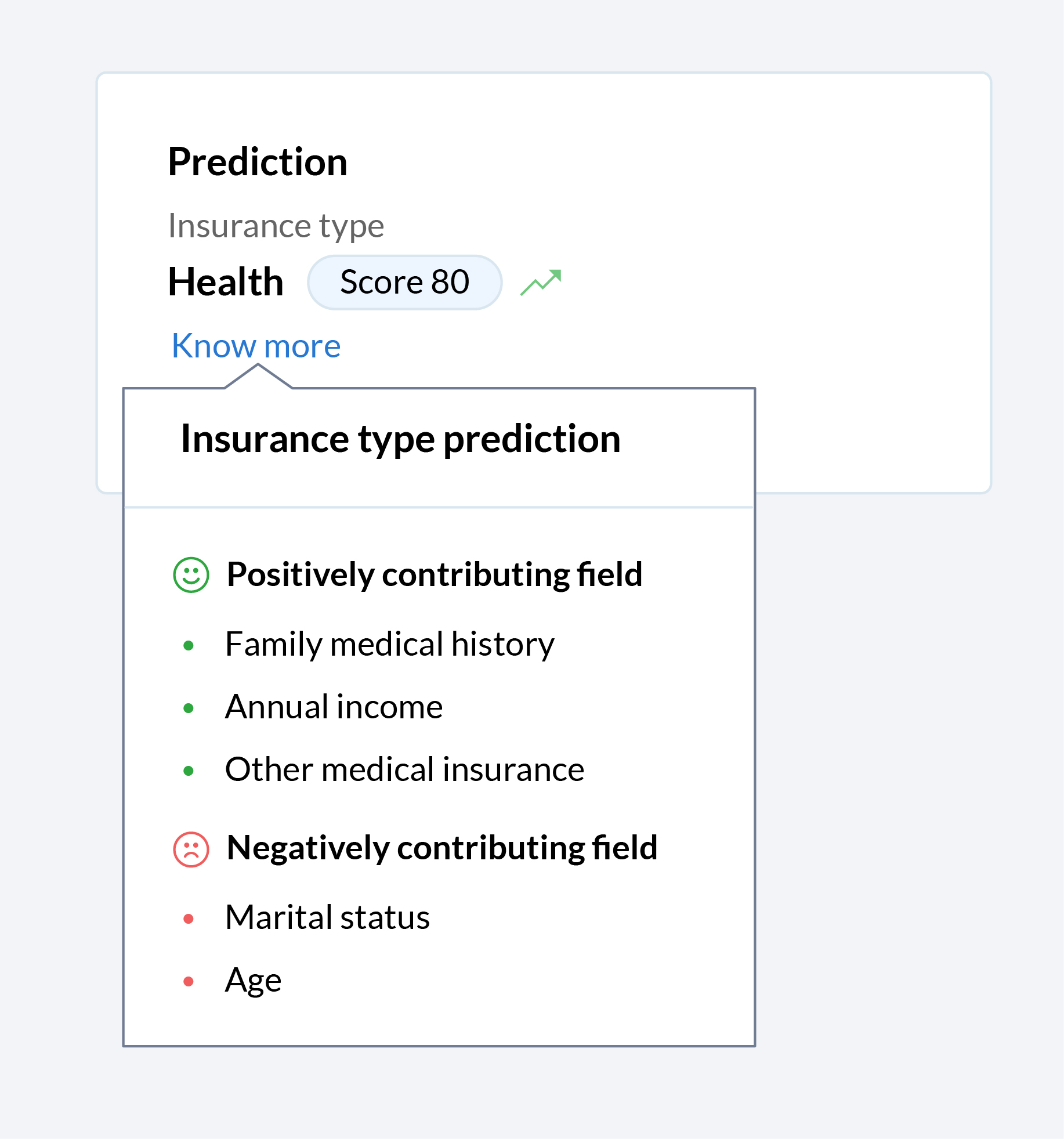
Let Zia tell you why
Zia offers a wide range of functions to make the life of your sales team easier. Zia predicts, recommends, assigns records, and more, but until now, your team only saw the end result. Now you can get a glimpse into the algorithm black box, so you can see what factors that contributed towards Zia making the recommendations, predictions, and assignments that your team relies on.
In today's hybrid working environment, it's vital for sales rep to maximize benefits across all channels of communication when engaging with prospects. To build on the robust omnichannel communication platform that's already part of the Zoho CRM system, we've introduced a number of enhancements across our email and telephony systems to help sales teams be more effective.
Add a personal touch to all your emails
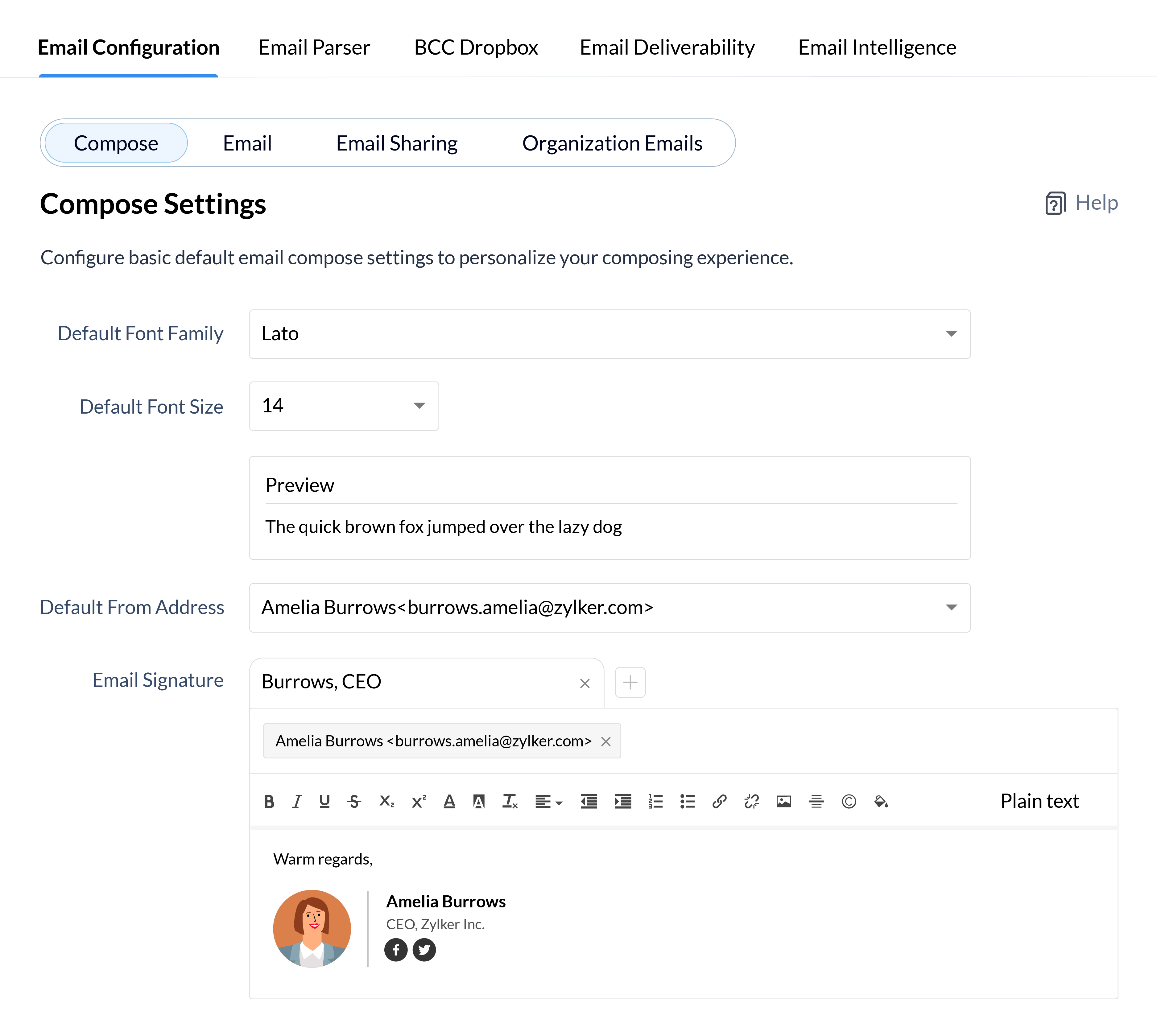
Personalized emails are key to building long-term trust with your clients, so why not add a personal flair to all your emails to define your identity and establish your brand identity in the minds of your clients? Customize every aspect of your emails from font styles and sizes to your email signatures for your individual email address and all your email aliases.
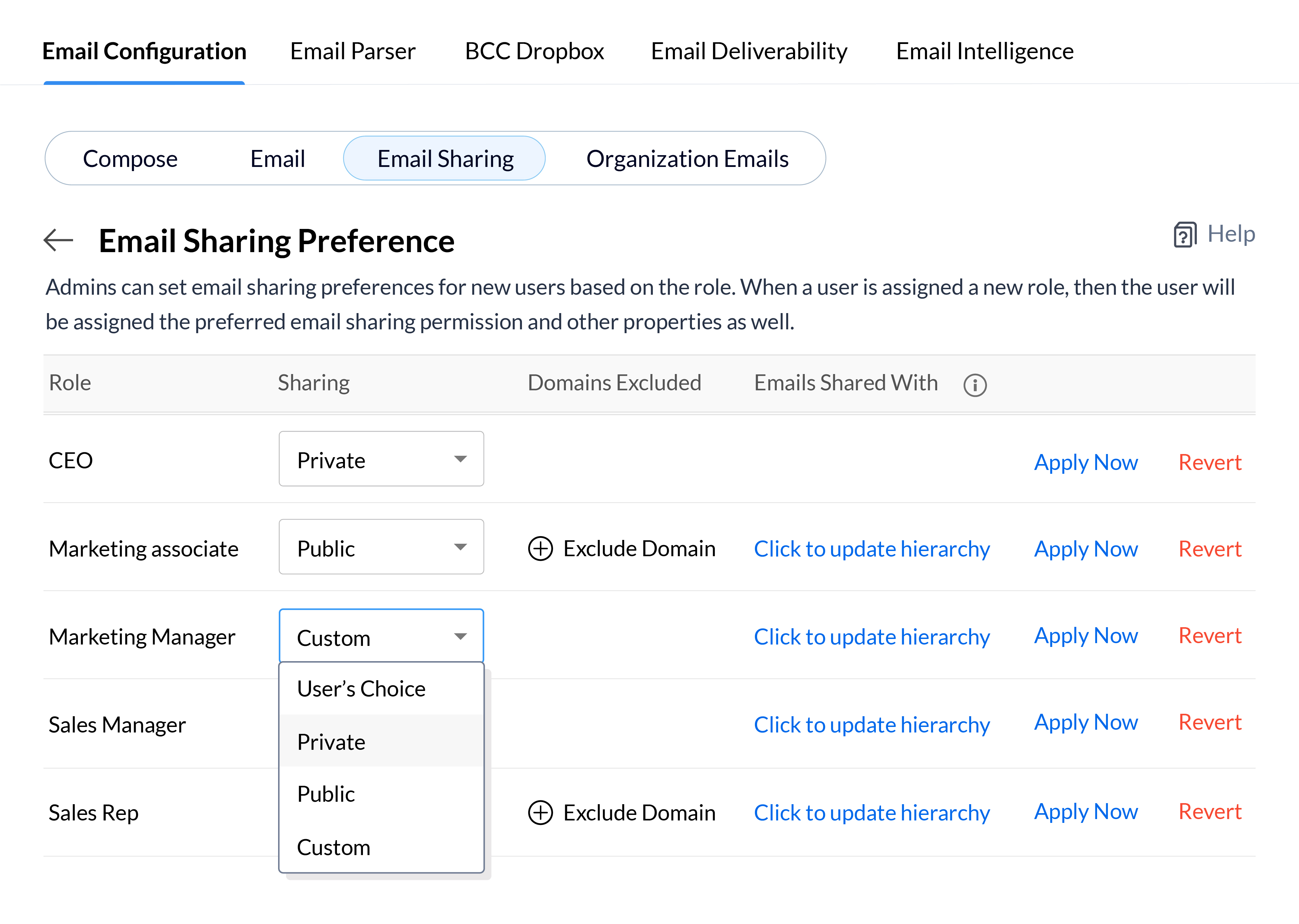
Depending on the roles of your CRM users and the nature of your email communications, you may want emails to be available to every user in your CRM, or keep them confidential and only available to a small group of key decision makers. Define your email sharing policy at the organizational level for each role and update the policy for users in bulk, so you can quickly set email sharing permissions for new employees or update them when users move to different roles in your CRM system.
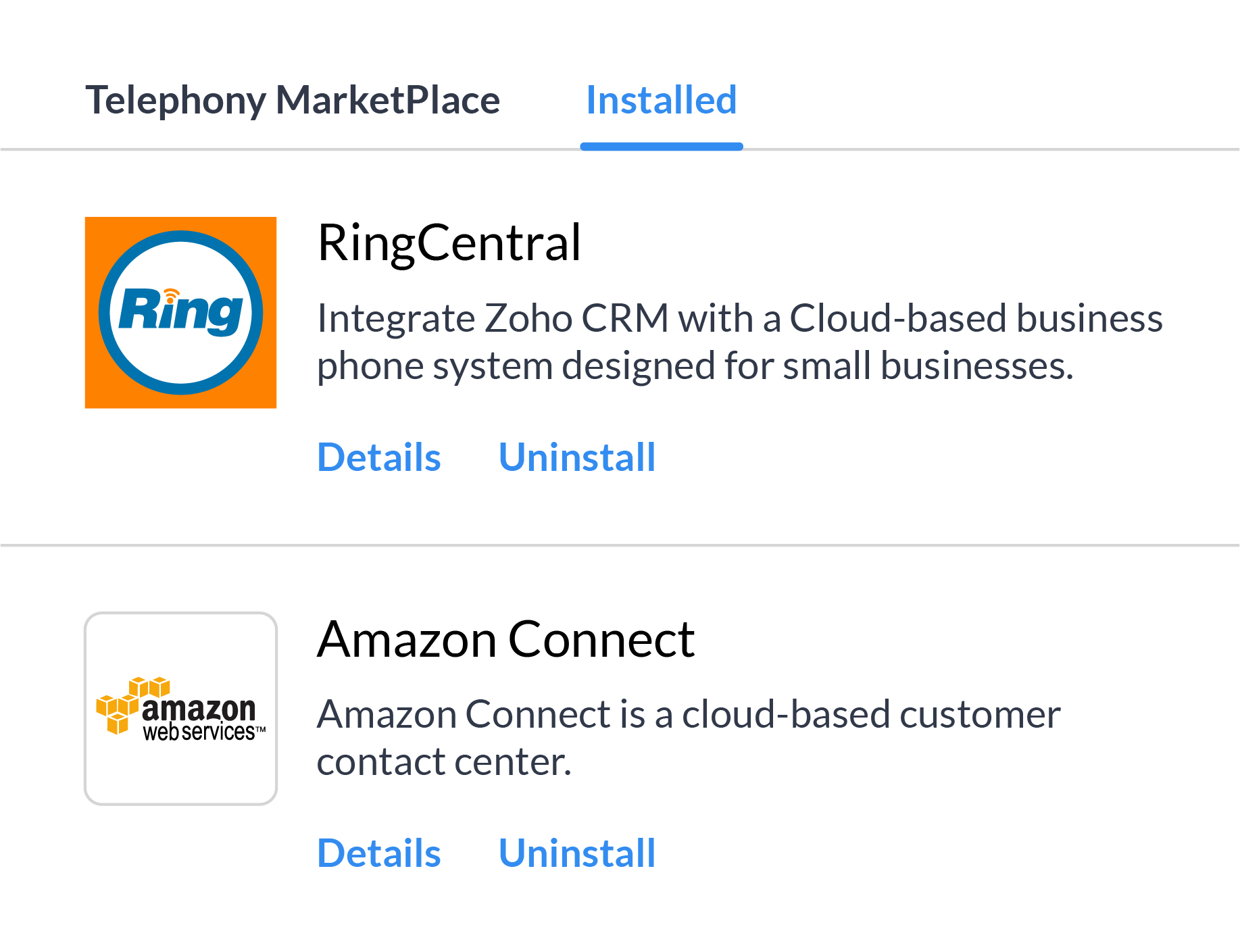
There's a whole range of reasons, from availability in all the countries you work in to cost of service, and more why it's not always feasible to depend on a single telephony vendor. Multi-vendor telephony support in Zoho CRM gives your business the flexibility to assign individuals or groups of users to different telephony systems and move users between different providers based on your business needs.
Kick off your call strategy with built-in telephony
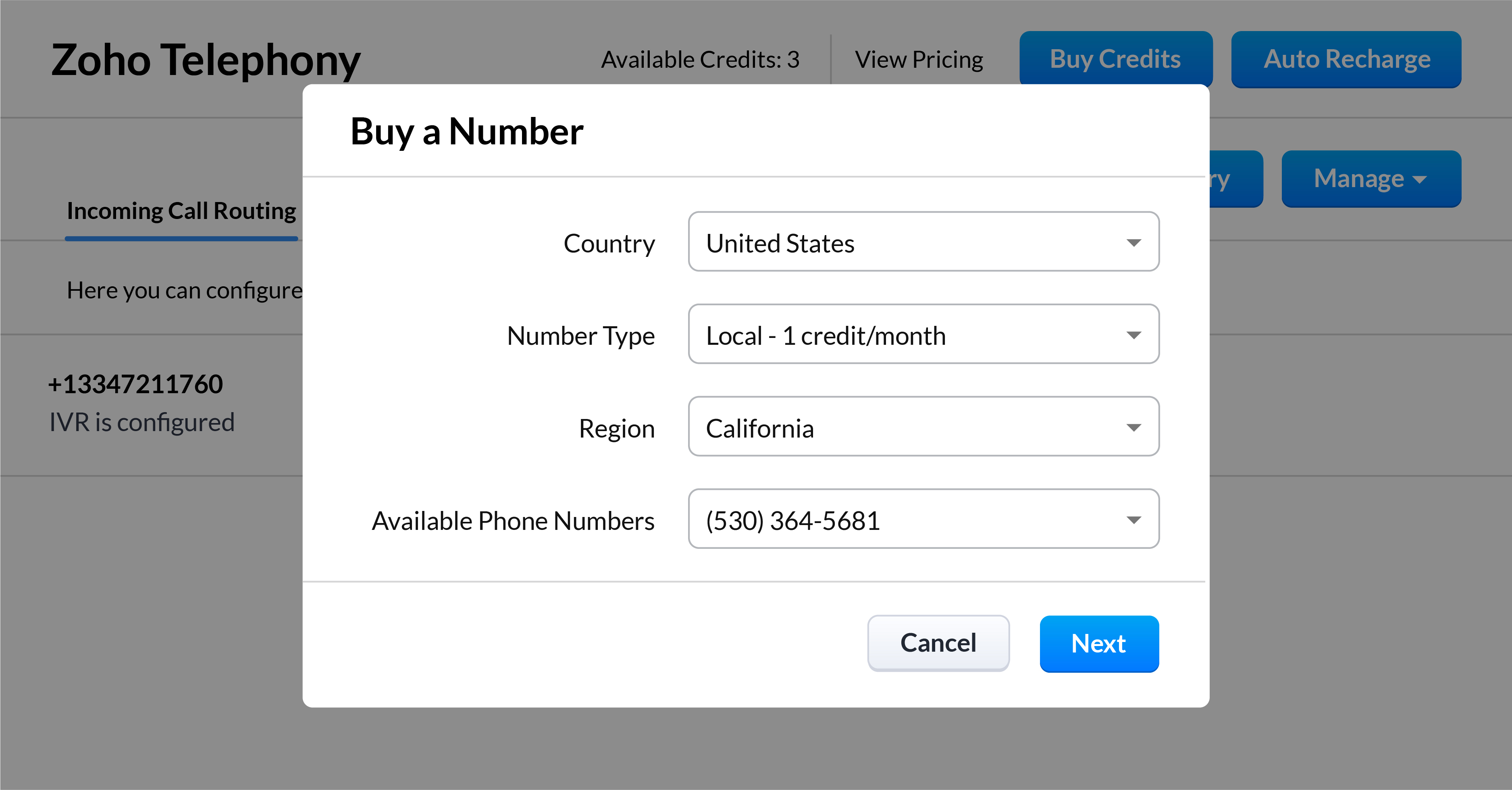
With Zoho CRM's built-in telephony system, you don't have to worry about choosing and integrating a telephony provider. Purchase local or toll-free numbers for the users in your organization and assign unique outgoing numbers to help your sales reps build a personal connection with your customers.
*Feature will be opened in phases
Streamline and manage your sales calls effectively
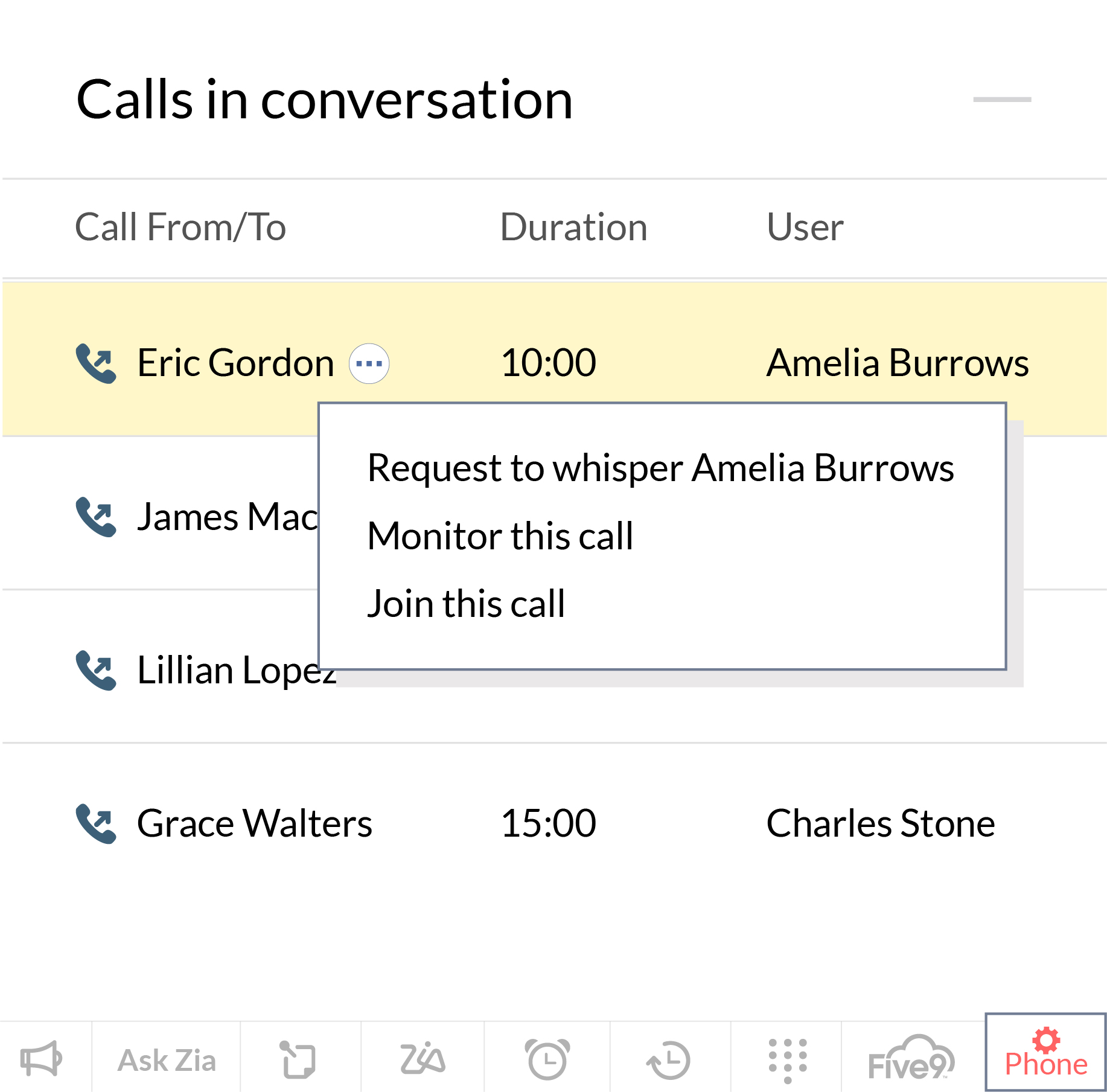
Our native integration allows managers to monitor, coach, and help their reps to get better at sales calls. Zoho CRM allows them to keep an eye on how their reps are performing in their active calls, and manage calls that are in the queue waiting. Sales managers can also coach new sales reps as they progress through a call and jump in directly to take the lead when the situation calls for it.
*Feature will be opened in phases
User Experience
This has long been an overlooked aspect of CRM solutions. In the pursuit of robust functionality, attractive prices, and strong market presence, businesses often overlook the experience these CRM solutions offer to their daily users. With the launch of Canvas, we wanted to help businesses improve the experience for daily users of Zoho CRM, and we're now introducing some intuitive functionality to make the UX even richer.
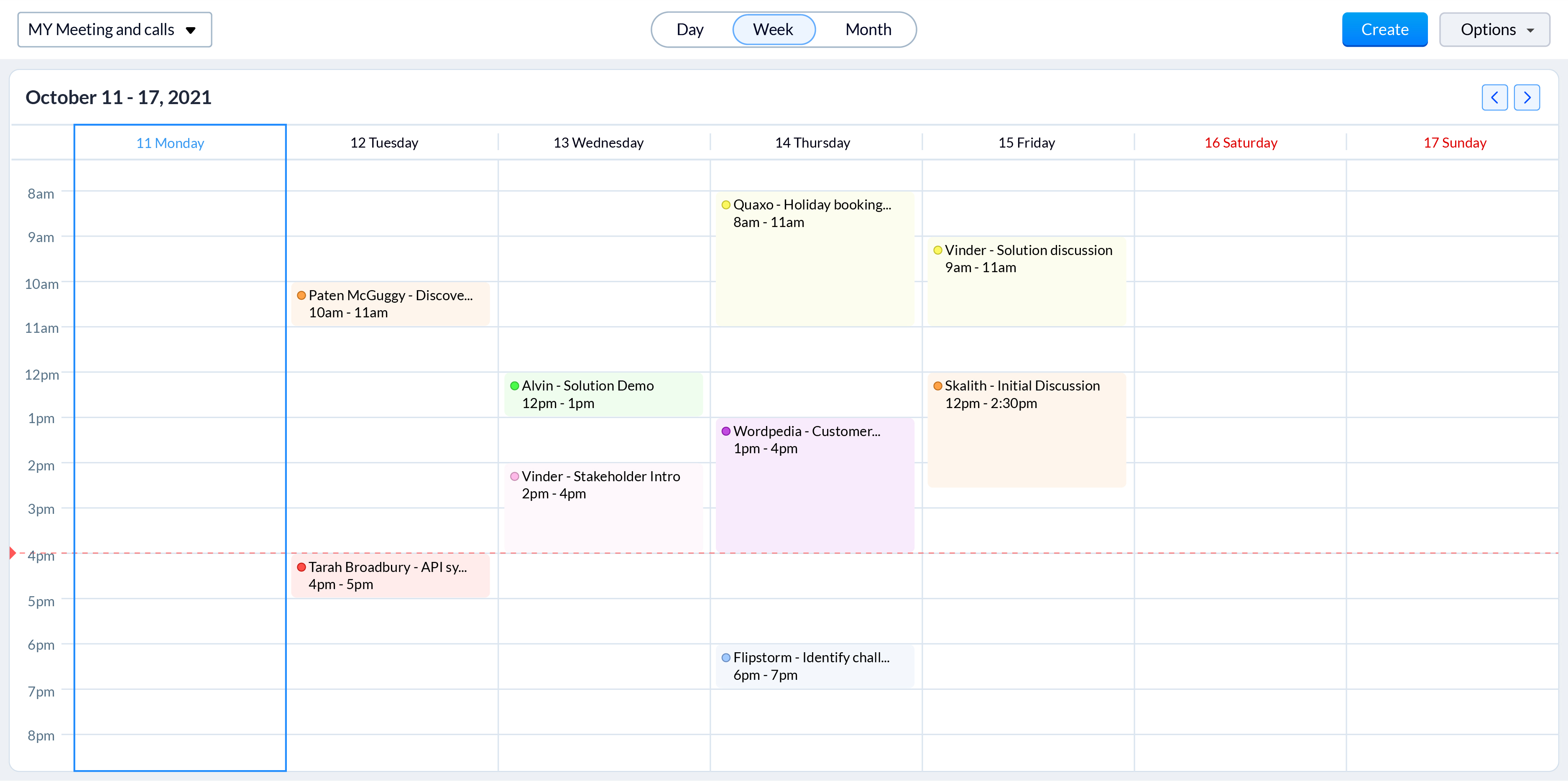
Color-coded meetings in calendars
Online meetings have become an integral part of today's hybrid working model. With sales reps engaging with prospects through online meetings more than ever, it is vital to offer them an easy way to track and prepare for them. Zoho CRM now allows sales reps to color code different meetings based on factors that are important to your business processes, such as whether they're online or in person. Now, even a quick glance at their calendar gives reps a clearer idea of all their upcoming meetings and what they need to prepare for.
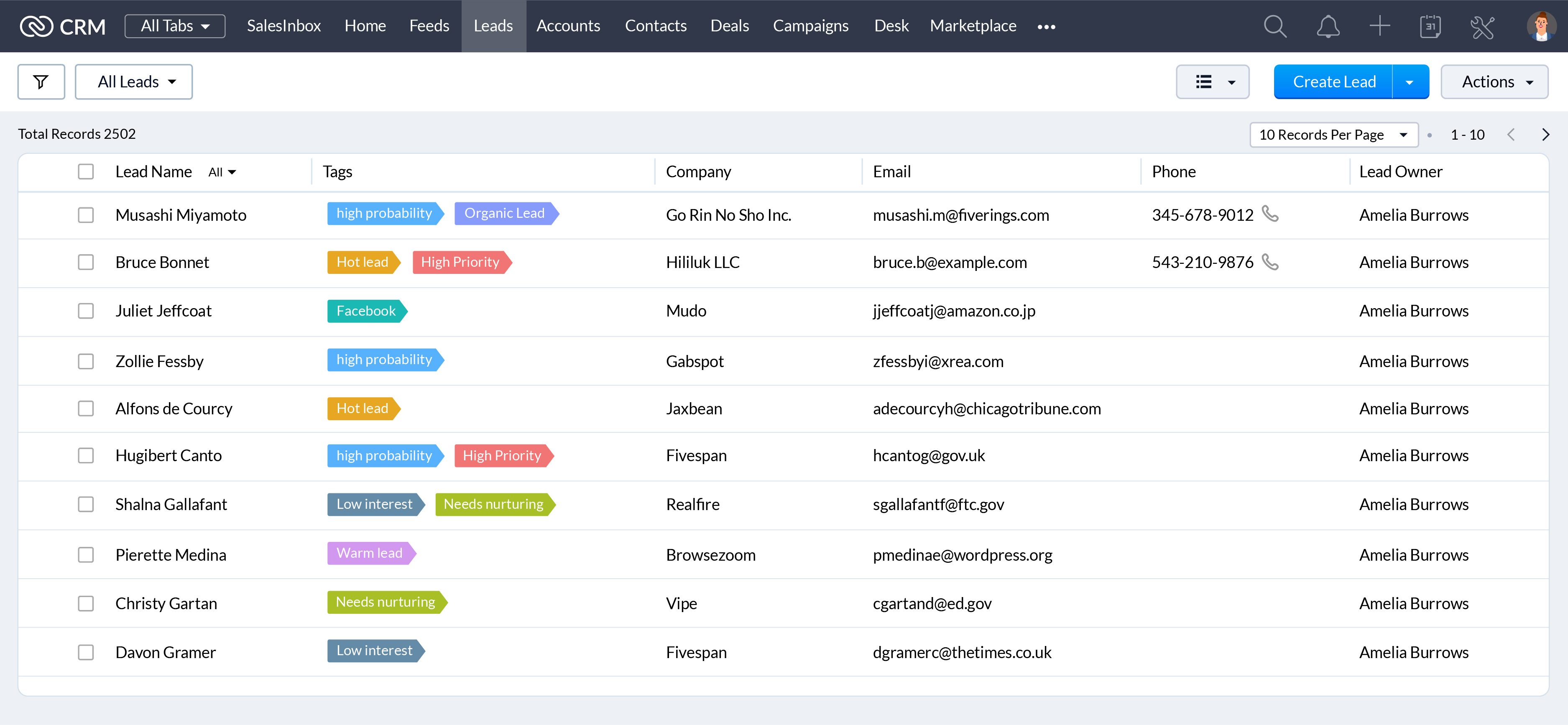
When they're working with hundreds of records everyday, a unique visual identifier makes it easier for your sales reps to search, categorize, prioritize, and segment records efficiently. Associate unique colors with your tags so your sales reps can see details like priority, deal state, associated departments, and more at a glance.
CRM administrators have one of the most challenging jobs: keeping your CRM system running like a well-oiled machine. We're announcing some exciting updates to make their jobs easier with the winter 2021 release.
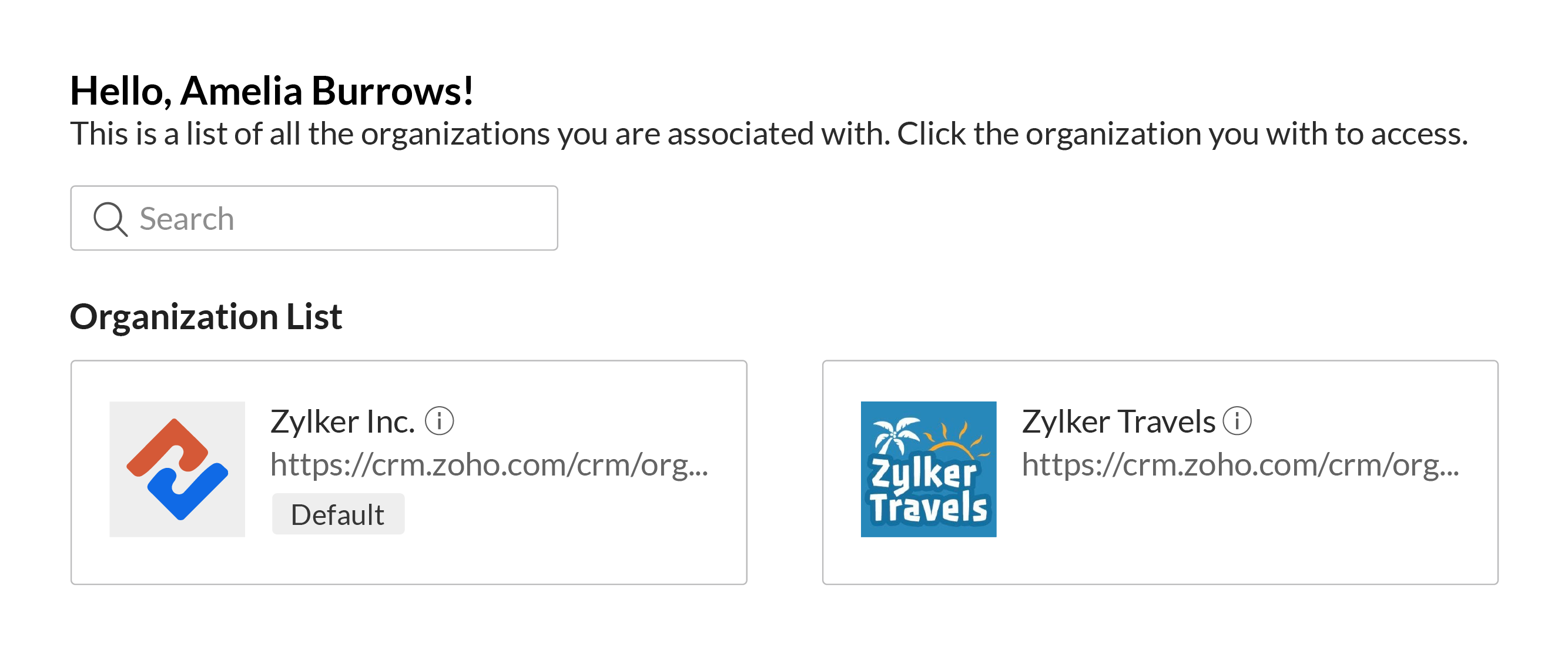
Access multiple CRM accounts with a common set of credentials
You can associate a user with multiple CRM accounts to allow business owners, upper management, and decision makers to manage multiple businesses or business units with ease. Users can switch between accounts quickly to make it easier to access key business data to help them understand growth and derive insights which can be used to prepare reports, agendas, and ideas for future planning, all with a single set of login credentials.
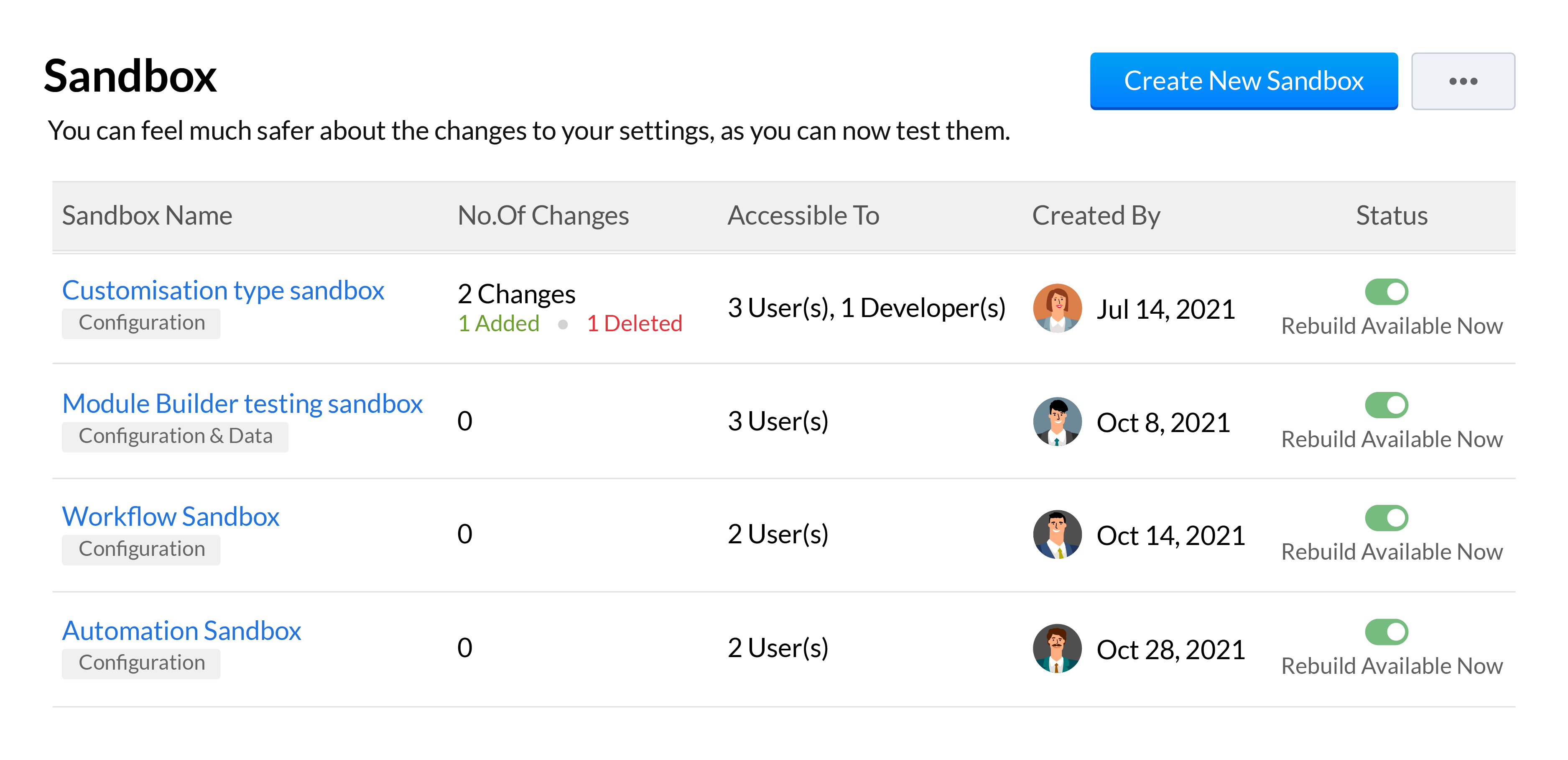
Sandboxes are essential in a CRM for testing and pushing error-free customizations to your live production account. We've added a number of features to our existing sandbox to help your developers be more effective when building and testing out customizations. This includes the ability to run multiple sandboxes, deploy all or only some settings, import sample or partial production data, and a unified deployment log to track your changes from all your sandboxes.
We'll be going over all these features across 3 overview webinars, which you can register for at the below links:
Webinar 1 | Date: 21/01/22 - This webinar will cover multiple sandbox, email sharing preferences, multi-organization support and retry support for workflow failures.
Webinar 2 | Date: 28/01/22 - This webinar will cover the new forecasting and reports system along with the new analytical components and improvements made to Zia.
That wraps up our Winter
'21 announcement and we look forward to all your thoughts and feedback
on these features and how they can be made better.
Happy selling,
Access your files securely from anywhere

Zoho Developer Community





Topic Participants
Shashank M K
Sticky Posts
Presenting ABM for Zoho CRM: Expand and retain your customers with precision
Picture this scenario: You're a growing SaaS company ready to launch a powerful business suite, and are looking to gain traction and momentum. But as a business with a tight budget, you know acquiring new customers is slow, expensive, and often deliversGood news! Calendar in Zoho CRM gets a face lift
Dear Customers, We are delighted to unveil the revamped calendar UI in Zoho CRM. With a complete visual overhaul aligned with CRM for Everyone, the calendar now offers a more intuitive and flexible scheduling experience. What’s new? Distinguish activitiesCreate and populate a record in an instant: Introducing zero-shot field prompting to Zia's ICR
A couple of months ago, we upgraded our in-house AI image detection and validation tool, Zia Vision, with intelligent character recognition (ICR). By training Zia with sample images, you could create and enrich CRM records with data extracted from standardIn-person ZUG Meetups for Real Estate Professionals - US Q1 2026
The Real Estate Zoho User Group is going on a multi-city, in-person meetup tour across the US, and we’d love to see you there! These meetups are a great opportunity to: Connect with fellow real estate professionals using Zoho Share challenges and discoverNimble enhancements to WhatsApp for Business integration in Zoho CRM: Enjoy context and clarity in business messaging
Dear Customers, We hope you're well! WhatsApp for business is a renowned business messaging platform that takes your business closer to your customers; it gives your business the power of personalized outreach. Using the WhatsApp for Business integration
Zoho TeamInbox Resources
Zoho CRM Plus Resources
Zoho Books Resources
Zoho Subscriptions Resources
Zoho Projects Resources
Zoho Sprints Resources
Qntrl Resources
Zoho Creator Resources
Zoho CRM Resources
Design. Discuss. Deliver.
Zoho Show Resources

Get Started. Write Away!
Writer is a powerful online word processor, designed for collaborative work.
-
オンラインヘルプ
-
Webセミナー
-
機能活用動画
-
よくある質問
-
Ebook
-
-
Zoho Campaigns
- Zoho サービスのWebセミナー
その他のサービス コンテンツ
Nederlandse Hulpbronnen

ご検討中の方
Recent Topics
Live Webinar: Getting Started with Zoho WorkDrive - A Complete Overview
Hello everyone, We’re excited to invite you to our upcoming live webinar! Discover how to set up your team, bring in your data, and make the most of WorkDrive’s collaboration, organization, AI, and security capabilities. This session is perfect for anyoneCalendly One-way sync- Beta Access
Hello Community, Many of our Zoho Calendar users have expressed their interests in Zoho Calendar and Calendly integration. We've been tightly working on with Calendly team to provide a two-way sync between Calendly and Zoho Calendar. However, there haveThe year that was at Zoho Calendar 2023- Part 2
In continuation with our previous post on all the exciting updates and improvements that have shaped Zoho Calendar over the past 12 months, Lets delve into more: Bring your calendars together- Introducing Zoho Calendar and Outlook calendar synchronisationTip of the week #18: Change the event organizer in Zoho Calendar.
We cannot always be available to conduct an event when we organise one. In these circumstances, you can use Zoho Calendar to change the event organizer at any moment before the event begins. This way, you can avoid cancelling the event while still takingTip of the week #20: Create and manage multiple personal calendars.
Zoho Calendar provides users with the facility to create and manage as many calendars as required. All these calendars can be managed and edited as per user requirements. You can alter the calendar view, make changes to the calendar theme, share the calendarTip of the week #24: Subscribe to the calendars of a Zoho Calendar user.
Calendars that are created by Zoho Calendar users can also be added to your Zoho calendar. All public calendars listed by the users will be available when you enter the email address. You can choose the calendar you need to subscribe to. Once the emailTip of the week #26: Import/ Export calendars in Zoho Calendar.
Any calendar on the web or calendars that you create in any other calendar application can be imported in to Zoho Calendar. This will help you to add the events from the calendars that you import to your Zoho Calendar. You also have the option to exportRemoving calendar for zoho email group
How do I make it so that an email group created in Zoho Mail does NOT have a calendar? I have a couple groups for our phone systems voicemails - one for each department. Voicemail recordings are sent to this groups email address so they have access toTip of the week #27: Edit personal calendars in Zoho Calendar.
In Zoho Calendar, the personal calendars you create can be edited to make changes you need to make. Edit a Personal Calendar The following changes can be made to the personal calendar by editing it: Calendar title Calendar color Reminders and DescriptionTip of the week #28: Show/ hide, enable/ disable and empty/ delete your calendars in Zoho Calendar.
The popularity of online calendars has soared in recent years. It's used both for personal and professional reasons. Calendars have evolved into an effective productivity tool in our lives, from creating events for birthdays and anniversaries to schedulingTip of the week #30: Share calendars publicly in Zoho Calendar.
In Zoho Calendar, calendars that are created under My Calendars can be shared publicly. Making your calendar public allows others to view it. When you need to share your calendar with a larger group, public sharing can help. You can restrict others fromTip of the week #31: Share your personal calendars within organization.
Keep your Organization members aware of what's happening. In Zoho Calendar, you can share your personal calendar with all the members in your organization using the Share with org option.When you enable org sharing for a particular personal calendar,Tip of the Week #33: Appointment scheduler in Zoho Calendar.
In Zoho Calendar, you can use the Schedule Appointment option to share your appointment request form with the public, allowing people to fill out the form to request an appointment with you. This form can be embedded on your website or blog. VisitorsTip of the Week #34: Embed Calendars using Zoho Calendar
You can make your calendars public and visible to the general public by embedding them in your websites/blogs using Zoho Calendar. You can use the embed code to add your own calendars to your website's/ blog's HTML code, and the calendar will appear onTip of the week #35: Migrate to Zoho Calendar from Google Calendar.
If you are looking to move your Google Calendar events to Zoho Calendar, never worry about missing out the events from your Google Calendar. You can migrate the events from Google Calendar using the export option and import it to Zoho Calendar and manageTip of the week #36: Migrate to Zoho Calendar from Outlook Calendar.
If you've been using Outlook calendar and looking to migrate to Zoho Calendar, you can seamlessly export your calendars from Outlook and import them into Zoho Calendar without losing any events, participants, and the reminders set for each event. To migrateShared calendar issues and duplications
Apparently there was a calendar update? Now when I schedule an event for a team member that has shared his calendar with me, the event makes me the organizer and adds the event to my calendar as well. Previous to this "update" I would scheduled an eventSubscribed Calendar
Hi i have subscribed to a calendar for Holidays in Canada it shows all the holidays perfectly but every one of them has the word Canada before the rest of the name is there a way to remove that word Canada? It takes up a lot of space in the square onThe year that was at Zoho Calendar 2023- Part 1
Hello, amazing community members! Happy new year from all of us here at Zoho Calendar. As we begin the new year, we'd like to thank each and everyone of our community members for your unwavering support and love that you have shown for Zoho Calendar.Zoho Calendar 2024: A Year in Review
Hello, community members! Happy new year from all of us here at Zoho Calendar. As we turn the page to a new year, we extend our heartfelt gratitude to every member of our Zoho Calendar community for your continued support and enthusiasm. Your feedbackZoho Calendar not syncing correctly with personal Google Calendar
Coming to this forum as Zoho Calendar support team is not responding, any more. For the past 8 weeks, I have been having an issue with Zoho Calendar not syncing with my personal Google Calendar correctly. I subscribed to Zoho Calendar iCal in my personalZeptomail API error 500 internal server error
Hi Everyone, getting this eror continuously! Can anyone please guide around the same! Zeptomail API error 500 internal server error Best RegardsWaiting multiple days to buy credits, causing my website to suffer
So I own a fairly large website that gets a lot of registered users. I use transmail send activation emails, and also forgot password emails. I sent an email to zoho's presales team when I was only at 4K/10K emails sent, hoping to buy more credits beforeFollow up
Hello, I sent a message 2 days ago but I don't receive any response and I cannot find my ticket here. this is the ticket: Your ticket has been created with the ticket ID 68925465 and subject "Fwd: Fishing-alert" looking forward to seeing your response.What's new in TransMail!
Note: TransMail is now ZeptoMail. Click here to know more. Hello again, everyone! We've recently crossed the 6 months mark of TransMail's launch. In this time post our launch, we have been constantly working on updating our platform and adding new featuresJune 2021 in TransMail!
Note: TransMail is now ZeptoMail. Click here to know more. Hello again, everyone! Hope you and your loved ones are doing well. If you're doing less than fine, we truly hope that things only get better for you. We've had a few updates in the past monthTransMail has a new name—ZeptoMail!
Tried navigating to TransMail's community forum but see a different name now? That's because TransMail has a new name. TransMail is now ZeptoMail! As we’ve grown from an internal service used mainly by other Zoho products to an up-and-coming competitorJuly 2021 in ZeptoMail!
Note: TransMail is now ZeptoMail. Click here to know more. Hello again, everyone! Hope you and your loved ones are doing well. We've had a few updates in the past month in ZeptoMail—some new features and some important announcements. Take look at whatSend Email From the ZeptoMail BY API
What is Zeptomail:- Transactional email service with reliable and fast delivery How we can Create a Connection for Zeptomail in Zoho CRM Go to the Setup Click on Connection Enter Connection Details:- Generate Consumer Key & Consumer Secret Using ZohoCustomer email on Opencart 3
When I place an order, 2 emails are sent: 1) administrator 2) to the user The administrator receives a beautiful letter, but the user receives a damaged letter (see screenshot). What could be the problem?[Announcement] Insert image from URL changes in Zoho Writer
Hi Zoho Writer users! We'd like to let you know that we've changed the behavior of the Insert image from URL option in Zoho Writer for security reasons. Earlier behavior Once you inserted an image URL in a Writer document, the image would be fetched fromWriter sing up problom
Zoho writer sing up prolom faceUnable to copy into a new document
Whe I create a new Writer doc and attemp to copy and past I get this message. The only way to copy into a document is I duplicate an existing document, erase the text and save it under a different name and then paste the information. Not ideal. Can you[Webinar] Live demos and user Q&A with Zoho Writer product experts
Join us on June 12, 2025 for live demos based on your use cases and real-world scenarios raised via form. This is also an opportunity to get your questions answered directly by product experts from the Zoho Writer team. Webinar agenda Live demos basedZoho Writer's built-in citation and bibliography generator
Hey researchers and writers! Do you manually format citations and bibliographies, spending hours jumping between apps and tabs? If so, then check out Zoho Writer's built-in "Citations and Bibliography" feature. Imagine you're writing a thesis on the futureSingle and group checkboxes in Zoho Writer's fillable forms
Hey Writer Fam, Are you making the most out of single and group checkboxes in fillable forms in Zoho Writer? Here is a handy tip to optimize your use of checkboxes, both single and group, and enhance your data collection process. Single checkboxes: SingleCollaborate efficiently with Zoho Writer's track changes feature
Hi Zoho Writer Community, Zoho Writer's track changes feature is a simple, built-in solution that helps you and your team work together efficiently. Instead of juggling multiple versions of a document or building up a long email chain of comments, eachZoho Writer's WordPress extensions
Hey Zoho Writer users! Say goodbye to all your WordPress content publishing woes with Zoho Writer's WordPress extensions. Publish content with all your formatting and images, republish content when you update a document, and more—from a single windowTime-saving table hacks
Hey Zoho Writer Community, Do you find yourself using a lot of tables in your documents? We're here to share some of our time-saving hacks that will help you work more efficiently, organize your data, and make your documents look neat and professional.Automating document approval and signing with Zoho Writer and Zoho Sign
Hey Zoho Writer Community! Here's another automation tip to make your processes more efficient! Question: Can I send a document for client approval first, then automatically send it for signing with Zoho Sign if they approve? Since it's the same personNext Page