How to create stunning booking pages in no time
Want to convince customers that you are the best in the business in under 3 seconds?
Use well-designed booking pages to captivate your audience coupled with a solid portfolio on your socials to win over your customers.
In this guide, we'll be helping you do that in no time.
How would your customers feel if your booking pages could go from amateur to pro?
Use well-designed booking pages to captivate your audience coupled with a solid portfolio on your socials to win over your customers.
In this guide, we'll be helping you do that in no time.
How would your customers feel if your booking pages could go from amateur to pro?
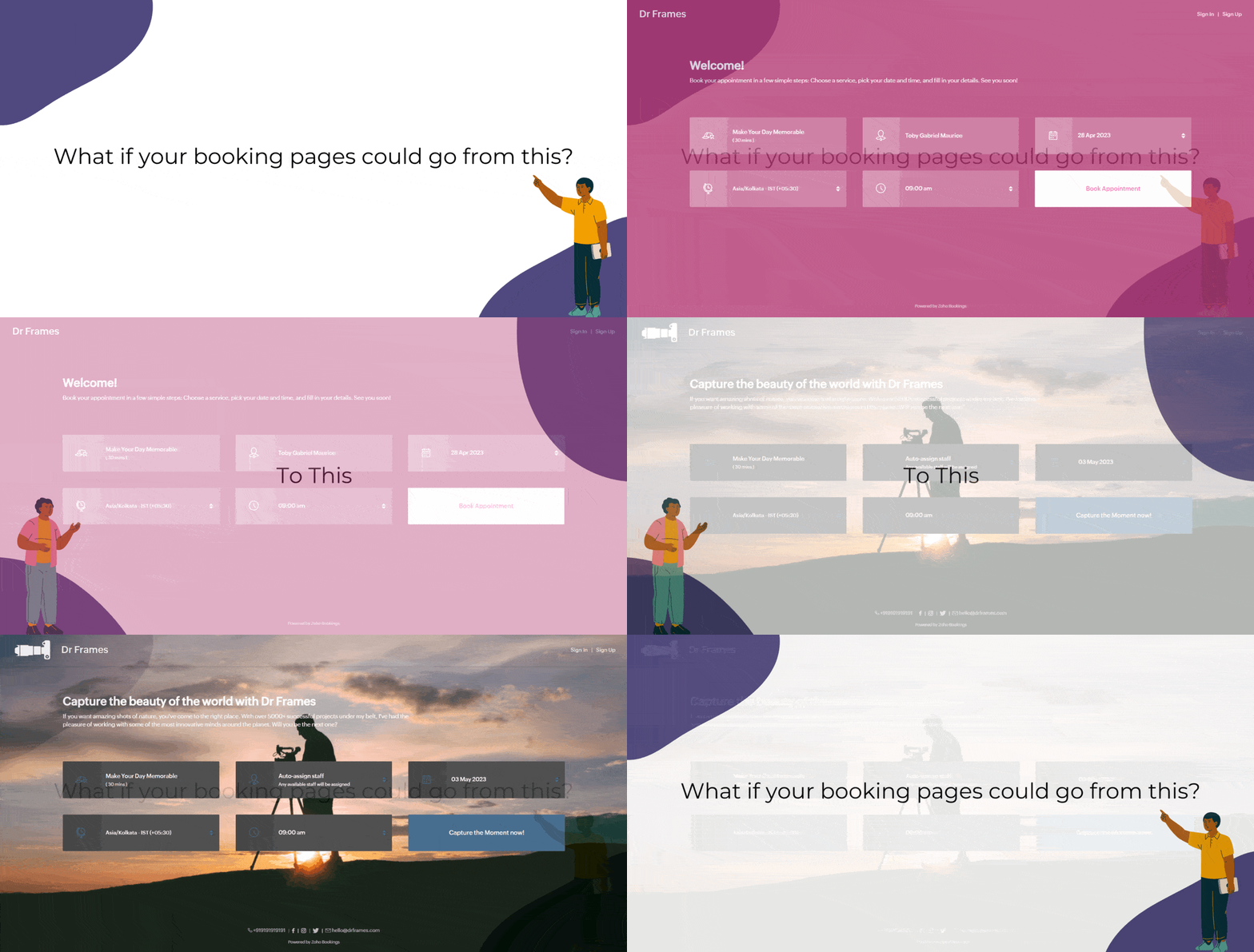
Captivating booking pages that align with your brand colors help you to,
- Hook the customer
- Deliver an impressive customer experience
- Improve Brand Recall
In this guide, we will customize various elements of the booking page such as,
- Text - Title and Description
- Images - Logo and Background
- Socials
- Colors - Background, Text, and Button Colors
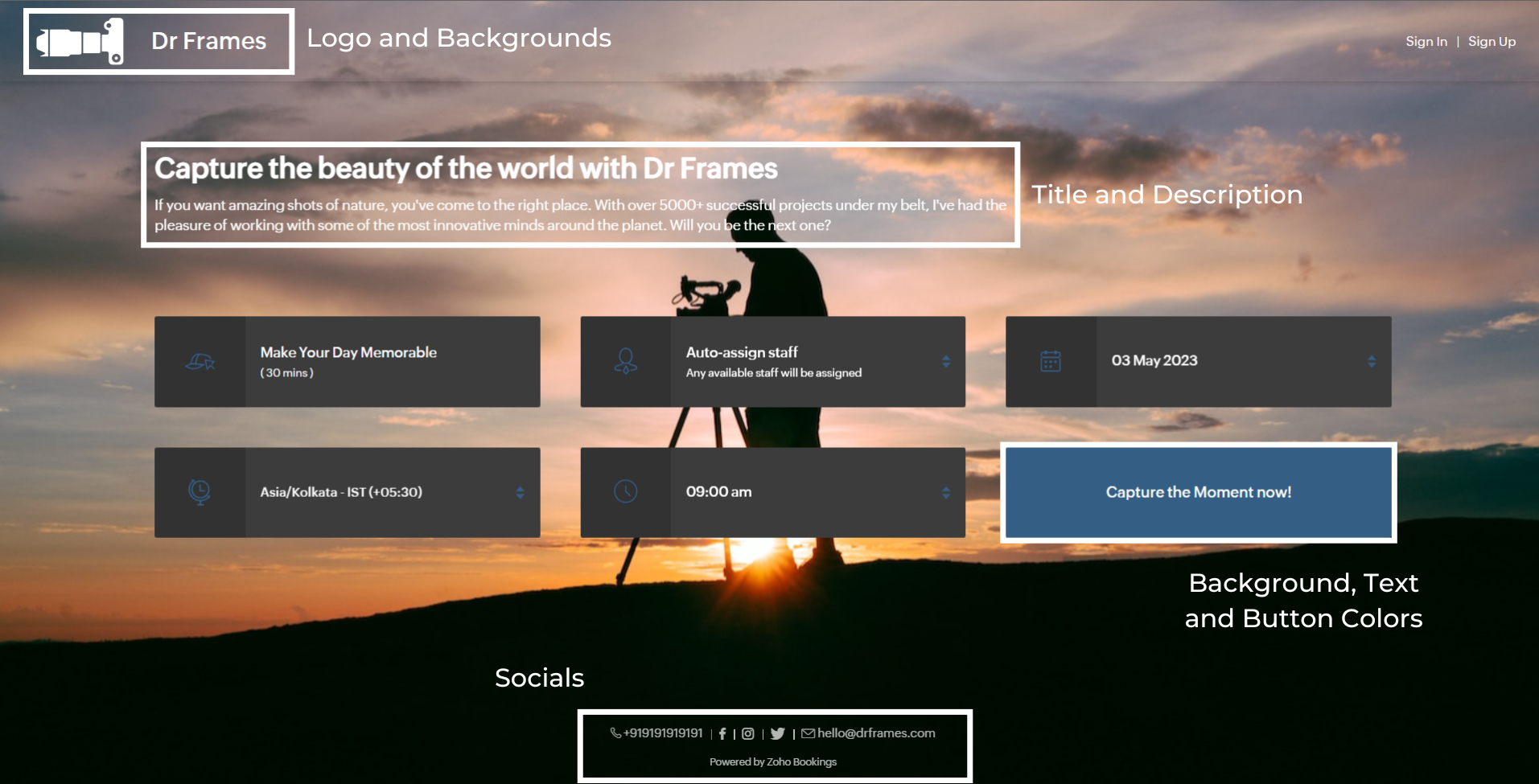
We'll take a sample image and tackle all aspects of the booking page one after the other.
Customizing Booking Page Text
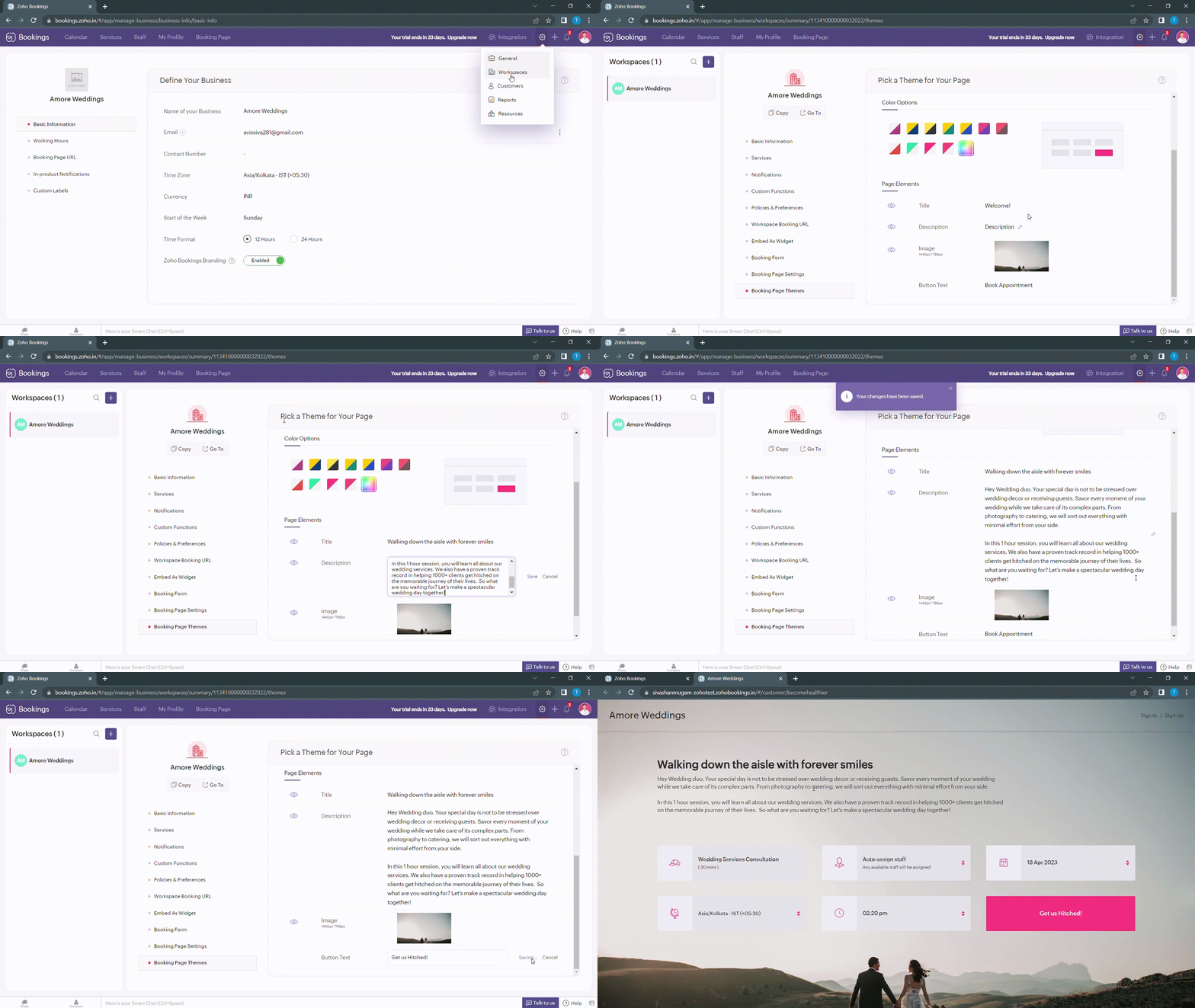
Navigate to Services > Workspaces > Booking page themes to set the title and description of your booking pages.
Under page elements, you can find three options:
- Title
- Description
- Button Text
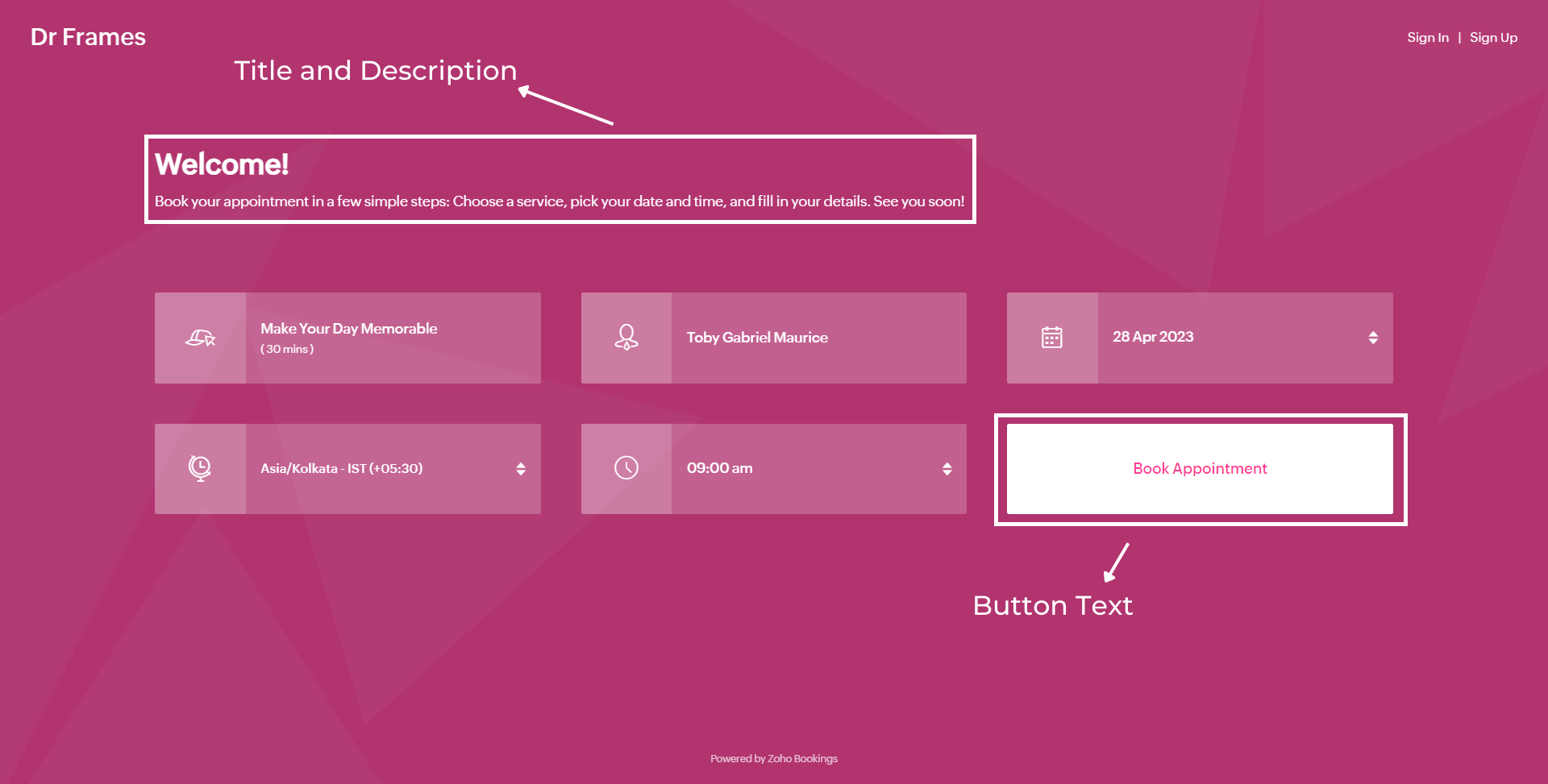
Let's start with titles. You can use it in two ways based on your goals,
- Introduce yourself and share them your expertise.
- Hook the customer's attention and tell them what to expect when they book with you.
We've provided you with samples to get you started,
- Wedding Industry (Hook) - Walking down the aisle with forever smiles
- Fitness Industry (Hook) - Unleash a healthier you one bite at a time
- Dental Industry (Intro) - Welcome to Crown Dental Care!
Note - You can have up to 50 characters in your titles.
Alternatively you can use AI tools to come up with Impressive titles. We managed to come up with this title as a hook for a booking page which offers wedding organizer services
"Wedding Bliss, No Stress! We've Got This!"
Check out the following video to create captivating titles using AI Tools.
"Wedding Bliss, No Stress! We've Got This!"
Check out the following video to create captivating titles using AI Tools.
Next up, Descriptions. It helps you seal the deal with your customers.
Descriptions can take different tones based on what you want to convey to your clients.
- Describe your offering - Basic, but conveys the vital information to the customer upfront.
- What can they expect out of this service? - Tease your customers with what they get from your service.
- Share past achievements - Share your past success to showcase your credibility.
Note - You can have up to 2000 characters in your description.
Sometimes it can be difficult to come up with creative descriptions. AI tools can add a little more poise to them.
Next up, button text.
Next up, button text.
Buttons are the final key to providing the best customer experience a booking page can offer. You can modify it depending on the industry you are in.
- Wedding Industry - Get us hitched!
- Fitness Industry - Transform me!/ Let's get shredded!
- Dental Industry - Onto healthier smiles!
Note - You can have up to 50 characters in your buttons.
The following are some guidelines that could help you craft a impressive CTA.
The following are some guidelines that could help you craft a impressive CTA.
- Evoke emotions: Use words that resonate with possible benefits clients can gain from your service - Confidence, Health, Happiness, etc.
- Keep it crisp: A word length of 3-4 words is apt to make your clients take action - Book appointments.
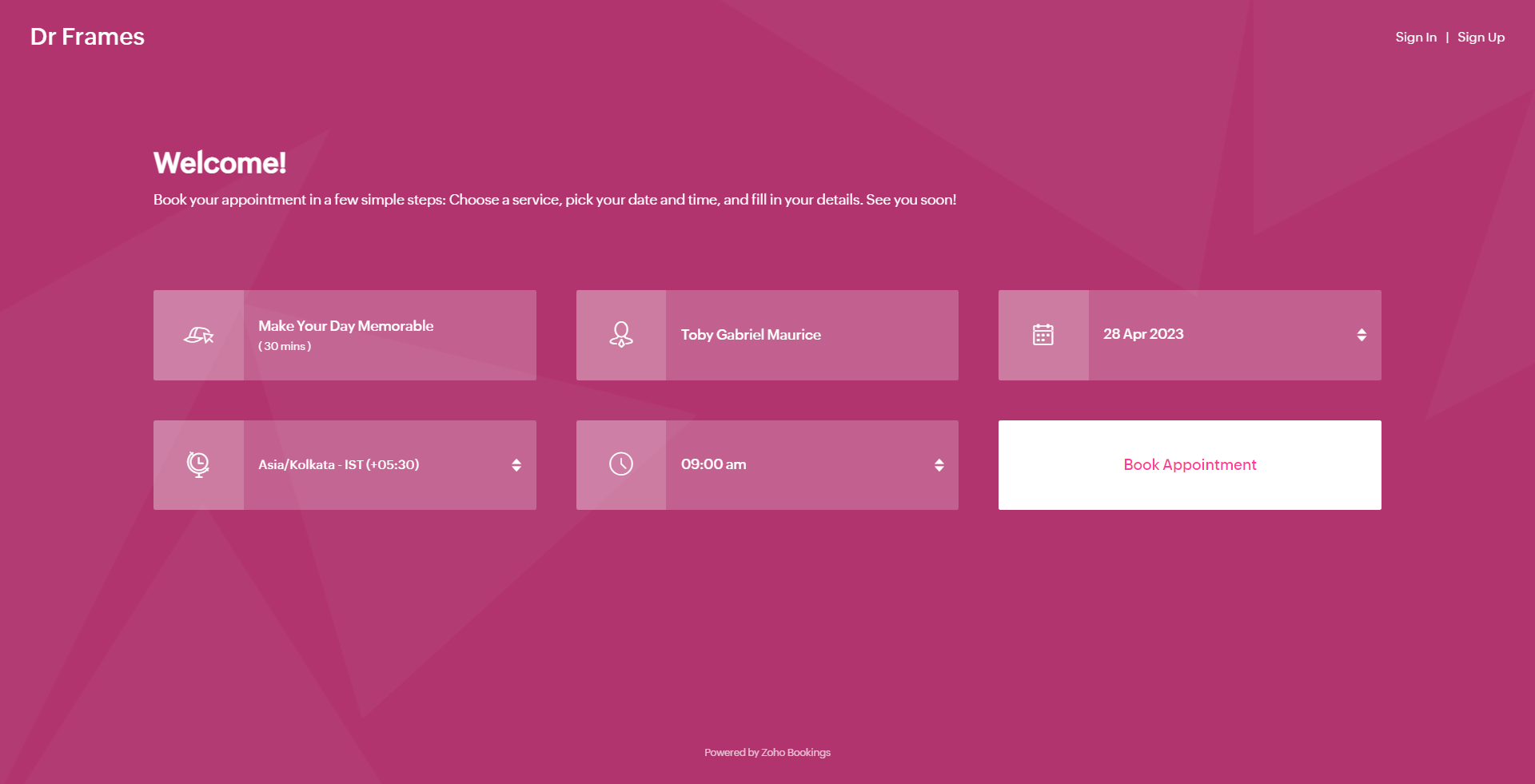
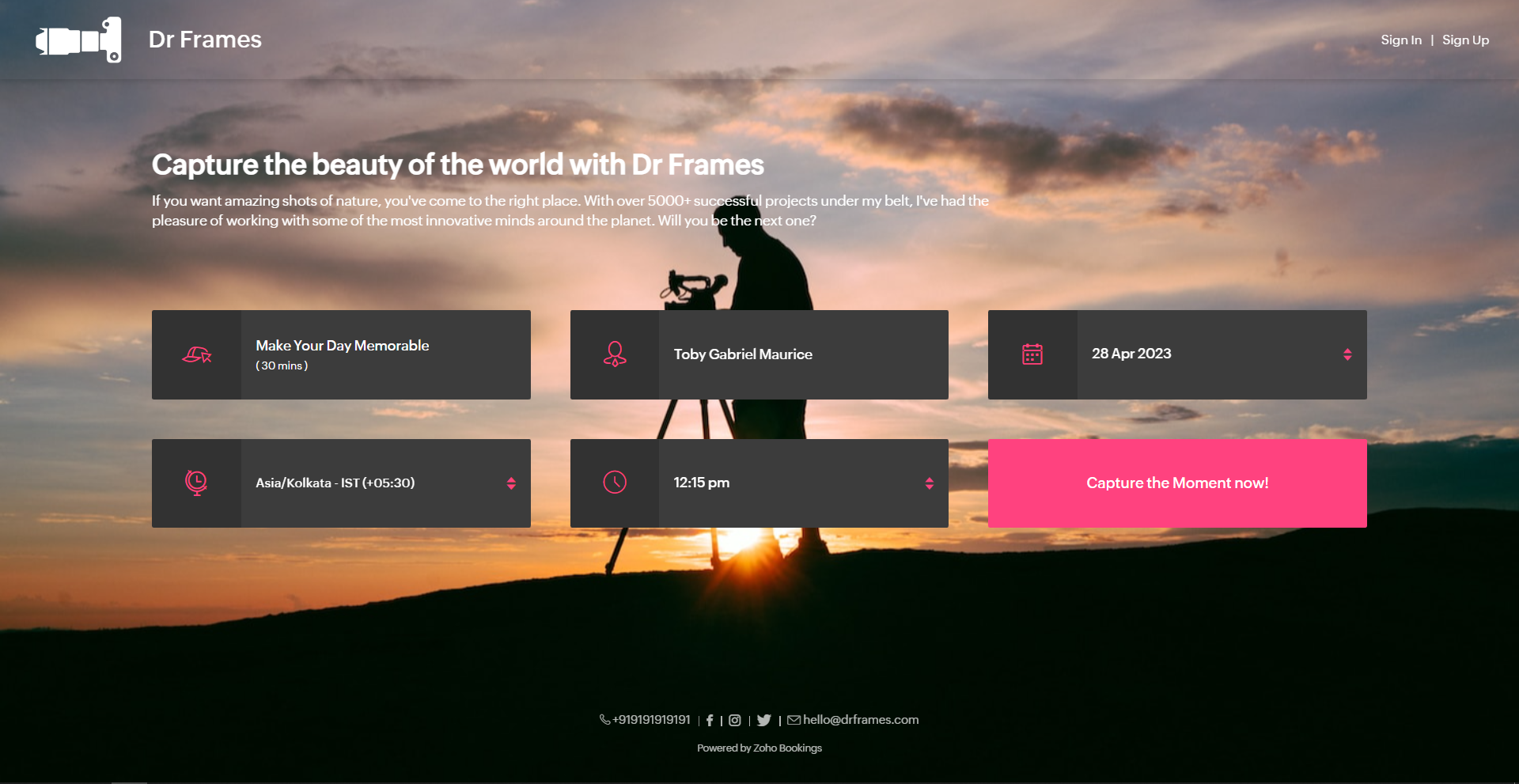
Below is a booking page for a photography offering service with a carefully crafted message.
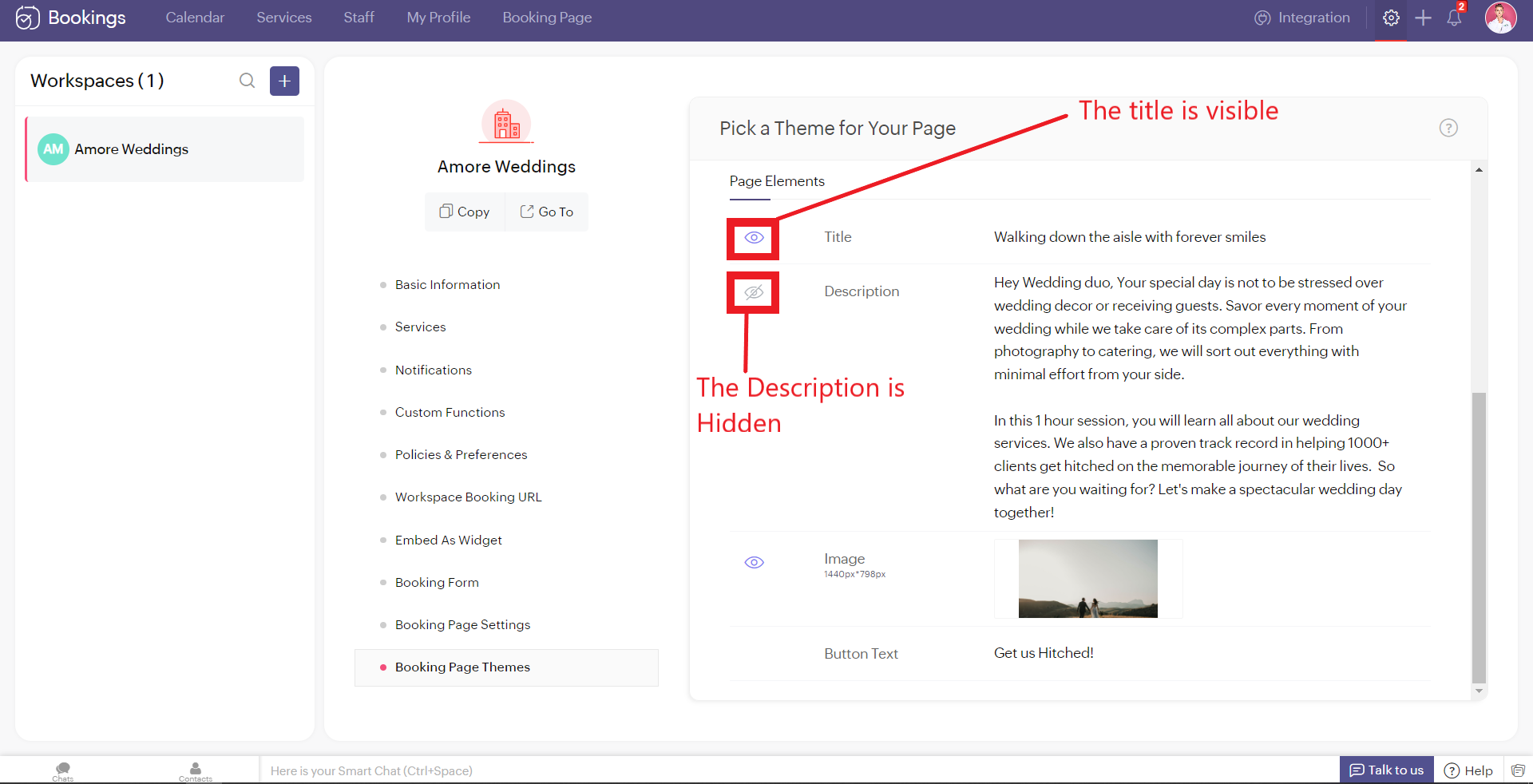
As much as you've options to add more detail to your booking page, you can choose which ones to hide or display using the eye icon.
Customizing Images
Images are at the core of compelling booking pages. There are two ways in which adding images enhances your pages.
- Background Images
- Logo
Let's start with Background Images.
The following themes support background images.
The following themes support background images.
- Modern Theme (Most color options except a few)
- New Layout
- Default Theme
- Classic Theme (Dual Color Options only)
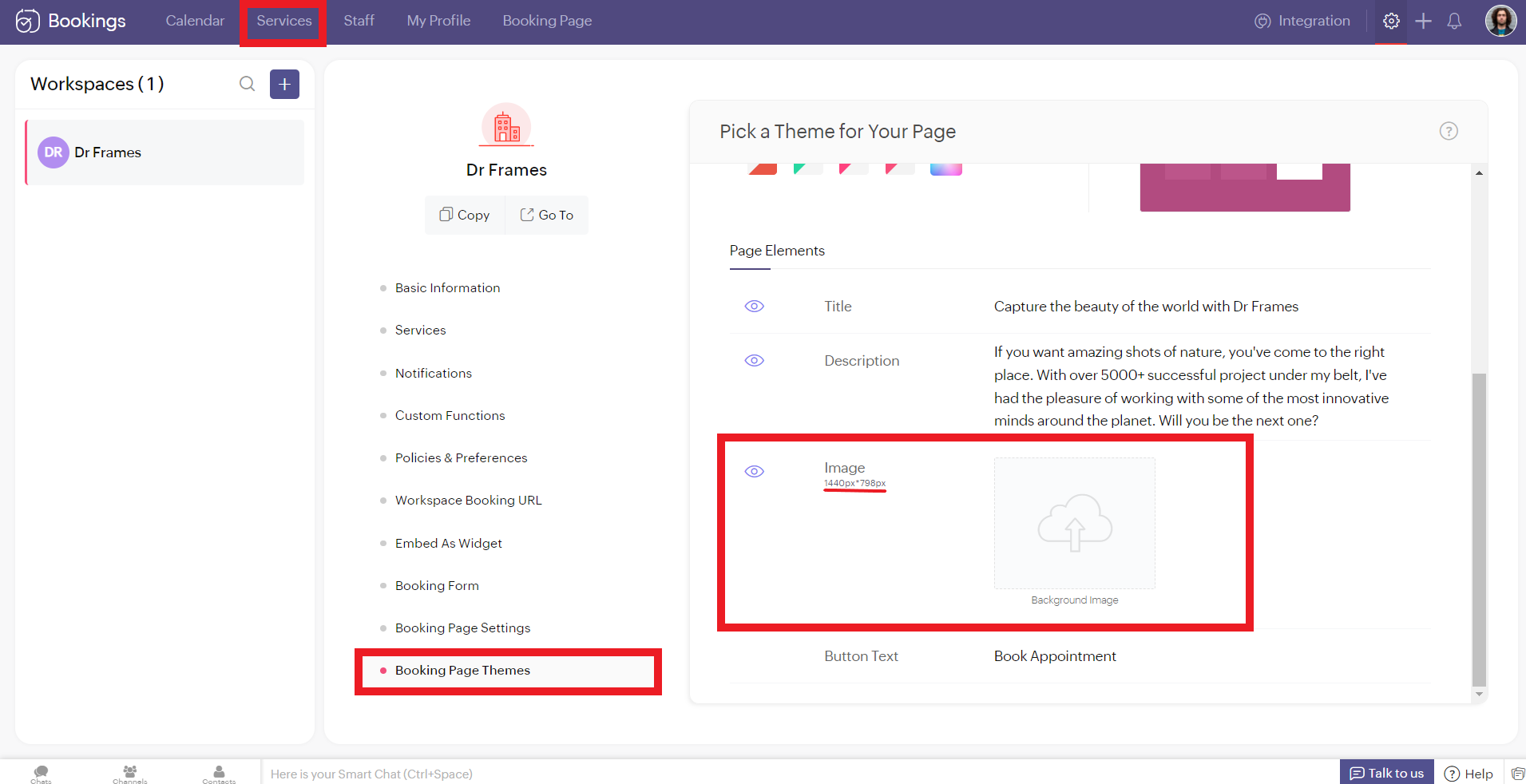
You can add images under Page Elements. Click on the empty box and upload your images. The size of your images is mentioned beside the box in pixels (px). You can also crop bigger images and click Upload. A pop-up box appears. You can drag the slider to adjust the transparency of your images
Controlling Image Opacity
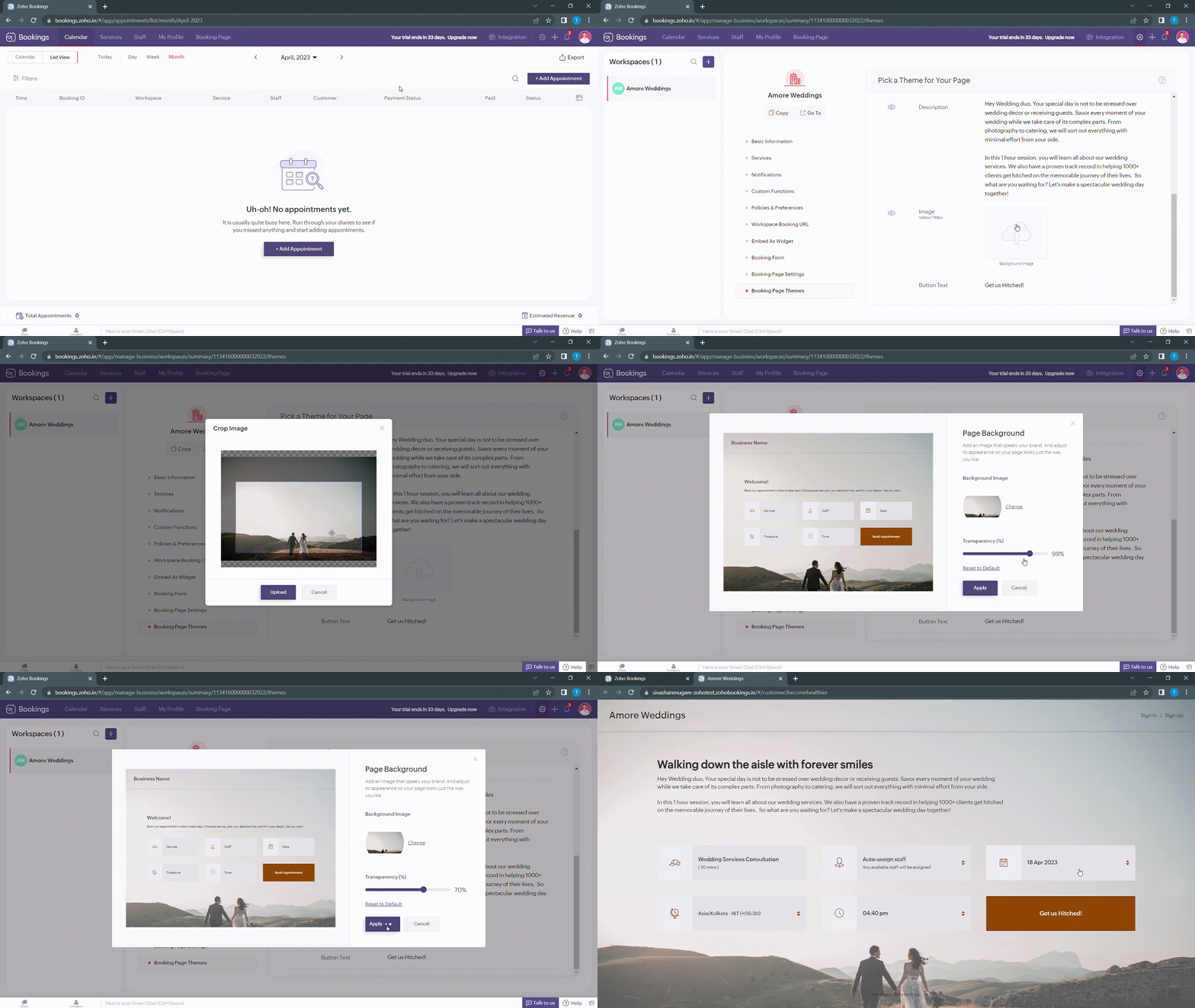
Transparency of your images significantly influence the text and button colors on your booking page. For example, when your image transparency is less (i.e., darker backgrounds), lighter text and button colors would be a great choice and vice versa.
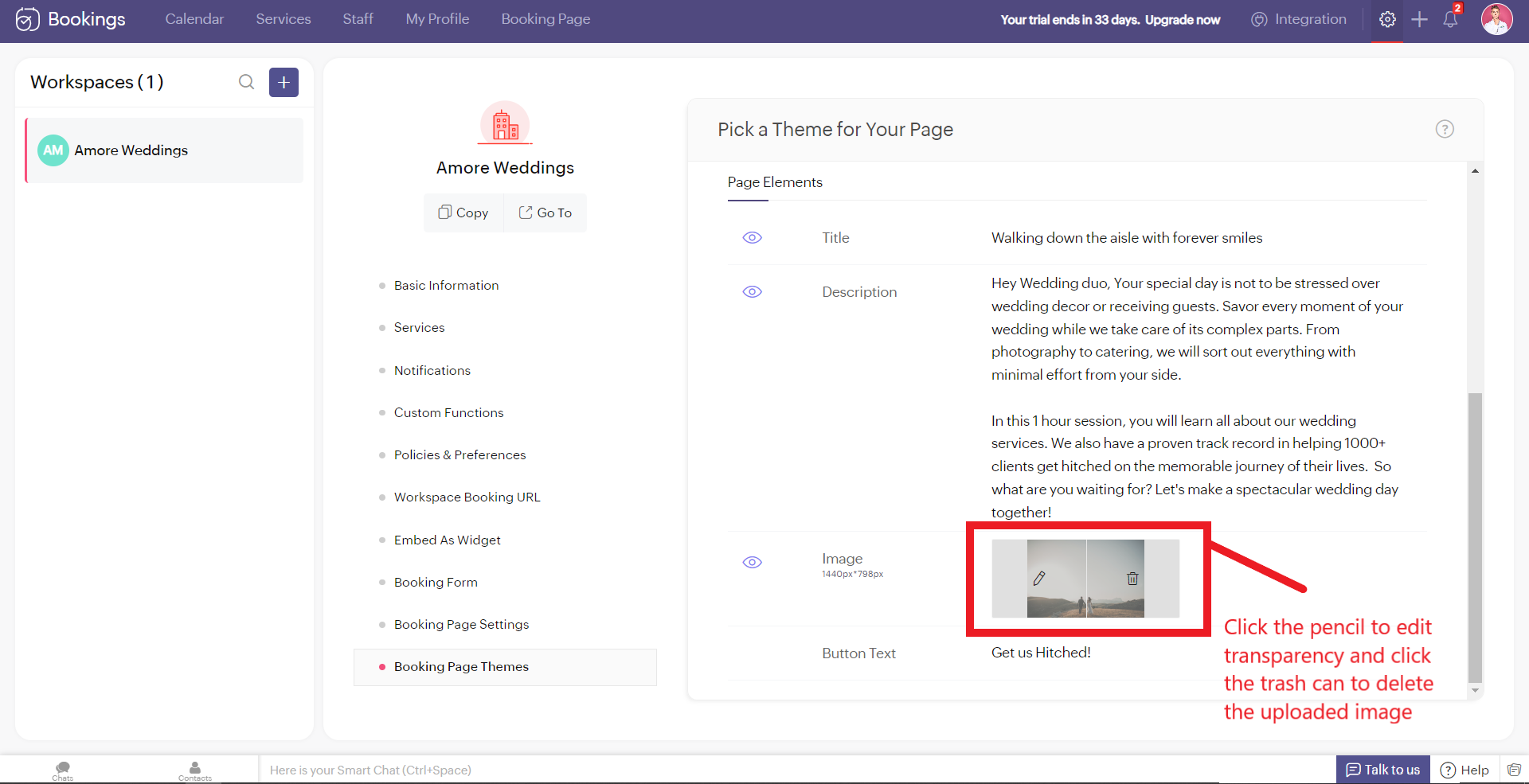
Alternatively, you can hover over your uploaded image, click on the pencil icon and drag the slider to adjust the transparency of your images.
Alternatively, you can hover over your uploaded image, click on the pencil icon and drag the slider to adjust the transparency of your images.
Best Practices
Avoid these mistakes while you upload your background images.
- Make sure the images you use and the text colors complement each other. Light text on dark backgrounds and vice versa.
- Avoid using very noisy images with a lot of attention-seeking elements. If you do so, reduce your transparency. Images with subtle elements like a sky pair well with your booking pages.
- Use images that
- Align with your business
- Evokes an enthusiastic emotion in your customer
- For Marriages - Two People Holding Hands
- For Dental Care - A Person with a happy smile
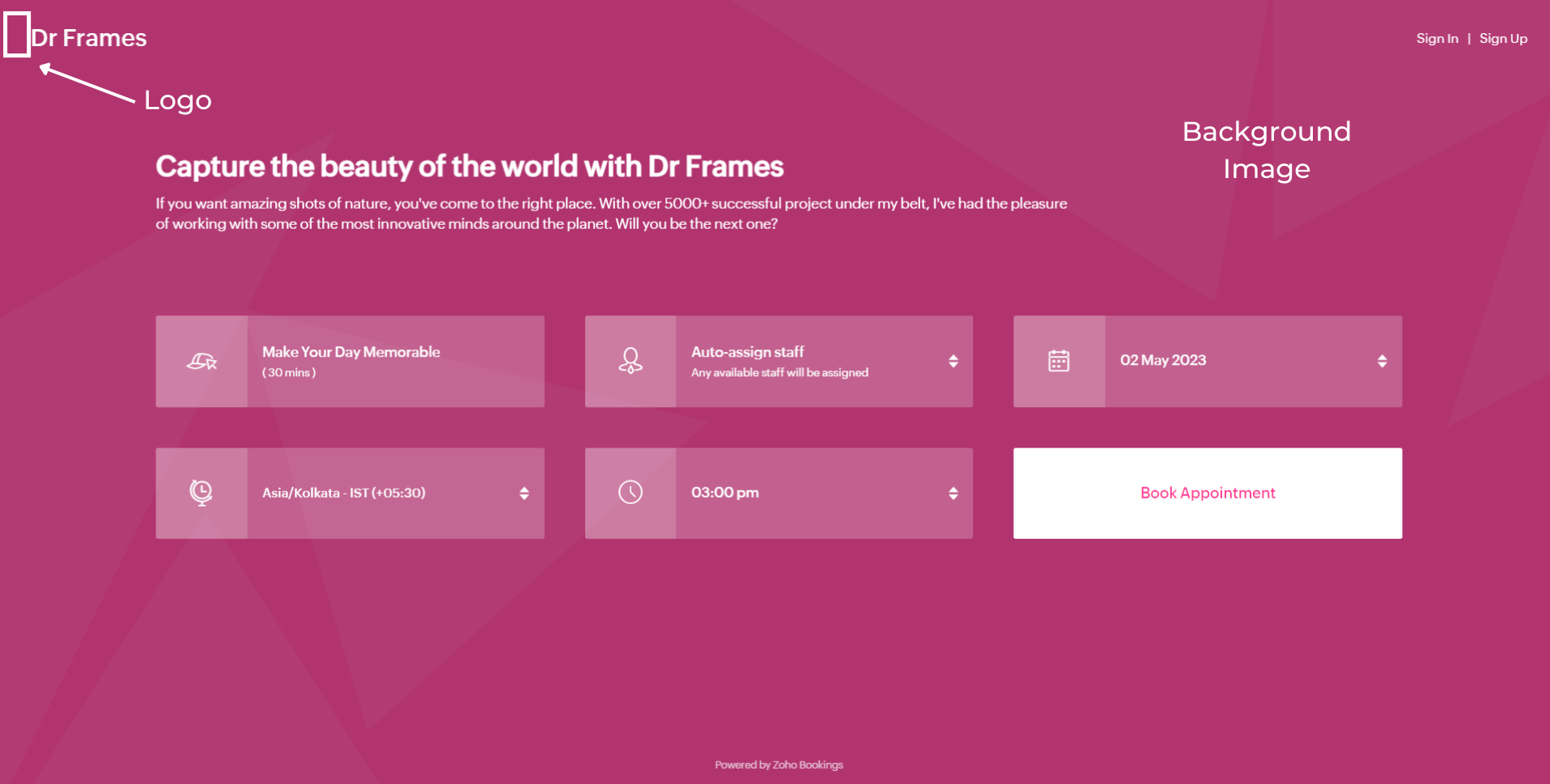
Next up, Logos. A brand logo is one of the crucial things that reinforce brand recall.
To add your brand logos to your booking page, navigate to Settings > Workspaces > Booking page settings.
The following are dimensions of your logo (50px to 110px - Width) * (50px - Height)
Besides the logos, you can add header text as well.
To add your brand logos to your booking page, navigate to Settings > Workspaces > Booking page settings.
The following are dimensions of your logo (50px to 110px - Width) * (50px - Height)
Besides the logos, you can add header text as well.
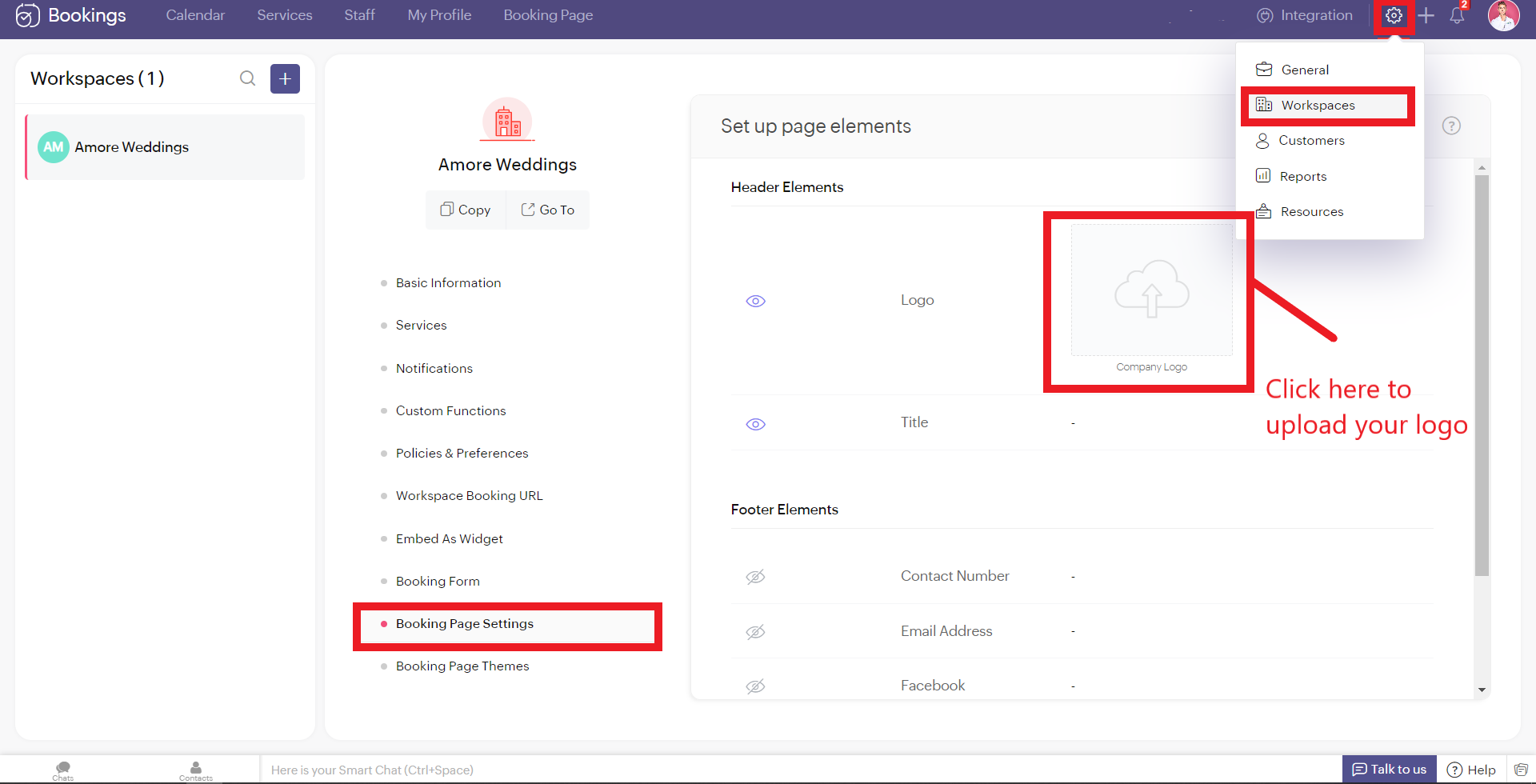
Don't worry if you don't have your own logo. You can use AI tools like Logo Makers to generate yourself an alluring logo in seconds.
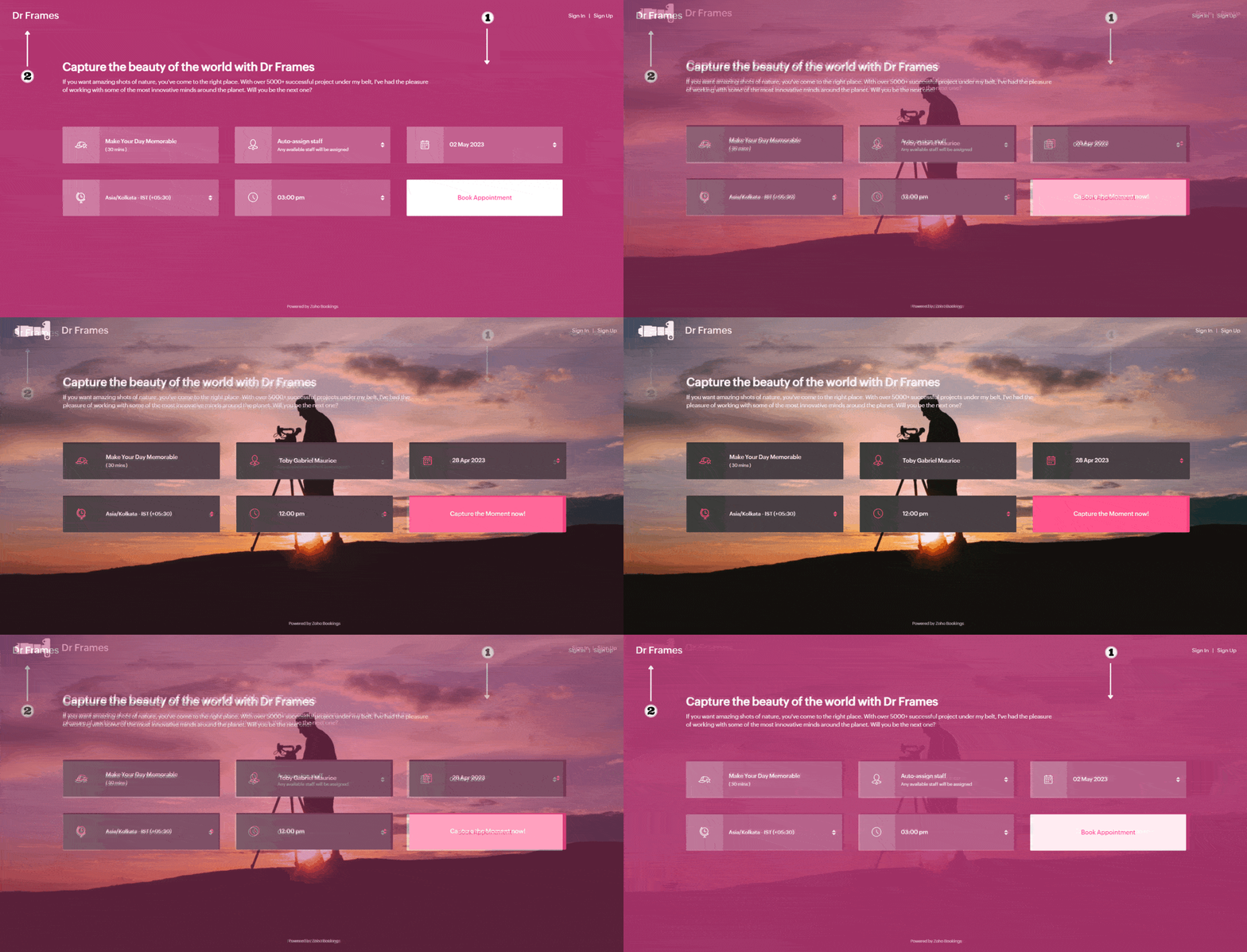
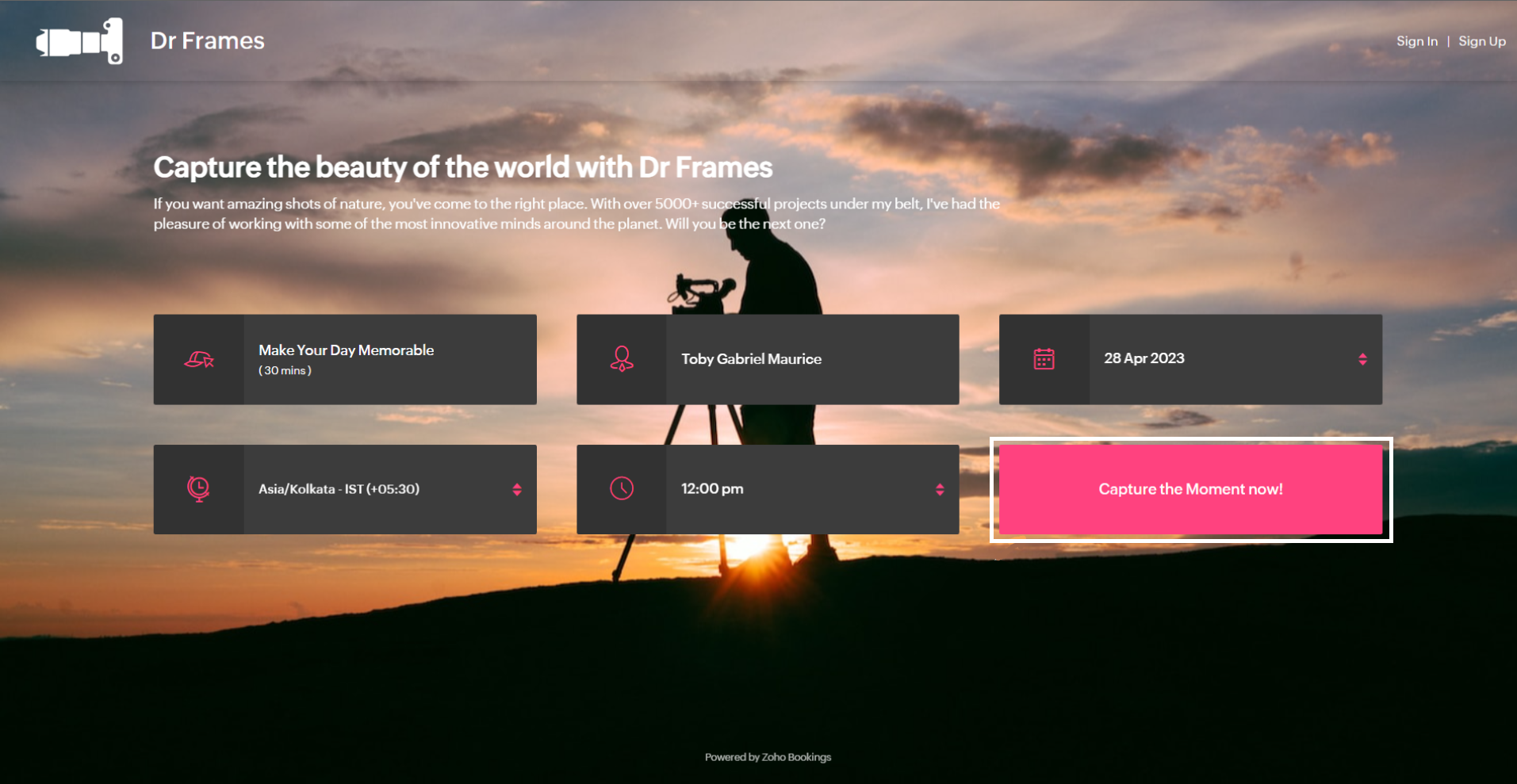
After these changes your booking page would look like this,
After these changes your booking page would look like this,
Adding Socials
It immediately adds credibility to your booking page.
This is vital for people who are involved in businesses like photography, bakery, wedding organizers etc... Your social profiles can be proof of your work and can help you get recurring clients in the long run.
You can add your Contact number, Email, Facebook, Instagram, and Twitter links.
This is vital for people who are involved in businesses like photography, bakery, wedding organizers etc... Your social profiles can be proof of your work and can help you get recurring clients in the long run.
You can add your Contact number, Email, Facebook, Instagram, and Twitter links.
Add your usernames in the boxes and click Save.
Your booking page would look like this after these changes,
Your booking page would look like this after these changes,
Exploring Color Options in Zoho Bookings
I've kept the best for the last - Customizing booking pages with more colors. It plays a vital role in making the page lively and aligns your booking page with your brand colors.
Since customization varies across every industry and there are so many possibilities, we've linked dedicated guides at the end of this tutorial. But for now, let's play around with the fundamental customizations that are similar across all industries.
Navigate to Workspaces > Booking Page themes > Color options.
Every theme allows you to have multiple customization options. However, there are cases where you wish to have the booking page reflect your exact brand/ website colors.
In those cases, switch to the 'Modern Web Theme.' It has unique features and a color palette with almost a million colors to choose from that could help you go the extra mile.
You will find a color palette. Click on it. You'll be given four choices:
Since customization varies across every industry and there are so many possibilities, we've linked dedicated guides at the end of this tutorial. But for now, let's play around with the fundamental customizations that are similar across all industries.
Navigate to Workspaces > Booking Page themes > Color options.
Every theme allows you to have multiple customization options. However, there are cases where you wish to have the booking page reflect your exact brand/ website colors.
In those cases, switch to the 'Modern Web Theme.' It has unique features and a color palette with almost a million colors to choose from that could help you go the extra mile.
You will find a color palette. Click on it. You'll be given four choices:
- Background Color
- Text Color
- Button color
- Button Text Color
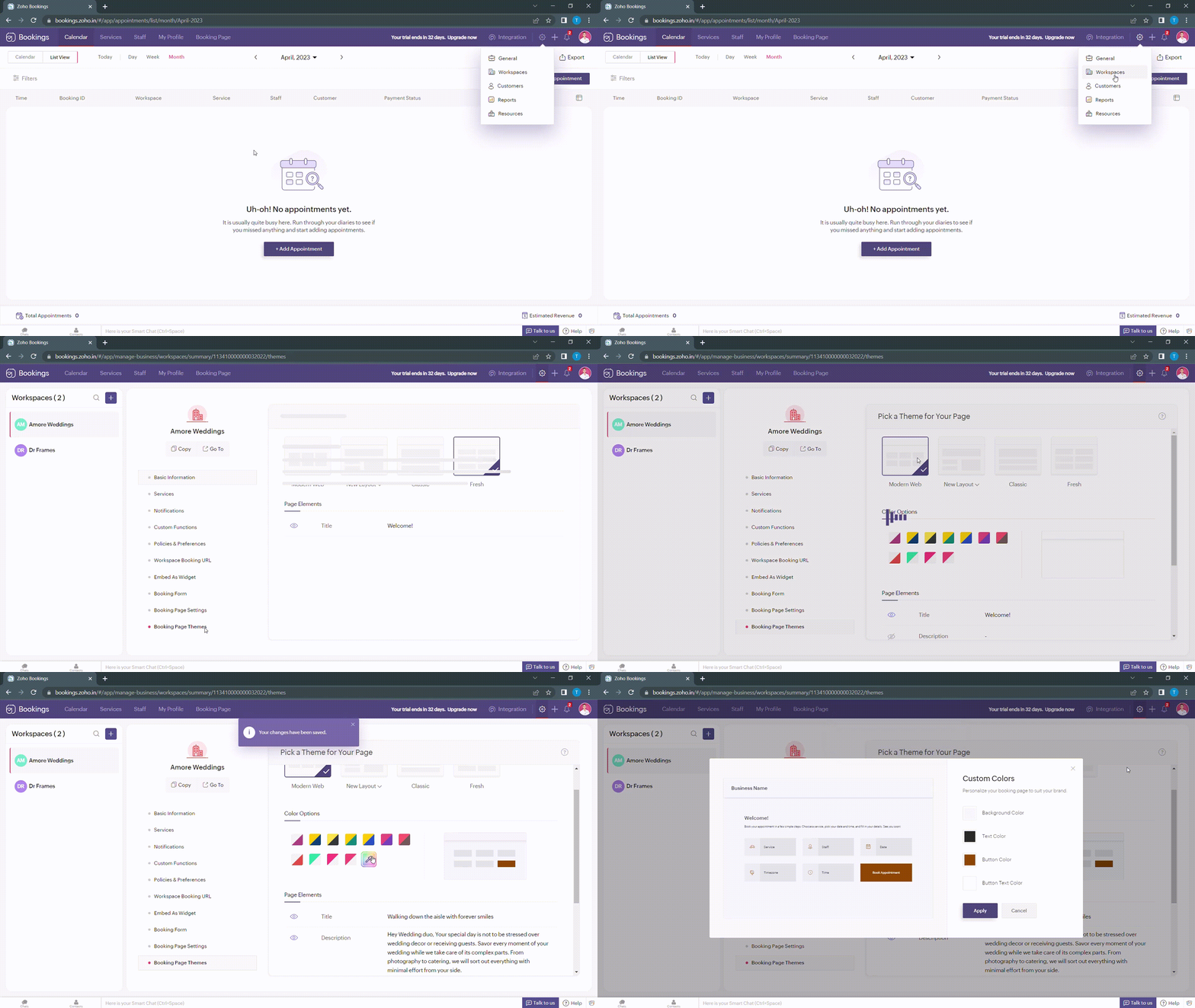
When you click on any of these boxes, Zoho Bookings prompts you to enter a color code. You can either pick the color you want or enter a hex code corresponding to the desired color.
It's always a great idea to use the same colors that you use on your website. Check out the video to get the exact colors of your webpage on your booking pages.
Disclaimer - We've listed a third party website which can help you design your booking pages efficiently. They are intended for illustration and guidance purposes only. Feel free to use any tool that fits your needs.
After all the changes your booking page will look like this,
After all the changes your booking page will look like this,
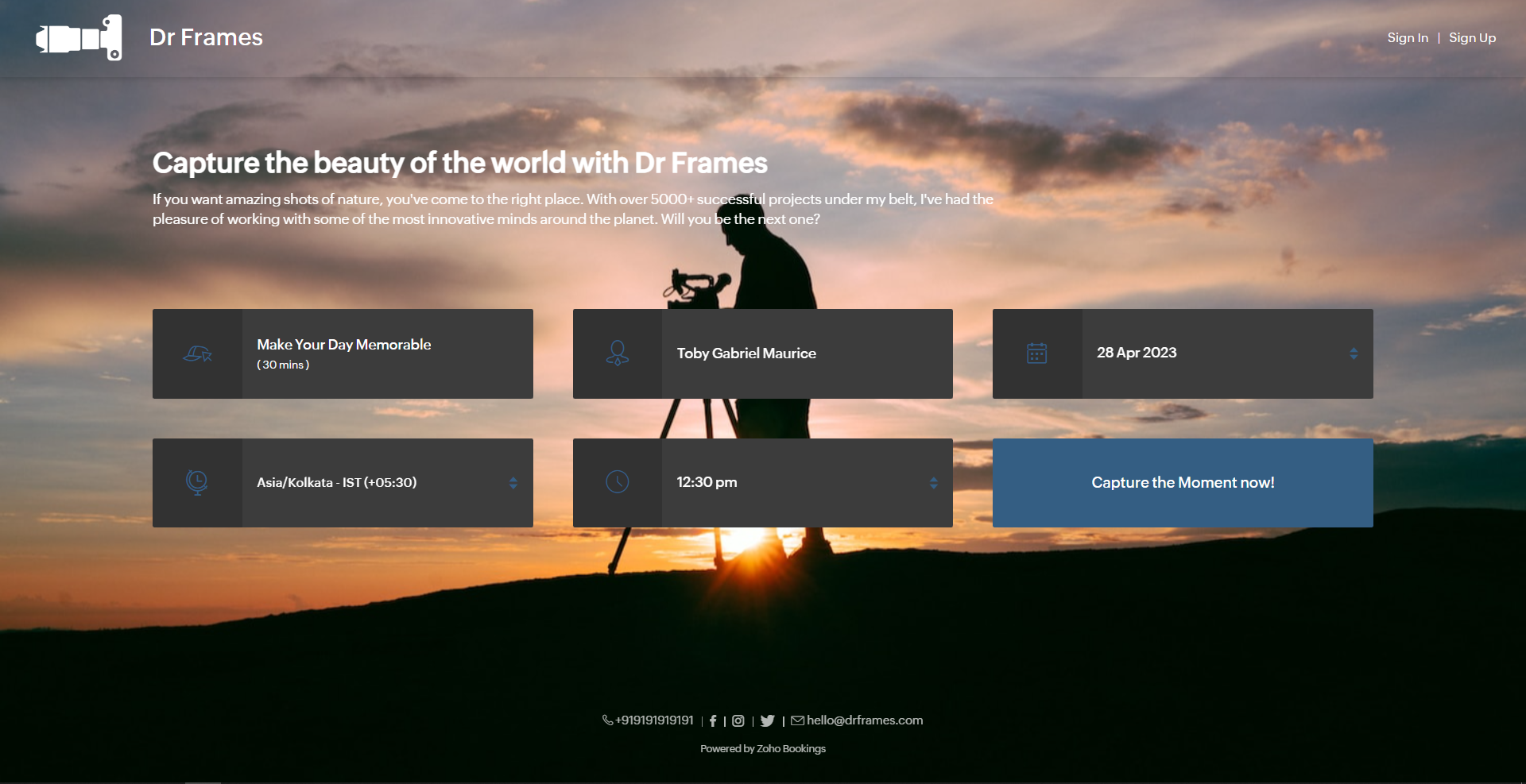
Here's a few other examples of well designed booking pages:
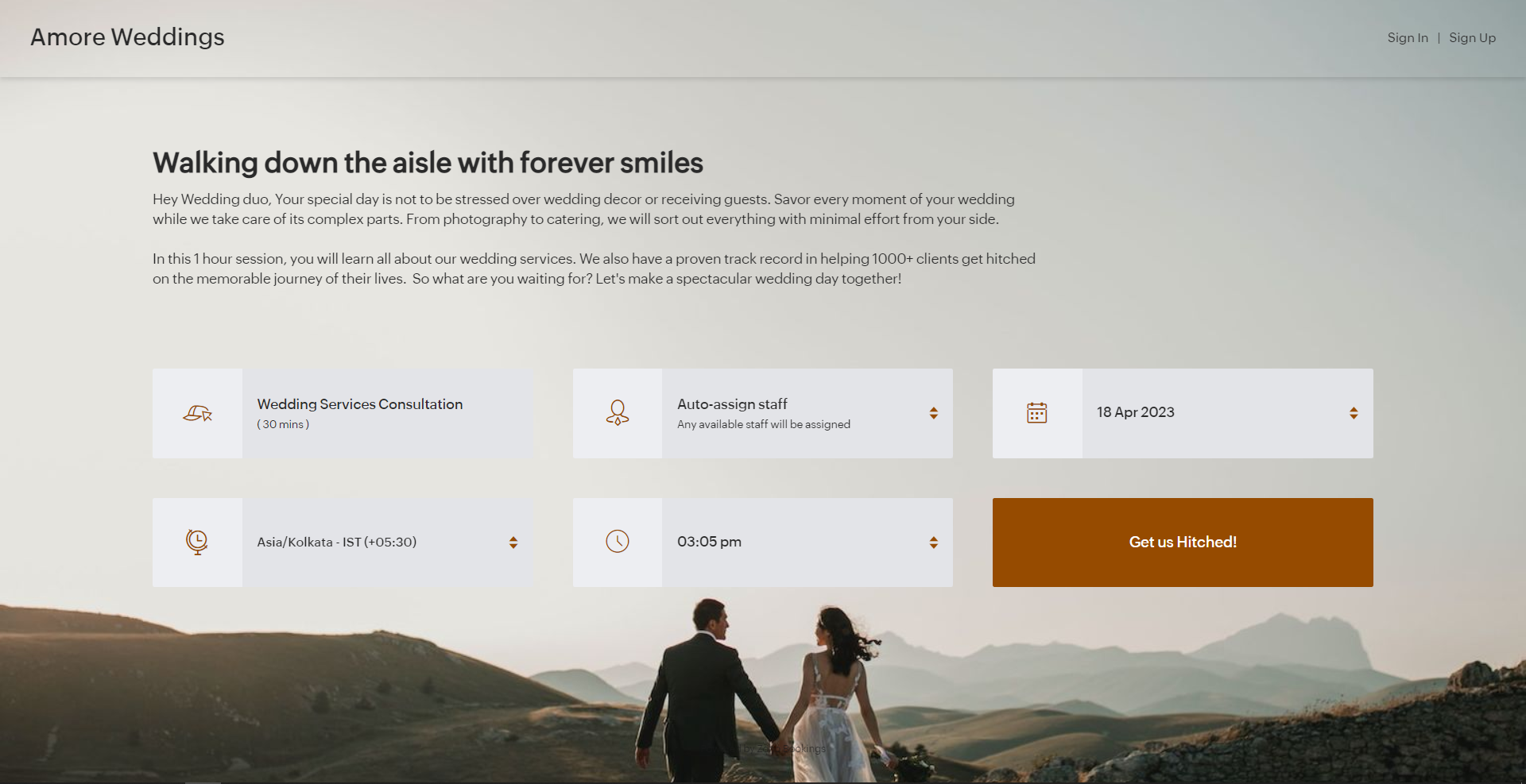
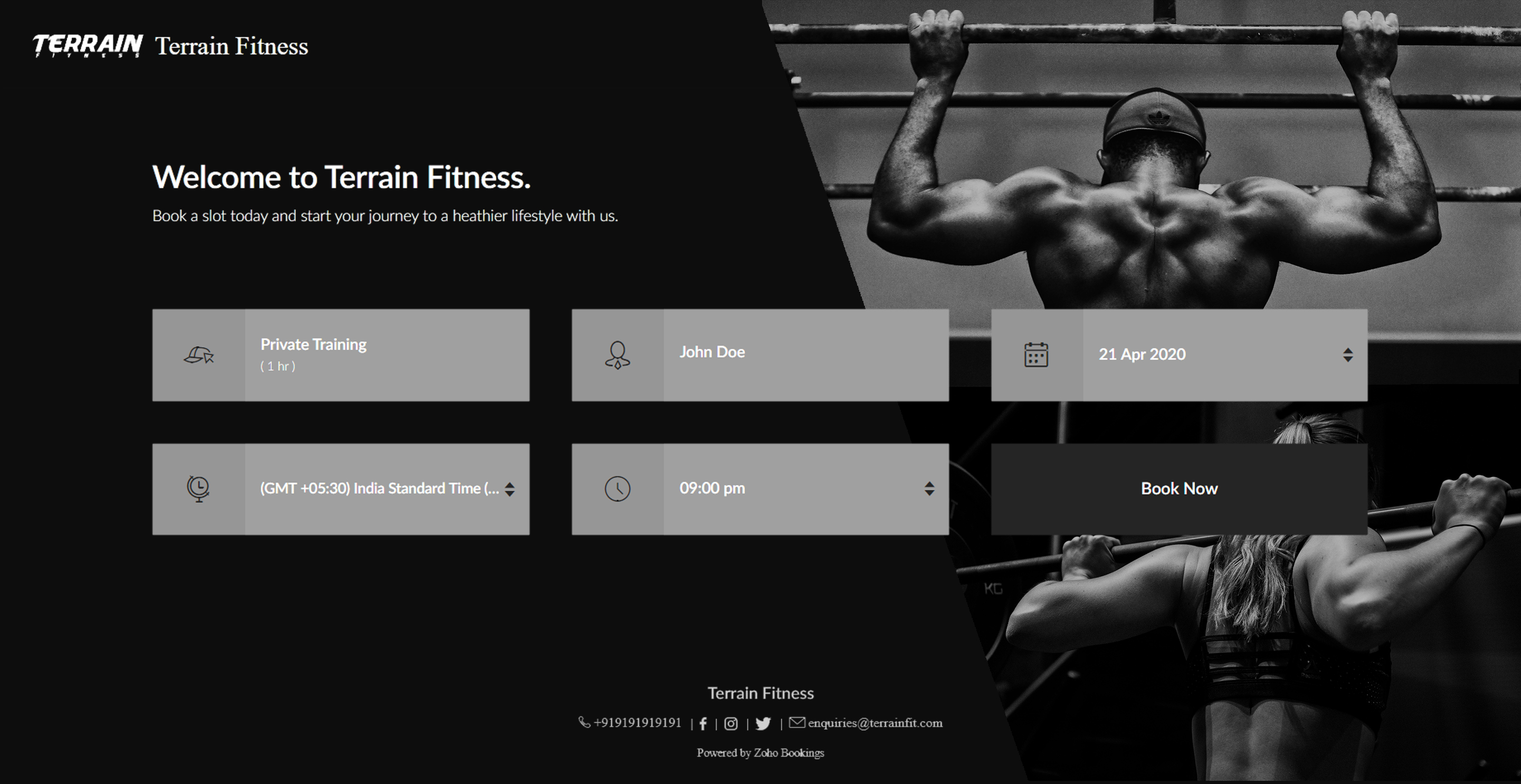
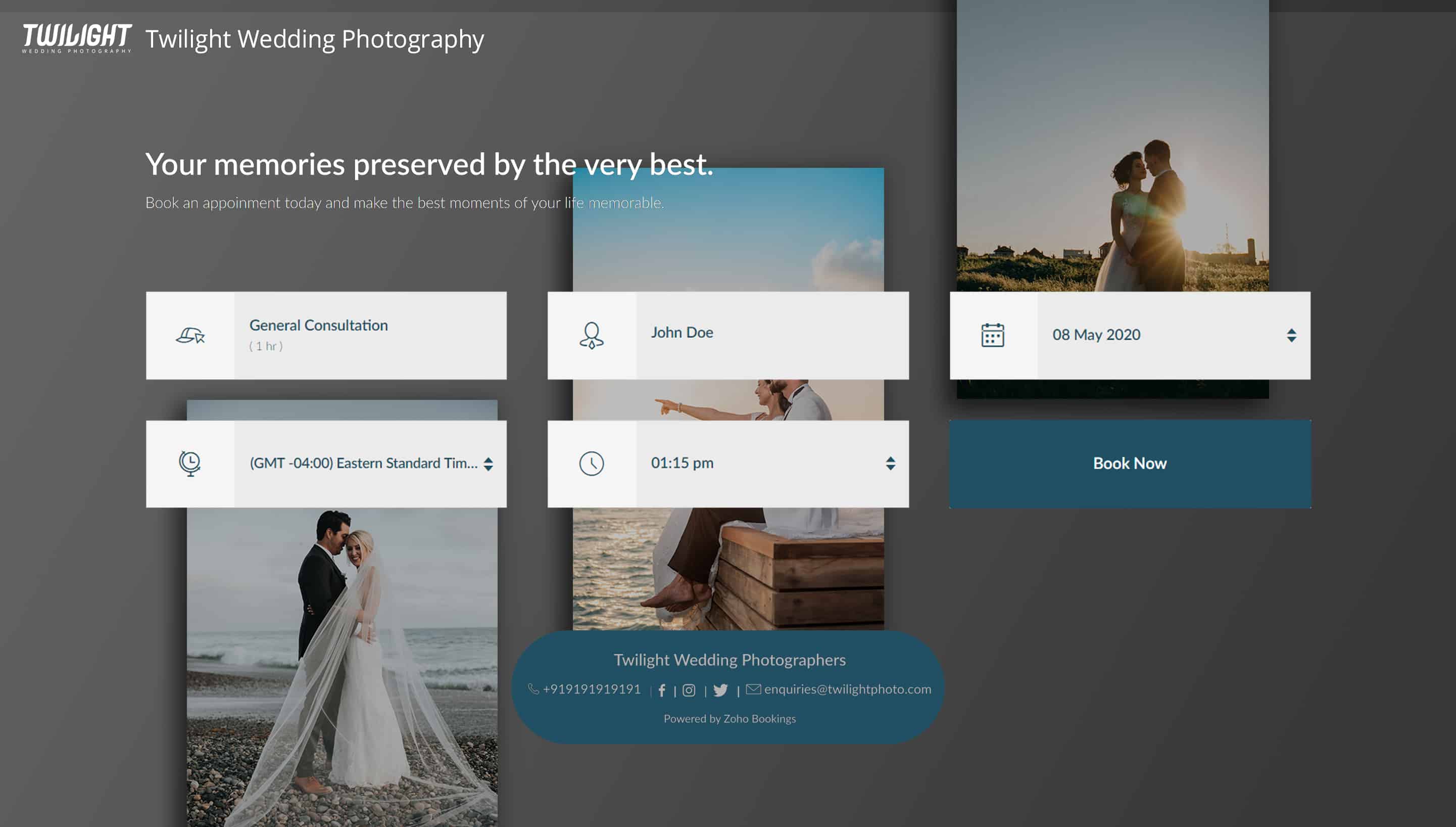
Bonus - Choose colors like a pro
Text colors - Use lighter text colors for darker backgrounds and vice versa. You can also tweak the transparency of your images to figure out which text colors would be the right fit for you.
In the following illustration, we've set the transparency to 100% and used a dark background. To complement this, I've used light text colors(white).
In the following illustration, we've set the transparency to 100% and used a dark background. To complement this, I've used light text colors(white).
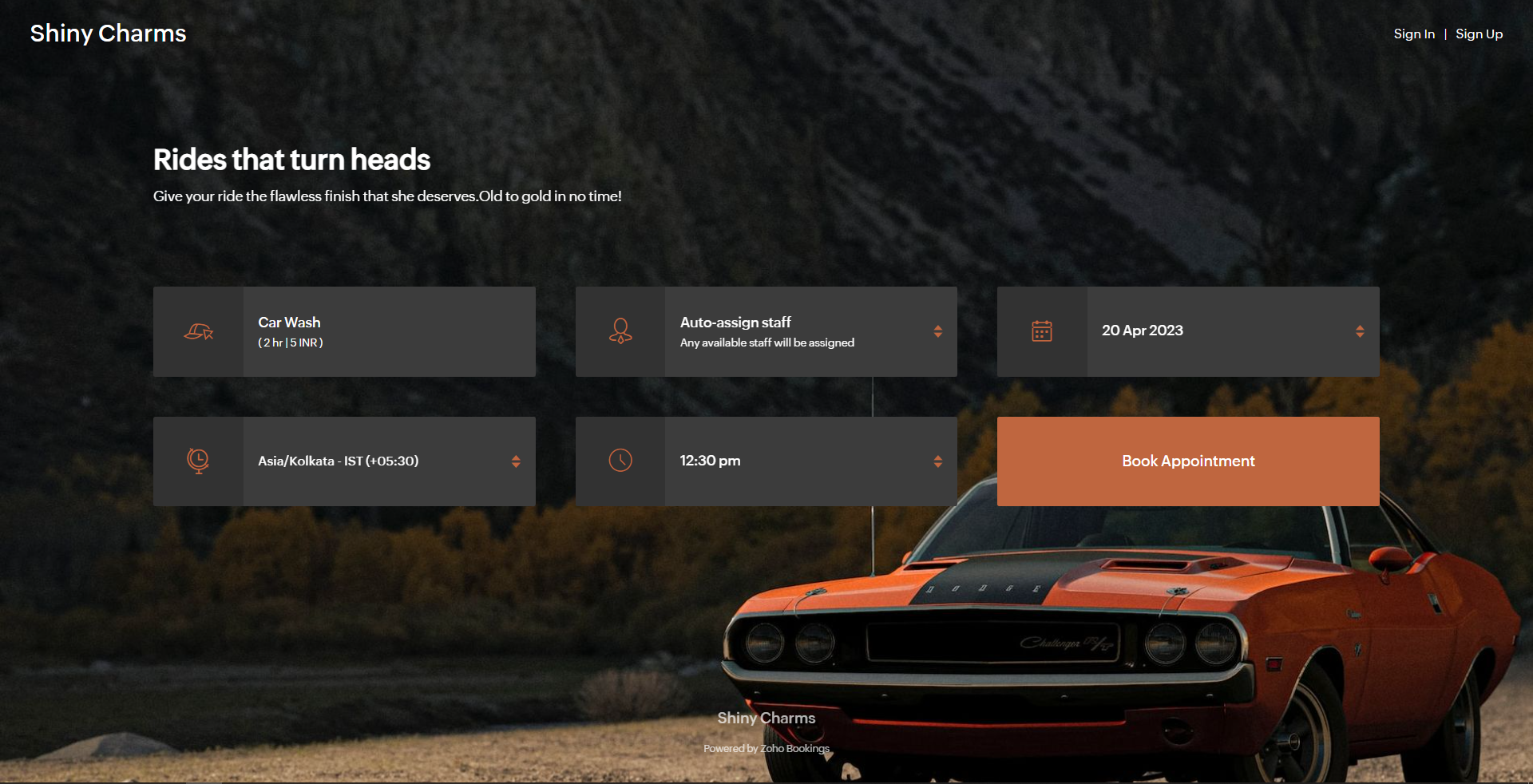
Button colors - To provide an immersive customer experience, set button colors that align with your brand colors. Alternatively, you can have them based on your images.
In the above example, we've set button colors that is in line with the background image. So, I've used the rusty orange of the car as my button color.
Button Text Colors - These are the colors inside the buttons. You can customize these based on your button colors. For darker backgrounds choose lighter colors and vice versa.
In the above example, to stay consistent with the text color of the other elements and to complement the button color, we've used white as the button text color.
We have an array of pages that go into details about industry-specific customizations. Check out the following guides that give you detailed instructions.
- Accountants
- Beauty Industry
- Business Consultants
- Car Care
- Child Care Industry
- Classrooms and Labs
- Cleaning Services
- Community Facilities
- Co-working spaces
- Customer Success
- Decorators
- Dental Industry
- Digital Marketing Agencies
- Education Industry
- Fitness Industry
- General Clinics
- Handy Persons
- Law Firms
- Logistics Industry
- Makeup Artists
- Marketing Industry
- Massage Parlors
- Meeting Rooms
- Motel Industry
- Non-Profit Organizations
- Personal Trainers
- Photography Industry
- Professional Consultation
- Professional Studios
- Property Management
- Psychiatrists
- SaaS
- Salesperson
- Spa Salons
- Sports Industry
- Wedding Industry
- Yoga Centers
To Wrap Up
In this guide, we've learned to customize booking page text, add images, logo, and socials, and created beautiful-looking booking pages.
Need a hand with this? We can help you out. Reach out to us at hello@zohobookings.com
Share your booking pages in the comments. If you have better tips to make booking pages better, please let us know.
Need a hand with this? We can help you out. Reach out to us at hello@zohobookings.com
Share your booking pages in the comments. If you have better tips to make booking pages better, please let us know.
Access your files securely from anywhere
New to Zoho Recruit?

Zoho Developer Community
New to Zoho LandingPage?
Zoho LandingPage Resources
New to Zoho Survey?
New to Zoho CRM Plus?
Deliver unforgettable customer experiences
New to Zoho CRM Plus?
Deliver unforgettable customer experiences
New to Zoho Marketing Plus?
Everything you need to run your marketing
New to Zoho Marketing Plus?
Everything you need to run your marketing
New to Bigin?





New to Zoho TeamInbox?
Zoho TeamInbox Resources
Zoho CRM Plus Resources
Zoho Books Resources
Zoho Subscriptions Resources
Zoho Projects Resources
Zoho Sprints Resources
Qntrl Resources
Zoho Creator Resources
Zoho CRM Resources
Design. Discuss. Deliver.
Zoho Show Resources

Get Started. Write Away!
Writer is a powerful online word processor, designed for collaborative work.
Zoho CRM コンテンツ
-
オンラインヘルプ
-
Webセミナー
-
機能活用動画
-
よくある質問
-
Ebook
-
-
Zoho Campaigns
- Zoho サービスのWebセミナー
その他のサービス コンテンツ
Nederlandse Hulpbronnen

ご検討中の方
Recent Topics
Payment Card or Identity form-fill from Vault?
Hello! I'm working on replacing Bitwarden with Vault and one issue I've run into is that I can't find any option to fill address and payment forms from Payment Card or Identity info that has been saved in Vault. Is there a way to do this? Is it a plannedAbility to add VAT to Retainer Invoices
Hello, I've had a telephone conversation a month ago with Dinesh on this topic and my request to allow for the addition of VAT on Retainer Invoices. It's currently not possible to add VAT to Retainer Invoices and it was mutually agreed that there is absolutely no reason why there shouldn't be, especially as TAX LAW makes VAT mandatory on each invoice in Europe! So basically, what i'm saying is that if you don't allow us to add VAT to Retainer Invoices, than the whole Retainer Invoices becomesTime Log Reminder
Tracking the time spent on tasks and issues is one of the most important functions of a timesheet. However, users may forget to update the time logs because they have their own goals to achieve. But, time logs must be updated at regular intervals to keep[Early-access] Introducing Zoho's CommandCenter - Cross-Zoho business process automation
Resources to help Webinar recording | Documentation Feature Restrictions Currently available on early-access only for US data center accounts Features Role CommandCenter as a Service uses signals across Zoho services to propel the movement of recordsTip #58- Accessibility Controls in Zoho Assist: Learning- 'Insider Insights'
Learning should be clear and interruption-free for everyone. Timely feedback plays an important role in helping users understand actions as they happen, without breaking their focus. In this post, we’ll explore the final section of Accessibility: Learning.ZIA "Generate Content" action doesn't have contexual data from the ticket
"Generate Content" action doesn't have contexual data from the ticket. I try to get AI to help me with this ticket but it doesn't seem to have any ticket information as context. Although the ticket has a lot of information in it.Zoho Desk - Zoho FSM Integration issue on Mobile and iPad
Hello Team, I am trying to create a Work Order (WO) using the Zoho FSM integration (Add-on Service) that is integrated with Zoho Desk. The issue is that the integration is not working on mobile devices and iPads. While I am able to create the WO, Request,E-File Form 1099 Directly With the IRS From Zoho Books
The Form 1099 filing season has begun, and businesses are required to e-file certain forms with the IRS to report payments made to vendors and contractors. If your business made qualifying payments during the year, you must e-file the appropriate FormCan I hide empty Contact fields from view?
Some contacts have a lot of empty fields, others are mostly filled. Is there a way I can hide/show empty fields without changing the actual Layout? I would like to de-clutter my view, and also be able to add information later as I am able. I would be willing to learn to code a button, but I am highly confused about it and thus worried it would be beyond me. I've looked at a lot of the developer documents and I'm not able to make a lot of sense of them. Thank you in advance to anyone who knows theSuggestions for showing subscribed Topics in CRM (contact record)
We have several Topics set up in ZMA. We also have a sync set up between ZMA and CRM. I'd like to display the subscribed topics on the CRM Contact record. This will allow the Sales team (who uses CRM) to see at a glance what topics a Contact is subscribedReplies sometimes creating separate ticket
Sometimes when a customer responds to an email coming from Zoho Desk, instead of adding a reply to the original ticket, a separate ticket is created. This happens even though the response subject line contained the ticket number, and the person respondingRe-hide fields when option is unselected
Hi all Can anyone help me with this - when I create a 'show' field rule for when a dropdown option is selected, how to I make it so the 'show' option re-hides if that option is no longer selected?Allow Attaching Quartz Recordings to Existing Zoho Support Tickets
Hi Zoho Team, We would like to request an enhancement to how Zoho Quartz recordings integrate with Zoho Support tickets. Current Behavior: At the moment, each Quartz recording automatically creates a new support ticket. However, in many real-world scenarios:I'm getting this error when I try to link an email to a deal inside the Zohomail Zoho CRM extension.
When I click "Yes, associate," the system displays an "Oops!! Something went wrong" error message. I have attached a screenshot of the issue for reference.Custom Fields
There is no way to add a custom field in the "Timesheet" module. Honestly, the ability to add a custom field should be available in every module.Remove the “One Migration Per User” Limitation in Zoho WorkDrive
Hi Zoho WorkDrive Team, Hope you are doing well. We would like to raise a critical feature request regarding the Google Drive → Zoho WorkDrive migration process. Current Limitation: Zoho WorkDrive currently enforces a hard limitation: A Zoho WorkDriveTranslation from Chinese (Simplified) to Chinese (Traditional) is not working. It randomly translated. Google Translate accurately but zoho translate is not working at all
Hi friends, The newly added language for translation. https://www.zoho.com/deluge/help/ai-tasks/translate.html "zh" - Chinese "zh-CN" - Chinese (Simplified) "zh-TW" - Chinese (Traditional) my original text: 郑这钻 (and it is zh-CN) translated traditionalConsultant-Only Booking Page
Zoho Bookings does not allow for Meeting Type OR Workspace-Wide booking pages to be turned off. This is detrimental to organizations that have territory-based or assigned accounts, because if prospects can go to these booking pages and either select theAll new Address Field in Zoho CRM: maintain structured and accurate address inputs
The address field will be available exclusively for IN DC users. We'll keep you updated on the DC-specific rollout soon. It's currently available for all new sign-ups and for existing Zoho CRM orgs which are in the Professional edition. Latest updateCall result pop up on call when call ends
I’d like to be able to create a pop up that appears after a call has finished that allows me to select the Call Result. I'm using RingCentral. I have seen from a previous, now locked, thread on Zoho Cares that this capability has been implemented, butCustom Sorting based on other columns in table
I need the ability to apply custom sorting to a text-based dimension in the X axis where the sorting is based on another column in the table. For example, I have a chart report where the X axis is a text label. I would like to be able to sort those textFeature Request: Enable Custom PDF Layout Editor for All Modules (Including Package Slips)
Hello Zoho Community and Product Team, I am writing to share a suggestion that would significantly enhance the customization capabilities within Zoho Books. We all appreciate the power of the Custom PDF Layouts (the "New" template engine) that allowsIs there a way to invoke deluge function from within a widget?
Hi! I have custom functions in deluge and I was wondering whether there is any way to call this function through a widget? Something like on click of a button inside a widget, run the deluge custom function. Would this be possible?Can a default task Priority be set?
The "Priority" field in the Task layout does not allow a default to be set. Is there another way of doing it? Because the current default is "None" and the Zoho Kanban board design has selected this field as critical information to surface by includingAdding a threshold to a line chart based on date range
I have a line chart that is tracking a percentage over time. It also has a filter for 50 different clients. I would like to create a threshold that is based on a portion of the date range. As I understand it, this would be done by adding a column to theResize Signature field dynamically
On the tablet, it is perfect. But on smaller mobile devices and PCs, both web and application, it is too small for people to sign. Is there any plan to make the signature field size dynamically in the future update?Super Admin Logging in as another User
How can a Super Admin login as another user. For example, I have a sales rep that is having issues with their Accounts and I want to view their Zoho Account with out having to do a GTM and sharing screens. Moderation Update (8th Aug 2025): We are workingZoho Creator Application - New User Not able to access the application
In Zoho Creator, The newly added user not able to access the " Added Application" - User has received the Invitation Email, but while clicking "confirm Account" in the invitation Email, the following error message has appeared. "Sorry! you cannot acceptDeleting Salutation Field
We have updated our lead input screen and 'Salutation' has appeared. This is not visible in the 'Edit Pgae Layout' screen so cannot be moved to 'List of Removed Fields' Salutation is visible in the list in 'Customization - Fields' however I can only 'Edit' or 'Replace' I cannot delete and I do not need this field on my lead input screen. Please can you advise how to get rid of this. Screen shots can be provided if needed. Thank you TashaAuto-Generate & Update Asset Serial Numbers using a custom function (Assets Module)
Hello Team, I’ve been working on a script to automate one of our processes in Zoho FSM, and the core functionality has been successfully implemented. However, I’m encountering an issue related to serial number allocation, which is not working as expected.Partner with HDFC And Sbi Bank.
Hdfc and sbi both are very popular bank if zoho books become partner with this banks then many of the zoho books users will benefit premium features of partnered banks.Zoho Mail iOS app update: Access Delegated Mailbox.
Hello everyone! You can now access the delegated mailbox from within the iOS version of the Zoho Mail app. To access the delegated mailbox: Open the Zoho Mail app. Go on to the 'Email' module. Tap the profile picture. Choose the delegated mailbox PleaseHow to convert Lead's country field from Text to Pick List
Hi, I would like to change the default country field in ZCRM from text to pick list. It looks like not I can't delete default country field and recreate it as pick list nor can i create an new custom field country because such a label belong to default field. So what do I have to do? Any ideas? LHow create a draft via workflow?
I wish to create a workflow rule for specific emails that creates a draft response - not an automatic email reply, but just a draft with a set response ready to be verified by an agent who can then manually select recipients. Alternatively, the workflowNew feature: Invite additional guests for your bookings
Hello everyone, Greetings from Zoho Bookings! We are happy to announce the much-awaited feature Guest Invite, which enhances your booking experience like never before. This feature allows additional participants to be invited for the bookings to makeImproved Contact Sync flow in Google Integration with Zoho CRM
Hello Everyone, Your contact sync in Google integration just got revamped! We have redesigned the sync process to give users more control over what data flows into Google and ensure that this data flows effortlessly between Zoho CRM and Google. With thisImage field in custom module
Hi guy, Is there any hope of adding a custom image field in the custom module? We created a custom module to keep track of assets, and it would be helpful if we could attach an image to the record. Thanks Rudyالخصم على مستوى فاتورة المبيعات
السلام عليكم ورحمة الله وبركاته مطلوب في إنشاء خصم على مستوى فاتورة المبيعات وليس على مستوى البند أريد معرفة الطريقة؟VAT and Taxes option not available
Dear ZOHO Team , The VAT and Taxes options in my ZOHO books account not available,I tried to find how to enable or check the way to use this option but unfortunately couldn't find it anywhere ,I'm in UAE ,kindly let me know what to do to solve this issueDefault Tagging on API-generated Transactions
If one assigns tags to an Item or Customer, those tags get auto-populated in each line item of an Invoice or Sales Order when one creates those documents. However, if one creates the Sales Order or Invoice via the API (either directly coding or usingNext Page